
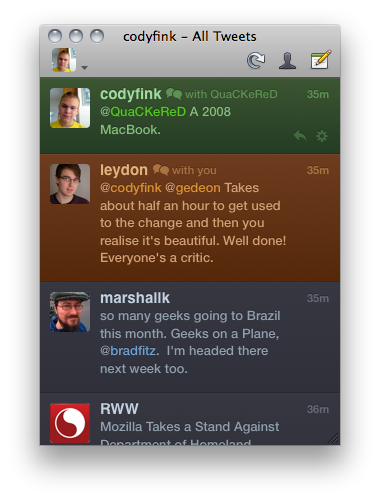
If you’re a proud user of The Iconfactory’s Twitterrific (Hooah!), it’s time to check the Mac App Store or the menubar for an update to 4.1, which brings lots of new & thoughtful features to the colorful client. Introduced with the most recent iOS update, Twitterrific for the Mac now boasts autocomplete (which is done just as tastefully) and has updated its fonts to Helvetica, prominently used in Lion. Font rendering and especially scrolling performance will now see a significant improvement with the Magic Mouse, but that’s not all you’ll find underneath the new hood.
Posts in Featured
Twitterrific for Mac 4.1: Autocomplete, Visual Tweaks, and Better than Ever

Access Extra Content and Perks
Founded in 2015, Club MacStories has delivered exclusive content every week for nearly a decade.
What started with weekly and monthly email newsletters has blossomed into a family of memberships designed for every MacStories fan.
Club MacStories: Weekly and monthly newsletters via email and the web that are brimming with apps, tips, automation workflows, longform writing, early access to the MacStories Unwind podcast, periodic giveaways, and more;
Club MacStories+: Everything that Club MacStories offers, plus an active Discord community, advanced search and custom RSS features for exploring the Club’s entire back catalog, bonus columns, and dozens of app discounts;
Club Premier: All of the above and AppStories+, an extended version of our flagship podcast that’s delivered early, ad-free, and in high-bitrate audio.
Preview: Fantastical, Upcoming Calendar App for Mac
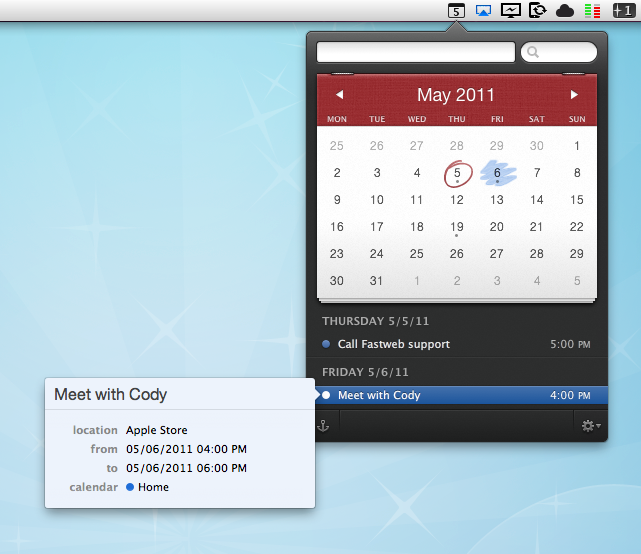
How do you improve the default OS X calendar application? How do you set out to create an alternative that can be appealing to power users, and accessible for calendar novices at the same time? While beta testing Fantastical, an upcoming Mac app by Flexibits, I thought these were the questions the developers tried to answer with their latest creation. Like in Twitter clients, developing a third-party calendar isn’t an easy task: you have to make sure it will work with all those calendar protocols out there, but most of all you have to know you’ve got something on your hands that will stand out from the crowd – especially when Apple itself ships a full-featured iCal.app with OS X that does its job just fine for most users, and doesn’t require an additional purchase. As usual, though, I believe there’s plenty of room for alternatives if you’re willing to take a risk and believe in your product. And it shows when testing Fantastical: Flexibits believes in its new app so much they wrote “your Mac’s calendar will never be the same again” on the teaser website.
Indeed, Fantastical does some things the default Mac calendar client can’t even imagine. First off, it’s elegant, minimal and unobtrusive, yet beautiful to look at. I know the very own purpose of a calendar app isn’t that of letting you stare at it, but when compared to this or this you’ll notice the difference. User interface, however, is functional to Fantastical: it’s minimal because Fantastical wants to be simple to use, and it’s gorgeous for as much as it’s powerful inside. Fantastical uses a natural language parser that will let you write down events in plain English, and have the app correctly recognize the input in various fields. Example: Meet with Cody tomorrow at Apple Store, Viterbo 5 PM to 6 PM. Adding this sentence to a new iCal event does nothing. But writing it in Fantastical? It creates a new calendar event with “Meet with Cody” as the title, “tomorrow” as the relative date, “Apple Store, Viterbo” as the desired location, and 5 PM to 6 PM as the timeframe. It’s almost unbelievable how well this thing works and how deeply it improves the way I can add events using nothing but English. I don’t have to navigate with my keyboard and mouse, I just write and hit Enter to process the event and add it to my default calendar. Sure, I could still do things manually and adjust dates or location with the cursor, but since installing the first beta of Fantastical I haven’t found a reason why I should.
The language parser is the big feature of Fantastical, but there’s lots more. Without revealing too much right now (let’s save it for a final review, shall we?), I can say Fantastical’s huge advantage over several third-party calendar apps for OS X is that it works perfectly in conjunction with Apple’s iCal, which is responsible for keeping all your calendar configurations. You can start using Fantastical seconds after launch without doing anything, as the app fetches the accounts you’ve already set up in iCal. This means Google Calendar, MobileMe, CalDAV, Exchange, Yahoo Calendar – they all work out of the box. And if you want, you can make a calendar the default one so that adding new events will be as fast as hitting a shortcut, and write.
I wasn’t sure I was going to use Fantastical much initially, mainly because I didn’t think a replacement for the standard calendar interface was needed on a Mac. But after trying it, I have to say Fantastical is the calendar app to look forward to. You can sign up for updates here, and stay tuned for a complete review on MacStories soon. Read more
Access Extra Content and Perks
Founded in 2015, Club MacStories has delivered exclusive content every week for nearly a decade.
What started with weekly and monthly email newsletters has blossomed into a family of memberships designed for every MacStories fan.
Club MacStories: Weekly and monthly newsletters via email and the web that are brimming with apps, tips, automation workflows, longform writing, early access to the MacStories Unwind podcast, periodic giveaways, and more;
Club MacStories+: Everything that Club MacStories offers, plus an active Discord community, advanced search and custom RSS features for exploring the Club’s entire back catalog, bonus columns, and dozens of app discounts;
Club Premier: All of the above and AppStories+, an extended version of our flagship podcast that’s delivered early, ad-free, and in high-bitrate audio.
iOS 5 To Feature Over The Air OS Updates?
According to 9to5 Mac, Apple is preparing to implement the capability for users to get over-the-air OS updates for the iPhone from iOS 5. Android and HP/Palm’s webOS users have long had the convenience of having OS updates pushed to their phone as soon as an update is available. Whereas users of iOS devices have had to resort to manually connecting the device to their computer with iTunes where it is downloaded and then installed.
9to5 Mac claims that multiple sources have said to them that the new feature will debut in iOS 5, allowing any subsequent updates to be pushed to the device. According to their sources, Apple has been discussing the feature with Verizon since early this year and are hoping to reach an agreement with them. Although it isn’t known whether other carriers internationally, or even AT&T in the US, have been approached by Apple over the feature.
Apple clearly has the fundamental technology for over-the-air updates working because the Apple TV (iOS version from late last year) is able to update itself without any computer connection. However there are two fundamental stumbling blocks before over-the-air updates could be seen to be feasible. Current updates are over 600MB, which is a substantial size to be downloading over any 3G connections. To get carriers to be happy with allowing the updates, let alone achieving an agreement with them to exclude them from any download caps, Apple would have to substantially trim that size down. The second issue is that of backups, currently before an update is installed, iTunes will create a back-up in case of a failed update. A cloud based back-up system is the obvious, but perhaps complex, solution to this issue.
Following the article, several people in the jailbreaking scene made some comments about the feasibility of over-the-air updates. In particular, @chronic and @chpwn make comments that a lot of the code required for over-the-air updates have already made their way into iOS4. For example, the MobileSoftwareUpdate.framework is in all iOS4 devices but has only been “fleshed out” on the Apple TV.
[Via 9to5 Mac]
Access Extra Content and Perks
Founded in 2015, Club MacStories has delivered exclusive content every week for nearly a decade.
What started with weekly and monthly email newsletters has blossomed into a family of memberships designed for every MacStories fan.
Club MacStories: Weekly and monthly newsletters via email and the web that are brimming with apps, tips, automation workflows, longform writing, early access to the MacStories Unwind podcast, periodic giveaways, and more;
Club MacStories+: Everything that Club MacStories offers, plus an active Discord community, advanced search and custom RSS features for exploring the Club’s entire back catalog, bonus columns, and dozens of app discounts;
Club Premier: All of the above and AppStories+, an extended version of our flagship podcast that’s delivered early, ad-free, and in high-bitrate audio.
The Daily: 800k Downloads Since February, $10 Million Loss

It’s not looking good for The Daily, the joint collaboration of Apple and News Corp. that launched in February as an iPad-exclusive magazine featuring the new iTunes subscription system. During today’s News Corp.’s March quarter earnings call, the company revealed the app is still a “work in progress” that generated a $10 million loss over the last quarter, as reported by Peter Kafka at MediaMemo.
For instance: Asked to comment on The Daily’s performance, Carey says it’s a work in progress, which lost $10 million last quarter. Then, in the background, someone — most likely CFO Dave DeVoe, mentions “800,000 downloads”.
Assuming that’s the actual number, that’s the first time anyone from News Corp. has talked about the iPad app’s performance. I’ve asked News Corp. to confirm.
MediaMemo also reports the 800k figure is for downloads through iTunes, not paid subscriptions. Downloads below one million seem to be a little low for The Daily, which was heavily promoted by Apple on its website and the App Store with multiple weekly homepage features. News Corp. itself stated several times in the past that the app was set to expand to more devices (like Android tablets) in the future, but it appears that Apple is still holding an exclusive on it as of today. Apple for instance helped The Daily’s team implementing subscriptions before the app’s launch giving them access to unreleased APIs not available to other developers, and News Corp. even tried to push the app to millions of eyeballs with a remarkable Super Bowl commercial. However, a few weeks ago rumors started to surface about The Daily’s slow decline in popularity and social media engagement, in spite of the publication even offering a website to read news coming from the iPad version.
Access Extra Content and Perks
Founded in 2015, Club MacStories has delivered exclusive content every week for nearly a decade.
What started with weekly and monthly email newsletters has blossomed into a family of memberships designed for every MacStories fan.
Club MacStories: Weekly and monthly newsletters via email and the web that are brimming with apps, tips, automation workflows, longform writing, early access to the MacStories Unwind podcast, periodic giveaways, and more;
Club MacStories+: Everything that Club MacStories offers, plus an active Discord community, advanced search and custom RSS features for exploring the Club’s entire back catalog, bonus columns, and dozens of app discounts;
Club Premier: All of the above and AppStories+, an extended version of our flagship podcast that’s delivered early, ad-free, and in high-bitrate audio.
Apple Releases iOS 4.3.3 [Direct Links]
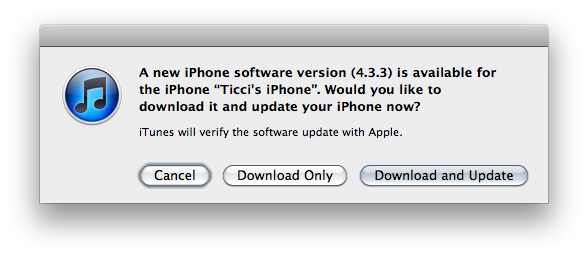
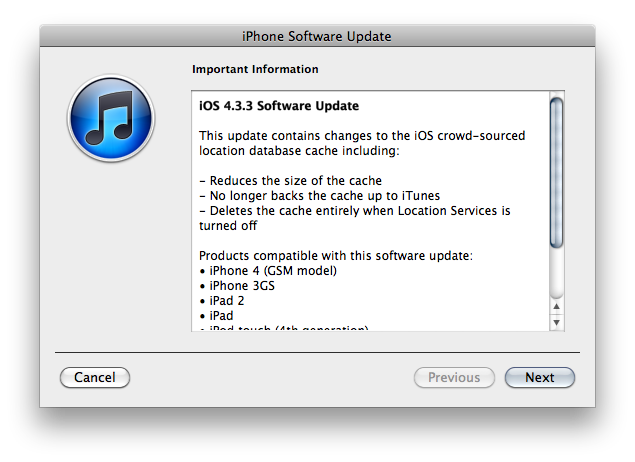
Apple just released iOS 4.3.3. It’s available now in iTunes if you check for updates, and direct links to the downloads will be available shortly.
As previously reported, iOS 4.3.3 improves the way iPhones and iPads handle the location tracking database stored on-device by making it smaller in size. The location database will be no longer backed up to iTunes and it will be deleted entirely when Location Services are turned off.
Here are the direct links for iOS 4.3.3:
- iPhone 3GS
- iPhone 4 (GSM)
- iPad
- iPad 2 (also iPad 2,2 and iPad 2,3)
- iPod touch 3rd gen
- iPod touch 4th gen
Apple also released iOS 4.2.8 for the Verizon iPhone. You can download it here. As for the build numbers: iOS 4.3.3 for the iPad 1 is labelled 8J3, with other iOS devices getting build 8J2. The Verizon iPhone’s iOS 4.3.3 is build 8E401.
Access Extra Content and Perks
Founded in 2015, Club MacStories has delivered exclusive content every week for nearly a decade.
What started with weekly and monthly email newsletters has blossomed into a family of memberships designed for every MacStories fan.
Club MacStories: Weekly and monthly newsletters via email and the web that are brimming with apps, tips, automation workflows, longform writing, early access to the MacStories Unwind podcast, periodic giveaways, and more;
Club MacStories+: Everything that Club MacStories offers, plus an active Discord community, advanced search and custom RSS features for exploring the Club’s entire back catalog, bonus columns, and dozens of app discounts;
Club Premier: All of the above and AppStories+, an extended version of our flagship podcast that’s delivered early, ad-free, and in high-bitrate audio.
Listary for iPhone Creates Lists, Syncs with Simplenote
I’m a huge fan of Simplenote, the free web service that works anywhere and allows you to create and sync notes across the web, iPhone, iPad and desktop computers thanks to a plethora of native third-party apps. In fact, I believe Simplenote is the easiest, yet most powerful note-syncing tool currently available on iOS devices: forget MobileMe’s notes, Simplenote is elegant, minimal, and when unlocked at its full potential with a $19.99 Premium account it allows you to do some nifty things with your notes like turn them into plain text lists, back them up on Dropbox (thus opening a whole new layer of possibilities) and create a personalized RSS feed. Simplenote works well as a free service, but it becomes a powerhouse of notes when using it as a Premium subscriber. It doesn’t surprise anyone that in the past year dozens of apps that sync with Simplenote and also sport Dropbox integration have been released in the App Store. Thanks to all these apps (including the excellent Notational Velocity for Mac), users have found a way to keep notes in the cloud, and have them always available, anywhere, on any device.
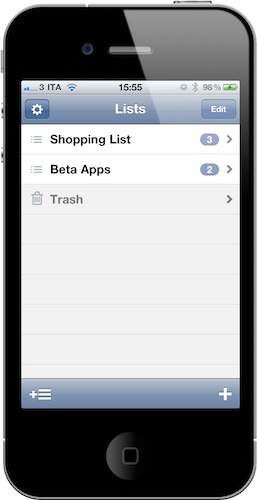
Listary, a new iPhone app by developers Portmanteau, wants to turn Simplenote into a list management tool without requiring a Premium subscription. With an elegant interface and the use of its own plain text syntax to recognize new and completed items, Listary works on the iPhone as a native app but can be accessed by any other Simplenote app, text editor or web browser. It basically works like this: once logged in with your Simplenote account, Listary will look into your note database and asks you if there’s any existing note you’d like to turn into a list. Read more
Access Extra Content and Perks
Founded in 2015, Club MacStories has delivered exclusive content every week for nearly a decade.
What started with weekly and monthly email newsletters has blossomed into a family of memberships designed for every MacStories fan.
Club MacStories: Weekly and monthly newsletters via email and the web that are brimming with apps, tips, automation workflows, longform writing, early access to the MacStories Unwind podcast, periodic giveaways, and more;
Club MacStories+: Everything that Club MacStories offers, plus an active Discord community, advanced search and custom RSS features for exploring the Club’s entire back catalog, bonus columns, and dozens of app discounts;
Club Premier: All of the above and AppStories+, an extended version of our flagship podcast that’s delivered early, ad-free, and in high-bitrate audio.
Spotify Now Lets You Sync MP3s To Your iPod Without iTunes
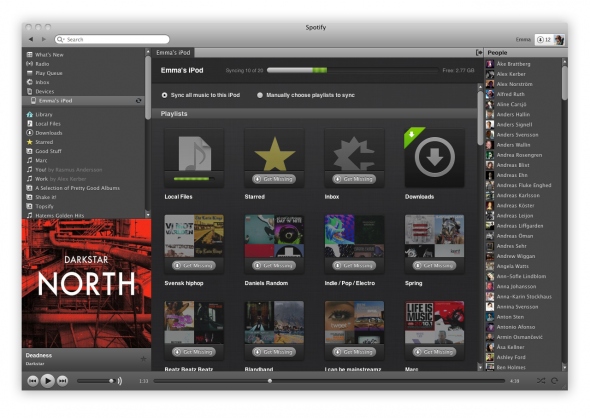
Spotify, the music streaming service that counts millions of active users in Europe but has been struggling to launch in the US due to the lack of deals with major music labels, announced some important new features last night, both for Premium and Free users. With an update to the official desktop app that will automatically roll out to all users in the next few days to “ensure technical quality”, Spotify now allows you to sync your music to an iPod Classic, iPod Shuffle or iPod Nano without using iTunes at all. With the new Spotify, users will be able to place the MP3s they bought (more on this in a minute) or saved locally inside a playlist (as they usually do) and sync these playlists to an iPod thanks to the new “Devices” section in the app’s sidebar. It’s worth noting that Spotify doesn’t allow sync via USB cable to iOS devices, as they’re only focusing on standard iPod models now. However, with the updated mobile app for iPhone and iPod touch (now also available to free users for playlist sync, whilst Premium subscribers retain the ability to stream everything) users get the possibility to sync playlists wirelessly. Clearly, Spotify has set out to become the standard music player for many both on the desktop and mobile devices, although the software still can’t sync back to iOS devices like iPhones and iPads through a USB cable. Plus, the lack of a native iPad app still makes it impossible for iPad users to properly enjoy the Spotify experience.
For the first time, seamlessly manage any iPod classic, iPod nano and iPod shuffle in Spotify. Simply connect your iPod to your computer via your USB cable and watch it magically appear in the new ‘Devices’ section of your Spotify sidebar.
iPod integration was your biggest request, but there are also a lot of Spotify Free users out there who are iPhone and Android phone owners. You asked for the ability to buy your MP3 playlists and sync to your phones. So we’ve got you covered too…
As of today, everyone can download the Spotify Mobile iPhone & Android apps to wirelessly sync your MP3 playlists in Spotify from your computer to your phone. Fire up your mobile app and see your phone appear in the ‘Devices’ section of the Spotify sidebar, ready to rock and roll. No cables required!
As mentioned above, users can now take the music they bought or already own on the go all the time. Spotify is, in fact, launching a new “download service” that, through a simple click&buy interface, allows you to purchase a range of MP3 bundles offered by the service starting at 50p per song. I haven’t managed to test the new music store and iPod Classic integration as the update is still rolling out and I don’t have it available, but from what Spotify unveiled last night, it really looks like the company’s intention is to take on Apple and (the future) iTunes with a mix of streaming, local cache, USB sync, and online store. The variety of apps offered by Spotify surely gives them an important head start in the music streaming scene for mobile devices, but they obviously still can’t compete with the music catalogue offered by iTunes. And when Apple finally rolls out is iCloud service for music with iTunes integration, it’ll be interesting to see how Spotify will react.
[image via TechCrunch]
Read more
Access Extra Content and Perks
Founded in 2015, Club MacStories has delivered exclusive content every week for nearly a decade.
What started with weekly and monthly email newsletters has blossomed into a family of memberships designed for every MacStories fan.
Club MacStories: Weekly and monthly newsletters via email and the web that are brimming with apps, tips, automation workflows, longform writing, early access to the MacStories Unwind podcast, periodic giveaways, and more;
Club MacStories+: Everything that Club MacStories offers, plus an active Discord community, advanced search and custom RSS features for exploring the Club’s entire back catalog, bonus columns, and dozens of app discounts;
Club Premier: All of the above and AppStories+, an extended version of our flagship podcast that’s delivered early, ad-free, and in high-bitrate audio.
Notificant Now Delivers Beautiful Reminders Across iPhone, Mac and Web
Released back in January on the Mac a few days after the Mac App Store grand opening, Notificant for Mac was a pretty sweet way to create reminders and timed notifications on the desktop, and have them always available thanks to the web app counterpart developers Caramel Cloud built. As the name of the company suggests, Notificant is a heavily cloud-oriented product: the Mac app is simple and unobtrusive in the way it lives in the menubar, but it leverages the power of the cloud and client sync to fire off notifications across computers and web browsers with incredible reliability and speed. And today, with the release of Notificant for iPhone, Caramel Cloud wants to extend the capabilities of the platform to the iPhone, delivering notifications anywhere, at any time.
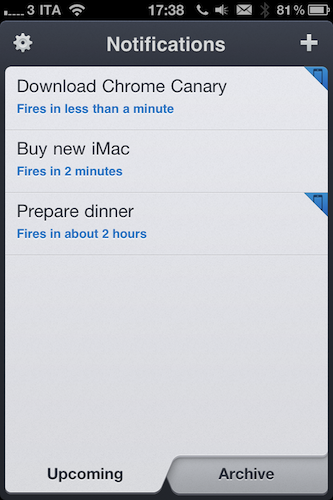
Notificant for iPhone follows the path traced by the Mac and web apps, offering users a clean and elegant interface to create and manage upcoming notifications. Once you log in with your Caramel Cloud account, you’ll be able to choose a custom sound effect in the settings, as well as decide to show an icon badge on the homescreen. The main screen is organized in two tabs: Archive lets you access past reminders and re-schedule them if you want to create a new notification off an old one, whilst the Upcoming tab lists all the notifications that you set and are about to fire off across the cloud to your registered computers and mobile devices. To add a new notification, you have to tap on the + button in the upper right corner. In this new screen, two other tabs allow you to set a delivery date and time; the text entry box at the top lets you write down details of your reminder, as well as shorten any link you’ve inserted. Similarly to Twitter, Notificant’s reminders have a limit of 160 characters (Twitter’s limit is 140). In my tests, I’ve found Notificant’s reminders created on the iPhone to be as reliable and precise as those added on the Mac and web app – which is great, as it means the system put in place by the developers is working correctly and doing its job throughout the cloud. A welcome addition to the iPhone app would be a refresh button in the main page to quickly remove notifications and check for new ones – of course, it’d also be great to have a native iPad app in the future. I’m sure Caramel Cloud is considering the option.
Notificant for iPhone makes reminders simple, and available anywhere. It’s simple, well-designed, and focused on one feature: enabling you to be notified of the things you care about. Get the app here. Read more
Access Extra Content and Perks
Founded in 2015, Club MacStories has delivered exclusive content every week for nearly a decade.
What started with weekly and monthly email newsletters has blossomed into a family of memberships designed for every MacStories fan.
Club MacStories: Weekly and monthly newsletters via email and the web that are brimming with apps, tips, automation workflows, longform writing, early access to the MacStories Unwind podcast, periodic giveaways, and more;
Club MacStories+: Everything that Club MacStories offers, plus an active Discord community, advanced search and custom RSS features for exploring the Club’s entire back catalog, bonus columns, and dozens of app discounts;
Club Premier: All of the above and AppStories+, an extended version of our flagship podcast that’s delivered early, ad-free, and in high-bitrate audio.
New iMac Notes: Dual External Display Output, OS X on SSD - No Video Input? [Updated]
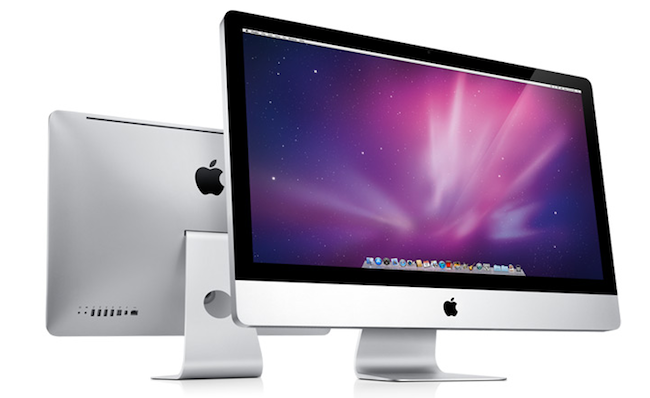
Following this morning’s refresh of the iMac – you can read more about it here – a few technical tidbits have started popping up on the Internet causing some interest and speculation from Apple fans and bloggers. Among the new features of the updated line – such as improved graphics, and new Intel “Sandy Bridge” processors – support for the Thunderbolt technology on the 27-inch iMacs has been extended, as the bigger models now come with two Thunderbolt ports to use for data transfer, daisy-chaining of external drives and peripherals and, as noticed and confirmed with Apple by GigaOM, dual external display output. Support for dual display out through Thunderbolt means you’ll be able to connect two external monitors to the new 27-inch iMac, and output the computer’s screen to the monitors simultaneously. This is great news for those who like external vertical monitor setups, and it’s now made extremely easy by the Thunderbolt ports located on the back of the iMac.
One of the most exciting things about today’s new iMacs (and the thing that will probably result in me buying one) are the dual Thunderbolt ports on the 27-inch iMac. They’re great in that they provide a lot of potential I/O transfer power, but more importantly because it allows the new iMac to output to two external monitors simultaneously, Apple confirmed to me this morning.
Achieving a similar setup was possible before, but it required users to buy USB or VGA adapters that resulted in loss of quality and poor performances when compared to native, wired Mini DisplayPort connections. Thanks to Thunderbolt’s daisy-chaining functionality, using both Thunderbolt ports for dual display output doesn’t mean you’ll be forced to constantly plug in and disconnect peripherals: if you own a Thunderbolt-based external drive, you’ll be able to connect it to the iMac, and then plug a secondary display into the drive’s Thunderbolt port. This way, Thunderbolt is used at its full capacity and you still retain the possibility to output to two different monitors simultaneously. Read more
Access Extra Content and Perks
Founded in 2015, Club MacStories has delivered exclusive content every week for nearly a decade.
What started with weekly and monthly email newsletters has blossomed into a family of memberships designed for every MacStories fan.
Club MacStories: Weekly and monthly newsletters via email and the web that are brimming with apps, tips, automation workflows, longform writing, early access to the MacStories Unwind podcast, periodic giveaways, and more;
Club MacStories+: Everything that Club MacStories offers, plus an active Discord community, advanced search and custom RSS features for exploring the Club’s entire back catalog, bonus columns, and dozens of app discounts;
Club Premier: All of the above and AppStories+, an extended version of our flagship podcast that’s delivered early, ad-free, and in high-bitrate audio.