Posts in Featured

Apple Inks Deal with EMI, Cloud Music Almost Finalized

Cnet reports tonight Apple has inked a deal with EMI over the upcoming launch of the rumored cloud music service that is expected to be unveiled at the WWDC in June. Cnet also claims the last two remaining deals with Sony and Music Entertainment and Universal Music Group (Warner Music Group reportedly signed a deal last month) could be signed as early as next week.

Apple has signed a cloud-music licensing agreement with EMI Music and is very near to completing deals with Universal Music Group and Sony Music Entertainment, multiple music industry sources told CNET.

The negotiations between Sony Music Group and Universal Music Group could be wrapped up as early as next week, the sources said. What this means is that signed contracts with all four of the top four record companies will be in Apple’s hip pocket on June 6 when Apple kicks off the company’s Worldwide Developers Conference. The sources who spoke with CNET did not know when Apple would announce the deals or roll out the cloud service.

With Apple signing the four major music labels in the United States, the cloud music service the company has been working on might include a subscription-based system where users simply stream music they don’t actually own (like in Spotify), the possibility to automatically beam to the cloud purchases from the iTunes Store or then again, as many suggest, Apple may be simply looking to having full support from the music industry in order to avoid possible lawsuits and debates surrounding cloud products from Google and Amazon, also recently launched.

Cloud is rumored to be a big part of iOS 5 and OS X Lion, set to be previewed on June 6 at the WWDC.

Access Extra Content and Perks

Founded in 2015, Club MacStories has delivered exclusive content every week for nearly a decade.

What started with weekly and monthly email newsletters has blossomed into a family of memberships designed for every MacStories fan.

Learn more here and from our Club FAQs.

Club MacStories: Weekly and monthly newsletters via email and the web that are brimming with apps, tips, automation workflows, longform writing, early access to the MacStories Unwind podcast, periodic giveaways, and more;

Club MacStories+: Everything that Club MacStories offers, plus an active Discord community, advanced search and custom RSS features for exploring the Club’s entire back catalog, bonus columns, and dozens of app discounts;

Club Premier: All of the above and AppStories+, an extended version of our flagship podcast that’s delivered early, ad-free, and in high-bitrate audio.

Learn more here and from our Club FAQs.


New MacBook Airs Coming In June / July

A new report from Digitimes seems to corroborate rumors we’ve heard in the past weeks about a MacBook Air refresh this summer, featuring Intel’s Sandy Bridge processors and Thunderbolt technology:

The Taiwan-based supply chain for Apple products will begin shipments of new 11.6-inch and 13.3-inch MacBook Air models featuring Sandy Bridge platform and Thunderbolt interface in late May for launch in June or July, according to makers in the supply chain. While Apple’s PR representatives in Taiwan have neither confirmed nor responded to the report, it has long been understood that Apple always keeps silent about its new products not yet launched, the sources emphasized.

Earlier reports about the new MacBook Airs (last updated in October at the Back to the Mac event) suggested production would start later this month for a June release. Cnet was first to report in February the MacBook Airs would receive an upgrade; there’s a lot of anticipation when it comes to the MacBook Airs thanks to their super-thin design, native SSD and screen resolution, with analysts claiming the line could become a $2.2 billion annual business for Apple.

Access Extra Content and Perks

Founded in 2015, Club MacStories has delivered exclusive content every week for nearly a decade.

What started with weekly and monthly email newsletters has blossomed into a family of memberships designed for every MacStories fan.

Learn more here and from our Club FAQs.

Club MacStories: Weekly and monthly newsletters via email and the web that are brimming with apps, tips, automation workflows, longform writing, early access to the MacStories Unwind podcast, periodic giveaways, and more;

Club MacStories+: Everything that Club MacStories offers, plus an active Discord community, advanced search and custom RSS features for exploring the Club’s entire back catalog, bonus columns, and dozens of app discounts;

Club Premier: All of the above and AppStories+, an extended version of our flagship podcast that’s delivered early, ad-free, and in high-bitrate audio.

Learn more here and from our Club FAQs.


Going to WWDC? Find The Perfect Party With This App

In about 20 days from now, the city of San Francisco will see thousands of knowledge-hungry Mac and iOS developers arriving from all parts of the globe to attend the WWDC, Apple’s annual developer event that this year officially kicks off on June 6. With Apple showcasing the next version of iOS and Mac OS X Lion on stage, plus other cloud-related services we’ve heard about in the past weeks, there’s the chance this year’s WWDC is going to be one of those to be remembered for years to come. Not to mention the Apple Design Awards, for the first time counting both Mac and iOS applications that provided an example of excellence and developer craftsmanship throughout the past months of App Store availability.

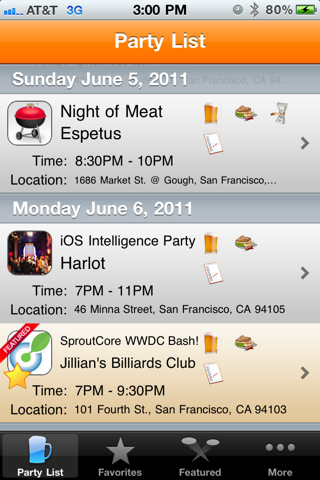
I’ve never been to WWDC, but I have a pretty solid feeling it’s not just about Steve Jobs, Forstall’s perennial surprised face, Cocoa and sessions. From what I hear, there are some wild parties and dinners going down in San Francisco during the WWDC. After all, those tired developers deserve some fun after a day of CoreAnimation training and ADAs tension, right? Meet Party List, a free iPhone app that everyone who’s going to WWDC this year should download. The app? It basically gives you a list of ”all the hippest, kewlest, craziest, and down right awesomest parties” happening during WWDC. Then, you save a party to your favorites and you go there – simple. To promote and event you’re organizing, just get in touch with the developers and ask them to include it in the app. That’s it.

Party List is free – attending the WWDC, of course, is not. I won’t be in San Francisco to record my experiences with developers, parties and drinks with Scott Forstall, but if I could come, I’d certainly put Party List on my homescreen. The app even supports push notifications – now, here’s something I wish Apple will fix come June 6.

Access Extra Content and Perks

Founded in 2015, Club MacStories has delivered exclusive content every week for nearly a decade.

What started with weekly and monthly email newsletters has blossomed into a family of memberships designed for every MacStories fan.

Learn more here and from our Club FAQs.

Club MacStories: Weekly and monthly newsletters via email and the web that are brimming with apps, tips, automation workflows, longform writing, early access to the MacStories Unwind podcast, periodic giveaways, and more;

Club MacStories+: Everything that Club MacStories offers, plus an active Discord community, advanced search and custom RSS features for exploring the Club’s entire back catalog, bonus columns, and dozens of app discounts;

Club Premier: All of the above and AppStories+, an extended version of our flagship podcast that’s delivered early, ad-free, and in high-bitrate audio.

Learn more here and from our Club FAQs.


OmniFocus for iPad Gets Calendar Integration

The Omni Group’s flagship GTD application, OmniFocus, received an update earlier today in its iPad version to include a number of new functionalities, bug fixes, and miscellaneous improvements to the interface. Widely regarded as the best version of OmniFocus currently available on all platforms, OmniFocus for iPad managed to win the hearts of The Omni Group’s loyal user base thanks to a clean and elegant design, a powerful sync engine that keeps tasks, projects and contexts always available across the Mac and iOS, but most of all the Forecast view, a slimmed down version of the popular Due perspective, which on the iPad has been completely reimagined as a timeline of sorts with the upcoming week’s days sitting in a top toolbar, listing all your next actions for quick reviewing and rescheduling. Coming soon on the iPhone as well and rumored to be part of OmniFocus for Mac 2.0 big upgrade (expected later this year), the Forecast view in OmniFocus 1.3 for iPad now allows you see items with a start date and, more importantly, calendar events.

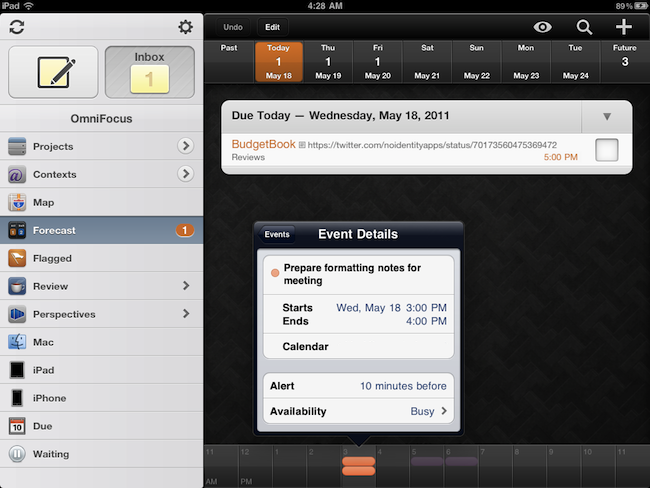
Calendar integration in OmniFocus for iPad will display all events for one day through a bar along the bottom that, among other things, allows you see events in popover menus, and change your availability status. You can’t edit events within OmniFocus, as I guess the developers wanted to offer a way to see what’s going on. The addition is very welcome for users like me, who keep an organized set of tasks and projects in OmniFocus, but save other things like reminders and meetings in iCal. At first, however, I was a little disoriented by the changelog of version 1.3 that illustrated the new feature:

OmniFocus for iPad 1.3 updates Forecast Mode: Never spread yourself too thin. Enable Calendar integration to see your hard landscape events alongside your overdue and due soon OmniFocus actions. Use the View options menu to show your items with a start date. Reschedule your projects and actions—with just a tap or two—to keep your days balanced.

Forecast mode now integrates calendar events into a convenient timeline. Use the View options menu to configure which calendars appear on the timeline, and the range of hours for which events are displayed.

Because I keep my OmniFocus for iPad in sync with the Mac version through the Omni Sync Server beta, I initially thought enabling calendar integration would require me to open the desktop app and fiddle with the iCal tab in the Preferences. I clearly read the changelog wrong (and didn’t really remember iCal’s send-to functionalities on OS X), because OmniFocus for Mac doesn’t let you import events, it lets you publish tasks and contexts to a calendar. Instead, what The Omni Group is doing here is different: they’re letting you see calendar events in OmniFocus for iPad alongside tasks in the Forecast view. How does it work? Simple: by relying on the iOS calendar API, any calendar that’s already been configured on an iPad can be displayed out of the box in OmniFocus. Just tap the view icon in the upper right corner, select Calendar Events, and choose a calendar from the Calendars tab. Select a day’s start and end times and you’ll be able to view events at the bottom. Events are color-coded depending on your calendar’s settings, and like I said above you can’t edit them. I wish the developers implemented a way to see events for the next weeks as well (as I treat events differently than most of my tasks and I need to know with weeks in advance about that meeting in Rome), but I guess that breaks the whole purpose of the Forecast view. Anyway, well done.

OmniFocus for iPad 1.3 also packs other interesting features. For one, I love the new fullscreen mode for editing notes in a task’s panel. Or the fact that the app’s badge counts due, overdue and flagged items, but items that are both overdue and flagged aren’t counted twice anymore. Another new neat functionality is video mirroring: by taking advantage of the iPad 2 hardware, The Omni Group now allows you to mirror OmniFocus on a second display, with viewers being able to see gestures, taps and swipes on screen. This will be huge for OmniFocus users like Merlin Mann having a presentation about OF in the future – and it’s something more developers should support.

OmniFocus 1.3 is a huge update with lots of additional fixes and enhancements you can check out in detail here. The app is available at $39.99 in the App Store – it was worth it before, and with calendar integration in the latest version it’s simply become a must-have.

Access Extra Content and Perks

Founded in 2015, Club MacStories has delivered exclusive content every week for nearly a decade.

What started with weekly and monthly email newsletters has blossomed into a family of memberships designed for every MacStories fan.

Learn more here and from our Club FAQs.

Club MacStories: Weekly and monthly newsletters via email and the web that are brimming with apps, tips, automation workflows, longform writing, early access to the MacStories Unwind podcast, periodic giveaways, and more;

Club MacStories+: Everything that Club MacStories offers, plus an active Discord community, advanced search and custom RSS features for exploring the Club’s entire back catalog, bonus columns, and dozens of app discounts;

Club Premier: All of the above and AppStories+, an extended version of our flagship podcast that’s delivered early, ad-free, and in high-bitrate audio.

Learn more here and from our Club FAQs.


Foodish: Delightfully Mindful of What You’re Eating. Review & Giveaway!

Calories aren’t fun. No matter what kind of appreciation you have for food, watching what you eat while being a food-a-holic can be difficult when everyone else focuses on just the numbers. Eating should be about discovery. It should enjoyable, shared, and fun without making everything else out to be a dangerous game of cat and calories. In my opinion, it’s much better to be mindful of what you’re eating, and Foodish is exactly the kind of app that fulfills this desire very well.

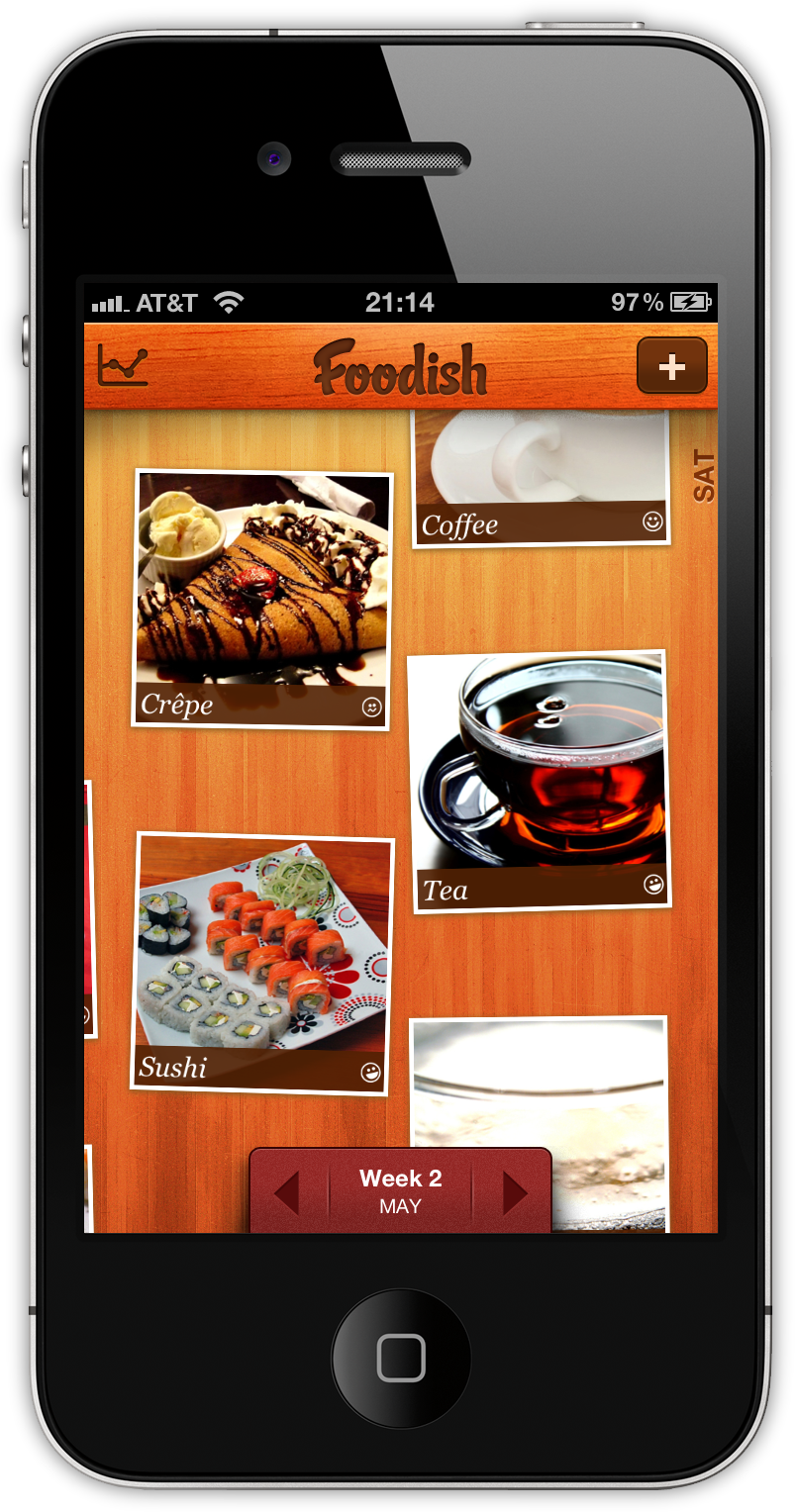
Not only is Foodish wrapped in a beautiful user interface, it’s fun and simple to use. Based on good conscience alone, you simply snap a picture of your meals and rate them on a general “bad to good” scale that tracks your overall eating habits over time. The concept is great: not only can the foodie in you keep a record of all those great meals and memories, but it also keeps you aware of just what exactly you’re shoving into that pie hole. Plus, you get to totally brag about the incredible meal you’re having at that five start restaurant from within the app. It’s a win-win!

Read more

Access Extra Content and Perks

Founded in 2015, Club MacStories has delivered exclusive content every week for nearly a decade.

What started with weekly and monthly email newsletters has blossomed into a family of memberships designed for every MacStories fan.

Learn more here and from our Club FAQs.

Club MacStories: Weekly and monthly newsletters via email and the web that are brimming with apps, tips, automation workflows, longform writing, early access to the MacStories Unwind podcast, periodic giveaways, and more;

Club MacStories+: Everything that Club MacStories offers, plus an active Discord community, advanced search and custom RSS features for exploring the Club’s entire back catalog, bonus columns, and dozens of app discounts;

Club Premier: All of the above and AppStories+, an extended version of our flagship podcast that’s delivered early, ad-free, and in high-bitrate audio.

Learn more here and from our Club FAQs.


Screenstagram: An Instagram Screensaver On Your Mac

After the release of an official API months ago, Instagram has become a ubiquitous service that already has a plethora of third-party tools for Mac, Windows and iOS devices in spite of the lack of a website to browse photos and the fact that it still is ”just an iPhone app.” The ecosystem built by Instagram is amazing, especially considering the kind of growth the developers had to face and the number of devs that suddenly signed up for the API to start creating external tools and toys like Postagram, an iPhone app that sends you real postcards based off Instagram photos. Like I said multiple times in the past, Instagram’s success on the iPhone has no equal. And we have seen there are some pretty good clients on the Mac, too.

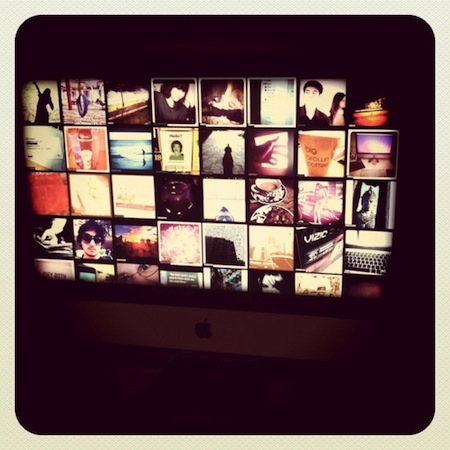
If you feel like there’s never enough Instagram around, perhaps you should check out this new utility called screenstagram, a Mac screensaver based on, you guessed it, Instagram pictures. That’s it: just photos rotating on a grid once your Mac is in screensaver mode. The cool thing the developers added? You can log in with your account and have the screensaver serve photos found in your feed. Otherwise, screenstagram will simply use Instagram’s popular feed to deliver its magic to a sleeping OS X. The developers write on their blog:

It took us a while to figure out what to build with the new web service. We’re no strangers to leveraging that kind of resource, but it’s generally for data-driven services, like Twitter or Foursquare. It’s not too often that a visually rich system like Instagram comes along and releases an API. We wanted to do something that took advantage of the eye candy, something beyond a web-based photo browser – something to really showcase our friends’ grainy, bar room photography. A way we could sit with the photos and soak them in longer than usually allowed by the ephemeral, wham-bam-thank-you-ma’am approach taken by the feed in the Instagram iPhone app. Once those photos are out of your friends’ feed, they’re sort of gone, never to be seen again without some digging on your part. So we decided on an old fashioned screen saver, a medium that doesn’t get much love these days.

The idea is very neat and well-implemented. We recommend you check it out here, as it’s a free and lightweight download. Read more

Access Extra Content and Perks

Founded in 2015, Club MacStories has delivered exclusive content every week for nearly a decade.

What started with weekly and monthly email newsletters has blossomed into a family of memberships designed for every MacStories fan.

Learn more here and from our Club FAQs.

Club MacStories: Weekly and monthly newsletters via email and the web that are brimming with apps, tips, automation workflows, longform writing, early access to the MacStories Unwind podcast, periodic giveaways, and more;

Club MacStories+: Everything that Club MacStories offers, plus an active Discord community, advanced search and custom RSS features for exploring the Club’s entire back catalog, bonus columns, and dozens of app discounts;

Club Premier: All of the above and AppStories+, an extended version of our flagship podcast that’s delivered early, ad-free, and in high-bitrate audio.

Learn more here and from our Club FAQs.


Fantastical: Your Personal iCal Assistant


In my preview of Fantastical, a new Mac application by Flexibits, I noted how developing a new calendar utility for OS X wasn’t an easy task at all: not only does the competition offer some great alternatives, Apple itself bundles the free iCal into the main installation of Mac OS X Snow Leopard, giving users a relatively powerful tool to manage appointments, invites, to-dos and all sorts of calendar needs. Whilst iCal – and on iOS, the Calendar app for iPhones and iPads – makes it super-simple to see all events at a glance with the supported Google Calendar, MobileMe, CalDAV and other protocols, it appears Apple didn’t really focus on letting users quickly and easily add new items with a few keystrokes and commands. To enter a new event in Apple’s default iCal, you have to open the app, head over the day you’ve chosen (or hit a keyboard shortcut) and type in every single field for the new event. That includes things like name, location, all-day checkbox, date and time, repeat, invitees and status.

Being forced to manually type all info and move the cursor around every single time is boring, and annoying; that’s exactly what Flexibits wants to fix and improve with Fantastical.

As I highlighted in my initial preview, Fantastical’s biggest feature lies in the way it allows you to enter events with natural language. Plain English, that’s it. Once the app is configured with your calendars and up and running in the menubar, you’ll be able to invoke its main window with a shortcut (or by clicking on the menubar icon), be automatically focused in the text entry field, and start typing. Before I delve deeper into this, a quick note about Fantastical’s calendar support: being the app an external tool that can be integrated with iCal, the app perfectly supports all the protocols already supported by Apple out of the box. That means MobileMe, Google Calendar, CalDAV, shared calendars – anything, really. In my tests, the app (and iCal, set as my default calendar app, more on this in a minute) worked just fine with a personal Me calendar, two Google Calendars, as well as a shared cal configured through Exchange both on Mac and iOS. As far as calendar support goes, there’s nothing to worry about if your calendars are already working in iCal. In fact, the app looks directly into it to fetch local and online calendars you might want to use, and iCal doesn’t even need to be running for Fantastical to add new events. Furthermore, the app also supports Outlook and Entourage, Yahoo! Calendar accounts as well as delegates both on Google and Yahoo.

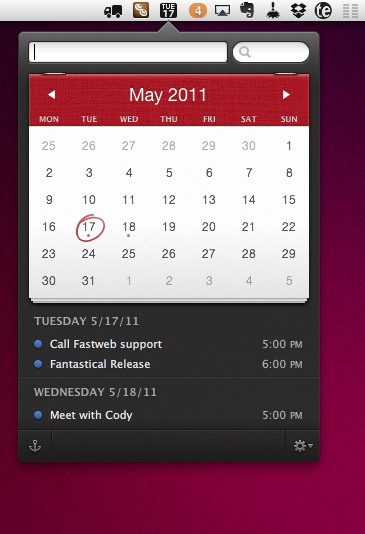
Fantastical’s natural language system is without a doubt the most important feature that sets it apart from other calendar utilities for Mac and Apple’s own iCal. As I noted in my preview, writing “Meet with Cody tomorrow at Apple Store, Viterbo 5 PM to 6 PM” in iCal does nothing, in spite of the sentence being correct and relatively simple to understand for a computer. Writing the same sentence in plain English in Fantastical adds a new event with all the fields already filled in. I’m talking about the event’s name (Meet with Cody), location (Apple Store, Viterbo), relative date (tomorrow) and time (from 5 PM to 6 PM). Fantastical understand what you’ve written, and leaves room for typos such as “Thrsday” or “tomorow.” The system implemented by Flexibits is very powerful and, as the company’s name reflects, flexible, allowing you to enter an event’s name in almost any way you want with the app still recognizing it correctly. Why is it a big deal? Because it’s smart and it helps me save time. Instead of having to move my cursor to select checkboxes and repeat the same actions over and over again, I just write a quick sentence like I’m used to and the app does the job for me. Indeed, Fantastical is the closest thing to a “calendar assistant” the Mac has ever seen. More importantly, the system is smart in the way it knows when I’m referring to people already in my Address Book. In the screenshot below, you can see how I wrote “Meet with Cody” and the app knew “Cody” was an entry in the Mac’s Address Book. From there, it fetched the two email addresses saved with Cody’s contact information and enabled me to send an invitation without leaving the app or having to open a browser. Overall, Fantastical’s natural input technology is the best thing that ever happened to a calendar application, for all the reasons listed above.

Fantastical, however, is also a great utility because of its intelligent and clever design. Let alone the fact that the app looks beautiful (just take a look at the screenshot or download the trial and play with it for 5 minutes), the design is functional to what a user has to accomplish: entering events quickly, in seconds, without opening a full-featured calendar app. Fantastical is unobtrusive, sits in the menubar and can be launched with a keyboard shortcut. If you feel like you want to look at it all the time, you can pin the app to stay above other windows. I don’t do that, but the feature might come in handy when adding events from other applications. The calendar design is minimal, tasteful, and allows you to navigate between months with ease. Marked days and events are done the right way with subtle indicators and graphics overlaying the main calendar. Nothing about Fantastical is “too much” or redundant: events can be previewed in a small popup if you head over them with your mouse, and if you double-click them iCal will launch. Events can’t be deleted from within Fantastical, but the app allows you to enter a new one from any app or browser – as you can see in the screenshot below. The system-wide service is incredibly useful when dealing with receipts and expenses in PDF documents, or just about any date displayed on screen. It’d be nice to be able to delete events in Fantastical, but I think the focus for the developers now is to let users add events in any way they want, as fast as possible.

There are other functionalities worth mentioning, too. From Fantastical’s window, you can decide how many “next events” or “next days” to show, so you’ll always be focused on the right amount of time and events. From the same menu, you can jump to today’s view. There are some things to tweak in the Preferences as well: you can choose a default calendar and calendar app, which will be the one that handles event management in the background as you add new stuff in Fantastical. The keyboard shortcut for quick entry can be customized, alongside the menubar icon that can show date, date and weekday, or date and month. Calendars can be managed in the preferences’ second tab, and you can set default alarms for timed and all-day events so you’ll always end up with a standard alarm for every new event – very useful.

Fantastical is the calendar assistant to install on every Mac that has to deal with calendars. Not because Fantastical is more powerful than other solutions like iCal and Outlook, but because is smarter and different. Fantastical wants to be the best, fastest and most intuitive way to add new events, whereas other desktop applications focus on letting you manage your calendar, sometimes packing features that slow down the whole process of adding new events. Fantastical is available on the Mac App Store at an introductory price of $14.99, with a free trial available here. Read more

Access Extra Content and Perks

Founded in 2015, Club MacStories has delivered exclusive content every week for nearly a decade.

What started with weekly and monthly email newsletters has blossomed into a family of memberships designed for every MacStories fan.

Learn more here and from our Club FAQs.

Club MacStories: Weekly and monthly newsletters via email and the web that are brimming with apps, tips, automation workflows, longform writing, early access to the MacStories Unwind podcast, periodic giveaways, and more;

Club MacStories+: Everything that Club MacStories offers, plus an active Discord community, advanced search and custom RSS features for exploring the Club’s entire back catalog, bonus columns, and dozens of app discounts;

Club Premier: All of the above and AppStories+, an extended version of our flagship podcast that’s delivered early, ad-free, and in high-bitrate audio.

Learn more here and from our Club FAQs.


Apple Proposes Standard To Make SIM Cards Smaller

According to Reuters, an executive of Orange has confirmed the French carrier is backing Apple’s plans for a new standard to make SIM cards smaller in order to use them in future thinner mobile devices. The proposed standard aims at reducing the size of SIM cards, which are currently implemented as “micro” models in the iPhone 4 and iPad.

We were quite happy to see last week that Apple has submitted a new requirement to (European telecoms standards body) ETSI for a smaller SIM form factor – smaller than the one that goes in iPhone 4 and iPad,” said Anne Bouverot, Orange’s head of mobile services.

“They have done that through the standardization route, through ETSI, with the sponsorship of some major mobile operators, Orange being one of them,” she told the Paris leg of the Reuters Global Technology Summit.

Reuters claims the approval process for such a new standard would take time, with new devices carrying the new SIM models not coming out at least until next year. A rumor surfaced last year indicated Apple was working closely with Gemalto to develop an integrated SIM card that would be embedded in every iPhone to enable users to quickly switch between carriers without restrictions and obligations, but this new report seems to suggest Apple is simply aiming for a smaller chip, perhaps following the opposition from carriers to an embedded SIM that would cut mobile operators out of the retail game.

Access Extra Content and Perks

Founded in 2015, Club MacStories has delivered exclusive content every week for nearly a decade.

What started with weekly and monthly email newsletters has blossomed into a family of memberships designed for every MacStories fan.

Learn more here and from our Club FAQs.

Club MacStories: Weekly and monthly newsletters via email and the web that are brimming with apps, tips, automation workflows, longform writing, early access to the MacStories Unwind podcast, periodic giveaways, and more;

Club MacStories+: Everything that Club MacStories offers, plus an active Discord community, advanced search and custom RSS features for exploring the Club’s entire back catalog, bonus columns, and dozens of app discounts;

Club Premier: All of the above and AppStories+, an extended version of our flagship podcast that’s delivered early, ad-free, and in high-bitrate audio.

Learn more here and from our Club FAQs.


ProductiveMacs Bundle: 8 Great Mac Apps at $29

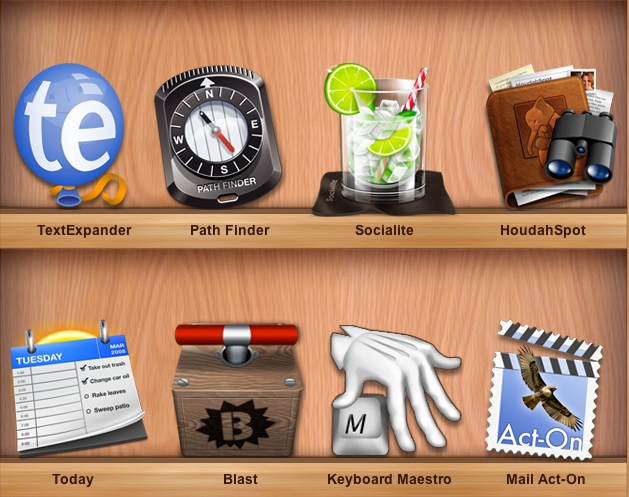
Given all the great apps available for the Mac, wouldn’t be great if someone bundled together some really powerful utilities that help you get work done? How about utilities like Keyboard Maestro, Mail Act-on, TextExpander, and Path Finder all in one shot? If the addition of HoudahSpot and Today wasn’t enough, then how about the killer price tag of $29? The ProductiveMacs bundle, organized via Apparent Software (who just picked up Socialite from Realmac Software) are hosting a bundle that features a fine collection of seriously powerful software for your Mac.

Read more

Access Extra Content and Perks

Founded in 2015, Club MacStories has delivered exclusive content every week for nearly a decade.

What started with weekly and monthly email newsletters has blossomed into a family of memberships designed for every MacStories fan.

Learn more here and from our Club FAQs.

Club MacStories: Weekly and monthly newsletters via email and the web that are brimming with apps, tips, automation workflows, longform writing, early access to the MacStories Unwind podcast, periodic giveaways, and more;

Club MacStories+: Everything that Club MacStories offers, plus an active Discord community, advanced search and custom RSS features for exploring the Club’s entire back catalog, bonus columns, and dozens of app discounts;

Club Premier: All of the above and AppStories+, an extended version of our flagship podcast that’s delivered early, ad-free, and in high-bitrate audio.

Learn more here and from our Club FAQs.