

Sparrow is the email client for the rest of us who want nothing more than an elegant app that requires no setup, looks good, and works seamlessly with Gmail out of the box. There is no concept of mapping folders to your Inbox or setting up an archive heap: Sparrow simply works with your IMAP or POP3 accounts with little needed configuration. As you may have previously read, Sparrow recently updated to include a universal inbox so you can see all of your activity in one place, and Facebook fans will be happy with the additional ability to add people as Facebook friends and pull down profile pics. Toss in Gravatar and Address Book support, and Sparrow aims to keep you connected its venture towards social integration. A lite version of Sparrow is free in the App Store, and the full version can be found for $9.99. Today, AppSumo is offering a 40% discount off Sparrow so you can pick it up for just $6, and we’re teaming up with the sales gurus to make the deal even sweeter. We’re giving away ten copies to our email churning MacStorians, and you can find all of the necessary rules past the break.
Posts in Featured
Get Social with the Sparrow 1.2 Giveaway!

Access Extra Content and Perks
Founded in 2015, Club MacStories has delivered exclusive content every week for nearly a decade.
What started with weekly and monthly email newsletters has blossomed into a family of memberships designed for every MacStories fan.
Club MacStories: Weekly and monthly newsletters via email and the web that are brimming with apps, tips, automation workflows, longform writing, early access to the MacStories Unwind podcast, periodic giveaways, and more;
Club MacStories+: Everything that Club MacStories offers, plus an active Discord community, advanced search and custom RSS features for exploring the Club’s entire back catalog, bonus columns, and dozens of app discounts;
Club Premier: All of the above and AppStories+, an extended version of our flagship podcast that’s delivered early, ad-free, and in high-bitrate audio.
Miro 4.0 Available Now, Miro For iPad Coming Soon
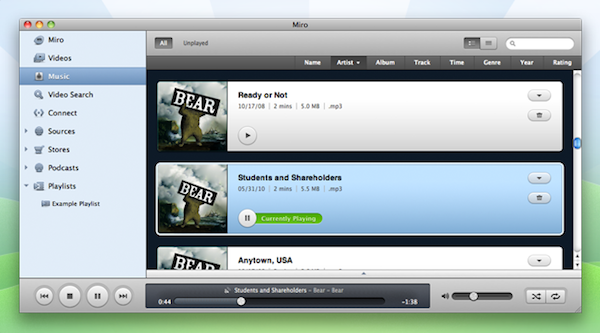
Miro, the open source media player and organiser, was today updated to version 4 and it heralds in some significant improvements and feature additions. Most notably it has taken on the role of being iTunes for Android devices, challenging others such as DoubleTwist with its media syncing capabilities.
It allows Android users sync the typical music, movies and podcasts but will even allow them to download Android apps from either the Google Android Market or from Amazon’s Android app store. The other significant addition is a home sharing feature for content stored in Miro. Using the iTunes DAAP protocol, it lets users stream their Miro Library to any other DAAP or vice versa, letting you play content from other DAAP clients, even a NAS drive on your network.
The New York Times is also reporting that the Miro developers, the non-profit group The Participatory Culture Foundation, have also been hard at work developing a Miro app for the iPad, which will launch within three weeks. The app will likely support the streaming features introduced in Miro 4.0 as well as focusing on podcasts, which was the original appeal for Miro.
[Via The New York Times]
Access Extra Content and Perks
Founded in 2015, Club MacStories has delivered exclusive content every week for nearly a decade.
What started with weekly and monthly email newsletters has blossomed into a family of memberships designed for every MacStories fan.
Club MacStories: Weekly and monthly newsletters via email and the web that are brimming with apps, tips, automation workflows, longform writing, early access to the MacStories Unwind podcast, periodic giveaways, and more;
Club MacStories+: Everything that Club MacStories offers, plus an active Discord community, advanced search and custom RSS features for exploring the Club’s entire back catalog, bonus columns, and dozens of app discounts;
Club Premier: All of the above and AppStories+, an extended version of our flagship podcast that’s delivered early, ad-free, and in high-bitrate audio.
Prototypes Turns Mockups Into Tappable iPhone Demoes
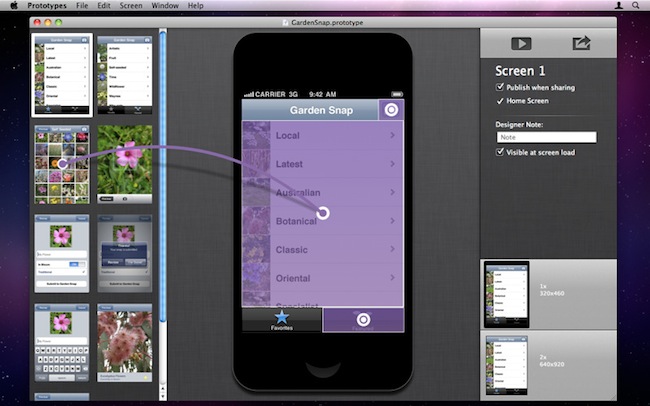
If you’re an iPhone developer, you know how long it takes to turn a mockup realized in Photoshop, Illustrator or Fireworks into a working app that can be tested to see if your idea is actually working on a device’s screen. Whilst an app screen may look good in Photoshop with its fancy graphics and menus you first sketched on your notebook, there’s always the risk that, once running on a real device with an actual multitouch display, your idea will simply suck. Prototypes, a new Mac app released today at $39.99, is a new tool for developers aimed at making the process of converting a mockup into a tappable and shareable application super-simple. Prototypes won’t magically turn your .png’s into Cocoa code, instead it will allow you to display these images on an iPhone or iPod touch screen, and allow users to tap around and get the idea of how an app works.
From Prototypes’ desktop view, developers can import image files and start building a new project. Once all the images are in, Prototypes offers the possibility to create connections and links between objects and pages, add tappable areas and establish dependencies between app menus and sections. What Prototypes basically does is simple: it takes all your app mockups you’ve created in Photoshop, bundles them up in a package, and takes care of including animations, transitions, hotspots, and more to give users the feeling that they’re using a real application while, in fact, they’re just tapping on “smart images” connected by links. It’s genius. Of course you won’t end up using an app on your phone – you’ll simply be running a bookmark saved from the web that’s nothing but a living mockup meant for testing purposes.
Prototypes also offers developers a way to share these mockups with users, their boss, or friends: by hosting a mockup on the free ptyp.es service, devs will be able to easily allow everyone to “install the app” using Mobile Safari and a special PIN code for extra security. You can try one of Prototypes smart mockups by heading over this link with your iPhone, saving the page on your Home screen, and entering 12345678 as PIN.
I think Prototypes is an incredible idea and a great time-saving utility for iOS developers that have been looking for ways to test a mockup without actually writing code. You can get the app here at $39.99.
Access Extra Content and Perks
Founded in 2015, Club MacStories has delivered exclusive content every week for nearly a decade.
What started with weekly and monthly email newsletters has blossomed into a family of memberships designed for every MacStories fan.
Club MacStories: Weekly and monthly newsletters via email and the web that are brimming with apps, tips, automation workflows, longform writing, early access to the MacStories Unwind podcast, periodic giveaways, and more;
Club MacStories+: Everything that Club MacStories offers, plus an active Discord community, advanced search and custom RSS features for exploring the Club’s entire back catalog, bonus columns, and dozens of app discounts;
Club Premier: All of the above and AppStories+, an extended version of our flagship podcast that’s delivered early, ad-free, and in high-bitrate audio.
QuickCal: A Simple iCal Add-On with Natural Language Input
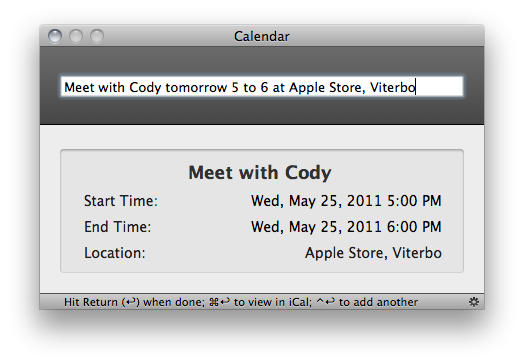
When I reviewed Fantastical, a new calendar utility by Flexibits that lives in the OS X menubar, I was impressed by the design of the app and the support for natural language input, a feature that allows you to write down your calendar events quickly using nothing but plain English – say you have a meeting tomorrow at your local coffee shop, with Fantastical you don’t need to click on checkboxes and date fields to get your new event set up. You can just write “meeting at coffee shop tomorrow at 5.30 PM”, and Fantastical will know how to handle it. After my Fantastical review, several readers pointed out in the comments and via Twitter that QuickCal, another calendar app that works from the menubar, does more or less the same things of Fantastical, only with a more simple and standard UI and at $0.99 in the Mac App Store, as opposed to Fantastical’s $14.99 introductory price. Because I’m a sucker for new software I love to play with and I care about my readers’ app recommendations, I decided to download QuickCal for Mac and take it for a spin. There’s also an iPhone version available, but after the break I will take a look at QuickCal for Mac – the review of the iPhone version will follow later this week.
Surprisingly, QuickCal works a lot like Fantastical. That is not to say the Fantastical developers “copied” the main features of QuickCal – I’m just surprised I didn’t know about this app before. QuickCal is indeed very similar to Fantastical in how it enables you to write down events using simple, plain English, and it’s got some additional functionalities that integrate the app with iCal, or directly with Google Calendar’s online interface. QuickCal is also fundamentally different from Fantastical in how it lets you start adding a new event, and the design of the event list in the menubar has a simpler look that, unlike Flexibits’ app, doesn’t embed a full monthly calendar, bur rather only shows upcoming events in a vertical list. Both apps have some features in common, but the implementation is ultimately different and exclusive to each one of them. Read more
Access Extra Content and Perks
Founded in 2015, Club MacStories has delivered exclusive content every week for nearly a decade.
What started with weekly and monthly email newsletters has blossomed into a family of memberships designed for every MacStories fan.
Club MacStories: Weekly and monthly newsletters via email and the web that are brimming with apps, tips, automation workflows, longform writing, early access to the MacStories Unwind podcast, periodic giveaways, and more;
Club MacStories+: Everything that Club MacStories offers, plus an active Discord community, advanced search and custom RSS features for exploring the Club’s entire back catalog, bonus columns, and dozens of app discounts;
Club Premier: All of the above and AppStories+, an extended version of our flagship podcast that’s delivered early, ad-free, and in high-bitrate audio.
Rumor: iPhone 3GS Won’t Get iOS 5
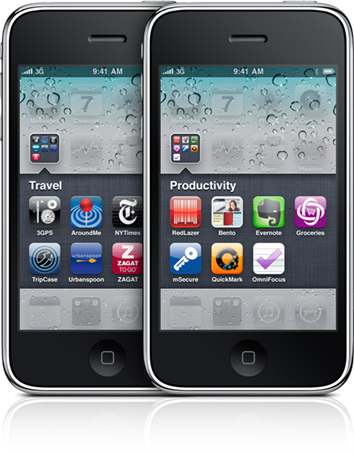
With Apple wrapping up its software announcements for the WWDC set to kick off in San Francisco on June 6, a new rumor suggests the two-year old iPhone 3GS won’t get the iOS 5 upgrade when Apple releases the first betas this summer and the final version of the OS likely this Fall. According to Russian analyst and Mobile Review editor Eldar Murtazin, the 2009 iPhone 3GS will stay on iOS 4, thus leaving the iPhone 4 and next-generation device Apple is scheduled to announce later this year as the only iPhone models capable of running iOS 5. Murtazin wrote in a tweet posted earlier today:
Just one comment. Apple iPhone 3Gs wont be upgradable to iOS 5.x. iPhone 4 will.
No additional details are provided by Murtazin in his Twitter timeline, leaving room for much speculation in regards to reliability of the rumor. When Apple released iOS 4 in summer 2010, for example, the company made sure it could run on the iPhone 3G, 3GS and iPhone 4. It was only with the first beta of iOS 4.3 (seeded in January) that Apple dropped support for the iPhone 3G and iPod touch 2nd gen – older devices the software team at Cupertino thought wouldn’t be capable of running the latest versions of iOS anymore. And again, Apple “unofficially” confirmed they were dropping support for the original 2007 iPhone in 2010, when Steve Jobs replied to a customer email and said Apple wouldn’t update the original iPhone in the future. Indeed, the 2007 iPhone can’t run iOS 4.
At this point, it’s unclear whether or not the iPhone 3GS will receive an upgrade to iOS 5, though Apple’s history seems to indicate that an iPhone lifespan varies from two to two years and a half. A report posted by 9to5mac earlier this month claimed that Apple was internally testing iOS 5 on the iPhone 3GS, although the website suggested that it wasn’t “immediately clear” whether the 3GS would eventually get the public version of iOS 5.
The iPhone 3GS was introduced on June 8, 2009, at the WWDC in San Francisco. It was released on June 19 in the United States, Canada and six more European countries, featuring faster performances with 256 MB of RAM, better camera with video capabilities, voice control and digital compass. The device is still available on Apple’s website at a discounted price of $49 for the 8 GB version. The iPhone 3GS runs the latest iOS 4.3.3, though the difference in performances is notable when compared to A4 and A5-enabled devices like the iPhone 4 and iPad 2.
[Thanks, Kevin]
Access Extra Content and Perks
Founded in 2015, Club MacStories has delivered exclusive content every week for nearly a decade.
What started with weekly and monthly email newsletters has blossomed into a family of memberships designed for every MacStories fan.
Club MacStories: Weekly and monthly newsletters via email and the web that are brimming with apps, tips, automation workflows, longform writing, early access to the MacStories Unwind podcast, periodic giveaways, and more;
Club MacStories+: Everything that Club MacStories offers, plus an active Discord community, advanced search and custom RSS features for exploring the Club’s entire back catalog, bonus columns, and dozens of app discounts;
Club Premier: All of the above and AppStories+, an extended version of our flagship podcast that’s delivered early, ad-free, and in high-bitrate audio.
Opera Mini for iPad Now Available
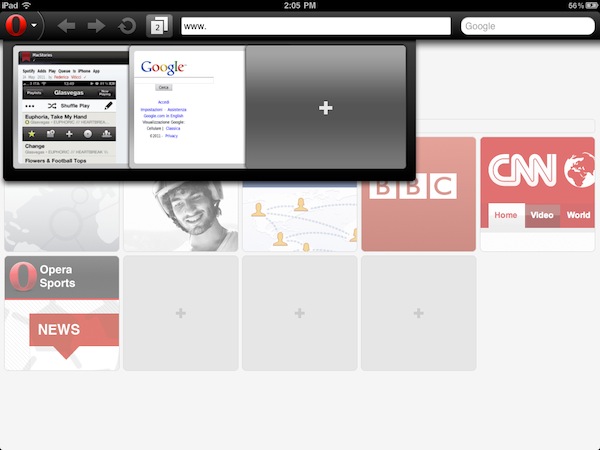
A few months after the first teaser shots and previews that confirmed Opera was working on an iPad version of its alternative browser featuring visual tabs and updated sharing options for the larger screen, the Norwegian company has finally released an update to its Opera Mini web browser this morning, bringing new features and an updated interface to the iPhone 4’s Retina Display, but most of all a native version to the iPad. You can find Opera for iPad now in the App Store.
We’ll have a full review of Opera for iPad later this week on MacStories, but in the meantime we’ve taken the app for a quick spin and we’re positively impressed with it. Visual tabs play an important role on the iPad, as they allow you to keep multiple pages open at once and actually see their previews concurrently on screen to quickly switch between them. Animations of the tab drawer at the top seem very smooth, though I’ve noticed that Opera Mini for iPad sometimes opens web pages in their iPhone mobile web view, rather than the desktop one as Safari for iPad does by default. This might be related to the server-side compression Opera does to speed up browsing, but we’ll make sure to further look into the Settings to resolve this issue. As for other features, a big Opera logo in the upper left corner allows you to access a popup menu with Bookmarks, History, Settings, and Sharing options, which include Facebook, Twitter and My Opera. Pages can be opened in background tabs, and overall the interface has been polished to look great on the iPhone 4 with minor tweaks here and there as well.
From the changelog:
- Updated design with a fresh new look and feel
- Super smooth pinch-to-zoom and panning
- Support for iPhone 4 retina display, iPad, and iPad 2 devices
- Direct share on Facebook, Twitter, and My Opera
- Open new page in background tab
- Improved international font support for Arabic, Chinese, Vietnamese, and other non-latin languages
Opera Mini for iPad can be downloaded here for free. Check out more screenshots and the promo video below. Read more
Access Extra Content and Perks
Founded in 2015, Club MacStories has delivered exclusive content every week for nearly a decade.
What started with weekly and monthly email newsletters has blossomed into a family of memberships designed for every MacStories fan.
Club MacStories: Weekly and monthly newsletters via email and the web that are brimming with apps, tips, automation workflows, longform writing, early access to the MacStories Unwind podcast, periodic giveaways, and more;
Club MacStories+: Everything that Club MacStories offers, plus an active Discord community, advanced search and custom RSS features for exploring the Club’s entire back catalog, bonus columns, and dozens of app discounts;
Club Premier: All of the above and AppStories+, an extended version of our flagship podcast that’s delivered early, ad-free, and in high-bitrate audio.
ForeverSave 2 Giveaway
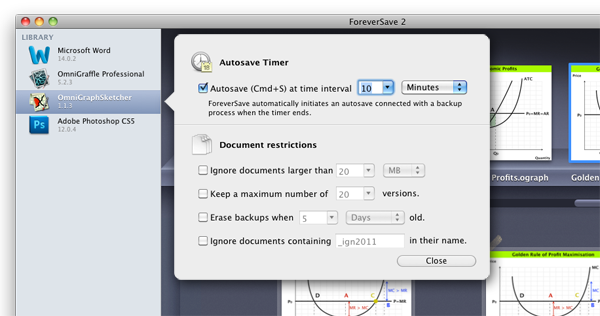
There’s nothing worse than working on an important document only to have the power cut, and it can be heartbreaking if your most recent changes haven’t been saved before beforehand. Dropbox is an excellent tool for making sure files are backed up, but what if you imbued Snow Leopard with a powerful library capable of browsing file history (outside of Time Machine of course), storing those multiple iterations in Dropbox, and automatically invoking that command-S keystroke at timed or inactive intervals so you’ll always have the most recent version of the file on hand? ForeverSave 2 is my Textmate, OmniOutliner, Pages, and otherwise all-around document companion for constantly saving multiple versions of my documents in preparation for the worst-case scenario. ForeverSave 2 is a convenient menubar utility with a simple activation and reminder scheme for initial setup (just check out our review), and it’s currently available for $19.99 in the Mac App Store. We want you to remain vigilant with your backup regimen, which is why we’re prescribing ten copies to ail those versioning blues. Rules after the break.
Read more
Access Extra Content and Perks
Founded in 2015, Club MacStories has delivered exclusive content every week for nearly a decade.
What started with weekly and monthly email newsletters has blossomed into a family of memberships designed for every MacStories fan.
Club MacStories: Weekly and monthly newsletters via email and the web that are brimming with apps, tips, automation workflows, longform writing, early access to the MacStories Unwind podcast, periodic giveaways, and more;
Club MacStories+: Everything that Club MacStories offers, plus an active Discord community, advanced search and custom RSS features for exploring the Club’s entire back catalog, bonus columns, and dozens of app discounts;
Club Premier: All of the above and AppStories+, an extended version of our flagship podcast that’s delivered early, ad-free, and in high-bitrate audio.
Square Releases Major 2.0 Update for iPhone and iPad
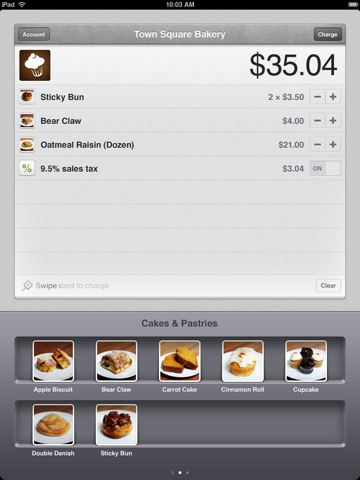
Square, the mobile payment company that allows you to pay with your credit card on the go by simply swiping it through an iPhone or iPad secure reader, teased some major announcements last week, leading to speculation that the service might have something huge up its sleeve after being featured by Apple multiple times in iPad and iPhone commercials and receiving approval to sell the card reader in Apple’s retail stores. While Square’s Jack Dorsey is stil holding a special announcement at TechCrunch Disrupt in about two hours, it turns out the big new update was a major overhaul of the mobile app, which has just been upgraded to version 2.0 in the App Store.
Square 2.0 brings a refreshed interface on the iPhone (which looks pretty neat from the screenshots) and an entirely new design on the iPad that lets business owners organize items into shelves for “easier browsing.” Alongside other bug fixes, the UI changes seem to be the focus on this new update. Apparently, the new Square is now allowing merchants to easily organize different items with different “variations” (categories, we assume) on these new shelves that should make it easier and faster for customers to select something they want to buy. You can swipe through shelves, add items to the processing queue and, as usual, swipe your credit card to pay. The interface changes on the iPhone make for a more professional-looking, elegant app we’re pretty sure Apple will feature again soon.
From the changelog:
- iPad: Arrange your items into shelves, for easier browsing and faster checkout.
- iPad: Small, medium, large; chocolate, vanilla, strawberry – create variations of your items.
- iPhone: Refined look and feel.
- Minor bug fixes.
Square 2.0 is now live in the App Store. We’re still waiting for other major announcements later today, especially considering the company recently achieved 3 million payments processed every day. Check out more screenshots below. Read more
Access Extra Content and Perks
Founded in 2015, Club MacStories has delivered exclusive content every week for nearly a decade.
What started with weekly and monthly email newsletters has blossomed into a family of memberships designed for every MacStories fan.
Club MacStories: Weekly and monthly newsletters via email and the web that are brimming with apps, tips, automation workflows, longform writing, early access to the MacStories Unwind podcast, periodic giveaways, and more;
Club MacStories+: Everything that Club MacStories offers, plus an active Discord community, advanced search and custom RSS features for exploring the Club’s entire back catalog, bonus columns, and dozens of app discounts;
Club Premier: All of the above and AppStories+, an extended version of our flagship podcast that’s delivered early, ad-free, and in high-bitrate audio.
Apple Updates Apple Store App with Custom Configure Options, New In-Store Features
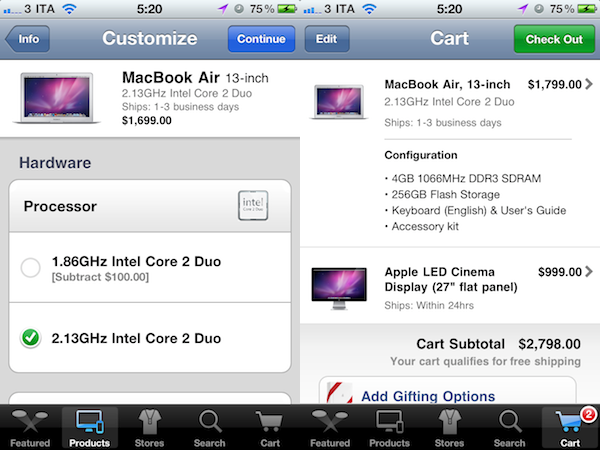
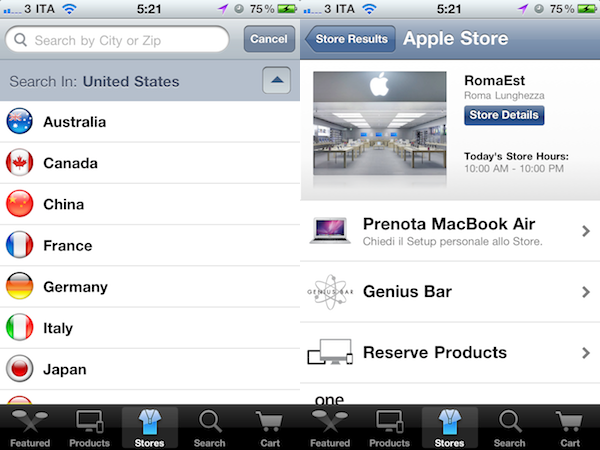
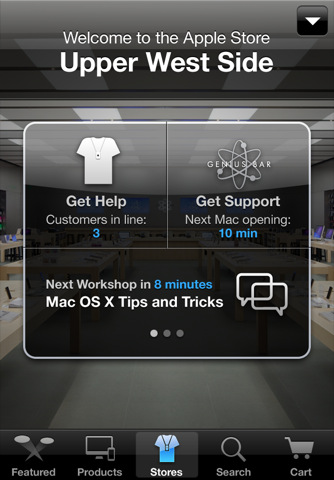
As widely expected, Apple has just updated the official Apple Store app to version 1.3 including custom configure options for Macs and the ability to get support quickly inside an Apple retail store. Contrarily to previous speculation, the app seems to be US-exclusive and doesn’t include an iPad universal version for now. With the new configure options, users are now able to build and order the Mac they want by selecting different RAM configurations, hard drives, displays and more – just like on the Apple Online Store. As for in-store support, the screenshot below shows you can access Mac OS X Tips and Tricks and workshop schedules, see how many customers are in line in front of you, and check out the next opening at the Genius Bar.

From the changelog:
- Enhanced in-store mode lets you get help and support quickly when you’re at an Apple Retail Store.
- The ability to custom-configure a new Mac with the options you want.
The app is available now in the App Store here.
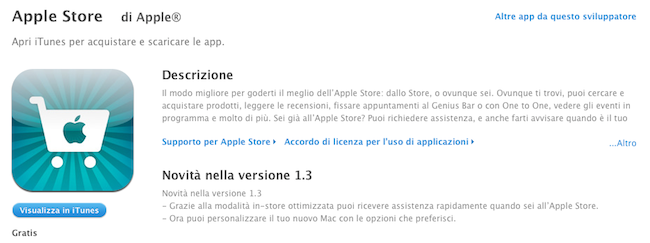
Update: the app is actually becoming available internationally this time. Here’s the link to get it from the Italian store. The Apple Store app is now slowly propagating across Europe, as it’s out in France, Germany, UK, and Spain.
Access Extra Content and Perks
Founded in 2015, Club MacStories has delivered exclusive content every week for nearly a decade.
What started with weekly and monthly email newsletters has blossomed into a family of memberships designed for every MacStories fan.
Club MacStories: Weekly and monthly newsletters via email and the web that are brimming with apps, tips, automation workflows, longform writing, early access to the MacStories Unwind podcast, periodic giveaways, and more;
Club MacStories+: Everything that Club MacStories offers, plus an active Discord community, advanced search and custom RSS features for exploring the Club’s entire back catalog, bonus columns, and dozens of app discounts;
Club Premier: All of the above and AppStories+, an extended version of our flagship podcast that’s delivered early, ad-free, and in high-bitrate audio.