Posts in Featured

OS X Lion: Installation Guide, Boot Discs and Q&A

Apple today released Mac OS X 10.7 Lion and it is the first release of OS X to be distributed primarily through a digital channel. That digital channel, the recently released Mac App Store, is the main way in which Apple is selling Lion.

To help you (or perhaps a family member or friend who may need a little guidance) with the various installation methods, and how the Mac App Store changes things, we’ve prepared the following post. In this article we include a step-by-step guide for the typical Lion upgrade process, explain what the new Recovery Partition is, how to make your own bootable Lion Installation media, how to do a clean Lion installation and a helpful Q&A section.

So jump after the break to see the full article and learn more than you would want to know about the Lion installation process.

Contents

To make things as simple as possible we have split this article into several sections so you can jump right to the section you most want/need to learn about. So as a side note to those who wish to read the whole article, be warned some parts and information is repeated multiple times.

  1. Introduction to Mac App Store Distribution of Lion
  2. The Simple Upgrade Installation (from Snow Leopard)
  3. The Recovery Partition, What Is It?
  4. Making Your Own Bootable Media
  5. The Quasi-Clean Installation
  6. The Completely Clean Installation
  7. Q & A

Read more

Access Extra Content and Perks

Founded in 2015, Club MacStories has delivered exclusive content every week for nearly a decade.

What started with weekly and monthly email newsletters has blossomed into a family of memberships designed for every MacStories fan.

Learn more here and from our Club FAQs.

Club MacStories: Weekly and monthly newsletters via email and the web that are brimming with apps, tips, automation workflows, longform writing, early access to the MacStories Unwind podcast, periodic giveaways, and more;

Club MacStories+: Everything that Club MacStories offers, plus an active Discord community, advanced search and custom RSS features for exploring the Club’s entire back catalog, bonus columns, and dozens of app discounts;

Club Premier: All of the above and AppStories+, an extended version of our flagship podcast that’s delivered early, ad-free, and in high-bitrate audio.

Learn more here and from our Club FAQs.


A New Cat to Tame: OS X Lion Review

Coming into this Lion review, I think the first thing you’d expect me to say is that Lion is a transitionary version of OS X that begins the process of converging with iOS. At a first scratch on the cat post, this is the conclusion that we may immediately jump to as we glance across the changes made. We focus too much on the Launchpad, complaining about what seems to be obvious handholding without looking deeper into the underlying enhancements Apple has made for everyone across the board. OS X Lion may be influenced by a lot of smart interactions discovered in iOS, but it doesn’t feel nearly as limited as initially perceived. It is one of Apple’s goals to provide consistency across all of their platforms, but OS X is still of its own design.

Lion is exceptionally well done. Consistency, the user experience, and improvements to the user interface aren’t a nod towards iOS, but rather a nod towards Apple’s future. Much attention was paid to making the Finder easier to navigate, the interface more fluid, and the desktop more accessible than ever before. Lion fixes and improves upon the previous version of OS X just like every other version did. The fundamentals never change. Instead, concepts are expanded upon and built out in new, delightful ways. With Apple’s recent innovations and discoveries being made on iOS, it only makes sense that they’d implement much of what they’ve learned into their desktop OS.

Read more

Access Extra Content and Perks

Founded in 2015, Club MacStories has delivered exclusive content every week for nearly a decade.

What started with weekly and monthly email newsletters has blossomed into a family of memberships designed for every MacStories fan.

Learn more here and from our Club FAQs.

Club MacStories: Weekly and monthly newsletters via email and the web that are brimming with apps, tips, automation workflows, longform writing, early access to the MacStories Unwind podcast, periodic giveaways, and more;

Club MacStories+: Everything that Club MacStories offers, plus an active Discord community, advanced search and custom RSS features for exploring the Club’s entire back catalog, bonus columns, and dozens of app discounts;

Club Premier: All of the above and AppStories+, an extended version of our flagship podcast that’s delivered early, ad-free, and in high-bitrate audio.

Learn more here and from our Club FAQs.


Apple Confirms: OS X Lion Coming Tomorrow

At the Q3 2011 earnings call, Apple just confirmed OS X Lion is launching tomorrow, July 20th. The OS will be available on the Mac App Store at $29.99.

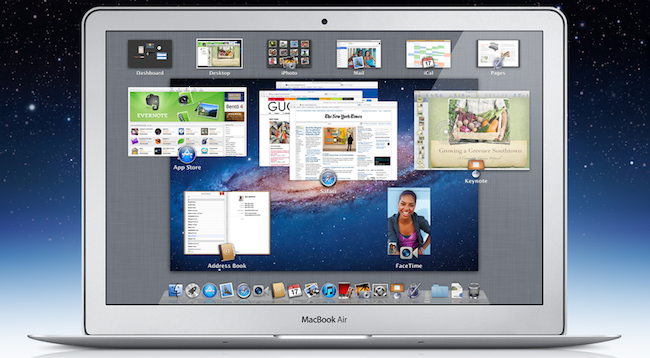
OS X Lion is a major upgrade to Apple’s desktop operating system which introduces over 250 new user features and brings several interface and navigation schemes from iOS devices like the iPad, to the Mac’s multi-touch trackpad and desktop environment. Among the notable changes in Lion, also highlighted on Apple’s website, are the Launchpad and Mission Control, two new ways to launch and organize application and windows, respectively. Lion adds a new file sharing system called “AirDrop” baked into the Finder to share files and documents with nearby Macs, and the Finder itself has been finely tuned and improved to sport a more subtle window UI, new file and folder merging functionalities, and a new “All My Files” view that collects all the documents and media found on your computer in a single screen.

Lion also represents a big change for OS X developers: with new APIs and features like Sandboxing, Automatic Termination and Resume, app makers will be able to rewrite their software taking advantage of the new user experience enhancements brought by Apple to the desktop. For instance, apps can now automatically save their “state” upon quitting – meaning accidental shut downs and force-quits will no longer affect the document you were working on. Combined with Auto Save and Version, this opens to a lot more possibilities when it comes to dealing with documents stored on your computer.

Access Extra Content and Perks

Founded in 2015, Club MacStories has delivered exclusive content every week for nearly a decade.

What started with weekly and monthly email newsletters has blossomed into a family of memberships designed for every MacStories fan.

Learn more here and from our Club FAQs.

Club MacStories: Weekly and monthly newsletters via email and the web that are brimming with apps, tips, automation workflows, longform writing, early access to the MacStories Unwind podcast, periodic giveaways, and more;

Club MacStories+: Everything that Club MacStories offers, plus an active Discord community, advanced search and custom RSS features for exploring the Club’s entire back catalog, bonus columns, and dozens of app discounts;

Club Premier: All of the above and AppStories+, an extended version of our flagship podcast that’s delivered early, ad-free, and in high-bitrate audio.

Learn more here and from our Club FAQs.


Apple Q3 2011 Results: $28.57 Billion Revenue, 20.34 Million iPhones, 9.25 Million iPads, 3.95 Million Macs Sold

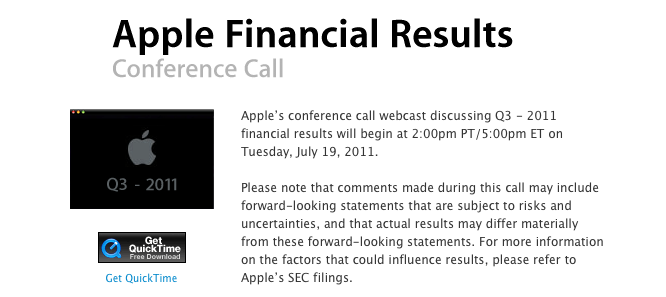
Apple has just posted their Q3 2011 financial results. The company posted record-breaking revenue of $28.57 billion, with 9.25 million iPads, 20.34 million iPhones and 3.95 million Macs sold. Apple reported record quarterly net profit of $7.31 billion, or $7.79 per diluted share. Wall Street consensus’ estimate was earnings of $5.80 per share and revenue of $24.92 billion. The company posted record quarterly revenue of $28.57 billion and record quarterly net profit of $7.31 billion, or $7.79 per diluted share.

In Q2 2011, the company said they expected revenue of about $23 billion and diluted earnings per share of about $5.03 in the third fiscal quarter of 2011.

From the results, iPhone is growing 142% year over year, and with 9.25 million units sold the iPad saw a 183% increase over the year-ago quarter. Apple sold sold 7.54 million iPods with a 20% unit decline. The third quarter has been the best non-holiday Mac quarter ever, best iPhone quarter ever, best iPad quarter ever. There are now 28.7 million iPads out there, including 14 million units shipped this calendar year.

In Q2 2011, the company posted revenue of $24.67 billion with 4.69 million iPads, 18.65 million iPhones and 4.69 million Macs sold. In the year-ago quarter, Apple posted revenue of $15.7 billion and net quarterly profit of $3.25 billion. The company sold 3.47 million Macs, 8.4 million iPhones and 3.27 million iPads, which began selling during the quarter.

Apple will provide a live audio feed of its Q3 2011 conference call at 2:00 PM Pacific, and we’ll update this story with the conference highlights. Full press release is embedded after the break. Read more

Access Extra Content and Perks

Founded in 2015, Club MacStories has delivered exclusive content every week for nearly a decade.

What started with weekly and monthly email newsletters has blossomed into a family of memberships designed for every MacStories fan.

Learn more here and from our Club FAQs.

Club MacStories: Weekly and monthly newsletters via email and the web that are brimming with apps, tips, automation workflows, longform writing, early access to the MacStories Unwind podcast, periodic giveaways, and more;

Club MacStories+: Everything that Club MacStories offers, plus an active Discord community, advanced search and custom RSS features for exploring the Club’s entire back catalog, bonus columns, and dozens of app discounts;

Club Premier: All of the above and AppStories+, an extended version of our flagship podcast that’s delivered early, ad-free, and in high-bitrate audio.

Learn more here and from our Club FAQs.


Official Google+ App for iPhone Now Available

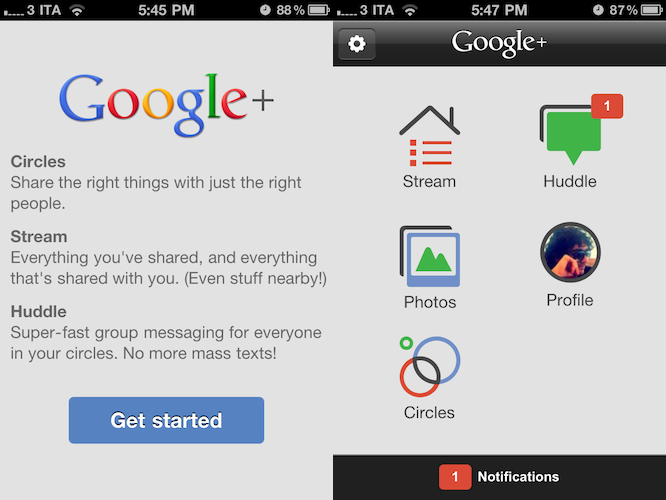
Google has just released the official Google+ app for iPhone on the App Store. The app is free and available here, and at the moment of writing this Google hasn’t updated its Mobile webpage to showcase the new app yet.

The Google+ iOS app provides a native interface to access much of the functionalities of the website, such as the Huddle group messaging feature – which was exclusive to Android devices prior to the app’s approval. The dashboard of the Google+ app presents a grid of icons to access the Stream, Huddle, Photos, your Profile and Circles, as well as a Notifications tab at the bottom that will open a vertical list of all your incoming notifications. Whilst much of the navigation seems to rely on web views optimized for the iPhone and fetched by the device, the animations when switching between sections are quite snappy and fast on iOS 4. Just like on the desktop, the Stream provides recent updates from the people you follow and your Circles, allowing you to check for new posts with the popular “pull to refresh gesture” and comment or +1 others’s posts. You can’t +1 from the home page – you have to open a single post and hit the + button in the upper right corner, while a text field at the bottom will let you leave a comment. You can also “mute” or “report” a post. The app is capable of sending push notifications for new comments, shares, and so forth. Read more

Access Extra Content and Perks

Founded in 2015, Club MacStories has delivered exclusive content every week for nearly a decade.

What started with weekly and monthly email newsletters has blossomed into a family of memberships designed for every MacStories fan.

Learn more here and from our Club FAQs.

Club MacStories: Weekly and monthly newsletters via email and the web that are brimming with apps, tips, automation workflows, longform writing, early access to the MacStories Unwind podcast, periodic giveaways, and more;

Club MacStories+: Everything that Club MacStories offers, plus an active Discord community, advanced search and custom RSS features for exploring the Club’s entire back catalog, bonus columns, and dozens of app discounts;

Club Premier: All of the above and AppStories+, an extended version of our flagship podcast that’s delivered early, ad-free, and in high-bitrate audio.

Learn more here and from our Club FAQs.


Fantastical Adds Lion Support, And We’re Giving Away 10 Codes

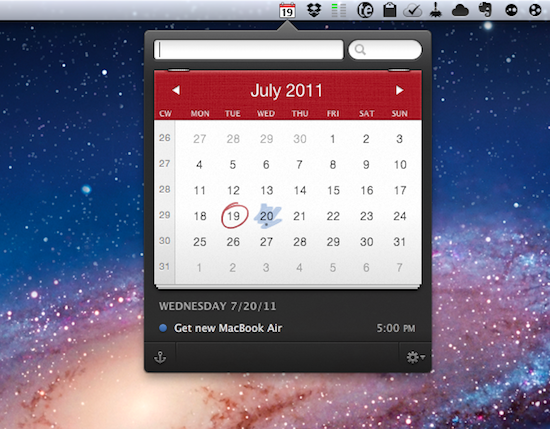
Fantastical is a calendar assistant that works with Apple’s iCal and the popular third-party BusyCal software, allowing you to quickly creates event in your default system calendar with plain English. Thanks to a built-in natural language parser, Fantastical lets you write down something like “Get a new MacBook Air tomorrow at Apple Store at 5 PM”, and see the sentence becoming a new event with all the necessary fields already filled in your calendar. And because Fantastical directly plugs into calendar accounts configured on your Mac, you won’t need to enter your information again.

Fantastical 1.0.3, released today, adds full Lion compatibility and a new Lion-only feature that allows you to swipe with two fingers to move between months in the calendar. The animation is really nice, and reminds me of Safari’s new feature for navigating webpages with a two-finger swipe on Lion. Among various bug fixes, Fantastical also adds a new color menubar icon preference, a last-selected calendar option, and several parsing engine fixes.

You can read our initial review of Fantastical here, and buy the app from the Mac App Store. However, the Flexibits developers have been kind enough to offer 10 promo codes to celebrate the next major release of OS X with MacStories readers, so if you’re interested in the giveaway jump after the break for the full details of how to enter. Read more

Access Extra Content and Perks

Founded in 2015, Club MacStories has delivered exclusive content every week for nearly a decade.

What started with weekly and monthly email newsletters has blossomed into a family of memberships designed for every MacStories fan.

Learn more here and from our Club FAQs.

Club MacStories: Weekly and monthly newsletters via email and the web that are brimming with apps, tips, automation workflows, longform writing, early access to the MacStories Unwind podcast, periodic giveaways, and more;

Club MacStories+: Everything that Club MacStories offers, plus an active Discord community, advanced search and custom RSS features for exploring the Club’s entire back catalog, bonus columns, and dozens of app discounts;

Club Premier: All of the above and AppStories+, an extended version of our flagship podcast that’s delivered early, ad-free, and in high-bitrate audio.

Learn more here and from our Club FAQs.


Saver For iPhone Giveaway: Mundane Expense Tracking Made Beautiful

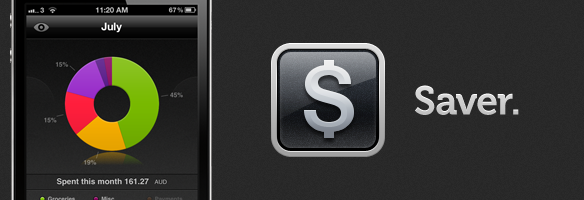
Two weeks ago we reviewed Saver for iPhone, which was a new expense-tracking app for the iPhone that had just launched in the App Store. In the review, I made particular note of the design of Saver – which I feel has one the nicest user interfaces of any iPhone app I’ve used. For a task that is important (for many) but often dull and boring, Saver not only makes things a little more exciting and vibrant but it also makes it extremely easy (whilst still being fairly powerful) to accomplish various tasks such as adding an expense entry or viewing what kinds of things you spend most on.

You can read our full review of Saver here and purchase Saver on the App Store here. However, the developer of Saver has been kind enough to offer MacStories readers 3 copies of the app so we are running a giveaway. If you are interested, jump the break for the full details of how to enter.

Read more

Access Extra Content and Perks

Founded in 2015, Club MacStories has delivered exclusive content every week for nearly a decade.

What started with weekly and monthly email newsletters has blossomed into a family of memberships designed for every MacStories fan.

Learn more here and from our Club FAQs.

Club MacStories: Weekly and monthly newsletters via email and the web that are brimming with apps, tips, automation workflows, longform writing, early access to the MacStories Unwind podcast, periodic giveaways, and more;

Club MacStories+: Everything that Club MacStories offers, plus an active Discord community, advanced search and custom RSS features for exploring the Club’s entire back catalog, bonus columns, and dozens of app discounts;

Club Premier: All of the above and AppStories+, an extended version of our flagship podcast that’s delivered early, ad-free, and in high-bitrate audio.

Learn more here and from our Club FAQs.


Sparrow 1.3 Brings Lion Support, Interface Changes

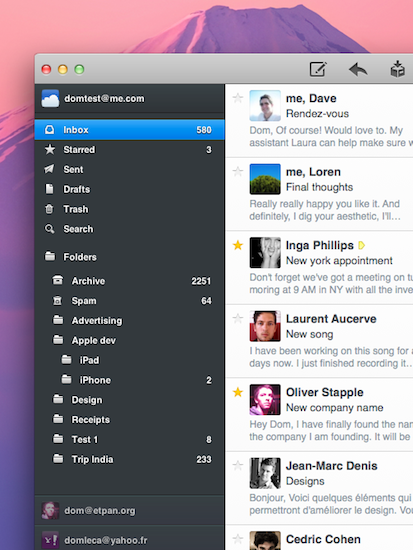
Sparrow started out as a minimal, Tweetie-like email experiment for Mac back in October of last year and, following the success of the public beta, eventually evolved into a powerful desktop solution to access Gmail and IMAP email accounts using new interface concepts inspired by iOS apps, Mac gems like Twitter and Reeder, or other changes previewed by Apple in Lion. As we reported in our previous coverage, the latest big update to the app, Sparrow 1.2, went as far as adding social support with Facebook integration,  Gravatar support, and more.

Sparrow 1.3 was approved yesterday, but the developers had to quickly pull it from sale as a critical bug that caused the app to crash was discovered. After apologizing for the technical error and uploading a patched version for non-Mac App Store users, the team announced a fix had been already submitted with the request of an expedited review from Apple. Personally, I updated to Sparrow 1.3 yesterday and didn’t experience any issues, but I decided to hold my coverage until the promised fix would be available on the App Store – more importantly, the entire app had to come back on Apple’s servers as the developers pulled it to make sure no one would install a “buggy” version. Read more

Access Extra Content and Perks

Founded in 2015, Club MacStories has delivered exclusive content every week for nearly a decade.

What started with weekly and monthly email newsletters has blossomed into a family of memberships designed for every MacStories fan.

Learn more here and from our Club FAQs.

Club MacStories: Weekly and monthly newsletters via email and the web that are brimming with apps, tips, automation workflows, longform writing, early access to the MacStories Unwind podcast, periodic giveaways, and more;

Club MacStories+: Everything that Club MacStories offers, plus an active Discord community, advanced search and custom RSS features for exploring the Club’s entire back catalog, bonus columns, and dozens of app discounts;

Club Premier: All of the above and AppStories+, an extended version of our flagship podcast that’s delivered early, ad-free, and in high-bitrate audio.

Learn more here and from our Club FAQs.


What Does An Image Leak Suggest About Next Week?


Over the past few weeks, a number of “leaks” from Apple’s supply chain and retail operations suggested the company was on track to launch the next major version of OS X, Lion, alongside new Macs this week, more specifically yesterday, July 14. According to the rumors, Apple was gearing up to unveil new MacBook Airs, Mac minis and white MacBooks all featuring updated Sandy Bridge processors from Intel and Thunderbolt connectivity. Whilst rumors about Lion immediately sounded fairly accurate as Apple seeded the “Golden Master” version of the OS to developers on July 1 (unless major issues are discovered, the GM version usually matches the public release’s build number and codebase) and the company said at the WWDC Lion would be available in July, speculation about new Macs generated from a series of factors that had been capturing the interest of the tech press since February. Read more

Access Extra Content and Perks

Founded in 2015, Club MacStories has delivered exclusive content every week for nearly a decade.

What started with weekly and monthly email newsletters has blossomed into a family of memberships designed for every MacStories fan.

Learn more here and from our Club FAQs.

Club MacStories: Weekly and monthly newsletters via email and the web that are brimming with apps, tips, automation workflows, longform writing, early access to the MacStories Unwind podcast, periodic giveaways, and more;

Club MacStories+: Everything that Club MacStories offers, plus an active Discord community, advanced search and custom RSS features for exploring the Club’s entire back catalog, bonus columns, and dozens of app discounts;

Club Premier: All of the above and AppStories+, an extended version of our flagship podcast that’s delivered early, ad-free, and in high-bitrate audio.

Learn more here and from our Club FAQs.