Posts in Featured

iOS 5 & iCloud Tips: Sharing an Apple ID With Your Family

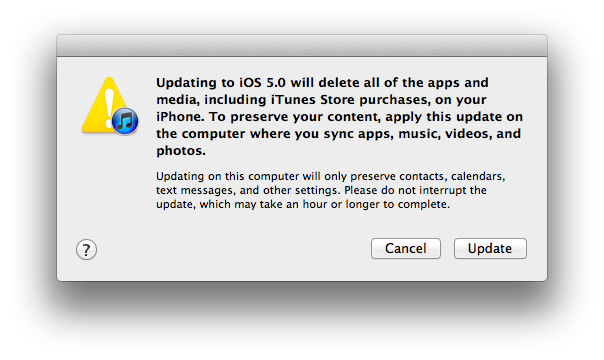
With the launch of iOS 5 and iCloud on Wednesday, Apple took another huge step towards the Post-PC era. They have increasingly made the PC less important and iCloud has meant that it is no longer the ‘hub’ to which your devices sync to - iCloud is now that hub and importantly, it is all tied to an Apple ID. As many are realizing as they update to iOS 5 and begin to use iCloud, this can be somewhat problematic when iCloud is used with the Apple ID that is shared by their whole family.

Prior to iOS 5, sharing an Apple ID wasn’t really a problem because its main purpose was for purchasing content on iTunes, using it for support purposes and purchasing items on the online Apple Store - all tasks that worked fine when sharing an ID. Now that Apple ID is tied to a bunch of services, a lot of which involve personal and private data that you don’t necessarily want to share with others - even family members. The other issue is that iCloud involves a lot of data synchronization and this doesn’t work well with multiple people as it results in data conflicts and devices syncing data (such as calendar events) that are meant for another person in the family.

Fortunately there are a number of ways to resolve these issues, whilst still benefiting from all of the new iOS 5 and iCloud features. Jump the break to see all of our tips in dealing with this issue.

Read more

Access Extra Content and Perks

Founded in 2015, Club MacStories has delivered exclusive content every week for nearly a decade.

What started with weekly and monthly email newsletters has blossomed into a family of memberships designed for every MacStories fan.

Learn more here and from our Club FAQs.

Club MacStories: Weekly and monthly newsletters via email and the web that are brimming with apps, tips, automation workflows, longform writing, early access to the MacStories Unwind podcast, periodic giveaways, and more;

Club MacStories+: Everything that Club MacStories offers, plus an active Discord community, advanced search and custom RSS features for exploring the Club’s entire back catalog, bonus columns, and dozens of app discounts;

Club Premier: All of the above and AppStories+, an extended version of our flagship podcast that’s delivered early, ad-free, and in high-bitrate audio.

Learn more here and from our Club FAQs.


There Are Some Siri Limitations Outside The US

As the iPhone 4S launches today in seven countries (US, Canada, Japan, Australia, UK, France, Germany – our launch coverage here), many customers are finding out for the first time that Siri, the voice assistant Apple announced and demoed at the Let’s Talk iPhone media event last week, has some limitations outside the United States.

Several websites reported that Yelp integration for local businesses wouldn’t be available outside the US initially. Siri is still in beta, available in a few languages, and Apple has already announced that more languages and services will be available soon. On Apple’s website, the Siri page reports in a footnote: “Siri is available in Beta only on iPhone 4S and requires Internet access. Siri may not be available in all languages or in all areas, and features may vary by area. Cellular data charges may apply.” Some of the early reviews of the iPhone 4S briefly touched on the subject of limitations outside the United States and mentioned Siri could have some issues with some very specific accents (albeit the software does recognize the difference between U.S. English, UK and Australia); as customers get their hands on the iPhone 4S today, features that have been omitted from the first version of Siri outside the US  are starting to surface online.

Electricpig was first to report maps and directions wouldn’t be available to Siri except for US customers; today, a number of users have confirmed that both businesses (with Yelp integration) as well as maps/traffic data aren’t available outside the United States. When asked for Maps information in the UK, Siri says “I can only look for businesses, maps, and traffic in the United States, and when you’re using U.S English. Sorry about that.” (thanks, Sam).

Rene Ritchie of TiPb has also got his iPhone 4S, and confirmed Siri can’t “provide maps and directions in Canada” and “look for places in Canada”. From the screenshots, it appears Siri fetches the current location, but can’t provide additional information through Maps or Yelp integration yet. Furthermore, we’ve received a number of reports from French and German users unable to look up data on Wolfram Alpha through Siri, suggesting that Wolfram integration is only available to English-speaking countries for now. Read more

Access Extra Content and Perks

Founded in 2015, Club MacStories has delivered exclusive content every week for nearly a decade.

What started with weekly and monthly email newsletters has blossomed into a family of memberships designed for every MacStories fan.

Learn more here and from our Club FAQs.

Club MacStories: Weekly and monthly newsletters via email and the web that are brimming with apps, tips, automation workflows, longform writing, early access to the MacStories Unwind podcast, periodic giveaways, and more;

Club MacStories+: Everything that Club MacStories offers, plus an active Discord community, advanced search and custom RSS features for exploring the Club’s entire back catalog, bonus columns, and dozens of app discounts;

Club Premier: All of the above and AppStories+, an extended version of our flagship podcast that’s delivered early, ad-free, and in high-bitrate audio.

Learn more here and from our Club FAQs.


iCloud: The Future of Apple’s Ecosystem

With the launch of iCloud, Apple is fundamentally challenging the old concepts of computing and “file”, changing the way people interact with computers and devices.

iCloud as a service presents itself as a very straightforward idea: iCloud stores your content and wirelessly pushes it to all your devices. iCloud works with the apps you use every day on your Mac, iPhone or iPad, so you don’t have to worry about syncing your music, photos, documents, contacts and calendars again. iCloud is the evolution of MobileMe, rebuilt from the ground up and re-engineered to take advantage of persistent connections and the concept of “push”, rather than visible, sometimes manual sync. iCloud is not just a big hard disk in the sky, as Steve Jobs joked at WWDC ‘11: iCloud is an invisible service that’s just there, and is now allowing Apple to virtually connect more than 200 million iOS devices.

It just works. Read more

Access Extra Content and Perks

Founded in 2015, Club MacStories has delivered exclusive content every week for nearly a decade.

What started with weekly and monthly email newsletters has blossomed into a family of memberships designed for every MacStories fan.

Learn more here and from our Club FAQs.

Club MacStories: Weekly and monthly newsletters via email and the web that are brimming with apps, tips, automation workflows, longform writing, early access to the MacStories Unwind podcast, periodic giveaways, and more;

Club MacStories+: Everything that Club MacStories offers, plus an active Discord community, advanced search and custom RSS features for exploring the Club’s entire back catalog, bonus columns, and dozens of app discounts;

Club Premier: All of the above and AppStories+, an extended version of our flagship podcast that’s delivered early, ad-free, and in high-bitrate audio.

Learn more here and from our Club FAQs.


iOS 5: iMessage

With today’s release of iOS 5, Apple has added a significant new feature to their Messages app with the introduction of iMessage. Seamlessly integrating into the existing Messages application, iMessage is a new service from Apple that acts as a replacement for the traditional text message service that comes with mobile phones.

In actual fact, a more accurate description of the Messages app with iMessage on iOS 5 would be that it improves on the traditional text messaging service whilst maintaining compatibility with it. The new iMessage service works by associating a person with an Apple ID - rather than a particular device or SIM card as the traditional text message service does. This is one of iMessage’s advantages, you are not restricted to a single device and you can now use your iPad or iPod touch (and hopefully Mac soon) for receiving and sending messages to other people.

Jump the break to read the rest of our iMessage overview.
Read more

Access Extra Content and Perks

Founded in 2015, Club MacStories has delivered exclusive content every week for nearly a decade.

What started with weekly and monthly email newsletters has blossomed into a family of memberships designed for every MacStories fan.

Learn more here and from our Club FAQs.

Club MacStories: Weekly and monthly newsletters via email and the web that are brimming with apps, tips, automation workflows, longform writing, early access to the MacStories Unwind podcast, periodic giveaways, and more;

Club MacStories+: Everything that Club MacStories offers, plus an active Discord community, advanced search and custom RSS features for exploring the Club’s entire back catalog, bonus columns, and dozens of app discounts;

Club Premier: All of the above and AppStories+, an extended version of our flagship podcast that’s delivered early, ad-free, and in high-bitrate audio.

Learn more here and from our Club FAQs.


iOS 5: Twitter Integration

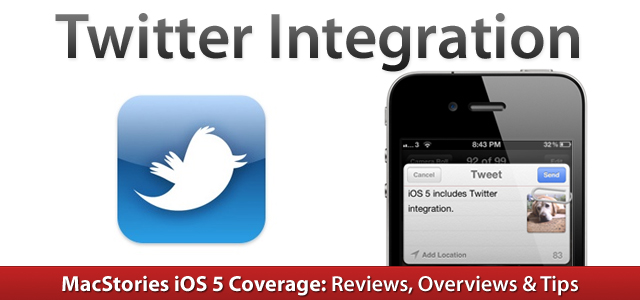
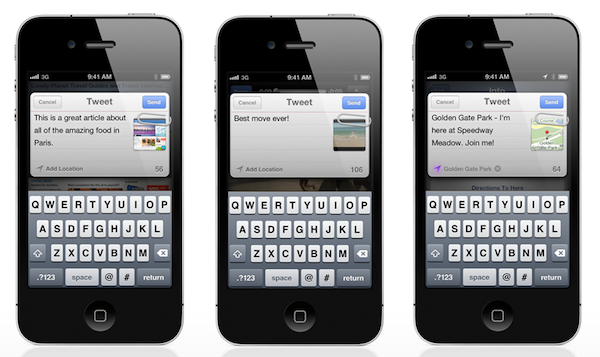
With iOS 5, Apple is officially acknowledging the existence of external social networks besides Ping and Apple ID (one of the authentication options for iOS 5’s iMessage) and the result is direct Twitter support, unveiled after much speculation at the WWDC in June, and now available inside Apple’s Settings app. Twitter integration in iOS 5, however, goes beyond a couple of preferences and options to tweak – it’s a systemwide framework that will allow developers to build “official” Twitter support in their apps, as well as let users forget about having to log in with Twitter every time they want to try a new Twitter app.

Twitter is expecting a massive growth in the upcoming months thanks to integration with Apple’s devices, and rightfully so: with the new Twitter preference panel available in iOS 5’s Settings, users are able to sign in once with their Twitter account, and use that “single sign-on” to authorize other apps downloaded from the App Store to access their Twitter credentials. With this method, not only is Apple giving users support for Twitter at a system level, they’re also leveraging iOS technologies to make the experience of downloading and configuring Twitter apps (admittedly, quite many) as frictionless as possible. Read more

Access Extra Content and Perks

Founded in 2015, Club MacStories has delivered exclusive content every week for nearly a decade.

What started with weekly and monthly email newsletters has blossomed into a family of memberships designed for every MacStories fan.

Learn more here and from our Club FAQs.

Club MacStories: Weekly and monthly newsletters via email and the web that are brimming with apps, tips, automation workflows, longform writing, early access to the MacStories Unwind podcast, periodic giveaways, and more;

Club MacStories+: Everything that Club MacStories offers, plus an active Discord community, advanced search and custom RSS features for exploring the Club’s entire back catalog, bonus columns, and dozens of app discounts;

Club Premier: All of the above and AppStories+, an extended version of our flagship podcast that’s delivered early, ad-free, and in high-bitrate audio.

Learn more here and from our Club FAQs.


iOS 5: Notification Center


Notification Center is one of the key features of iOS 5, one that will profoundly change the way iPhone and iPad users approach the incoming stream of data and notifications on mobile devices. There is no doubt Notification Center is among the most anticipated new functionalities to land on iOS, but before we delve deeper into its advantages over the old notification system of iOS 4.x and its (very few) shortcomings, here’s a bit of background history that should better put Notification Center into context.

Looking at Notification Center now – and playing with it for at least a day – it’s clear the system is indisputably better than what we used to have on our devices in the pre-iOS 5 era. Criticized both by the tech press and average users alike, the old notifications had, really, one main problem: they became annoying with time. And by “became” I mean that they began to show their utter nature of a system built for non-connected applications as soon as the App Store turned into a platform for the always-on individual who’s constantly connected, even when he plays Angry Birds or is eating a new meal at a restaurant a friend suggested.

The old notifications were built for a different set of apps. Read more

Access Extra Content and Perks

Founded in 2015, Club MacStories has delivered exclusive content every week for nearly a decade.

What started with weekly and monthly email newsletters has blossomed into a family of memberships designed for every MacStories fan.

Learn more here and from our Club FAQs.

Club MacStories: Weekly and monthly newsletters via email and the web that are brimming with apps, tips, automation workflows, longform writing, early access to the MacStories Unwind podcast, periodic giveaways, and more;

Club MacStories+: Everything that Club MacStories offers, plus an active Discord community, advanced search and custom RSS features for exploring the Club’s entire back catalog, bonus columns, and dozens of app discounts;

Club Premier: All of the above and AppStories+, an extended version of our flagship podcast that’s delivered early, ad-free, and in high-bitrate audio.

Learn more here and from our Club FAQs.


Thoughts On iOS 5

iOS 5, the latest version of Apple’s mobile operating system for the iPhone, iPad and iPod touch released today, comes with more than 1,500 new developer APIs and over 200 new user features. In our iOS 5 coverage, we have chosen to focus on the key functionalities of the OS, while leaving room for the most visible subtle improvements that have made it through Apple’s new release as well.

On a simple checklist, iOS 5 is the widest, most extensive software update ever released by Apple for mobile devices since the original iPhone OS in 2007. Not even iPhone OS 3.2, then iOS, which shipped with the iPad in 2010 could claim to have the same amount of new technology, user interface, APIs, cloud features and overall reassessment of the platform that iOS 5 presents today. But in the past four years, we’ve come to learn a new Apple product – be it a device or a major software update – isn’t strictly about the number of new functionalities a user can spot, or the APIs a developer can implement in his code. Those things certainly contribute to the concept of “major release” by adding their sheer number of updates – they just don’t form the full picture.

In iOS 5, the 200 new features Apple’s Senior VP of iOS Software Scott Forstall announced at WWDC in June are the consequence of an operating system completely re-imagined around speed, efficiency and interconnectedness. These three principles, intrinsic foundation of Apple’s vision for iOS going forward, define iOS’ independency as a platform, and ecosystem.

A key term in Apple’s iOS 5 parlance is “quick”. In iOS 5, you can quickly tweet thanks to systemwide Twitter integration; create a new to-do from the Reminders app; activate the Camera from the Lock Screen; even access all your missed notifications with a single swipe on any screen. Speed is key to iOS 5: as Apple devices gain faster processors and more RAM, an OS that’s equally responsive and lets you perform common tasks in seconds is functional to the user experience. A device can get an infinite amount of hardware upgrades, but an OS that’s not meant for speed will never feel fast when it comes down to regular usage. Luckily, that’s not the case with iOS 5.

Alongside speed, Apple focused on making iOS a modern operating system that doesn’t require a PC to accomplish certain goals or perform functionalities usually associated to desktop computers. At WWDC, Forstall said they looked in every corner of the OS, and asked themselves how they could make iOS better by adding new powerful functionality, while keeping it fast and intuitive.

“There is a feature for everyone out there”.

So, for instance, iOS 5 gained the capability of managing calendars directly on the device: users can now add, rename, and delete calendars, as well as view event attachments and share calendars with friends and family through iCloud. Previously, a Mac or PC was required to do this. Looking at the various apps that come bundled with iOS, it’s clear Apple’s intention was to add functionalities in a way that wouldn’t compromise the overall experience’s ease of use. Safari received a substantial update, adding tabs on the iPad for better web browsing and Reading List to save webpages for later; Mail can now compose rich text styles and indent/outdent lines in a message; with iCloud documents & data for developers, Apple has paved the path towards a massive increase of apps that will be able to effortlessly push documents across iOS devices. A first example of this can be observed in Apple’s mobile iWork suite, which comes with iCloud support out of the box. There’s more: iOS devices can now sync wirelessly to iTunes, and they support over-the-air (OTA) software updates, meaning you’ll be able to download and install iOS 5.1 when it comes out directly from your iPhone or iPad. Users who sign up for iCloud can buy new storage (for a price) on device, choose which app libraries to back up to the cloud, and set up a new device without needing to activate it through iTunes on a Mac or PC. iOS 5 now lets you delete songs manually from the Music app, change a device’s name without iTunes, and even edit photos. On top of these new options, iOS 5 devices automatically back up and share the most recent photos with each other through iCloud’s Photo Stream, and it’s now possible to create and manage photo albums without having to switch to iPhoto on a Mac.

What’s worth noting about iOS 5 – basic concepts and 200 new features aside – is that while a general trend on desktop operating systems seems to be a heavy focus on removing functionalities, iOS keeps adding new ones. In fact, if you take Lion into consideration, iOS 5 is where Apple keeps adding features to the checklist, whereas Mac users have been found lamenting the removal of several of their favorite features on the latest OS X upgrade.

And, really, the reason is extremely simple: iOS is a different paradigm, one that gave Apple a fresh start four years ago and that is still allowing the company to experiment. The checklist doesn’t matter when an OS that keeps gaining features still doesn’t feel like it should be simplified.

If anything, iPhone and iPad users will start asking for more tomorrow.

What’s even more obvious to me is that iOS is starting to feel like a “connected OS” in its fifth version. Apple is “cutting the cord” under the large “PC Free” marketing umbrella that defines iOS’ independency from desktop computers, and for the first time iPhones and iPads are acting as devices fully aware of each other’s apps and data. The emblem of this renewed interconnectedness is iCloud: Apple’s new cloud service enables apps to push documents back and forth between devices, and it allows iPhones and iPads to manage their own cloud storage and the data that gets backed up to the cloud. Photo Stream connects a device’s recent photos with others’ camera rolls, and iTunes in the Cloud makes sure new and past purchases are immediately pushed on all your devices and always available for re-download, respectively.

For the first time in years, using and installing new apps doesn’t feel like adding new data silos to a confined environment. There’s still a long road to iOS apps’ full capability of “talking” to each other, but with iCloud now up and running, the task doesn’t seem as complex as it did yesterday.

iOS will never be “complete”.

In his WWDC keynote in June, Steve Jobs said: “You know, if the hardware is the brain and the sinew of our products, the software in them is their soul”. In Apple’s vision, a modern software – the “soul” of a device – is able to evolve and fit to the circumstances and change its behavior accordingly to new user requests, the app market, and third-party developers. The flexibility of iOS – and the reason Apple doesn’t care about legacy software as much as other companies do – can be easily spotted looking back at the original iPhone, or the first version of the App Store from 2008. iPhone OS was never “done”. The App Store itself was never 100% complete – the Store is just a showcase for an ever-changing landscape of mobile applications built on top of new technologies offered to developers. Yet sometimes those developers come up with new solutions to existing problems and better ways to improve the functionalities Apple gave them out of the box.

iOS, the App Store, the mobile ecosystem, the cloud, third-party developers – they’re all connected and, at the same time, independent from each other in a way that ensures evolution is consistent, but resilient.

That’s why iOS 5 is both a milestone and a starting point: it sets a new standard for developers who are now given access to thousands of new APIs, but it still lacks some functionalities that many will begin requesting tomorrow and, probably, Apple will deliver at its next WWDC keynote. You will hear about things such as better podcast and document management, streaming of music and movies through iCloud, iChat for iOS and Notification Center widgets throughout the next year. It’s just the way the iOS ecosystem works: as new technology comes around and it’s adopted by the users and developers, it’s time to start wondering about what’s next. About the direction the ecosystem needs to take to be stable, flourish, allure third-party app makers and, more importantly, evolve.

Today, there’s iOS 5. It’s fast, efficient and connected in a way that iOS 4 never was, and perhaps didn’t need to be – because it was too soon. As Apple begins to roll out its iCloud services and developers start writing new software that takes advantage of modern APIs and technologies, the next few months will prepare the road that will lead us to the introduction of iOS 6 next year. At the same time, users will get accustomed to the new functionalities of iOS 5, and a new breed of quick, productive and connected applications will rise on the App Store, eventually finding its way back to the Mac as it’s always done in the past years.

iOS 5: it just works - and now it does more.

Access Extra Content and Perks

Founded in 2015, Club MacStories has delivered exclusive content every week for nearly a decade.

What started with weekly and monthly email newsletters has blossomed into a family of memberships designed for every MacStories fan.

Learn more here and from our Club FAQs.

Club MacStories: Weekly and monthly newsletters via email and the web that are brimming with apps, tips, automation workflows, longform writing, early access to the MacStories Unwind podcast, periodic giveaways, and more;

Club MacStories+: Everything that Club MacStories offers, plus an active Discord community, advanced search and custom RSS features for exploring the Club’s entire back catalog, bonus columns, and dozens of app discounts;

Club Premier: All of the above and AppStories+, an extended version of our flagship podcast that’s delivered early, ad-free, and in high-bitrate audio.

Learn more here and from our Club FAQs.


Apple Releases iOS 5 [Direct Links]

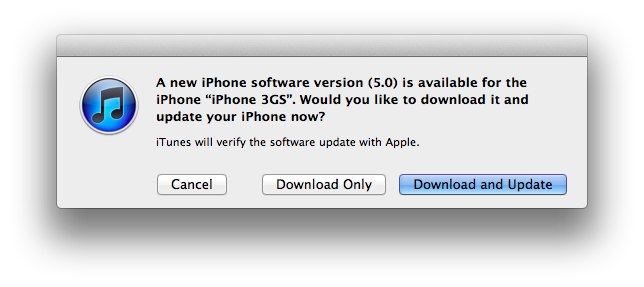
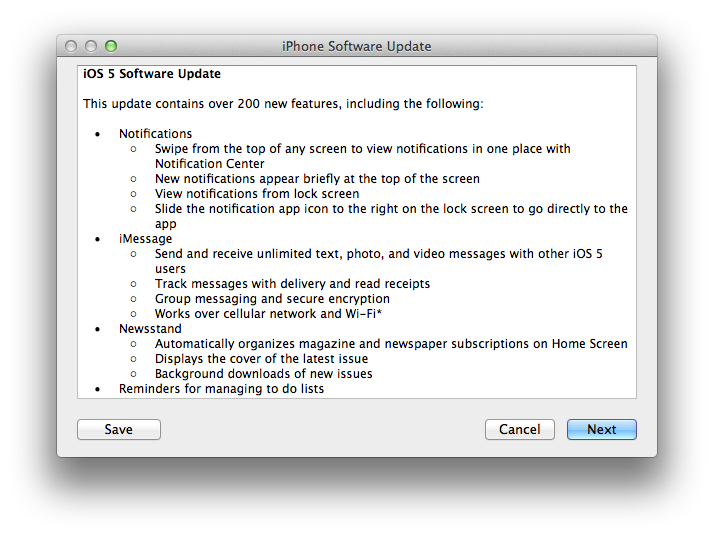
Apple today released iOS 5, a major update for the iPhone, iPad and iPod touch that adds over 200 new user features including Notification Center, iMessage, iCloud support and PC Free. iOS 5 is now available for download in iTunes; to install the new software on your iOS device, connect it to iTunes via USB and “Check for Updates” in the device’s info screen.

Originally previewed and seeded to developers at WWDC in June, iOS 5 is a major update that enables developers to implement thousands of new APIs to take advantage of Apple’s latest technologies in their apps. Apple has already started approving third-party apps built for iOS 5, with several of them available in the App Store today. iOS 5 introduces new functionalities like Notification Center, a new systemwide interface for keeping track of missed notifications; iMessage, a free text messaging solution for iOS 5 users; Twitter integration built into Safari, Photos, YouTube and Maps; iCloud, a new cloud service that automatically stores your content and wirelessly pushes it to all your devices, including Macs and PCs. iCloud, expected to roll out today as well, will allow users to keep their contacts, calendars, bookmarks, mail, notes and more in sync across multiple devices; the service is integrated into iOS apps and comes with a web counterpart available at iCloud.com.

Other features of iOS 5 include Mail and Safari improvements, a new camera button in the Lock Screen, AirPlay Mirroring to an Apple TV and a systemwide split keyboard to make it easier to type on the iPad.

For a complete overview of the new features of iOS 5, iCloud and editorial pieces on today’s software updates, visit this page on MacStories.

iOS 5 direct download links:

Access Extra Content and Perks

Founded in 2015, Club MacStories has delivered exclusive content every week for nearly a decade.

What started with weekly and monthly email newsletters has blossomed into a family of memberships designed for every MacStories fan.

Learn more here and from our Club FAQs.

Club MacStories: Weekly and monthly newsletters via email and the web that are brimming with apps, tips, automation workflows, longform writing, early access to the MacStories Unwind podcast, periodic giveaways, and more;

Club MacStories+: Everything that Club MacStories offers, plus an active Discord community, advanced search and custom RSS features for exploring the Club’s entire back catalog, bonus columns, and dozens of app discounts;

Club Premier: All of the above and AppStories+, an extended version of our flagship podcast that’s delivered early, ad-free, and in high-bitrate audio.

Learn more here and from our Club FAQs.


Facebook Releases Official iPad App, New Mobile Website

After months of speculation, Facebook released today the first version of its official iPad application, available for free on the App Store. The version available today looks fairly similar to the leaked app posted by TechCrunch earlier this year: there is a navigation sidebar on the left side of the screen to search, open your Facebook profile, check out the News Feed, Messages, Events, Friends and more. An upper toolbar gives you access to friend requests, messages and notifications, whilst Chat has been integrated in a right hand vertical panel. Judging from a first test, it appears what we wrote back in July still holds true for the final Facebook iPad app:

Facebook for iPad uses a concept not too dissimilar from Twitter’s iPad app — rather than displaying all content vertically, the app heavily relies on horizontal navigation to access various Facebook sections, the news feed, chats, liked posts, and so forth. For instance, a sidebar on the left contains tabs below your main profile to open your News Feed, Messages, Events, Places, Friends, and Photos. In the same sidebar, there are links to jump to the groups you’re subscribed to — it almost appears as Facebook wants to put the focus on Groups as much as Google gave Circles, its friend-organization tool, a huge role in Google+. There are two top bars in the middle panel: one has buttons to upload photos from your iPad’s camera and library, the other two are associated with a regular status update and check-ins. In the blue toolbar, the app has a series of additional icons to open the friend requests panel, messages, and notifications — this looks very similar to Facebook on the desktop, and the design is very distant from Facebook’s implementation on the iPhone. There is also a search function in the app, though it’s been placed at the top of the sidebar, rather than the toolbar.

We’ll have a more detailed look at Facebook’s iPad client as we get to play with it in the next few hours. Another prominent feature of today’s Facebook’s releases is app discovery and integration with mobile browsers – basically what used to be called Project Spartan in the weeks leading up to the iPad app’s release. The Facebook app now allows users to tap on links shared on the News Feed by specific apps, like Words with Friends, and if the app is already installed on the device and recognized by Facebook, it’ll launch it. If the app isn’t installed but available on the App Store, Facebook will forward the link to the App Store; if no App Store version is available, Facebook will try to load a new HTML5 version as part of a partnership with several developers to bring Facebook apps to mobile browsers. Previously, many Facebook apps had to be written in Flash to run on Facebook’s website, and this limitation made them incompatible with Apple’s devices and Safari browser, which don’t support Flash. AllThingsD shares more information on this new web initiative from Facebook:

The combined native and Web app experience is only available on iOS for now. On Android and other phones with Web browsers, users will default to the Web experience. Facebook CTO Bret Taylor told AllThingsD today that Facebook is also working on an update to its native Android application.

On the downside, there’s one place Facebook wasn’t able to negotiate a consistent experience for users: payments. This was a major sticking point in ongoing discussions with Apple, as I’d written last week. Facebook Credits can’t be used to pay for virtual goods within in native iOS apps or mobile Web apps running within a Facebook app on iOS. Instead, users will have to buy separate in-app currency through Apple’s own in-app payment system.

Facebook notes that there are some missing features from its iPad client such as the ticker, a recently launched interface to access your friends’ recent activity from a sidebar on Facebook’s website. Facebook says the ticker couldn’t be implemented on the iPad due to time constraints and limited real screen estate. For this first release, Facebook is putting the focus on photos, available in high-res thanks to the iPad’s screen, games and simplified navigation, which allows you to switch between posts, friends updates and messages with a few taps through the iPad’s interface.

The new Facebook mobile interface is also live through Safari on iOS; the mobile website has received several updates detailed in this blog post, and it borrows heavily from UI elements of the iPad app released today, with a toolbar for friend requests, messages and notifications, and “bookmarks” on the left to search, open your profile, pages, News Feed, and so forth.

With the new Requests dialog for mobile, users can invite their friends to your app. Friends can receive requests anywhere that your app is supported. For example, if a user plays a move in a game on Facebook.com, their friend can respond from her iPhone. As with bookmarks, users will tap the notification and land directly on the mobile version of your app, whether it is a native iOS app or a mobile web app.

Navigation on the new mobile website has been dramatically improved with this update – switching between sections doesn’t reload the entire webpage and it makes for a faster, more pleasant mobile browsing experience. An obvious advantage of the native Facebook apps remains camera access and chat, which the mobile web version still can’t provide through Safari and other mobile browsers.

You can find Facebook for iPad here, and check out Facebook’s new mobile web view at m.facebook.com.

Update: I’ve been playing with the Facebook iPad app, and I’m fairly impressed with how the final version turned out to be – clearly, the app that leaked this summer was a development build that wasn’t ready for primetime. The News Feed design is clean and simple, but unfortunately it’s also the only section that lagged a bit in performances on my iPad 2 with iOS 5: the News Feed’s scrolling isn’t terribly smooth, certainly not as fluid as scrolling through a user’s profile, the Messages window or a Facebook page. I assume Facebook will make changes in the next few weeks to make the News Feed as smooth as possible. Another thing I didn’t particularly like is the Settings window, which isn’t iPad optimized and looks strange on the big screen.

But everything else is quite impressive in this first iPad app. You can have chat conversations with multiple contacts as you’d normally do, and keep the conversations going either by using the Chat sidebar or the unified Messages view. When a contact pings you in Chat, Facebook brings him/her at the top of the list so you can easily respond; unlike Facebook.com, chats aren’t displayed as open “tabs” along the bottom – they’re listed at the top of the Chat sidebar and you can go back and forth between them by tapping on them.

It appears Facebook has given much importance to gestures in this iPad release: you can swipe to open the left sidebar (the one that displays Search, Favorites, Apps and Pages) and swipe to navigate back to previous screens. For instance, you can open your profile from the News Feed, check out something on your profile, then swipe back to the News Feed. Animations are quite fast and responsive. Profiles’ design is extremely simple, with tabs on the left to access the Wall, Info screen, Photos and Friends. These last two items are presented with a typical iPad grid interface, and you can pinch to open photos (or swipe to navigate between them in full-screen). You can add a new friend from the Profile view or, if you’re already friends with someone, tap on the action button in the upper right corner to Send a Message, Chat, Poke and Unfriend. While on a friend’s profile, you can obviously like and comment on posts too, and the buttons to perform such actions have been moved into a single + icon next to each post.

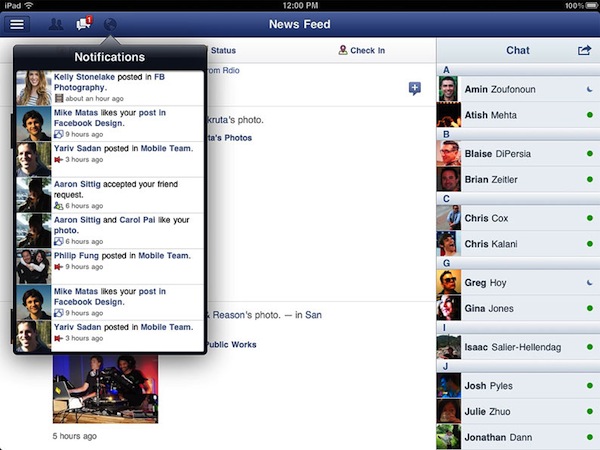
The most visible interface elements of the new Facebook app are the sidebar and toolbar. The upper toolbar, just like Facebook’s website, contains buttons to see Friend requests, messages and notifications. While the updated Facebook mobile website had to recreate Apple’s popover menus inside Mobile Safari, Facebook for iPad features native popover menus to check out requests and notifications; Facebook developers went as far as adding popover-based interaction for posting a new status update (with options to tag friends, insert location, attach a photo or video, and control privacy settings). Popovers work nicely in offering a quick glance at what’s new in your Facebook account, and a little red badge will sit next to them for a missed notification or friend request. When you tap on a notification for someone that liked or commented on a post of yours, Facebook won’t take you to a single page for that comment thread – it’ll open a sidebar allowing you to comment back. Messages, too, when accessed from the upper toolbar won’t launch a dedicated page – they’ll enable you to reply from within the popover itself. It’s a nice touch that simplifies navigation by eliminating the need of constantly swiping through pages, and a huge advantage over the mobile website (which, as you can guess, doesn’t let you reply inside popovers like the iPad app – it’ll quickly reload a new page). Another nice addition to the Messages’ popover menu is the action button that lets you open a thread in the full Messages view, archive it, mark it as spam or unread. The main sidebar on the left, too, provides quick access to often-used Facebook sections with a few taps. Your friends, News Feed, Messages and Nearby check-ins will be listed here if you want to check them out. But the new addition in this 4.0 release is the aforementioned app discovery: apps that have been connected with your Facebook account will show up as entries in the Apps section of the sidebar. Tapping on these apps will launch them if already installed on the device, or open the App Store. Which brings me to the also-updated Facebook app for iPhone.

Facebook for iPhone has received a massive overhaul that makes the app look a bit like the iPad version and new mobile website (screenshots below). Unlike the mobile website, however, items in the top toolbar won’t open in popover menus: Facebook for iPhone loads new full-screen windows for them, and I assume it’s because popovers are native to the iPad’s SDK, not the iPhone’s. The fact that Facebook was able to implement popovers on the iPhone’s web UI clearly shows the different kind of control the web gives Facebook. However, small technical differences aside, Facebook 4.0 on the iPhone looks very similar to its web counterpart. The sidebar is the same, basic navigation concepts are the same, and apps are listed in the sidebar. And because on my iPhone I have some third-party apps that are connected to Facebook, I was able to launch them directly from the iPhone app’s new sidebar. I tapped on Instagram and Shazam, and Facebook for iPhone launched them directly. Other apps that weren’t installed forced Facebook to open the App Store link instead.

Overall, I have the feeling Facebook did something very good this time. The technologies used in the mobile website make for a better experience and unify the Facebook user interface across devices; the new iOS app is more polished, faster to navigate, and it’s got the same obvious perks like chat and camera access. The iPad app is especially easy to use thanks to gestures and the bigger screen, which makes everything more readable and “organized”. The iOS app could still use some tweaks (especially in scrolling the News Feed), but I believe version 4.0 is a huge step forward for Facebook, and the mobile interface is a platform we should keep an eye on in the next months.

Find a gallery of screenshots below.

Read more

Access Extra Content and Perks

Founded in 2015, Club MacStories has delivered exclusive content every week for nearly a decade.

What started with weekly and monthly email newsletters has blossomed into a family of memberships designed for every MacStories fan.

Learn more here and from our Club FAQs.

Club MacStories: Weekly and monthly newsletters via email and the web that are brimming with apps, tips, automation workflows, longform writing, early access to the MacStories Unwind podcast, periodic giveaways, and more;

Club MacStories+: Everything that Club MacStories offers, plus an active Discord community, advanced search and custom RSS features for exploring the Club’s entire back catalog, bonus columns, and dozens of app discounts;

Club Premier: All of the above and AppStories+, an extended version of our flagship podcast that’s delivered early, ad-free, and in high-bitrate audio.

Learn more here and from our Club FAQs.