Federico Viticci

10776 posts on MacStories since April 2009

Federico is the founder and Editor-in-Chief of MacStories, where he writes about Apple with a focus on apps, developers, iPad, and iOS productivity. He founded MacStories in April 2009 and has been writing about Apple since. Federico is also the co-host of AppStories, a weekly podcast exploring the world of apps, Unwind, a fun exploration of media and more, and NPC: Next Portable Console, a show about portable gaming and the handheld revolution.

Atari Introduces “Greatest Hits” App with 100 Retro Games

If you love retro gaming as much as I do, Atari’s latest app for the iPhone and iPad (which will launch in the US App Store later today) might as well be a dream come true: with Atari’s Greatest Hits, you’ll have access to 100 old Atari games from a single app that presents them in a beautiful interface with arcade cabinets and original box arts. That’s right, 100 games in a single universal app. Where’s the catch? The app is free and comes bundled with PONG, but if you want to download the other included games you’ll have to choose between some in-app purchases options. The huge deal is the following: games have been organized in 25 game packs; each game pack will cost you $0.99 via in-app purchase. Alternatively, you can buy all the packs (and thus 100 games) together with a single purchase at $14.99. Which brings us to: 15 bucks for 100 old Atari games, on the iPhone. Some of them have even been updated to include local Bluetooth multiplayer. I won’t be missing this offer as soon as the app goes live, for sure.

The app is available now in the New Zealand store and will go live at this link in the US tonight. Full list of included games after the break. [via Touch Arcade] Read more


iAd Gallery Violates Apple’s Own Guidelines

iAd Gallery, a free iPhone app Apple released yesterday in the App Store, has generated several debates on the Internet about its rather “limited” feature set: the app, good-looking and responsive, does only one thing: it’s a collection of advertisements you can browse and “love.” By aggregating the best campaigns recently launched on the iAd network, iAd Gallery only lets users interact with a spinning wheel featuring ads from different brands, view information and “launch” them to experience the rich functionalities of iAds. Basically, it’s a free ad collector for iPhone. Not exactly the kind of “productive” (or at least entertaining) software most users would expect from Apple.

As noted by Dan Frommer at Silicon Alley Insider, it is kind of ironic that iAd Gallery may be violating Apple’s own Review Guidelines for iOS apps and should have been rejected by Apple itself. In the 2.13 section of the Guidelines, the company explains:

Apps that are primarily marketing materials or advertisements will be rejected

iAd Gallery indeed is based on marketing materials and doesn’t do anything but enabling you to browse various ad campaigns. Sure, you can read details about a specific campaign and learn more about the agency behind it, but that’s not really a “functionality” in our opinion. The app also lets you get in touch with the iAd team with a Contact button: perhaps the App Review Team at Cupertino thought that was enough to let the app through the App Store gates.

The truth is, of course Apple won’t reject its own app because it violates one of the Guidelines. They manage and have the ultimate word on the App Store, and they can release whatever they want under the Apple, Inc. name. But looking at the big picture, it is kind of funny that Apple is distributing an app that would have been rejected if it came from someone else.


Apple Orders 12 Petabytes (That’s 12 Million Gigabytes) For iTunes Store Video

After all the theories surrounding Apple’s new data center in North Carolina, and the rumors surfaced in the past months pinpointing a complete revamp of iOS and MobileMe with extensive cloud features, here comes an interesting tidbit suggesting that Apple is looking to improve capacity of the iTunes Store by ordering 12 petabytes of storage from Isilon Systems. As reported by AppleInsider, the additional storage will be used for hosting video content on the iTunes Store – although it is not clear whether this storage will also be dedicated to video streaming, future iOS or MobileMe functionalities, or just downloads for the existing iTunes Store. Currently, the iTunes Store hosts thousands of movies, TV shows and video podcasts that are available both in standard and high definition, can be streamed to an Apple TV or downloaded locally on Windows PCs and Macs. Read more


Camera+ Goes Social With User Pages, Comments, Mobile View

Camera+ for iPhone is one of our favorite photography apps here at MacStories: version 2.0 brought lots of new features and optimizations to an already great piece of software, and another update released last week introduced a brand new “Clarity” effect that’s a serious competitor to Apple’s own HDR processing. Camera+ is packed with features, has a beautiful user interface and powerful sharing options. It doesn’t come as a surprise that the app sold more than 2 million copies in a few months. Camera+, according to many, is the photography app for iPhone Apple should have bundled into iOS in the first place.

Today the tap tap tap developers are taking a leap forward by completely revamping the social aspect of Camera+ – the campl.us website that allows you to upload photos (even multiple pics at once) directly to app’s servers and then share a link on Twitter, Facebook or other social networks. The new Camera+ website now supports comments, has got user pages to quickly browse all the images posted by your friends, and – finally – has also a mobile view optimized for the iPhone and iPod touch. You can see a photo of mine here, and my user page here. You can comment either as a Guest or by logging in with Twitter and Facebook (with optional comment sharing as well); photo pages sport the usual view count and image info; the mobile web view perfectly fits the iPhone’s screen and you can also swipe through photos at the bottom to quickly switch between them.

The developers write on the company’s blog:

For a long time we were hesitant about doing mobile optimized versions of our sharing pages because we still wanted to support the zooming into pictures that our desktop pages allowed. We’ve finally come up with a solution that makes everything easier to read and browse while still supporting high quality photos that can be pinched in to see more detail. We really wanted to make our mobile pages “feel” exactly like their desktop counterparts, all the information on them makes its way over, just organized and designed for a smaller screen. We also support the same commenting via mobile as on the full desktop website.

We really like the new social features of Camera+ on the web, and we look forward to more functionalities (such as albums, they would be great) hopefully coming soon. If you still haven’t downloaded Camera+, go get it here. Check out more screenshots below. Read more


With The Latest Update, Cloud Connect Becomes A Finder for iPhone

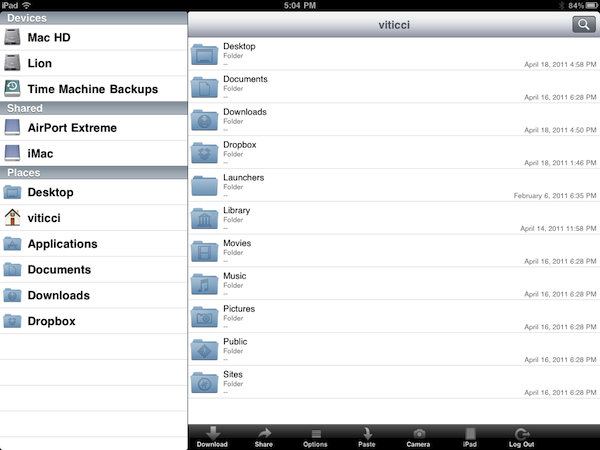
Back in January when I reviewed Antacea’s Cloud Connect Pro, I called the app “a Finder for the iPad” thanks to its large set of functionalities that allowed users to easily connect to computers, AirPort stations, shared drives and a variety of services / machines with a few taps. The app didn’t exactly sport a beautiful user interface (the developers are still working on improving this aspect), but it was already a full-fledged solution to put most of the features of the Mac’s Finder into the tablet’s screen: copy and paste actions, sorting options, media streaming, column-based folder navigation were there in the first release. Of all the apps to locally or remotely connect to a computer (SMB, FTP, SFTP protocols are supported, as well as VNC and RDP for screensharing) I’ve tried over the past years, Cloud Connect Pro was, in spite of graphic elements that could have been better, the most powerful way to put a computer or online services like Dropbox in your hands. And with the latest 2.0 update, this is now possible on the iPhone too.

Cloud Connect Pro has gone universal with the update released on April 1st, and the iPhone version is nothing but the iPad app on a smaller screen with tweaked navigation to please your thumbs. It’s got the same features of the iPad client: iDisk and Dropbox remote access, Google Docs / Box.net support, FTP / SFTP / WebDAV / Apple File Sharing and SMB authentication. Plus screensharing functionalities that turn the app into a simple VNC client. Not to mention automatic discovery of computers on your local network, different login options as Guest or Administrator, copy & paste support, local downloads and much more. All the features I mentioned here have been implemented on the iPhone, basically. Of course you can’t see multiple columns at once when browsing a computer, but you can move back and forward between folders with a single swipe. A button in the upper left corner takes you back to the main screen that lists all your servers and desktop machines. Feature-wise, Cloud Connect Pro blows most of its competitors out of the water.

The 2.0 update also brings support for multitasking (finally), which now allows you to stream music in the background even when not using the app. At $24.99 in the App Store Cloud Connect Pro doesn’t come cheap, but it’s packed with features that will enable you to connect to your computers, services and shared drives directly from an iOS device. More screenshots below. Read more


Survey Reveals 37% Of Teens Will Soon Buy An iPhone, 22% Of Them Have “A Tablet”

When I was a kid, having an iPod meant you wanted to be different and you cared about the quality of your music. At least in my town, most kids bought MP3 players from a variety of popular / unknown brands at the local electronics store or mall, and they didn’t really care about the functionalities of the device as long as they could “put MP3s” into them. I know the situation was different in the States and, perhaps, in other towns of Italy too, but that’s what I remember.

The scenario nowadays, of course, is completely different. Every teenager knows what the iPod is, they have iPhones and, when they really want to go Apple all-the-way, they also have Macs. Apple’s sales numbers and popularity have dramatically changed (for the better) over the past decade, and with 100 million iPhones and 15 million iPads out there the company has surely created a new market for smartphones and tablets. Yet there’s still a huge room for growth, and according to Piper Jaffray’s latest bi-annual survey of high school students in the US, the numbers for Apple are promising. Among the 4,500 surveyed kids, 37% of them plan on buying an iPhone in the next six months, and 17% of them already have one. That’s up from 31% and 14% in Spring 2010. What about tablets? 22% of high school kids said they own one (and I guess they’re talking about the iPad here), whilst 20% plan on buying one in the next six months.

As for MP3 players, 86% of the kids who have one are using an Apple iPod. Other devices from Microsoft, Sony and Dell follow in the chart with incredibly lower numbers. But the MP3 player is clearly decreasing in popularity as kids prefer to listen to music on their phones rather than a dedicated device: in Fall 2010, 90% of surveyed kids had an MP3 player; in Spring 2011 “only” 80% of them have said they own a standalone device for playing music. And of course the iTunes Store has a 95% share among the “legal ways” of downloading music online; on the other hand, 65% of kids still use P2P services to illegally download music from the Internet.

So this survey leaves us with an interesting question: what will the popularity of tablets be like in 12 months? What’s going to happen to the iPod and, most of all, will Apple reboot the entire line to make sure it still makes sense for a kid to have an MP3 player alongside an iPhone? We know the iPod touch makes for a great gaming device, but I can see how having an all-in-one device (phone+music+games) can be a more attractive option. Check out the full survey here.


iCushion Stand for iPhone

Is there anything better than keeping an iPhone 4 with its flush, shiny glass back on the flat surface of a desk that also hosts a variety of other Apple products? For some, it’s keeping the iPhone into a desktop stand like the Xtand. Others prefer the simplicity of a standard Apple dock. Last, some people keep their iPhones protected with a bumper, which also ensures the device won’t slide and fall off a flat surface like your office’s desk or coffee table. For these people, and for all those who hate how cables inevitably create a giant tangled mess on your desk, the iCushion for iPhone could be a great alternative to the usual DIY stand or protective case: designed by Fadtronics, the iCushion is a seat for the iPhone that a) also keeps the cables in place neatly organized and b) has a suction cup to prevent the device from slipping away. Plus, it’s cute.

The iCushion stand is likely just a design experiment, and we’re not sure the thing will ever be available for purchase. But it should. Check out more photos here.


Fring To Introduce Group Video Calling For iPhone

In its continuous effort to develop the best mobile video calling app for iOS and Android devices, popular service fring has announced that they’ll soon launch a private beta to pilot a group video calling feature that will be available on fring later this year. The beta program is open to Android and iOS users, and it’s been demoed in a video published by the developers in a blog post.

The new fring will allow you to easily browse the buddy list and pick a contact to add to a group call. The functionality apparently supports up to 4 simultaneous conversations and works both on WiFi and 3G. Once a person has been added to the group call, you can go back to the main screen and keep adding buddies until the limit is reached. As soon as you tap on a contact’s name, fring will initiate the call – meaning you don’t have to wait for all connections to go through at the same time. You can see how it works in the video below.

The dev team is putting the finishing touches on a super cool new service: free, mobile Group Video Calls. We are having too much fun with it already, and want to get some feedback from users ahead of public launch on Android & iPhone.

Of course, this is super-exciting as it’s the 1st time the world will get to enjoy free Group Video calls.

Fring for iPhone was recently updated to include the possibility to switch between cameras, buy credit through in-app purchases and enjoy fullscreen video calling with a “Dynamic Video Quality” the company has heavily promoted on mobile devices. Fring for iPhone is available for free in the App Store.

Read more


Official TED iPad App Now Supports AirPlay

We’re big fans of the official TED app for the iPad, and we’re also huge fans of Apple’s AirPlay streaming technology and the second-gen Apple TV – entirely based on streaming content from iTunes or your local network. The latest update to the TED app doesn’t introduce several new features and optimizations (the app was initially released in October 2010), but it adds one key functionality: AirPlay support for all talks and playlists.

Version 1.3 doesn’t add anything else, but it’s okay. AirPlay support for TED talks was our most requested feature, and it’s finally available. Go get the app here.