Federico Viticci

10775 posts on MacStories since April 2009

Federico is the founder and Editor-in-Chief of MacStories, where he writes about Apple with a focus on apps, developers, iPad, and iOS productivity. He founded MacStories in April 2009 and has been writing about Apple since. Federico is also the co-host of AppStories, a weekly podcast exploring the world of apps, Unwind, a fun exploration of media and more, and NPC: Next Portable Console, a show about portable gaming and the handheld revolution.

Conde Nast Will Implement Apple’s Subscriptions Starting Next Week

Over the past weeks, several reports pointed to major publishers and publications starting to use Apple’s in-app subscriptions in their magazine and newspaper apps for iPad, quite possibly ahead of the rumored June 30 deadline that will require developers of existing “publishing apps” to implement subscriptions, or get pulled from the App Store. Following the big names from the last weeks – Hearst confirming subscriptions coming with the July issues of magazines like Popular Mechanics and Oprah Magazine or Time Inc. inking a deal with Apple over free access for print subscribers – The New York Post reports Conde Nast, publishers of dozens of magazines also available on the iPad in digital form, will begin relying on in-app subscriptions starting next week with The New Yorker, available on the iPad since last September. The decision to move forward with subscriptions and The New Yorker apparently came after the death of Osama bin Laden, with Conde Nast looking to “capitalize” on the coverage through subscriptions and digital content for iPad.

Conde Nast is very close to a deal to begin selling digital subscriptions via Apple’s iPad.

The New Yorker will become the first publication from the S.I. Newhouse, Jr., empire to be available via subscription on the popular tablet, and it will happen early next week, said a source familiar with the situation.

Conde Nast is also planning on dramatically slashing the prices of single-issue downloads for other iPad magazines like Wired, Golf Digest, Glamour, Vanity Fair, Self, Allure and GQ: the issues will be sold in-app at $1.99, down from the current $4.99 and $3.99 (Glamour). This will keep the prices in line with the current newsstand print editions, and it will also allow Conde Nast to sell annual iPad subscriptions at $19.99. With developers and publishers expected to implement subscriptions before the end of next month, the amount of magazines and newspapers featuring subscriptions will likely increase, allowing Apple to showcase even more in the App Store’s homepage.


Week Calendar Comes To The iPad

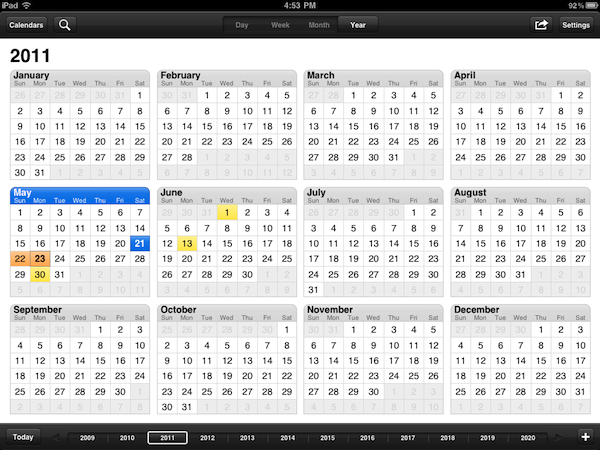
When I first reviewed Week Calendar for iPhone in March, I called it a powerful alternative to Apple’s standard calendar app for iOS devices. It’s not that Apple’s Calendar.app lacks basic functionalities or is utterly broken: in fact, I think Calendar is more than fine for most users. But if you’re willing to get the most out of your MobileMe, Google Calendar, Exchange or CalDAV calendars, UtiliTap’s application is the full-featured alternative to install on an iPhone. And today, you’ll be able to enjoy Week Calendar on the iPad as well, thanks to an “HD” counterpart that’s just been approved and is now available at $2.99 in the App Store.

Week Calendar HD has all the features from the iPhone version, only on a bigger screen and with visual cues from Lion’s calendar app. The difference between the iPad’s native Calendar and Week Calendar HD is very subtle, but Week Calendar implements a leather background and bits of torn paper in a way that’s more reminiscent of Lion than Apple’s own app. Clearly some people are going to hate this choice if they were looking for a cleaner UI as seen on the iPhone, and perhaps the developers will revise their decision. I don’t know, but right now this is what you get. And, more importantly, what matters is that Week Calendar still outpaces Apple’s calendar solution when it comes down to views, gestures, copy & paste support or mere customization of the calendar. Week Calendar’s biggest advantage over Apple’s cal is support for multitouch with copy & paste, possibility to add a new event with tap & hold, easy resizing of events and pinch to personalize the selected view. You can tap and hold an existing event to move it around and change its start and end date; you can “cut” an event and paste it somewhere else; you can access an event’s info panel with a single tap, rather than having to tap the Edit button like in Apple’s calendar. Again, this works like the iPhone version but it’s been ported successfully to the iPad with the use of popovers and bigger real screen estate. From the Event Details panel, like on Week Cal for iPhone, you can set an alert, availability status, custom color, or find your away around four buttons that allow you to share an event, print it, email it or add it to the template list. Week Calendar, in fact, can turn any event into a template to use again in the future. Notes, invitees and local contacts can be attached to an event, too.

The selection of settings is equally impressive. You can turn on time zone support and specify when the week or weekend start,  manage new events’ default preferences and the aforementioned templates (these will save you a lot of time), customize standard colors to assign a color by default to events that meet certain title criteria. There’s more: you can activate TextExpander integration (save even more time), turn off drag & drop entirely, completely overhaul the way the app displays days and weeks. For instance, you can change font sizes, enable out-of-view indicators, tell the app when a day starts and ends. Anything else is just Week Calendar for iPhone, running on the iPad with a new UI: lots of features, yet easy to use.

If you’re a calendar nerd, Week Calendar HD for iPad is a dream come true. It’s got all the customization options you’ve always wanted from the tablet’s calendar app, plus a design consistent with Apple’s recent standards and tons of gestures to simplify navigation. Get it here at $2.99.


Foxconn Now Wants To Start Building iPads In Brazil In July

Last month, we reported Brazilian’s President Dilma Roussef and Hon Hai Precision’s founder Terry Gou discussed during an official meeting in Beijing the possibility for Hon Hai’s subsidiary Foxconn to invest $12 billion to start producing and assembling mobile devices in Brazil throughout the next five years, including Apple’s iPad – currently assembled by Foxconn in its Asian facilities. The investment, result of long-term negotiations between Hon Hai and Brazilian minister of Science and Technology Mercadante, is aimed at targeting Brazil’s growing consumer market, as well as allowing Foxconn and its partner Apple to directly address the distribution issues of devices in Brazil, long affected by import tariffs, inflated prices and poor retail presence.

Whilst the original reports claimed Foxconn was planning to start building iPads in Brazil this November, Reuters reports today the company has moved the estimated date to July, still seeking, however, to obtain tax breaks and other government concessions to ease high labor costs that Hon Hai had to face since they opened three other facilities to build components for Sony, Dell and HP in Brazil years ago. It’s still unknown whether iPad production will be located in an existing facility, or if Foxconn is planning on opening a new one just to build iOS devices. Speculation in the past weeks suggested the second possibility, pointing to the massive investment from Foxconn and the requirements forwarded to the Brazilian government such as training for 200 future employees in China, or the need for 20,000 specialized engineers.

Foxconn has moved up its desired start date for assembling iPads in Brazil to July from November, seeking to tap massive demand for the device in Brazil’s booming consumer market, according to newspapers Estado de S.Paulo and Folha de S.Paulo. Their reports quoted government officials.

“It’s a daring timeline. Whatever is within our reach, we’re going to work on making that viable,” Science and Technology Minister Aloizio Mercadante told Folha.

Reuters also reports Foxconn will initially import components from Asia to assemble devices in Brazil (thus the need for tax incentives on imported materials), shifting the manufacturing chain to local production in the next few years.


Search for Tweaks From Your Desktop with Cydia Search


iPhone news website and repository Planet-iPhones launched at the end of April Cydia Search, an online interface that allows you to browse tweaks, apps, utilities and themes available on Cydia. The web app, accessible from any computer and browser, is not meant to replace Cydia – as the name suggests, it provides a streamlined view of Cydia and the packages inside it, enabling you to browse everything without using your iPhone’s Cydia app, which can be slow sometimes. Cydia Search lets you search apps by name, author or description, comes with an embedded iPhone template to see what the package will look like in the actual Cydia (as seen in the screenshot above) and has a pretty huge list of default repositories, top packages, categories, recent updates and latest packages.

Among the features of Cydia Search:

  • View a listing of the most popular packages based on user ratings, the newest packages added, and even recently updated packages.
  • Each package offers detailed descriptions complete with screenshots, author/developer info, etc.
  • Listings clearly show paid packages in a different color similar to the way Cydia does.
  • All packages are clearly labeled whether or not they are from a default major repository.
  • RSS feeds are available for the newest packages list, recent updated packages list, and also for any search query.

If you’ve been looking for an elegant way to see what’s in Cydia without grabbing your iPhone or, more importantly, being forced to jailbreak, Cydia Search is a solid solution we hope will stick around for months to come. You can head over Cydia Search now and start browsing hacks and themes to install on your jailbroken iOS device. [via TUAWPlanet-iPhones]


Light Leakage Issues with LG Displays Caused iPad Shortages Last Quarter

Last month, a report by IHS’ iSuppli claimed the iPad 2 shortages Apple had to face in the quarter (with 4.69 million units sold announced at the Q2 2011 earnings call, well below Wall Street’s analysts’ estimates) were caused by production issues with the IPS display and built-in speaker of the device. Whilst the report didn’t provide additional details on the reasons behind the display manufacturing issues, iSupply wrote “quality concerns” affected Apple’s estimated number of initial iPad 2 shipments. The company mentioned ”lamination issues with one of the touch suppliers”, yet stating that Apple was on track to increase the volume of iPad shipments in the next quarter, as also mentioned by Tim Cook when referring to the iPad 2 as the “mother of all backlogs.”

A new report by Digitimes today claims the production issues with the iPad’s display were caused by light leakage issues in LG’s units, with LG shipping only 3.2 million display units in the quarter.

In other news, Samsung Electronics shipped a total of four million 9.7-inch panels for iPads in the first quarter, outpacing rival LG Display (LGD) as the largest tablet PC panel supplier for Apple, the sources indicated. LGD’s iPad panel shipments reached only 3.2 million units in the first quarter.

LGD was forced to reduce its shipments in the first quarter due to light leakage problem for panels produced at its 6G production lines. The company reportedly has fixed the problem and will resume shipment momentum to Apple in the second quarter, said the sources.

Digitimes does not relate LG’s manufacturing issues with overall iPad shortages in Apple’s Q2, but the report seems to corroborate iSuppli’s previous claims of shipments below estimates due to problems in the iPad production chain.


Footprints Lets You Share Your Location, Track Your Friends and Family

With all the debates surrounding Apple’s use of location tracking data, it’s not surprise that apps based on the opposite concept have started showing up on the web and App Store: whilst the blogosphere made a big deal out of a software bug in iOS that left a cache of cellular points unencrypted on a computer, some people thought from the beginning of this latest Apple brouhaha that having visual access to your location in history, on a map was a cool thing. That’s why the NYT Lab department itself created a web tool to donate and visualize location data: if you have nothing to hide and you don’t mind sharing your location history, seeing stuff on a map is neat. Some even say it reminds us of the power of mobile technology nowadays. Footprints, a new app for iPhone and iPad, takes this idea a step further and allows you to constantly monitor the real-time location of your friends, family members and employees legally, with an app, all the time, with a few taps.

Footprints has got an interesting pricing scheme: it’s free for two months, but you can purchase a subscription for 3 months ($0.99), one year ($2.99) or two years ($4.99). If you download the app now, create an account and then purchase a three-month subscription, those three months will add on top of the two months you already have for free. Very cool. So how does it work? You basically can create an account to be tracked in real-time, and share your location with your friends and family. Similarly, people can share their location with you, choosing an expiration time for sharing and the maximum number of “waypoints” to display. Footprints relies on Apple’s GPS tracking implementation, and for this reason it comes with several settings to tweak the behavior of background tracking in order to make sure battery won’t die in 2 hours. The developers explain the app uses Apple’s “Significant Location Change” technology to determine location changes and waypoints, which are typically logged after a change “of 500 meters to 3 km or a quarter-mile to 2 miles”, depending on cellular network coverage. In the Settings, however, you can customize the location tracking method even deeper: if you don’t want to use cellular triangulation, you can turn on GPS pulse every 10 minutes, or every 5 minutes. Of course, the more frequently a GPS call occurs, the faster your battery will drain. But there’s more: you can specify a “sufficient accuracy” in locating your position, auto-sensing and “minimum movement.”

The app’s got Facebook check-in integration and parental controls with passcode, but what struck me as incredibly easy is the way you can share your location with people you know and trust. In the settings, all you have to do is pick a contact from your Address Book, and choose to share your location with him / her. Provided this person is using Footprints with the same phone number and email address you have in your Address Book, he or she will be able to see your position based on the sharing settings you chose. In the main screen of the app (a map), you’ll be able to switch between your location (marked by a Me tab) and others’ (the Friends tab). That’s it. As these people move and go places, you’ll see them on your device with the waypoints and information they chose to share. It’s remarkably user-friendly, private, and, overall, simply well done.

Footprints is free, features iTunes in-app purchases and adopts the “it just works” philosophy for two important subjects nowadays like location tracking and privacy. Give it a try.


AirServer Brings AirPlay For Everything to OS X

During the past months, I’ve stumbled upon several Mac apps that enable to turn your computer into an AirPlay receiver. None of them, however, provided the same amount of stability and functionality I’ve found today in AirServer, a $3 app that easily turns your Mac into an AirPlay device for audio, photos and videos. Since Apple introduced AirPlay with iOS 4.2 back in November, many have wondered whether it’d be possible to use the streaming features of the protocol (for music and other kinds of media) on a Mac, rather than on iPhones, iPads, and Apple TVs. The number of Mac apps that came out promising to bring AirPlay on the desktop was quite overwhelming: from simple utilities to stream music to more complex solutions like Banana TV, developers didn’t even refrain from creating similar alternatives for iOS devices, turning an iPad into a receiver for video. And if that’s not enough, remember a few weeks ago a hacker cracked the encryption keys used by Apple in the AirPort Express station – opening the door to even more apps with AirPlay / AirTunes integration.

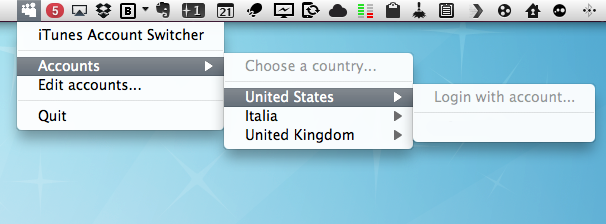
AirServer brings some clarity and unification with a $3 purchase and a simple package that runs in the menubar. That’s it, no UI. Heck, the icon can be removed from the menubar, if you want. What AirServer does is simple: it turns a Mac into an AirPlay receiver for anything. Provided you have an iOS device (or another Mac) to start a streaming session, you’ll be able to listen to music (or any other audio) or watch videos and photos coming from AirPlay on your Mac’s big screen. I have an iMac at home, and AirServer is just perfect on it: I can fire up Instacast on my iPhone and listen to my favorite podcast on better speakers (pardon me if I don’t have external speakers); I can find a cool YouTube video and instantly beam it to my Mac without sharing any link; I can take my entire Camera Roll and show photos of my last vacation to my (poorly sighted) parents on the iMac. Now we’re talking.

As for quality, I have tested AirServer on two different local networks with pretty good results. Videos stored on device start playing almost instantly; music quality was great, with a couple of lags on my slower home network in a 2-hour playing time; photos stream just fine with responsive touch controls as you swipe. AirServer takes a minimal footprint on your Mac, and I’ve also noticed it reproduces the fading effect you get on the iPhone when you change your audio source. Overall, the app is stable and I was pleased to see an update was issued a few hours after I bought the app.

To sum up: at $3 you get an AirPlay receiver for Mac that supports audio, videos (even from Youtube and other apps) and photos. If you love AirPlay, get AirServer.


Preview: Fantastical, Upcoming Calendar App for Mac

How do you improve the default OS X calendar application? How do you set out to create an alternative that can be appealing to power users, and accessible for calendar novices at the same time? While beta testing Fantastical, an upcoming Mac app by Flexibits, I thought these were the questions the developers tried to answer with their latest creation. Like in Twitter clients, developing a third-party calendar isn’t an easy task: you have to make sure it will work with all those calendar protocols out there, but most of all you have to know you’ve got something on your hands that will stand out from the crowd – especially when Apple itself ships a full-featured iCal.app with OS X that does its job just fine for most users, and doesn’t require an additional purchase. As usual, though, I believe there’s plenty of room for alternatives if you’re willing to take a risk and believe in your product. And it shows when testing Fantastical: Flexibits believes in its new app so much they wrote “your Mac’s calendar will never be the same again” on the teaser website.

Indeed, Fantastical does some things the default Mac calendar client can’t even imagine. First off, it’s elegant, minimal and unobtrusive, yet beautiful to look at. I know the very own purpose of a calendar app isn’t that of letting you stare at it, but when compared to this or this you’ll notice the difference. User interface, however, is functional to Fantastical: it’s minimal because Fantastical wants to be simple to use, and it’s gorgeous for as much as it’s powerful inside. Fantastical uses a natural language parser that will let you write down events in plain English, and have the app correctly recognize the input in various fields. Example: Meet with Cody tomorrow at Apple Store, Viterbo 5 PM to 6 PM. Adding this sentence to a new iCal event does nothing. But writing it in Fantastical? It creates a new calendar event with “Meet with Cody” as the title, “tomorrow” as the relative date, “Apple Store, Viterbo” as the desired location, and 5 PM to 6 PM as the timeframe. It’s almost unbelievable how well this thing works and how deeply it improves the way I can add events using nothing but English. I don’t have to navigate with my keyboard and mouse, I just write and hit Enter to process the event and add it to my default calendar. Sure, I could still do things manually and adjust dates or location with the cursor, but since installing the first beta of Fantastical I haven’t found a reason why I should.

The language parser is the big feature of Fantastical, but there’s lots more. Without revealing too much right now (let’s save it for a final review, shall we?), I can say Fantastical’s huge advantage over several third-party calendar apps for OS X is that it works perfectly in conjunction with Apple’s iCal, which is responsible for keeping all your calendar configurations. You can start using Fantastical seconds after launch without doing anything, as the app fetches the accounts you’ve already set up in iCal. This means Google Calendar, MobileMe, CalDAV, Exchange, Yahoo Calendar – they all work out of the box. And if you want, you can make a calendar the default one so that adding new events will be as fast as hitting a shortcut, and write.

I wasn’t sure I was going to use Fantastical much initially, mainly because I didn’t think a replacement for the standard calendar interface was needed on a Mac. But after trying it, I have to say Fantastical is the calendar app to look forward to. You can sign up for updates here, and stay tuned for a complete review on MacStories soon. Read more


NYT Labs Create Tool To Donate Your iPhone Location Data

Apple may have fixed the iPhone’s location tracking issues with the recent iOS 4.3.3 update, but The New York Times’ Research and Development Lab thinks this location data is still valuable in the way it provides users and researchers an historical archive of devices’ cellular triangulation points and WiFi hotspot databases. The NYT Labs, the same folks behind innovative iPad news reader News.me, have developed and released a web application called OpenPaths that allows iPhone users to register and anonymously share their location database. The web tool, available here, is touted as a way to ”securely store, explore, and donate your iOS location data”, Nick Bilton at The New York Times Bits blog reports. While it’s unclear how the web app works with the latest iOS software update (which stops iOS devices from backing up the location database to a computer, but still keeps an unencrypted copy stored on device), OpenPaths apparently finds a way to obtain this location data and reorganize it in a beautiful interface that also enables you to navigate maps, set specific times of a day, and browse by date.

People who participate in the project are asked to upload location information from their phone, which is then made anonymous and added to a database with the data from every other upload. People can then browse their own location data on an interactive map. At a later date researchers will be able request access to the collection of location uploads.

As for privacy concerns in regards to OpenPaths, the website’s homepage explains how the system works:

Our upload system is completely anonymous. We store your location data separately from your user profile. It is only with your express permission, combined with a unique passcode that only you know and that openpaths does not store, that we release your data to whom you approve. You will always have control over how much of your information is shared.

The main focus of OpenPaths is that of enabling you to donate your data to researchers around the world working on problems like “disaster preparedness, traffic flow, urban planning, and disease transmission.” You can choose to grant researchers access to portions of your data, or skip the process entirely and keep everything for yourself for personal purposes. It’ll be interesting to see whether this NYT Labs project will gain traction in the next weeks, and if future iOS updates will break its functionality with further location database encryption. In the meantime, you can sign up for OpenPaths here.