Federico Viticci

10768 posts on MacStories since April 2009

Federico is the founder and Editor-in-Chief of MacStories, where he writes about Apple with a focus on apps, developers, iPad, and iOS productivity. He founded MacStories in April 2009 and has been writing about Apple since. Federico is also the co-host of AppStories, a weekly podcast exploring the world of apps, Unwind, a fun exploration of media and more, and NPC: Next Portable Console, a show about portable gaming and the handheld revolution.

Apple Confirms “Extremely Small” Verizon iPad 2 Recall

Reports surfaced earlier today indicated Apple was in the process of recalling Verizon iPad 2 models that were being shipped from China (where they’re made) to the United States, leading to speculation that faulty units had been produced by Foxconn. In a brief note to All Things Digital, however, Apple has confirmed that they have recalled an “extremely small” number of Verizon iPad 2 due to a problem with device identifiers, otherwise known as ”mobile equipment identifiers” (MEIDs), which play a key role when setting up a new iPad for cellular data activation. Due to a problem with Verizon flashing the same MEID on different iPads, users could run into the impossibility of activating their device as it’s already registered on the carrier’s network.

Duplicate MEID numbers were flashed onto an extremely small number of iPad 2 units for the verizon 3G network,” an Apple representative said on Friday.

Although most of the small number of devices involved were still in the process of hitting the market, a few had already found their way into customers’ hands.

Some iPad 2 customers have reported receiving credits and free accessories as a compensation for the delay, although Apple hasn’t issued an official statement or policy in regards to this recall. It is also unclear what the company will do for those customers who have already got their hands on a Verizon iPad 2 with the wrong MEID, but it wouldn’t be a surprise if Apple contacted this small number of people to issue a full refund or send a new unit free of charge.



AirServer 2.2: AirPlay On OS X Already Working with Lion and iOS 5

AirServer is an OS X utility I first reviewed in May that allows you send music, photos and videos from iOS devices to a Mac’s display using AirPlay. Unlike similar apps that enabled such functionality before, AirServer stood out because the first release was stable, fast, and cheap at $3. Since then the price increased to $4.99, but the developers released a plethora of updates (seriously, I’m pretty sure I updated the app more than 10 times) to bring several other functionalities like dual display support, a different icon, a settings panel, audio controls, service rebroadcasting, and more.

With the latest 2.2 update, however, the developers have gone all out to implement early support for iOS 5 and OS X Lion. Both OSes aren’t out yet, but if you’re rocking the betas on your device or computer you’ll be able to use AirServer to beam music and videos – you’ll just have to disable dual-mode AirPlay on iOS 5 for now. The devs also said that they’re looking into implementing iOS 5’s AirPlay Mirroring on AirServer (iOS apps mirrored on a Mac, that would be nice), but that could be difficult as it uses Apple’s FairPlay encryption.

Alongside OS compatibility, recent AirServer updates also brought audio controls in video apps, support for Boxee, XBMC, FrontRow, Wake on Demand, as well as 24-bit audio support. I’ve tested AirServer with iOS 5 and Snow Leopard and it works very well, with songs and YouTube videos playing just fine on my MacBook Pro.

Go download Air Server here.


“iCloud Is The Operating System”

The conversation my friend Francesca and I were having in front of a good cup of coffee ended when she concluded that iCloud was the operating system.

At first, that silly statement didn’t make any sense to me. I laughed, and tried to explain her that it’s not the operating system – the one you have to download and install on your computer or device – rather, I told her iCloud was a new way to keep all her content stored somewhere else she could access at any time. But the more I went on to illustrate the advantages of pushing media from the Internet (“the cloud”) to devices without a USB cable, the more she kept asking why would that be any different from having the operating system on the Internet, “doing stuff for you automatically.” Read more


iOS 5 To Allow 1080p Video Export

Following the increasing speculation about the next-generation iPhone getting an 8-megapixel camera, the iOS 5 beta seeded to developers earlier this week keeps providing interesting details on features that Apple is baking into the OS, but aren’t ready or usable yet as they’re being built for future devices. In addition to iOS 5 enabling playback of 1080p video files scaled down to 720p as Apple hasn’t built a screen with enough resolution to support 1080p, 9to5mac points to more code strings from the developer beta that seem to confirm developers will soon be able to activate video export options at 1080p in their applications. This means Apple’s apps like Camera and iMovie, or other third-party solutions, will be capable of saving 1080p files with the public release of iOS 5. Previously, developers could only export videos to 720p.

Programmers use the AVAsset class to work on a detailed level with timed media assets such as videos and sounds. It lets them examine, create, edit or reencode media files, get input streams from devices, manipulate video clips during realtime capture and playback and more. It is now clear that iOS 5 enables devices such as iPhone 4, iPad 1 and 2 and fourth-generation iPod touch to both decode 1080p videos and encode content in 1080p.

An improved camera/processor in the iPhone 5 could allow the device to go past the iPhone 4’s 720p limitation and also start shooting flicks at 1080p with dedicated export options, though Apple would need to bump up the screen resolution to offer native, true 1080p playback. As far as the camera speculation goes, a new report by Digitimes today also indicates camera lens maker Largan Precision (caught in the Apple rumor mill before) has hinted at increasing orders for 8-megapixel modules from smartphone vendors like Apple and HTC. Reports in the past months suggested Apple’s regular supplier OmniVision would provide the 8 MP camera lens for the iPhone 5, although separate claims pointed out that Largan Precision was selected by Apple.


redsn0w Tethered Jailbreak Now Available For iOS 5 Beta 1

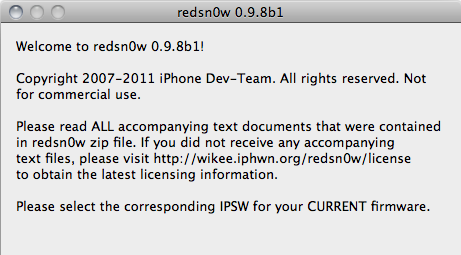
This week’s developer release of iOS 5 has brought hundreds of new features for iPhone and iPad owners, but jailbreakers haven’t wasted any time trying to figure out a way to get the old tweaks and hacks from Cydia working on the devices running the new OS. As tweeted by Musclenerd two hours ago, a new beta of popular jailbreaking tool redsn0w is available, bringing compatibility with devices on iOS 5 beta but exclusively meant for developers willing to beta test the software. As iOS 5 beta is developer-only and consumers shouldn’t get their hands on it, the Dev Team is asking developers of jailbroken apps to test their tweaks against the OS Apple will release this Fall.

Compatible devices:

  • iPod touch 3G
  • iPod touch 4G
  • iPad 1
  • iPhone3GS
  • iPhone4 (GSM)
  • iPhone4 (CDMA)

Furthermore, iSpazio reports a first list of compatible and not working tweaks on iOS 5 beta 1:

Working

  • iFile
  • CyDelete
  • OpenSSH
  • iSHSHit

Not Working

  • MobileSubstrate
  • Springtomize
  • PhotoMail
  • ActionMenu
  • Celeste
  • BiteSMS
  • WinterBoard

The new beta is Mac-only, and if you’re a developer interested in checking out whether your Cydia app is working on iOS 5 beta, you can download it here.


Mac mini, Mac Pro Server Refresh Coming Soon?

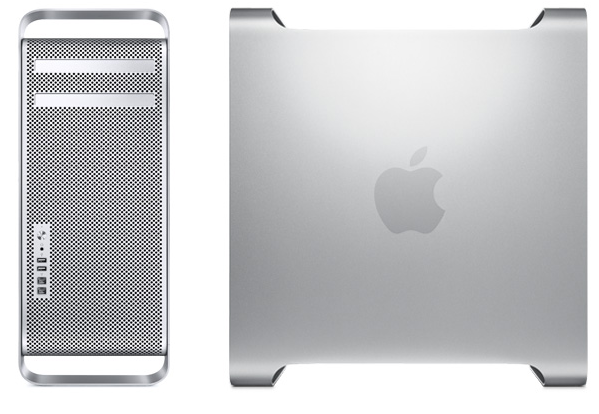
According to 9to5mac, “sources” are pointing to an upcoming refresh for the Mac mini and Mac Pro server lineup which could come in “the next month or so”. Apple will launch OS X Lion in July and, following the implementation of Sandy Bridge processors and Thunderbolt I/O technology in the latest MacBook Pro and iMac refreshes, it’s very likely the company will begin shipping new Mac minis and Mac Pros featuring the new aforementioned hardware. 9to5mac mentions, however, that the server lineup will go under a refresh, so we’re not sure how that would play out with the consumer version of the products. Still, it seems fairly obvious that all forthcoming Mac updates will carry Sandy Bridge and Thunderbolt. Apple quietly introduced its Mac Pro Server product after the Xserve’s discontinuation was announced in November.

The interesting part about both the Mac Pro and Mac mini server models become constrained simultaneously is that Apple might be looking to completely revamp their server offerings, not just update each respective product.

In past few weeks, rumors claimed Apple would soon refresh the MacBook Air family (perhaps in June or July) and the AirPort Extreme/Time Capsule lineup to bring better integration with its recently announced iCloud service. Whilst the Time Capsule announcement didn’t come true at the WWDC keynote, several sources have indicated the MacBook Air would soon receive an update to increase performances with new processors, as well as better connectivity with Thunderbolt.


Tweetbot 1.2 Released With Several Enhancements

Tweetbot, the Twitter client from Tapbots we reviewed here, has been updated to version 1.2, adding several features requested by users in the past weeks and fixing some of the minor gripes we had with the application when it first came out. Whilst version 1.1 focused on adding CloudApp and landscape support, Tweetbot 1.2 brings a series of refinements and enhancements across all the sections of the client that should dramatically improve the experience. For example, you can now undo retweets, and retweet from another account if you hold down the retweet button. That’s quite handy: not only you can delete accidental retweets, you can also retweet quickly without constantly switching between accounts. And if you don’t like Twitter’s standard retweets, Tweetbot 1.2 has an option to send old “quote style” retweets.

Tweetbot 1.2 introduces absolute and relative timestamps, Google/Instapaper Mobilizer support for when you need to strip away all the clutter from a webpage and read it in a text-only view, as well as integration with Bitly.Pro for those who keep a custom domain on the popular link shortening service. Besides the new great user & hashtag picker from the compose view (make sure to check out the animations), short link geeks should be happy to know Tweetbot 1.2 has support for custom API endpoints. Other features in this update include:

  • Pinboard support in the read later options
  • Pikchur image upload support
  • Tapping on a success/failure message dismisses it instantly
  • Added @username/listname for followed lists

Tweetbot 1.2 is available now at $1.99 on the App Store.


iOS 5 To Enable FaceTime in Middle East?

According to a report posted by website Apple-wd.com [Google Translation], the iOS 5 beta seeded to developers earlier this week doesn’t come with the FaceTime restrictions in Middle East countries we first covered back in October. Soon after Apple started removing graphics and mentions of FaceTime from its Saudi Arabia eight months ago, the company released an official document detailing the carriers that were not supporting FaceTime video calls on iOS – the document is still available here and shows Saudi Arabia and United Arab Emirates having FaceTime unavailable on certain carriers.

Other reports also confirmed FaceTime for Mac wasn’t showing Middle East countries as supported ones in the app’s preferences, which left us wondering why would the Mac version go under the same “rules” if a carrier wasn’t needed at all. Well, according to Apple-wd the iOS 5 beta has FaceTime working between iPhones in Saudi Arabia from STC and Mobily, as seen in the screenshot above.

Apple-wd speculates this might be a good indication of iOS 5 finally easing carrier restrictions on FaceTime which, as spotted at the WWDC keynote slides, is getting improvements for video call quality and may even work on 3G come the final release. However, it’s also possible that carriers will update their configuration files when iOS 5 is released publicly to block FaceTime again.


iOS 5 To Feature Panoramic Camera Option?

According to some code strings posted by 9to5mac and found in the first beta version of iOS 5, Apple may soon introduce a panoramic camera functionality to go alongside the photo editing enhancements announced at the WWDC keynote. As detailed by Scott Forstall on stage, iOS 5 will bring the possibility to crop, rotate and auto-enhance images from the native Photos app – these features won’t be available on the iPhone 3GS, but they represent a great addition for iPhone 4 users that won’t need to purchase additional basic photo-editing apps anymore. With red-eye reduction and Photo Stream compatibility, Apple touts the new Photos app as the best way to take photos on an iPhone, and send them to an iPad for a quick touch-up. However, as the code discovered suggests, there may be more coming in future betas.

There’s a variety of “pano” photo apps available in the App Store, some of them like Occipital’s 360 Panorama and Pano we reviewed on MacStories before. These apps allow you to take photos of what’s around you to build a panoramic, zoomable representation that “stitches” the various images you’ve taken together in a single file.

The code found in iOS 5 beta doesn’t suggest much, except that Apple has been thinking about a menu to “take” and “save” a panorama. These strings are usually a good indication of new features to come in iOS 5 – in January, iOS 4.3 beta code confirmed that Photo Booth camera effects would be implemented sooner or later, and indeed the iPad 2 (released in March) sported a native Photo Booth app on its custom 4.3 version.