Federico Viticci

10766 posts on MacStories since April 2009

Federico is the founder and Editor-in-Chief of MacStories, where he writes about Apple with a focus on apps, developers, iPad, and iOS productivity. He founded MacStories in April 2009 and has been writing about Apple since. Federico is also the co-host of AppStories, a weekly podcast exploring the world of apps, Unwind, a fun exploration of media and more, and NPC: Next Portable Console, a show about portable gaming and the handheld revolution.

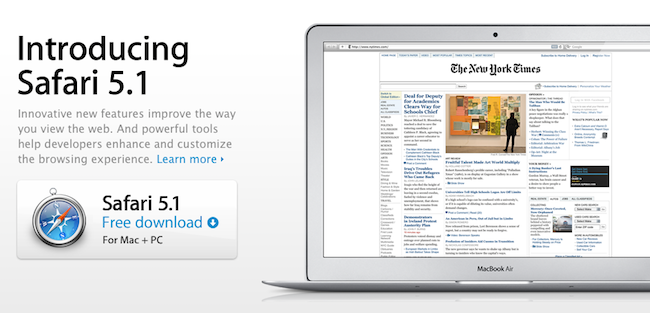
Apple Releases Safari 5.1: Full-Screen, Gestures, Reading List, And More

Alongside OS X Lion, new MacBook Airs, new Mac Minis and Thunderbolt Display, Apple just released a major update to Safari, reaching version 5.1. Available to developers for quite some time, the new Safari brings extensive support for gestures, the Reading List, new privacy and security features, full-screen browsing and more.

Safari isn’t just the world’s most innovative web browser. It changes the way you interact with the web. With great new features that take advantage of OS X Lion, you’ll become completely immersed in everything you see, touch, read, and watch. Oh, and browse.

The Reading List allows users to save webpages for later, and read them at any time by accessing them from a new sidebar. Reading List will gain iOS sync capabilities with iCloud this Fall, but in the meantime it works perfectly in conjunction with Safari Reader, which can strip out the clutter off webpages saved in the Reading List easily.

New multi-touch gestures and full-screen are exclusive to Lion, as they take advantage of the new APIs introduced by Apple in the new OS. You can double-tap to zoom, swipe to navigate as detailed in our Lion review, or pinch to zoom to better focus on content. Read more


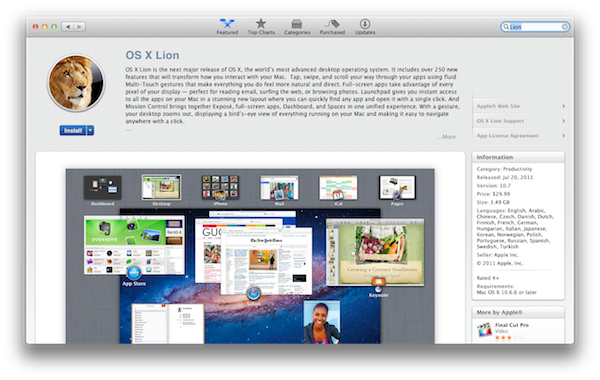
Apple Releases OS X Lion, USB Thumb Drive Coming at $69

As widely expected, Apple released the next major version of OS X, Lion, on the Mac App Store today. The new OS is now available at $29.99 as digital-only download and is propagating through all the international App Stores at the moment of writing this.

You can download OS X Lion here. OS X Lion Server is available as a separate add-on here.

Lion is a major upgrade to Apple’s desktop OS that introduces over 250 new features and blends several typical desktop UI elements with design concepts and implementations first explored on the iPhone and iPad. Indeed, at the “Back to the Mac” event in October 2010, Apple described Lion as “OS X meets the iPad”. The Launchpad, for example, is a new way to install, organize and launch apps that’s heavily inspired by iOS’ Springboard, which lays out app icons in a grid against a default background with possibility of creating, moving, and deleting folders. Mission Control, a new way to manage app windows, combines the best elements of Snow Leopard’s Exposè and Spaces to create a new experience that unifies windows, desktops and full-screen apps in a single, easy to use interface. Lion brings hundreds of changes and subtle refinements, most of them delightfully added throughout the whole operating system in apps like iChat and System Preferences, others immediately visible like “All My Files” and “AirDrop”, two new Finder features to browse all documents and share files locally with others, respectively.

Lion brings new functionalities and APIs that should make users and developers alike excited to try out the new OS. For instance, developers can enable the new Automatic Termination and Resume APIs in their applications to make sure the “state” of an app is always saved upon quitting, and resumed on the next OS boot or app launch. This behavior can be reversed, but it’s enabled by default to put the emphasis on an operating system capable of saving your work and “app state” without you even thinking about it – app state means anything from open windows to position on screen and mouse cursor. Similarly, the new Auto Save when combined with Lion’s Versions will allow you to never worry about “saving” a document again, and have the OS perform continuos versioning in the background that you can access from a new Time Machine-like UI. Versions allow you to restore a document’s previous changes and edits from any point in time since you first created it.

Lion is a milestone in Apple’s desktop OS history, and we’ll have a complete review, as well as a detailed installation guide, in a few minutes on our site’s homepage.

Update: In the official press release, also embedded below, Apple confirms that Lion will be made available on a USB thumb drive at $69 for users without broadband access.

Mac OS X Lion is available as an upgrade to Mac OS X version 10.6.6 Snow Leopard® from the Mac App Store for $29.99 (US). Lion is the easiest OS X upgrade and at around 4GB, it is about the size of an HD movie from the iTunes Store®. Users who do not have broadband access at home, work or school can download Lion at Apple retail stores and later this August, Lion will be made available on a USB thumb drive through the Apple Store® (www.apple.com) for $69 (US). Mac OS X Lion Server requires Lion and is available from the Mac App Store for $49.99 (US).

Read more


Apple Releases Migration Assistant Update Ahead of Lion’s Launch

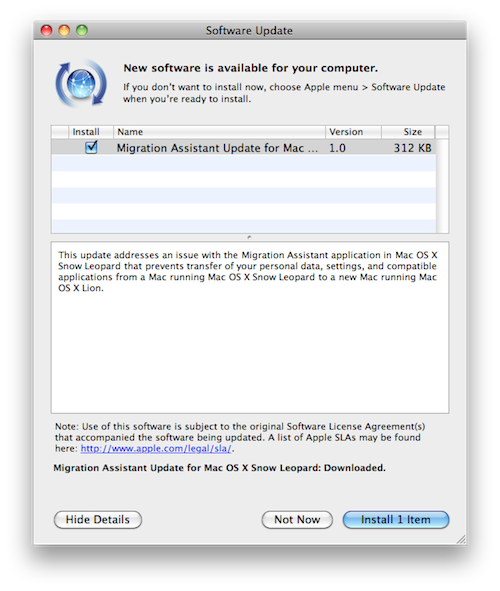
At the Q3 2011 earnings call, Apple confirmed OS X Lion is coming tomorrow on the Mac App Store. As noted by MacRumors, a few minutes before the call started Apple pushed an update for Migration Assistant to Snow Leopard users, fixing an issue that prevented the correct transfer of personal data and apps from a Snow Leopard computer to a Mac running Lion.

This update addresses an issue with the Migration Assistant application in Mac OS X Snow Leopard that prevents transfer of your personal data, settings, and compatible applications from a Mac running Mac OS X Snow Leopard to a new Mac running Mac OS X Lion.

The lightweight update can be downloaded now on Snow Leopard from Software Update, or directly from Apple’s website.


Apple Confirms: OS X Lion Coming Tomorrow

At the Q3 2011 earnings call, Apple just confirmed OS X Lion is launching tomorrow, July 20th. The OS will be available on the Mac App Store at $29.99.

OS X Lion is a major upgrade to Apple’s desktop operating system which introduces over 250 new user features and brings several interface and navigation schemes from iOS devices like the iPad, to the Mac’s multi-touch trackpad and desktop environment. Among the notable changes in Lion, also highlighted on Apple’s website, are the Launchpad and Mission Control, two new ways to launch and organize application and windows, respectively. Lion adds a new file sharing system called “AirDrop” baked into the Finder to share files and documents with nearby Macs, and the Finder itself has been finely tuned and improved to sport a more subtle window UI, new file and folder merging functionalities, and a new “All My Files” view that collects all the documents and media found on your computer in a single screen.

Lion also represents a big change for OS X developers: with new APIs and features like Sandboxing, Automatic Termination and Resume, app makers will be able to rewrite their software taking advantage of the new user experience enhancements brought by Apple to the desktop. For instance, apps can now automatically save their “state” upon quitting – meaning accidental shut downs and force-quits will no longer affect the document you were working on. Combined with Auto Save and Version, this opens to a lot more possibilities when it comes to dealing with documents stored on your computer.


Apple Q3 2011 Results: $28.57 Billion Revenue, 20.34 Million iPhones, 9.25 Million iPads, 3.95 Million Macs Sold

Apple has just posted their Q3 2011 financial results. The company posted record-breaking revenue of $28.57 billion, with 9.25 million iPads, 20.34 million iPhones and 3.95 million Macs sold. Apple reported record quarterly net profit of $7.31 billion, or $7.79 per diluted share. Wall Street consensus’ estimate was earnings of $5.80 per share and revenue of $24.92 billion. The company posted record quarterly revenue of $28.57 billion and record quarterly net profit of $7.31 billion, or $7.79 per diluted share.

In Q2 2011, the company said they expected revenue of about $23 billion and diluted earnings per share of about $5.03 in the third fiscal quarter of 2011.

From the results, iPhone is growing 142% year over year, and with 9.25 million units sold the iPad saw a 183% increase over the year-ago quarter. Apple sold sold 7.54 million iPods with a 20% unit decline. The third quarter has been the best non-holiday Mac quarter ever, best iPhone quarter ever, best iPad quarter ever. There are now 28.7 million iPads out there, including 14 million units shipped this calendar year.

In Q2 2011, the company posted revenue of $24.67 billion with 4.69 million iPads, 18.65 million iPhones and 4.69 million Macs sold. In the year-ago quarter, Apple posted revenue of $15.7 billion and net quarterly profit of $3.25 billion. The company sold 3.47 million Macs, 8.4 million iPhones and 3.27 million iPads, which began selling during the quarter.

Apple will provide a live audio feed of its Q3 2011 conference call at 2:00 PM Pacific, and we’ll update this story with the conference highlights. Full press release is embedded after the break. Read more


Official Google+ App for iPhone Now Available

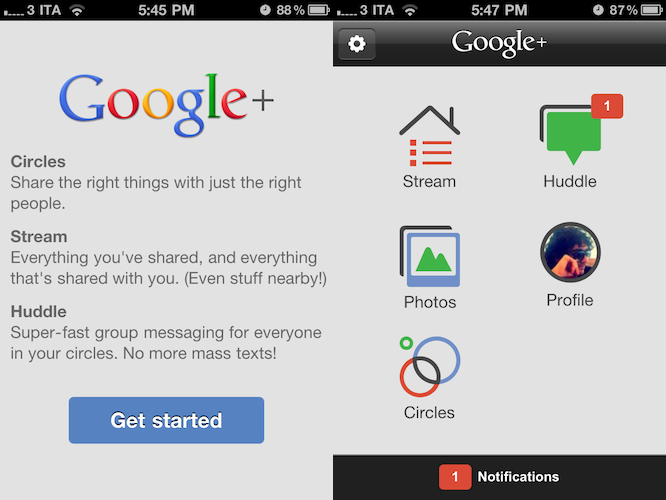
Google has just released the official Google+ app for iPhone on the App Store. The app is free and available here, and at the moment of writing this Google hasn’t updated its Mobile webpage to showcase the new app yet.

The Google+ iOS app provides a native interface to access much of the functionalities of the website, such as the Huddle group messaging feature – which was exclusive to Android devices prior to the app’s approval. The dashboard of the Google+ app presents a grid of icons to access the Stream, Huddle, Photos, your Profile and Circles, as well as a Notifications tab at the bottom that will open a vertical list of all your incoming notifications. Whilst much of the navigation seems to rely on web views optimized for the iPhone and fetched by the device, the animations when switching between sections are quite snappy and fast on iOS 4. Just like on the desktop, the Stream provides recent updates from the people you follow and your Circles, allowing you to check for new posts with the popular “pull to refresh gesture” and comment or +1 others’s posts. You can’t +1 from the home page – you have to open a single post and hit the + button in the upper right corner, while a text field at the bottom will let you leave a comment. You can also “mute” or “report” a post. The app is capable of sending push notifications for new comments, shares, and so forth. Read more


Lion Signage Appears At Italian Retailer Ahead Of Official Launch

As reported by Italian website Macity [a Google translation is not possible as Macity seems to have pulled the article before we could generate a link, Google cache here] the first promotional material for OS X Lion has been set up in advance at Italian retail chain Euronics in Taranto, at the Mongolfiera shopping mall. Whilst recent rumors have pegged the new OS for a Wednesday launch (tomorrow), Apple hasn’t confirmed any official release date, nor did they authorize retailers to showcase signage ahead of the much anticipated launch. It appears, as Macity reports, that employees at Euronics wrongly set up the signage before the rumored launch date, as machines spotted in the electronics section of the shopping mall haven’t even been correctly updated for Lion (they’re still running OS X 10.6.6, whilst 10.6.8 is a requirement to update to the new OS).

The signage touts Lion’s biggest new features such as multi-touch gestures, Launchpad and Mission Control. The banners say “Now on every new Mac”, reinforcing speculation that new computers will be released shortly after the new OS, running Lion by default as a rumor previously claimed. The banners also encourage users to try out Lion, heavily promoting with photos the various multitasking gestures enabled in the OS.

According to recent reports, Apple has shipped hard drives containing Lion to retail stores so that employees can install the OS on store floor machines. Others also report “overnights” are planned later today to train retail staff on Lion, and change in-store promotional material for the (alleged) launch tomorrow morning. New MacBook Airs (as well as new Thunderbolt-equipped Cinema Displays) are expected to launch alongside Lion as well.


Fantastical Adds Lion Support, And We’re Giving Away 10 Codes

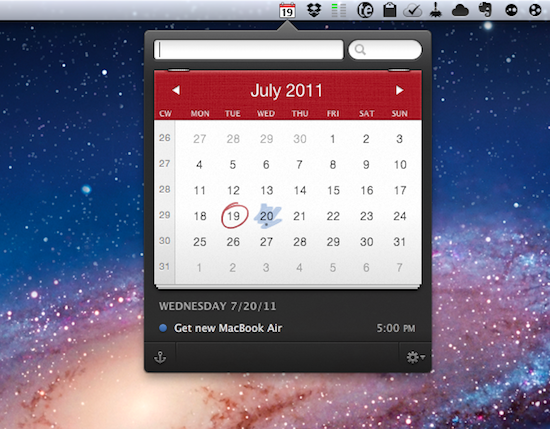
Fantastical is a calendar assistant that works with Apple’s iCal and the popular third-party BusyCal software, allowing you to quickly creates event in your default system calendar with plain English. Thanks to a built-in natural language parser, Fantastical lets you write down something like “Get a new MacBook Air tomorrow at Apple Store at 5 PM”, and see the sentence becoming a new event with all the necessary fields already filled in your calendar. And because Fantastical directly plugs into calendar accounts configured on your Mac, you won’t need to enter your information again.

Fantastical 1.0.3, released today, adds full Lion compatibility and a new Lion-only feature that allows you to swipe with two fingers to move between months in the calendar. The animation is really nice, and reminds me of Safari’s new feature for navigating webpages with a two-finger swipe on Lion. Among various bug fixes, Fantastical also adds a new color menubar icon preference, a last-selected calendar option, and several parsing engine fixes.

You can read our initial review of Fantastical here, and buy the app from the Mac App Store. However, the Flexibits developers have been kind enough to offer 10 promo codes to celebrate the next major release of OS X with MacStories readers, so if you’re interested in the giveaway jump after the break for the full details of how to enter. Read more


Sparrow 1.3 Brings Lion Support, Interface Changes

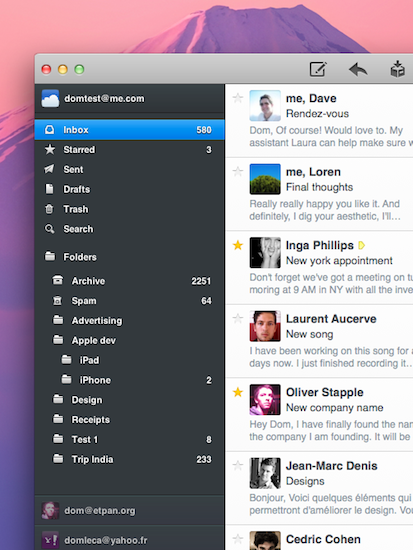
Sparrow started out as a minimal, Tweetie-like email experiment for Mac back in October of last year and, following the success of the public beta, eventually evolved into a powerful desktop solution to access Gmail and IMAP email accounts using new interface concepts inspired by iOS apps, Mac gems like Twitter and Reeder, or other changes previewed by Apple in Lion. As we reported in our previous coverage, the latest big update to the app, Sparrow 1.2, went as far as adding social support with Facebook integration,  Gravatar support, and more.

Sparrow 1.3 was approved yesterday, but the developers had to quickly pull it from sale as a critical bug that caused the app to crash was discovered. After apologizing for the technical error and uploading a patched version for non-Mac App Store users, the team announced a fix had been already submitted with the request of an expedited review from Apple. Personally, I updated to Sparrow 1.3 yesterday and didn’t experience any issues, but I decided to hold my coverage until the promised fix would be available on the App Store – more importantly, the entire app had to come back on Apple’s servers as the developers pulled it to make sure no one would install a “buggy” version. Read more