Federico Viticci

10765 posts on MacStories since April 2009

Federico is the founder and Editor-in-Chief of MacStories, where he writes about Apple with a focus on apps, developers, iPad, and iOS productivity. He founded MacStories in April 2009 and has been writing about Apple since. Federico is also the co-host of AppStories, a weekly podcast exploring the world of apps, Unwind, a fun exploration of media and more, and NPC: Next Portable Console, a show about portable gaming and the handheld revolution.

Apple Releases iOS 5.1 Beta 3

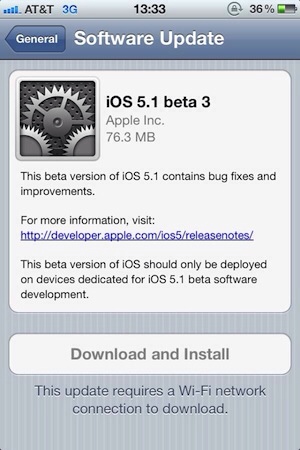
As noted by MacRumors, Apple has released a few minutes ago the third beta of iOS 5.1 to developers. The new beta comes almost a month after iOS 5.1 beta 2, which was released on December 12. Currently, it appears beta 3 is only showing up as over-the-air update with the Developer Center still reporting beta 2 as the latest available.

The new beta carries build number 9B5141a. The first two betas of iOS 5.1 brought bug fixes and minor new features to the operating system, and it’s still unclear whether Apple may be planning to add more functionalities throughtout various betas seeded to developers.

We’ll update this post with relevant information in case it becomes available. iOS 5.1 beta 3 should become available on the iOS Dev Center shortly.


Vimeo for iPad Previewed, Coming “Later This Month”

Originally released on the iPhone back in March, today web video platform Vimeo confirmed a major update for the iPhone client, as well as a brand new app specifically designed for the iPad are in the works and should become available “later this month”. The Verge has posted an initial preview of the iPad version, which sports a completely new design, various sharing options, and the built-in video editor that was introduced with version 1.0 for iPhone and iPod touch users.

The Vimeo iPhone app, in fact, besides allowing you to access your Vimeo account and thus check on liked videos, “watch later” queue and items from Vimeo’s popular picks, packs a rather impressive video editor to adjust media on the go and upload directly to the service without using a computer.

Vimeo is also launching apps for Android smartphones and tablets and Windows Phone 7, and it looks like interface-wise, Android and iOS users are at least going to share the same “dashboard grid” paradigm made popular by Facebook and several other iPhone apps.

Judging from the screenshots posted by The Verge, it appears Vimeo for iPad will allow for both shooting and browsing within the same app; similarly to the iPhone app (whose update hasn’t been revealed just yet), iPad users will be able to browse featured videos, liked items, subscriptions, videos saved for later and personal uploads.

Vimeo for iPhone is currently free and available on the App Store.


Slippery slopes

Slippery slopes

Good response by Marco Arment to my counterargument to his post about auto-renewal subscriptions and iOS technologies Apple doesn’t open up to developers (or at least the majority of them). I particularly like his proposed solution for Newsstand Kit’s push notification applied to other apps:

Newsstand Kit’s background-wakeup push notification can only fire once a day, and background NKAssetDownloads only work if the device is on Wi-Fi and has a healthy battery charge. So give all apps the ability to receive that background-wakeup push notification once a day, as long as the user has granted them permission to use push notifications. Then let them update or download whatever they can do in the 10 minutes that they’re allowed to run in the background. And if the system decides to terminate them during those 10 minutes for any reason, that’s fine, too.

Even without NKAssetDownloads, and even if Wi-Fi was required, this would be a huge benefit. Unlimited-time NKAssetDownloads are only required by magazines because so many of them are ridiculously bloated at hundreds of megabytes per issue, but a huge class of apps could download everything they need in a few hundred kilobytes over a few minutes, at most.

I still think auto-renewable subscriptions should be limited to a specific set of apps (and Apple must be clear about that – enough with the unwritten rules), but I have to say I’m intrigued by the idea of smaller lightweight downloads now.

Permalink

How Many iPhones Did Apple Sell In Q1 2012?

Philip Elmer-Dewitt reports on analysts’ expectations for iPhone sales in Apple’s first financial quarter of 2012 (which ended last week):

The numbers from the 22 Wall Street analysts who have responded so far to our call for estimates range from a high of 35 million iPhones from BTIG’s Walter Piecyk to a low of 25.2 million from Gabelli’s Hendi Susanto. The average among this group is 29.74 million, which would represent a year-over-year increase of 83%.

The average among our panel of 15 independents – an assortment of bloggers, enthusiasts and individual investors – is 33.42 million iPhones, or an annual increase of nearly 106%. Among this group, the estimates range from a high of 35.75 million from Posts at Eventide’s Robert Paul Leitao to a low of 30.17 million from Alexis Cabot of the MacObserver’s Apple Finance Board.

To put these predictions in context, here’s how Apple performed in its previous Q1s:

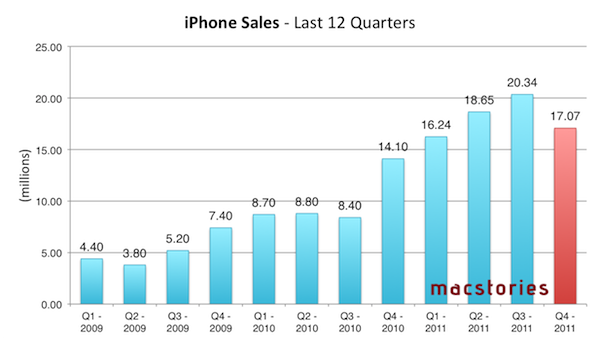
And here’s a graph showing every iPhone quarter to date:

Predictions for Q1 2012 (results will be announced on January 24) now range between 25.2 million and 35.75 million iPhones sold. Either way, it’s going to be a “blow-out quarter” for iPhone sales – even if we consider Apple’s Q3 2011, the biggest ever for iPhone sales to date with 20.34 million units sold.

It’ll be interesting to observe how Asia-Pacific will perform in relation to iPhone sales, too, as Apple reported overall sales more than doubled in Q4 2011. As for Q1 2012 itself, Apple CEO Tim Cook said they were confident to have enough 4S supply to go through the holiday season, and also confirmed the company was expecting record iPhone sales for the quarter with revenue guidance set at $37 billion (Asymco’s Horace Dediu, however, expects revenue to hit $44 billion).


Apple’s “Targeted Enhancements”

Marco Arment, writing about iOS’ Auto-Renewable subscriptions, which appear to be exclusive to apps that deliver “new content” during each renewal period:

Ultimately, I had to ship Instapaper 4.0 with non-renewing subscriptions, I was able to delete all of the clunky auto-renewing server code, nobody sees that terrible dialog in my app, and I need to ship an update soon that will annoy my best customers with manual-renewal notifications.

But this is a great example, like Newsstand Kit’s background downloads, of Apple adding a capability to iOS that’s potentially useful to thousands of developers, and then restricting it so that only a handful of players (usually big companies) can actually use it.

I hope that, in time, they unbundle some of these myopically targeted enhancements and make them potentially useful to all developers. But Apple’s record on this isn’t great so far.

Marco is right – auto-renewable subscriptions are easy to use (and understand) and more developers should get access to it. Imagine being able to subscribe to Instapaper through iTunes, or getting your Evernote Premium account billed automatically every year or month, instead of having to purchase it manually (as it happens now). But I could argue that, at the same time, new technologies like Newsstand Kit’s background downloads (described here) and auto-renewable subscriptions are more of a conceptual and technical issue for Apple rather than a “limitation” imposed to developers. Imagine if every app in the Store went free, and started billing users periodically for “usage”. That would create an unrealistic ecosystem of free apps with in-app subscriptions for all kinds of content. I’m not saying apps like Instapaper shouldn’t get access to auto-renewable subscriptions – it actually seems like a perfect fit to me – but I believe that instead of going on a case-by-case basis, Apple decided to roll out the feature for “publishers of new content” first. That’s easier to scale.

It gets murkier with the background downloads of Newsstand. Periodicals and newspapers get this neat implementation of automatic downloads of new issues. Would a third-party app like Instapaper benefit from it? Sure. Imagine being able to have your Instapaper queue delivered to you wirelessly, each morning, instead of having to download it manually (which takes seconds but it’s still a manual action). That’d be great. Or the aforementioned Evernote, which could, in theory, figure out a way to push changes from its remote database once per day without a user’s direct action (case in point: I add a lot of items to Evernote on my Mac overnight, I see all the changes automatically pushed to my iPad the next morning). Again, I believe some apps should get this functionality for increased usability and overall enjoyment of the user, but there are exceptions I’m fairly certain Apple considered. What if every developer of every app starts implementing background downloads for remote content? Even once per day, for every app, it can be  a lot of data. And when you add data caps to the mix and start imagining games that can download new levels remotely on 3G…not good.

Obviously, if we follow this argument – that every developer should get access to the latest technologies used by Apple, or that at least some developers should be able to – we could say that Apple did figure out solutions in the past to avoid problems with, say, data caps and 3G downloads. Granular controls, like “Use Cellular Data” in the Store’s Settings, or the common limit of 20 MB for App Store downloads on 3G. But again, imagine a scenario where every developer gets to implement subscriptions or background downloads. Is the user supposed to go through a list of 100+ apps and switch every single one of them to “off” for background downloads? And if the list is a bad idea, and we argue again that only some apps should get these features – why, say, just Instapaper or Evernote? Why not Infinity Blade II?

Last, it is true Apple doesn’t have a great record for bringing iOS’ enhancements to third-party developers in a short period of time – but keep in mind that the iPhone launched without multitasking and background applications and eventually got one of the best implementations of multitasking out there and background tasks (for some apps) up to 10 minutes. The other side of the coin, obviously, is that third-party apps can’t run in the background all the time like Apple’s Music app - but the same question rises again: can you imagine every single developer doing that? (Speaking of enhancements in Apple’s apps: I expect Mail’s rich text controls to be opened up next to developers for integration. And did anyone mention Siri?)

In the past four (almost five now) years, Apple has taught us (and the industry) that iOS isn’t about big press releases and revolutions as much as it’s about incremental progress, iterative improvements and refinements. Apple rolls in its very own way, and looking back at the differences between iPhone OS 1 and iOS 5, it’s clear that a lot of work went into all the updates and fixes and changes that got us this.

Developers rightfully want access to cool new features as soon as they’re available (especially when they seem such a good fit) and users are always eager to see the latest software functionalities implemented in delightful new ways, but the App Store’s ecosystem is so variegate and unique that sometimes waiting is the best option.


Mac App Store: Year One

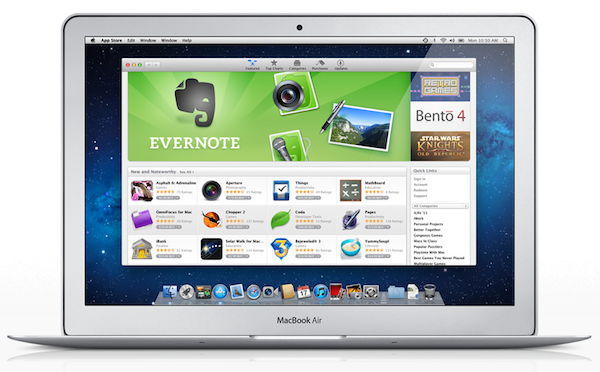
One year ago today, Apple’s Mac App Store officially opened for business. Bundled into Snow Leopard’s 10.6.6 software update, and later installed by default on OS X Lion, the Mac App Store is a native, built-in marketplace for third-party developers and Apple’s own software. Just as the iOS App Store has contributed to the solidification of a software ecosystem built around iPhones, iPods and iPads in the past three years, helping “indie” as well as bigger developers achieve a sustainable business model in selling smartphone and tablet apps, in the past 365 days the Mac App Store has quickly reshaped and fundamentally changed the OS X software landscape and users’ perception of “desktop apps”.

It’s not absurd to say many didn’t even know it was possible to “install apps” on a Mac before the launch of the Mac App Store. What the Mac App Store did – besides allowing long-time Mac users and developers to consolidate their software library in a single place and provide them with a better way to discover and showcase the latest indie hit – is it finally created a viable and consumer-friendly way to find and buy apps. Before the Mac App Store, the average Mac user could get work done easily with just Safari and Mail because he or she knew those were all the apps a Mac came with. Great apps, for sure, but just those apps. The Mac App Store, just like the iOS App Store, opened a whole new portal for users and a market for developers (and a way for Apple to break even on costs with a 30% cut) to know a completely new world made of utilities, productivity apps, games, news readers and more. The Mail aficionados of 2010 have likely jumped over to Sparrow, and those who swore by Preview perhaps have found something more attractive in Pixelmator 2.0.

With 100 million downloads under its belt and Apple’s latest major OS X revision, Lion, available digitally, there’s no denying the Mac App Store had a great run in 2011. Here’s a look back at these 365 days, and how the Mac App Store we know today (quickly) came to be. Read more


Google Translate for iOS Updated with iPad Support

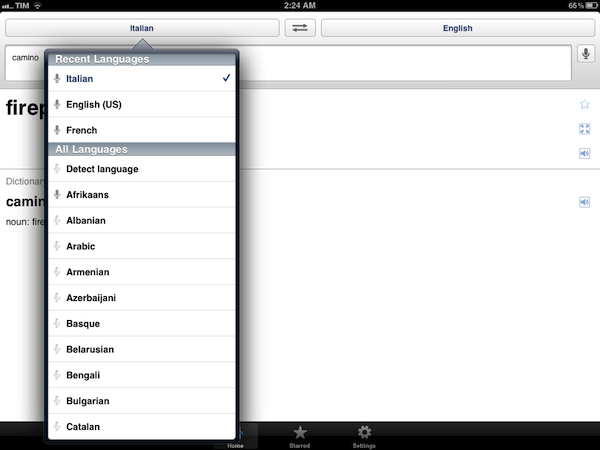
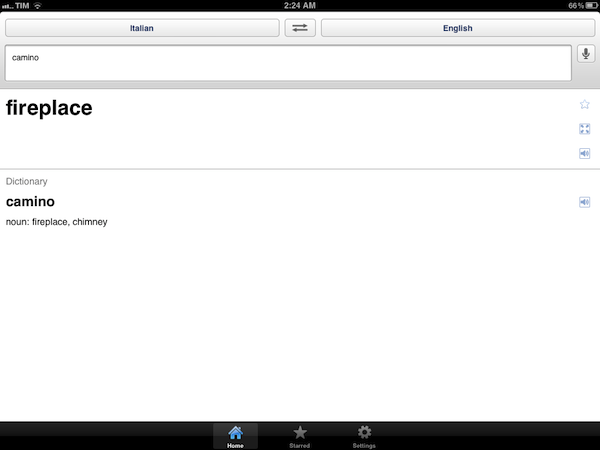
Previously available exclusively for iPhone and iPod touch owners, earlier today Google updated its official Google Translate iOS app to include a native interface for the iPad. The updated Google Translate, available here, heavily resembles its iPhone counterpart with larger interface elements ported to the iPad’s screen – there are three tabs at the bottom to switch between translations, favorite items and Settings, a microphone icon to speak directly into the device’s mic, and you can choose between multiple languages from a popover menu.

Unlike the surprisingly refreshing (for Google’s iOS standards) Google Search app, it appears Google Translate didn’t receive any particular iPad treatment in the conversion process.

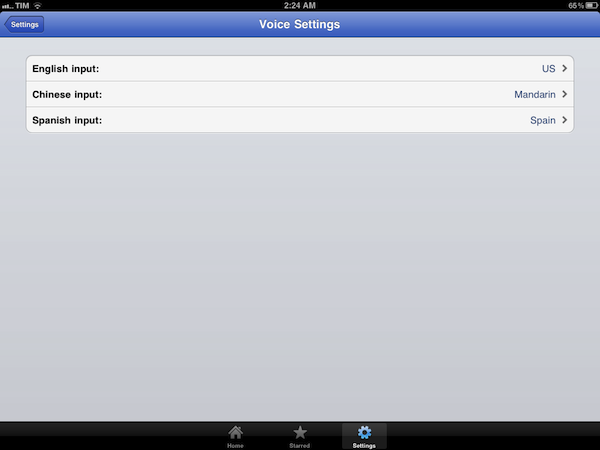
Among the lesser known features of the app, you can specify input for English, Chinese and Spanish languages, display translations in full-screen mode, and tap on results for text-to-speech.

Google Translate 1.3 (changelog simply reads “Added support for iPad”) is available for free on the App Store.


Finding Song Lyrics On Mac & iOS

In spite of iOS devices having good support for song lyrics in Apple’s Music app and the Mac surely not lacking access to song information with iTunes and a variety of third-party apps, until last week I didn’t have a quick and effortless way to check on the lyrics of the songs I was listening to through my setup. The problem with lyrics, in fact, is that whilst iTunes allows you to import them and have them properly synced to an iPhone or iPad, those of you who, like me, have decided to shift their listening habits to streaming services like Rdio and Spotify might be out of luck when it comes to humming along the latest Coldplay hit.

Being all about access, services like Rdio and Spotify (and MOG and Deezer, to name a few alternatives) often forgo the need of having a “complete package” for the music you’re paying a monthly fee for, focusing on streaming and leaving additional information like artists’ bio, photos, videos and, yes, lyrics as second citizens on the feature checklist. Which may be regarded as a rather anachronistic choice, considering the interconnectedness these web-based services offer through APIs, web apps and add-ons. Probably also because of lyric rights being treated differently from music streaming rights by labels and publishers, services like Rdio still don’t provide users with an integrated way to check on the lyrics of the song (or entire album) they’re streaming.

The flourishing of streaming services and their obvious lack of lyrics integration has lead, I believe, to a decent if not considerable increase in Google queries for lyrics websites, which are many, often ugly, yet still the best option you’ve got if you want to know what a song is saying. These websites are generally crammed with ads, ringtone adverts, and a plethora of additional information most users looking for the latest Adele single won’t ever need. These websites are awful to navigate. The fact that a Google suggestion for “lyrics website without ads” even exists is telling.

For the reasons listed above, and because I’ve been on a Rdio collection-and-playlist building spree lately, last week I set out to find the simplest iPhone, iPad and Mac apps to give me lyrics for the songs I listen to every day. My requirements were pretty basic:

  • Rdio support
  • iTunes support (just in case)
  • Decent UI
  • Easy to use
  • A search box

As it turns out, I’ve only found three apps that might work for me in the long term. As I tweeted yesterday, the big player in the iOS music-recognition scene, Shazam, doesn’t offer the same amount of functionality of its popular iPhone app (I use Encore) in its iPad client, which is surprisingly poor and limited. You’d expect Shazam to have some kind of deal or API integration with Spotify and Rdio (and, again, possibly others), but they don’t. Shazam offers a “Play on Spotify” command, but to me it looks like they’re missing big time on the music streaming front by only providing access to microphone recognition and manual search. The same is true for Shazam’s biggest competitor, SoundHound; I could be wrong about the API offered to developers by the likes of Spotify and Rdio, but I’m firmly convinced these companies should figure out a solution together if they want to reach the millions of users that are increasingly streaming music, and want to know more about it. Still, both Shazam Encore and SoundHound (universal app) offer basic lyrics support with manual searches; the third app I’ve installed is a very simple utility called Instalyrics, which is a paid app that works on the Mac and iOS with integration between the two.

Here’s a quick look at how these three apps provide lyric access. Read more


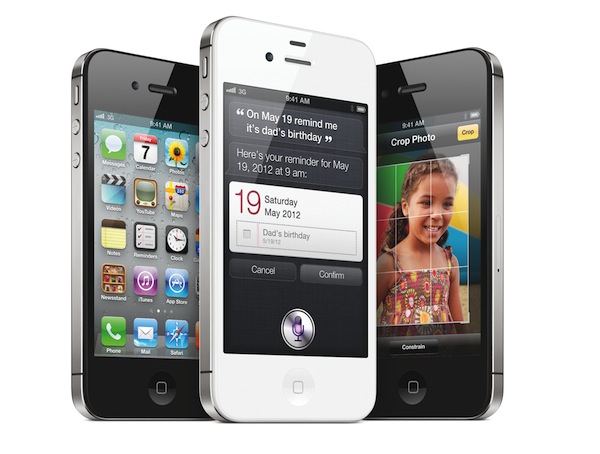
iPhone 4S Launches In China and 21 Additional Countries On January 13

With a press release, Apple announced that its latest iPhone model, the iPhone 4S, will be available in China and 21 additional countries on Friday, January 13. Making it the fastest iPhone rollout to date, the iPhone 4S will be available in over 90 countries by next week; Apple targeted a launch in 70 countries by the end of 2011.

Customer response to our products in China has been off the charts,” said Tim Cook, Apple’s CEO. “With the launch in China next week, iPhone 4S will be available in over 90 countries making this our fastest iPhone rollout ever.

On January 13, the iPhone 4S will become available in: Anguilla, Antigua and Barbuda, Bolivia, Botswana, British Virgin Islands, Cameroon, Cayman Islands, Central African Republic, China, Dominica, Dominican Republic, Ecuador, Grenada, Guam, Guinea Conakry, Ivory Coast, Jamaica, Kenya, Madagascar, Mali, Mauritius, Niger, Senegal, St. Vincent and The Grenadines, Trinidad and Tobago, Turks and Caicos and Uganda.

Since its introduction in October, the iPhone 4S has seen a steady rollout to meet Apple’s expectations of availability in 70 countries by the end of 2011. Just as U.S. carriers were reportedly struggling to meet the 4S’ demand and Apple launched an initiative to reserve a model for in-store pickup, the device launched in Hong Kong and South Korea, several countries in Europe and India. At the same time, Apple began selling unlocked iPhone 4S units in the United States, and confirmed they were “very pleased” with the initial demand for the device.

In October, it was reported the 4S sold 4 million units in its first weekend. Apple hasn’t disclosed new numbers since, but the company is expected to reveal financial results for the past quarter on January 24, where they’ll likely give out new pieces of information regarding the 4S’ performances in different markets. As a side note, Apple’s press release doesn’t include any details on the carrier(s) that will support the 4S in China, which has been an ongoing source of speculation among rumor sites and Apple watchers in the past few months due to China Unicom’s (the country’s second largest carrier) reported interest in the 4S.