Federico Viticci

10765 posts on MacStories since April 2009

Federico is the founder and Editor-in-Chief of MacStories, where he writes about Apple with a focus on apps, developers, iPad, and iOS productivity. He founded MacStories in April 2009 and has been writing about Apple since. Federico is also the co-host of AppStories, a weekly podcast exploring the world of apps, Unwind, a fun exploration of media and more, and NPC: Next Portable Console, a show about portable gaming and the handheld revolution.

Apple’s Q1 2012: Quarter Recap and Estimates

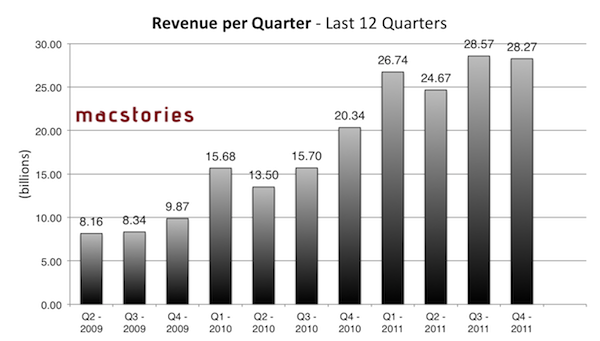
At 2 PM PT, Apple is set to announce its financial results for the quarter that ended on December 24th, 2011. According to several analysts polled in the past weeks and Apple’s own guidance for the quarter, Q1 2012 is on track to become Apple’s biggest quarter to date both in terms of sales (with expected record iPhone and iPad sales) and revenue. Until today, Apple’s most profitable quarter has been Q3 2011 with $28.57 billion revenue. Below, we’ve compiled a breakdown of Q1 2012 estimates with a recap of what happened during the quarter.

Estimates and Previous Quarters

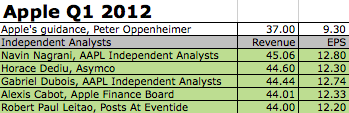
During last quarter’s earnings call, Apple said they were expecting $37 billion in revenue and diluted earnings per share of around $9.30 for this quarter. As Apple’s guidance for future quarters is historically low and conservative, the already high projection of $37 billion led bloggers to speculate Apple’s Q1 2012 would be a blowout quarter; some analysts, on the other hand, usually don’t pay attention to Apple’s guidance as the company lowballs expectations for the upcoming quarter.

Analysts and bloggers polled in the past few weeks had different takes on what Apple will report later today. Some of them, such as Robert Paul Leitao, Horace Dediu and Navin Nagrani projected revenue above $44 billion with iPhone sales of 34-35 million units and iPad sales in the range of 13 million units; as we reported three weeks ago, Asymco’s Horace Diedu estimates that Apple will report earnings of $12.3 on revenues of $44.6 billion, with the street price aiming at $9.75 EPS on $37.99 billion. As Philip Elmer-Dewitt also noted, analysts’ estimates need to be taken carefully, as several of them were released after the previous quarter’s results, and were never updated reflecting changes that took place through the quarter (such as fluctuating iPhone demand and international product launches).

Fortune’s comprehensive list of estimates for Q1 2012 is available here.

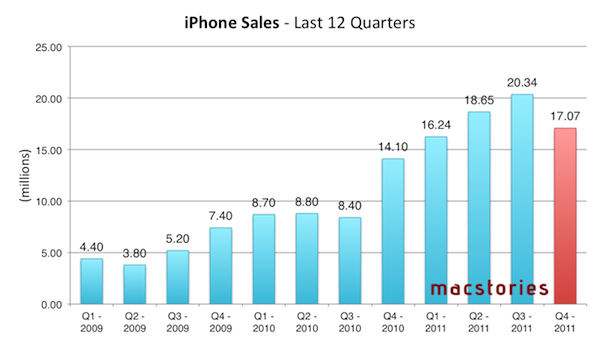
As far as iPhone sales are concerned (in Q4 2011, the device accounted for 47% of Apple’s revenue), this quarter will see Apple finally providing some actual insight into the iPhone 4S’ performance on the market. The device is well-regarded as a success on various international markets and the United States, but the only real numbers Apple posted referred to the opening weekend. Predictions for Q1 2012 go as high as 35 million units sold (those would indicate cumulative sales for iPhone 4, 4S and 3GS, not just the iPhone 4S), with an approximate figure of 30 million units sold being shared the majority of analysts and bloggers.

According to Nielsen, the launch of the iPhone 4S had an “enormous impact” on smartphone owners:

Among recent acquirers, meaning those who said they got a new device within the past three months, 44.5 percent of those surveyed in December said they chose an iPhone, compared to just 25.1 percent in October. Furthermore, 57 percent of new iPhone owners surveyed in December said they got an iPhone 4S.

This morning, Verizon Wireless reported 4.2 million iPhone activations. Reuters wrote Verizon’s ”business was hit by the high costs of sales of advanced phones such as the Apple Inc iPhone.”


In Q4 2011, Apple posted revenue of $28.27 billion, with 11.12 million iPads, 17.07 million iPhones and 4.89 million Macs sold. The company posted quarterly net profit of $6.62 billion, or $7.05 per diluted share. iPhone represented a 21 percent unit growth over the year-ago quarter; iPod sales were down 27 percent from the year-ago quarter, and Apple reported the best iPad quarter to date with over 11 million units sold and a 166% increase over the year-ago quarter. In the year-go quarter, Apple posted revenue of $26.74 billion with 7.33 million iPads, 16.24 million iPhones and 4.13 million Macs sold. Read more


A5 Jailbreak Reaches One Million Downloads in 24 Hours [Updated]

According to developer and hacker Joshua Hill, the latest jailbreak for devices running Apple’s A5 processor has been downloaded more than one million times in one day, Cult of Mac reports. The new jailbreak – dubbed Absinthe – was released for Mac OS X on Friday after months of speculation as to whether it was possible to hack into Apple’s new CPU architecture. The Absinthe jailbreak supports the latest version of iOS, iOS 5.0.1; iOS 5 was released in October, and users of iPhone 4S and iPad 2 have been waiting for a fully untethered jailbreak solution compatible with their devices since then.

According to Cult of Mac, one million downloads were achieved on Mac OS X alone as a Windows version of the jailbreak was released after the initial 24 hours. As Alex Heath notes, this figure is noteworthy as it seems to confirm that interest in jailbreaking devices hasn’t died down after the release of iOS 5; the operating system introduced more than 200 new features for iPhone and iPad as we detailed back in October. If anything, it was iOS 5 itself that led developers to create new apps and tweaks that are taking advantage of the latest features offered by Apple such as Notification Center and Twitter integration.

To put the A5 jailbreak’s numbers into context: one million downloads were reached in 24 hours by JailbreakMe 3.0 as well when it came out for iOS 4 devices last summer. Currently, the Absinthe jailbreak is available for OS X and Windows machines over at Greenpois0n.com.

Update: With a tweet, MuscleNerd says that 205,000 new Cydia accounts were created by Sunday morning, suggesting that a large percentage of Absinthe early adopters were users who had jailbroken their devices in the past, thus likely already having a Cydia account. See update below.

Update #2: Whilst we assumed “new Cydia installs” referred to the amount of new accounts created last weekend, MuscleNerd has clarified the figure indicates how many times Cydia was launched on a unique A5 device.

Update #3: Cydia creator Saurik chimes in with more numbers, clarifying that 205,000 were the iPhone 4S units with Cydia until Sunday morning.

Update #4: And last, the Dev-Team has published a blog post with the official numbers since Friday morning:

  • 491,325 new iPhone 4,1 devices (4S)
  • 308,967 new iPad 2 devices
  • 152,940 previously jailbroken (at 4.x) iPad 2 devices

For a total of 953,232 new A5 jailbreaks in over three days. At this point, if the previous 1 million/24 hours figure is to be believed, it’s possible 1 million downloads actually happened in 24 hours, but many users couldn’t immediately run Absinthe due to the server problems that affected Greenpois0n.com.


Preview: Analog 1.1 Launches Tomorrow With New Photo Options, Filters

When I reviewed Realmac’s Analog, a lightweight photo sharing app, back in September, I was impressed by the execution of a simple concept – applying filters to your photos to share them online – that was made popular on iOS by apps like Instagram and Camera+. From my review:

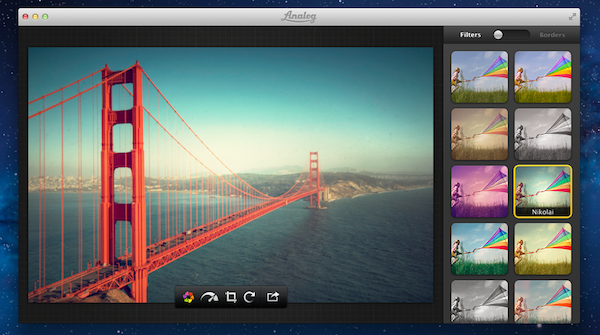
Analog offers 20 filters, which have been carefully researched by Realmac over the past months to make sure each one of them has its own personality (something we know that matters in this kind of apps) and will make your photos look great. Now I’m no photography expert, but I can recognize a nice filter when I see it. Analog’s filters range from washed out (Hefga, Golden Hour) to black & white (Noir, Dark Knight, Bromide — three B&W variations with different grey scales and contrast) to contrasty (Memory, XProcess) and other interesting options that I can’t quite classify (Kyoto, Hawkeye). Analog’s filters look good, and I definitely like the choice of 20 different filters offered by Realmac. You might argue some of them look similar to each other, but the developers have also implemented a system that ensures scratches, noise and other effects are always randomized on each processing session.

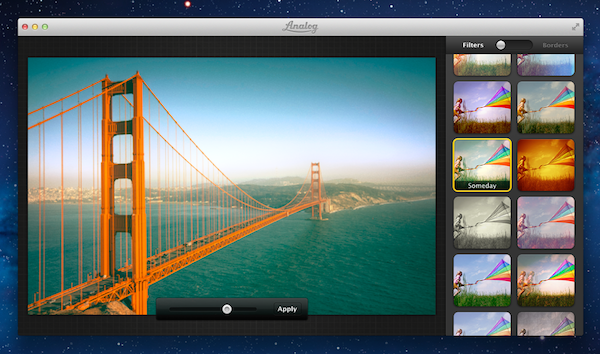
I had a chance to try out a pre-release version of Analog 1.1, which is coming out tomorrow, and it looks like those who liked the workflow and polished design of version 1.0 might have to hit the Mac App Store’s Update section as soon as the app goes live. Analog 1.1 improves on several aspects of the first version: performances and memory management have been improved, making the app snappier and more responsive when adding filters and switching between edited and non-edited versions of a photo.

The update will bring three new filters (I tested them, they look good), two new borders, and, more importantly, a new slider to adjust the intensity of your chosen filter. In my tests, this has turned out to be quite handy to manually refine the amount of modifications I wanted to make to an image. Obviously, Analog 1.1 retains the filter randomization capabilities of the previous version (so that scratches, noise and other effects are randomized on each processing session) and all the other features that made Analog 1.0 intuitive and fun to use.

Analog 1.0 is currently available on the Mac App Store at $6.99. Analog 1.1 will be available tomorrow (January 24th) as a free update for existing Analog customers.


An Experiment with Comics, iBooks 2.0 and iBooks Author

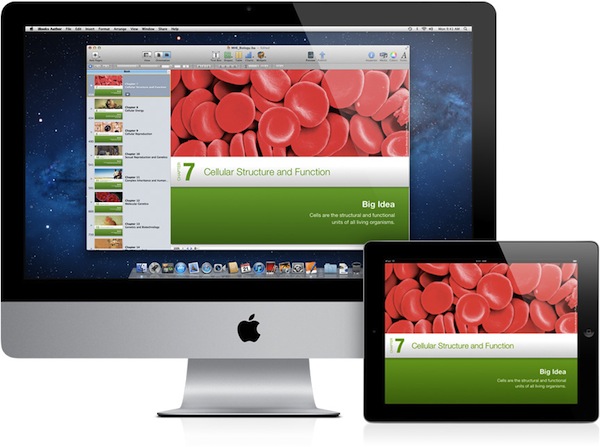
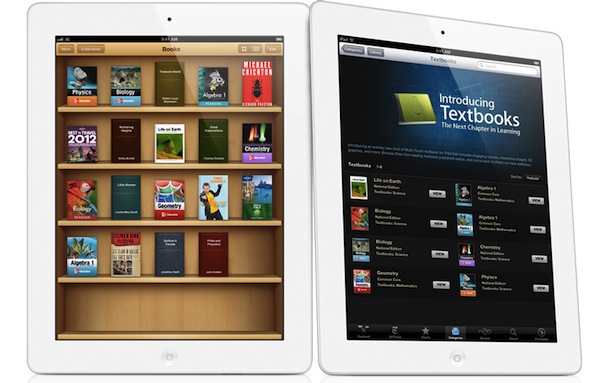
Last week, Apple unveiled its iBooks Textbooks initiative alongside a new desktop application for OS X, iBooks Author, aimed at offering a single solution for authors willing to edit and design iBooks for the iBookstore or manual distribution through exporting options. Some limitations of iBooks Author have sparked a debate that we’ve covered extensively on MacStories last week, also through articles in our Reading List.

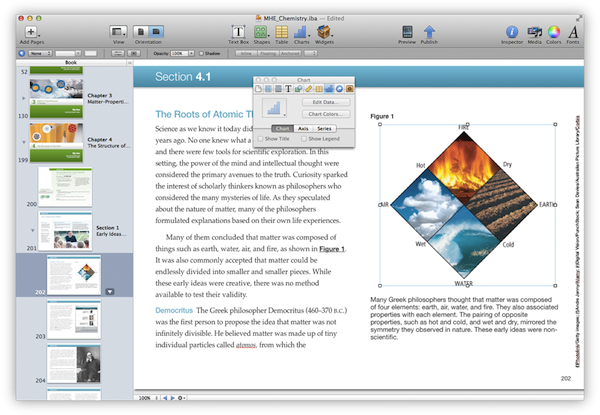
Proprietary file format controversies aside, it was already clear that iBooks Author would undoubtedly facilitate the creation of textbooks and eBooks heavily relying on graphics with its easy-to-use align tools and familiar interface.

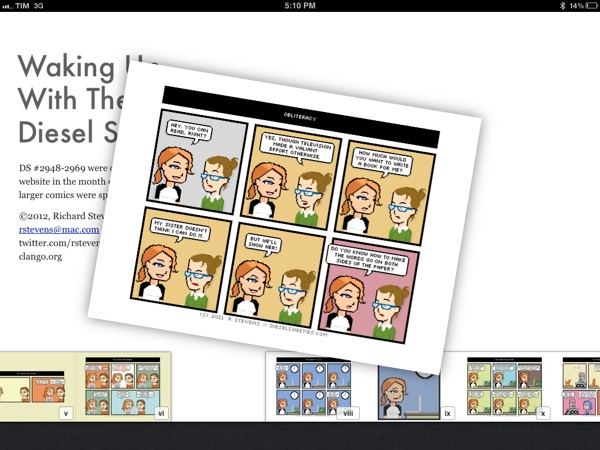
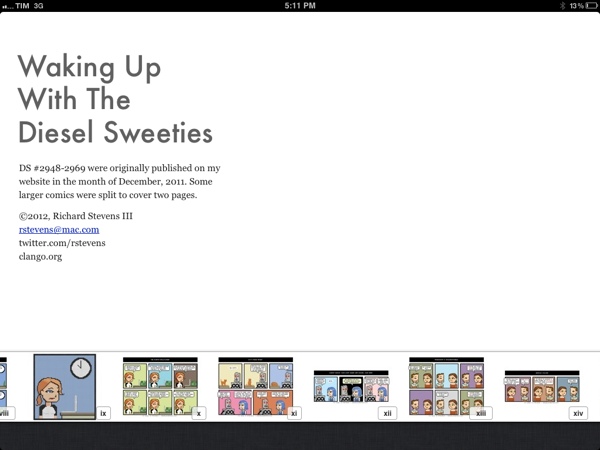
Today, cartoon and t-shirt designer Richard Stevens has published an iBooks adaptation of its popular webcomic series that’s been entirely converted and tweaked using iBooks Author as an initial experiment.

Waking Up With the Diesel Sweeties is a tiny little free ebook for the iPad. It contains all my comics from last month with a few tweaks, formatted in iBooks Author. This version only works on the iPad. It’s not in the iBookstore, so you’ll need to download the file and sync it to your iPad.

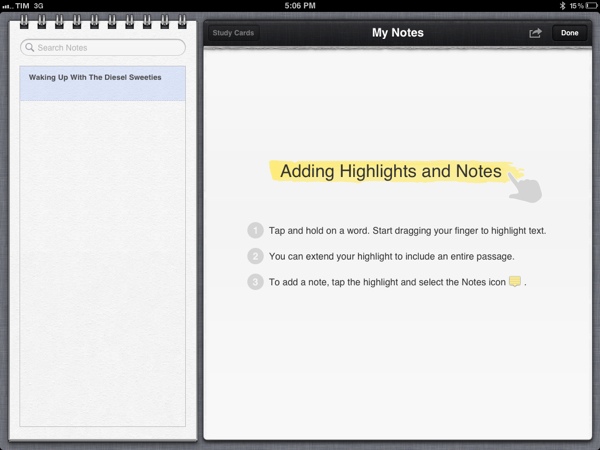
The eBook is available for download through Dropbox, and it can be installed on an iPad running iBooks 2. You can manually sync the file from iTunes to your iPad, or use an app like GoodReader to download it directly on your device and open it in iBooks. Whilst Stevens’ first iBook is an experiment, it shows the possibilities opened by iBooks 2 and iBooks Author: the book fully supports iBooks’ new annotations, highlights and study cards, and you can pinch on pages to access iBooks’ new navigation with thumbnails displayed at the bottom of the screen.

I wrote last week that I wouldn’t be surprised to see iBooks Author-based eBooks be used for something else other than regular books – for instance, I’ve heard more than one developer say that they’d be interested in using the software to create interactive manuals and help tools for their apps, among other things. iBooks Author may have been criticized and there’s still a lot of features Apple has to clarify and implement (especially for independent authors and publishers), but the interactivity and WebKit-based functionalities offered by the format look more promising every day.


Review: Logitech Tablet Keyboard for iPad

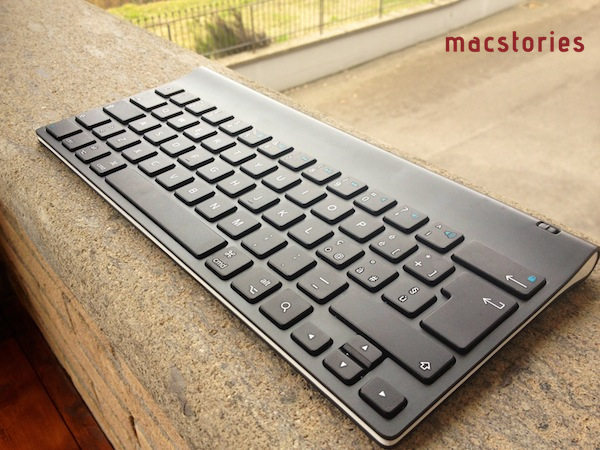
As I mentioned in my post about new apps and tools for 2012, I’ve been playing around with a Logitech Tablet Keyboard for iPad, which is available at $69 through Logitech’s website or $59 on Amazon. The Tablet Keyboard connects to the iPad (or any iOS device) wirelessly over Bluetooth, comes with built-in batteries, a carrying case that can be turned into a stand for the iPad, and media keys that trigger some of the tablet’s functions such as audio controls and Spotlight. Here are my impressions so far.

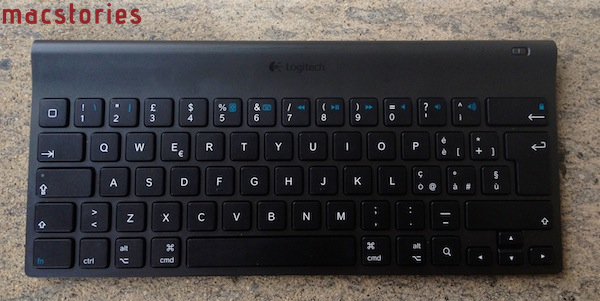
Normally, I wouldn’t have much to say about a keyboard except for “it’s comfortable” or “I can’t type anything on this”. Fortunately, the Logitech keyboard for iPad fits into the former category, with a sturdy plastic design that feels “premium” when compared to other keyboards available on the market, a good keyboard layout, and a carrying case that’s not as premium as the device but certainly gets its job done. Below, the Italian layout of my Logitech Tablet Keyboard:

As you can see, the keyboard isn’t necessarily “standard” as it’s been designed to include iOS-specific keys like shortcuts for Spotlight search, Home button, volume controls, slideshows, media playback and screen lock/unlock controls. The basic layout is the one of a Mac keyboard, and the function keys can be activated by holding fn. Obviously, this isn’t as intuitive as simply reaching out to the screen with your finger to adjust volume, but if you’re going to work with your iPad using the keyboard, you’ll want to know it’s possible to do more than just type.

Which brings me to this: why would you want a physical keyboard for your iPad when the system one is more than acceptable? I don’t know about you, but I’ve been working mainly from my iPad in the past month, and I found a physical keyboard to be a must-have if you’re serious about getting real, regular writing done in a text editor or word processor. iOS’ multitouch keyboard is fine to fire off quick email replies and tweets (and iOS 5’s new split keyboard helps a lot for “general typing” in every day usage), but I still can’t give up on the allure of plastic QWERTY for long-form content and serious email time. Logitech’s iPad offering fits nicely in my workflow (and Tom Bihn Ristretto Bag): I can get it out of its case, turn it on, wait a few seconds for the iPad to connect (once paired, the Bluetooth connection process is very fast on iPad 2) and start writing. Read more


A5 Jailbreak for iPhone 4S and iPad 2 Released

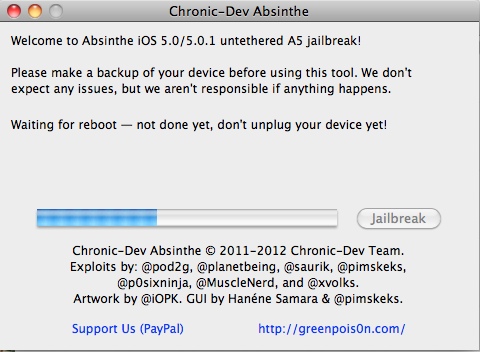
The long-awaited jailbreak for the iPhone 4S and iPad 2, both devices running Apple’s A5 processor, has been released. As posted by hacker p0sixninja a few minutes ago on Twitter – p0sixninja and other developers including Cydia’s Saurik contributed to the release of the latest jailbreak tool – users can head over greenpois0n.com to download the OS X version. A Windows version is said to be “coming soon” and, at the moment of writing this, greenpois0n seems to be down/very slow.

The A5 jailbreak, teased in the past weeks, comes with a graphical user interface called “Absinthe” that guides users through the process of jailbreaking A5 devices running iOS 5.0 and iOS 5.0.1. Absinthe has been developed by the Chronic Dev Team, whereas the iPhone Dev Team has created a CLI (command line interface) for more advanced users and diagnostic purposes. As usual with jailbreak releases, a backup of your data is advised and you should probably wait a few hours before rushing in to jailbreak your devices, so that any possible bugs left will be fixed.

The A5 jailbreak is available now, it is an “untethered jailbreak” and it’s currently out for OS X users on greenpois0n.com. [image via]


iBooks Author From Apple’s Perspective

In following the interesting debate that has arisen with the release of iBooks 2.0, iBooks Author for Mac and a EULA that doesn’t allow authors to sell iBooks outside of the iBookstore, I’ve seen two kind of reactions: it’s either a draconian move or the “obvious choice” for Apple. I think the reasoning for Apple to release iBooks Author 1.0 today lies somewhere in the middle, so I’m trying to analyze this story from Apple’s perspective, if possible.

Earlier today I tweeted:

John Gruber posted similar thoughts on Daring Fireball:

Second, it’s about not wanting iBooks Author to serve as an authoring tool for competing bookstores like Amazon’s or Google’s. The output of iBooks Author is, as far as I can tell, HTML5 — pretty much ePub 3 with whatever nonstandard liberties Apple saw fit to take in order to achieve the results they wanted. It’s not a standard format in the sense of following a spec from a standards body like the W3C, but it’s just HTML5 rendered by WebKit — not a binary blob tied to iOS or Cocoa. It may not be easy, but I don’t think it would be that much work for anyone else with an ePub reader that’s based on WebKit to add support for these iBooks textbooks. Apple is saying, “Fuck that, unless you’re giving it away for free.

To recap: iBooks created with iBooks Author can be given away for free or sold through the iBookstore, where Apple takes a 30% cut. iBooks created with iBooks Author cannot be sold outside the iBookstore, as stated in the iBooks Author EULA

Now let’s consider the complicated scenario Apple must have faced when deciding as to whether iBooks Author 1.0 should have been a broader authoring tool, or a desktop editing suite for the iBookstore. Many devices nowadays are capable of displaying eBooks: smartphones, computers, tablets. There are several participants in the eBook race with the biggest player being Amazon, followed, I guess, by Apple with the iPad/iBookstore and many others including Barnes & Noble, Google, and so forth. eBooks are variegate: there are many file formats, different distribution networks with their own licenses and terms, different desktop editing programs that comply to a few standards, the most popular one being EPUB, which Apple also accepts for iBooks and the iBookstore. Apple is not alone in the eBook market.

Apple, however, doesn’t make much revenue off Internet services and the various Stores it operates. It’s a known fact iTunes and the App Store have been a break-even operation for many years, with the main goal of providing content and not making a serious profit. I assume the numbers for the iBookstore fall in line with iTunes and the App Store – Apple doesn’t make much money out of iBooks, nor did they ever plan to base their business on it. But: iBooks, apps and media are ways to get people to buy iOS hardware, which is where Apple makes money. Apple is a hardware company that produces fine software that helps them sell a lot of hardware. The iBookstore is, ultimately, a way for Apple to tell people that an amazing eBook reading experience is possible on iOS devices. iBooks is a brand that Apple should care to protect and maintain because it is associated with its main source of revenue – the hardware. Other companies, too, seem to understand that software and content drive hardware sales.

Because iBooks is Apple’s brand and platform now, Apple obviously wants to have some kind of control on the whole experience and distribution. And this is where things start to get tricky. On the App Store, apps have technical limitations that force them to go through the approval process before a user can install them. You can’t install apps in any other way, unless you’re willing to hack into your device’s operating system. Apps are made with Xcode and sold by developers enrolled in the iOS Developer Program. The setup is fairly similar with the iBookstore: iBooks are created in iBooks Author by writers/editors enrolled in the program, sold in the iBookstore so a user can download them. But there’s a big difference: we learn today that iBooks can be distributed for free elsewhere. This is not possible for iOS apps, and this is the reason I believe today’s announcement has been so controversial.

The problem, I think, is that allowing iBooks to be distributed for free anywhere but forcing authors to sell them only through Apple is seen as a pretentious move from a company that many were expecting to announce a grand plan to save the publishing industry today. It’s the sort of gray area that’s open to discussion and generally causes the sort of debates we’ve seen on the Internet. But, in fact, it is a move from a company that wants to make money: if you were to run a business you know it’s going to break even, giving away a great desktop application that costed thousands of dollars in research and development knowing that you’ll have to maintain it for years to come, wouldn’t you want to have products in your own Store and at least ask for a 30% cut?

Others say the main issue is not with the 30% cut itself – we’re used to it now – it’s with the requirement of having paid editions of iBooks only in the iBookstore. It’s not like it’s technically impossible to sell them elsewhere, right? It’s not like apps – and that is correct. In theory, Apple could allow .ibooks files to become just another file format that you can distribute digitally online, and even sell it for a price as several designers do, for instance, with .psd files. But the problem lies deeper, not in the revenue cut but in the locking-in philosophy that is leading some people to believe this is akin to banning free speech. So let’s look at this from a more conceptual standpoint.

I mentioned above iBooks is a brand that is functional to Apple’s primary way of making money. Imagine this: if Apple were to allow distribution of paid eBooks anywhere, nothing could stop an author from selling it on other channels – I’d say Google and Amazon but let’s assume “his website” for now. What would stop this author from selling his iBook at a lower price on his website, and at a 30% more on the iBookstore to make up for Apple’s cut? And now with the second scenario: imagine Google rolling out support for .ibooks files in the eBookstore. Why would Apple want Google, of all companies, to get to brag about .ibooks? And even if it’s not about the .ibooks published format (of limited use outside of iBooks 2.0), why wouldn’t Apple require a small kickback for the result of a desktop program they gave you for free?

Keeping a brand, lock-in, revenue cut: it’s all part of a bigger plan, which is selling hardware people want because of the experience it provides. This experience is provided by content. Again, ecosystem.

So, in a way, iBooks aren’t too different from apps. I could even argue that in Apple’s vision, everything that goes through iTunes has some sort of exclusivity attached to it. Yes, even music and movies: iTunes Extras and LPs aren’t as popular as apps and books, but they’re an example of the integrated media/platform experience that Apple sells.

From my perspective, of course I would have been more excited to see a broader authoring tool announced today with no licensing terms for paid eBooks and full EPUB support. But as I’ve stated in a Twitter conversation with Jason Snell, this is a 1.0 version of a tool that was clearly meant for textbook publishers, and released today for other authors as well. What I could really argue is that it’s not like Apple doesn’t have the resources to come up with a full-featured authoring tool on Day One, and it would have been much better to appeal to all kinds of authors and audiences starting today with a great format and a great app. But: not all apps are perfect on day one. Not even Apple’s. Political speculation aside, I wouldn’t be surprised to know they had to get this out of the door today in preparation of the big iPad 3 launch. We’ll never know why iBooks Author was released today and not in two months with more features, but we know that Apple is a company that in the past months hasn’t been afraid of reversing a couple of unpopular decisions.

As usual, we wait.


Considering iBooks Author For Your Next Book Project

Considering iBooks Author For Your Next Book Project

Matt Gemmell has put together a nice overview of what it’ll be like to work with Apple’s new authoring tool. To sum up: you can sell iBooks only through the iBookstore with a maximum price of $14.99, but you can also give them away for free elsewhere. iBooks 2.0 is required, as well as an iPad. iBooks Author is Mac-only and it doesn’t have any collaborative features yet.

But here’s the most important part, which I think Apple could have explained a little better: iBooks Author-created book files can be sold through iBookstore and Apple takes a 30% cut. iBooks Author-created files can be given away elsewhere, for free. Content from an iBooks Author file (read: your actual text and images) can be-repackaged in another authoring environment. Lex Friedman pointed out in a Twitter conversation that the model is similar to apps but misguided because apps can’t be given away for free, whereas iBooks when sold must go through Apple’s Store. Again, we’ll see how authors will respond in the next months.

Also keep in mind this observation from Gemmell:

Naturally, once your text is in iBooks Author, you’re essentially writing and editing within a page-layout application, rather than a word processor or text editor. As with any publishing workflow, you will want to do the writing and editing first, and then put the book together (as much as possible). iBooks Author is resolutely not a writing environment.

Question now remains as to whether the iBooks Author EULA is something that will stick around, will be clarified, or if it’s simply the work of an overzealous lawyer. Dan Wineman writes:

In other words: Apple is trying to enforce a rule that whatever I create with this application, if I sell it, I have to give them a cut. And iBooks Author is free, so this arrangement sounds pretty reasonable.

[…]

When I make something myself, no matter what software I use to make it, then — assuming it doesn’t infringe any copyrights — it’s my right to distribute it however I want, in whatever format I choose, for free or not. I don’t lose the right to publish my novel if Microsoft determines that I wrote it using a pirated copy of Word. Would I lose that right if I tried to sell my iBook outside of the iBookstore and Apple got wind of it? I don’t know; we’re in uncharted waters here. Or how about this: for a moment I’ll stipulate that Apple’s EULA is valid and I’ve agreed to it implicitly by using the software. Now suppose I create an iBook and give it to someone else who has never downloaded iBooks Author and is not party to the EULA, and that person sells it on their own website. What happens now?

Hopefully an online turmoil will force Apple to clarify this.

Permalink

iBooks Textbooks Commentary

Following the announcements Apple made this morning about iBooks 2.0, textbooks and iTunes U, some interesting discussions have surfaced online in regards to Apple’s willingness to improve the education system – and reinvent textbooks – using iBooks and the iPad. Being based in Italy, I can’t comment specifically on the U.S. school system and what these new products mean for students, school districts and educational institutions, but I do have a few ideas and links to share.

iBooks has turned into a platform. No more just an e-Reader, with the addition of textbooks and books created through iBooks Author Apple seems to be betting on iBooks as a platform that stands on its own, just like iTunes and the App Store. You could argue that this was already clear from the start with the dedicated iBooks app and iBookstore within iOS, but it’s even more relevant now because of one key factor: content creation. Provided you have an iBookstore account, you can now create content-rich books on your Mac and sell them through the iBookstore. You can also export them locally, and preview them on your iPad. I have no idea how smaller, independent publishers and authors will respond to iBooks Author in the long term, but as far as creating content goes, Apple’s latest desktop app looks fantastic. The double nature of this announcement (rich textbooks, books by authors) combined with the existing features of iBooks has a real chance of creating “an iBooks ecosystem”.

Software sells the hardware. Obvious consequence: books created with iBooks Author (packages, not the actual content) can only be sold through the iBookstore. Now, assuming authors like the functionalities and workflow enabled by iBooks Author and assuming they also like money, if this initiative proves successful in the long term, what devices are authors going to recommend?

…It depends. iBooks Author looks like a great eBook creation app, but some authors are skeptical. We will have to wait and see if authors will adopt the software, if Apple will provide continued support with updates and, ultimately, if iBooks Author can be used effectively for all kinds of eBooks, not just those heavy on media and fancy effects. For instance, it doesn’t look like EPUB is supported right now as the format seems to be different. Ben Brooks is right: Apple seems to be targeting Kindle Singles directly with iBooks Author.

Rich content made simple. iBooks Author simplifies the process of creating content-rich books with drag & drop, pop-out menus, auto-align controls, and more. From iBooks Author’s Help section:

  • Gallery: Add a sequence of images your readers can swipe through, each with its own custom caption.
  • Media: Add a movie or audio file readers can play.
  • Review: Add a sequence of interactive multiple-choice or drag-to-target questions.
  • Keynote: Add a Keynote presentation (exported as HTML).
  • Interactive image: Use labels (sometimes called callouts), panning, and zooming to provide detailed information about specific parts of a graphic.
  • 3D: Add a 3D COLLADA (.dae) file readers can rotate.
  • HTML: Add a Dashboard widget (.wdgt).

By using web technologies, desktop-class content creation software and an iWork-like interface, with iBooks Author Apple is offering what Xcode is to the App Store. For free.

Accessibility. iBooks Author fully takes advantage of VoiceOver and other Accessibility technologies to let people with disabilities read and experience books. Apple takes Accessibility seriously, and it shows.

Other uses for iBooks Author? I haven’t played with it yet, but I wouldn’t be surprised to see iBooks Author being used for other purposes.

iBooks Textbooks remind me of Push Pop Press. And guess what, the folks behind PPP (acquired by Facebook earlier this year – coincidence?) sound pretty pissed off.

Prices. iPads are expensive! But so were PCs and Macs. As Stephen Hackett correctly points out, Apple doesn’t disclose educational pricing, and several schools already have leased Macs in the classrooms. Will Apple provide a 1-1 “switching program” for schools that don’t need Macs anymore? And what will base pricing of leased iPads look like? The Verge spoke to Apple’s Phil Schiller, who told them “he thinks the numbers work out favorably for school districts if you weigh the costs of textbooks and classroom computers against iBooks content and iPads”. Joshua Schnell has a slightly different take and suggests that iPads may only end up being used in ”rich white kid schools”. I think we don’t have enough details to speculate on Apple’s educational pricing right now (as usual, a Volume Purchase Program for apps and books is available). The only data point we have is that iBooks Textbooks will be cheaper than physical textbooks…if publishers don’t change their minds.

Yes, physical books are more “durable” if you drop them. But what do you use today, an encyclopedia with a typewriter or a PC? Time to move on.

Other devices. I’m hearing reports of iBooks 2.0 and iTunes U not running smoothly on the original iPad and older iPhones, confirming my theory that textbooks seem to be heavily targeting the speedy A5 processor of the iPad 2 (I have no idea why would iTunes U and regular books run slower on older-gen devices though). Let’s not forget that an A6-enabled iPad 3 is rumored to land soon, and Apple may keep the iPad 2 around at a lower price.

Digital books are still heavy. Pearson’s Biology textbook is a 2.77 GB download. We complained about iPad magazines and their absurd download sizes, but it looks like there isn’t much you can do about heavy content like images and video. When I was a kid, I often needed a bigger backpack for textbooks. Now kids will need bigger flash memory.

It’s up to schools and teachers. Pricing issue aside (and that is a huge “aside” for now), schools and teachers will obviously have to learn how to deploy and manage iPads, as well as integrate textbooks and new learning experiences into their curricula. In the current scenario, it’s very likely that kids already know how to use iPads, and their teachers will have to play catch up. On the technical side, I’d suggest schools to look for inspiration in Fraser Speirs’ experiences.

Apple doesn’t want to fix textbooks. They want to improve learning. The underlying message of today’s announcements isn’t strictly about textbooks – surely they play a big role in education, but the scope of Apple’s mission is much broader. Apple wants to re-imagine learning and improve current standards with new technologies: content management systems for classes are nothing new, but iTunes U takes it to a whole new level with a beautiful, always-connected, interactive application. There are big corporations that control the education/textbook market and who knows if they’re really willing to give Apple the leading role in this game with distribution, standardization of technologies and guidance. As Dan Frommer notes, change is not going to happen overnight but you can’t believe in paper textbooks as “the future”.

Apple’s revamped education strategy will be interesting to follow.