Federico Viticci

10936 posts on MacStories since April 2009

Federico is the founder and Editor-in-Chief of MacStories, where he writes about Apple with a focus on apps, developers, iPad, and iOS productivity. He founded MacStories in April 2009 and has been writing about Apple since. Federico is also the co-host of AppStories, a weekly podcast exploring the world of apps, Unwind, a fun exploration of media and more, and NPC: Next Portable Console, a show about portable gaming and the handheld revolution.

This Week's Sponsor:

SaneBox

Clear the Clutter, Keep What Matters.


iPad Third-Generation Review Roundup

With lines starting to form around the world for the launch of the new iPad, journalists with access to review units of the device have been given the go-ahead by Apple to publish their impressions of the device. With a Retina display described as “glowing paper”, same 10 hours of battery life and faster 4G connectivity, the new iPad is off to very positive reviews.

Below, we’ve collected some key points from the reviews that have been published today. Make sure to follow the source links, and look for more coverage of the new iPad on MacStories later this week.

On the Retina display

The Retina display is, quite possibly, the biggest reason to consider an upgrade to the new iPad. Reviews focus on the incredible quality of the display, which makes for sharper text, more vibrant colors, and an overall better visual experience when compared to the iPad 2.

Jim Dalrymple

I struggled after the event to put the right words together to describe the display and a week later I’m still lost for the proper analogy. The only thing I can think of that comes close is comparing it to the first time you ever saw an HDTV. Remember how startling it was to go from one of those giant standard definition projector TVs to an HDTV? That’s what this is like.

Jason Snell

The effect is even more dramatic with photos and video. Pictures reveal small details that simply weren’t there before. A photo that looks just fine on an iPad 2 looks almost undefinably better on the new iPad. It’s the same image, but all of a sudden, there’s much more information there—small textures and tiny details that were previously omitted.

Walt Mossberg

My epiphany came when I placed my iPad 2 next to the new model, with the same text on the screen. Letters and words that had seemed sharp on the older model five minutes earlier suddenly looked fuzzier.

MG Siegler

Even if you have perfect vision, indulge me here for a second. You know when you go in for an eye exam and you’re asked to look at a combination of letters and numbers on a chart against a far wall? You read the first few lines, then realize you actually can’t go any further. Then you get prescribed glasses (or contacts) and you can all of a sudden read every letter and number. And even the ones you could read before are now so much clearer.

That’s what it’s like looking at the new iPad versus the older iPads.

On the A5X processor

The new iPad’s dual-core A5X isn’t a revolution coming from the iPad 2’s dual-core A5, at least in terms of initial impressions with apps that haven’t been updated to take advantage of it. With quad-core graphics, however, expect a lot more games and apps to gain powerful new functionalities soon.

Jason Snell

That power comes from the X factor in the A5X processor—a new quad-core graphics engine. And sure enough, the third-generation iPad blows away every other iOS device in terms of graphics performance. In our tests using the GLBench 3D graphics testing app, the third-generation iPad could draw a complex 3D scene at the full frame rate of its display, 60 frames per second, without breaking a sweat. And in GLBench offscreen tests, which aren’t constrained by the display’s frame rate, the third-generation iPad had a frame rate 1.6 times that of the iPad 2 (and 13 times that of the original iPad).

Joshua Topolsky

The fact that the new iPad touts an A5X SoC versus a completely new generation of chip may give some buyers pause, but in my testing I see no evidence that the processor in the iPad isn’t every bit as powerful as it should be. While there’s not some obvious speed boost in comparison to the previous generation iPad, there’s certainly no stutter, stagger, or delay when using the tablet. Apps opened and closed quickly and without issue, app switching was efficient, and graphically-intensive games played smoothly on the device.

On cameras

The new iPad shoots better pictures, but don’t expect 4S-quality photos. The front-facing camera is still VGA.

Vincent Nguyen

Apple says it has borrowed the camera technology and optics from the iPhone 4S for the new iPad, though still the 5-megapixel images the tablet is capable of do lag behind the 8-megapixel examples from the smartphone. There’s more visible noise and chromatic aberrations at full zoom, though the quality is far, far better than any stills the iPad 2 can achieve. You also get face recognition for up to ten people per frame, automatically adjusting focus and exposure, but the camera app UI itself is no more complex than before.

On LTE

From the reviews, LTE seems fast, at least for those who have been able to try it in the US.

MG Siegler

Yesterday, I clocked the new iPad using LTE at over 40 mbps down and 20 up on Verizon’s network. That’s about twice as fast as my current home cable broadband. For good measure, I tethered the new iPad to my iPhone 4S to compare it to Verizon’s 3G speeds. It’s about 40x faster for downloading.

[…]

One other slight downside which I have to assume is related to either the battery or the LTE functionality is that unlike previous iPad models, the new iPad does get noticeably warm in the lower left corner after prolonged use. It’s never hot, just warm. But again, I never noticed this on other models.

Joshua Topolsky

In terms of raw speeds, I saw downloads hit more than 22Mbps, while upstream data topped out around an outrageous 21Mbps — and that was in mid-town Manhattan. Of course, a lot of this depends on your coverage and how many people around you are on the network. One other small thing: I did notice the device getting a bit warm when I was using LTE for extended periods of time, but that’s pretty common for most 4G products I’ve tested.

On iPhone apps in 2x mode

It appears iPhone apps running in “1x mode” on the new iPad can use Retina assets, but they still look pixelated if brought in 2x mode.

Vincent Nguyen

Interestingly, it’s not just native third-party iPad apps that are improved with the Retina Display technology. iPhone titles used in the “2x doubling” mode look considerably better than on either of the previous iPad versions, with the new smoothing technology being brought to bear to make them feel less obviously magnified.

Jason Snell

If you’re running an iPhone app on the new iPad, it will display it in high-resolution Retina detail—but in a small compatibility window in the center of the iPad screen. (You can, as always, tap a 2x button to make iPhone apps bigger but more pixelated.)

The new iPad goes on sale on Friday, March 16th, at 8 A.M. local time in 10 countries.


Byword for iOS Review

Byword, the Mac app that I used last summer to write my MacBook Air review, has been updated today to include iCloud syncing on the Mac, and support for a brand new iOS app that briefly went live on Saturday, was pulled, and now is back on the App Store at $2.99.

Byword is a minimal text editor that works with the Markdown format and allows for easy exporting of plain text to a variety of formats including HTML, PDF, and LaTex. Unlike most minimal text editors these days, Byword for Mac has become popular among writers and bloggers (also) thanks to extensive support for keyboard shortcuts, built-in Markdown preview, and integration with Lion’s full-screen mode, auto save, and Versions. We have covered Byword on MacStories before.

The iOS version of Byword runs as a universal app on the iPhone and iPad, and I have been able to test it since its first release last week. Despite some initial issues with iCloud syncing, I was able to activate the functionality, and sync text documents across devices using Apple’s cloud service and Dropbox, which is also natively supported inside the app. Having tried both solutions, I can say that whilst the developers ensured the two syncing services would appear as “invisible” as possible to the user, iCloud seems a little faster at pushing and picking up changes made on another device. On iOS, upon first launch the app will ask you to choose a syncing service between iCloud and Dropbox – alternatively, you can go with none and save documents locally. If you choose iCloud, which I did, the app will show documents stored in the cloud from a sidebar on the iPad, or a dedicated screen on the iPhone. On both devices, you can switch back and forth between the browsing and editing interface with a single swipe on screen – I found this very intuitive and responsive. Syncing between iOS devices through iCloud has been remarkably stable for me in the past few days, allowing me to effortlessly push changes to this very article around in seconds. I also like how Byword for iOS is capable of updating changes “live” inside your document even if it’s already open but being edited on a second device. Read more


Rdio Launches Complete Redesign

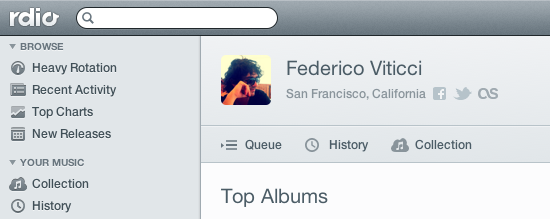
Rdio, a music streaming service that works on the web, Mac, and iOS, is holding a press event today to announce a major redesign that, however, is already available to subscribers in the web browser. Once enabled, “New Rdio”, as the company is calling the new experience, shows a complete rethink of the music browsing and listening workflow behind Rdio.com.

New Rdio is a visually beautiful and dynamic way to play Rdio’s massive catalogue of 15 million songs. New features include the oft requested drag and drop playlist creation, a more personalized Heavy Rotation, and private playlists.

From a first test, it appears the new user interface is heavily based on sidebars and panels to manage your music collection, playlists, queue, and network of friends or people you should follow. Playlists have been updated, and it’s now possible to create them and manage them through drag & drop, as well as make new “private playlists” that you can choose to share with just a few people. A new sidebar on the left organizes people and music influencers by “Your network” and “Who to follow”. The Network tab is similar to Facebook’s own ticker system, in that it shows people you’re currently friends with and the music they’re listening to. Click on an item, and a popover will open allowing you check out a song right away. The suggestions tab is equally interesting, presenting people that Rdio thinks you should invite or follow on the service. The aforementioned drag & drop system has also been enabled for sharing – you can now grab an item from the main panel, head over a friend’s avatar, and share it. Twitter, Facebook, and email sharing are supported.

Search seems a lot faster than before, presenting results for artists, songs, or albums in a few seconds. The overall design feels cleaner, less crowded, and easier to use. As the company stated at its press event “We basically took Rdio apart and put it back together”. The app is more social, puts music and people front and center, and, more importantly, keeps more items and sections within a single page thanks to popups, sidebars, and panels. Furthermore, the new design also allows you to click through items – for instance, an album – and navigate back while maintaining page position, without having to scroll again. What I think is interesting, and will likely take some time getting used to, is that while the Heavy Rotation for your account is harder to access and has been seemingly also incorporated with your network’s rotation, people that are listening to same music as you are now always shown in the UI, your collection included. Top Charts, Recent Activity, Queue, and New Releases keep more or less the same functionalities as before, only with a new design.

The new Rdio experience has also been brought to the official Mac app, which was updated earlier today to version 2.0 and is capable of automatically switching to the new UI once enabled in your account. The app is now smarter at recognizing when music is playing on another location (such as the browser), and offers you a way to quickly switch playback to the desktop.

We will update this story with more screenshots and details from Rdio as the company details the new features at its media event. For now, New Rdio is available only to Web and Unlimited subscribers, with everyone else gaining access sometime in the future. A promo video of the new Rdio is embedded after the break. Read more


Tweetbot Gets Streaming

Tweetbot, Tapbots’ excellent Twitter client for iOS that we recently reviewed for the launch of its long-awaited iPad version and 2.0 update on the iPhone, received today support for one of the most requested functionalities by its users: streaming.

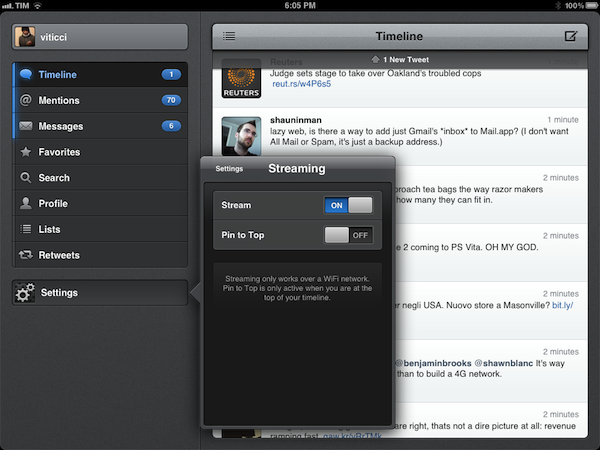
Available today in version 2.1 of the iPad app, live streaming allows users to stay on top of the latest tweets thanks to Twitter’s real-time push technology that can be seen in the new Tweetbot timeline, which, when on WiFi, will constantly check for new tweets and automatically load them above your timeline position. An option is available to disable streaming in the app’s Settings, as well as a switch to enable “Pin to Top”. In my tests, Tweetbot’s new streaming feature has been extremely reliable – that is, unless Twitter itself was experiencing issues – and has enabled me to forego completely the need of manually refreshing or waiting for Tweetbot to update my timeline every few minutes. Like on Twitter for Mac, I think streaming is an invaluable tool if you’re planning on getting the most out of Twitter’s real time nature, and Tweetbot’s implementation doesn’t disappoint.

With streaming come a few other changes to make the experience of fetching and syncing tweets more pleasant. The new tweets sound, for instance, is now limited to mentions, direct messages, and tweets fetched with pull-to-refresh. The Tweet Marker service, which allows you to keep your Tweetbots (and other supporting clients) in sync, has been vastly improved. Generally, this means the process of getting your latest-seen tweet and timeline position should sync faster to the cloud and back to the app – in testing the latest Tweetbot, I can confirm Tweet Marker sync seems a little faster and more “accurate” than before.

Tweetbot is my favorite Twitter client on any platform, and streaming makes it a lot better from a user experience standpoint. You can get iPad update from the App Store now (the app’s graphics are also ready for the new iPad coming out later this week); version 2.1 of the iPhone app, sporting the same new features and Camera+ 3.0 integration, is still waiting for approval in the App Store’s queue.


Camera+ 3.0 Review

Few iPhone apps have managed to substantially improve on the functionalities offered by Apple in its core system apps. Tap tap tap’s Camera+, a popular alternative to Apple’s Camera app, is one of them, and the 3.0 version released today takes a major leap in turning Camera+ into a more powerful solution to shoot, edit, and share photos online, as well as providing a solid foundation other developers can integrate their apps with.

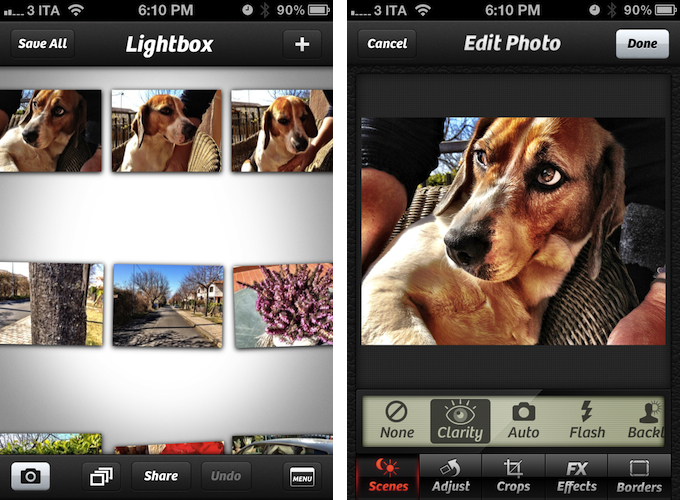
The thing about Camera+ is that its lead developer and creator, John Casasanta, knows what people want from an iPhone app, and understands the rules behind viral marketing for software sold on the App Store. In spite of a 4-month ban that forced Camera+ out of the App Store due to a functionality the developers shouldn’t have hidden without telling Apple, the app has been an example of modern success in the App Store, granting its developers a renowned position in the top charts with millions of copies sold worldwide. But it’s not just about clever marketing (Casasanta also runs MacHeist, a website dedicated to promoting deals on Mac software that has amassed an incredible amount of followers in the past years). Camera+ is a very well-done app – from the polished user interface to the features it adds on top of Apple’s standard camera-related functionalities, Camera+ has become many users’ go-to camera app thanks to its enhanced view options, filters and effects, and elegant sharing capabilities.

With Camera+ 3.0, a free update for existing users, tap tap tap wants to refine every aspect of the app, whilst opening the door to third-party devs with APIs to offer Camera+’s features into other apps. Read more


Apple Releases Safari 5.1.4

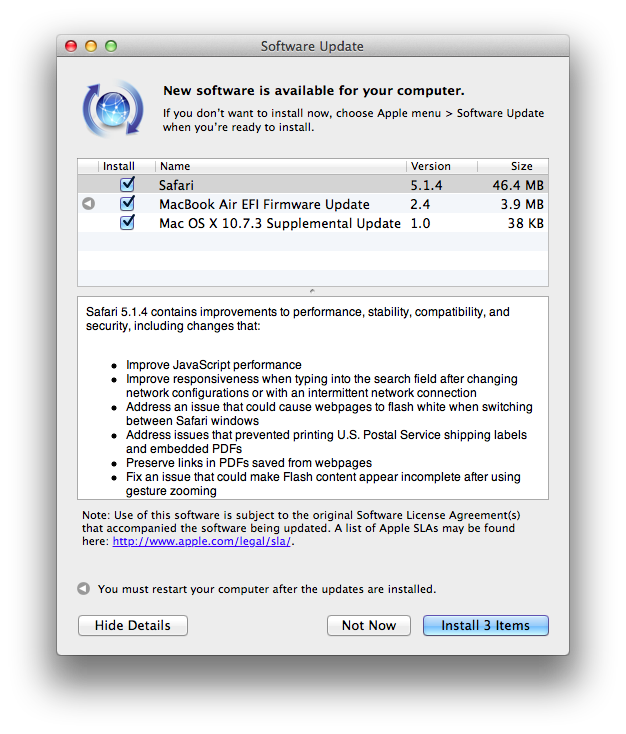
Apple just released an update to Safari on its Downloads website and Software Update, adding a number of improvements for stability, compatibility, and security.

  • Improve JavaScript performance
  • Improve responsiveness when typing into the search field after changing network configurations or with an intermittent network connection
  • Address an issue that could cause webpages to flash white when switching between Safari windows
  • Address issues that prevented printing U.S. Postal Service shipping labels and embedded PDFs
  • Preserve links in PDFs saved from webpages
  • Fix an issue that could make Flash content appear incomplete after using gesture zooming
  • Fix an issue that could cause the screen to dim while watching HTML5 video
  • Improve stability, compatibility and startup time when using extensions
  • Allow cookies set during regular browsing to be available after using Private Browsing
  • Fix an issue that could cause some data to be left behind after pressing the “Remove All Website Data” button

You can find Safari 5.1.4 here. The previous version of Safari, 5.1.3, was released alongside 10.7.3, adding, again, bug fixes and improvements.


OnCue 5.0 Brings Powerful Music Queue Features To iOS

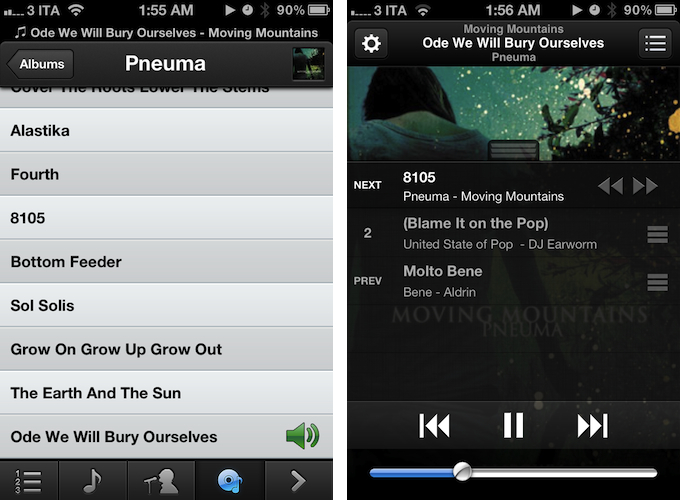
These days, most of my music consumption happens on Rdio. The term “consumption” isn’t there because that’s how providers like to present content: I consume albums and artists that I discover online. However, for as much as I’m completely hooked to paying a monthly fee to get access to a (virtually) unlimited amount of music, there are albums that I still have to keep synced locally through iTunes. Either because Rdio applies some curious restrictions on several artists from Europe or because these artists choose not to make their music available for streaming (ask Coldplay), I have resorted to keeping a portion of my music synced on the devices I own (32 GB iPhone 4S and iPad 2, soon to be new iPad). And when I want to play songs from this “mini library” I sync, I stumble upon the same problem I initially wrote about last year: Apple’s Music app doesn’t let me create queues, and I loathe creating playlists for all possible scenarios my music listening habits may fall into. Just like last year, Dan Pouradi’s OnCue comes to the rescue, this time with a completely re-engineered version that works with iOS 5, and sports a new UI. Read more


MacStories Reading List: New iPad Special Edition

What a week for Apple news. Last Wednesday, after much speculation and last-minute predictions, Apple officially took the wraps off its new iPad, simply called, well, the new iPad. Debates on the name aside, the new device sounds like a great achievement for the company: in the same design of the iPad with only minimum weight and thickness added (to allow for a battery with more capacity), the new iPad adds a Retina display, 4G LTE networking, Bluetooth 4.0, a quad-core CPU, A5X processor – all while keeping the same price. Make sure to read all the details in our new iPad overview and keynote roundup.

It has been a crazy week filled with news, hands-on impressions, and editorials, and it deserved a proper Special Edition of our Reading List. Grab your favorite read later app or browser of choice, and follow us along after the break as we collect the best links and articles about the new iPad. Read more


Reddit Client Alien Blue for iPad Receives Major 2.0 Update

When I’m not writing, reading, or talking to my team, one of the things I like to do online is casually check on Reddit for the latest meme, links to interesting news, or more serious discussion that can only take place thanks to Reddit’s unique nature and community. And when I’m not using my computer, which is “most of the time” these days, I like to do so using Jason Morrisey’s Alien Blue, a Reddit client for iOS that I recently re-reviewed in its newest iPhone version, and that today received a major 2.0 update on the iPad.

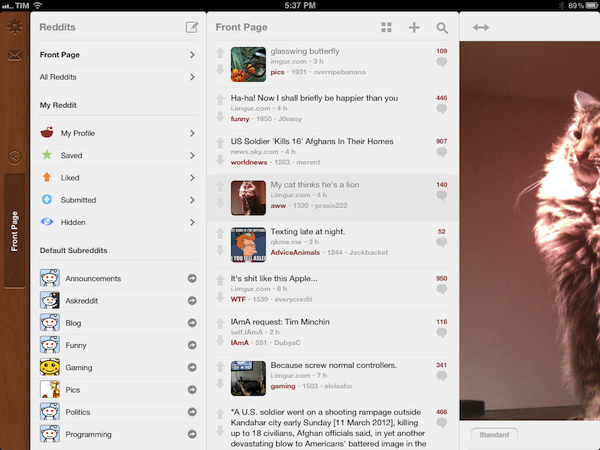
Just like the 2.5 update for iPhone, Alien Blue HD 2.0 includes several interface changes to make the Reddit browsing experience more pleasant, as well as various new features that take advantage of the iPad’s larger screen. For instance, Alien Blue HD is already Retina-enabled for the new iPad, with the exception of launch images, which will be updated soon. But the biggest change in this version, new coat of interface paint aside, is the new panel-based navigation that allows you to seamlessly move through Alien Blue’s main sidebar – which lists Reddit sections and subreddits – and posts, comments, and web views. Inspired by Twitter for iPad’s panel-based UX, but much simpler to use, Alien Blue lets you swipe through panels to move around in the interface, or simple pinch on these panels to dismiss them. In fact, the entire app has been tweaked to allow for more gestures, as listed below:

  • Double-tap header for fullscreen
  • Hold-tap on Posts list to show post options
  • (Alternative) 2-finger swipe to show post options
  • 2-finger tap to upvote items
  • 3-finger tap to downvote items
  • 2-finger left swipe over comments to collapse to root
  • Drag Posts list up to load more

I’ve found myself using the double-tap and 2-finger tap gestures a lot, and I think they contribute to making the app faster and easier to use. A visual guide for gestures is available in the Settings screen as well.

There are several improvements and optimizations that found their way in this 2.0 update. The app now supports larger thumbnails, and you can view videos alongside comments in any thread. The post and comment interfaces have been redesigned, alongside the new pull-to-refresh gesture that works similarly to its iPhone counterpart (the subtle animation is pretty amazing). Image links and YouTube videos are now displayed more elegantly, and a new “Optimal” setting for web views enables webpages to scale intelligently to fit Alien Blue’s window. There’s more: you can now delete posts, and links to subreddits open directly within Alien Blue. The app sports Evernote integration to let you save posts in any of your notebooks, and you can check out a submitter’s details right from a post you’re viewing. There are new tags for NSFW posts, and Facebook and Twitter sharing have been fixed. There are dozens of little improvements and fixes in Alien Blue HD 2.0, so I recommend you check out the release notes for the complete list.

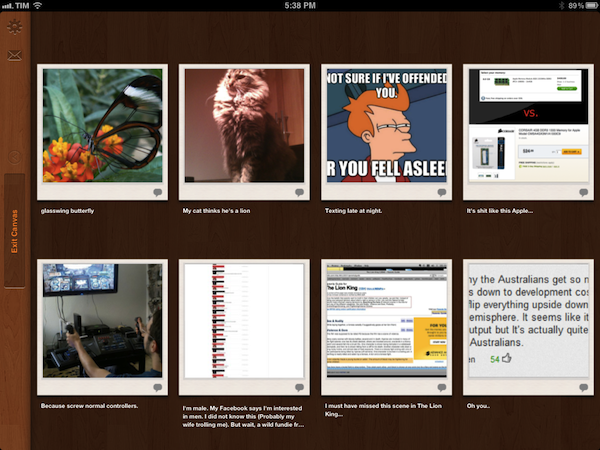
More importantly, I like how Alien Blue’s experience is still intact in spite of the interface changes and new navigation schemes. You can still switch to Canvas view to browse images as large thumbnails, and there are several themes to choose from in the Settings. The new UI doesn’t add weight to the app in terms of performance, as Alien Blue still scrolls smoothly and updates fast on the iPad 2.

Alien Blue HD 2.0 offers a rich and intuitive Reddit experience in a native app that comes with many options to interact with Reddit content and links submitted to the site. Even if you don’t spend hours on Reddit every day, the app still offers an incredibly polished experience that I recommend you consider if you’re planning on browsing Reddit from your iPad.

Alien Blue HD 2.0 is available at $3.99 on the App Store.