Federico Viticci

10765 posts on MacStories since April 2009

Federico is the founder and Editor-in-Chief of MacStories, where he writes about Apple with a focus on apps, developers, iPad, and iOS productivity. He founded MacStories in April 2009 and has been writing about Apple since. Federico is also the co-host of AppStories, a weekly podcast exploring the world of apps, Unwind, a fun exploration of media and more, and NPC: Next Portable Console, a show about portable gaming and the handheld revolution.

Apple Announces iPhoto for iOS: Coming Today at $4.99

At the media event in San Francisco, Apple today announced an all-new version of iPhoto for iPad. Giving users new ways to organize and browse their photos, iPhoto for iPad comes with new effects, new gestures, multi-touch editing, and a new feature to seamlessly share photos between devices.

With a dark interface completely rebuilt for the iPad, iPhoto makes heavy use of gestures to browse and edit photos. With a simple swipe gestures from the side of the screen, users can bring up a list of photos to edit. A double-tap will allow users to automatically find similar pictures, or enter full-screen mode. With support for EXIF information and sharing on various social networks including Flickr, iPhoto for iPad is set to become a great mobile companion to photographers – the app even features an auto-enhance mode to instantly enhance various aspects of an image, as well as other advanced effects. Brushes, white balance, cropping – they can all be accessed through multi-touch gestures and commands in the new iPhoto for iPad.

Aside from skeuomorphic brushes, iPhoto for iPad comes with a new Photo Journals functionality that lets users build “journals” using photos and additional information such as location and weather data using the stored GPS info and various EXIF data from images. Users can move photos around, add captions, choose favorites, and share the results with their friends.

iPhoto is a universal app (runs on the iPhone as well), and it will be released today at $4.99. Check out our complete March 7th coverage here.

[image via]


This Is The New iPad: Our Complete Overview

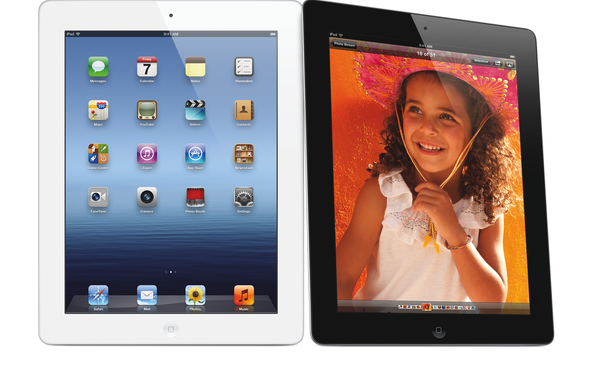
Rumored for the past two years, the new iPad featuring a higher resolution Retina display is finally here, and it’s simply called “iPad “. Announced at Apple’s media event in San Francisco a few minutes ago (our liveblog and March 7 news hub), the new device features the same design of the iPad 2 (flat aluminum back with tapered edges), and it comes in two colors, black & white. Looking at the initial photos of the new iPad, a less tech-savvy eye wouldn’t notice any difference from the current-gen model. The new iPad, however, is packed with completely new hardware components inside, so let’s take a look. Read more


The Apple TV Gets A Refresh: New UI, 1080p Playback, Available on March 16 [Photos]

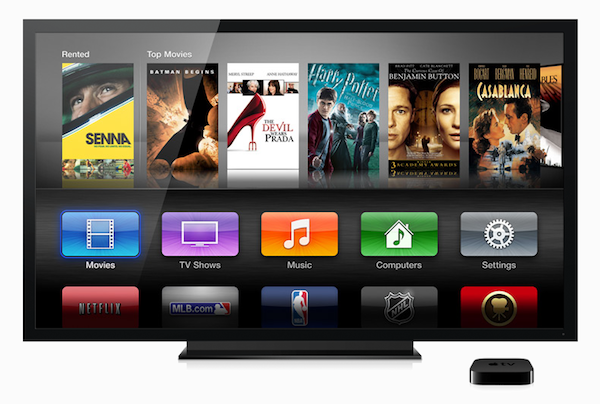
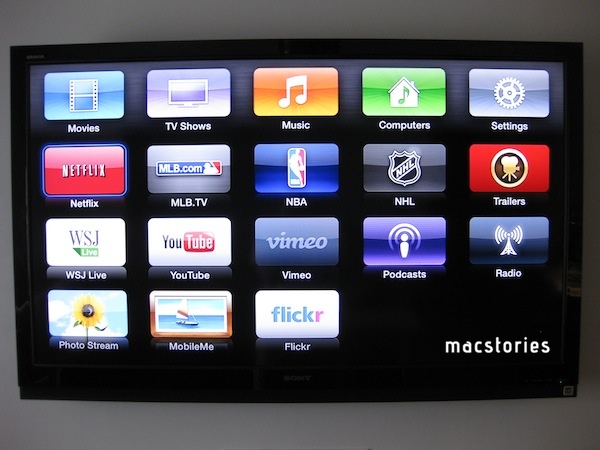
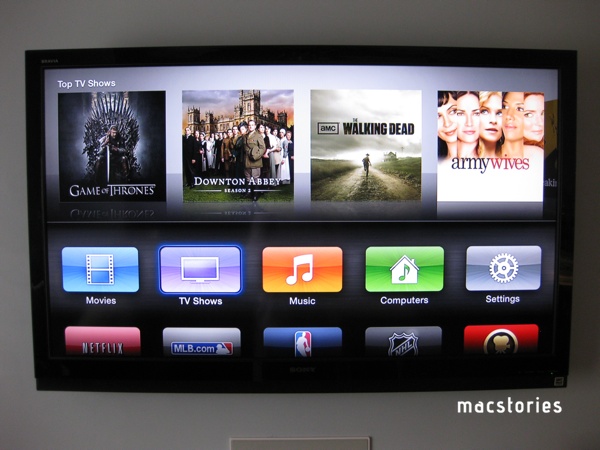
At the media event in San Francisco, Apple CEO Tim Cook announced an update to the Apple TV. The updated model will support 1080p playback, newly added iTunes in the Cloud for movies and TV shows which will allow users to watch their purchased content on-demand in 1080p definition if available. The new Apple TV ships with a new streamlined interface that will make it easier to navigate between apps, browse photos and media from an iCloud account, and initiate playback.

“People are going to love streaming movies and TV shows in 1080p with the new Apple TV, and photos look beautiful displayed at the maximum resolution of your TV,” said Philip Schiller, Apple’s senior vice president of Worldwide Marketing. “Apple TV is easier than ever to use with its new icon-based interface and the ability to access your purchased movies, TV shows and music right from iCloud.”

Apple has also prepared several content providers to stream HD quality content to the new Apple TV. Netflix, Vimeo, and of course movies and TV shows available through iTunes will be in HD for consumers on launch day. Apple also stated that there will be over 15,000 movies and over 90,000 TV episodes available on the iTunes Store. Just some of the other notable apps that will be prominently displayed on the Apple TV’s new icon based interface includes YouTube, Flickr, and the Wall Street Journal.

The Apple TV also gained greater integration with iCloud today. Now users can purchase, not just rent, movies and TV episodes from the Apple TV and watch them on their all of their Apple devices. iCloud makes it incredibly easy to access all of your digital content regardless of what device you are using.

The new Apple TV will remain only $99, and it will be available on March 16. Pre-orders for the new Apple TV will begin today.

For additional information, check out the Apple press release on the new Apple TV.

Update: MacRumors is reporting that the 5.0 software update for the current (second generation) Apple TV is live and available for download. They also state that not only has Netflix rolled out 1080p streaming but Netflix also has a new billing option that allows customers to pay for their Netflix subscriptions through their iTunes Store accounts.

Update #2: From the short amount of time I have spent with the 5.0 update to the (second-gen) Apple TV, I find it to be a really great upgrade for existing Apple TV owners. I love the new movies and TV shows in the Cloud feature. To test it out, I selected the Movies icon on the home screen, browsed to my purchased videos and found a couple of movies I forgot I had purchased well over a year ago. Selecting my Halloween (2007) movie started it as if I had just rented in through iTunes. The process was simple, fast, and very well implemented.

Screenshots of new 5.0 Software.

Update #3 Ars Technica has details on the processor inside the new Apple TV model. It’s not the same of the new iPad.

We asked whether the third-gen Apple TV had the same A5X processor as that in the new iPad (as was previously rumored), but an Apple spokesperson told us that it has a “single-core version of the A5” and it’s not the same as what’s in the iPad. The CPU is capable of handling 1080p HD video. The spokesperson also claimed that users “only need an 8-10 megabit Internet connection” in order to take advantage of 1080p movies from iTunes, but speaking as someone with experience with the second-generation Apple TV at a mere 720p, this depends highly upon your individual ISP.


Apple Creates New “Catalogs” App Store Category Ahead of iPad 3 Event

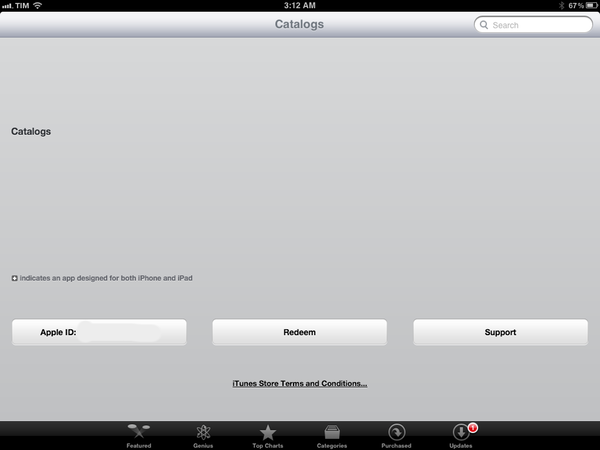
As noted by MacRumors, Apple has created a new Catalogs category on the App Store, moving a number of existing apps into it. The category looks interesting for a number of reasons: first off, Apple doesn’t just create new App Store categories, which are prominently featured on iTunes, leaving them empty as Catalogs looks when browsed from its direct URL right now. Second, whilst both iPhone and iPad apps have been moved into Catalogs, the empty App Store listing page reports “iPad Catalogs” – this might as well hint at catalogs, as in shopping guides, being part of an announcement on stage tomorrow, or perhaps some demo time.

Several existing apps have already been placed into the Catalogs category, including Catalog Spree (pictured above), SkyMall, MTG Merchant and more. These apps have long existed in the App Store and have now been recategorized to “Catalogs”. The apps had previously been listed under the Lifestyle and Utility sections of the App Store.

Interestingly enough, Google’s own Catalogs app for iOS has received the new category treatment, while IKEA’s app is still listed under Lifestyle. The new Catalogs category can be accessed here, albeit opening the link in a browser returns an empty itunes.com webpage.

Whilst a new category isn’t necessarily related to the next iPad, the fact that Catalogs went live ahead of the scheduled event and that it appears to not be completely developed seems to suggest that might be more coming soon. Tune in tomorrow at 9:30 AM PST for our Apple event liveblog.


Skype 5.6 For Mac Released with Automatic Updates, Lion Full-Screen, New Group Video Calling UI

Earlier today, Skype updated its Mac client with a series of new features, bringing the app to version 5.6 up from the 5.5 beta released in January. Among the most notable improvements, full-screen support for OS X Lion will allow Skype users to eliminate distractions and focus on the chat or call at hand by putting the app in a dedicated workspace on 10.7. Speaking of calls, group video calling received a fresh coat of paint with an improved user interface design that now allows for easy switching between dynamic and non-dynamic modes – when dynamic mode is on, the person who is speaking is moved automatically to the top of the window, similarly to how Hangouts work on Google+.

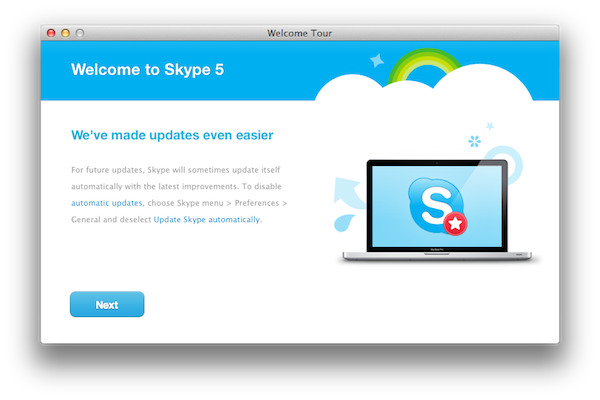
Whilst still featuring the much criticized window design that was introduced with version 5.0 last year, Skype is making some subtle improvements to the app. For instance, messages can be removed from conversations now, and entire conversations can be deleted from the sidebar (and the history). The first-run experience has also been redesigned, now including a handy tutorial to show what’s new in the latest version of Skype, and guide users though some basic steps such as making a call. Equally important it’s the new Automatic Updates function, which will make sure Skype is running the latest version available and will relaunch the app every once in a while if an update has been detected and downloaded in the background. This option can be disabled in the Preferences.

Skype 5.6 is a recommended update for all Skype for Mac users (it also contains bug fixes), and it can be downloaded here.


ListBook Goes Universal, Adds iCloud Sync

When I reviewed the first, iPhone-only version of ListBook from noidentity last year, I called it ”a good alternative to Apple’s Notes app for most iPhone users”. In the past 12 months, however, Apple shipped iOS 5, a major revision of its mobile operating system that, among other things, includes a native list-making app called Reminders. The writing was on the wall for developers of third-party list apps: Apple likes to “borrow” ideas from successful applications every once in a while, and simple todo lists are just something too common to ignore for a possible system integration. As usual after Apple comes out with its own take on a previously third party-only idea, many rush to declare Product X has been “sherlocked” by Apple. It happens every time. The opposite is quite true: Apple’s take on such ideas and workflows often creates an even bigger market for developers, raising the public’s awareness on a particular kind of software, leading more people to seek out alternatives and different takes from other developers.
The new ListBook, released today, falls exactly under this category. With a simple interface, lists, and iCloud sync, one could easily think it’s a Reminders clone with a price tag on top of it (the app is sold at $1.99 on the App Store). As I mentioned above, those looking for a different take on Reminders – which will also gain a desktop counterpart on Mountain Lion – will be pleased to find in ListBook some clever features implemented in a way that makes switching between the iPhone and iPad version as effortless as iCloud allows.

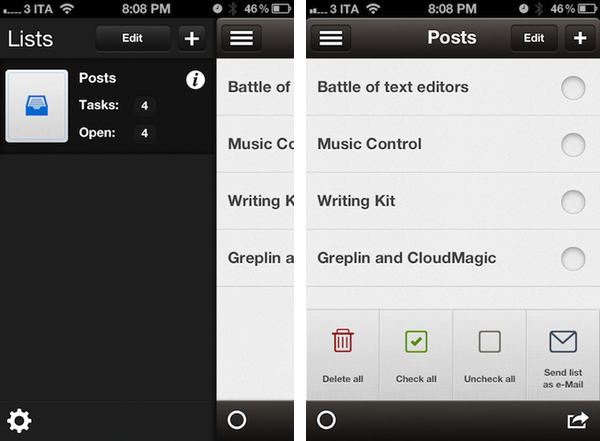
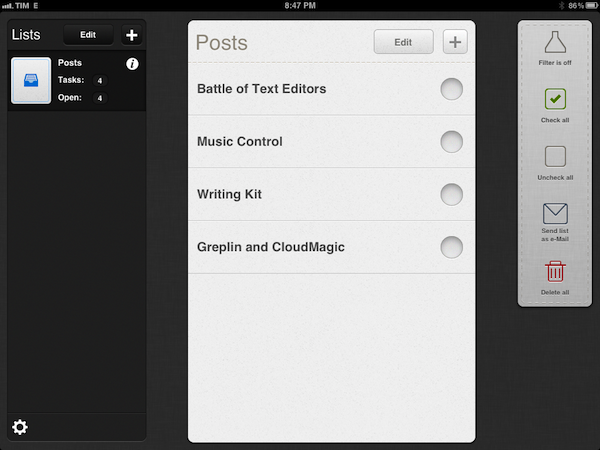
ListBook makes lists. On the iPhone, these lists are accessible from a button in the top left corner that you might have seen elsewhere recently;  on the iPad, the app uses a split interface that’s quite attractive and works fine.

Lists can be assigned an icon (the selection is nice), and you can disable Home screen badges on a list basis. Each list shows how many items you entered in total (tasks) and how many of them haven’t been completed (open). Because ListBook isn’t strictly GTD, but wants to combine text-based lists with a simple todo management system, completed items will stay in a list until you delete them permanently – a Filter button lets you view only “open tasks” if you prefer such view. This view setting, alongside lists and todos, will sync across devices using iCloud, and in my tests sync has been fairly responsive – it takes only a few seconds to see new items appear on another device, even if the app is already in the foreground.

Overall, I think ListBook 3.0 is a great update and the right path to follow for the developers, especially with iCloud, which would open the door to a possible Mac app in the future. If you like well-crafted user interfaces (the icon is also very polished and not blue or red), a simpler approach to list creation and supporting indie developers, you should give ListBook a try – it’s $1.99 on the App Store. For people who are just looking for a basic todo list app that syncs across devices, however, hitting the Buy button on this one might be a little hard. Apple’s Reminders does more, is integrated with Macs and PCs, and it’s free. Those users will be more than fine using Reminders, and I don’t blame them – Apple’s utility covers various aspects of list management very well, it’s got Siri support, and will gain a desktop version this summer. If, for some reason, you don’t like Reminders, or are simply intrigued by third-party apps in general, you should still try the new ListBook – it’s very nice and gets the job done.


Adobe Releases Lightroom 4

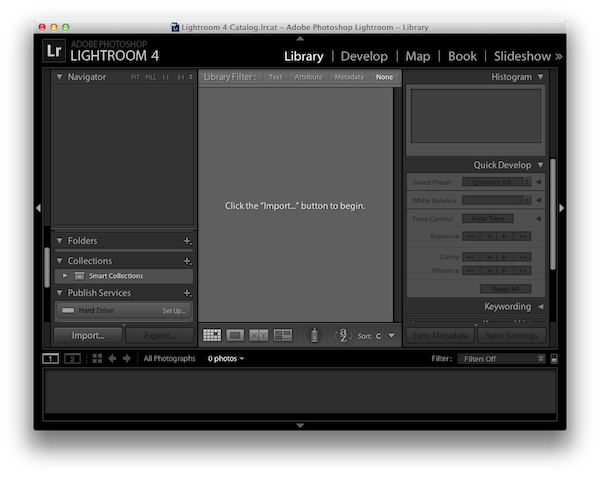
Initially released as public beta in January, the final version of Adobe’s desktop photo editing and management tool, Lightroom 4, has been made available today starting at $149 on Adobe’s website. Focusing on image quality with new shadow and highlight processing and different output options, Lightroom 4 is largely meant at enhancing the performance architecture and image quality improvements of Lightroom 4. In January, we wrote:

Alongside image refinements and extended, robust video support for organizing, editing and sharing videos on Flickr and Facebook (again, make sure to check out Adobe’s blog for the full details on video adjustments), Lightroom 4.0 beta features photo book creation with over 180 page design layouts, drag & drop support with layout guides, background graphics and integration with the Blurb book printing service. Adobe says photo books have grown in the popularity in the last couple of years, and I have no doubt this is a good move on Adobe’s side (assuming the service is impeccable) at the light of Apple’s moderate success with iPhoto photo books. Lightroom photo books can also be exported to PDF; in this beta, Blurb books are limited to 160 pages.

Similarly to iPhoto, Lightroom 4.0 now allows users to organize and browse photos by location. Thanks to a new Google Maps module (which obviously requires an Internet connection), Lightroom 4.0 will determine a a photo’s location if the camera that created the file supports GPS coordinates; otherwise, users can manually drop photos onto a location and create saved locations for future usage.

Those who downloaded the beta two months ago will find the same functionalities, fine-tuned for the final release (the beta can still be downloaded from Adobe’s website, and used until its expiration date). Among the key improvements of version 4.0, Adobe added native video support, giving photographers the ability to play and quickly edit videos shot on DSLRs, smartphones, and point-and-shoot cameras. The app comes with a series of video presets, and files can be exported to H.264 format or uploaded online to Facebook and Flickr directly within Lightroom.

Adobe Lightroom 4 costs $149, or $79 for upgrades from 3.0 – with this version, Adobe lowered the price from $299 of Lightroom 3 (upgrades used to be $99). Furthermore, Lightroom 4 will also be made available through Adobe’s Creative Cloud once it launches later this year with a subscription model (details here). A full list of features is available here and here; Lightroom 4 for OS X requires a Mac with 2 GB of RAM, 64-bit Intel multicore processor, and 10.6.8 or later. Check out a video of the app after the break.
Read more


Ten One Design Announces iPad 3 Pressure-Sensitive Stylus Powered by Bluetooth 4.0

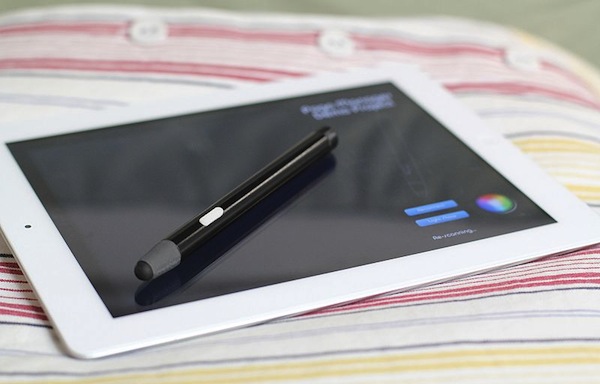
Ten One Design, makers of the popular Pogo stylus for iOS devices, announced today a brand new product – code named Blue Tiger for now but likely to receive the Pogo monicker come the final release – that the company is marketing as suitable for the yet-unannounced iPad 3. The stylus, pressure-sensitive and powered by Bluetooth 4.0 technology, will work with the iPhone and iPad, and feature an SDK for developers to integrate the pressure-sensitivity technology in their iOS apps.

You may have been hearing good things about Bluetooth 4.0. It’s a fast wireless connection, and is fully supported by the CoreBluetooth framework in iOS 5.

Bluetooth 4.0 devices don’t need to pair with your iPhone or iPad, they just connect and work. Also, the battery life is dramatically better - think months or a year on a single coin battery. We’ve developed the first pressure-sensitive stylus for iPad that uses Bluetooth 4.0.

It’s not clear why would Ten One Design specifically state the new stylus is “made for iPad 3” just a few days ahead of Apple’s announcement, but the fact that the new device will carry Bluetooth 4.0 is an assumption that’s been made by many lately (Apple itself has upgraded several of its devices and computers to Bluetooth 4.0 in the past year). Sample hardware of the Blue Tiger is available for testing today, and, judging from the first video, it appears the stylus in combination with hardware (and, we assume, Bluetooth) will be able to ignore palm and finger touches, focusing exclusively on the custom-made pen tip.

Details are scarce for now, and Ten One Design promises more will be revealed in the coming months as the product is finalized and gets FCC approval. For now, we can only speculate that the iPad 3 will indeed feature Bluetooth 4.0, and watch Ten One Design’s first video of the Blue Tiger, embedded below. Read more


Apple Releases Mac OS X 10.7.3 Supplemental Update

Apple just released a “supplemental update” to OS X 10.7.3, resolving ”an issue when restoring a Mac from a Time Machine backup.” Apple also adds in the release notes: ”This update is recommended for users running 10.7.3 with Time Machine backups.” OS X 10.7.3 was originally released on February 1, adding a number of fixes and improvements to Lion.

The update is now available on Apple’s website, and through Software Update as a 38 KB Delta update for users running 10.7.3.