Federico Viticci

10763 posts on MacStories since April 2009

Federico is the founder and Editor-in-Chief of MacStories, where he writes about Apple with a focus on apps, developers, iPad, and iOS productivity. He founded MacStories in April 2009 and has been writing about Apple since. Federico is also the co-host of AppStories, a weekly podcast exploring the world of apps, Unwind, a fun exploration of media and more, and NPC: Next Portable Console, a show about portable gaming and the handheld revolution.

Read It Later Reborn: Pocket Saves Everything “For Later”

In the past five years, reading on the web has fundamentally changed. Read It Later, the first popular service to pioneer a certain kind of “bookmarking” for web articles, is reborn today as Pocket, and it promises to change the way users think of web content to “save for later”. Most importantly, Pocket wants to address what has become the scarcest resource of web citizens: time.

Read Later

People never had time to check out all the cool stuff that happens on the Internet every day. As blogging platforms started taking off in the past decade, sometime during 2006 some people began to realize they didn’t have time to read every article that was posted online. The digital publishing revolution had already happened, but the explosion of blogging was just starting to produce high-quality, journalistic and well-informed pieces that, due to a simple scarcity of time and intuitive tools, people didn’t have time to read in their entirety. Whilst the act of “bookmarking” something on the Internet goes back to several years ago, the more focused, practical act of “saving an article for later” can actually be traced back in the form of popular consumer software to somewhere in between late 2006 and 2007.

Nate Weiner was one of the first developers (and avid web readers) to understand that the bookmarking systems in place at the time (Delicious, magnolia, or simple browser bookmarks) weren’t cutting it, from a technical and psychological perspective, for those users that just wanted to put off an article for later.

The difference between “bookmarking” and “saving for later” is both practical and conceptual: a regular bookmark is usually archived for good, as bookmarking services place great emphasis on letting users store bookmarks – links to webpages – forever in their accounts. There are some exceptions today, but the underlying philosophy has pretty much stayed the same. The action of “saving an article for later”, on the other hand, takes a more pragmatical approach: an article a user wants to read today or tomorrow isn’t necessarily representative of a webpage he wants to store and archive for eternity. The terminology itself – “for later” – indicates that something is going to happen ”later”. Once an article is read, most users tend to go on with their lives and forget about it. Like I said, it’s different today, and there are some specific use cases in which someone might want to archive articles – but the original concept lives on. People don’t have time to read every web article ever published.

Back in 2007, Nate Weiner set out to create a simple Firefox extension that would allow him to keep articles he found at work (and wanted to “read later”) in a different place than its browser bookmarks. On August 6, 2007, he launched the aptly-named Read It Later, a Firefox extension that did one thing well: it kept articles in a cozy little extension, saved for later. Users could hit a button to quickly save an article, and they could even save multiple browser tabs at once. As the extension started taking off, Nate began adding more features to Read It Later, such as offline support in December 2007.

Meanwhile, Marco Arment, developer at Tumblr, was facing a similar problem himself in 2007. He was constantly coming across news or blog articles he didn’t have time to read at the moment, and he needed something to read while on the bus or waiting in line. Arment discovered that there was no easy way to save links from a computer and access them later from the iPhone – we’re talking mid-2007 here, when the iPhone was getting in the hands of the first millions of customers, and when there was no SDK for developers to build native apps. So Arment decided, as he would later explain, to build just the service for that: Instapaper, a webpage that collected links saved from a bookmarklet, was launched publicly in January 2008. Like Read It Later, Instapaper solved a twofold issue: it allowed users to quickly save articles, and retrieve them later. Unlike Weiner’s app, though, Instapaper saved links in a webpage that could be easily accessed from the iPhone – mobile reading, in fact, seemed to be one of Instapaper’s primary features from the get-go. As Arment’s service became popular, he also went back to the drawing board – or in his case, programming tools – to implement new functionalities for Instapaper. The service’s hallmark feature, a text mode that strips unnecessary content out of web articles, was released in April 2008.

The rest is history. As Apple kept improving its mobile ecosystem with new devices, OS upgrades, and the App Store, Read It Later and Instapaper evolved, and iteratively became two fantastic services that serve millions of users every month. Over the years, we have followed both Instapaper and Read It Later closely at MacStories. Read more

Samuel L. Jackson and Siri Star in New iPhone 4S Commercial (Update: Zooey Deschanel Too)

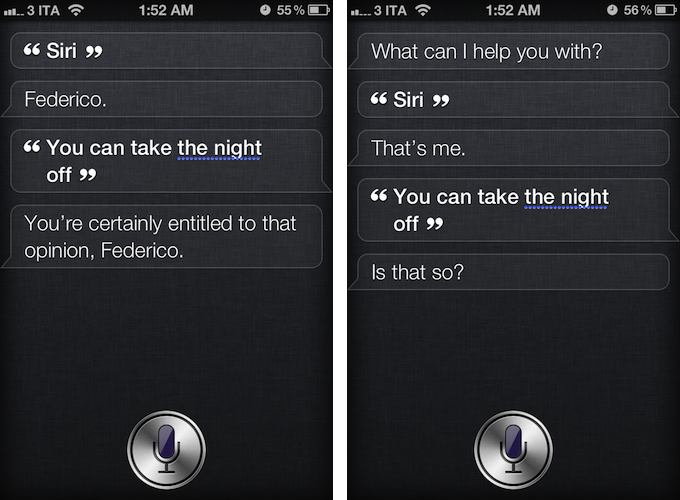
As noted by The Next Web, U.S. carrier Verizon Wireless aired a new iPhone 4S commercial featuring actor Samuel L. Jackson and Siri, the company’s virtual assistant for the iPhone 4S. Remarkably similar to Apple’s own ads in terms of style and message, the ad places Siri front and center, showcasing various functionalities of the software. Samuel L. Jackson asks his assistant to cancel appointments, create reminders, look up locations, and convert units to prepare for his “date night”. At the end of the commercial, the actor ironically asks Siri to take the night off, to which Siri replies “if you say so”.

Even more ironically, as depicted in the screenshots above, Siri really does reply to that command with a series of different answers.

Verizon Wireless’ official YouTube channel hasn’t been updated yet with the new commercial, and it’s not clear whether Apple’s official ad agency Chiat\Day may have been involved in the creation of the ad. You can check out an official embed after the break.

Update: It appears a full “Siri and celebrities” ad campaign is going live today. Another ad featuring actress Zooey Deschanel just aired as well, for carrier Sprint. It also seems like the same ads are airing with different carriers logo at the end, confirming the Samuel L. Jackson ad wasn’t simply a Verizon Wireless commercial, as initially suggested.

Update 17/4: Apple just posted the official versions of the ads on its website and YouTube channel. Find them below, or on Apple’s website (Date Night, Rainy Day).
Read more


Mockups of 16:9 and “Bigger” iPhone

Mockups of 16:9 and “Bigger” iPhone

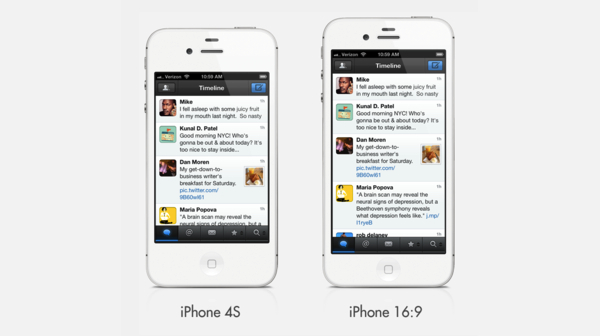
Dan Provost addresses recent speculation of a 4-inch iPhone with two interesting mockups of what a 16:9 and a 3:2 iPhone with bigger screen could look like:

The image above shows the current iPhone, a mockup of the alleged 16:9 phone, and a mockup with a bigger 3:2 screen at 300dpi, which measures 3.84” diagonally. I estimated that the physical size of the phone would need to increase slightly, getting taller in the 16:9 version and wider in the 3:2 version. I don’t think either of these size increases are deal breakers. The 3:2 version is actually still narrower than the iPhone 3GS.

Changing the aspect ratio of the iPhone would ultimately change the device’s experience, and developers would have to rework their apps for 16:9. Keeping the existing 3:2 ratio, lowering the pixel-per-inch count to make for a bigger screen, would still see some developers needing an optimization of their apps, but it’d have less consequences on the iPhone experience users are now accustomed to. And, aside from apps, let’s not forget that many websites have created custom mobile layouts specifically built for the iPhone’s 3:2 ratio.

The same question I asked for the rumored 7.85-inch iPad applies here: why would Apple want to change the iPhone’s screen? Apple doesn’t “have to” consider bigger screens just because its Android and Windows Phone 7 competitors are doing it, so unless Apple finds value in having a bigger iPhone screen, they won’t do it.

Permalink

OS X Abstract Art

OS X Abstract Art

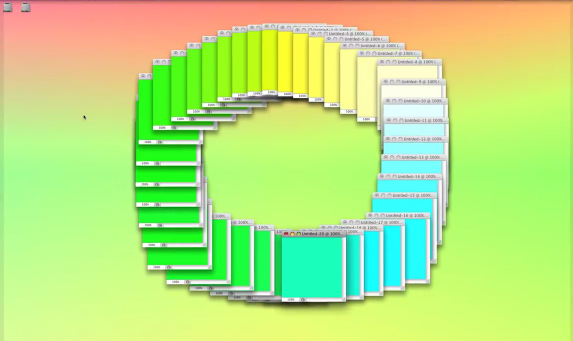
Emilio Gomariz uses OS X to create abstract animations. With a combination of applications, window animations, keyboard controls, and QuickTime, he assembled a mesmerizing collection of digital art that mixes graphics and music for a unique result. For the “alternate gradients” animation, he wrote:

The “Spectrum” screen saver from Mac OS X is alternated by the use of five Quicktime video players which also reproduce the own screen saver in different times and sizes, following a decreasing and centered composition.

In the “ctrl tab torus” animation, on the other hand, he used the CTRL+Tab action of Photoshop to create a rotating spiral of windows with different colors. Or, again, in “Open_Close.txt”, he used dozens of open items with colored backgrounds to create a virtual accordion for the standard open/close animations of OS X.

The whole collection of videos shows great creativity and willingness to experiment with the digital graphics of our computers. Check it out here. [TUAW via Today and Tomorrow]

Permalink

Apple II’s 35th Birthday

Apple II’s 35th Birthday

Harry McCracken reports on the original Apple II’s 35th birthday:

You probably weren’t paying attention when a tiny company called Apple Computer introduced its second product, the Apple II microcomputer, at the West Coast Computer Faire on April 16 and 17, 1977. (I wasn’t.) You may never have owned an Apple II. (I didn’t.) But it’s still easy to get fascinated by the machine and its legacy. (I sure am.) And there are many ways to explore its world — many of which you can do without getting out of the chair you’re sitting in right now, thanks to the Web.

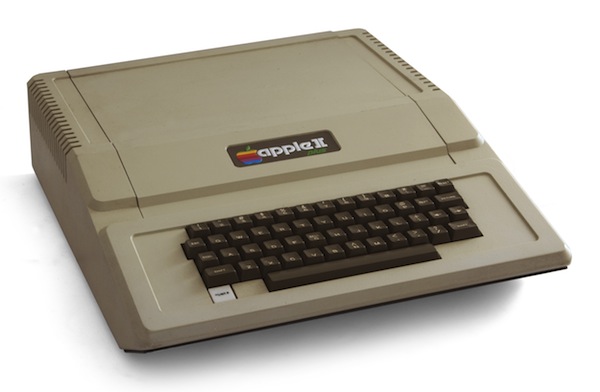
Make sure to check out McCracken’s post for a cornucopia of facts, anecdotes, and videos about the Apple II. Pictured above (via) is the Apple II Plus, a successor to the Apple II introduced in 1979, featuring improved graphics and disk-booting support in the ROM. Wikipedia is a good resource to learn more about the Apple II series today.

Also, don’t forget that registrations are open for the KansasFest 2012, an annual convention dedicated to the Apple II. Check out the schedule and list of presentations and workshops here.

Permalink

Apple Removes iWork, Aperture Trials From Its Website

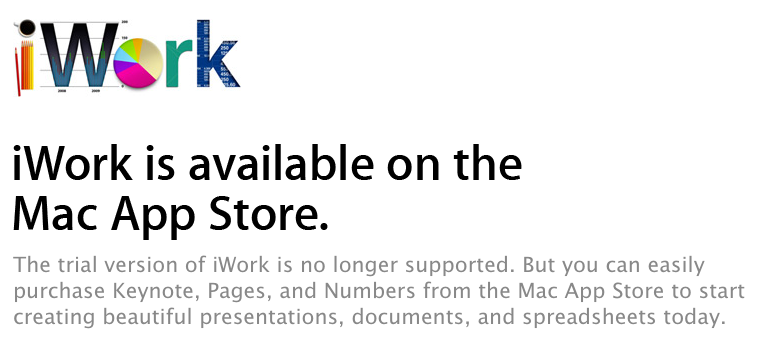
The trial version of iWork ‘09, Apple’s productivity suite that includes Pages, Numbers, and Keynote, is no longer available on the company’s website for download. The company has replaced the former iWork trial webpage with a message informing customers that iWork is available on the Mac App Store.

The trial version of iWork is no longer supported. But you can easily purchase Keynote, Pages, and Numbers from the Mac App Store to start creating beautiful presentations, documents, and spreadsheets today.

On the Mac App Store, the iWork apps are available as standalone purchases priced at $19.99 each. The iWork trial webpage is still available on some international Apple.com websites, such as the Italian one, although we are hearing reports that the download returns an error, reloading the webpage and displaying the same message about the Mac App Store. The iWork trial briefly disappeared last year, but came back shortly after. In March, Apple also announced the beta of iWork.com (which iWork ‘09 supported) will be discontinued in July.

Similarly, the company has removed the trial of Aperture 3 from its website, with users on Apple Support Communities noticing the change at least more than two weeks ago (recent Apple support documents still instruct users on how to remove the Aperture trial). Aperture is available on the Mac App Store at $79.99.

The trial version of Aperture is no longer available. If you currently have a copy of the Aperture 3 Trial installed on your Mac, you must delete it from your Applications folder before downloading Aperture 3 from the Mac App Store.

The removal of trials from Apple.com shouldn’t come as a surprise. The company has been gradually shifting all its software releases to the App Store, including major releases of OS X and Final Cut Pro. In July 2011, Apple also shut down the Mac OS X Downloads webpage, redirecting customers to the Mac App Store. Apple, however, still has a trial of Final Cut Pro (which is sold at $299.99 on the Mac App Store) available on its website, suggesting that more expensive software may still receive support for trials in the future.

Apple has been rumored for over a year to be on the verge of releasing a new version of iWork, although such rumors never materialized in a finished product with substantial new features. Apple released compatibility updates to introduce Lion support and bug fixes, but avoided implementing direct iCloud integration back in October, requiring users to manually upload and download documents to sync through iCloud.com. According to more recent speculation, Apple may release an updated version of iWork with Mountain Lion, which is on track to become available sometime this summer. [Thanks, Luca]


iPad Launches In 12 Additional Countries This Week

With a press release published this morning, Apple confirmed the new iPad will launch in 12 additional countries this week. The April 20th launch countries include South Korea, Uruguay, and Venezuela. On April 27th, the device will become available in 9 more countries including India and South Africa.

In addition to South Korea, the new iPad also will be available beginning on Friday, April 20 in Brunei, Croatia, Cyprus, Dominican Republic, El Salvador, Guatemala, Malaysia, Panama, St Maarten, Uruguay and Venezuela. Beginning on Friday, April 27, the new iPad will be available in Colombia, Estonia, India, Israel, Latvia, Lithuania, Montenegro, South Africa and Thailand.

The third-generation iPad has been the company’s fastest rollout to date; after the April 27th release day, the new iPad will be available in 56 different countries worldwide since its launch 42 days ago.

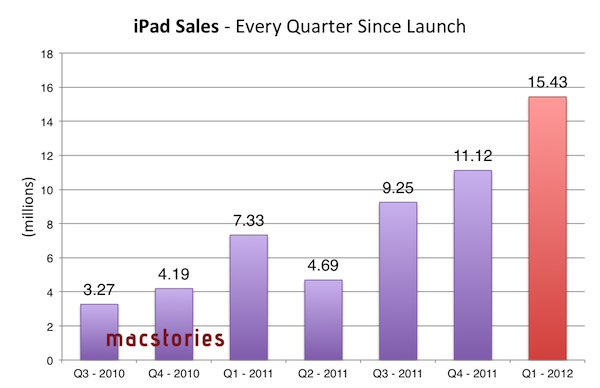
Below, a recap of the iPad’s launch dates and units sold until Q1 2012.

March 16 (10 countries): United States, Australia, Canada, France, Germany, Hong Kong, Japan, Singapore, Switzerland and the UK.

March 23 (25 countries): Austria, Belgium, Bulgaria, Czech Republic, Denmark, Finland, Greece, Hungary, Iceland, Ireland, Italy, Liechtenstein, Luxembourg, Macau, Mexico, The Netherlands, New Zealand, Norway, Poland, Portugal, Romania, Slovakia, Slovenia, Spain and Sweden.

April 20 (12 countries): South Korea, Brunei, Croatia, Cyprus, Dominican Republic, El Salvador, Guatemala, Malaysia, Panama, St Maarten, Uruguay and Venezuela.

April 27 (9 countries): Colombia, Estonia, India, Israel, Latvia, Lithuania, Montenegro, South Africa and Thailand.

On March 19th, the company confirmed the iPad had sold 3 million units in 4 days. The April 20 and April 27 international launches won’t be included in the company’s Q2 earnings, which ended on March 31. Apple will hold its Q2 earnings call on April 24.


MacStories Reading List: April 8 - April 15

The MacStories Reading List is back, and it features the best articles about the most important news of the past weeks. From the Instagram acquisition to renewed interest in bigger iPhones with different screens, the Apple blogging machine picked up steam after the release of the new iPad and is now looking forward to WWDC ‘12, which Apple is rumored to be announcing soon.

Until then, put on your favorite reading glasses, and follow us after the break for this week’s best Apple-related writing. Read more


Apple Confirms 10th Retail Store in Italy

(The location of the Apple Store at Porta di Roma. Image via Macity)

As first noted by setteBIT, Apple officially acknowledged the existence of its 10th retail store in Italy, at the Porta di Roma shopping mall. As previously reported, the retail store is rumored to be opening on Saturday, April 21, albeit no official confirmation in regards to the grand opening has been made yet. The “Galleria Porta di Roma” shopping mall, located near the GRA highway of Rome, is open from 9 AM to 10 PM during the weekends, and it includes 220 retail stores. The new store’s dedicated webpage will be available here.

Two weeks ago, a rumor suggested the Porta di Roma Apple retail store would open on April 21st; on the same day every year, the city of Rome commemorates its founding in 753 BC, The celebration is known as “Natale di Roma” (Birthday of Rome), and such date would certainly provide an opportunity for Apple to play around the marketing tagline of the store opening.

Apple’s first retail store in Italy opened in April 2007 at Roma Est, another shopping mall located outside Rome. The new Apple store at Porta di Roma will be the company no. 365 worldwide, Italy’s 10th, and the 118th to open outside the United States.