Federico is the founder and Editor-in-Chief of MacStories, where he writes about Apple with a focus on apps, developers, iPad, and iOS productivity. He founded MacStories in April 2009 and has been writing about Apple since. Federico is also the co-host of AppStories, a weekly podcast exploring the world of apps, Unwind, a fun exploration of media and more, and NPC: Next Portable Console, a show about portable gaming and the handheld revolution.
Federico and Ryan discuss using the iPad Pro as a modular computer, and the pros and cons of the 12.9-inch and 11-inch models in different setups. Afterwards, a Keynote presentation about, to the surprise of no one, the iPad.
You can listen below (and find the show notes here), and don’t forget to send us questions using #AskAdapt and by tagging our Twitter account.
0:00 01:04:53
Adapt, Episode 23
AppStories+ Deeper into the world of apps
Sponsored by:
Pingdom: Start monitoring your website performance and availability today, and get instant alerts when an outage occurs or a site transaction fails. Use offer code ADAPT to get 30% off. Offer expires on January 31, 2021.
Federico rejects a new iPhone charging solution, Myke opens a new store and Stephen passes a collection basket to add a set of wheels to his Mac Pro. Then, the three talk about the new iPhone SE.
You can listen below (and find the show notes here).
0:00 01:21:45
Connected, Episode 290
AppStories+ Deeper into the world of apps
Sponsored by:
StoryWorth: Record your family stories. Get $10 off your first purchase.
Ooni: Bring the world’s best pizza to your own backyard. Use the code CONNECTED for 10% off.
Hover: Make a name for yourself. Get 10% off any domain name.
For the past week or so, I’ve been going through every single app installed on my iPhone and doing some necessary spring-cleaning of my Home screens. What better time to take care of this, after all, than during a quarantine with lots of free time and a relatively slow Apple news period? I find...
This week, Myke talks about a sell on Cinema Displays, then the guys move on discuss Federico’s recent iPad article on modularity, the possibilities of widgets in iOS 14 and Stephen’s Mac Madness winner and picks.
You can listen below (and find the show notes here).
0:00 01:26:18
Connected, Episode 289
AppStories+ Deeper into the world of apps
Sponsored by:
Pingdom: Start monitoring your website performance and availability today, and get instant alerts when an outage occurs or a site transaction fails. Use offer code CONNECTED to get 30% off. Offer expires on January 31, 2021.
Squarespace: Make your next move. Enter offer code CONNECTED at checkout to get 10% off your first purchase.
Boll & Branch: The Softest Organic Sheets & Luxury Bedding. Save $50. Try them for 30 days in a risk free trial.
This week, Federico and John recap MacStories’ iPad at 10 coverage and then compare notes on the research apps they use and approaches they take when working on a big project.
When I started my iPad-only journey in 2012, I was stuck in a hospital bed and couldn’t use my Mac. It’s a story I’ve told many times before: I had to figure out a way to get work done without a Mac, and I realized the iPad – despite its limited ecosystem of apps and lackluster OS at the time – granted me the computing freedom I sought. At a time when I couldn’t use a desk or connect to a Wi-Fi network, a tablet I could hold in my hands and use to comunicate with remote colleagues over a cellular connection was all I needed. Over time, however, that state of necessity became a choice: for a few years now, I’ve preferred working on my iPad Pro and iPadOS (née iOS) in lieu of my Mac mini, even when I’m home and have access to my desk and macOS workstation.
The more I think about it, the more I come to this conclusion: the iPad, unlike other computers running a “traditional” desktop OS, possesses the unique quality of being multiple things at once. Hold an iPad in your hands, and you can use it as a classic tablet; pair it with a keyboard cover, and it takes on a laptop form; place it on a desk and connect it to a variety of external accessories, and you’ve got a desktop workstation revolving around a single slab of glass. This multiplicity of states isn’t an afterthought, nor is it the byproduct of happenstance: it was a deliberate design decision on Apple’s part based on the principle of modularity.
In looking back at the past decade of iPad and, more specifically, the past two years of the current iPad Pro line, I believe different factors contributed to making the iPad Pro Apple’s first modular computer – a device whose shape and function can optionally be determined by the extra hardware paired with it.
The original iPad Pro showed how Apple was willing to go beyond the old “just a tablet” connotation with the Apple Pencil and Smart Keyboard. Three years later, the company followed up on the iPad Pro’s original vision with a switch to USB-C which, as a result, opened the iPad to a wider ecosystem of external accessories and potential configurations. At the same time, even without considerable software enhancements by Apple, the creativity of third-party developers allowed iPad apps to embrace external displays and new file management functionalities. And lastly, just a few weeks ago, Apple unveiled iPadOS’ native cursor mode, finally putting an end to the debate about whether the iPad would ever support the desktop PC’s classic input method.
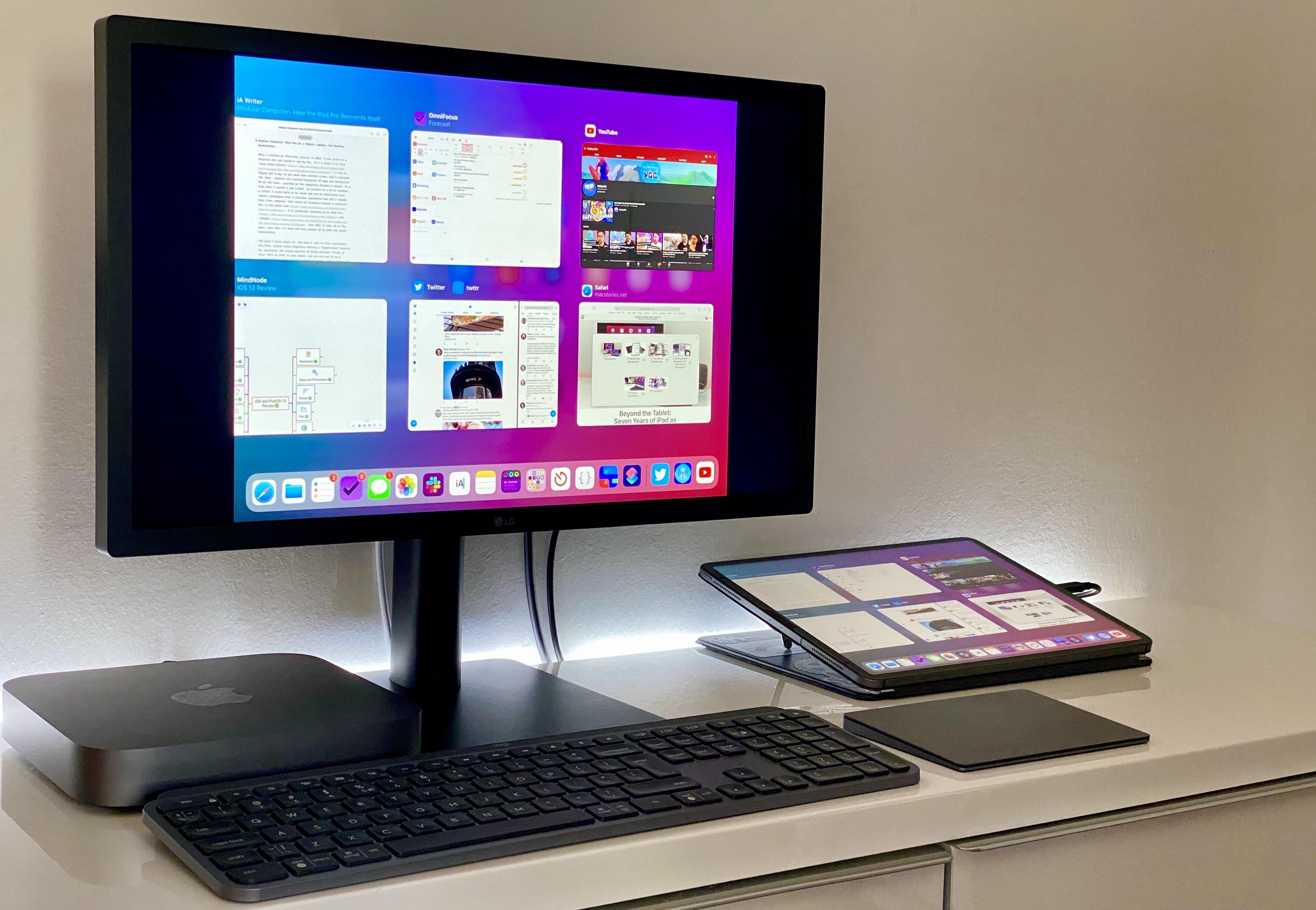
The intersection of these evolutionary paths is the modern iPad Pro, a device that fills many roles in my professional and personal life. Ever since I purchased the 2018 iPad Pro1, I’ve been regularly optimizing my setup at home and on the go to take advantage of the device’s versatility. I’ve tested dozens of different keyboards, purchased more USB-C hubs than I care to admit, and tried to minimize overhead by designing a system that lets me use the same external display and keyboard with two different computers – the Mac mini and iPad Pro.
At the end of this fun, eye-opening process, I’ve ended up with a computer that is greater than the sum of its parts. By virtue of its modular nature, I find my custom iPad Pro setup superior to a traditional laptop, and more flexible than a regular desktop workstation.
So how exactly did I transform the iPad Pro into this new kind of modular computer? Let’s dig in.
Earlier today, I published an iPad article on MacStories I’ve been working on for a long time: a comprehensive look at how I use the iPad Pro as a modular computer, serving the roles of tablet, laptop, and desktop workstation. In the story, besides discussing iPadOS 13.4’s new native pointer, I also highlight the...
Mac Madness is down to the final two machines, and Myke explains why it is all Stephen’s fault. Then, Federico takes everyone on a tour of high-resolution audio apps for the iPhone and iPad … which are all wild. Lastly, we check the temperature of the room on Apple’s Dark Sky acquisition.
You can listen below (and find the show notes here).
Pingdom: Start monitoring your website performance and availability today, and get instant alerts when an outage occurs or a site transaction fails. Use offer code CONNECTED to get 30% off. Offer expires on January 31, 2021.
Ahrefs: SEO Tools & Resources To Grow Your Search Traffic. Get a 7-day trial for just $7.









 John
John