Graham Spencer

917 posts on MacStories since January 2011

Former MacStories contributor.


VMware Releases Fusion 4, Brings Full Lion Support

VMware Fusion 4 has today been released by VMware, the latest version of the popular emulation software for running Windows on Macs. It comes just two weeks after Parallels Desktop 7 became available, which brought significant enhancements to the software when running on Lion.

Enhancements to VMware Fusion® 4 make it a breeze to run Windows and Mac applications side by side on a Mac,” said Pat Lee, director, client product management, VMware.

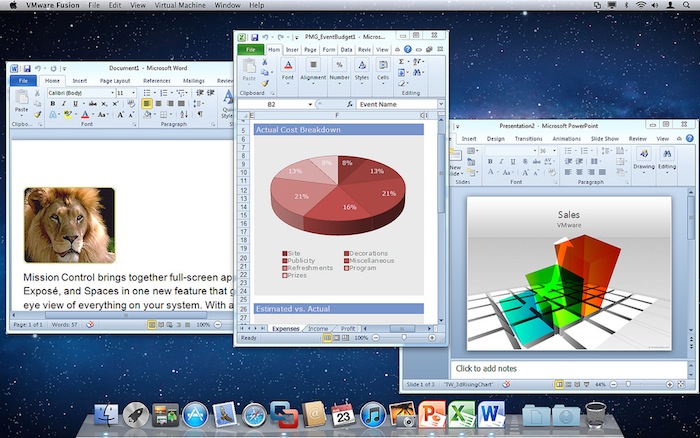
Todays update to VMware Fusion similarly brings full support for Lion including the ability to add Windows programs to Launchpad, Mission Control support and even utilising full-screen mode. Furthermore, VMware claims that performance has also been improved markedly,  potentially running up to 2.5 times faster than previous versions of Fusion. Other new features include the support for running Lion in a virtual machine (as per Lions new License Agreement) and more of a “Mac-Like Experience” when running Windows.

VMware Fusion 4 is available from today for $49.99 until the end of the year, when the pricing will revert to $79.99. VMware is also offering customers who purchased Fusion 3 on or after July 20 a free electronic upgrade to Fusion 4. You can purchase it online or at select resellers including the Apple retail and online stores. Jump the break for some screenshots of VMware Fusion 4.

[Via The Loop]
Read more


Microsoft Releases Office 2011 14.1.3 Update, Patches Some Lion Issues

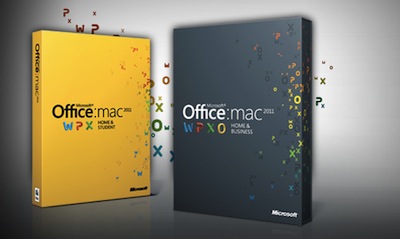
Microsoft announced in late July that it was preparing updates for Office 2011 to fix bugs and generally improve Lion support. That first update finally went live late yesterday, fixing a variety of minor bugs that affected Office 2011 in Lion. Unfortunately one of the biggest complaints when Lion was released was that Outlook 2011 couldn’t import emails from Mail.app - that issue has yet to be fixed, with Microsoft simply disabling the ability to import email on Lion.

As Microsoft’s Mac department revealed back in July, another more significant update for Office 2011 will arrive in a few months. In that update Microsoft has said they will bring support for new Lion features such as Versioning, Auto Save and full-screen mode to their applications.

Jump the break for a full list of improvements, whilst you can manually download the update from the Microsoft Download Center.

[Via TUAW]

Read more


Apple Seeds New Developer Build Of OS X 10.7.2, Incorporates iCloud Beta

Late last night Apple seeded a new develper preview of OS X 10.7.2, Build 11C55. Of most interest is that this new build now incorporates OS X iCloud components. Prior developer previews had required a seperate download for the iCloud components.

OS X Lion Software Update 10.7.2 is an update to OS X Lion 10.7 and includes support for iCloud beta. Please refer to the seed note for more details and installation instructions.

This latest developer preview of OS X 10.7.2 comes less than 10 days after the last preview and just a few days after new iTunes and iWork developer previews were seeded to developers.


Apple Tweaks Online Store, Adds New iPad Purchasing Wizard

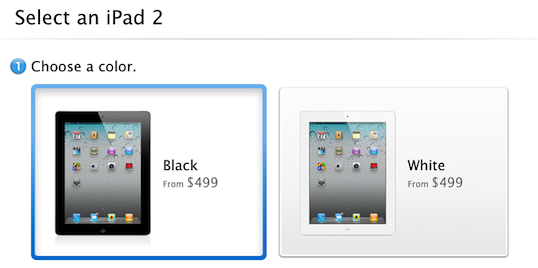
The online Apple Store went down earlier today, but it wasn’t because of any new products. Apple has tweaked their online store with some minor changes, some new features and improved performance. The most noticeable change is an enhanced iPad ordering process that guides a customer through choosing the correct iPad for themselves.

Now when a customer opts to purchase an iPad online, they will be guided not to a list of all the available iPad models but to a simple two or three step wizard. This new selection process starts by asking a customer whether they would like a black or white iPad, then which model they would like - whether it be a WiFi-only or WiFi+3G model and what size storage they want. Then, if a customer has chosen a 3G model they will be prompted as to whether they would like a Verizon or AT&T model - although this option only applies in the US store.

The process is guided by simple questions, short descriptions and large graphics and if a customer needs further help there is a link to a “Get answers before you buy” help page. Curiously this new wizard hasn’t been applied to the iPhone purchase page, which still simply lists all the available models.  Jump the break for a screenshot of the entire selection process, or try it yourself on the Apple Store website.

[Via The Next Web]

Read more


Home Improvement Store, Lowe’s, Deploying 42,000 iPhones

US home improvement and appliance retailer, Lowe’s, has revealed that it is undertaking a significant technological upgrade over the coming months. In addition to overhauling its website, the store is replacing decade old technology in its stores by deploying new technology and products such as iPhones.

The store chain is spending a record amount on technology over this fiscal year, replacing 72,000 computer screens with flat panels, adding WiFi to stores for customers to use and purchasing more than 42,000 iPhones (that’s 25 for every one of Lowe’s 1700 stores).  The iPhones will replace scanner guns from the 1990s and staff will now be able to check product information or even view how-to videos, right as they stand next to the customer.

“Forget about the competition, we are playing catch-up with the customer psyche,” Mike Brown, Lowe’s Chief Information Officer, said.

The iPhones will also eventually be enabled to do more tasks including calling customers or suppliers, emailing, text-messaging as well as processing credit card purchases - similar to how the iPod Touch is used by Apple in their retail stores.

[Via Bloomberg]


Apple Could Already Be Planning A Third Campus To Cope With Employee Growth

Cupertino City officials will tonight be holding a meeting on Apple’s new ‘spaceship’ campus that was revealed by Steve Jobs himself back in June of this year. It will be the first opportunity that Cupertino residents will be able to raise issues about the project for the City to consider before approval is given for construction. But already, Apple may be planning the construction of a third campus with expected employee growth to be greater than the 13,000 this new ‘spaceship’ campus can hold.

This is according to Cupertino Mayor, Gilbert Wong, who told the Contra Costa Times that Apple Executives have informed him that they are expecting to start working on a third campus at an unknown location after they finish the ‘spaceship’ campus in 2015. Gilbert also notes that within Apple the campuses may just be named as simply as the iPad and iPhone product lines, with this forthcoming ‘spaceship’ campus simply dubbed “Apple 2”.

“I think it makes sense to call it Apple 2,” Mayor Gilbert Wong said Wednesday. “They have iPad 1 and iPad 2; iPhone 1 and iPhone 2. This building is probably going to have much more innovative technologies and products than what they have at” their first campus, also in Cupertino.

You’ll be able to watch tonight’s Cupertino City Council meeting either live in person or online where a broadcast will be streamed.

[Contra Costa Times via The Next Web]


Adobe Sees 45% Growth Of Premiere Pro On The Mac, Credits Final Cut Pro X

According to a report in The Loop, Adobe will today announce that sales of its professional video production tools have skyrocketed year-over-year. Which, in large part has been driven by growth on the Mac platform with disillusioned Final Cut Pro users moving over to alternative products after Apple released the controversial Final Cut Pro X version earlier this year.

As the backlash began from professional video editors, Adobe targeted them, giving discounts for Premiere Pro (Adobe’s alternative to Final Cut Pro) and publishing video tutorials and documents to ease the transition. This appears to have payed off with a 45% growth of Adobe’s video production tools on the Mac and total year-on-year growth across both the PC and Mac platforms at 22%.

In comparison to Adobe’s efforts, Apple hasn’t done much to quell concerns apart from release a Q&A article, refund customers for the purchase and only last week they began selling Final Cut Pro 7 again but at the standard $999 price.

[Via The Loop]


MacUpdate Bundle: A Fine Selection Of 11 Mac Apps For Just $50

Following Monday’s Bundlehunt package of 11 great Mac apps and various ‘design goodies’, today there is a new MacUpdate Bundle which also comes with a selection of top-notch Mac apps and utilities for just $49.99. The bundle includes some of MacStories’ favourite Mac apps including the excellent Fantastical (review here), the informative iStat Menus and the useful Printopia (review here). If you tried purchasing the included apps individually you’d be paying nearly $500, so if you’re looking to beef up your collection of Mac apps this is a terrific deal at just $49.99.

The MacUpdate Bundle includes:

  • Toast 11 Titanium - if you need to do more than the basic disc burning that the iLife software provides, Toast is an excellent option. It also has a solid set of video conversion tools as well as supporting the ability to burn copies of recorded video from EyeTV and copying CDs and DVDs with no fuss.
  • Printopia - only available to the first 10,000 purchasers of the MacUpdate Bundle, Printopia allows you to share your printers connected to a Mac (physically or over a network) with an iPad, iPhone or iPod Touch - allowing you to print from an iOS device to virtually any printer (as opposed to the limited selection of HP printers that are natively supported).
  • Data Rescue - this is an advanced piece of digital data recovery software for the Mac, allowing you to safely recover previously deleted files.
  • FX Photo Studio Pro - this Mac post-processing image editor comes loaded with over 150 image effects and comes with some substantial customizations options, allowing you to mix and match effects to perfect an image.
  • Fantastical - this is a powerful Calendar application that sits in your menu bar, working with existing calendars and comes with a powerful natural language engine that can create an event from a simple phrase (e.g. Lunch with Matt on Wednesday 1pm).
  • iStat Menus - monitor all of your Mac’s vital statistics with just one glance to the menubar, it supports monitoring everything from CPU usage to component temperatures to network usage and more.
  • Phoneview - access and export various pieces of data from your iPhone or other iOS device from call history, text messages, photos, voice memos and more.
  • Concealer - conceal important snippets of data in an encrypted archive - everything from license keys to diary entries can be concealed.
  • EarthDesk - replace a boring desktop background with a live-updating image of the Earth with real time movement of the sun and even cloud coverage.
  • Mellel - a powerful word processor that is appreciated by scholars, students and those writing technical documentation.
  • Bookends - for professionals and students this is an extremely powerful reference management application (and it integrates perfectly with Mellel)


Disclaimer: For every bundle purchased through MacStories, we receive a small kickback. If you’re interested in the bundle and supporting the MacStories crew, please use the link here or any of the affiliate links above.


Adobe Adds Full Support For Newsstand In Its Digital Publishing Suite

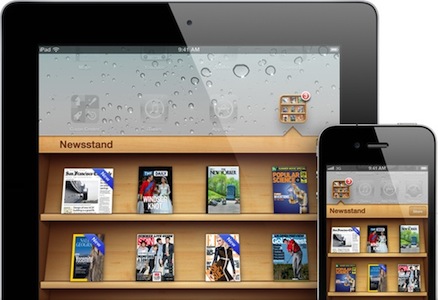
Adobe has today announced that publishers who use the Adobe Digital Publishing Suite will be able to create newspaper and magazine files that appear in Apple’s new Newsstand feature. Announced at WWDC and arriving in iOS 5 this Fall, Newsstand will allow new editions of Newspapers and Magazines to be automatically downloaded (in the background) as soon as they are made available - and storing them all in a pseudo-folder on a user’s home screen.

Today’s announcement by Adobe reveals that their Digital Publishing Suite will be able to create files that are compatible with Newsstand, allowing publishers to create and deliver new editions directly to users with little fuss. Todd Teresi, from Adobe’s Media Solutions department said the “support for Newsstand will provide Adobe’s publishing customers the ability to deliver engaging content directly to the digital doorstep of subscribers on their iPads”.

Applications built with Adobe Digital Publishing Suite and enabled for Newsstand will allow publishers to better merchandise their content with support for Newsstand push notifications and icon covers displayed on the Newsstand shelf, reflecting the latest issue of the magazine or newspaper.

This move by Adobe is quite a significant motion of support for Apple’s Newsstand feature because their Digital Publishing Suite is already used to create more than 600 titles, including high profile publishers such as Conde Naste and Reader’s Digest. With little effort, all these publishers can now add support for Newsstand.

[Via MacRumors]