This Week's Sponsor:

Halide

Unlock Your iPhone Camera


Posts tagged with "video"

Macworld 2011: The Future of the Mac [Video]

Here’s a 48-minute video for your typical Sunday morning: at Macworld Expo 2011, Daring Fireball’s John Gruber, Macworld’s Jason Snell and Dan Moren and Tidbits’ Adam Engst talk about the future of the Mac, the Mac App Store as the biggest innovation happening to the platform, the iOS influences on OS X and much more.

One argument that really made me think after watching the video is the idea of two kinds of Macs in the future: a “simplified Mac” with a closed system similar to iOS, and a Mac for advanced users. I don’t know how I would react to a closed, straightforward and really  simple Mac personally, but I do know that I would appreciate a new system for managing and deleting apps. Perhaps Launchpad will bring some fresh air on Lion. But then again, should Apple just make the Mac as simple as possible and let “power users” enable the features they want (like, say, the Finder) in the machine’s preferences? And how does the Mac App Store fit in all this? Great discussion in the video above.
Ions: Impressive Particle Visualizer for iPad

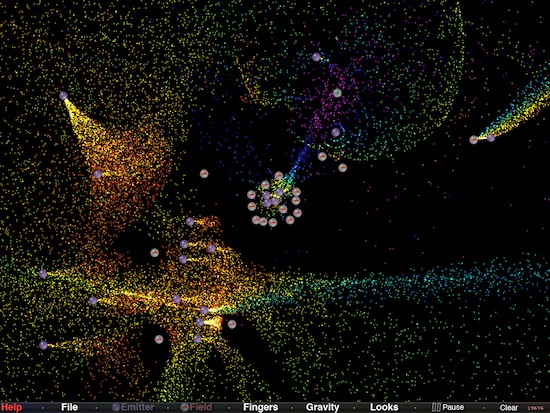
Soon after the iPad came out and Apple launched an App Store specifically meant for it, an app quickly jumped to first position of the charts: Uzu. The app, launched as free and eventually priced at $1.99, is a neat particle visualizer that supports multitouch input and allows you to create patterns with your fingers. Check our demo video here if you missed.

Ions, developed by Douglas Applewhite and available in App Store at $0.99, is an equally impressive particle visualizer that, unlike Uzu, gives you more control over the particles of light moving on screen. In fact, Ions might just be the most powerful and technically advanced particle visualizer we’ve seen on the iOS platform. The app comes with different particle light styles that you can switch at any time; you can control gravity with a slider or de-activate it from a popup menu; most of all, you can place emitters and negative fields on screen to control the movement of particles, which can go up to 20,000. Everything runs at 60fps and I haven’t noticed a single slowdown in my tests. Even with the maximum amount of emitters and fields particle were still running smoothly and fast.

You can also control the amount of particles released by an emitter, adjust the orientation and speed of the flow. Once you’ve achieved an interesting layout, you can save it and load it later to show it to your friends.

Go download Ions here. Demo video after the break. Really impressive. Read more


BBC iPlayer App for iOS Launching Next Month?

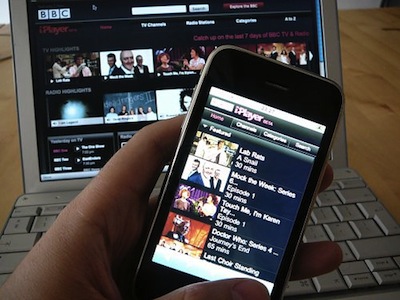
In December, a series of reports suggested that BBC was working on a subscription-based version of the popular iPlayer streaming service for iPad, targeting a mid-2011 release only in “certain markets” with both free and paid versions.

According to PaidContent, the BBC iPlayer app for iPhone and iPad is now nearing final release and should be available by the end of February, ahead of BBC’s technology director Erik Huggers departure to Intel.

The service’s web-native version already works on iPhone and iPad, to a fashion. Executable app versions are likely to work a lot better. Some Android users have complained about lack of plans for their smartphones.

The service will be available only in the UK, though BBC Worldwide is planning an international, subscription iPlayer containing different shows.

The iPlayer service registered a record 145 million requests in December 2010, with users making 4% percent of those requests through mobile browsers. A native iPlayer iOS app could bring more features than simple streaming via Mobile Safari, like social integration, support for AirPlay, a better UI and a faster navigation system.


Movie Player for iOS Plays Most Video Formats

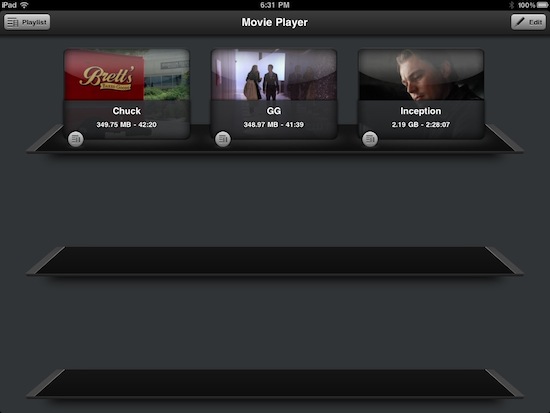
If you feel sad about the removal of VLC from the App Store and you didn’t purchase the app in time before it got pulled, Movie Player is an interesting alternative I’ve been this past week you might consider for your portable movie needs. The app is universal for iPhone and iPad, it will cost you $2.99 and it’s got nice interface design and animations. Most of all, Movie Player can play most any video format you have on your hard drive, ready to be synced via iTunes.

The huge list of supported formats includes: divx, avi, flv, mov, wmv, mpg, mpeg, mpeg1, mpeg2, mpeg4, mp4, m4v , mpv, vob, ts, ogv, ogm, mkv, dv, asf, 3gp, m2p, m2ts, m2v, gxf, wm. I have tested the app with avi, mkv, mp4 and mov files.

In my tests, the app played most formats smoothly, launching files of 2GB in 2-3 seconds. I also would like to point out that I’ve run Movie Player against iOS 4.3 beta, which isn’t officially supported yet. I’ve only noticed slow downs with large movies that had .srt subtitles, also synced with iTunes’ file manager. The app recognized the subtitles but didn’t generate a thumbnail, and moving the scrubber through the movie was a little too slow. Anything else, however, worked perfectly under the new OS on the iPad and iPhone 4.

Movie Player allows you create playlists to watch videos one after the other without interruptions, very useful for TV shows and video podcasts. A small detail I particularly appreciated is the curtain-like animation that shows up when opening and closing a movie.

Movie Player definitely gets its job done, it hasn’t got many additional features but playback is smooth. At $2.99 in the App Store, give it a try. More screenshots below. Read more


iOS 4.3 Apps Already Being Approved

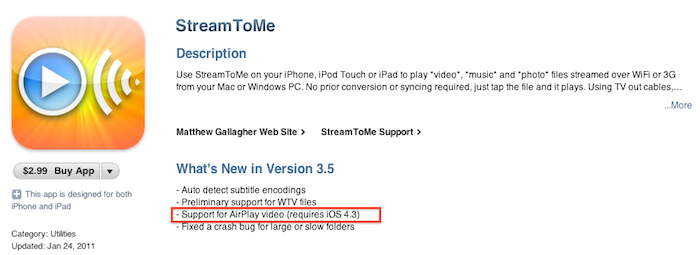
It appears that Apple has started approving applications that use features that will officially be introduced in the upcoming iOS 4.3 software update. StreamToMe, an app we previously reviewed here, has been updated a few hours ago with support for AirPlay video streaming, a functionality that’s not available on the current iOS 4.2. Being the feature exclusive to iOS 4.3, you won’t be able to try it unless you’re a developer. An Apple TV running the latest pre-release software is also required.

Does this mean iOS 4.3 is just around the corner? Beta 2 was shipped last week and we’ll likely see Beta 3 this Wednesday. Apple usually goes into 4-5 betas and a GM seed before public release, so we speculate we might see the final version of iOS 4.3 in late February. But then again, issues may come up in iOS betas at any time.


The Incident Gets Recreated In Real Life

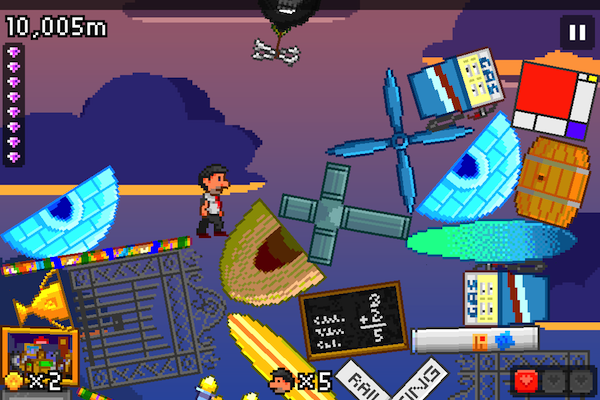
Last week there was the real life Fruit Ninja, today another iOS game, The Incident has been emulated (or technically “sweded”) in real life and the video is just comical and begs to be watched. The Incident is of course the iOS game that makes you run and dodge objects falling from the sky.

The fans of The Incident that created this video were pretty ingenious in the way they put it together obviously avoiding actually dropping anvils from the sky, and the errrr “music” that accompanies it is just awesome. There really isn’t much else to say, just watch the video after the break!

Read more


This Notification System Would Look Good on iOS 5 [Mockup]

One of the key areas users would like Apple to focus on for iOS 5 is the notification system. Currently, notifications on iOS are far from useful and unobtrusive: they get in the way too much, there’s no way to access a log of past notifications, if you’re playing a game and quickly dismiss a notification’s alert because you’re busy / concentrated, there’s no way to get that notification back. Many says notifications are the less Apple-like feature in iOS.

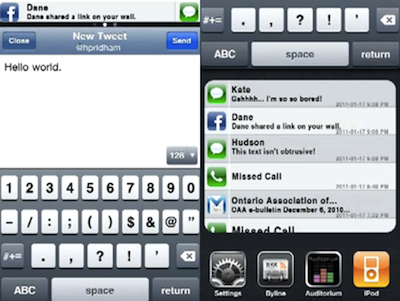
In the past, we have covered several alternative solutions to improve iOS’ notification system, like Notified. All these tweaks are available for jailbreakers in Cydia, and require a bit of manual hacking and configuration. The following mockup, realized by Youtube user hustn, shows a few ideas that we think might be a good fit for the next major update of iOS. Notifications that don’t get in the way but appear in a bar at the top, even multiple ones; possibility to tweak the settings with quiet times and display order; an additional section above the multitasking tray that shows the most recent notifications from all apps. It looks pretty good and interesting. As the creator explains:

This is a mockup of my current side project of designing an improved iPhone notification system. Unlike other attempts at improving the iPhone’s notification system, my approach is to use design direction from the current iPhone UI to create a seamless interface for the user.

This is purely theoretical. There is no code behind this; I’ve mocked this all up in Flash and Photoshop.

What do you think? The system looks a bit like the notifications seen in Palm’s webOS, and undoubtedly borrowing a few ideas from Palm wouldn’t be so bad for Apple. Especially considering that former Palm Senior UI Designer Rich Dellinger now works at Cupertino. [via Reddit]
Read more


AT&T and Verizon Finally Together In Apple’s New Ad

So Apple has a new iPhone 4 coming out on February 10 in the U.S., under Verizon’s network. We guess you know everything about it at this point. Well, Apple wants you to take a look at the big picture: iPhone on two carriers is better than iPhone on one carrier. It’s pure and simple Jobsian mathematical art. The iPhone 4 on Big Red and AT&T is something worth launching a new commercial for.

Or, as a commenter on Youtube says, “AT&T and Verizon both in the same commercial? I’m surprised the universe didn’t explode.”

Indeed, think about 3 months ago when this was all rumors.