Posts tagged with "google"

Leaving Google Chrome: Why I’ve Returned To Safari

Safari

Safari

I guess you could say that I was quite the fan of Google Chrome.

Before switching to Chrome last year, I didn’t have a “favorite” browser or “browser of choice”: I just kept jumping between Safari, Chrome, and Firefox, trying out all the features that the three major players had to offer on OS X. I’m pretty sure that, at one point, I even tried to go a full week with using Opera. My browser requirements have always been fairly standard (several open tabs; a lot of reading; sync with mobile devices), so I could afford to change browsers without having to worry about setting up a complex environment from scratch.[1]

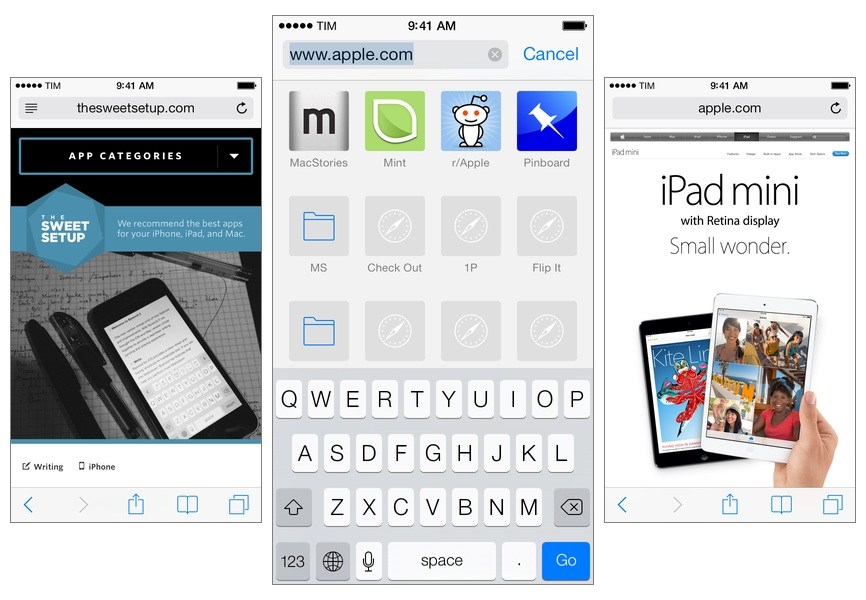
As I started using my iPad as my primary computer last year, I was growing increasingly annoyed with the state of iCloud sync in Safari and lack of major overhaul to a design that originally shipped with iPhone OS 1. I don’t frequently abandon systems that work for me due to stagnation, but iOS 6’s Safari exhibited a certain staleness on top of issues with bookmark and tab sync that, for me, were becoming an annoying problem. I liked Safari’s speed and native integrations with iOS, but it was prone to errors and boring.

On the other hand, Google Chrome for iOS was promising, familiar, and power user-friendly. I fell in love with Google’s support for x-callback-url, which I integrated in several workflows of mine as it allowed me to save time when switching between apps on my iPad; sync was nearly perfect; I praised Google’s superior implementation of voice dictation and feedback, although I noted how their Voice Search couldn’t exactly compete with Siri. Google kept pushing updates to Chrome for iOS, making it a capable browser for average and power users alike.

A few weeks after publishing my review of iOS 7, I decided to uninstall Chrome from all my devices and move back to Safari as my main and only browser on my iPhone, iPad, and two Macs.

I’m not looking back. I’m happy with the new Safari – so much, in fact, that I’m even considering Reading List as my “read later” service going forward.
Read more


Google Play Music Now Available on the App Store

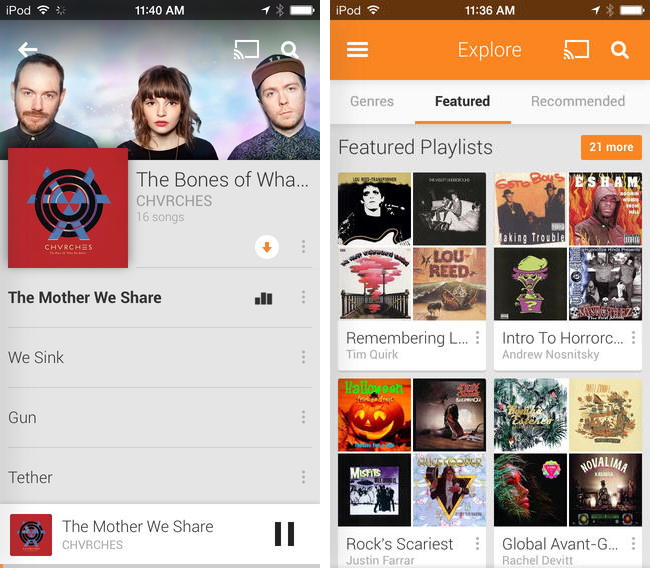
Joining the wealth of music streaming services such as Rdio and Spotify, Google Play Music is now available to download on the App Store. Formally announced in March, Google Play Music All Access originally let subscribers stream a collection of two million songs from the web and to Android devices for $9.99 a month. Similar to iTunes Match, Google also lets users match up to 20,000 songs from local music libraries for free, but like Spotify lets users listen to local music alongside streaming content.

Google Play Music for iOS brings all of All Access’ features to the iPhone, including unlimited streaming, ad-free custom radio stations with unlimited skips based on songs or artists, recommendations, and curated playlists. For streaming to speakers, the iOS app will stream over AirPlay and Chromecast.

Download Google Play Music from the App Store for free. A $9.99 monthly subscription is required to enjoy the service, but you can stream the first month for free.

[via 9to5Mac, The Verge]


Google Hangouts For iOS Updated with Support for GIFs

In what can be heralded as the first “major” update to the app since May 2013, Google has today released a new version of Hangouts for iOS that brings support for animated GIFs.

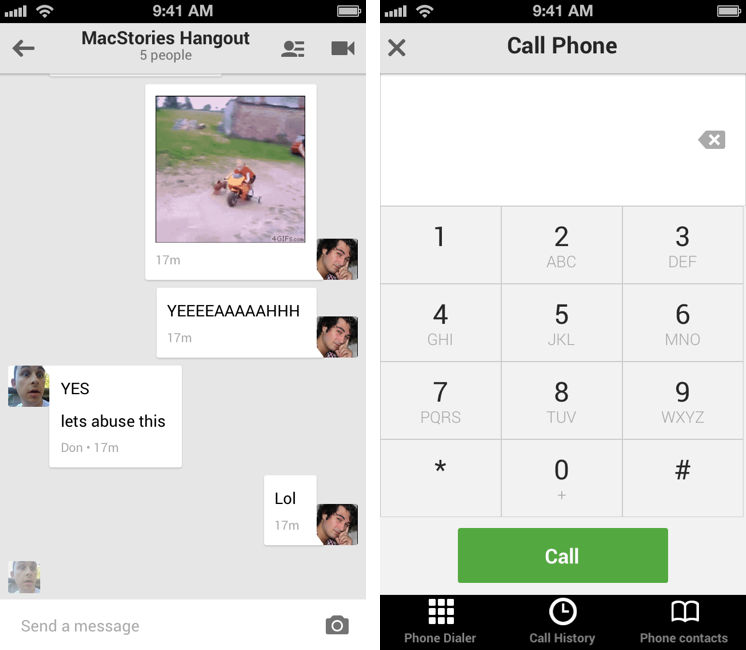
Hangouts 1.3 also lets you make and receive calls using your Google Voice number, it has indicators for contacts that are online and reachable, and it even fixes a pesky bug that caused audio playback to stop when the app was running in the foreground – but the highlight is, clearly, support for inline visualization of GIFs.

Considered a priority over smooth scrolling and proper iOS 7 support (the app sports a lovely iOS 6 keyboard), GIF support works in tandem with the iOS Camera Roll: whenever you’re in need of sending a friend, a co-worker, or a loved one a GIF that can, more than any other static image, prove a point through the use of animated cats, the new Hangouts app can pick a GIF from the Camera Roll, preview it, and insert it in a conversation. The GIF will be played inline across the web and the new iOS app.

In my tests, GIFs that I had archived in Evernote and saved to the Camera Roll weren’t attached as animated GIFs to the Hangouts app; however, it’s possible that this may be an issue of the Evernote app, as GIFs saved from Safari worked well with Google’s client, retaining their beautiful and modern animations.

Support for inline animated GIFs is welcome; based on our first few tests, we can’t pinpoint whether Google also made much-needed improvements to the app’s performance – particularly an issue for long threads and group conversations. On a somewhat related note, Apple released an update to iOS last month, but Google didn’t decide to take advantage on it for version 1.3, deeming inline GIFs the feature worth improving in Hangouts.

Google Hangouts 1.3 is available on the App Store. GIFs are available on the Internet.


YouTube 2.2

The official YouTube app for iOS received an update earlier today. You can now choose the quality of videos you want to stream (tap the new icon on the video player); unfortunately, after two months, the app still isn’t built for iOS 7.

Previously, YouTube announced that an update set to be released in November will add a new feature to download videos for offline watching.

Permalink

iOS 7 Updates: Twitter, Facebook, Yahoo Weather, and Google Chrome

Yesterday saw the release of thousands of apps optimized, enhanced, or, in some cases, completely redesigned for iOS 7. At MacStories, we highlighted several apps that were ready for the OS’ rollout such as Pocket, OmniFocus 2, or Instacast 4, and then we fired up iTunes – or simply waited for automatic updates to do their magic on iOS 7 – and checked out all the other apps that were also released yesterday. In this post, I thought I could offer a quick overview of iOS 7 updates from four big-name companies: Twitter, Facebook, Yahoo, and Google. Read more


Chrome For iOS Update Brings New Icon, Improved Voice Search and Navigation

Released earlier today on the App Store, Chrome for iOS version 29.0.1547.11 (according to Google’s release notes) brings various search and navigation improvements, as well as a new white-themed icon that seems to be aimed at making Chrome fit more with the upcoming aesthetic of iOS 7.

The first improvement is better handling of single sign on with other Google apps for iOS, something that the company has been focusing on lately to provide an even tighter integration between its apps for iPhones and iPads.

Alongside bug fixes and stability improvements, Google has added a way to more easily swipe back from a webpage to search results: when you search on Google and choose a result, when you go back to your search query you’ll see a new animation and, more importantly, your previous results instantly appear on screen. Switching back and forth between results was cumbersome in the old Chrome, as it wasn’t fast and often led to problems with the Google Search page reloading again.

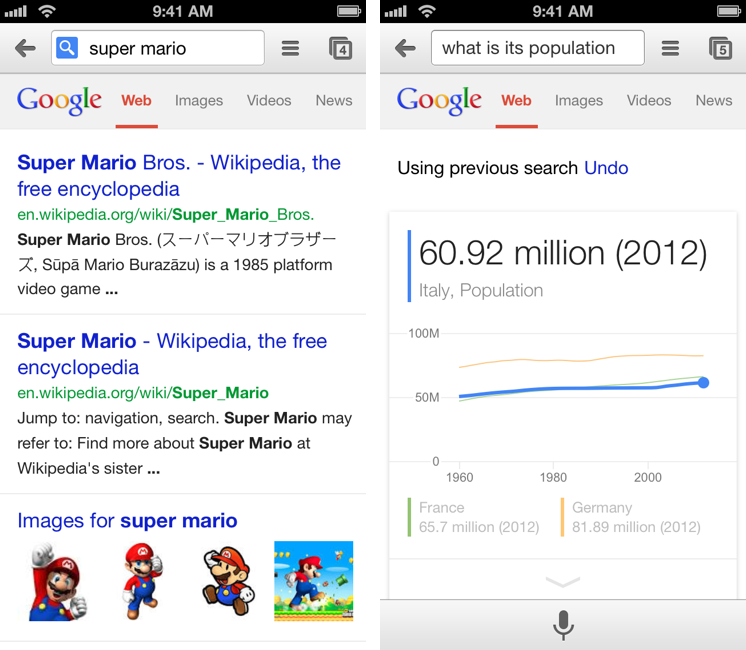
Last, Google says that Voice Search has been enhanced with pronoun support for chaining queries like “Who is Barack Obama?” followed by “Who is his wife?”. in my tests, the feature worked as advertised with US English Voice Search, correctly displaying results for the aforementioned person/wife combination, as well as “What is the capital of Italy?” and “What is its population?”. However, improved pronoun support doesn’t seem to be working with Italian yet, which wouldn’t be surprising considering that Google rolled out international versions of Voice Search months after the US launch.

You can get the latest Chrome for iOS update on the App Store.


Shared Accounts In Google’s iOS Apps

Alex Chitu, reporting on a feature that I also noticed after YouTube’s 2.0 update:

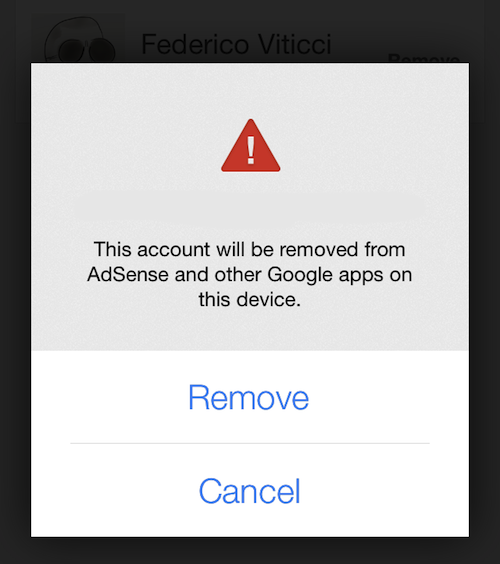
If you enter the credentials of a Google account in the YouTube app and then open the AdSense app, you’ll find the new account and you can sign in without entering the password. If you remove an account, it will be removed from the other Google apps that support this feature. I assume that most Google apps for iOS will be updated to use this brilliant feature.

Once I logged into YouTube with my account (on an iOS 7 device), I then fired up the AdSense app (that I had just downloaded from the App Store) and my account was already listed in the screen with available accounts. It does seem like the YouTube and AdSense apps are capable of sharing accounts so users won’t have to log into their account every time in each Google app. AdSense didn’t bring up an authorization screen in YouTube – it just recognized the account that I had set up in YouTube.

Google’s documentation for YouTube confirms this, but doesn’t specify which iOS apps support shared accounts:

If you’ve signed in with another Google app on your iOS device, you may see this account listed.

Google’s explanation isn’t clear; the shared account option isn’t mentioned in the documentation for Gmail and Chrome. Upon signing out from the YouTube app, an alert dialog reads:

To sign in again, just select one of your Google accounts saved on this device. You will not be required to enter your password. To remove a saved account, tap “Sign In” > “Manage” > “Remove”.

It’ll be interesting to see if and when shared accounts will be integrated with Google’s other iOS apps. In the past few months, Google enhanced the inter-app communication capabilities of Gmail, Maps, Drive, and Chrome with the ability to open links in other apps, completely foregoing the need to launch Apple apps like Safari, Maps, or Mail.

Furthermore, Google is also providing an SDK for developers to add this functionality to their apps (for web links), showcasing examples of third-party apps that support Chrome. While Google apps won’t have the same kind of system integration that they have on Android, the combination of URL callbacks and shared accounts could help the creation of a “Google app ecosystem” on iOS.


YouTube 2.0 For iOS Released With Picture-in-Picture, Updated Design

YouTube 2.0

YouTube 2.0

Today, Google has officially launched version 2.0 of its YouTube app on the App Store, bringing a tweaked user interface, new icon, and picture-in-picture to the mobile client.

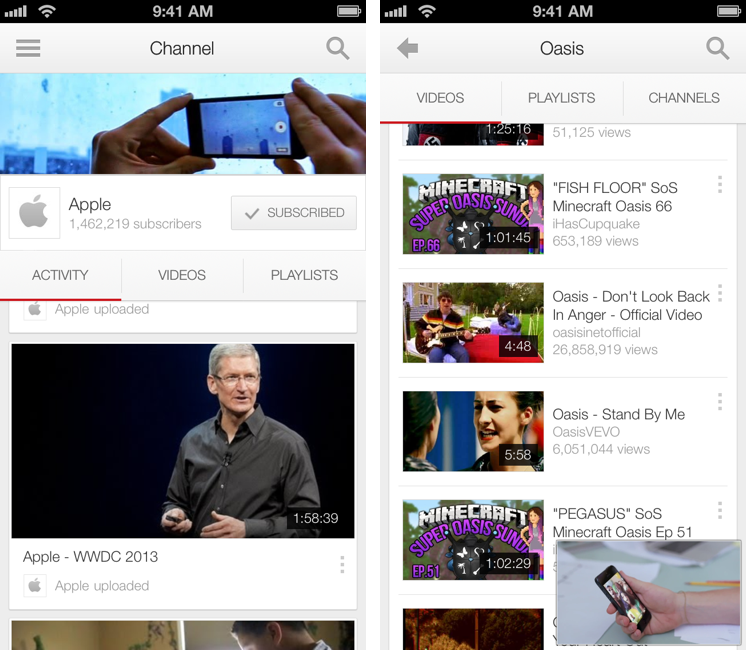
The big new feature of this version is picture-in-picture for videos, which allows you to keep watching a video while browsing or searching. This has been a popular option of third-party clients such as FoxTube for quite a while, and, in Google’s implementation, the player can be dismissed with a tap on an arrow button or a swipe down directly on the video player. Both on the iPhone and iPad, dismissing the player reveals a delightful animation and transition that quickly sends the video down to the bottom of the screen, where you can tap again to enlarge it, or swipe it away to close it.

Overall, the improved animations of the app are much snappier and responsive than version 1.4, and there are dozens of new transitions, translucency effects, and subtle interface hints that contribute to making navigation faster and fluid.

YouTube 2.0

YouTube 2.0

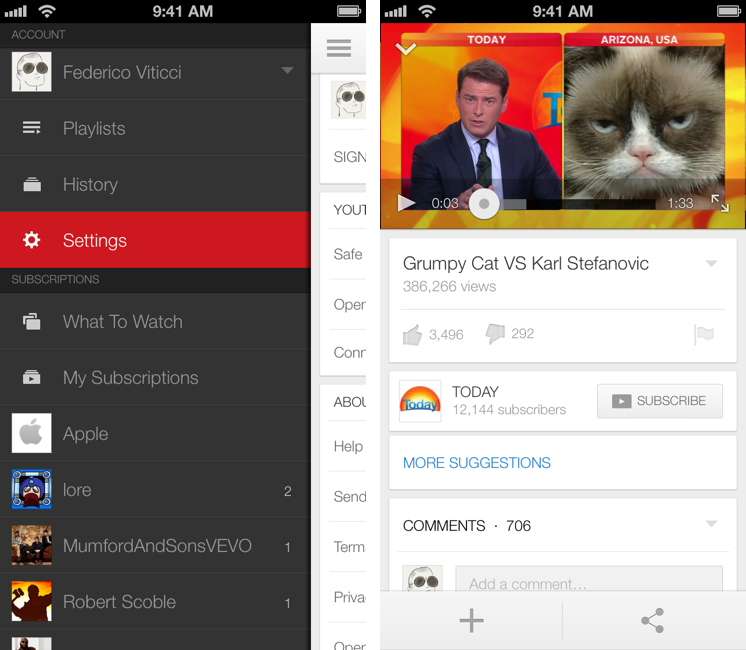
More importantly, YouTube 2.0 packs a tweaked design – starting from the icon – that suggests Google has been getting its iOS apps ready for the major 7.0 update coming to iOS this Fall. The app gets rid of several textures and graphical elements for a more subdued design with a focus on colors (red for selections, gray for the sidebar, whitespace for navigation and search results), transparency, gestures, and animations. It wouldn’t be hard to imagine Google going one step further with this new design and enhancing with iOS 7-only APIs such as blurs and physics effects once iOS 7 is available. The new app doesn’t mimic the look of Apple’s iOS 7 apps, but it does look like Google’s way of easing users into iOS 7’s (fast-approaching) future.

Based on my initial tests, YouTube 2.0 seems to be a powerful and welcome improvement over the old version. The picture-in-picture player is a great addition, and the app has a cleaner, more responsive interface.

YouTube 2.0 is available on the App Store.


Resolve Short URLs with Pythonista on iOS

Clean URLs

Clean URLs

I don’t like it when third-party apps or services force me to share links to articles or webpages using their own custom shortened links. I understand the appeal of personalized short domains – after all, we tweet mcstr.net links with the @macstoriesnet account – as they can provide analytics to track clicks, can save characters, and, at least in theory, they “look cool”. However, I’ve been long considering the idea of dropping our mcstr.net links, but I think the issue is worse (and more annoying) for apps and services that don’t tweet links to their own content (like we do) but that override others’ links with different domains. An example is Pocket, which gives you the clean, original URL when you choose the “Copy Link” action from the sharing menu, but that instead returns pocket.co links when sending text to Drafts (which I do often). I’ve grown tired of this practice (in Pocket and other services), and I’ve put together a workflow based on a Python script that allows me to easily resolve short links without having to open the browser and tap on multiple menus. Read more