Posts tagged with "google"

Google’s Document On Data Compression In Chrome For iOS

Last week, I wondered whether Google’s new data compression feature for Chrome for iOS was partially motivated by the inability to use the Nitro engine to speed up page load times. Today, I have stumbled upon the technical document that details how the data-saving process actually works – in short, it uses Google’s proxy to optimize web traffic sent by Chrome.

The proxy server receives the request initiated on the mobile device, initiates a request for the required resource on your behalf, and then optimizes each asset before delivering it back to the client. The content optimization is performed by our open-source PageSpeed libraries, which are specifically tuned for the Chrome Mobile browser. The rendering of the page, and all JavaScript execution, is performed by the client’s browser.

Of note, the transcoding of images from JPEG and PNG to WebP:

Over 60% of the transferred bytes, for an average page, are images. Hence, the proxy takes great care to optimize and transcode all images to the WebP format, which requires fewer bytes than other popular formats, such as JPEG and PNG. The proxy supports the new WebP lossless format for certain images, and also optimizes the perceptual quality of each image based on device screen resolution and pixel density of your device.

I’ve never been a fan of speed optimization through proxies personally, but I’m curious to try out Google’s implementation. The feature is still rolling out for Chrome users on iOS.

Permalink

Google Maps for iPad Now Available

With a 2.0 update released today on the App Store, Google has brought Google Maps to the iPad, adding the enhancements and new features that the company announced last week.

Google Maps, first released in December 2012 following Apple’s apology for issues with their own iOS 6 Maps service, can now take advantage of improved navigation with accident information and live traffic reports whenever available; using Zagat and Offers, Google Maps can now recommend the best places around you with reviews and exclusive deals; for selected areas, Google Maps features indoor mapping for malls, train stations, and airports.

Results for businesses are displayed on a grid that shows inline photo previews, distance from your current location, and total amount of available reviews; tapping on a result brings up a dedicated page with buttons to save, share (via Message, Mail, or Clipboard), get directions, see Street View, and view photos.

The app now puts more focus on discovering places to “eat, drink, sleep, and shop” with a new card-based layout that aims at simplifying the process of finding nearby businesses. As we expected, Maps for iPad follows Google’s relaunched web app and client for Android tablets in the way it displays large, full-screen map views with search boxes and “cards” on the left side of the screen to find places, see suggestions, and preview directions. A list button in the top left corner of the app allows you to view Traffic and Public Transit information (if available for your area); directions are displayed in a floating card with alternate routes stacked directly below it. Overall, the iPad app is consistent with the design language and animations of the iPhone app and redesigned web experience.

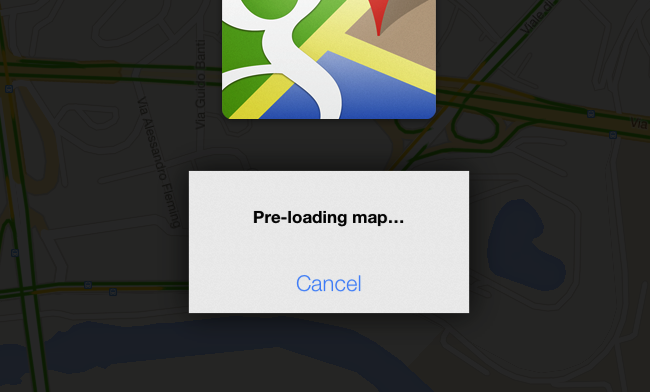
It’s also possible to cache a portion of a map for offline usage (what Google calls “pre-loading”). Simply zoom into an area, and search for “OK Maps” to activate the command that will tell the app to save a cache of the currently displayed area. In my tests, this indeed enabled me to load cached areas with no Internet connection available – without, however, being able to use search or anything else. Also, if you try to save larger areas with the “OK Maps” command, Google will warn you that the map is too large for pre-loading.

Google Maps 2.0 is available on the App Store.


Gmail for iOS Gets New Inbox, Improved Notification Settings

Announced last week, Google has today released an update to its official Gmail app for iOS that adds support to the new inbox and brings finer controls for push notifications.

The new inbox, configurable from Gmail’s desktop website, allows you to enable different categories for “primary” emails and other messages such as promotions, social updates, or notifications from online forums. As we described the feature last week, “categories and tabs are basically pre-defined filters and labels with training wheels”. Messages can be moved from a tab to another to train Gmail’s algorithm in better automatic organization; currently, Gmail will try its best to automatically sort an incoming message into the appropriate category, but there isn’t an option to create new custom categories from scratch.

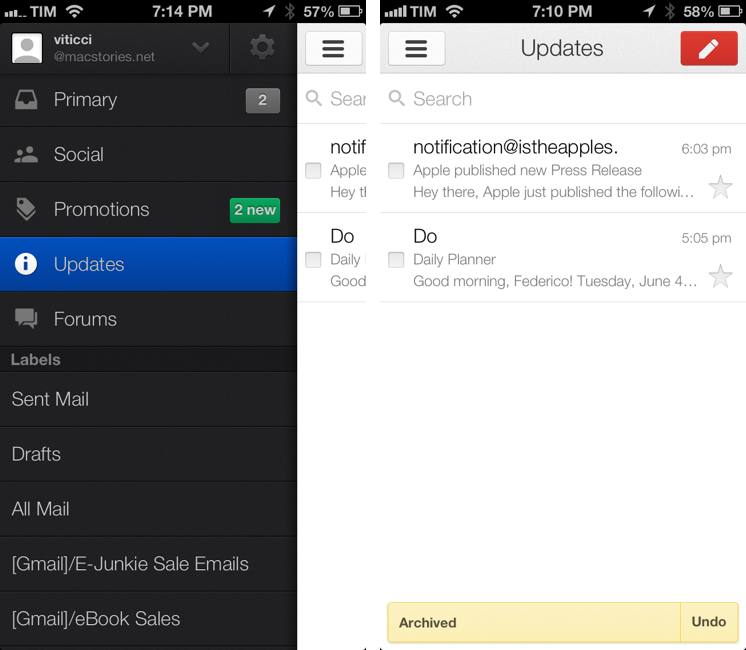
The Gmail app now shows Inbox categories in the account sidebar, where they’re listed with custom icons and colored badges for unread emails in each category. Like the desktop website, you can move messages across categories, but you can’t configure the Inbox directly on iOS (the app will remind you to open Gmail “on a computer” to do that).

Gmail’s notifications have been updated to reflect the change. With today’s update, you can set notifications for all new mail, none, or only messages that are marked as “primary”. Notification settings are available inside each account, where you can also activate your mobile signature and vacation responder.

Gmail for iOS is available on the App Store. For a refresher on the new Inbox, here’s Google’s blog post from last week.


Gmail Introduces Categories With a Tabbed Interface, Gradually Rolling Out Over the Coming Weeks

Today, Google announced new features for Gmail that sorts your inbox into various categories for social network notifications, receipts and shipping updates, and promotions from your favorite shopping sites. While Priority Inbox made an attempt to surface only the stuff that really mattered, categories breaks the inbox down to a series of tabs that should help cut down on some of the clutter. Categories and tabs are basically pre-defined filters and labels with training wheels.

On the desktop, the new inbox groups your mail into categories which appear as different tabs. You simply choose which categories you want and voilà! Your inbox is organized in a way that lets you see what’s new at a glance and decide which emails you want to read when.

Categories for Android, iOS, and the desktop will be gradually rolling out to Gmail users and their respective app stores over the coming weeks. In the meantime, be sure to check out The Verge, who have an initials hands-on with the latest features.

Permalink

Chrome for iOS Getting Voice Search Soon

Following this morning’s rollout of the Voice Search for desktop, Google has also announced through the official Chrome blog that Chrome for iOS will receive the same feature “over the coming days”.

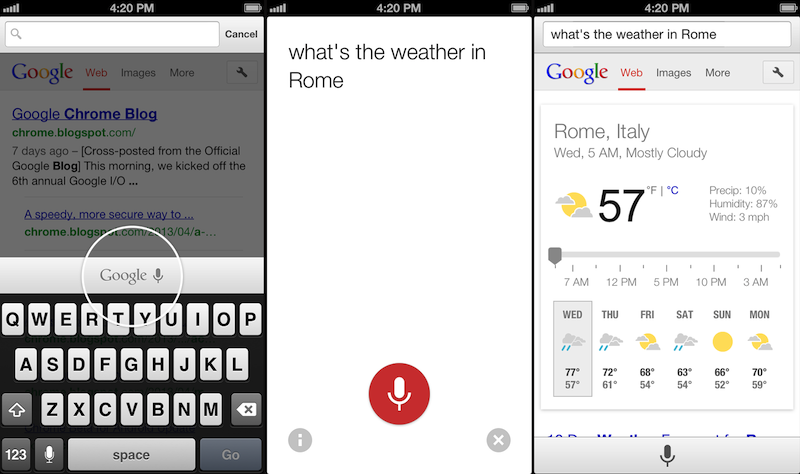
Voice Search, already available through the standalone Google Search app, will be activated in Google Chrome by tapping on a microphone button above the iOS keyboard:

Over the coming days, we’re rolling out an update for iPhone and iPad as well. You can now speak your searches into the omnibox. Touch the microphone, say your search query aloud and see your results (in some cases spoken back to you), all without typing a single letter.

Interestingly, the screenshot shown by Google displays the microphone button in the same additional keyboard row that’s currently occupied by buttons aimed at enabling users to more easily type URLs. Because Chrome for iOS, unlike Safari, uses a unified address bar for URLs and web searches, the extra keyboard buttons were necessary to let users quickly insert URL-related characters. It’s possible that Google will figure out a way to show both keyboard rows – the buttons and the new microphone – by letting users swipe horizontally above the keyboard.

Alongside performance improvements, Google also notes that “iOS apps can now give you the option to open links in Chrome and then return to the app with just one tap”. Assuming that Google is referring to the Chrome URL scheme with support for x-callback-url, that wouldn’t be new as it is already used by a variety of iOS apps (and as I showed today, users can play with it as well). However, Google has been quite vocal about its existing support for URL schemes lately, and it wouldn’t be surprising to see the company advertising the feature as new again.

Chrome for iOS, free on the App Store, was last updated in April.


Latest Chrome Release Includes Voice Search Support

Jerry Hildenbrand:

Google Now style voice search has just went live in the latest Chrome stable version for the desktop (Version 27.0.1453.93). As far as we can tell from playing around testing things, the full contextual search isn’t running like we saw in the demo during the Google I/O keynote, but the basic voice search and response is ready to go.

Announced and demoed at I/O last week, Voice Search for the desktop mimics the experience launched on Google’s Search app for iOS last year. Voice Search for the desktop lets you dictate search queries to Google, which will transcribe them in (almost) real-time and take you directly to results, powered by the Knowledge Graph. Like on iOS, certain queries will trigger a voice response by Google itself, whereas others will display cards of information or regular results.

It appears Google is rolling out the feature this morning, as the new voice interface is available in Chrome but leading to frequent “No Internet connection” dialogs; I was able to try Voice Search twice, and it worked as expected.

You can watch a demo of Google’s Voice Search for the desktop from I/O 2013 here; an announcent will likely be posted on the official Google Chrome blog.

Permalink


New Google Maps for the Web Previewed, iPad App Expected This Summer

Google demonstrated a new version of Google Maps during the Google I/O 2013 keynote today, showcasing a full screen maps application for the web that reacts to every click. Redesigned in an effort to put an emphasis on directions and places, Maps’ new interface is focused on discovery. As you click, Maps will surface contextual information about what you can find at a desired location through a carousel and contextual cards, highlighting popular tourist attractions, directions to that place, and street views so you know exactly what to expect when you get there. Based on photos taken in the area, Google will even create tours so you can easily plan your next trip.

It’s contextually aware too: taking into account location information from your Google account, such as where you live and where you work, Google Maps will make recommendations on places to visit, utilizing reviews from Zagat and recent places your friends on Google+ have visited to highlight what’s popular in the area. It’ll also highlight new places you might be interested in based on your previous search history.

Maps will be much faster than before, as vector maps are replacing tile-based maps on the web, bringing it up to date with Android and iOS. For WebGL-enabled browsers, Google Earth is now a part of the web app and can be activated through a simple toggle for viewing 3D imagery. Just the like the desktop app, you can zoom out and fly around the entire planet or just around your favorite locale.

You can request an invite to preview the update for Google Maps before it hits the web at http://maps.google.com/preview.

Google also talked about updates to their mobile applications, announcing than an iPad app will be arriving in the summer. Building upon the interface introduced with Google Maps on iOS, Google will be bringing in global traffic data and alerts for live reports on incidents and accidents, no matter where you’ll be going. Google Offers will also be integrated, giving you a heads up on nearby deals from restaurants and department stores so that you can take advantage of discounts and special offers.

Be sure to additionally check out The Verge for their great rundown on the new Google Maps for the web and what to expect for mobile devices for more information.

[via Google Maps]


Google Play Game Services

A few days ago, I remembered a story by TouchArcade from last year that explained how adding iCloud support to games was no easy task for most independent developers:

It’s also obvious to us that iCloud and the implementation of it needs to be easier, and the service itself needs to be more reliable. Almost every studio we talked to had some trepidations or a horror story to share. Browse our message board, and you’ll find even more from users receiving the bad end of an iCloud problem.

Today, Google announced Google Play Game Services, a set of APIs to enable cross-platform gaming features like saved game states, leaderboards with Google+ support, achievements, and automatic player matches with real-time multiplayer. There is a native SDK for iOS and Android, REST APIs and various libraries for the web.

WWDC ‘13 is less than a month away, and it’s safe to assume Apple will show new developer tools for iCloud and Game Center. It’ll be interesting to see if “Sign In with Google+” buttons will start showing up in iOS games in the next few months.

Permalink