Posts tagged with "google"

Inside Hangouts

Ellis Hamburger and Dieter Bohn have published an in-depth feature story on the newly launched Hangouts over at The Verge. Make sure to watch the video.

A detail that struck as a great feature was, surprisingly, related to Google+ and photos:

The service’s Google+ integration is one of the best features in the entire product: every photo that you or a friend posts is automatically saved in a private, shared album on Google+. For example, after a year of using Hangouts, it will be easy not just to trace the text conversations your budding relationship has produced, but to track the photos you’ve shared over time.

I have been using iMessage with the MacStories team since the service first launched; it used to be the only communication tool we relied upon to stay in touch. We have shared thousands of screenshots and photos in a group thread, but Messages makes it nearly impossible to browse old attachments. You can retrieve attachments through the OS X Finder, but the process is cumbersome at best. Having Google automatically archive Hangouts photos and organize them in a private album shared with my coworkers sounds obvious and, for someone who relies on a group chat on a daily basis, incredibly useful. This would be a great addition to iCloud and Photo Stream with iOS 7.

Permalink


Google Launches “Hangouts” Messaging Service for iOS, Android, and Web

Rumored for the past few months, Google has today announced its new unified messaging system for iOS, Android, and web called “Hangouts”. A free service that includes text, photo, and video messaging, Hangouts is a rebrand of Google’s former video-chat service for Google+. The new Hangouts will unify Google Talk and Google+ messages under a single service, storing conversations in the cloud.

With Hangouts, users will be able to access their full history of conversations on any device, an option that can be turned off. While other messaging services such as WhatsApp, Apple’s iMessage, or Facebook Messenger focus on either text or static media, Google promises to leverage its experience with Talk and Google+ to provide a solution that encompasses all kinds of messages, including live video. Another key aspect of Hangouts, demoed at Google’s I/O conference earlier today, is the possibility of syncing notifications across devices: instead of buzzing multiple devices for a message that’s already been read somewhere else, Google will try to sync every Hangouts notification on mobile devices and the web (Hangouts is also available through Google+ and Gmail). Read more


Play Breakout In Google Search (Also On iPad)

Drew Olanoff, writing about Google’s Breakout easter egg:

The game’s introduction was 37 years ago today, in 1976. Google decided to commemorate the occasion with a little easter egg in image search that will suck all of your free time from you. It’s good to see Google doing these kinds of things away from their normal doodle, especially since a lot of their users might not remember Breakout.

You can also play it on the iPad. I tried with Google Chrome, but Safari had much faster, smoother scrolling (I guess because of Nitro). Alas, I couldn’t find a way to get an iPhone-optimized version.

Permalink

Gmail for iOS Updated With New Sign Out Option, Integration with Google iOS Apps

Gmail

Gmail

An update to the official Gmail app for iOS released today brings a series of welcome improvements that users had been requesting since the (re)launch of the client last year.

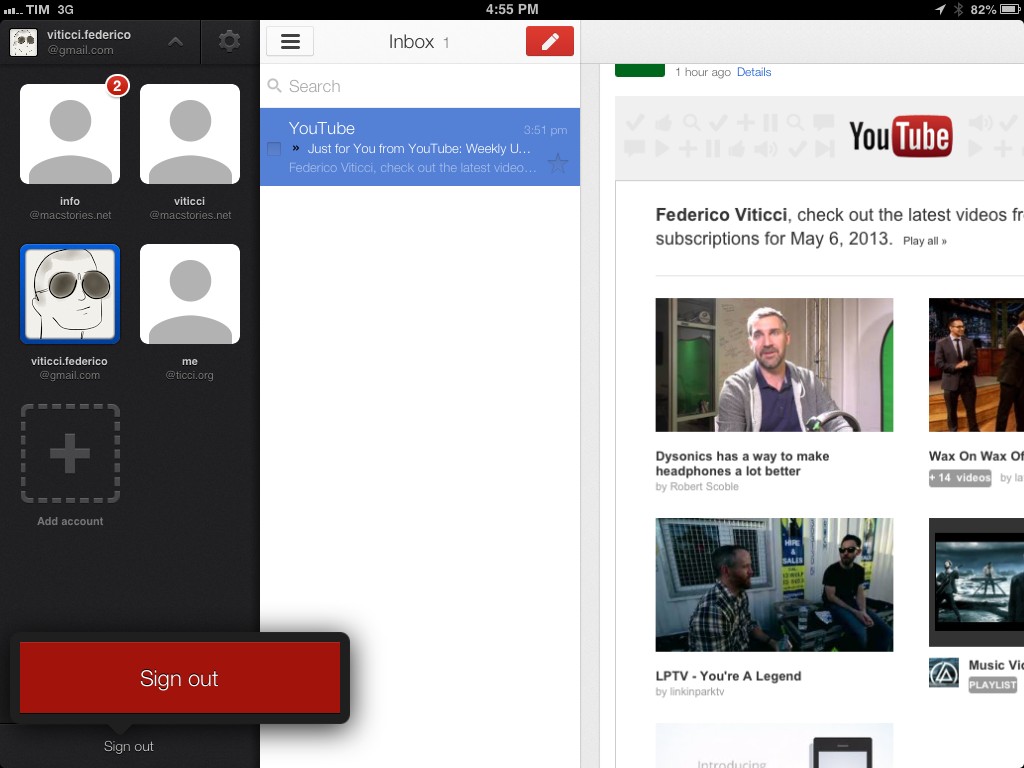
The first notable addition is support for signing out of individual accounts. In older versions of the app, users were forced to sign out of all accounts at once, a tedious process that didn’t make much sense considering the app had a dedicated section for accounts that could use better sign out options. In today’s update, you can tap & hold an account’s avatar in the sidebar to bring up a Sign Out button in a popover at the bottom.

The new version of Gmail also works nicely with Google’s other apps for iOS: from the Settings, you can now specify whether YouTube, Google Maps, and web links should directly open in Google’s native app replacements or a mobile web view. These options are available in the Settings screen for each account, but they will be enabled for the entire app, not single accounts.

The last new feature, also shown in the app’s updated walkthrough, are search suggestions as you type. While Gmail has always been able to search across all your mail, today’s version brings suggestions that (based on initial tests) should match addresses and subject lines found in your account.

You can find Gmail for iOS on the App Store.


Google Glass Will Let iPhone Owners Text and Navigate

Talking about Google, A Google representative has confirmed to TechCrunch that iPhone owners will in fact be able to use text messaging and navigation features with Glass. The representative noted that Glass will work independently of the device it’s connected to, and it’s an affirmation of a statement made by Google earlier in the year. Currently, Glass wearers can only use the full set of features with an Android smartphone with the MyGlass companion app.

Frederic Lardinois makes clear that Glass doesn’t have its own connection to the Internet to use such features, but will rather tether off of your smartphone to access data and pull in relevant information.

In this context, it’s worth noting that one of the myths surrounding Glass is that it is independently connected to the Internet. That’s not true, however. Instead, Glass users need to have a tethering plan for their phones to connect Glass to the Internet. In the eyes of your wireless provider, Glass is just another device that uses your phone’s personal hotspot feature.

Also keep in mind that at least on iOS, text messaging won’t work with Apple’s iMessage service. Instead, Glass will likely integrate with Google’s rumored messaging service, Babel.

Permalink

Google Now Comes To iOS with Search App Update

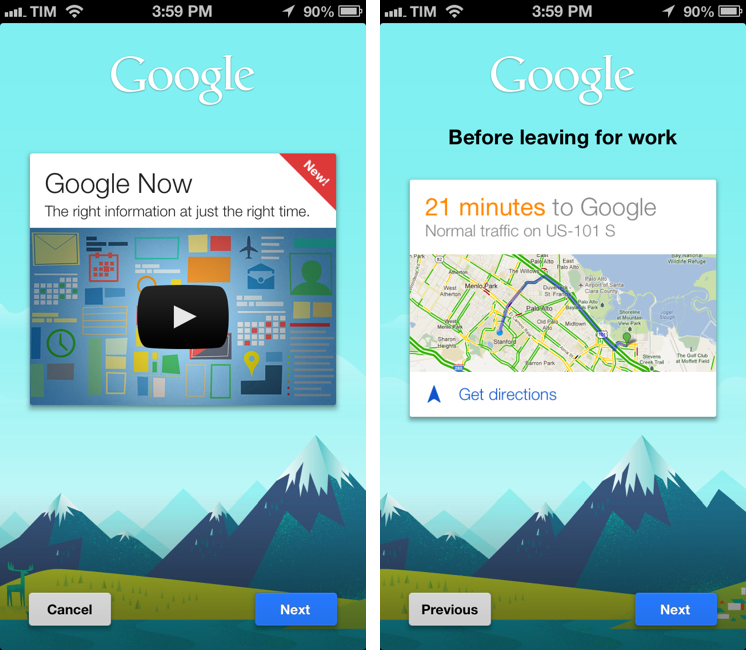
Last month, it was rumored that Google would release Google Now for iOS through an update to its existing Search app for iPhone and iPad. Version 3.0 of the app, released today on the App Store, indeed adds Google Now functionality by displaying weather and traffic data, updates on sports teams and “breaking news”, and more directly within the iOS app. Read more


Google Now Coming To iOS?

Google Now Coming To iOS?

Engadget has posted what they believe is a “leaked” video of Google Now for iOS that was accidentally posted on YouTube and then removed.

Supposedly, Now will be accessible in an upcoming iOS app update simply by swiping up from the main screen. Of course, there’s always the chance that is an impressive fake or even a canceled project that’s only being leaked now. We’ve reached out to Google for comment, but even if the search giant remains silent, we’re confident the truth will be known soon enough.

Two weeks ago, I said this when comparing Google Voice Search to Siri:

Now, four months after Google Voice Search launched, I still think Google’s implementation is, from a user experience standpoint, superior. While it’s nice that Siri says things like “Ok, here you go”, I just want to get results faster. I don’t care if my virtual assistant has manners: I want it to be neutral and efficient. Is Siri’s distinct personality a key element to its success? Does the way Siri is built justify the fact that Google Voice Search is almost twice as fast as Siri? Or are Siri’s manners just a way to give some feedback while the software is working on a process that, in practice, takes more seconds than Google’s?

In that post, I was speculating on the possibility of a Google Assistant that would play by Apple’s rules to mix voice commands with native iOS apps like Reminders and Messages.

However, rather than going through the effort to develop such a Siri clone, it appears Google may be taking the “obvious” approach: porting Google Now to iOS by putting it inside the existing Google Search app. It looks like built-in Twitter and Messages sharing is as “native” as Google will go on iOS.

Engadget’s video may be fake, but I think it’s safe to assume Google is considering Google Now for iOS. Code references were spotted in Google’s Chrome browser and OS, and iOS seems like a logical step considering the nature of the product. Giving the “right information at the right time” is meant for mobile devices – phones and tablets that tend to be always with us.

It used to be that Android was the platform for Google users, but I’d argue that Google has been narrowing the gap between iOS and Android in the past months. With Chrome, Maps, YouTube, Gmail, Search, and (allegedly) Google Now, Google has been building a solid ecosystem inside iOS, and, as a user, I see that as a “best of both worlds” scenario: I can use (what I believe are) Apple’s superior devices, user experience, and third-party ecosystem with (what I believe are) Google’s superior web services.

Permalink

Google Field Trip

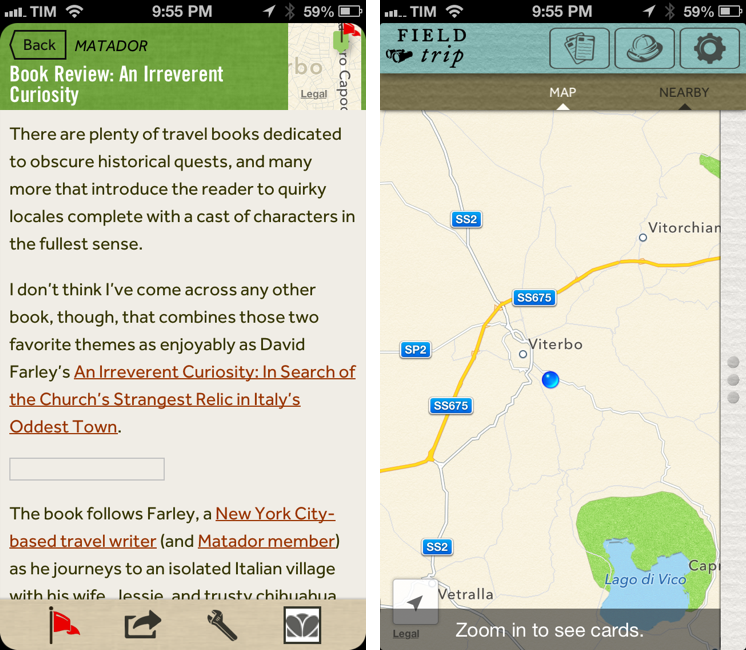
Earlier today, Google released Field Trip for iPhone, a tour guide app to alert users through notifications of ”cool, hidden, and unique things” that are nearby. Using your location, the app can provide notifications for “your interests” such as Food, Drinks & Fun, Museums, Deals, and more. The app uses various data providers, including their own Zagat, to provide information about places to the user.

Released on Android in the Fall of 2012, Field Trip can “speak” notifications using either a Bluetooth headset or the iPhone’s speaker. A cool thing about Field Trip, in fact, is that you have control over audio output in the Settings: you can choose whether the app should speak the name of an interesting place or also its description, or if you want to enable the app’s audio notifications when device is docked, connected via wired headset, or through a Bluetooth device. This part of the app is really well done. Field Trip can even detect while you’re driving (my guess is through GPS).

The interface and data availability leaves much to be desired. In terms of UI design, my personal taste doesn’t like the choices made by Google: there’s a strange mix of fonts, plus rounded and non-rounded flat buttons that make browsing Field Trip confusing. Furthermore, the app puts buttons to switch between views in the title bar rather than a bottom toolbar – something that is utterly confusing on iOS in my opinion. Read more