This Week's Sponsor:

Hello Weather

Half Off for WWDC Week, Just in Time for Summer.


Posts tagged with "app store"

The iPad: Now With 100,000 Apps Available

At the end of March we ran a story on the iPad App Store reaching the 75,000 apps milestone in less than 365 days since the original iPad came out in April 2010. Considering the competition the iPad had to face in the past year (though some people say there really isn’t a tablet market) and the options given to developers when it came to choosing which platform to develop for, seeing iPad users gaining access to almost 100,000 apps in roughly 12 months was a surprise – looking back at those statements from tech pundits who claimed the iPad was “dead in the water”, the 75,000 milestone surely helped putting things in perspective.

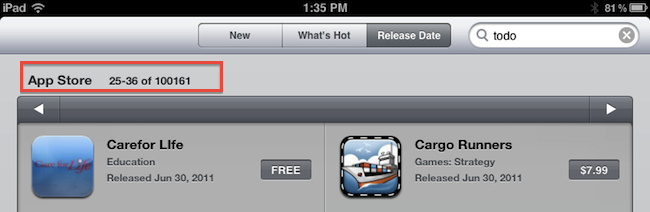
Yet Apple and third-party developers have set a new record: in 453 days since the original iPad came out on April 3, 2010, the App Store has more than 100,000 iPad-exclusive apps available. Either specifically targeting the tablet, or released as universal updates to existing iPhone apps, at the moment of writing this there are 100,161 iPad apps in the Store. How do I know? The App Store app itself on my iPad shows that.

Obviously, one could argue that the iPad’s development scene was “helped” by the success of the iPhone in the previous years. The original iPhone came out with no SDK in 2007, and developers were told to create web apps for it. Apple listened, and months later they released the first developer tools to create native apps for the iPhone. With the release of the iPhone 3G in 2008, Apple also launched the App Store, a unified marketplace to browse and download apps. The rest is history: a few graphical enhancements, sections, and 10 billion downloads later, the App Store is Apple’s crown jewel as far as digital downloads go. A success that has inspired the company to create an OS X version and name it Mac App Store which, unsurprisingly, is once again helping developers sustain their business because of the ease of use of the whole process. On the other hand, users love discovering and buying apps from the App Store because it’s simple, it’s full of apps, and it’s regularly updated. It’s a win-win scenario for Apple (who keeps a 30% cut off every transaction), the developers, and the users.

What’s next for the App Store and, more specifically, apps for the iPad? 100,000 is an important milestone, but don’t expect things to change dramatically in a short period of time. Considering how Apple rolls, the App Store will be slightly tweaked to accomodate new sections as it’s always been, more apps will be released in the next weeks, and users will keep buying apps and games. Don’t expect a revolution because Apple has reached 100,000 apps for the iPad. But that’s not to say the result isn’t remarkable or that new things aren’t coming: with iCloud going public this fall and Automatic Downloads already set in place, Apple wants to make the process of buying and syncing apps to iOS devices even simpler. With Lion approaching its public launch on the Mac App Store in July, it’s clear Apple is betting on the App Store brand as the de-facto solution for downloading software for iOS and OS X devices.

Congratulations, developers. Now onto 200,000 apps.


“One Time Exception” with Final Cut Pro X Refunds

As noted by The Next Web, amidst criticism surrounding the release of Final Cut Pro X on the Mac App Store (seen by several video professionals and customers as a consumer-level app lacking many of the “pro” functionalities of the previous version) Apple has begun issuing refunds to App Store customers who have bought Final Cut Pro X, Motion, or Compressor. In an attempt to do “damage control” after the criticized release, an alleged email to a customer outlines how the company is making an exception to issue refunds for FCP X, as opposed to their usual policy for iOS and Mac apps.

EOSHD reports the following email:

Moving forward, I understand that you are not satisfied with the app “Final Cut Pro”. I can certainly appreciate you would like a refund, and I would be more than happy to help you out with this today. In five to seven business days, a credit of £179.99 should be posted to the credit card that appears on the receipt for that purchase.

Please note that this is a one time exception because the iTunes Terms and Conditions state that all sales are final.

Apple has been known for not including refunds for apps in their sales policy, thus forcing customers to deeply consider each purchase before clicking the buy button. In a support document, in fact, Apple clearly states that “all sales are final”:

Subject to the iTunes Terms of Sale, all sales on the iTunes Store are final. When you agree to purchase an item by clicking the Buy button (using either 1-Click or Wish List), your Apple ID is charged and the transaction cannot be cancelled. See the iTunes Terms of Sale for additional information.

The same policy is corroborated by the iTunes Terms & Services, which outlines the “final” status of sales and rentals and indicates Apple doesn’t issue refunds for price reductions:

All sales and rentals of products are final.

Prices for products offered via the Services may change at any time, and the Services do not provide price protection or refunds in the event of a price reduction or promotional offering.

However, Apple has also been known for applying a different policy before: by filing a formal request on the App Store customer support website (usually within hours after a purchase) and providing an explanation of what went wrong with a purchase, Apple usually issues app refunds to unhappy customers who believe the software they purchased doesn’t function as advertised or has technical issues that prevent a correct usage. Indeed, this seems to be the most common explanation provided by Final Cut Pro X customers as a thread on Apple Support Communities confirms.

It’s not clear how exactly Apple is making an “exception” with FCP X – whether it’s because several days have passed since the release, or because they never had to deal with large-scale Mac App Store refund request – but it appears the company is moving forward to ensure customers who don’t find FCP X suitable to their needs will get their money back. Refunds are nothing new to the App Store, but this may be the first time Apple has to provide such extended support due to Final Cut Pro’s troubled launch.


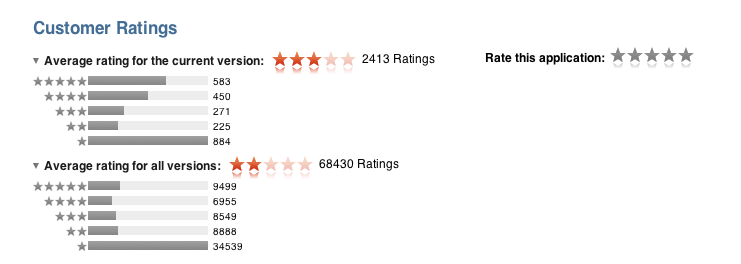
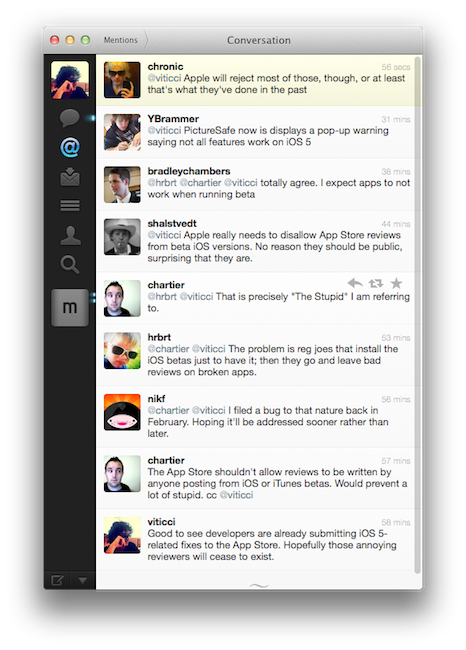
Don’t Be Stupid: Keep App Reviews To Yourself While Using an iOS Beta

These past few weeks of iOS 5 testing and casual talking with my fellow writers and Twitter followers had me thinking about the fact that some people really don’t get the difference between “public previews” and “developer-only betas”. I’m talking about those people who are leaving negative reviews in iTunes for apps that are allegedly “broken” under iOS 5, which reached the beta 2 status last Friday.

There’s an important difference between previews and developer betas. With previews, like iTunes in the Cloud, Apple feels confident enough to release a new piece of software with new features to the public and let everyone enjoy it until the final version (with more features) comes out. Example: automatic downloads and past purchases. In spite of Apple calling it a “beta”, this is in fact a public preview (that requires iTunes 10.3, also public) of the new iTunes in the Cloud system that will gain the additional Match functionality this Fall. So why is Apple letting regular users mess with a beta? Because it’s not really a “beta”, not in the sense we geeks are used to when seeing the beta label on Apple’s various Dev Centers. iTunes in the Cloud is a public preview of something that will grow even bigger in a matter of a few months. The company knows it’s stable enough for everyone to play with. All the systems are in place. No third-party support is required. All users can benefit from it now, and will get to use more functionalities once the faux beta label goes away. It’s a good deal. Read more


Instagallery Updates to 1.2.2: We Catch Up with all the New Features

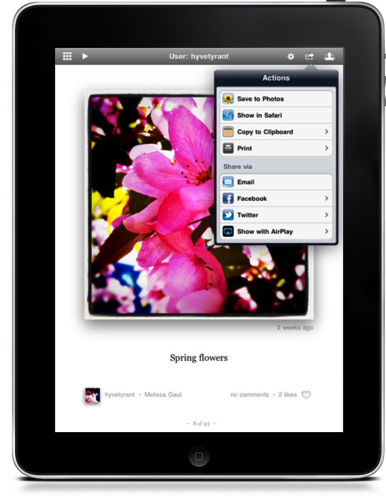
There’s a pair of updates to Instagallery which we first briefly covered in March as an Instagram browser for your iPad, and they bring a ton of functionality to the $1.99 preview-based app that’s sure to excite many Instagram fans.

The update to version 1.2 delivered social sharing to Facebook and Twitter, the ability to open images in Safari, a grid view so you can browse photos quickly, AirPlay so you can get Instagram on your big screen TV, improvements to commenting and tagging, TextExpander support, a history view to browse recent photos, and printing to AirPrint enabled servers amongst of slew of other features.

Yesterday, Instagallery was updated to version 1.2.2 which added translations for foreign languages, author bio and website information, and lots of performance tweaks to keep browsing snappy.

Instagallery is available for $1.99 in the App Store, universally for the iPhone, iPod touch, and iPad.


Discovr Apps Is Like Pandora For The App Store

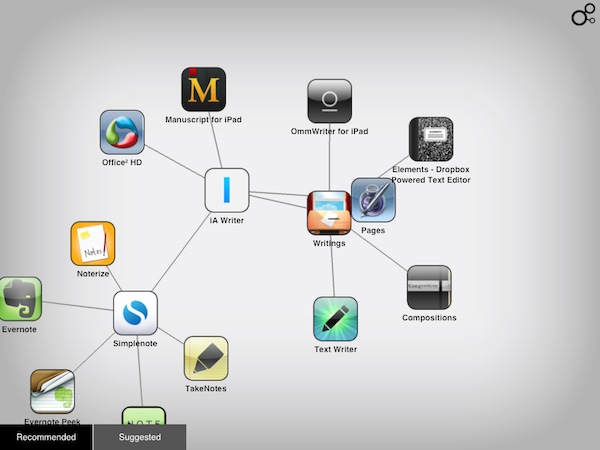
Back in January I reviewed Discovr, an interactive music map that was aimed at letting you easily and joyfully discover new artists and songs based on your tastes. By providing an original interface that turned classic hyperlinking into an interactive experience with animated maps and multitouch, Discovr still holds up as one of the most original iPad apps to explore the iTunes Store in an alternate view that, eventually, also made its way to the iPhone. But after music, the Filter Squad developers might have asked themselves what is that iOS users want to discover on a daily basis. And that is apps, obviously. Discovr Apps, a new version of Discovr available in the App Store at $0.99, runs on the iPhone and iPad and, just like its music counterpart, wants to turn the App Store categories and links into a map that changes every time according to the suggestions you’re given and the apps you’re interested in.

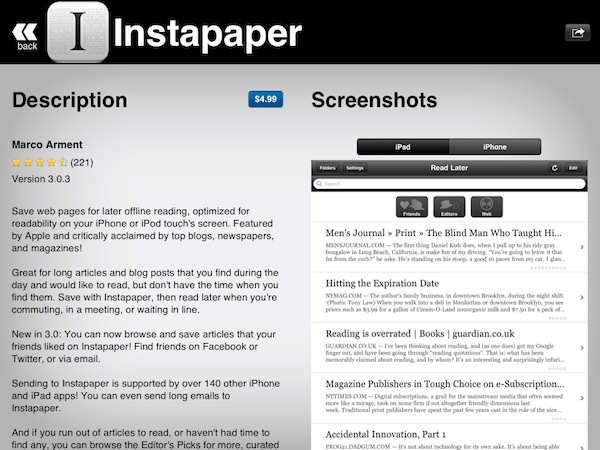
In the main page, you’re presented with a search box to manually start looking for an app, or two tabs at the bottom: recommended for you, and suggested apps. For those who don’t know how Discovr works: after the first element – in our case, an app – pops up on screen, a tap will generate related items connected to it, thus creating a map. As you keep tapping to view related items, the map grows and the connections expand. To view an item in detail, you just have to double-tap and you’re brought to an App Store-like page with description and screenshots. If you want a broader view of the map you’ve generated, pinch to go back.

You can share discoveries on Twitter and Facebook or via email, but the main point of the app is to sit down, check out the recommendations or start with an app you like, and see where Discovr brings you with its interactive system. And as far as recommendations go, I’m very satisfied with this app-focused version of Discovr: even more than Discovr for music, I found app suggestions to be really tailored to my tastes and needs, with gems like Twitterrific, Evernote, Simplenote and Writings often showing up in my maps.

Discovr is, once again, an interesting experiment that offers an intuitive way to discover media you’d probably miss in the sea of App Store apps and updates. At $0.99 in the App Store, that’s an investment you should consider to discover more great apps in the future.


Apple Removes App That Revealed The Most Common PINs

On Monday we reported on what the most common PINs were for users of the Big Brother Camera Security app after its developer had added the ability for the app to anonymously send back those PINs. Many were not happy about hearing this and Apple was clearly among those as the Big Brother Camera Security app was pulled from the App Store yesterday.

In a blog post, the developer of the app, Danial Amitay explains that the app was not obtaining the actual lockscreen PINs but rather those used for his app. He also quells fears by explaining that when the app sent the data to his server it was “literally sending only that number (e.g. “1234”) and nothing else”. Amitay had presumed (when he added the function) that it would be within the iTunes EULA for him to do so, as it states the following (emphasis added):

b. Consent to Use of Data: You agree that Application Provider may collect and use technical data and related information, including but not limited to technical information about Your device, system and application software, and peripherals, that is gathered periodically to facilitate the provision of software updates, product support and other services to You (if any) related to the Licensed Application. Application Provider may use this information, as long as it is in a form that does not personally identify You, to improve its products or to provide services or technologies to You.

Amitay says he is actively trying to work out the issue Apple had with the app and get it back into the App Store soon. If it means he has to get rid of the code that sent the PIN data, he says would “gladly” do that, understanding the concern it raised. He does say however that he had planned to warn users not choose the obvious PINs that the data had revealed in a future update.

[Via Macgasm]


Funnel is an Expressive News App Based on Google News

Looking for all the hot topics of today? Patrick Rhone of Minimal Mac points to a very cool looking iPhone app called Funnel, which reminds me of Marcos Weskamp’s Newsmap, which provides a distinct way to view upcoming topics on Google News. While I haven’t visited the “Marumushi Newsmap” (as I called it when I was but a young teen) in a long time, provided you have Flash installed or you use Google Chrome, you can check out how news aggregates in real time. If we return to Funnel, it’s practically the same thing (which is great considering you can have Newsmap on the go). The bigger the news, the more popular that particular news item is. You can download it here (currently I’m having trouble pulling it up in the App Store). Let us know what you think if it’s available in your part of town.

[via Minimal Mac]


Boxee Getting an Update on Mac, PC, and Linux This Fall

Just because Boxee’s released the Boxee Box doesn’t mean they’ve forgotten about our beloved desktop clients. Straight from the Boxee blog, Avner Ronen writes:

We are going to release an update for the downloadable version this fall, and hope to keep it more up to speed with the CE version going forward. We also hope to make the open source version of the downloadable version easier to use for people who want to build out their own versions of Boxee. That said, updates for the downloadable version will most likely lag behind the versions of Boxee for devices.

Before Boxee released the Boxee Box with D-Link, their efforts were focused on supporting their device for consumers. Now that the device is on the market (and from the sounds of things doing okay), the Boxee team wants to bring an updated version back to the desktop to remove usability issues. Lastly, the company wants to open-source their app so developers can bring Boxee to new platforms and devices. That’s pretty cool if you ask me.

Read more


Nuance Releases Dragon Remote Microphone for iOS

With Nuance technology possibly sprinkled in iOS, why not show off with a brand new app that’s free in the App Store? Dragon Remote Microphone was announced by Nuance today as a sort of “wireless microphone” for Dragon NaturallySpeaking, Windows-only speech recognition software for the desktop. The best part is that all you need is a WiFi connection to the PC - you don’t need to crawl under your desk or visit staples to buy an accessory.

In conjunction with the launch of Dragon NaturallySpeaking 11.5, Nuance introduced the Dragon Remote Mic App, a free application on the Apple iOS app store which makes it possible to use an iPhone, iPod touch, or iPad as a wireless microphone for Dragon via a Wi-Fi network connection. Many customers have requested to use their smartphones and other mobile devices with Dragon to have more flexibility with how and where they dictate with Dragon. The new Dragon Remote Mic App takes advantage of the nearly 200 million iOS devices in use today, and transforms the device into a wireless microphone that easily captures dictation and controls applications on your PC.

Leading up to WWDC 2011, the Internet was lit with rumors about Apple possibly integrating Nuance technology into iOS 5. Later leaked screenshots reveal Nuance dictation to be embedded, which may offer speech-to-text input thanks to a microphone button on your keyboard (not dissimilar from Android). Remember when Apple acquired Siri? Much of Siri’s technology was based on Nuance - TechCrunch speculated that Apple may already be running Nuance’s translation software in the Apple data center. That deal was rumored to be dismissed, however, as a partnership would reduce costs, yet it’s unknown whether a partnership could reveal itself by the time iOS 5 is released in the fall. As Nuance continues to release apps on iOS, including the previously released Dragon Dictation for iPhone and iPad (free in the App Store), they convey that iOS seems to be a prime candidate future integration.

[Nuance via MacRumors]