This Week's Sponsor:

Hello Weather

Half Off for WWDC Week, Just in Time for Summer.


Posts tagged with "app store"

Want to Host Your Own iTunes Store? That’ll Cost You $1.3 Billion a Year.

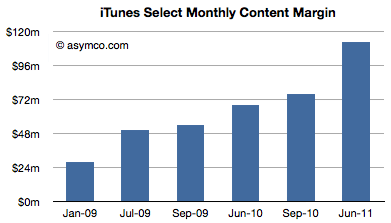
If you were to run your iTunes Store out of your basement, just think about how much it would cost to serve Apple’s 225 million accounts on file. With 15 Billion iTunes song downloads, 14 Billion app downloads, and with those downloads soon to be happening simultaneously between your Mac, iPad, and iPhone thanks to iCloud, Horace Diedu writes that we can deduce a lot about how much it costs Apple to keep the operation running smoothly. “Since we know something about the average price of songs and apps, and we know the split between developers and Apple (and roughly between music labels and Apple) we can get a rough estimate of the amount Apple retains to run its store.”

Diedu took the margin of apps and song downloads per month (assuming if the app store runs ‘break even’) and added them together; the margin consists of what Apple pays out to content owners before processing, delivery, and maintenance costs. He concludes that it costs Apple $133 million a month, or $1.3 billion which is paid towards keeping everything operating smoothly. Remember, we’re not calculating the gross margin, but rather the amount Apple is left with after paying developers, record labels, and publishers, before pouring that cash into their operating fees. The leftovers, Deidu concludes, would go towards capacity increases, perhaps in Apple’s new datacenter.

[via Asymco]


iOS5: There’s a reason it’s called ‘beta’ software.

iOS5: There’s a reason it’s called ‘beta’ software.

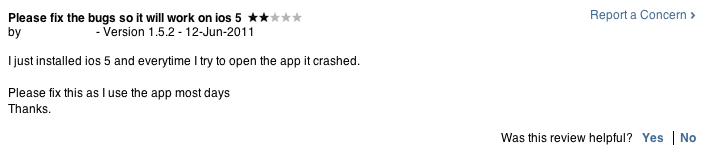
Malcom Barclay comments on how iOS 5 is hurting App Store reviews,

I can understand users are very eager to get their hands on the latest & greatest iOS shown off at WWDC. So they sign up for developer accounts for £59, with a few clicks and an alternative restore through iTunes. Voilà new iOS on shinny iPhone. Problem is, this is beta software and there’s a very good reason it’s called beta software. It’s not finished.

Barclay writes, “The review system is not for leaving bug or support related questions, for example, ‘How do I add a favourite?’.” While the review system in the Mac App Store is generally unfiltered and used to spew much vitriol if an app doesn’t work, the iOS 5 beta adds to this problem since so many casual users are downloading the software early from Apple or somewhere online, and then complain when these apps are broken or crash.

Barclay reminds us that while Apple doesn’t provide a proper support system so developers can better engage with customers, that you should be mindful (in general) and contact the developer directly with any questions, concerns, or bugs. With iOS 5 just being released this week, developers have had little time to update their apps, submit it to the app store, wait for the review process, and fix any current bugs. Considering that iOS 5 is beta software, you shouldn’t expect anything to run smoothly - iOS 5 is scheduled to be released in the fall, and iterative updates will be made in the meantime. ”There is no point in dev’s releasing fixes for these issues yet because this is just beta 1, there could be as many as 6 more to go.” Barclay concludes.

Many of us often forget that the beta labels software that is untested; instead it’s associated with ‘early’ or ‘preview’. If you currently have iOS 5 running on your devices, be aware that developers aren’t supermen. Many are just getting back from WWDC (full of knowledge), and will be working to update their apps for the scheduled Fall release. If stuff doesn’t work in the meantime, that’s the risk you take. That doesn’t mean you shouldn’t enjoy your first look, but to simply to be mindful that you’re using an unfinished product.

Permalink

Apple to Reject Apps that Identify DUI Checkpoints

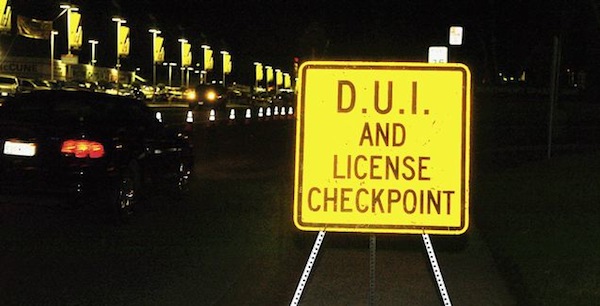
After four US Senators sent a letter to Apple’s Scott Forstall concerning apps that reveal DUI Checkpoints, Apple has updated their App Store Review Guidelines to reject apps that aid drunk drivers (and sober drives who just don’t want to be bothered by the delay) from evading the law. Senators Harry Reid, Charles Schumer, Frank Lautenberg and Tom Udall expressed grave concerns about apps that enabled those who drink and drive to escape law enforcement, and cited the apps as harmful to public safety. Apple’s new rules can be found in section 22.8:

Apps which contain DUI checkpoints that are not published by law enforcement agencies, or encourage and enable drunk driving, will be rejected.

If flashing your lights to alert oncoming drivers to a speed trap is against the law in the United States, why shouldn’t these iPhone apps be banned as well? This certainly opens up the opportunity for drunk drivers to break the law, but what about other iPhone apps that can check into police radio and point out speed traps? Just like with sexually explicit apps, this is going to be another hot topic of debate as Apple curates content on the App Store.

[via Autoblog]


“Automatic Downloads” Lets You Push Purchases Over The Air

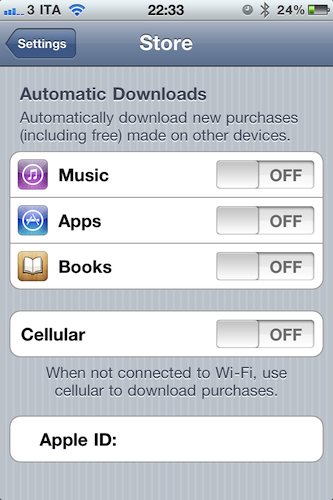
Revealed last week with a leaked screenshot from iTunes and officially announced earlier today at the WWDC keynote, the “Automatic Downloads” feature for iOS device is now live and accessible from the Store menu inside the Settings app on an iPhone, iPod touch or iPad running iOS 4.3. Here’s how it works: once enabled in the Store menu, the new functionality will allow you to beam apps, books and songs across devices – Macs, iPhones and iPads. For a first test, I enabled the menu on my iPhone, and started downloading a free app on my Mac. Within the seconds, the download started on my iPhone, which wasn’t connected via USB – it was an OTA download based on the fact that I hit “download” on my MacBook Pro.

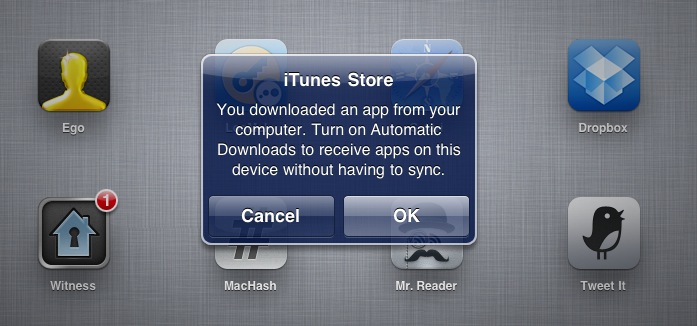
The iPad, which was not enabled to have Automatic Downloads, alerted me to say I had to activate the feature if I wanted to see purchases becoming available on it.

Once activated on the iPad too, I downloaded an app on my iPhone and it started downloading both on the iPhone and iPad, automatically. But what about updates, not new purchases or free downloads? The system seems to be a bit unstable now: I had three app updates on my Mac, and I downloaded them. Those updates were showing up on the iPad App Store app with a red badge, but the download didn’t start automatically as with a new purchase / download. However, as soon as I opened the App Store on my iPad, those updates were gone – as if the device downloaded them in the background without me seeing a loading indicator. Maybe Apple simply needs a better UI for app updates (again, not new purchases) or better integration with iTunes 10.2.2 on the desktop (the announced iTunes 10.3 is not available yet).

To test the new Automatic Downloads for iOS and Macs, go to the Store menu on your iPhone and iPad and turn the switches to “on”. You can also decide to use cellular data when not on WiFi.


App Store Now Lets You Download Not-Available Apps, Like Tweetie 1

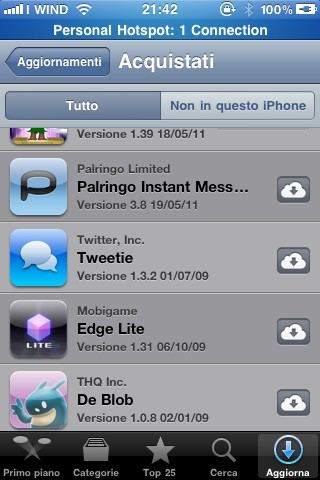
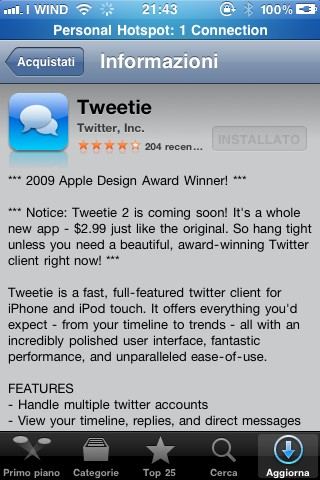
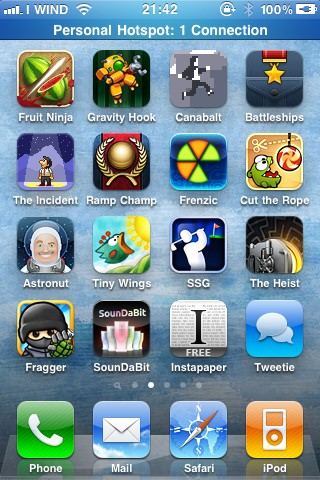
Great news coming from the updated App Store application featuring the new Purchased tab: as noticed by our reader Nicola, you can download, install and run apps no longer available in the App Store, like the original Tweetie 1 or Instapaper Free. The apps appear in your purchase history alongside the usual description and screenshots page.

Unfortunately, due to Twitter’s changes, Tweetie 1 doesn’t work anymore – still this looks like a great option to fill your app library with software developers removed from sale. It might also be a temporary glitch on Apple’s end – we’re not sure. But for now, you can download apps that don’t appear in the App Store listings.


Apple Finally Brings Wireless Sync and OTA Software Updates to iOS

Following direct Twitter integration, Newsstand and all the new features of iOS 5, Apple has just announced what many were hoping for in the months leading up to today’s keynote: wireless syncing. Dubbed PC Free by Scott Forstall, the new feature will allow for a variety of cord-free functionalities such as no iTunes required for activation, over-the-air software updates, Delta updates to only download what’s changed in the new OS.

From This Is My Next:

We said, why do people go back to a computer? Calendars, people create or delete them. You can do that now. Photo editing, you can do it on the devices. Even mail — you can create folders. So if you want to cut the cord, you can. So you no longer need to plugin to update your software. And they’re now Delta updates. Instead of downloading the whole OS, you only download what’s changed.

More on this later when Apple will seed the first iOS 5 beta.

Update: new cloud-based features have also been introduced in the App Store app without needing an update. The App Store application on iOS 4.3 already has a new Purchased tab that, similarly to the Mac App Store, allows you to get a list of all the app you’ve previously bought, also from other devices.


App Store Reaches 400,000 iOS Apps?

Just ahead of the WWDC keynote that kicks off tomorrow at 10 AM PDT in San Francisco, AppAdvice reports the App Store has passed 400,000 available iOS applications. According to data provided by App Store tracking system AppShopper, there are 401,446 iOS apps at the moment of writing this, though in three years Apple approved just over 500,000 apps – 507,293 to be exact. The important milestone of 400,000 apps (if AppShopper’s figure is to be trusted, but we believe so considering 148Apps reports 398,845 as of May 30, 2011) will surely be part of Steve Jobs’ keynote slides tomorrow as he explains why the App Store is a thriving marketplace for developers willing to monetize their efforts, in spite of the recent Lodsys controversy that, perhaps, will also be briefly addressed by Apple executives on stage for the purpose of clarification. Interestingly enough, however, AppShopper reports 97,946 iPad apps available whilst the App Store app on my iPad says there are 92,483 apps as of today.

The App Store officially launched on July 10, 2008, a day before the release of the iPhone 3G running iPhone OS 2.0.1. In 1060 days – or 34 months and 26 days as Wolfram Alpha calculates – the original App Store has been organized in two different sections in iTunes (iPhone and iPad apps) and a separate one living in its own application, the Mac App Store, launched on January 6, 2011.


App Stores and iTunes Showing Trouble Worldwide [Update: Back Online!]

If you wanted to download Angry Birds, take a gander at Apple’s new WWDC app, or download Lady Gaga’s newest album, you may have noticed that iTunes and the App Store ecosystems are failing to download or accept purchases worldwide. While content may still be accessible to browse, Engadget first noticed that the podcast section of iTunes has gone offline, followed by failure by many to download apps from the iOS and Mac App Stores. The most common issue right now is that users can’t download apps from the iPhone or iPad, with symptoms of slow loading times, download failures, and general errors popping up in several countries worldwide. Several users are reporting problems, so either Apple is working on the backend (perhaps this service disruption as something to do with iCloud), or a server or two have decided to bite the dust at the wrong time. Apple Discussion forums such as this one are starting to crop up during this moment of inconvenience, and we’ll keep you updated as the afternoon progresses.

[Updating…]

Read more


Notefile by Junecloud makes a Splash on your Dashboard, iOS

It’s not too often we see really nice Dashboard widgets and iOS apps working in sync, but if you’re familiar with Deliveries for the iPad and iPhone, you’re already well aware that Junecloud are pros at providing seamless syncing. Notefile is their latest endeavor, which was heavily inspired by the desire to sync notes outside of Mail’s notes between Mac and iOS, as well the lack of undo in the Stickies widget. Notefile could be considered the much needed upgrade to Apple’s own Notes, delivering a better default font choice and syncing capabilities with a free Dashboard widget. I personally like the developer’s yellow stylings over the bright white backgrounds many note apps use for their text fields, which is why I often return to Notes’ legal pad. With Notefile, you get a simple, yet seamless syncing experience between all of your Apple devices in a familiar interface. There are no subscription fees asides from the $4.99 entry price for the iOS app, which I’d pay for the gorgeous icon alone. Simplenote writers won’t find Notefile to be a compelling alternative, but Notes users wanting near instant sync for quickly sharing ideas between their Mac and iPhone will find this to be a reasonable upgrade.