
 MacStories Weekly: Issue 226
MacStories Unwind: MacStories Perspective Icons, a Big Spend Stack Update, and a New Read-It-Later App






This week on MacStories Unwind:
MacStories
- Introducing MacStories Perspective Icons: 20,000 Custom Perspective Icons for OmniFocus Pro
- Tot’s New Share Extension
- Keep Review: The Read-Later App I’ve Been Looking For
- The Inside Story of Mythic Quest’s Quarantine Episode
- Spend Stack Adds Apple Card Import, Recurring Cost Tracking, Per-List Currencies, iPad Improvements, and More
Club MacStories
- MacStories Weekly
- MacStories Perspective Icons
- Miximum
- A collection of apps for exploring the world around you
- A teaser of Federico’s upcoming story about his use of OmniFocus perspectives
- Q&A, links, apps, and more
- MacStories Unplugged
- An extra-nerdy episode all about MarginNote 3
AppStories
Unwind Picks
Tot’s New Share Extension→
Craig Hockenberry, writing on The Iconfactory blog:
We’re happy to announce a new version of Tot with some features frequently requested by the app’s legion of fans.
The main focus of today’s release are system extensions that allow Tot to co-exist with other apps. To this end, we’ve added a Sharing extension for both iOS and macOS. Additionally, there’s also a widget for iOS that lets you quickly access any of Tot’s dots. Like everything else in Tot, attention was paid to minimizing friction, allowing information to be collected as quickly as possible.
Tot’s new share extension is, quite possibly, the best one I’ve ever tried for a plain text note-taking app. In an intuitive, compact UI, the extension offers everything I need: I can pick one of Tot’s seven dots; I can choose to append or prepend text to a dot; the extension even lets me pick the number of line breaks I want to put between a dot’s existing content and the new text I’m inserting into a note. And here’s the best part: the upper section of the share extension’s popup has a full, scrollable preview of the selected dot, so I can see what the entire note will look like before appending or prepending text. Tot is the first note-taking app I’ve used that gets this aspect of sharing text/links to an extension right.
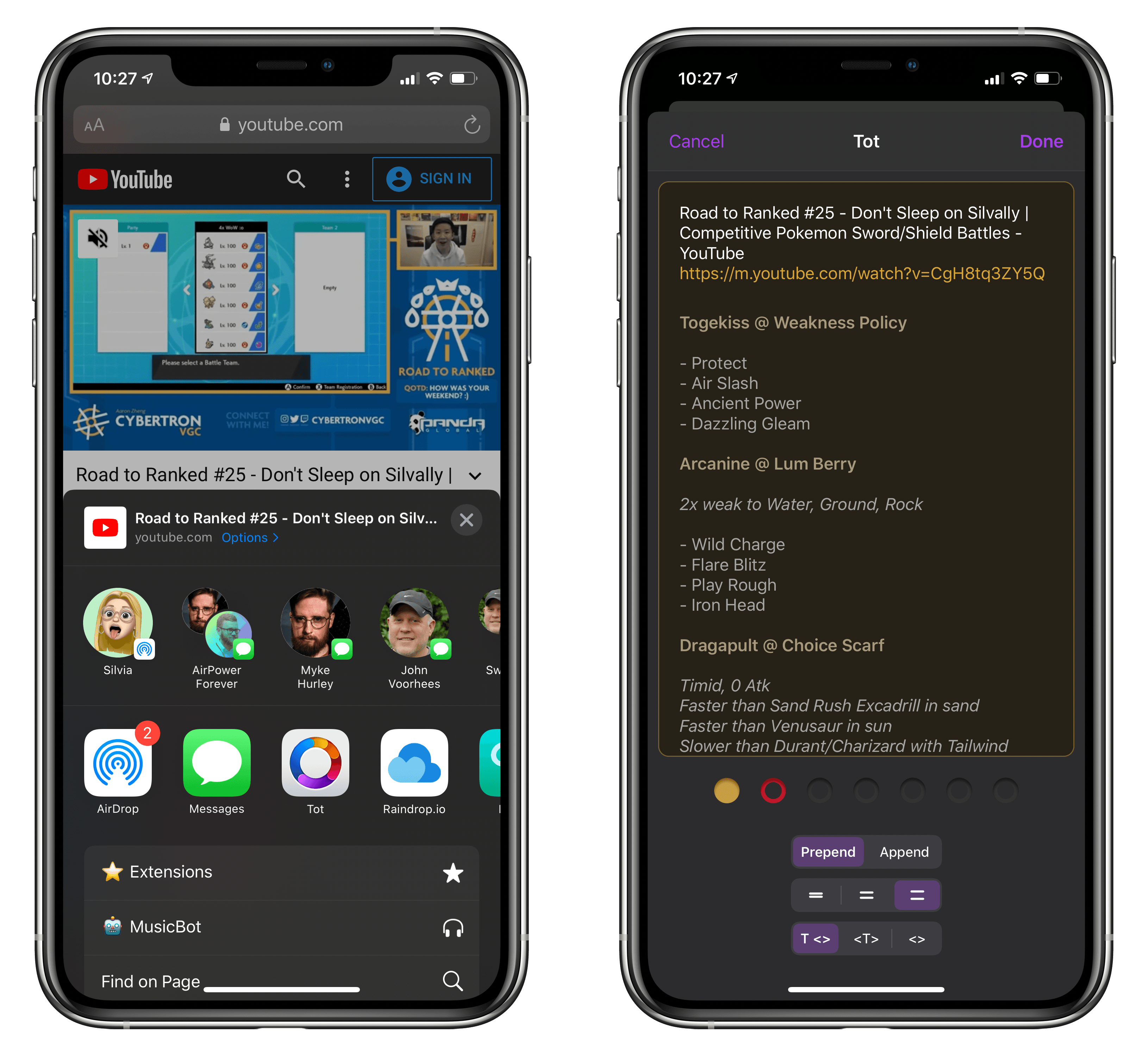
It may be considered a small enhancement to the app, but Tot’s new extension shows how much consideration went into designing an experience that is both powerful and willing to get out of the way as quickly as possible. I wish more note-taking apps offered a share extension similar to The Iconfactory’s app, which, months after its original release, I still use as my go-to scratchpad every day.
Introducing MacStories Perspective Icons: 20,000 Custom Perspective Icons for OmniFocus Pro
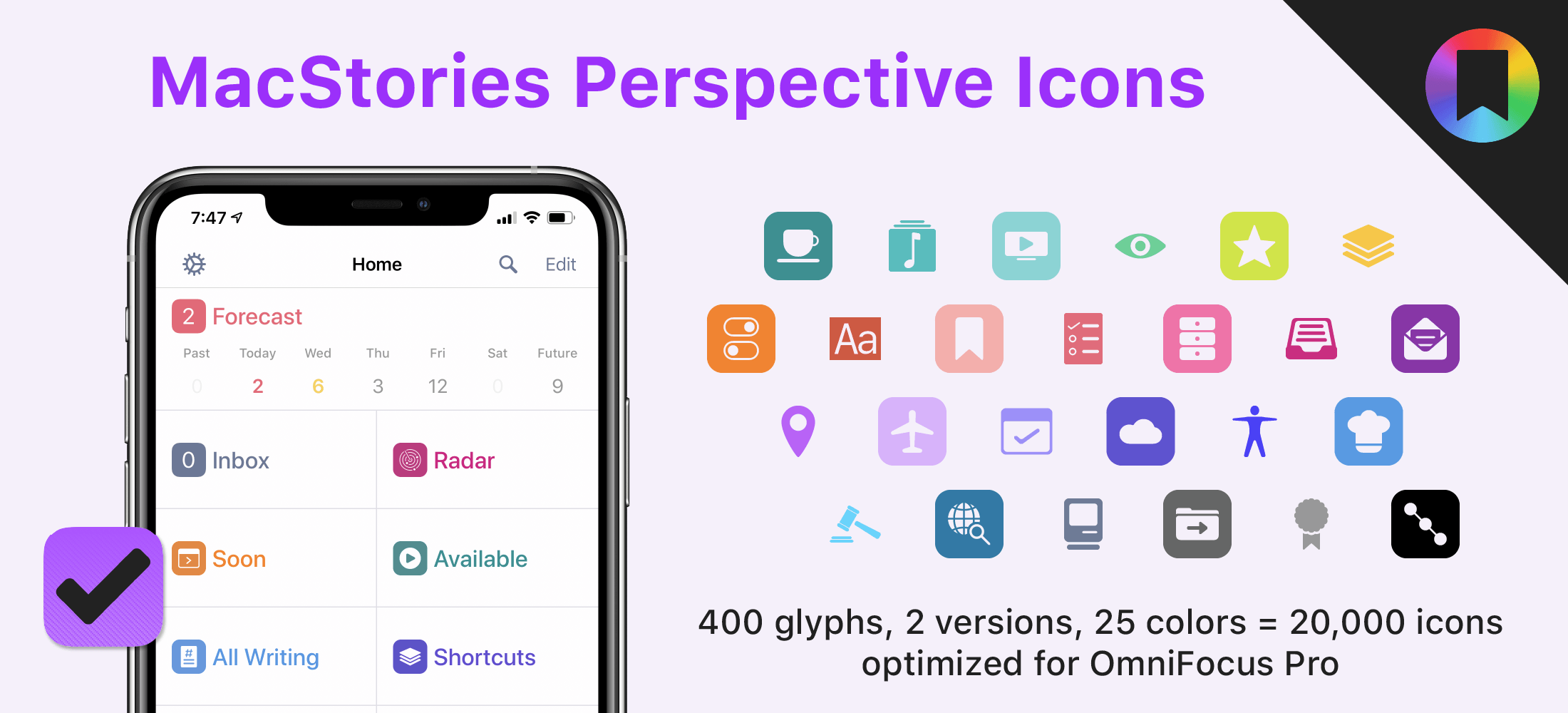
Today, I’m thrilled to announce MacStories Perspective Icons, a set of 20,000 icons for custom perspectives in OmniFocus Pro.
Here’s the short version of this story: our brand new Perspective Icons offer 400 unique glyphs with two distinct icon shapes available in 25 different colors, for a total of 20,000 icons included in the set. Yes, you read that number right. The icons can be easily installed in OmniFocus Pro for Mac, iPad, and iPhone using Finder or the Files app; all the icons and colors have been optimized for OmniFocus and designed to look like native additions to the app.
For a limited time, you can get the set at $17.99, down from the regular price of $24.99.
AppStories, Episode 165 – Imagining the Perfect Research App→
This week on AppStories, we discuss the time we’ve spent investigating research apps on iPadOS and the Mac and consider the features and approaches we’d like to see in an ideal research app or suite of apps.

AppStories Episode 165 - Imagining the Perfect Research App
0:00
48:44
48:44
Keep Review: The Read-Later App I’ve Been Looking For
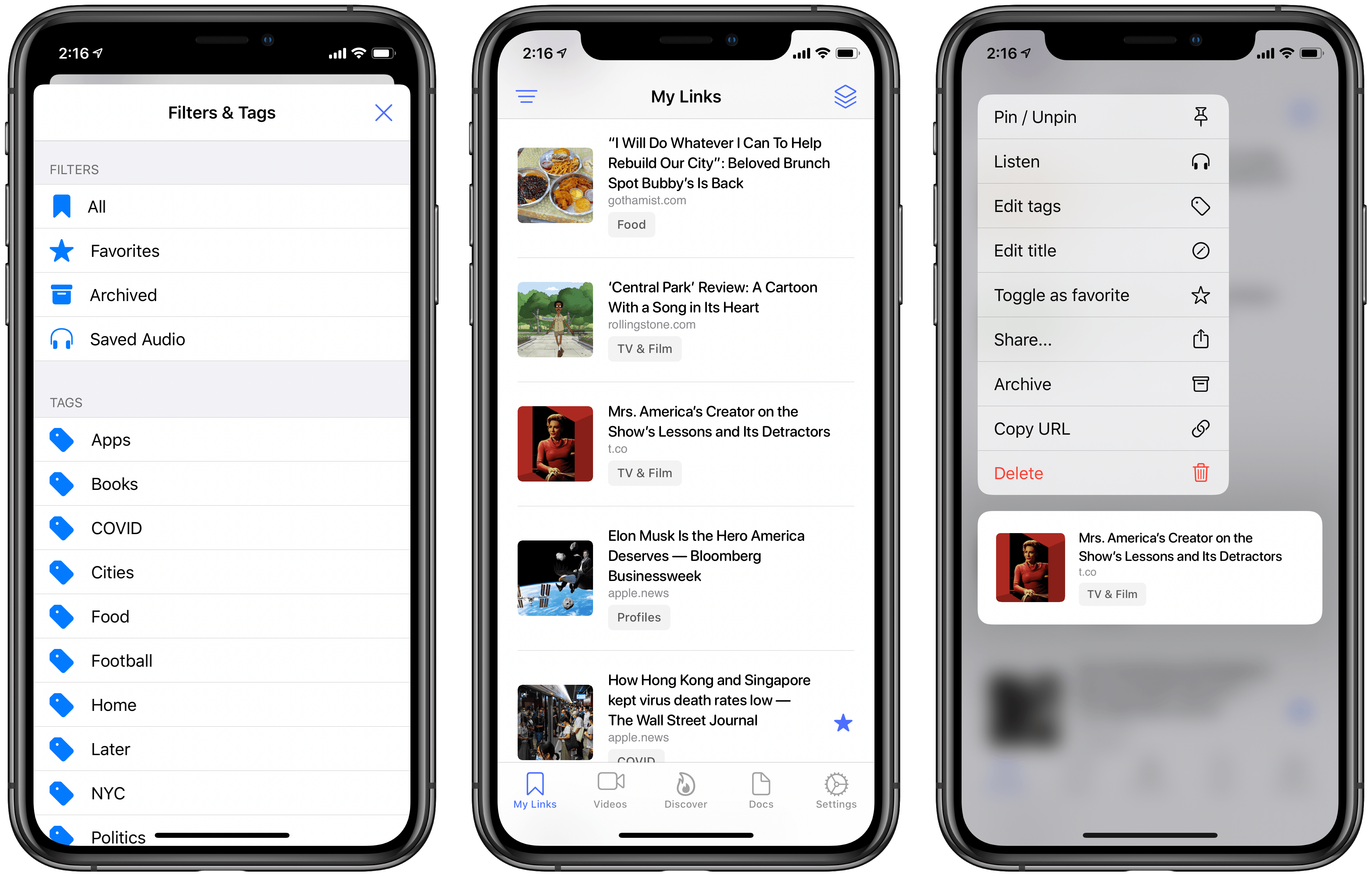
After years of happily using Safari’s Reading List and Apple News’ Saved Stories for all my read-later needs, recently I found myself facing a conundrum: there were too many articles saved in each place, and thus I needed a categorization system that neither Safari nor News provide. This problem is of course partly my fault, since I’m clearly not adequately working through my reading queue.1 But I’m not at all willing to nuke these interesting stories and start fresh with zero saved links. Thus, I’ve been on the hunt for a read-later app that better meets my new needs.
If there’s one lesson this journey has taught me, it’s that read-later apps are just like task managers and email clients: there’s no perfect one-size-fits-all approach. Developers and users all have their own ideas about how such an app should best function, so there’s no perfect option out there. After a long search, however, I’ve found the app that comes as close to ideal for me as possible: Keep by developer Michael Zsigmond, which is available for iPhone, iPad, and also offers a web client.
The Inside Story of Mythic Quest’s Quarantine Episode→
Last Friday Apple debuted a special new episode of its TV+ series Mythic Quest that was produced entirely during this season of quarantine. Lacey Rose at The Hollywood Reporter interviewed the co-creators of the show, Rob McElhenney and Megan Ganz, about the origins and challenges of the episode:
McElhenney pitched the idea to his bosses at Apple, who were immediately on board. To pull it off, he told a team in Cupertino, California, that the production would need 40 new iPhones and 20 sets of earbuds later that week. “This was a Monday, and I said, ‘If we have them by Friday, I think we could pull this off. Is that possible?’” he recounts by phone. “There was a rep on the call who didn’t skip a beat. She said, ‘I already have them tracked down. They’re in L.A. and I can have them to you by this afternoon.’”
Three weeks later, Mythic Quest: Quarantine was shot, edited and ready to air. McElhenney and the programmers at Apple feel so strongly about the finished product, which will drop on Friday, that they’re submitting it for Emmy consideration. “In the beginning, I think there was a real possibility that it would be a nightmare,” says Nicdao, “but by the end, I was ready to do three more.”
I watched the episode over the weekend, and it really is something special. It beautifully captures the human experience of this pandemic, confronting the dark moments while also providing a lot of joy. I won’t be at all surprised if it wins an Emmy.
If you’re interested in TV production at all, the full interview goes into lots of nitty gritty details that are fascinating and well checking out.
Spend Stack Adds Apple Card Import, Recurring Cost Tracking, Per-List Currencies, iPad Improvements, and More
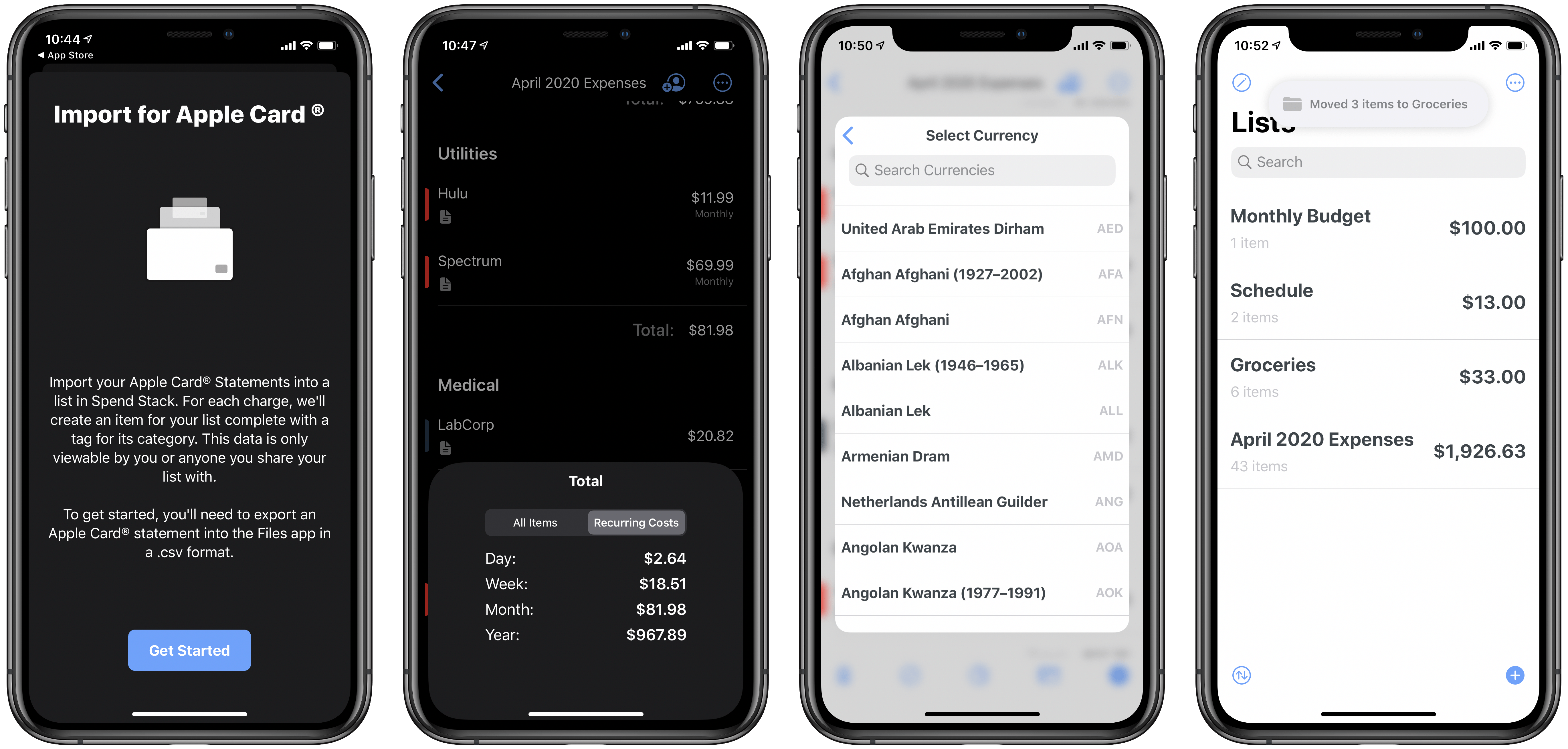
I’m not normally a fan of finance apps. They tend to be more work than I want to bother with, and are often riddled with poor design choices that make them a pain to use. Not so Spend Stack, the finance-centered list app that I first wrote about last fall. Spend Stack looks and feels thoroughly modern, with an elegant design and deep support for modern technologies like iPad multiwindow, iCloud collaboration, and more. It enables creating lists of items that have monetary values and having the sum cost or value automatically calculated, making it ideal for budgets, shopping lists, vacation planning, and more.
Version 1.2 of Spend Stack recently debuted, introducing a strong set of new features and enhancements: Apple Card monthly statements can now be imported seamlessly, working with multiple currencies and recurring costs is now possible, the iPad app has gotten even better, and there are some nice new design touches. Let’s dive in.
Agenda: Date-Focused Note Taking [Sponsor]

Agenda is the award-winning note-taking app for iOS, iPadOS, and the Mac with a focus on dates. Our lives are full of notes and dates, and it only makes sense to bring order to it all by integrating them. Agenda, the winner of an Apple Design Award and the MacStories Selects Award for Best New App of 2018, does precisely that, ensuring that your notes are always at your fingertips when and where you need them most.
By tightly integrating your calendar and notes, Agenda becomes something more than either can offer on their own. For example, by tying notes you’ve been taking in advance of a meeting to the event on your calendar, the notes are right there when you need them. You can use Agenda to track your team’s progress as you work on hitting milestones for a big project too. The app is also fantastic for keeping a daily journal or simply expanding your to-do list with relevant reference material and notes to help keep you on track.
You can create and edit events without ever leaving Agenda too. Rather than competing with your calendar, Agenda complements it, working perfectly together, supporting Apple’s Calendar app and Reminders.
Agenda 10 was just released, adding support for note templates, sharing from other apps, and localization in a bunch of languages. The update includes a templating system so you can save notes with pre-filled information to use over and over, saving you valuable time. There’s also a powerful new share sheet for accessing notes from other apps in Agenda and support for French, Spanish, German, and Chinese.
Agenda is free to download and use forever. Premium features are available with an In-App Purchase that unlocks all current premium features and new ones introduced over the following 12 months.
To learn more, visit Agenda’s website, or just download Agenda now for free on the Mac App Store and on iOS and iPadOS App Store.
Our thanks to Agenda for sponsoring MacStories this week.