
 MacStories Weekly: Issue 265
Recently-Created Shortcuts Links Are Currently Broken
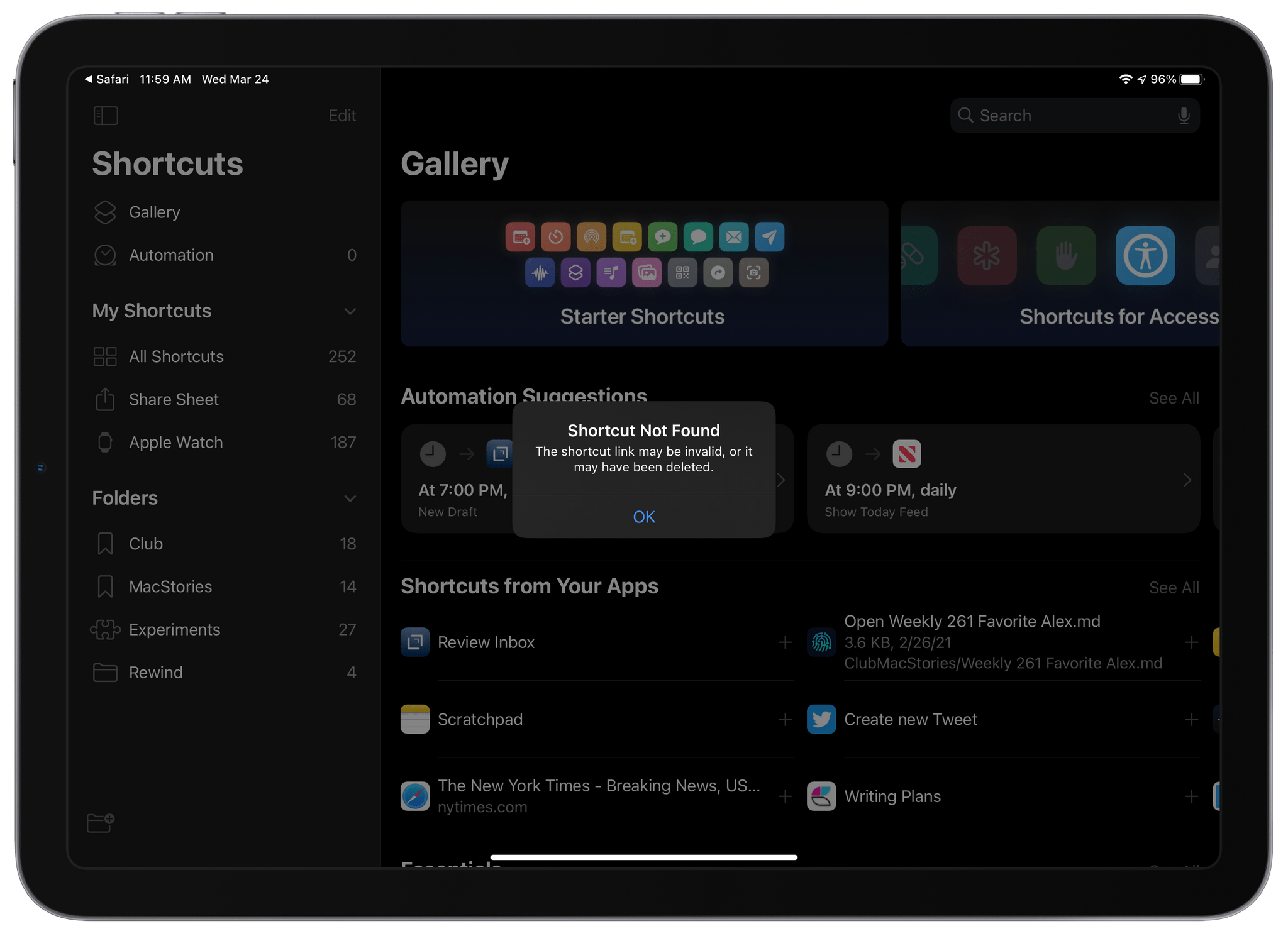
iCloud links to shortcuts broke sometime in the past 24 hours. Instead of opening the Shortcuts app and allowing users to install a shared shortcut, tapping a shortcut link displays an alert with the message ‘Shortcut Not Found,’ explaining that the link may be invalid or the shortcut may have been deleted. Based on our internal testing, the issue appears to affect all shortcut links created before yesterday.
The problem with shortcut links first surfaced in the Shortcuts subreddit late yesterday and early today on Twitter. Yesterday also saw the release of OS betas by Apple, but there is currently no evidence that the two events are linked. It’s also unknown whether the change was intentional or not. However, given that URLs can still be created and shared for new shortcuts, it seems more likely that the issue is related to a bug. We have contacted Apple seeking clarification about the situation but haven’t received a statement from the company.
The issue affects everyone who has shared shortcuts, from individual users to publications like MacStories that have shared shortcuts online. As a result, none of the shortcuts shared in the MacStories Shortcuts Archive currently work. That’s also true for other sites like RoutineHub and the shortcuts subreddit and writers and YouTubers like Chris Lawley and Matthew Cassinelli who have shared many of their own shortcuts.
Unfortunately, as this story is published, we don’t yet know if or when shortcuts links will begin working again. We will update this post as new information surfaces.
Update: Late yesterday, we received the following statement from Apple about the problem with previously-shared shortcuts links:
We are aware of an issue where previously shared shortcuts are currently unavailable. Newly shared shortcuts are available, and we are working to restore previously shared shortcuts as quickly as possible.
This is great news for shortcuts users. We don’t know yet when previously-shared shortcuts will be available, but we’ll let you know as soon as they are, so keep an eye on MacStories for further updates.
20 Years Ago, Mac OS X Set the Stage for Today’s Apple

It’s hard to believe that it’s been two decades since Mac OS X was released. I wasn’t a Mac user in 2001, but as a tech fan, I followed the release of OS X and the later switch to Intel closely, which was what finally convinced me to buy my first iMac.
Today, with Mac OS X gone and Intel chipsets not far behind, I thought it would be fun to look back at OS X and the transition to it compared to the recent switch to macOS 11 Big Sur. I started by watching Steve Jobs’ introduction of Mac OS X at Macworld Expo in 2000, which was a perilous time for the Mac. The company was just two and a half years into Jobs’ return as iCEO and had recently filled out its simplified product grid, adding the iBook to the iMac, Power Mac G4, and PowerBook lineup.
AppStories, Episode 210 – Imagining the Perfect Read-It-Later App→
This week on AppStories, we discuss the features and approaches we’d like to see in the ideal read-it-later app.
Sponsored by:
- DEVONthink – The one place for storing and working with all your documents, snippets, and bookmarks
- RevenueCat – In-app subscriptions made easy. Get started now for free.
- Pinstachio – A modern Pinboard app for your iPhone and iPad






Spotify Updating Home Hub with Recently Played Section, Deeper Podcast Integration→
As announced by Spotify last week, the company is rolling out a refreshed home hub in its mobile app featuring a new Recently Played section, an easier way to stream new releases from your favorite artists, and shortcuts to play and resume podcast episodes with one tap:
About a year ago, we reworked the Spotify mobile experience to refresh our Home interface. Since then, Spotify users have been able to access the content they love more quickly and easily—and maybe even discover something new straight from their home screen. But the ease and discovery don’t stop there. This month, we’re announcing a series of updates that will make the Home experience even more personalized for each and every listener.
We’re constantly working on ways to improve our user experience. Through this latest update, we’ll be rolling out several advancements on the mobile Home hub designed to make finding the audio you love easier and more intuitive. These will roll out to users globally on iOS and Android this month.
The redesigned home hub is the latest announcement in a series of recent product updates, including genre and mood filters for liked songs, real-time lyrics, and the upcoming lossless tier.
In my tests with Spotify this year, I’ve been positively impressed by the company’s pace of updates. What I find particularly intriguing in the refreshed home hub design is the integration with podcasts: I was very skeptical of blending music and podcasts in the same app when I switched to Spotify at the end of last year, but the more I use it, the more I understand why podcast listening in Spotify is growing rapidly. There’s something about making both kinds of audio content accessible in one place that works well for removing friction from having to choose what I want to listen to. I’m curious to see how Spotify will balance music and podcast episodes in new home hub (which I don’t have in my Spotify app yet).
Reflector 4 Updated with Modern UI and M1 Mac Support
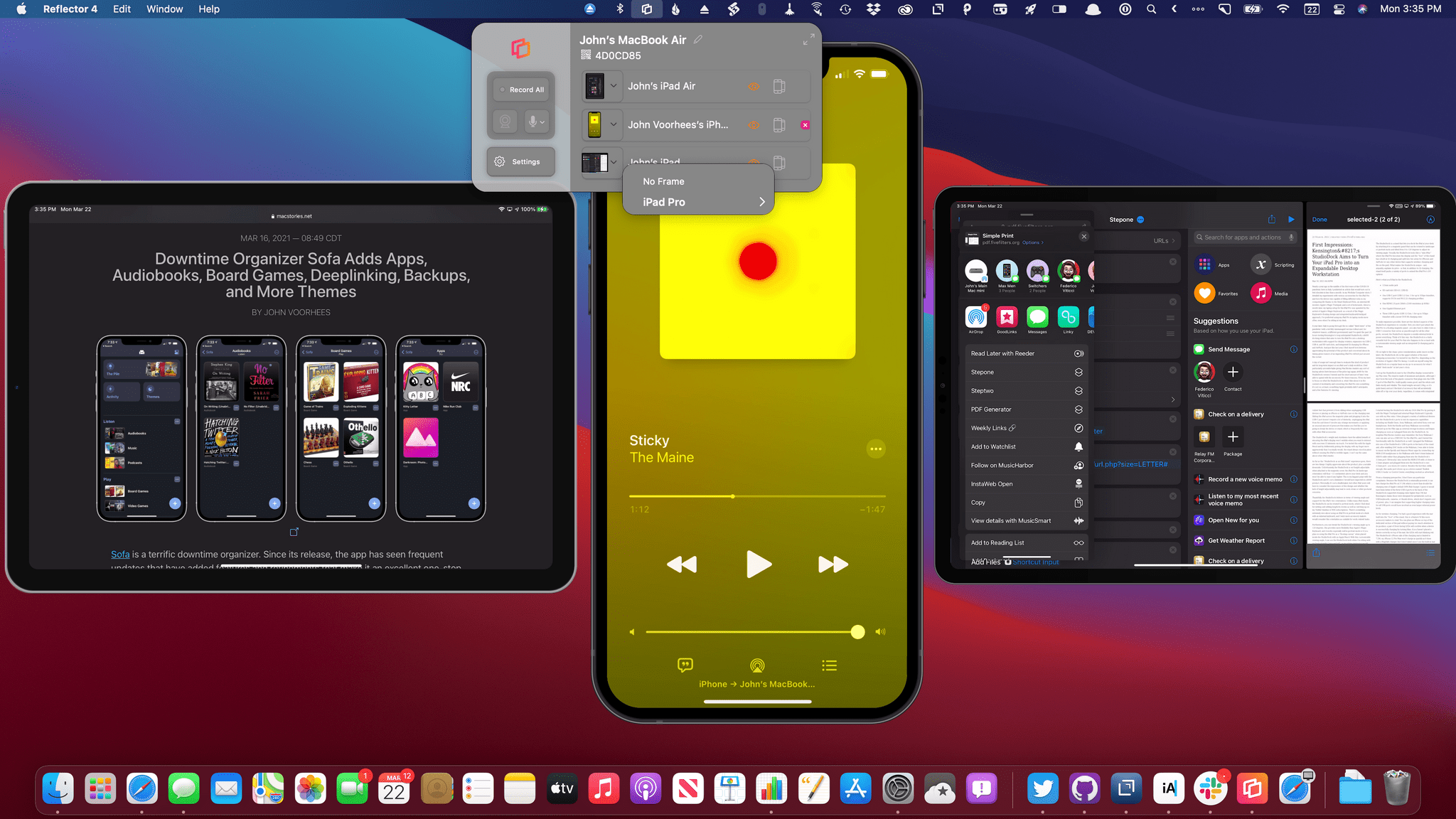
Reflector 4, an app for mirroring iPhones, iPads, and other devices to the Mac, has been updated with a new design, M1 Mac support, and new onscreen device frames. Whether you’re making screencasts, demoing apps for a group, or in a classroom environment, Reflector lets you wirelessly transmit your device’s UI to your Mac and record it too. In addition to mirroring iPhones and iPads, which is what I did in my testing, you can also mirror Android, Windows, and Chromebook devices. Think of it as Apple TV and Chromecast’s mirroring and streaming features all on a Mac, thanks to this one simple menu bar app.
Ulysses: The Ultimate Writing App for Mac, iPad and iPhone [Sponsor]

Ulysses is an exceptional text editor for the Mac, iPad, and iPhone with an unrivaled set of advanced features and a beautiful design that is always being refined and improved. The winner of an Apple Design Award, Ulysses features a distinctive balance of power-user features that writers appreciate in a simple, elegant, distraction-free UI that makes the app a pleasure to use.
A terrific example of the power available in Ulysses is its publishing tools. Users can publish to the most popular blogging platforms from right inside Ulysses. The app includes deep integration with WordPress, Ghost, and Medium, allowing you to publish directly to them, complete with images, tags, and excerpts. Ulysses 22 was just released and added support for Micro.blog and the ability to update previously-published WordPress posts too.
Ulysses has built-in grammar and style checking for over 20 languages and a special dashboard in the sidebar that includes statistics, keywords, and footnotes. An outline of the headings in your writing provides a handy bird’s-eye view of your work and a way to navigate your document.
The app’s Library sidebar helps order your writing into groups that can be nested. Along with features like sync, powerful search and filtering options, keyword support, in-line images that can be stored locally or remotely on a server, and new customization options, Ulysses is as flexible as it is powerful.
You can also set character, word, and other types of writing goals that can be attached to a single document or entire group, which, combined with deadlines, is a fantastic way to form good writing habits. Then, when you’re finished writing, Ulysses has abundant export options, including plain text, Markdown, TextBundle, rich text, DOCX, ePub, HTML, and PDF. To learn more about Ulysses, visit ulysses.app.
Ulysses is free to try before deciding whether to subscribe for $4.99/month or $39.99/year. Students can subscribe for six months at a time for $10.99. MacStories readers can take advantage of a special extended three-month free trial for a limited time. It’s a terrific way to discover the app’s full capabilities, so be sure to check out Ulysses’ new features right away.
Our thanks to Ulysses for sponsoring MacStories this week.
MacStories Unwind: Federico Test Drives a High-End iPad Dock, We Recap Reviews of Panic’s Nova and Sofa, and the Sad, Perplexing HomePod News

Sponsored by: Raycast – Goodbye Spotlight, Hello Raycast
This week on MacStories Unwind:
MacStories
- First Impressions: Kensington’s StudioDock Aims to Turn Your iPad Pro into an Expandable Desktop Workstation
- Nova Review: Panic’s Code Editor Demonstrates Why Mac-like Design Matters
- Downtime Organizer Sofa Adds Apps, Audiobooks, Board Games, Deeplinking, Backups, and More Themes
- Apple Maps Adds COVID-19 Vaccination Sites in the US
- Apple’s Perplexing Home Strategy
- Apple Has Discontinued the Original HomePod
Club MacStories
- MacStories Weekly
* Federico shares three more Taio automations
* John on CleanShot X
* An Interview with Sawyer Blatz, developer of Nudget
AppStories
Unwind
- Federico’s Pick:
- Federico spends John’s money on the Nintendo eShop
- Outriders demo on Xbox
- weapon and that won’t save us by Against The Current
- John’s Pick: