


With the introduction of iOS and iPadOS 15, Apple has created an entirely new class of utility app on the App Store: Safari web extensions. Mac users have enjoyed extensions for years. However, for iPhone and iPad users, they’re brand new and promise to make Safari more useful than ever by opening up new power-user functionality that extends Safari in ways that Apple hasn’t. Judging from the initial crop of extensions available, I think Safari users are going to be very happy.
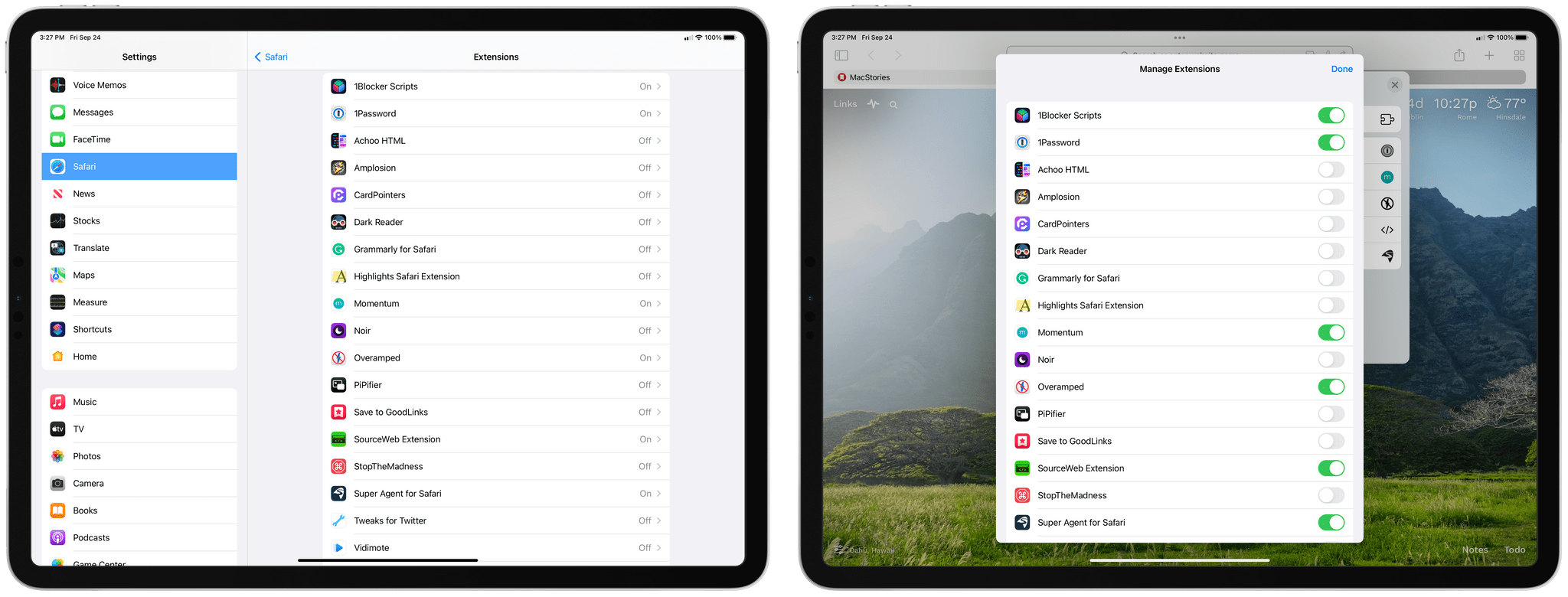
There are a couple of ways to install Safari extensions for iOS and iPadOS 15. First, you can go to the Settings app, select Safari, and inside the Extensions section, turn on any extensions you’ve installed and give them permission to interact with webpages. Second, you can enable or disable extensions by tapping on the puzzle piece icon in the address bar and then choosing ‘Manage Extensions.’ The same popover that appears when you tap the puzzle piece icon also lets you ‘Edit Actions,’ picking favorite extensions that will appear at the top of your extensions list in whatever order you drag them into, similar to the way picking favorite share and action extensions and rearranging them works.
Okay, let’s dig into some of the best extensions already available.







](https://cdn.macstories.net/banneras-1629219199428.png)
 Finn
Finn](https://cdn.macstories.net/9ed8e26b-bf71-4369-922d-f161e8f4a3be-1632357204240.jpeg)
](https://cdn.macstories.net/14c54e72-ed75-40ea-987b-237b59ceacf7-1632357204430.jpeg)
](https://cdn.macstories.net/b0689245-e6d4-4097-bb3c-a081b987b2d0-1632357765264.jpeg)