AppStories, Episode 356 – Web Apps and Services

This week on AppStories, we cover the web apps we use and why they’re sometimes preferable to native apps.

Sponsored by:

  • CleanMyMac X – Your Mac. As good as new. Get 5% off today.
  • Electric – Unbury yourself from IT tasks. Get a free pair of Beats Solo3 Wireless Headphones when you schedule a meeting.
  • Vitally – A new era for customer success productivity. Get a free pair of AirPods Pro when you book a qualified meeting.

On AppStories+, I explain why I’m a fan of Adaptive Noise Control and Conversation Awareness, Federico has come around on Dolby Atmos, and we both speculate about where the AirPods Max are heading.

We deliver AppStories+ to subscribers with bonus content, ad-free, and at a high bitrate early every week.

To learn more about the benefits included with an AppStories+ subscription, visit our Plans page, or read the AppStories+ FAQ.

Permalink

Automattic Acquires Interoperable Messaging Service Texts

Source: Texts.

Source: Texts.

Today, Automattic acquired Texts, a startup that’s been building a one-stop destination for managing your many chat and messaging apps in one place.

Automattic, which runs blogging platform WordPress.com and Tumblr, has been acquiring a growing list of companies in recent years, including the makers of apps like Day One and Pocket Casts. The company’s latest purchase marks its first foray into messaging.

Texts is a paid service that allows users to send and receive messages on several platforms, including iMessage, WhatsApp, Telegram, Signal, Messenger, Twitter, Instagram, LinkedIn, Slack, and Discord DMs, from a single app. There are other companies, like Beeper, attempting something similar using the open-source protocol Matrix, but Texts is a little different. It has developed its own technology stack for handling messages from multiple services that the company says doesn’t require it to send them across its servers and is end-to-end encrypted. Instead, Texts sends messages directly from one of its supported messaging platforms to another. Currently, Texts is available on the Mac, Windows, and Linux, with an iOS app under development and Android on the company’s roadmap too.

I had a chance to speak with Automattic CEO Matt Mullenweg about the acquisition, and it was clear from our conversation that he views it as a natural next step in the company’s support of open web platforms. It’s also a great fit with WordPress.org and Tumblr’s embrace of the ActivityPub protocol, which powers Mastodon and other federated social networks.

With the list of companies that offer some sort of siloed messaging that doesn’t interoperate with any others continuing to grow, I imagine the demand for a service like Texts’ is only going to grow over time. Backed by Automattic, Texts should have the resources to bring interoperability to more messaging services and grow its support for additional OSes more quickly, making it more competitive in what I expect will become an increasingly competitive market as lawmakers and regulators continue to put pressure on tech companies to make their messaging platforms more open.

Access Extra Content and Perks

Founded in 2015, Club MacStories has delivered exclusive content every week for nearly a decade.

What started with weekly and monthly email newsletters has blossomed into a family of memberships designed for every MacStories fan.

Learn more here and from our Club FAQs.

Club MacStories: Weekly and monthly newsletters via email and the web that are brimming with apps, tips, automation workflows, longform writing, early access to the MacStories Unwind podcast, periodic giveaways, and more;

Club MacStories+: Everything that Club MacStories offers, plus an active Discord community, advanced search and custom RSS features for exploring the Club’s entire back catalog, bonus columns, and dozens of app discounts;

Club Premier: All of the above and AppStories+, an extended version of our flagship podcast that’s delivered early, ad-free, and in high-bitrate audio.

Learn more here and from our Club FAQs.


Vivaldi for iOS Is Not Delivering on Its Promise Just Yet

Third-party web browsers on iOS and iPadOS have been in a peculiar state for some time. While it has been possible since iOS 14 to set a third-party browser as the default for opening web links, Apple still doesn’t permit the use of third-party browser enginesat least for now. This means third-party web browsers on iOS are essentially limited to serving as custom user interfaces built on top of the Safari engine.

However, some web browsers thrive in this space. Vivaldi, like many other web browsers on the desktop, is built on top of the Chromium engine and has become a staple of highly-customizable desktop web browsers. With its recent expansion to iOS, I thought I would try using it for a week to see how much of its desktop promise survived the port to Apple’s platform.

Read more

Access Extra Content and Perks

Founded in 2015, Club MacStories has delivered exclusive content every week for nearly a decade.

What started with weekly and monthly email newsletters has blossomed into a family of memberships designed for every MacStories fan.

Learn more here and from our Club FAQs.

Club MacStories: Weekly and monthly newsletters via email and the web that are brimming with apps, tips, automation workflows, longform writing, early access to the MacStories Unwind podcast, periodic giveaways, and more;

Club MacStories+: Everything that Club MacStories offers, plus an active Discord community, advanced search and custom RSS features for exploring the Club’s entire back catalog, bonus columns, and dozens of app discounts;

Club Premier: All of the above and AppStories+, an extended version of our flagship podcast that’s delivered early, ad-free, and in high-bitrate audio.

Learn more here and from our Club FAQs.


BetterTouchTool: Introducing Floating Menus [Sponsor]

BetterTouchTool is a powerful macOS application that enables users to completely customize their various input devices such as Keyboards, the (Magic) Mouse and Magic Trackpad, the Touch Bar, the Siri Remote or even things like the Stream Deck.

Today let’s have a look at a new feature that has recently been integrated into BetterTouchTool and is getting more powerful with every update: Floating Menus / Widgets.

Imagine them as highly flexible, widget-like menus that you can place virtually anywhere on your screen. You can attach them to specific positions in specific windows, to specific screens, the current mouse position and many more. You can specify whether they float on top, stick them to your desktop or have them behave like normal windows (and more). 
They can always be visible, expand on mouse hover or be shown/hidden via any trigger in BTT.

You can find various Floating Menu examples on https://share.folivora.ai. For example have a look at the Notch menu, which is invisible by default but expands from your Macbook’s Notch on hover.  Another nice example is the “Mini Emoji Menu” preset, it places a little transparent dot on the left edge of the focused window. When hovered it shows multiple custom emoji which you can insert by clicking.

The documentation for this new feature is available here and you can always visit our community page to discuss or request features.

Try BetterTouchTool now (45 day free trial) or go and purchase a license with this 20% coupon code: MACSTORIESBTT2023 at https://folivora.ai. BetterTouchTool is also included a Setapp subscription.

Our thanks to BetterTouchTool for sponsoring MacStories this week.

Access Extra Content and Perks

Founded in 2015, Club MacStories has delivered exclusive content every week for nearly a decade.

What started with weekly and monthly email newsletters has blossomed into a family of memberships designed for every MacStories fan.

Learn more here and from our Club FAQs.

Club MacStories: Weekly and monthly newsletters via email and the web that are brimming with apps, tips, automation workflows, longform writing, early access to the MacStories Unwind podcast, periodic giveaways, and more;

Club MacStories+: Everything that Club MacStories offers, plus an active Discord community, advanced search and custom RSS features for exploring the Club’s entire back catalog, bonus columns, and dozens of app discounts;

Club Premier: All of the above and AppStories+, an extended version of our flagship podcast that’s delivered early, ad-free, and in high-bitrate audio.

Learn more here and from our Club FAQs.


Macintosh Desktop Experience: No Mac Is an Island

One of the perks of a Club MacStories+ and Club Premier membership are special columns published periodically by me and John. In this week’s Macintosh Desktop Experience column, John explained how widgets in macOS Sonoma are the glue between apps and services that make the Mac feel even more like part of an integrated ecosystem of platforms and devices:

The Mac’s place in users’ computing lives has changed a lot since Steve Jobs returned to Apple and reimagined the Mac as a digital hub. Those days were marked by comparatively weak mobile phones, MP3 players, camcorders, and pocket digital cameras that benefitted from being paired with the Mac and Apple’s iLife suite.

The computing landscape is markedly different now. The constellation of gadgets surrounding the Mac in Jobs’ digital hub have all been replaced by the iPhone and iPad – powerful, portable computers in their own right. That’s been a seismic shift for the Mac. Today, the Mac is in a better place than it’s been in many years thanks to Apple silicon, but it’s no longer the center of attention. Instead, it sits alongside the iPhone and iPad as capable computing peers.

What hasn’t changed from the digital hub days is the critical role played by software. In 2001, iLife’s apps enabled the digital hub, but in 2023, the story is about widgets.

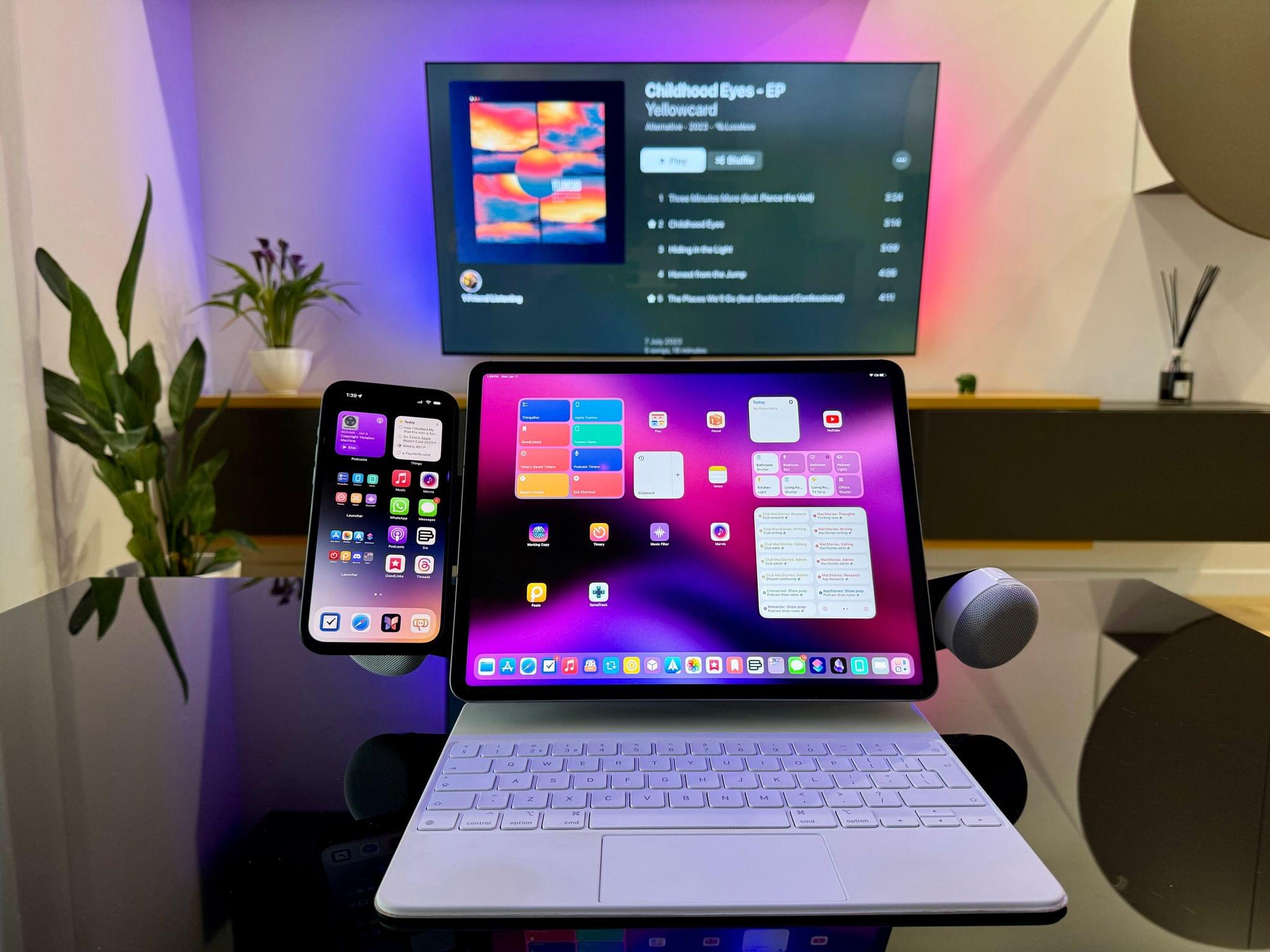
Stay until the end of the story and don’t miss the photo of John’s desk setup, which looks wild at first, but actually makes a lot of sense in the context of widgets.

Macintosh Desktop Experience is one of the many perks of a Club MacStories+ and Club Premier membership and a fantastic way to recognize the modern reality of macOS as well as get the most of your Mac thanks to John’s app recommendations, workflows, and more.

Join Club MacStories+:

Join Club Premier:

Permalink

MacStories Weekly: Issue 390

Read more

No Mac Is an Island

The Mac’s place in users’ computing lives has changed a lot since Steve Jobs returned to Apple and reimagined the Mac as a digital hub. Those days were marked by comparatively weak mobile phones, MP3 players, camcorders, and pocket digital cameras that benefitted from being paired with the Mac and Apple’s iLife suite. The computing...

Read more

MacStories Unwind: A Nintendo Boy at Heart

AppStories+ Deeper into the world of apps
0:00
21:30

AppStories+ Deeper into the world of apps


This week on MacStories Unwind, creative people we’d love to interview, desert island game systems, a brainy puzzle game and a TV show about an equally brainy chemist.

  • Kolide – It ensures that if a device isn’t secure it can’t access your apps.  It’s Device Trust for Okta. Watch the demo today!

Unplugged

Media Picks

MacStories Unwind+

We deliver MacStories Unwind+ to Club MacStories subscribers ad-free and early with high bitrate audio every week.

To learn more about the benefits of a Club MacStories subscription, visit our Plans page.

Access Extra Content and Perks

Founded in 2015, Club MacStories has delivered exclusive content every week for nearly a decade.

What started with weekly and monthly email newsletters has blossomed into a family of memberships designed for every MacStories fan.

Learn more here and from our Club FAQs.

Club MacStories: Weekly and monthly newsletters via email and the web that are brimming with apps, tips, automation workflows, longform writing, early access to the MacStories Unwind podcast, periodic giveaways, and more;

Club MacStories+: Everything that Club MacStories offers, plus an active Discord community, advanced search and custom RSS features for exploring the Club’s entire back catalog, bonus columns, and dozens of app discounts;

Club Premier: All of the above and AppStories+, an extended version of our flagship podcast that’s delivered early, ad-free, and in high-bitrate audio.

Learn more here and from our Club FAQs.