

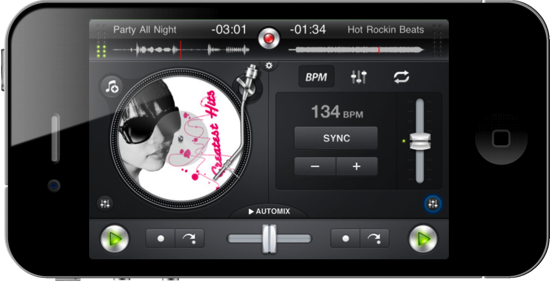
What would you spin with mobile DJ software that integrates directly with your iPhone or iPod music library? Scratch vinyls and interleave music with djay, your personal pocket mixer which loops tracks, fades music, and records live performance right from the palm of your hand. With nothing but a thumb or a free finger, you have precise controls over all of your music thanks to landscape and portrait orientation toggles which give you unhindered access to EQ and Automix controls. Let djay take over your playlist or pre-cue tracks thanks to the polished interface, scrub tracks, and pipe your tunes over Airplay for the ultimate in wireless beats. For only $9.99 in the App Store, it’s like having your own personal studio right in your pocket. Don’t forget about the iPad version, perfect your latest iPad 2 at only $19.99. You can also taste tracks with the Mac thanks to the version found in the Mac App Store, which can be accompanied by a wireless remote for BBQ and scratch synching. We’ve taken a look at the iPad and iPhone versions of djay previously, and we guys could get your groove on with the iPhone version. Past the break, we’re giving away two copies so you can jam wherever your travels take you.
Giveaway: Mix Music While Mobile With djay For iPhone or iPod touch
Rumor: Valve “Looking Into” iOS for Steam Expansion

If you’re familiar with the PC and Mac gaming scene, then you have most definitely heard of Steam: a game distribution platform by Valve that collects thousands of games in a single marketplace that’s easy to use and aggregates users worldwide enabling them to communicate through the platform. Steam, first released on Windows PCs, came out on OS X last year after much anticipation, quickly becoming many users’ favorite way of discovering and downloading games for the Mac.
Member of Steam’s forums Political Gamer recently visited the Valve headquarters and reported an interesting tidbit from his visit and talk with Valve co-founder Gabe Newell: Valve is apparently “looking into” iOS and Android as possible platforms for Steam’s expansion in the future:
After waiting in the lobby for a few minutes it turned out Gabe was in the office and wanted to say hi. To my great delight he was playing DOTA 2 when we walked in and from what I can see the game already looks very promising. After a little “sneak peek” we sat down to talk about Steam and other goings on in Valve. During this chat he confirmed that Steam will get a video recorder very soon, also he said they were looking into the iOS/Android platform for possible expansions with Steam. He also siad that the Source film maker is in the pipeline for a public release. After the chat was over he happily signed my copy of the Orange box and sent me on my way to Robin Walker.
The report doesn’t provide any additional details on Valve’s plans for a mobile Steam, and we only speculate that the development studio might be considering an iPhone or iPad client to check on your online Steam account and friends. Certainly Apple would never approve an iOS Steam app that lets you download and play games out of the App Store, whilst on Android Valve could easily deploy and alternative store like Amazon did (and got sued for the name choice). On iOS, Steam as we know it would be a difficult goal to accomplish: Apple doesn’t allow the installation of apps from alternative sources (the so-called “side-loading”) and the possible implementation of in-app purchases wouldn’t fit Steam’s growing catalogue of games.
Apple has turned its iOS and Mac App Stores into the perfect place for users to discover and buy games, and we don’t expect Steve Jobs to change his mind anytime soon about allowing other developers to “break the ecosystem” with unofficial app stores. So perhaps Steam for iOS will be a simple app to manage your online account? Or a “brand” for App Store developers to publish their games? We don’t know yet, but it’s interesting that Valve is at least looking at the possibilities offered by iOS. [via]
The Kitchen iLand

Tim Thaler has maximized the floor space in his kitchen, and also found a solution for an island - he hid the island in the floor. Tim’s island raisies up and down with an iPhone app and a tap.
Video after the break. Read more
Firefox 4 Is Officially Live
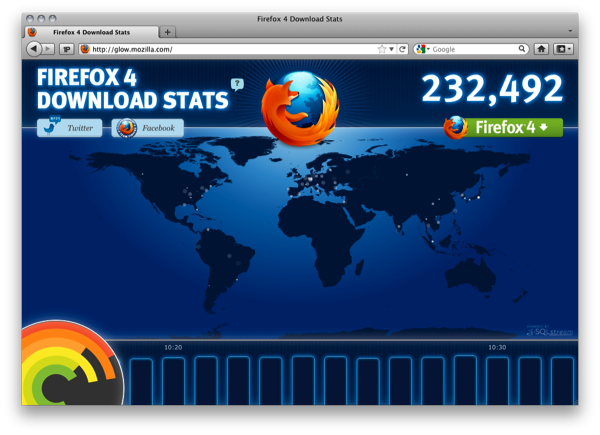
While sites leaked out the Firefox 4 download yesterday, rumors cropped up that the download was the 2nd release candidate with the 4.0 name. I wasn’t interested in verifying the download or posting it until it officially went, and as of this morning you can download and visualize Mozilla’s success in realtime from glow.mozilla.org. It’s very cool, and also provides ample opportunity to download Firefox 4.0 for yourself.
The new Firefox 4 interface not only looks a lot better (the address bar improvements are very cool), but now you have something Panorama available where you can group tabs by dragging and drop websites into collections for work, play, research, or however you want to organize them. According to Mozilla, Firefox 4 3x faster than Firefox 3.6 in the Sunspider test, and scores 6x higher on the V8 test. You can check out all the features here and download Firefox 4 from the same page.
Apple Confirms: iPad 2 in 25 More Countries This Friday, Launching at 5 PM

Apple just posted a press release confirming that the iPad 2 will launch in 25 more countries this Friday, thus denying the rumors of a delay we heard in these past days. The iPad 2 will be available at Apple retail stores and authorized resellers at 5 PM, with online orders starting at 1 AM. The device will be released in Hong Kong, Korea, Singapore and “other countries” in April.
Apple® today announced that iPad® 2, the second-generation of its third post-PC device, will go on sale in 25 additional countries this Friday, March 25. iPad 2 will be available at Apple retail stores and select Apple Authorized Resellers at 5 p.m. local time, and online through the Apple Store® (www.apple.com) beginning at 1 a.m. Apple today also announced that all models of iPad 2 will be available in Hong Kong, Korea, Singapore and additional countries in April.
This is the Italian pricing (and hopefully the same of other countries with Euro currency): €479,00 for the WiFi 16 GB model, €579,00 for the WiFi 32 GB model and €679,00 for WiFi 64 GB. The WiFi + 3G models will be available for €599,00, €699,00 and €799,00.
UK pricing: £399.00 for the 16GB model, £479.00 for the 32GB model, £559.00 for the 64GB model. Wi-Fi + 3G models will be available for £499.00, £579.00 and £659.00.
Australian pricing: iPad 2 WiFi: 16GB - $579; 32GB - $689; 64GB - $799; iPad 2 WiFi + 3G: 16GB - $729; 32GB - $839; 64GB - $949.
Overall, it seems like the iPad 2 is cheaper than the iPad 1 across Europe and Australia, a clever move considering Apple priced the iPad 2 just as the iPad 1 in the United States. Press release below.
Wife Said No But Apple Says Yes And Gives Guy Free iPad 2
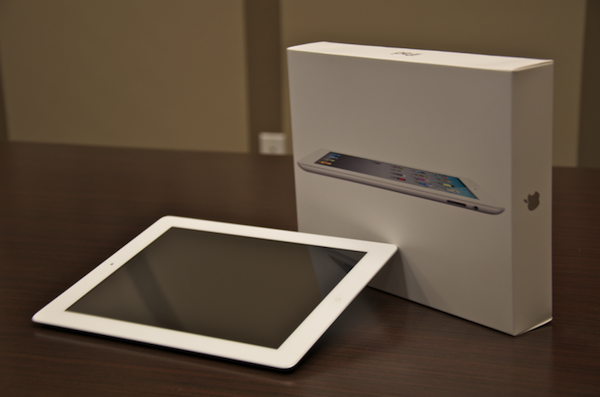
In what is quite an amusing tale, one of the iPad 2’s returned last week was owned by a guy who was unfortunately told to return it by his wife. Because Apple had been troubleshooting returned iPad 2’s his iPad was discovered with a post-it note reading “Wife said no.” According to MacRumors, this was escalated up the Apple hierarchy as somewhat of joke, eventually reaching two VPs.
Those VPs decided it was only fair to send the guy an iPad 2 and add a note that said “Apple said yes.”
Genius.
[Via MacRumors]
Steve Jobs Ordered By Court To Answer Questions In Class-Action Lawsuit

Steve Jobs has been ordered by a US Magistrate to answer questions in court in relation to a class-action lawsuit regarding the iTunes Music Store and monopolistic behavior by Apple. Bloomberg is reporting that yesterday US Magistrate Judge Howard R. Lloyd authorized lawyers representing consumers in the complaint to engage in limited questioning of Jobs.
The limited questioning is quantified as two hours of questions and only on the topic of changes that Apple made to their iPod software in October of 2004 that disrupted RealNetworks’ Harmony software. Harmony enabled users to transfer songs purchased from the RealNetworks store, to the iPod. When it was released the software caused considerable controversy and Apple quickly accused RealNetworks of using “the tactics and ethics of a hacker” and in a subsequent iPod update Apple stopped the Harmony software from working with iPods.
The class-action lawsuit was filed by Thomas Slattery in 2005 and alleged that by requiring customers use an iPod to listen to music purchased from the iTunes store, Apple had violated federal antitrust laws as well as California’s unfair competition regulations. David Kiernan, who is representing Apple, said that “any deposition of Mr.Jobs would be repetitive, at best.”
[Via AppleInsider]
Angry Birds Rio Flies Into The App Store

Angry Birds Rio, the collaboration app between Rovio and 20th Century Fox as part of the marketing of the new movie ‘Rio’ has just been released today. In principle this new foray in the Angry Birds series of apps is the same as before but with a different story based on the premise of the movie. The app also features new achievements, ‘special hidden fruit’ and a total of 60 levels across two episodes but with more promised to arrive over 2011.
What happens when everybody’s favourite fierce fowl get caged and shipped to Rio? They get very angry!
In Angry Birds Rio, the original Angry Birds are kidnapped and taken to the magical city of Rio de Janeiro, where they eventually escape their captors and set out to to save their friends, Blu and Jewel – two rare macaws and the stars of the upcoming Fox motion picture, Rio. Angry Birds Rio will pair the physics-based gameplay of the original game with unique twists based on the film.
Angry Birds Rio is available on the iPhone and iPod Touch for $0.99, on the iPad for $3.99 and on the Mac App Store for $4.99
Watchlater: iPad App That’s Like Instapaper For Video
Instapaper is one of my favorite apps ever made for iOS: it allows me to save any article for later, and enjoy it in an uncluttered view on the iPhone or iPad without the stress of the web browser. Offline access makes sure I can read everything even when an Internet connection is nowhere to be found, and the recently introduced social sharing capabilities enable me to stay up to date with items liked by people I read and trust. Instapaper is a great tool, but it works for text. And besides text, I happen to consume a lot of online video, too.
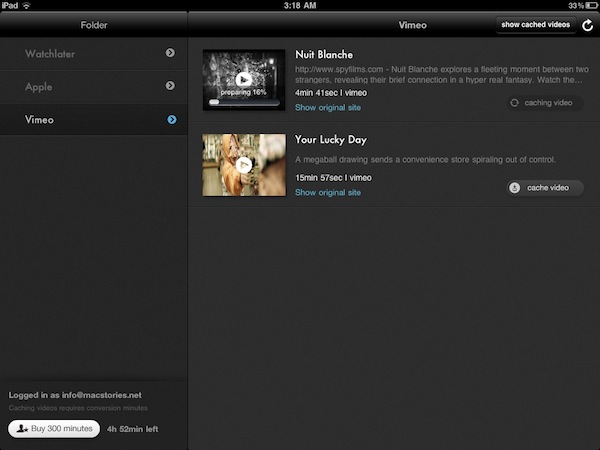
The idea of an Instapaper for video always came back to me as an intriguing experiment someone had to try: just like Instapaper, you hit a bookmarklet and the video is saved in your online account. You fire up an iOS app, the videos are automatically retrieved and cached, and you can watch them whenever you like. Without the anxiety factor offered by Youtube’s website design or, again, the information overload of the desktop browser. Just video.
Watchlater, a new iPad app available at $2.99 in the App Store, wants to become the “Instapaper for video” on iOS, and admittedly it’s a pretty neat application. I’ve tested the app over the past months, it’s got lots of potentialities and still a few issues to fix / missing features. But it is available now, and allows you to collect videos from Youtube and Vimeo in a single place. Read more