iOS 6 Wishes

I read two great articles over the past few days detailing how Apple could improve iOS by taking a page from its competitors’ book (specifically, Android and Windows Phone 7) to enhance the way apps communicate with each other, and by looking at the way webOS handles multitasking and application windows on the TouchPad. They are good articles with some clever ideas, so make sure to check them out.

I have been writing a lot about ecosystems, file sharing and inter-app communication in the past months. After the public launch of iCloud last October, I’ve argued that Apple’s cloud solution is the platform for the next decade that might as well become the “operating system” itself, although it (and, by reflection, iOS) still lacks document-oriented functionalities to facilitate the process of creating and moving documents between apps. I have also made the case for a “universal save” option for iOS apps that might take advantage of iCloud, and, fortunately, it seems Apple is listening.

Today I’d like to go on the record with a list of features and options I’d like to see in a future version of iOS. I’m not typically huge on lists or “feature request” (last one was a series of predictions for WWDC ‘11), but I believe it’s worth discussing the direction where Apple is headed with its mobile operating system and, while we’re at it, propose solutions to improve existing apps and system utilities. I’ll check back on this list after WWDC ‘12. Read more


Apple’s iPhone TV Ads: The Complete Campaign→

Apple’s iPhone TV Ads: The Complete Campaign

Adweek created a complete collection of every iPhone ad campaign to date, starting with the 2007 commercial “Hello” (aired on the night of the Oscars).

Without much fanfare, the iPhone campaign has surpassed its predecessor in terms of volume of work—”Get a Mac” lasted for 66 spots over four years (watch them all here), wrapping up its run in October 2009; the iPhone campaign is now entering its sixth year, and is up to 84 spots and counting. “Get a Mac” was beloved for its characters and wry humor. And while the iPhone work may lack that same level of charm—it is, at its heart, merely a series of product demonstrations—it is just as exquisitely produced and in many ways more varied.

I have previously written about how Apple’s commercials often tend to tell “stories” rather than simply showcasing the functionalities of a product. The complete collection of iPhone TV ads provides a fantastic example of how Apple’s marketing style can be a little different, but still effective and capable of establishing an emotional connection with the audience.

Check out Adweek’s gallery here.

Permalink

Clear Sells 350,000 Copies In 9 Days→

Clear Sells 350,000 Copies In 9 Days

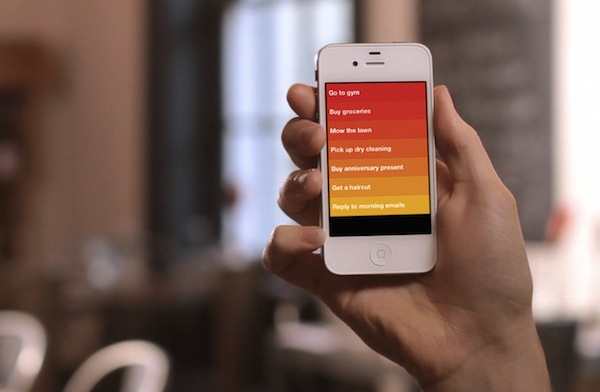
The Guardian reports “buttonless” todo list app Clear has sold over 350,000 copies in nine days of App Store availability:

We’ve sold just over 350,000 copies,” says product manager Nik Fletcher. “The launch day was massive, and by Wednesday last week it was number one on App Stores around the world. It’s been an incredible response.”

Clear costs 69p on the App Store, meaning that the app has generated net revenues of just over £169,000 so far, after Apple’s 30% cut. The revenues are being shared between Realmac, software studio Impending and co-creator Milen Dzhumerov, as Clear was a collaborative project.

Clear is another example of the App Store’s uniqueness as a platform for independent developers. A simple idea such as a todo list application for iPhone, coupled with a great UI and the right marketing strategy can be a sustainable business model for smaller development shops and individuals. It’s also another example of how buzz and social networks such as Twitter can build an incredible amount of hype around software these days (just take a look at the visualizations on Clear’s Vimeo teaser).

Make sure to check out our review of Clear if you missed it, and our interview with developer Phill Ryu.

Permalink

Tip: Handle iMessage Notification Overload with Contact Settings

Since Apple released a public beta of Messages for Mac, we’ve been having a bit of a notification overload here at MacStories HQ. See, ever since iMessage was released with iOS 5, we’ve had our own group message with everyone on the MacStories team – it was a portable water cooler, where we could chat about random things, share silly pictures and even co-ordinate things for the site, even when we were out and about. We used it quite frequently, but things turned for the worse last week when we all got that Messages for Mac beta. What might have been 10 messages in a given time period, suddenly morphed into 50 messages because of the convenience of having iMessage just a click way on our Macs. Things were becoming chaotic and quite distracting, Don had even turned off vibrations — meaning he got no notification for any message, from anyone.

We didn’t want to give up on using Messages for Mac, and it was probably going to be a hard task to change our messaging behaviours to limit the number of messages sent, but it was clear this week that we had to do something.

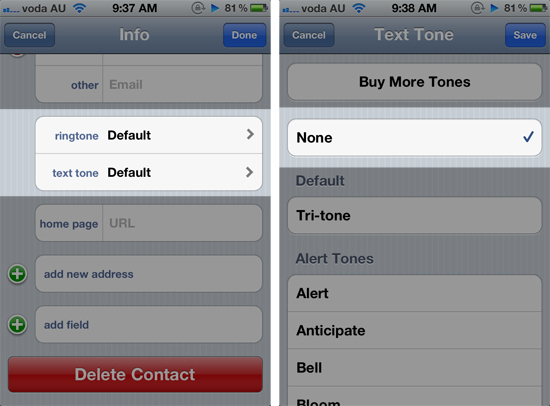
Fortunately, we think we have found a solution. In iOS, Apple includes the ability to change the text tone and ringtone on a per-contact basis. What we did for everyone in the MacStories team, was to change the text tone to “None”. You can do this by going into the Contacts app, selecting a contact and tapping the ‘Edit’ button and scrolling to “text tone”.

This now means regardless of whether your phone is on Silent or not, you will not get any noise or vibration to alert you to the new message. There are two downsides to this ‘workaround’: the first is that you will still get the notification bar flipping down from the top of your screen. The second problem, which could be a deal breaker for some, is that any messages from that person will not cause a vibration or text tone – important to remember if they are a participant in a few of your group message threads.

There should be another way…

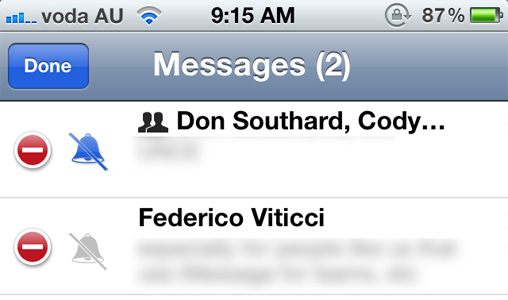
Whilst the ability to change the text tone (and ringtone) on a per-contact basis is really cool (and can be used for a number of other purposes), perhaps there should be another way to control message notifications differently – especially now that iMessage is bundled in iChat, and may lead to an increased number of messages sent to iOS devices. Specifically I’m talking about muting specific message conversations. This would allow me to mute the message thread that has all of the MacStories members, but still receive notifications from Federico, in case he urgently wanted me to cover something.

Apple could easily implement the option inside the Messages app, simply displaying a mute icon next to each message thread when in the ‘Edit’ mode. Just like changing the text tone on a per-contact basis, this power-user option wouldn’t make the UI messy, because it would only appear in the ‘Edit’ screen. That way, users could choose between completely muting on a per-contact basis or on a per-message thread basis – all whilst still receiving notifications for your other messages.

iPad + Office + Apple + Microsoft: Why It All Makes Sense→

iPad + Office + Apple + Microsoft: Why It All Makes Sense

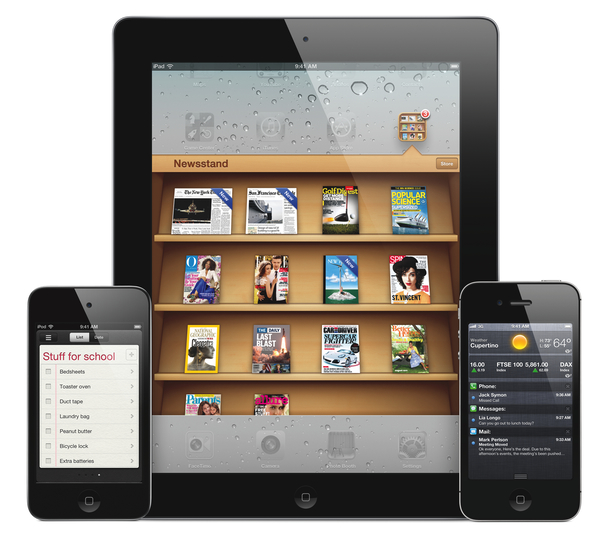
Rumors of Office for the iPad flared up again this week after The Daily posted an alleged photo of it, after apparently getting some hands on with a near-complete build. Some of you may recall me tweeting that day, what I thought was a crazy thought: Apple inviting Microsoft on stage next month at the iPad 3 keynote to demo Office for iPad. Apparently it wasn’t as crazy as I originally thought, because others are thinking it might just happen.

Office for the iPad makes total sense, though. And I wouldn’t be surprised if Apple did give Microsoft some stage time to unveil it at the new-iPad event in a few weeks.

Those are the words of Dan Frommer of SplatF, someone who (in my mind) has always made strong, rational cases for his arguments, never sensationalising or using hyperbole for the sake of it. In an article published a few hours ago, he lays out why “iPad + Office + Apple + Microsoft” actually makes sense. In it he lists out all the big arguments for such a Microsoft appearance at Apple’s iPad 3 keynote.

This isn’t like when Microsoft had to scratch and think before making Office for the Mac in the ’90s, when it would be lucky to sell a couple million copies per year. The iPad is way different: It should easily pass 50 million unit sales this year alone, and that’s potentially tens of millions of Office buyers for Microsoft. (Office, by the way, represented significantly more of Microsoft’s sales and profits last quarter than Windows.)

I strongly encourage you to read the full list of arguments in his article, I don’t think anyone could have laid out the argument for such a proposition any stronger than Dan did. On the flip side though, Daring Fireball’s John Gruber doesn’t think it’ll happen.

But what would be in it for Apple to offer such a spot to Microsoft? You can argue that the iPad with Office available is an even more attractive platform/device than the iPad as it stands today, sans Office. But why share the spotlight with Microsoft? Apple doesn’t need to.

Permalink


Buzz: My New Phone App Replacement and Contact Hub

I’m not typically one that likes to replace Apple’s core iOS apps with third-party alternatives, but Savvy Apps’ latest iPhone app, Buzz, allows me to access my contacts faster than Apple’s own Phone software, and I had to leave a spot for it in my Dock.

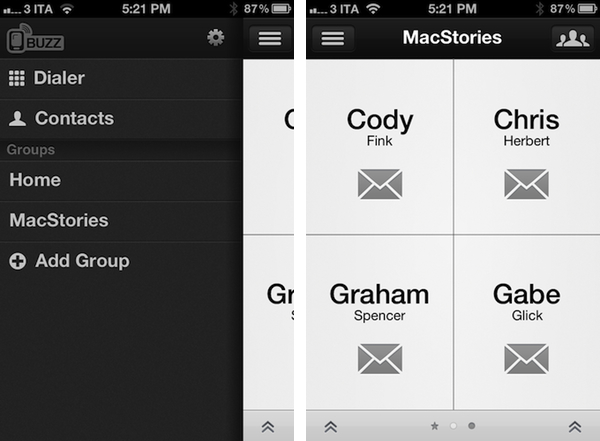
For the past two weeks, I’ve been testing Buzz, the latest production by iOS design and development firm Savvy Apps by Ken Yarmosh. Similarly to Agenda, also by Savvy Apps, Buzz comes with its own clean, custom UI focused on presenting text against a light background that contributes to increasing readability and finding things in seconds. Whilst I believe Agenda benefits more from this design aesthetic because of how it handles information density (a calendar app can get pretty busy), the same focus on clarity and simplicity works equally well for Buzz, which is a quick dialer/contact management app that emulates many of Apple’s Phone functionalities in a completely new interface.

Think of Buzz as a minimalist take on Apple’s Phone app, aimed at enhancing a few important functionalities, leaving out many others that are (at least in my workflow) rarely used. Whilst Phone.app obviously offers control over recently missed phone calls, the voicemail, and your system favorites, Buzz takes the “quick shortcut” aspect of apps like Launch Center and Matt Gemmell’s Favorites, combines it with group management and native integration with the Address Book, and comes up with a rather unique implementation that allows for a very lightweight usage, or deeper full-blown contact interaction. I believe many out there will find it hard to completely give up on the native Phone app – especially for the Recents view – but I found Buzz to be enough for me and, if anything, a better solution for my daily Address Book needs. Read more


Apple Purchases Land In Oregon For Another Large Data Center

An Apple spokeswoman has confirmed to news agency KTVZ.com that it has purchased land in Prineville, Oregon and plans to build a data center. The land, purchased from Crook County covers 160-acres and was purchased for a reported $5.6 million. Apple confirmed the purchase after they were named as the purchaser in a February 15th filing in Crook County.

Apple spokeswoman Kristin Huguet confirmed Tuesday that “we purchased the land and it’s for a data center,” but could not speak to details beyond that, other than to say it will be a “green” facility.

Rumors of Apple scouting out land in Prineville for another large data center emerged in December last year when it was reported that Apple was in discussions over purchasing the land. The land Apple purchased is nearby Facebook’s data center in Prinneville, which is pictured above.

[KTVZ.com via MacRumors]