QuickCal 3.1 Released with Improved Recognition Engine, iCloud Reminders, Autocomplete Feature

I love the start of a new year because it is a great time to revamp your productivity workflow. You can re-evaluate what tools you use and even buy new apps completely free of guilt. It is no secret that the cornerstone of any good system is the calendar but it can be difficult to force yourself to create calendar events on a regular basis. Well, the folks behind QuickCal have just released a great update to get you back in the routine of managing your calendar.

One major improvement in QuickCal 3.1 is the re-written recognition engine that the app uses to understand natural language input. QuickCal has no structured syntax for adding events and reminders which actually makes adding items extremely flexible. When typing in the event you no longer have to start with the event title, you actually have the option of starting with a time, duration, location, or title and QuickCal will almost always get it right. I have also noticed a dramatic improvement in QuickCal’s ability to correctly parse out event locations which is something I have had trouble with in previous versions. Regardless of the order in which you type out the information, QuickCal does an excellent job figuring out the details for you. Adding events to your calendar without worrying about correct syntax is incredibly powerful. The only way QuickCal could get any faster at creating calendar events is if it actually finished sentences for you.

oh, wait…

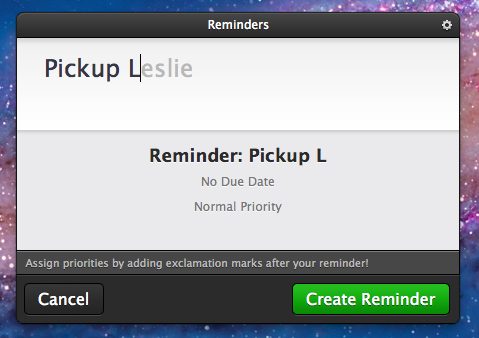
Have I mentioned their new autocomplete feature? Autocomplete does exactly what you expect it to do. As you are typing common words, QuickCal gives you suggestions of words it thinks you might be typing. To accept the autocompletion you can just hit the tab key and continue on typing. It will even pickup on your most frequently used words and auto-suggest them in the future. After only 3 or 4 reminders relating to my wife Leslie, QuickCal was finishing her name for me. It is awesome. In fact, I am finding it so useful that I am not sure how I had ever used QuickCal without this feature.

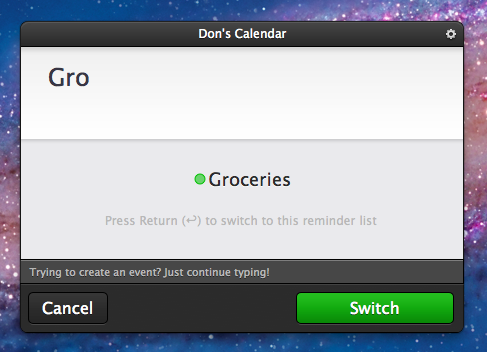
Perhaps the greatest improvement to QuickCal is its integration with iCloud Reminders. A reminder is now added to your default Reminders list and shows up in the iOS 5 Reminders app. If the reminder has a date or time then an alarm is also created. This alone is a neat feature but it wasn’t enough to pry me away from the Alfred extension I had created to quickly add simple iOS 5 Reminders. Although as I continued to use the new version of QuickCal, I realized that I could also add items to other lists by simply typing the name of the list. For example, my wife and I share a Groceries list. If I just start typing Gro… it suggests switching to my Groceries list so I can add an item to it. In true QuickCal fashion it does so very intuitively and without effort. It is a great feature that truly increases my dependency on QuickCal. The only drawback is still having to open iCal to trigger an iCloud sync. When CalDAV is supported and I no longer need that extra step, QuickCal will be my ideal iCal replacement.

Check out QuickCal 3.1 and all of its new features on the Mac App Store.


Apple’s Q1 2012: Quarter Recap and Estimates

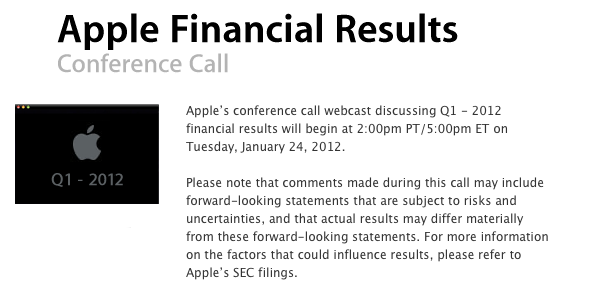
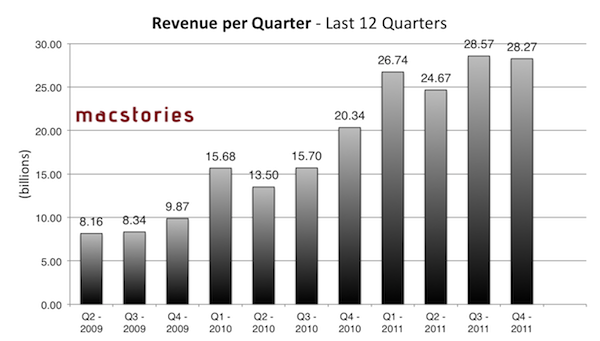
At 2 PM PT, Apple is set to announce its financial results for the quarter that ended on December 24th, 2011. According to several analysts polled in the past weeks and Apple’s own guidance for the quarter, Q1 2012 is on track to become Apple’s biggest quarter to date both in terms of sales (with expected record iPhone and iPad sales) and revenue. Until today, Apple’s most profitable quarter has been Q3 2011 with $28.57 billion revenue. Below, we’ve compiled a breakdown of Q1 2012 estimates with a recap of what happened during the quarter.

Estimates and Previous Quarters

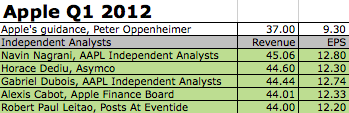
During last quarter’s earnings call, Apple said they were expecting $37 billion in revenue and diluted earnings per share of around $9.30 for this quarter. As Apple’s guidance for future quarters is historically low and conservative, the already high projection of $37 billion led bloggers to speculate Apple’s Q1 2012 would be a blowout quarter; some analysts, on the other hand, usually don’t pay attention to Apple’s guidance as the company lowballs expectations for the upcoming quarter.

Analysts and bloggers polled in the past few weeks had different takes on what Apple will report later today. Some of them, such as Robert Paul Leitao, Horace Dediu and Navin Nagrani projected revenue above $44 billion with iPhone sales of 34-35 million units and iPad sales in the range of 13 million units; as we reported three weeks ago, Asymco’s Horace Diedu estimates that Apple will report earnings of $12.3 on revenues of $44.6 billion, with the street price aiming at $9.75 EPS on $37.99 billion. As Philip Elmer-Dewitt also noted, analysts’ estimates need to be taken carefully, as several of them were released after the previous quarter’s results, and were never updated reflecting changes that took place through the quarter (such as fluctuating iPhone demand and international product launches).

Fortune’s comprehensive list of estimates for Q1 2012 is available here.

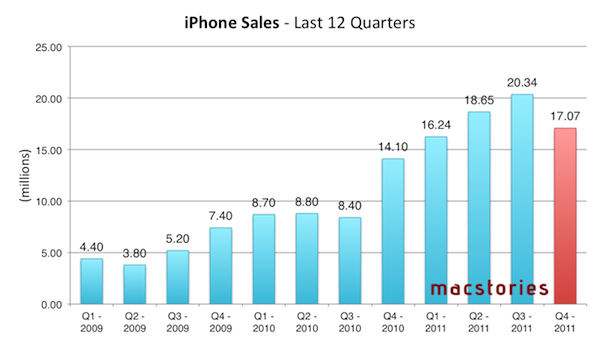
As far as iPhone sales are concerned (in Q4 2011, the device accounted for 47% of Apple’s revenue), this quarter will see Apple finally providing some actual insight into the iPhone 4S’ performance on the market. The device is well-regarded as a success on various international markets and the United States, but the only real numbers Apple posted referred to the opening weekend. Predictions for Q1 2012 go as high as 35 million units sold (those would indicate cumulative sales for iPhone 4, 4S and 3GS, not just the iPhone 4S), with an approximate figure of 30 million units sold being shared the majority of analysts and bloggers.

According to Nielsen, the launch of the iPhone 4S had an “enormous impact” on smartphone owners:

Among recent acquirers, meaning those who said they got a new device within the past three months, 44.5 percent of those surveyed in December said they chose an iPhone, compared to just 25.1 percent in October. Furthermore, 57 percent of new iPhone owners surveyed in December said they got an iPhone 4S.

This morning, Verizon Wireless reported 4.2 million iPhone activations. Reuters wrote Verizon’s ”business was hit by the high costs of sales of advanced phones such as the Apple Inc iPhone.”


In Q4 2011, Apple posted revenue of $28.27 billion, with 11.12 million iPads, 17.07 million iPhones and 4.89 million Macs sold. The company posted quarterly net profit of $6.62 billion, or $7.05 per diluted share. iPhone represented a 21 percent unit growth over the year-ago quarter; iPod sales were down 27 percent from the year-ago quarter, and Apple reported the best iPad quarter to date with over 11 million units sold and a 166% increase over the year-ago quarter. In the year-go quarter, Apple posted revenue of $26.74 billion with 7.33 million iPads, 16.24 million iPhones and 4.13 million Macs sold. Read more


PDF Expert 3.2 Brings Full PDF Searching And Better Support For Bluetooth Keyboards

PDF Expert for iPad was updated last night to version 3.2, adding some nice new features to further improve the capabilities of the excellent PDF manager, viewer and annotation iPad app. The big new addition is full text search, allowing you to search through all your PDFs, rather than just their file names. I gave this new feature a quick try and whilst the initial indexing took a few minutes, I did have 535 files saved in PDF Expert. Furthermore, once it was indexed, subsequent searches worked virtually instantly.

A new sorting panel is also present in PDF Expert 3.2, now allowing you to reorder your files by name, date or modified date. If you use a Bluetooth keyboard with your iPad you can now use those “Tab” and arrow keys for faster data entry, particularly for PDF forms.

Readdle has also improved the Handwriting and Wrist Protection features in PDF Expert so they work better with less accidental annotation because you have rested your wrist on the iPad’s screen. Included in this is a new eraser tool for your handwriting, so if you do make a mistake it is now easy to erase just what you want. Finally, yesterday’s update included the use of data protection APIs, so all your PDFs are now stored securely inside the app.

PDF Expert for iPad is available for $9.99 on the App Store.


Virgin America Names Jet “Stay Hungry, Stay Foolish” After Steve Jobs

The saying that Steve Jobs made popular with his 2005 Stanford commencement address, “Stay Foolish, Stay Hungry” has now (literally) made its way onto a Virgin America plane.

An Airbus A320 plane (tail number N845VA) that Virgin America owns and runs, has been named “Stay Hungry, Stay Foolish”, with the quote emblazoned on the front of the plane, as seen above. A Virgin America spokesperson explained to MacRumors that the name was chosen after an internal naming competition.

The quote originated from the 1970’s magazine The Whole Earth Catalogue as Steve Jobs noted in his commencement address:

On the back cover of their final issue was a photograph of an early morning country road, the kind you might find yourself hitchhiking on if you were so adventurous. Beneath it were the words: “Stay Hungry. Stay Foolish.” It was their farewell message as they signed off. Stay Hungry. Stay Foolish. And I have always wished that for myself. And now, as you graduate to begin anew, I wish that for you.

[Via MacRumors]


A5 Jailbreak Reaches One Million Downloads in 24 Hours [Updated]

According to developer and hacker Joshua Hill, the latest jailbreak for devices running Apple’s A5 processor has been downloaded more than one million times in one day, Cult of Mac reports. The new jailbreak – dubbed Absinthe – was released for Mac OS X on Friday after months of speculation as to whether it was possible to hack into Apple’s new CPU architecture. The Absinthe jailbreak supports the latest version of iOS, iOS 5.0.1; iOS 5 was released in October, and users of iPhone 4S and iPad 2 have been waiting for a fully untethered jailbreak solution compatible with their devices since then.

According to Cult of Mac, one million downloads were achieved on Mac OS X alone as a Windows version of the jailbreak was released after the initial 24 hours. As Alex Heath notes, this figure is noteworthy as it seems to confirm that interest in jailbreaking devices hasn’t died down after the release of iOS 5; the operating system introduced more than 200 new features for iPhone and iPad as we detailed back in October. If anything, it was iOS 5 itself that led developers to create new apps and tweaks that are taking advantage of the latest features offered by Apple such as Notification Center and Twitter integration.

To put the A5 jailbreak’s numbers into context: one million downloads were reached in 24 hours by JailbreakMe 3.0 as well when it came out for iOS 4 devices last summer. Currently, the Absinthe jailbreak is available for OS X and Windows machines over at Greenpois0n.com.

Update: With a tweet, MuscleNerd says that 205,000 new Cydia accounts were created by Sunday morning, suggesting that a large percentage of Absinthe early adopters were users who had jailbroken their devices in the past, thus likely already having a Cydia account. See update below.

Update #2: Whilst we assumed “new Cydia installs” referred to the amount of new accounts created last weekend, MuscleNerd has clarified the figure indicates how many times Cydia was launched on a unique A5 device.

Update #3: Cydia creator Saurik chimes in with more numbers, clarifying that 205,000 were the iPhone 4S units with Cydia until Sunday morning.

Update #4: And last, the Dev-Team has published a blog post with the official numbers since Friday morning:

  • 491,325 new iPhone 4,1 devices (4S)
  • 308,967 new iPad 2 devices
  • 152,940 previously jailbroken (at 4.x) iPad 2 devices

For a total of 953,232 new A5 jailbreaks in over three days. At this point, if the previous 1 million/24 hours figure is to be believed, it’s possible 1 million downloads actually happened in 24 hours, but many users couldn’t immediately run Absinthe due to the server problems that affected Greenpois0n.com.


Preview: Analog 1.1 Launches Tomorrow With New Photo Options, Filters

When I reviewed Realmac’s Analog, a lightweight photo sharing app, back in September, I was impressed by the execution of a simple concept – applying filters to your photos to share them online – that was made popular on iOS by apps like Instagram and Camera+. From my review:

Analog offers 20 filters, which have been carefully researched by Realmac over the past months to make sure each one of them has its own personality (something we know that matters in this kind of apps) and will make your photos look great. Now I’m no photography expert, but I can recognize a nice filter when I see it. Analog’s filters range from washed out (Hefga, Golden Hour) to black & white (Noir, Dark Knight, Bromide — three B&W variations with different grey scales and contrast) to contrasty (Memory, XProcess) and other interesting options that I can’t quite classify (Kyoto, Hawkeye). Analog’s filters look good, and I definitely like the choice of 20 different filters offered by Realmac. You might argue some of them look similar to each other, but the developers have also implemented a system that ensures scratches, noise and other effects are always randomized on each processing session.

I had a chance to try out a pre-release version of Analog 1.1, which is coming out tomorrow, and it looks like those who liked the workflow and polished design of version 1.0 might have to hit the Mac App Store’s Update section as soon as the app goes live. Analog 1.1 improves on several aspects of the first version: performances and memory management have been improved, making the app snappier and more responsive when adding filters and switching between edited and non-edited versions of a photo.

The update will bring three new filters (I tested them, they look good), two new borders, and, more importantly, a new slider to adjust the intensity of your chosen filter. In my tests, this has turned out to be quite handy to manually refine the amount of modifications I wanted to make to an image. Obviously, Analog 1.1 retains the filter randomization capabilities of the previous version (so that scratches, noise and other effects are randomized on each processing session) and all the other features that made Analog 1.0 intuitive and fun to use.

Analog 1.0 is currently available on the Mac App Store at $6.99. Analog 1.1 will be available tomorrow (January 24th) as a free update for existing Analog customers.


An Experiment with Comics, iBooks 2.0 and iBooks Author

Last week, Apple unveiled its iBooks Textbooks initiative alongside a new desktop application for OS X, iBooks Author, aimed at offering a single solution for authors willing to edit and design iBooks for the iBookstore or manual distribution through exporting options. Some limitations of iBooks Author have sparked a debate that we’ve covered extensively on MacStories last week, also through articles in our Reading List.

Proprietary file format controversies aside, it was already clear that iBooks Author would undoubtedly facilitate the creation of textbooks and eBooks heavily relying on graphics with its easy-to-use align tools and familiar interface.

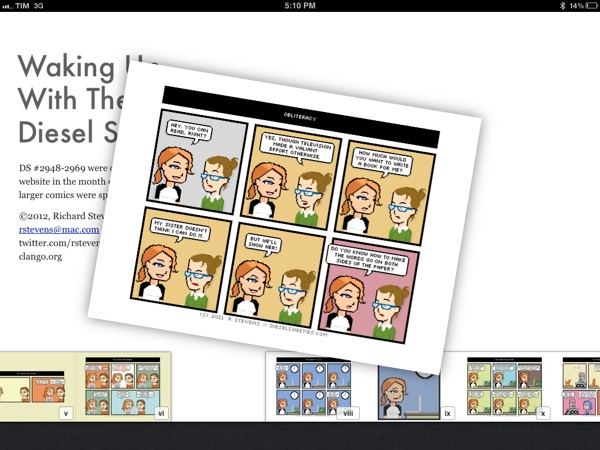
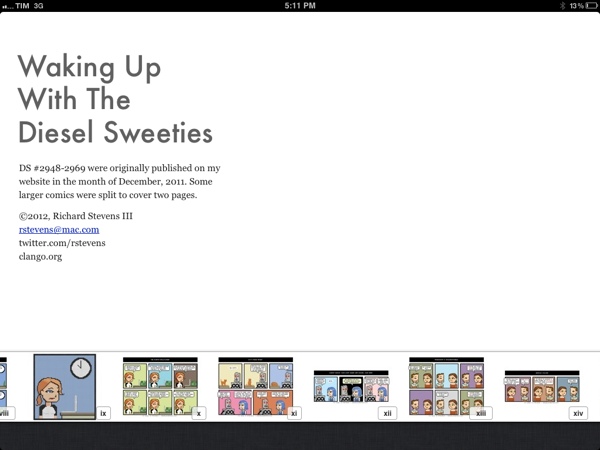
Today, cartoon and t-shirt designer Richard Stevens has published an iBooks adaptation of its popular webcomic series that’s been entirely converted and tweaked using iBooks Author as an initial experiment.

Waking Up With the Diesel Sweeties is a tiny little free ebook for the iPad. It contains all my comics from last month with a few tweaks, formatted in iBooks Author. This version only works on the iPad. It’s not in the iBookstore, so you’ll need to download the file and sync it to your iPad.

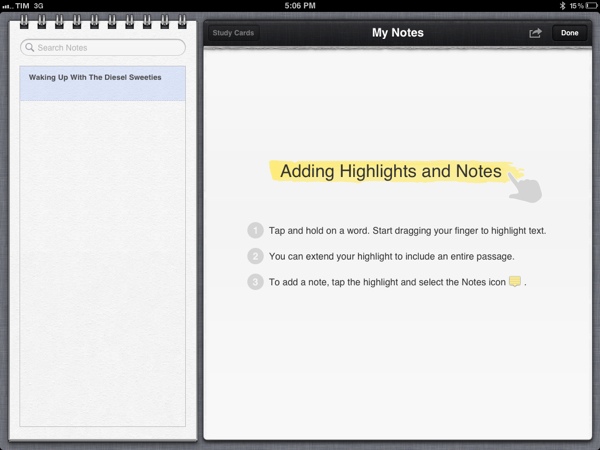
The eBook is available for download through Dropbox, and it can be installed on an iPad running iBooks 2. You can manually sync the file from iTunes to your iPad, or use an app like GoodReader to download it directly on your device and open it in iBooks. Whilst Stevens’ first iBook is an experiment, it shows the possibilities opened by iBooks 2 and iBooks Author: the book fully supports iBooks’ new annotations, highlights and study cards, and you can pinch on pages to access iBooks’ new navigation with thumbnails displayed at the bottom of the screen.

I wrote last week that I wouldn’t be surprised to see iBooks Author-based eBooks be used for something else other than regular books – for instance, I’ve heard more than one developer say that they’d be interested in using the software to create interactive manuals and help tools for their apps, among other things. iBooks Author may have been criticized and there’s still a lot of features Apple has to clarify and implement (especially for independent authors and publishers), but the interactivity and WebKit-based functionalities offered by the format look more promising every day.


Review: Logitech Tablet Keyboard for iPad

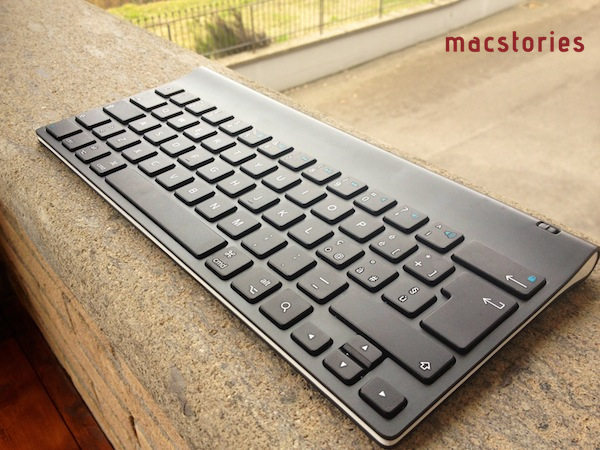
As I mentioned in my post about new apps and tools for 2012, I’ve been playing around with a Logitech Tablet Keyboard for iPad, which is available at $69 through Logitech’s website or $59 on Amazon. The Tablet Keyboard connects to the iPad (or any iOS device) wirelessly over Bluetooth, comes with built-in batteries, a carrying case that can be turned into a stand for the iPad, and media keys that trigger some of the tablet’s functions such as audio controls and Spotlight. Here are my impressions so far.

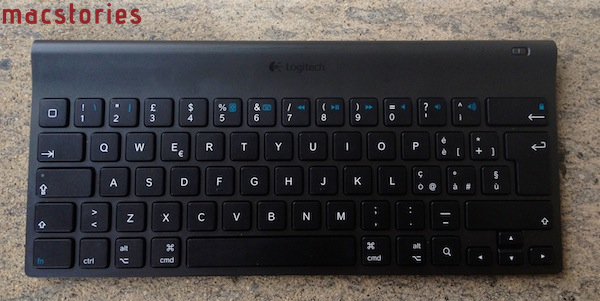
Normally, I wouldn’t have much to say about a keyboard except for “it’s comfortable” or “I can’t type anything on this”. Fortunately, the Logitech keyboard for iPad fits into the former category, with a sturdy plastic design that feels “premium” when compared to other keyboards available on the market, a good keyboard layout, and a carrying case that’s not as premium as the device but certainly gets its job done. Below, the Italian layout of my Logitech Tablet Keyboard:

As you can see, the keyboard isn’t necessarily “standard” as it’s been designed to include iOS-specific keys like shortcuts for Spotlight search, Home button, volume controls, slideshows, media playback and screen lock/unlock controls. The basic layout is the one of a Mac keyboard, and the function keys can be activated by holding fn. Obviously, this isn’t as intuitive as simply reaching out to the screen with your finger to adjust volume, but if you’re going to work with your iPad using the keyboard, you’ll want to know it’s possible to do more than just type.

Which brings me to this: why would you want a physical keyboard for your iPad when the system one is more than acceptable? I don’t know about you, but I’ve been working mainly from my iPad in the past month, and I found a physical keyboard to be a must-have if you’re serious about getting real, regular writing done in a text editor or word processor. iOS’ multitouch keyboard is fine to fire off quick email replies and tweets (and iOS 5’s new split keyboard helps a lot for “general typing” in every day usage), but I still can’t give up on the allure of plastic QWERTY for long-form content and serious email time. Logitech’s iPad offering fits nicely in my workflow (and Tom Bihn Ristretto Bag): I can get it out of its case, turn it on, wait a few seconds for the iPad to connect (once paired, the Bluetooth connection process is very fast on iPad 2) and start writing. Read more


MacStories Reading List: January 15 - January 22

At MacStories, we strive to produce great content every day. From news to stories and app reviews, we care about quality content to deliver to you, our readers, with insight and our personal analysis every day. But we can’t cover everything. And there’s some great writing on the Internet that we often can’t link to in our daily coverage, if only because there isn’t much we can add to an already excellent article.

Today we are introducing MacStories Reading List, a weekly selection of great stories from Authors that you should read. Every Sunday, we’ll publish a collection of links that we think you should read, such as the ones below. A very simple format for the great writing that is happening in the Apple community.

Even better, you can subscribe to the Reading List in your favorite RSS reader or Instapaper. We have created an Instapaper account dedicated to the Reading List, so head over this link to get the Instapaper feed for the links we’ll post here every week. You’ll also be able to able to find us in Instapaper if you’re already following @macstoriesnet and linked the service to your Twitter account.

On behalf of the entire MacStories team, I wish you a good reading. - Federico Viticci

World of Apple’s Alex Brooks reflects on his past few years of blogging, and ultimately decides that quality content, not the page views alone, is what matters. A must-read.

The site I want to read and will produce will post thoughtful commentary on Apple. The kind of commentary and prose that that’s sensible, articulate and adds value to a wider discussion happening across the internet. There are already a handful of sites just like this, authors who have in some cases taken grave risk to quit their day to day lives to produce content just like this. I value those sites, I enjoy reading their content.

Reflecting on Change, Alex Brooks (@alexbrooks)

Every month or so an analyst comes out and claims the iPad can’t be included in the same market share numbers of PCs, and vice versa. Asymco’s Horace Dediu collects actual numbers and puts things in perspective, revealing the true effect Android and iOS devices are having on the PC market.

This last view corresponds to the data in the first graph (line chart). If iOS and Android are added as potential substitutions for personal computing, the share of PCs suddenly collapses to less than 50%. It also suggests much more collapse to come.

How has the App Store third-party ecosystem evolved in the past four years? Is there still much of a difference between smaller developers who actually want to charge for their apps, and bigger studios that have adopted the “freemium” or in-app advertising models? App Cubby’s David Barnard has an insightful article from an indie developer’s perspective that’s worth reading and reflecting upon.

Ultimately, the users become the product, not the app. Selling users to advertisers and pushing in-app upgrades/consumables is a completely different game than carefully crafting apps to maximize user value/entertainment. It’d be a shame if the mobile software industry devolved into some horrific hybrid of Zynga and Facebook.

Free and Low-Cost Apps, David Barnard (@drbarnard)

Wandering Coder’s Pierre Lebeaupin makes an excellent case for iOS needing some sort of file management system at this point. You can disagree with him, but it’s undeniable the majority of users who want to use iPhones and iPads in a professional environment are still working with documents, and iOS doesn’t offer a native, integrated way for easily managing and searching them.

Let us contrast that with another situation. My father is a high school teacher; for the last 20+ years he has been working using computers, preparing teaching notes, transparent slides to project, diagrams, tests and their answers, student average note calculation documents, etc. on his Macs (and before that on an Apple ][e). He shares some of these with his colleagues (and back) and sometimes prints on school printers so it’s not like he is working in complete isolation, but he cannot rely on a supporting infrastructure and has to ensure and organize storage of these teaching material documents himself. He will often need to update these when it’s time to teach the same subject one year later, because the test needs to be changed so that it’s not the exact same as last year, because the curriculum is changing this year, because the actual class experience of using them the previous year led him to think of improvements to make the explanation clearer, because this year he’s teaching a class with a different option so they have less hours of his course (but the same curriculum…), etc. Can you imagine him using solely an iPad, or even solely an imaginary iOS 5 notebook, to do so? I can’t.

An amazingly detailed and in-depth overview of the iOS gaming scene with a series of post-mortems and sales figures for “blockbuster” and smaller iOS games. If you only read one article about mobile gaming this week, make it this one.

Eighteen months ago, when I left Ubisoft to start an independent game studio and focus on making my own games, I looked online a bit to get an idea of how much income I could expect to make as an indie. At Ubisoft I used to work on big AAA console games, and I had some figures in mind, but I knew they wouldn’t be relevant for my new life: $20M budgets, teams of 200 hundred people, 3 million sales at $70 per unit… I knew being an indie developer would be completely different, but I had very little information about how different it would be.

Angry Birds had taken off, Plants vs. Zombies was already a model, Doodle Jump was a good example of success, and soon after I started my “indie” life, Cut the Rope was selling a million copies a week. But except for what I call the “jackpots,” there were very few public stories or numbers on the web, and this meant we were a bit in the dark when we started SQUIDS. I have been tracking figures since then, and I’m writing this article to share what I’ve learned with my fellow indie dev buddies who might be in the same position I was, a year and a half ago.

Dov Frankel explains how the iPhone’s mute switch and audio controls really work.

On the last episode of The Talk Show, Gruber and Dan Benjamin discussed the design tradeoffs at length. During the discussion, they mentioned that you can set the iPad’s volume level to 0, but you can’t with the volume buttons on the iPhone. I understand the difference, and it’s something it took me a little while to figure out, way back in the early days of the first-generation iPhone.

Last week, Apple unveiled its iBooks Textbooks project as the result of deals with major US publishers that have agreed to release digital versions of their textbooks in a new iBooks format. Brian Lam has an interesting interview with former Apple intern Joseph Peters, who might have fueled Apple’s interest in textbooks back in 2008.

In 2008, Apple had its iContest in its Town Hall building. The iContest is sort of an American Idol for great ideas that gives interns a chance to present their best thoughts to executives. Here, Joseph Peters and some friends outlined the idea of bringing Textbooks to iTunes, before the iPad even existed to the rest of us. They won a set of Macbook Airs for their idea.

Much has been said and written about Apple’s decision to make iBooks Author a proprietary file format that only allows for selling eBooks into the iBookstore. Daring Fireball’s John Gruber looks at the “issue” from Apple’s perspective.

Glazman looks at these new iBooks books and sees a nonstandard proprietary format. Apple looks at these new iBooks and sees layouts and design features that no other e-book platform offers today. One man’s nonstandard is another man’s competitive differentiation.

Egg Freckles’ Thomas Brand looks back at Apple’s platform history and how the company has built its success on directly controlling the user experience in every possible way, from content sources to delivering software to the end user.

The iPhone may have been destined to become the world’s most popular smartphone due to the amazing multitouch technology it introduced, but Apple’s control over the iOS operating system, Xcode developer environment, and App Store distribution model have made the iPhone the central member of a new application ecosystem that can’t be beat.

Yesterday’s introduction of iBooks 2 and iBooks Author were significant announcements because they complete the platform pyramid Apple needs to enter the Textbook Market with the same control as its previous successes.

Macworld’s Serenity Caldwell follows up on Apple’s iBooks Author announcements and notes how authors welcome Apple’s entry in the digital publishing industry, but are still looking forward to a broader ePub-compatible publishing tool with advanced features, a polished interface, and Apple’s refined user experience.

It’s crazy that we have so few options after five years: The ebooks market is clearly making money. If Apple’s release of an authoring tool has shown anything, it’s that the demand is certainly out there. The publishing industry needs a Dreamweaver or Hype-type ePub application—one that won’t be limited by EULAs, or insistent on proprietary formats.

I’ve already written a wish-list for my perfect app; had I the talent, the skills, and the time to build it, I’d be half-tempted to try coding it myself. Silly, of course, but when it comes down to it, I just want to be able to make awesome ebooks. It shouldn’t take two weeks and six programs to create a book with images and interactive content.

Fraser Speirs, who knows a thing or two about iPad in schools, thinks that textbooks aren’t necessarily the future, but a way to get there.

Apple already revolutionized education when it invented the iPad. While iBooks textbooks are a bridge from the past to the future—and we do need a way to get to the future—they are not that future. If Henry Ford had been an educational publisher, his customers would have asked for electronic textbooks instead of faster horses.

How does Apple’s iBooks Textbooks initiative look from a teacher’s perspective? Kieran Healy’s post on the subject is insightful and detailed.

Apple’s proposed model would kill the used market, dead. The presentation emphasized that once you buy a book you always own it, and you can download it to any new devices you buy. But a corollary is that once you’re done with the book you can’t give or sell it to anyone else. So, at least initially, publishers can charge much less for their textbooks and make it up on volume. That’s fine by me if students end up paying less, though I immediately wonder whether the next step would be for publishers to modularize the books. Instead of your one giant Bio or Calc or Econ book for $14.99 rather than $129.99, you can have various shorter books available for the same price, but have to buy all of them over the course of a year or semester—like 19th century serial novels. This would likely be pitched to faculty as allowing for greater flexibility in curriculum construction, but again it’s the students who end up paying for the books.