Ken Segall Remembers Noah Wyle and Steve Jobs’ “Moment Of Truth”

Ken Segall Remembers Noah Wyle and Steve Jobs’ “Moment Of Truth”

Ken Segall has posted a fun anecdote about Steve Jobs and actor Noah Wyle from 1999, when the two orchestrated a fake keynote opening address at Macworld.

Steve’s response surprised me. “No, that’s just it. I never said anything. This never happened — it’s all made up.”

So there you have it. It was all a lie. Granted, Steve wasn’t exactly under oath when he offered this testimony, but he did deny it emphatically. Maybe one day we’ll get a rebuttal from an eyewitness to the event.

Make sure to check out his post for the full story. Here’s a video of the “performance” on stage at Macworld 1999.

Ken Segall is also working on “Insanely Apple”, a book about Steve Jobs and the importance of Simplicity in his career, and inside Apple as a company. Segall worked alongside Steve Jobs and the Chiat\Day agency for a number of ad campaigns, including the original iMac’s one. We’ll have a review of Insanely Simple when it becomes available on April 26th. [image via]

Permalink

DragonDrop Simplifies OS X Drag & Drop

Ever since Lion’s release last year, I have been looking for ways to improve the system’s support for drag & drop. Lion is so focused on gestures, yet incredibly similar to older versions of OS X when it comes to file management, that I am still surprised the Finder didn’t get new functionalities aimed at increasing our efficiency with working with files on trackpads. A number of utilities have sprung from many users’ need to have a simpler drag & drop, such as Yoink.

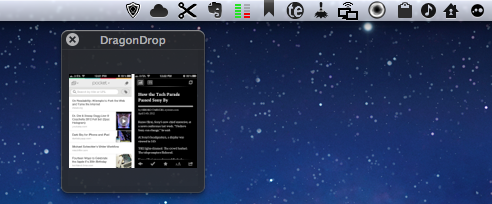
DragonDrop, another take on simplified drag & drop for the OS X Finder, offers a solution that’s somewhat in between the aforementioned Yoink and Quick Look previews. DragonDrop lets you “pause” the drag & drop action by temporarily placing a file – being it an image, text document, webclip, or just about anything OS X can drag & drop (even colors) – in a floating shelf. When you’re ready to “resume”, you can pick up the file and drop it on your destination as it came from the original source.

While this concept is nothing new, DragonDrop provides a unique implementation – a feature that caused the app to take some time to be approved by Apple for sale on the App Store. DragonDrop can be activated by dropping files onto its menubar icon, or by performing a “shake” gesture with your finger while dragging. Apple didn’t like this feature – which is optional in the app’s Preferences – but eventually decided to approve DragonDrop as other Mac App Store apps already modify system functionalities.

Not everyone’s going to like the possibility of bringing up DragonDrop’s shelf with a shake gesture, but I’ve been using it extensively over the past weeks to quickly copy text from webpages and emails (without having to perform a long, precise drag & drop) and folders from the Finder. I like how the shake gesture makes the floating shelf appear next to the mouse cursor, rather than up in the menubar.

At $4.99, DragonDrop is a very focused utility (it also supports cut/copy/paste in the menubar) aimed at enhancing one core functionality of OS X. I recommend it, but if you’re not sure you might need it, there’s a free trial available on the developers’ website.


Interview: Nate Weiner Talks Pocket Launch, Read It Later Evolution

I recently had the chance to talk with Nate Weiner, the creator of Read It Later, to discuss today’s launch of Pocket (here’s my review), the state of “read later” apps and reading on the web, and the direction Pocket is taking in enabling users to save their favorite content. Nate Weiner had the idea for Read It Later in 2007, when he found out he was constantly emailing links to himself for articles he wanted to read later. After five years, Read It Later is reborn today as Pocket.

MacStories: Looking back at my Purchased history on the App Store, I see the original Read It Later is the third app I installed on my iPhone. How has Read It Later changed in the past three years, leading to Pocket, launching today?

Nate Weiner: Was it really? That is awesome.

A lot has changed since then. When I launched the first iPhone app for Read It Later, I was just a solo developer working out of my bedroom in Minnesota. Today, I’m sitting in Read It Later’s office in downtown San Francisco alongside 7 other incredibly talented people.

What hasn’t changed is our focus. Read It Later was a simple tool that focused on doing just one thing: saving things for later. Pocket is about taking all of the core parts of what people did with Read It Later and making them better, easier, and quite honestly, just a lot more fun to use. Read more


Read It Later Reborn: Pocket Saves Everything “For Later”

In the past five years, reading on the web has fundamentally changed. Read It Later, the first popular service to pioneer a certain kind of “bookmarking” for web articles, is reborn today as Pocket, and it promises to change the way users think of web content to “save for later”. Most importantly, Pocket wants to address what has become the scarcest resource of web citizens: time.

Read Later

People never had time to check out all the cool stuff that happens on the Internet every day. As blogging platforms started taking off in the past decade, sometime during 2006 some people began to realize they didn’t have time to read every article that was posted online. The digital publishing revolution had already happened, but the explosion of blogging was just starting to produce high-quality, journalistic and well-informed pieces that, due to a simple scarcity of time and intuitive tools, people didn’t have time to read in their entirety. Whilst the act of “bookmarking” something on the Internet goes back to several years ago, the more focused, practical act of “saving an article for later” can actually be traced back in the form of popular consumer software to somewhere in between late 2006 and 2007.

Nate Weiner was one of the first developers (and avid web readers) to understand that the bookmarking systems in place at the time (Delicious, magnolia, or simple browser bookmarks) weren’t cutting it, from a technical and psychological perspective, for those users that just wanted to put off an article for later.

The difference between “bookmarking” and “saving for later” is both practical and conceptual: a regular bookmark is usually archived for good, as bookmarking services place great emphasis on letting users store bookmarks – links to webpages – forever in their accounts. There are some exceptions today, but the underlying philosophy has pretty much stayed the same. The action of “saving an article for later”, on the other hand, takes a more pragmatical approach: an article a user wants to read today or tomorrow isn’t necessarily representative of a webpage he wants to store and archive for eternity. The terminology itself – “for later” – indicates that something is going to happen ”later”. Once an article is read, most users tend to go on with their lives and forget about it. Like I said, it’s different today, and there are some specific use cases in which someone might want to archive articles – but the original concept lives on. People don’t have time to read every web article ever published.

Back in 2007, Nate Weiner set out to create a simple Firefox extension that would allow him to keep articles he found at work (and wanted to “read later”) in a different place than its browser bookmarks. On August 6, 2007, he launched the aptly-named Read It Later, a Firefox extension that did one thing well: it kept articles in a cozy little extension, saved for later. Users could hit a button to quickly save an article, and they could even save multiple browser tabs at once. As the extension started taking off, Nate began adding more features to Read It Later, such as offline support in December 2007.

Meanwhile, Marco Arment, developer at Tumblr, was facing a similar problem himself in 2007. He was constantly coming across news or blog articles he didn’t have time to read at the moment, and he needed something to read while on the bus or waiting in line. Arment discovered that there was no easy way to save links from a computer and access them later from the iPhone – we’re talking mid-2007 here, when the iPhone was getting in the hands of the first millions of customers, and when there was no SDK for developers to build native apps. So Arment decided, as he would later explain, to build just the service for that: Instapaper, a webpage that collected links saved from a bookmarklet, was launched publicly in January 2008. Like Read It Later, Instapaper solved a twofold issue: it allowed users to quickly save articles, and retrieve them later. Unlike Weiner’s app, though, Instapaper saved links in a webpage that could be easily accessed from the iPhone – mobile reading, in fact, seemed to be one of Instapaper’s primary features from the get-go. As Arment’s service became popular, he also went back to the drawing board – or in his case, programming tools – to implement new functionalities for Instapaper. The service’s hallmark feature, a text mode that strips unnecessary content out of web articles, was released in April 2008.

The rest is history. As Apple kept improving its mobile ecosystem with new devices, OS upgrades, and the App Store, Read It Later and Instapaper evolved, and iteratively became two fantastic services that serve millions of users every month. Over the years, we have followed both Instapaper and Read It Later closely at MacStories. Read more


Samuel L. Jackson and Siri Star in New iPhone 4S Commercial (Update: Zooey Deschanel Too)

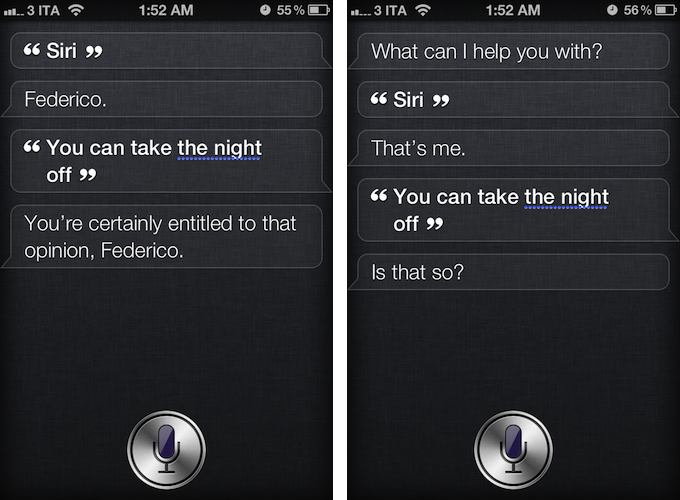
As noted by The Next Web, U.S. carrier Verizon Wireless aired a new iPhone 4S commercial featuring actor Samuel L. Jackson and Siri, the company’s virtual assistant for the iPhone 4S. Remarkably similar to Apple’s own ads in terms of style and message, the ad places Siri front and center, showcasing various functionalities of the software. Samuel L. Jackson asks his assistant to cancel appointments, create reminders, look up locations, and convert units to prepare for his “date night”. At the end of the commercial, the actor ironically asks Siri to take the night off, to which Siri replies “if you say so”.

Even more ironically, as depicted in the screenshots above, Siri really does reply to that command with a series of different answers.

Verizon Wireless’ official YouTube channel hasn’t been updated yet with the new commercial, and it’s not clear whether Apple’s official ad agency Chiat\Day may have been involved in the creation of the ad. You can check out an official embed after the break.

Update: It appears a full “Siri and celebrities” ad campaign is going live today. Another ad featuring actress Zooey Deschanel just aired as well, for carrier Sprint. It also seems like the same ads are airing with different carriers logo at the end, confirming the Samuel L. Jackson ad wasn’t simply a Verizon Wireless commercial, as initially suggested.

Update 17/4: Apple just posted the official versions of the ads on its website and YouTube channel. Find them below, or on Apple’s website (Date Night, Rainy Day).
Read more


Mockups of 16:9 and “Bigger” iPhone

Mockups of 16:9 and “Bigger” iPhone

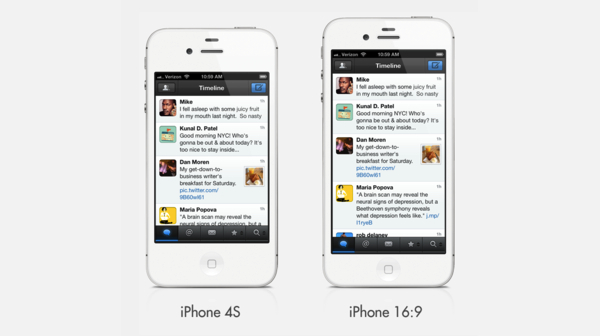
Dan Provost addresses recent speculation of a 4-inch iPhone with two interesting mockups of what a 16:9 and a 3:2 iPhone with bigger screen could look like:

The image above shows the current iPhone, a mockup of the alleged 16:9 phone, and a mockup with a bigger 3:2 screen at 300dpi, which measures 3.84” diagonally. I estimated that the physical size of the phone would need to increase slightly, getting taller in the 16:9 version and wider in the 3:2 version. I don’t think either of these size increases are deal breakers. The 3:2 version is actually still narrower than the iPhone 3GS.

Changing the aspect ratio of the iPhone would ultimately change the device’s experience, and developers would have to rework their apps for 16:9. Keeping the existing 3:2 ratio, lowering the pixel-per-inch count to make for a bigger screen, would still see some developers needing an optimization of their apps, but it’d have less consequences on the iPhone experience users are now accustomed to. And, aside from apps, let’s not forget that many websites have created custom mobile layouts specifically built for the iPhone’s 3:2 ratio.

The same question I asked for the rumored 7.85-inch iPad applies here: why would Apple want to change the iPhone’s screen? Apple doesn’t “have to” consider bigger screens just because its Android and Windows Phone 7 competitors are doing it, so unless Apple finds value in having a bigger iPhone screen, they won’t do it.

Permalink


OS X Abstract Art

OS X Abstract Art

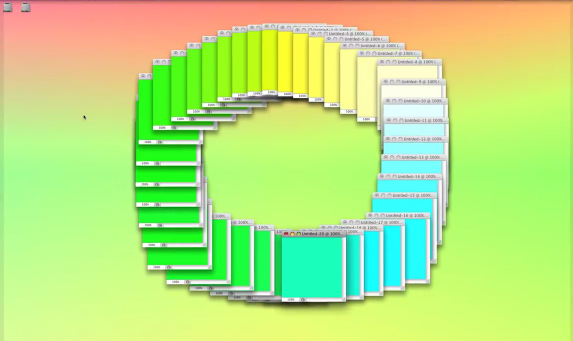
Emilio Gomariz uses OS X to create abstract animations. With a combination of applications, window animations, keyboard controls, and QuickTime, he assembled a mesmerizing collection of digital art that mixes graphics and music for a unique result. For the “alternate gradients” animation, he wrote:

The “Spectrum” screen saver from Mac OS X is alternated by the use of five Quicktime video players which also reproduce the own screen saver in different times and sizes, following a decreasing and centered composition.

In the “ctrl tab torus” animation, on the other hand, he used the CTRL+Tab action of Photoshop to create a rotating spiral of windows with different colors. Or, again, in “Open_Close.txt”, he used dozens of open items with colored backgrounds to create a virtual accordion for the standard open/close animations of OS X.

The whole collection of videos shows great creativity and willingness to experiment with the digital graphics of our computers. Check it out here. [TUAW via Today and Tomorrow]

Permalink

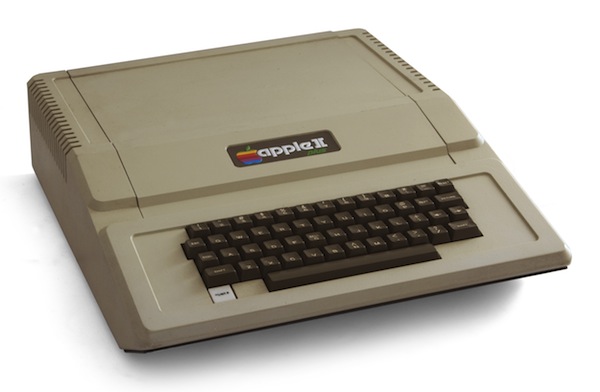
Apple II’s 35th Birthday

Apple II’s 35th Birthday

Harry McCracken reports on the original Apple II’s 35th birthday:

You probably weren’t paying attention when a tiny company called Apple Computer introduced its second product, the Apple II microcomputer, at the West Coast Computer Faire on April 16 and 17, 1977. (I wasn’t.) You may never have owned an Apple II. (I didn’t.) But it’s still easy to get fascinated by the machine and its legacy. (I sure am.) And there are many ways to explore its world — many of which you can do without getting out of the chair you’re sitting in right now, thanks to the Web.

Make sure to check out McCracken’s post for a cornucopia of facts, anecdotes, and videos about the Apple II. Pictured above (via) is the Apple II Plus, a successor to the Apple II introduced in 1979, featuring improved graphics and disk-booting support in the ROM. Wikipedia is a good resource to learn more about the Apple II series today.

Also, don’t forget that registrations are open for the KansasFest 2012, an annual convention dedicated to the Apple II. Check out the schedule and list of presentations and workshops here.

Permalink