Iris: A Beautiful and Simple Instagram App for iPad

Instagram may have been acquired by Facebook, but this isn’t stopping third-party developers from coming up with clever solutions to use the Instagram API. If anything, if Facebook will live up to its promise of keeping Instagram alive while growing and improving its network, everyone’s favorite photo sharing service may see even bigger numbers and user adoption. And there’s no better way to use official APIs than building software the developers of the original app are ignoring, at least for now.

For the past few weeks, I have been trying a new Instagram app for the iPad called Iris. It’s available now on the App Store and it’s optimized for the Retina display. While Instagram has started experimenting with a new API to allow other developers to upload pictures to the service, Iris doesn’t let you upload photos using the iPad’s camera and the app’s custom interface. Instead, Iris is another app focused on providing a beautiful experience for browsing and liking Instagram photos, and, in my opinion, it is the most attractive solution that’s been brought to the market to date.

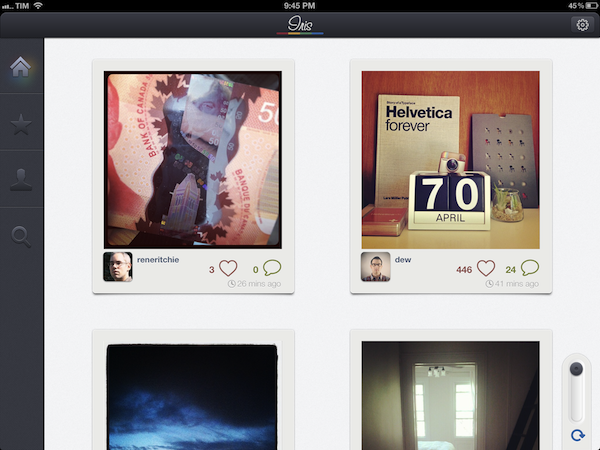
Iris puts great focus on large thumbnails for photos, a light background to make Instagram’s filters really pop, and a dark sidebar to switch between your feed, popular items, profile, and search. Iris allows you to browse either via large thumbnail previews or smaller ones; the layout change can be activated with a switch in the lower left corner. In the lower right corner, the developers have implemented a “pull to refresh” command, which literally requires you to pull a slider to refresh the main view. You can also hit the associated refresh button if you feel uncomfortable with pulling, but I found the gesture quite clever and fun. Unlike other apps, Iris doesn’t have standard pull to refresh at the top of the view.

To navigate, Iris uses a mix of tabs, “load more” buttons, and panels. For instance, the main feed gives you a vertical list of photos from people you follow, and once you reach the end of the list you can hit a “load more” button to fetch more items. I found the refresh times acceptable, and I like the custom popup dialog that shows up when you load sections or refresh pages. You can tap on a photo to bring it up at its original size; you can like with a double tap (like the original Instagram), or by hitting the heart icon below a photo. In the same area, you can find buttons to comment, and view a photo’s location. Comments are displayed in a panel that loads at the side of the screen and is reminiscent of Loren Brichter’s Twitter for iPad. If you tap on a user’s avatar while viewing a photo, the user’s profile will slide up from the bottom of the screen, and, if I had to point out a minor UI annoyance I noticed, you’ll have to hit a “back” button to make the profile view slide down again. I find the action confusing as back buttons are typically associated with the content area moving to the right.

The Popular section is pretty self-explanatory; I did find some nice touches in the profile view. You can view the people you follow and your followers in dedicated panels; you can follow/unfollow in-app, and of course check out another user’s complete set of photos. In your Profile, you can also hit a globe icon to have a history of your Instagram shots displayed as Iris pins on a Google map – it’s a neat summarization of the places you “visited” with Instagram.

The search function of the app is very basic as well: you can search for people and “tags”. While people results will open in the aforementioned side panel, tags will simply return associated photo results in a regular grid view.

If Instagram were to release an official iPad app, I think it’d be extremely similar to Iris’ approach. A minimal, beautiful interface for the Instagram community that takes advantage of the iPad’s display to lay out large thumbnails and photos. Instagram would obviously want to implement a camera in a (possible) official app – right now, Iris doesn’t let you upload anything, and has to display photos at low resolution on the iPad’s Retina display. The effect, however, is nice (especially thanks to filters, which help hiding some pixellation here and there), and I bet it gets a lot better on older iPad models.

Iris offers a simple, good-looking and enjoyable Instagram experience on the iPad, so if you’ve been looking for a great iPad app to browse your favorite photos, $1.99 should be a no-brainer.



The Humble Botanicula Debut

Spring is here, and what a better way to get you in the mood than a new game called Botanicula. Botanicula is a point’n’click exploration game created by the makers of award-winning Machinarium, development studio Amanita Design and Czech band DVA. Five friends, little tree creatures, set out on a journey to save the last seed from their home tree which is infested by evil parasites. Humble Bundle is debuting this game and offering more cross-platform titles (DRM free) to raise money for the habitat conservation charity World Land Trust. Donate for a great cause and get a bundle of excellent games in return. If you donate more than the average, you can acquire the bonus title Windosill, not otherwise available with the initial line up. If you bought these games separately, it would cost around $53, but they are letting you set the price. If you pay at least $5, you can optionally get a key to redeem the games on Steam (for Mac and Windows).

The Humble Botanicula Bundle includes lots of great titles such as Machinarium, Samorost 2, Windosill and the full-length feature film Kooky (with art direction by Amanita Design founder Jakub Dvorský), giving you plenty of unique Indie gaming to romp through this Spring. Soundtracks are also included with Botanicula, Machinarium, and Samorost 2. You can find links to all the great games below.

There’s fourteen days left to donate, so you have plenty of time to cash in your paycheck and donate to a worthy cause. Be sure to check out The Humble Botanicula official launch video after the break and get amped up!

Read more


Interview: Justin Williams

In our ongoing series of interviews with developers and creators in the Apple community, I recently had the chance to talk with Justin Williams, the founder of Second Gear and developer of Today, Elements, and MarkdownMail. When he’s not busy developing new features for his apps or sketching out ideas, Justin also writes his personal weblog at carpeaqua. You can follow him on Twitter as @justin. The interview below was conducted between January 18 and April 19.

MacStories: Hey Justin! Could you introduce yourself to the readers who haven’t heard about you or haven’t tried any of your apps before?

Justin Williams: I’m Justin Williams. I’m the Crew Chief and lead developer at Second Gear. You may or may not have heard of our products:

  1. Elements — the original Dropbox syncing Markdown text editor for iOS.
  2. MarkdownMail — A quick and easy way to send HTML emails on your iOS device written in Markdown syntax.
  3. Today — A daily calendar app for Mac OS X.

I also write about technology and user experience at carpeaqua.com and post bad jokes on Twitter at @justin. Read more


Produce Morse Ringtones With iToneMaker

Some of you who are interested in electronic music may know Moog analog synthesizers and guitar effects. With their big stainless steel knobs, LEDs and very elaborate technology behind them, they create enormously noisy, grungy and disturbing sounds. The company also managed to create a very polished music production app for the iPad, animoog. The UI designer of today’s pick, iToneMaker Morse Code, was definitely inspired by this company’s product design, but nevertheless the app is a very unique and lovely compiled ringtone maker for your iPhone.

As the name might already suggest, the app’s sound production is based on the morse code principle. Hence you have to type in a word or a random letter/digit combination as the basis of your new ringtone into a message panel within the main window. The slightly different sounds of the single characters are played consecutively and result in the final ringtone.

Within this main window you can also change the basic elements of your ringtone: like “normal” analog synths, iToneMaker is based on (in this case obviously digital) oscillatory sound production. You can choose between triangular, saw and square oscillators and adjust their pitch, speed and break length between the morse sounds via custom sliding controls. Just push the central play button and your ringtone is played back, over and over… it can get pretty annoying, I warrant you.

If you are not satisfied with the output of these few controls - which happened to me literally every time I tried to produce an agreeable sound - you can additionally superimpose more editing features via the option button. You’ll find reverb and low-pass filter regulators plus some different effector types and the ability to change pitch while a morse tone is played. Besides that, developers Eiji and Tom kindly created some presets to choose from so that you never have to start from scratch completely and possibly never get to a passable ringtone result.

But let’s go back to the Moog-inspired UI. The knobs marking the advanced features are designed threedimensionally with a reflecting silver tone and are definitely dominating the individual style of the app. Everything else has got a monochromic look to it and the selector buttons feature a very nice custom indicating orange LED-design when their function is active. iToneMaker is coherent in every little detail and works really smooth with iOS 5 on my 3rd generation iPod touch. Even the implementation of the address book in order to use a friend’s name as a morse code pattern and entering longer character lines works as fast as the rest does.

There is just one small problem to the UX which I consider as relatively disadvantageous: if you superimpose the options panel it overlaps the (actually pretty big) play button and you can not stop the playback from there, if your ringtone is still running. But for an app which features such a cool and elaborated interface and is still available for free, this seems like a quite acceptable problem to me.


Shazam Player Now Available for iPad

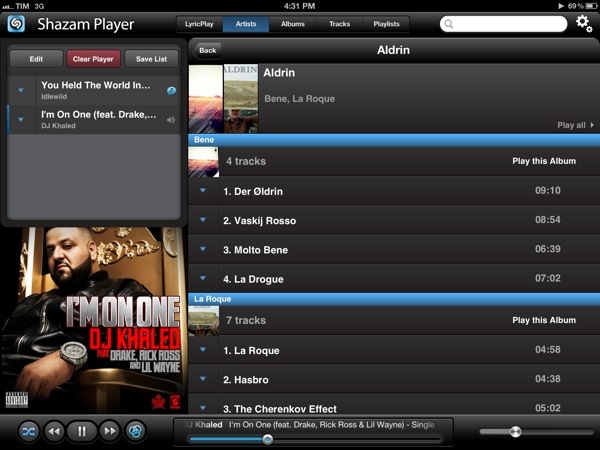
Shazam Player, the app from the creators of popular music recognition utility Shazam, has today reached version 1.5, adding support for the iPad, Retina graphics, and better display of lyrics on screen. Shazam Player, as I outlined in my original review of the iPhone version, provides an alternative view to Apple’s Music app, enhancing your music library with a plethora of sharing and discovery functionalities for artists and albums.

Like its iPhone counterpart, Shazam Player for iPad offers users the ability to create separate playlists from Apple’s Music app and organize songs in “good” and “bad” lists for easy retrieval later. The whole interface has been revised to take advantage of the iPad’s real screen estate, adding a “Player” box on the left side to visualize the songs playing in your queue. These songs can be rearranged for a particular order, and lists can be saved for later or cleared with one tap. You can send single songs or entire albums to the player with a tap or swipe. Tapping on the triangle button next to a song gives you access to a separate popover window containing the same sharing options of the iPhone app: you can share on Facebook and Twitter, check out related YouTube videos, artist information, and activate LyricPlay.

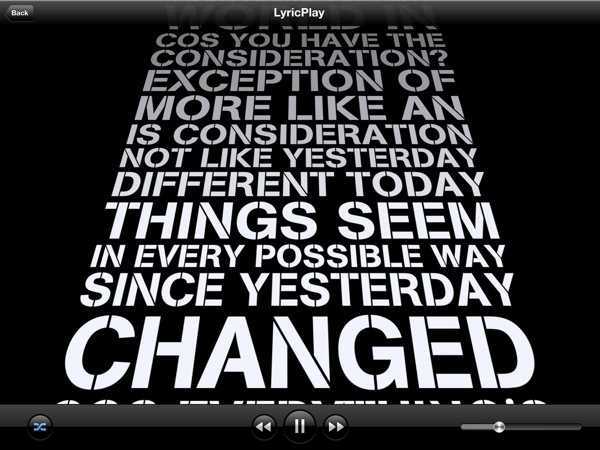
Shazam Player’s standout feature, in fact, is its support for song lyrics visualized on screen through a system Shazam calls LyricPlay. This functionality is only available for tracks that have been “scanned” and matched with Shazam’s servers, and unfortunately I found this new 1.5 version to be mostly hit or miss when it came to, say, matching popular songs from Drake, Oasis, or even The Eagles – all of them available on iTunes and well-known to Shazam (the standard app can fetch song info through the device’s mic). On the iPad, when the feature works, lyrics have been updated for the Retina display and they follow a song’s progression with an animation on screen. Lyrics can now be sent to the Apple TV via AirPlay, and songs that aren’t matched for LyricsPlay usage have also received a new UI for full-screen cover art and music visualizer.

Overall, I still find Shazam Player a solid alternative to the iOS Music app if you’re looking for on-device playlist creation, sharing and queue options, and online lyrics support all in the same package. Keeping in mind that LyricsPlay won’t probably find all your lyrics, you can check out the app for free on the App Store.


Keep An Eye On Your Twitter Followers With Detective

When it comes to research for new subjects to write about, I’m constantly confronted with ones that are at heart too marginal to discuss, but I’m doing it nevertheless, because they have some interesting touch to them. In Apple news, editors know that kind of problem and the question connected to it always sounds like: “Should I post about it or not? Will it be interesting enough?” When it comes to apps and good design, it’s much easier most of the time. Most of the time I can divide UI/UX design in two parts. Either the app works, looks fine and is easy to use or it does not. When I started to test Detective by Notion, I immediately recognized: Oh god, that’s a hard decision; it has got a very nice look but I am not sure about its feature. Is it that good? To go even further, I’m still asking myself if the app has a feature at all. But let’s dive in a bit deeper and you’ll hopefully get my point.

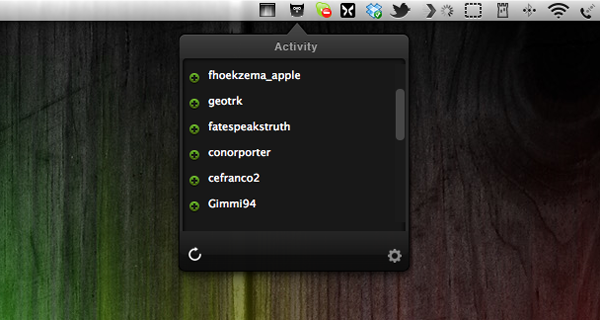
What Detective basically does is list your new Twitter followers and unfollowers in a top-down window from a menu bar icon. That’s it. Yeah, that’s it, really. You’re probably thinking that you could check that by yourself or that perhaps you don’t care at all about who and how many followers you have as long as you can tweet and follow what or whom you want. That’s all understandable, but I thought about it more and came to the conclusion that Detective — and especially its UI design — has got some advantages that may make the use of it legible to some people.

First of all, Twitter doesn’t notify you when people unfollow you at all. Psychologically speaking, that’s a good move, since everyone is more likely to enjoy seeing how he gets more and more famous over time without spending a thought on those who may dislike him (or her). But there are still some serious Twitter users out there, who do still care about their followership, they’re rare but they exist, trust me. They may even like to ask some of them why they stopped following them and what they could do better. For them, Detective could be nice to have. It just serves the need of showing up these people and does that with a polished, gloomy monochrome design only interrupted by the green pluses for new or red minuses for ex-followers, respectively. Apart from the very poorly designed preferences panel — which is in fact offending the rest of the app’s design and looks like it doesn’t belong to the app at all, Detective is minimalist, functional and performs very well.

Which brings us the the second, even more pleasant feature of Detective, at least to me: it’s totally unobtrusive. And I consider that as the main reason for granting this app such a long post. I assume that most of you who are twittering already deactivated the notification mails Twitter sends out if you have a new follower, direct message and so on. Detective on the other hand is faster than those notification mails and its basic approach of notifying you is different. It’s just there, you can check the changes by yourself when you want or you can choose Growl notifications if you’re too lazy to click on the menu bar icon, but even that is still better than those annoying mails which constantly interrupt your workflow and clutter your mail inbox. The rest of the time, when you don’t want to get distracted, Detective is completely invisible (yes, I know, there’s still that icon in the menu bar, but let’s be honest, no one can get distracted by an icon that small).

To me, it is this unobtrusiveness that really makes the app valuable, despite its very limited feature set and purpose. It definitely is an indicator for a knowledge of good design, if a developer is not out to usurpingly bring his work to the foreground just for the sake of making the user aware of it. Unfortunately I consider its price of $2.99 still too high. Although it’s by and large a very decent app, Detective needs way more features (which are promised indeed, but obviously not included in the current version) to justify such an expenditure. Hopefully Notion will keep their promise of implementing stuff like multiple account support or retweet/favorite notifications — because then I could recommend it with no hesitation.