iOS 6 Confirmed: New Banners Up at Moscone West

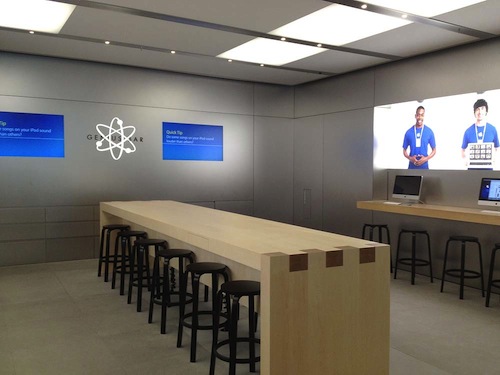
It’s been a couple days since we last checked in on the progress at Moscone West, and today it appears that new banners at WWDC are confirming expected discussion around iOS 6, Apple’s next iteration of their mobile OS. Banners in the halls of Moscone West are showing off a slick blue logo with a silver 6 inside, perhaps signifying that fresh coat of paint Rene Ritchie discussed as a possibility on iMore. We’re looking forward to Monday’s Keynote, and in the meantime we’ll continue updating our Moscone West 2012 post with great photographs as they come in.

The first floor layout of Moscone West is different from last year — in the photo above you can see the iOS 6 signage in comparison to last year’s open floor with rope lines. Banners have been hung on the 2nd floor of Moscone West, and there’s different banners for Mac Messages, Mac Notification Center, and for a Mac Game Center. WWDC 2012 is already shaping up to be a big event, and we’ll have more photos soon.

Past the break, we have a couple more photos for your viewing pleasure. Thanks again to @SteveStreza for the amazing pictures!

Read more


Reviewed: The iPhone Half of Track 8’s Universal Update

The Metro flavor — that recognizable blend of Swiss minimalism and Segoe typography — is still, by far, one of the most intriguing design languages to be employed. Perhaps Microsoft’s edgy futurist appeal will wear off as Windows 8 PCs and tablets normalize the trend of text driven interfaces, but the current novelty of Metro driven applications continues to leave us entranced and occasionally optimistic about the future of UI design. In stark contrast to skeuomorphic or icon driven designs of iOS and Android families, one has to wonder if Microsoft’s modern brainchild could find itself comfortably at home when integrated with other platforms and without clashing with the native’s traditional mechanisms of in-app navigation and interaction.

The now defunct Zune brand never made an appearance on iOS, and for good reason, but Ender Labs’ Track 8 trendy reimplementation of the Windows Phone 7 music player on the iPad had left us considering if both the aesthetic and function of a Metro designed application could be capitalized on iOS. Track 8 intentionally ignores the conventions of iOS, extending Microsoft’s interface onto the dimension of Apple’s touchscreen displays.

Originally conceived for the iPad, Track 8’s second version (yes, 2.0) delivers a few important enhancements. An AirPlay button is now built into the app, presenting itself only when an AirPlay device is available above the shuffle and continuous playback buttons on the Now Playing Screen. Per navigation, a navigational gripe is resolved thanks to the inclusion of a long press on the back button to return to the main menu. Additionally, artist backgrounds can be restricted to downloading only over Wi-Fi via a toggle in the settings. While all of these additions, especially the long press, greatly improve the Track 8 user experience, it is the app’s Universal signification that denotes the 2.0 convention and Track 8’s appearance on the iPhone.

Read more


New iPhone UI Concept Shows Mission Control, Dynamic Notification Badges, And More

It’s pre-WWDC speculation time. This year, like most, many people think about what new features and capabilities the next version of iOS could include. After watching some concept videos (including one by Jan Micheal Cart) and reading some iOS 6 wish lists, designer Joost van der Ree also decided to present some of his ideas on how Apple could improve the usability of iOS in a short YouTube video.

Read more


Apple Agrees It Misled Consumers With “WiFi + 4G” And Accepts AU$2.25M Penalty, Judge Yet To Approve Settlement

UPDATE: The Court has been adjourned and Justice Bromberg will receive confidential information from Apple (currently unclear what that will include, but presumably some sales and/or refund numbers) by next Wednesday. A decision about whether or not the penalty is appropriate can then be made.

In Australian Federal Court today, Apple has told the court it is willing to accept a AU$2.25 million penalty after agreeing it misled consumers by initially marketing the new iPad’s cellular capabilities as “with WiFi + 4G” in Australia. Apple accepted the penalty that the ACCC proposed which also requires Apple to contribute $300,000 to the ACCC’s legal fees. Colin Galvan, who is representing the ACCC noted that the ”substantial” penalty would amount to a warning to the computer industry that “such conduct will not be condoned”.

Although both Apple and the ACCC have now agreed on a proposed settlement, Judge  Mordy Bromberg must yet approve the deal. Judge Bromberg has said that he wants more information about the extent of misleading advertising after Apple has so far refused to provide any information about how many iPads have been sold, returned and how much revenue and profit Apple has earnt.

“I have some concern… that the agreed facts might be a little thin to allow me to do what I need to do and that is determine whether the proposed penalty is appropriate,”

Timeline of Events

  • On March 27th the ACCC announced it would initiate legal action against Apple for making misleading 4G claims in its marketing of the new iPad in Australia. The issue arose because although the new iPad supports US and Canadian 4G networks, the hardware in the new iPad does not support any of the Australian 4G networks.
  • Across Europe a few countries began to keep an eye on the issue and consider investigations into the issue after fielding complaints from consumers.
  • On March 30th, Apple clarified its iPad marketing in Australia by explicitly noting that “it is not compatible with current Australian 4G LTE networks and WiMAX networks.
  • On April 5th, Apple gave Australian customers the ability to get a full refund of the new iPad if they purchased it under the assumption of it supporting Australian 4G networks up until the 25th of April. They also informed Australian resellers to update marketing to explicitly mention the incompatibility with Australian 4G networks.
  • On May 12th Apple decided to rename the WiFi + 4G model to WiFi + Cellular - across the whole world (including the US and Canada), eliminating the confusion over whether the iPad supported 4G in a particular country like Australia, where it did not.

[Information via @NorrieRoss, @LucyBattersby, @_kate_osborn and The Australian]


TestFlight Introduces their TestFlight Desktop App Beta for Developers

TestFlight Introduces their TestFlight Desktop App Beta for Developers

This afternoon, Hjalti Jakobsson (@Hjalti) announced the availability of the TestFlight Desktop App private beta.

TestFlight Desktop App, now in private beta

We’re really excited to share an early version of TestFlight’s Desktop App. We think this will be a significant and much needed change in developers’ beta release workflow. Since we’re still in beta, we’d really appreciate you testing the app and providing feedback.

TestFlight’s Desktop App brings TestFlight’s powerful management features to the desktop, resulting in iOS archive detection from the menubar, the ability to set permissions for testers, automatic dSYM detection, and faster upload speeds. Developers can simply visit https://testflightapp.com/desktop/ to download the beta app and provide feedback before TestFlight’s public release.

Permalink

iOS 6 and Media Integration

iOS 6 and Media Integration

At Applingua, Tom Klaver argues that Apple shouldn’t provide a separate “Files.app” in iOS 6:

I completely see this improved integration happen throughout iOS 6. There won’t be yet another separate app — a collection library of all possible files a user can interact with will do. Would you want yet another icon on your Homescreen? Remember one of Apple’s (Sir Jony Ive’s) undisclosed philosophies: you shouldn’t see something unless you need it.

You say you want to add a photo from Hipstamatic while composing this email? No problem. Tap “Attach”, pick the Photos category, tap Hipstamatic, and you’ll see all your photos from Hipstamatic.

I don’t know if iOS 6 will feature a revamped document picker for better file management across apps, but Klaver’s proposed solution isn’t too dissimilar from what I envisioned two weeks ago. Rather than providing a separate app just to manage files, I think it’d be interesting to see Apple leveraging the existing iCloud interface (pictured above) to seamlessly let third-party access each other’s documents and data. Klaver thinks this menu could be organized by media type, such as “Photos”; as I have previously written, I believe the key point will be providing a simple, yet reliable way to work with documents across apps without creating duplicates. We’ll see at WWDC next week.

As an aside, Ole Begemann recently dug up an interesting quote by Steve Jobs from 2005:

Now, e-mail, there’s always been a better way to find stuff. You don’t keep your e-mail on your file system, right? The app manages it. And that was the breakthrough, as an example, in iTunes. You don’t keep your music in the file system, that would be crazy. You keep it in this app that knows about music and knows how to find things in lots of different ways. Same with photos: we’ve got an app that knows all about photos. And these apps manage their own file storage.

Permalink

vjay: Impressive, Fun Real-Time Video Mixing On iPad

In late 2010, German software maker Algoriddim released djay for iPad, a powerful portable audio mixing solution that went on to win an Apple Design Award at last year’s WWDC. With a combination of advanced features, intuitive UI design, and a care for attention to detail, djay became one of the most well-known DJ solutions with seamless interoperability across the Mac and iOS. However, because I am no audio professional, I sometime found myself slightly overwhelmed by the feature set of djay – the app certainly requires a bit of basic audio knowledge to get the most out of its settings such as visual mixing with waveforms, beat-matched looping, and pre-cueing.

For the past week, I have been testing Algoriddim’s new iPad app, vjay, and not only I haven’t found myself scratching my head in front of some complex setting or obscure audio terminology – I had fun using the app, taking advantage of the complex tech that the developers embedded in a $9.99 package to, ultimately, provide an engaging experience for the users. vjay is powerful, but, in a way, more accessible than djay.

As the name suggests, vjay works with videos. And perhaps it is the app’s focus on visuals, rather just waveforms, that increases its “wow” factor and accessibility to users who, like me, aren’t exactly mixing and syncing tempos on a daily basis. Furthermore, I also believe that, from a mere technological standpoint, vjay’s video capabilities offer a more tangible, visibly outstanding showcase of the iPad’s engine. More than djay, I found vjay to be a perfect mix – no pun intended – of powerful technology and user-friendliness.

vjay can mix videos in real-time. Taking the underlying concept of djay and bringing it to a different type of media, vjay comes with a split interface displaying two content sources at the bottom, and a large, central visual preview at the top. At the bottom, you can pick videos (and even audio) from two separate “add media” buttons that are directly connected with your Camera Roll, video and music library, iTunes Store, and pre-bundled content offered by Algoriddim as a demo to get you started. In my tests, I decided to pick two .mp4 videos from my friends @AldrinBand that I had previously synced to my iPad, and see what vjay would allow me to do with them. Read more


Hands On: OmniPlan for iPad


Back in February, I had the opportunity to talk with The Omni Group’s CEO Ken Case about their next iPad venture, OmniPlan. OmniPlan is a well known and powerful project management software that includes features like Gantt charts, smart scheduling, change tracking, team collaboration, and so much more. Today The Omni Group is releasing a full featured version of OmniPlan specifically designed and optimized for the iPad.

I remember asking Ken if the iPad version of OmniPlan was intended to be used in addition to the Mac version for complete project management; however, he was adamant that the iPad app would be “as complete as possible”. From the screenshots he provided at that time, it definitely seemed as if all the features that serious project managers would need were already finding their way in to the app. Three and half months later, the app is complete and it truly came together beautifully. Read more