This week marks the beginning of the actual Apple v Samsung trial in the United States, with jury selection and opening statements scheduled to happen today. But in the past week or so, as the parties have been filing the various documents in preparation, troves of interesting information have been dug up by journalists from around the web. To get you up to speed, we’ve collated some of the best nuggets of information that have been dug up in the pre-trial filings and put them together below. As the trial gets underway, we’ll endeavour to update this post with any other interesting pieces of information.
If you’re interested in paying closer attention to the trial, I highly recommend following along over at The Verge and AllThingsD which have already done a terrific job at covering the trial.
Prototype iPhone & iPad Images
Some Notable Witnesses
- Scott Forstall (Apple’s Senior VP of iOS Software)
- Phil Schiller (Apple’s Senior VP of Worldwide Marketing)
- Tony Blevins (Apple’s VP of Operations)
- Boris Teksler (Apple’s Director of Patent Licensing & Strategy)
- Susan Kare (Designer & Early Apple Employee)
- Justin Denison (Samsung America’s Chief Strategy Officer)
- Peter Bressler (University of Pennsylvania, Adjunct Professor of Integrated Product Design)
- Edward Knightly (Rice University Professor of Electrical and Computer Engineering)
- Janusz Ordover (New York University Professor of Economics)
- Russell Winer (Stern School of Business Professor of Marketing)
[AllThingsD]
Jury to receive adverse inference instruction against Samsung after Magistrate Judge Paul Grewal ordered on Wednesday July 25th that Samsung didn’t take reasonable steps to preserve emails after it was “reasonably foreseeable” that litigation with Apple was going to occur.
The jury will be told that they may presume that evidence that would have been beneficial to Apple was destroyed - but they don’t have to. The main issue regarding the spoliation was because Samsung’s email system automatically deleted mail messages after two weeks unless “saved” or downloaded locally using software such as Outlook. When litigation was “reasonably foreseeable” they did not take appropriate steps to tell relevant employees to save email or to turn off the automatic two-week deletion.
For an adverse inference jury instruction, this is relatively soft. The court could also have told the jury that it “must” presume that relevant evidence in Apple’s favor was lost, or in a worst-case scenario for Samsung, that certain of Apple’s claims must be deemed proven. But the fact that the outcome could have been worse, or even much worse, for Samsung doesn’t mean that the above isn’t pretty useful to Apple.
You can review the full order, uploaded by FOSS Patents.
[FOSS Patents]
Google warned Samsung that their prototype devices were “too similar” to the iPad in February of 2010. Google was referring to the “P1” and “P3” devices that later became the Galaxy Tab and Galaxy Tab 10.1. They demanded Samsung to make a “distinguishable design vis-à-vis the iPad for the P3”.
[AllThingsD]
Apple will use Samsung’s own words in regards to iPhone similarity in the trial. First is the reference by Samsung’s Product Design Group that noted it was “regrettable” that the Galaxy S “looks similar” to older iPhone models.
Secondly, as part of a Samsung sponsored evaluation, designers warned that the Galaxy S “looked like it copied the iPhone too much”, that “innovation is needed”, that it so “closely resembles the iPhone shape so as as to have no distinguishable elements” and that “all you have to do is cover up the Samsung logo and it’s difficult to find anything different from the iPhone.
[AllThingsD]
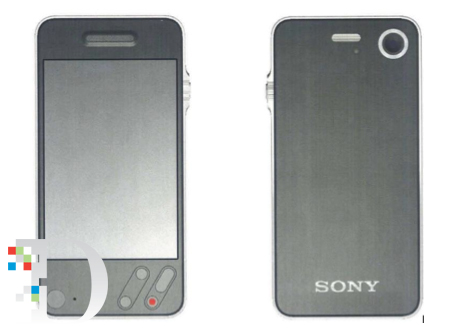
Samsung: Apple copied Sony when designing the iPhone and is also a “copyist”. According to their claims, a 2006 Businessweek interview with Sony product designers was passed around internally, including by Apple executives Tony Faddell, Jony Ive and Steve Jobs. Apple industrial designer, Shin Nishibori was directed to “prepare “a Sony-like” design for an Apple phone and then had CAD drawings and a three-dimensional model prepared.”
Apple responded to the theory in a following brief submitted to the court, arguing that it should be inadmissible. AllThingsD summed up their objections neatly:
- The theory, which implies Apple’s patents are obvious in light of Sony prior art, has already been excluded from the case by another judge.
- Samsung didn’t disclose this new theory until after the close of the discovery period of the case. It shouldn’t be allowed to ambush Apple with it now.
- The BusinessWeek article on which Samsung’s theory is based has no picture of any Sony product, making it impossible for the jury to assess from the article whether Apple in fact “derived” its designs from Sony products.
- The Sony Walkman that Samsung claims inspired the design of the iPhone looks absolutely nothing like it (see picture above, right).
- The testimony of former Apple designer Shin Nishibori who claims his Sony-style mock-ups influenced the design of the iPhone is inadmissible because his deposition wasn’t authorized by the court and Apple never stipulated to it.
- “It is unfair in a timed trial to require Apple to take the time to rebut such evidence.”
The Apple designer at the center of this Sony-style iPhone mockup, Shin Nishibori, has told the court through his lawyer that he has no plans to appear at the trial. In the letter to the court, his lawyer notes that Mr. Nishibori no longer works at Apple, is in Hawaii and is “trying to recover from several health issues”. AllThingsD has the full letter.
[AllThingsD]
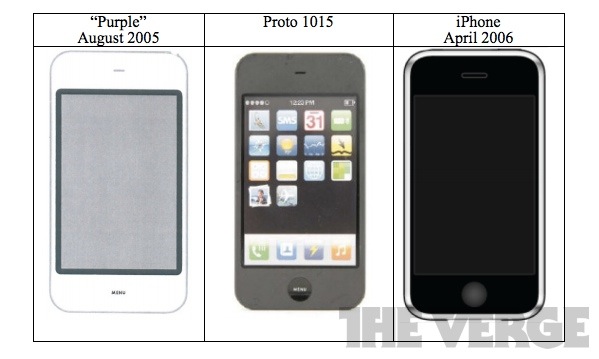
Another Filing Reveals Apple’s Prototype ‘Purple’ from August 2005. The filing aims to refute Samsung’s Sony-style theory by demonstrating an earlier prototype that looks very similar to the first iPhone. The filing states that the Sony-style designs were just “an ‘enjoyable’ side project”.
[The Verge]
Filings reveal Samsung’s “Beat Apple” goal for 2012. Whilst there are references from mid-2011, one memo from September of 2011 specifically states “Goal of next year - BEAT APPLE”. The documents dive-in deeper, saying that the goal should be to go “head-to-head” with Apple in many regions and in many price segments. A February 2012 memo noted that “three horse race [is] becoming a two horse race between Apple and Samsung”.
[The Verge]
Best Buy surveys reveal a common reason for Galaxy Tab returns is confusion with the iPad 2. Samsung had surveyed 30 Best Buy stores in August 2011 and found that of 30 stores, 7 cited “lack of product knowledge” as the primary reason for returns. Within that category it was noted:
The most common pattern is that a customer returns the product which was purchased because the customer thought it was an Apple iPad 2
[The Verge]
Apple is asking for damages of $2.5 billion of Samsung, mostly representing the total profit that Samsung made from selling products that it says infringed their designs and patents.
Samsung has reaped billions of dollars in profits and caused Apple to lose hundreds of millions of dollars through its violation of Apple’s intellectual property.
[WSJ]
Steve Jobs’ “thermonuclear” comment will not be used in the trial after Judge Lucy Koh denied Samsung’s request to include the statement. Judge Koh agreed with Apple’s argument that “Out-of-court statements by Mr. Isaacson about what Mr. Jobs allegedly said to his biographer are inadmissible hearsay irrelevant to any issue in this case”.
I’m going to destroy Android, because it’s a stolen product. I’m willing to go thermonuclear on this.
[CNet]