We’ve collected the best #MacStoriesDeals for July 4th, so be quick and get them! If new deals become available, updates for each category will be listed at the top.
You can find us as @MacStoriesDeals on Twitter.

We’ve collected the best #MacStoriesDeals for July 4th, so be quick and get them! If new deals become available, updates for each category will be listed at the top.
You can find us as @MacStoriesDeals on Twitter.
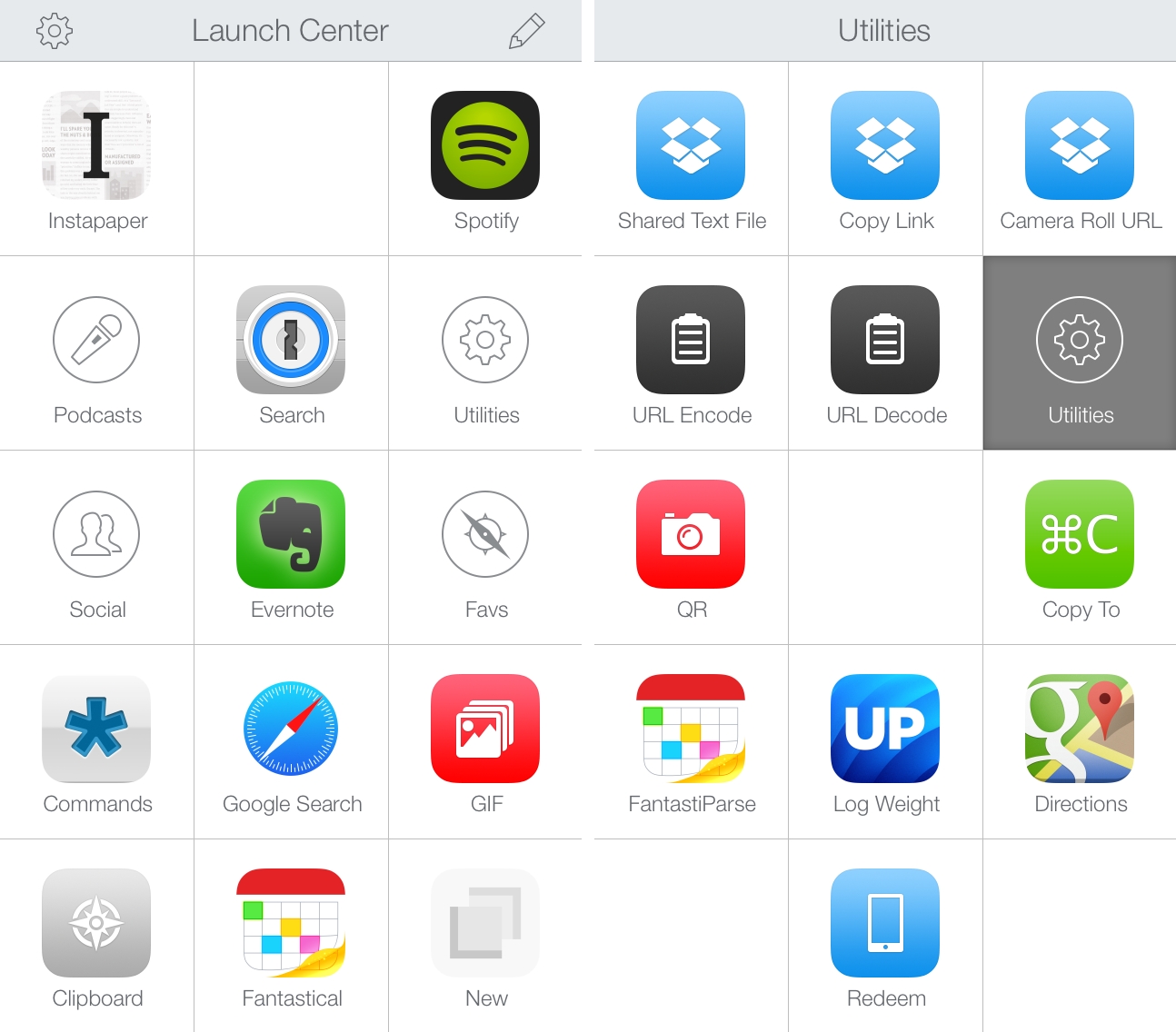
Over the past two years, we’ve covered Launch Center Pro, one of my favorite apps for iPhone and iPad, several times here at MacStories. We’ve detailed major updates that were released by Contrast and published a complete guide to go from novice to advanced user; we’ve also focused on the hidden features for power users that the developers recently snuck into a seemingly minor update. And yet, in spite of the coverage, I’ve never really addressed the question that I often receive from MacStories readers – How do you use Launch Center Pro?
In this post, I’m going to detail the actions and groups that I use with Launch Center Pro every day. I keep Launch Center Pro in my dock, and I use it for actions that are both work-related or simple shortcuts to my favorite music streaming app or animated GIFs. I’ve realized that quickly mentioning an action or including examples in a review isn’t the best way to explain how I’m using the app, and hopefully this post will provide a good overview of my practical use for a fantastic utility that I rely on.
Below, you’ll find a breakdown of my Launch Center Pro setup with sections for the app’s Home screen and groups. The screenshots will show my iPhone setup, but I keep the same actions on my iPad. Whenever possible, each action will have a download link to install it on your device.
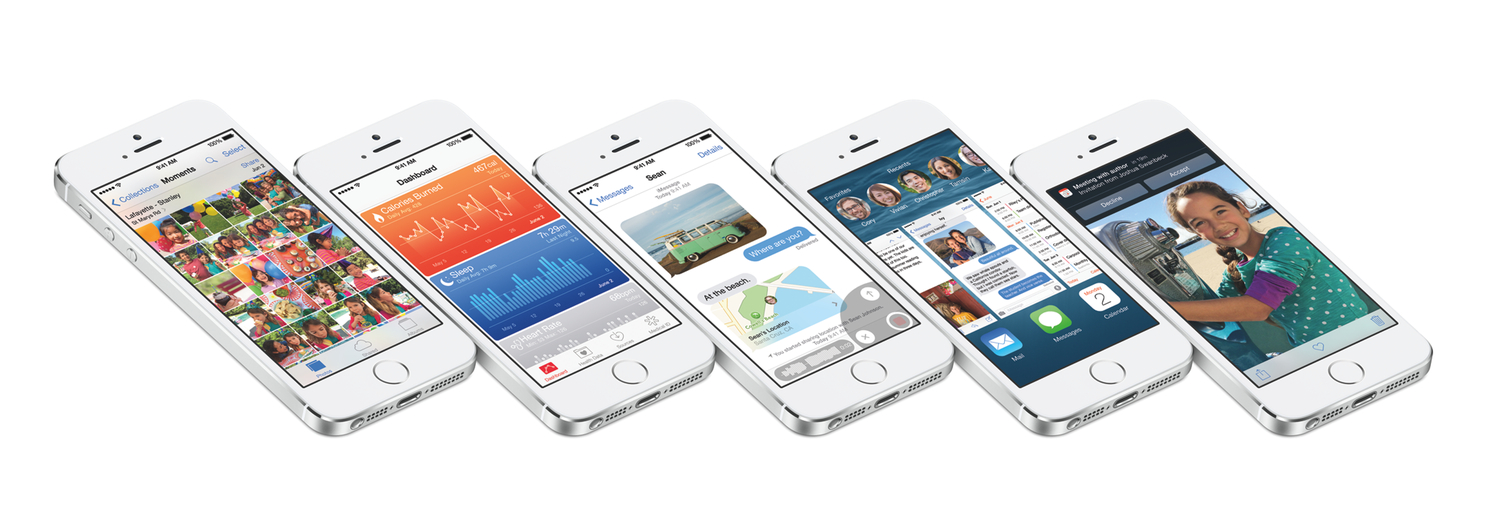
iOS 8, announced by Apple at WWDC yesterday, will feature major improvements to Messages and inter-app communication, a new Health app and predictive keyboard, and changes to several system apps and features.
Among big additions and redesigns, however, there are always smaller features and hidden tweaks that the company only briefly mentioned during the keynote or described with a short paragraph on their preview website. In this post, I collected 15 other iOS 8 features that are worth noting and waiting for.
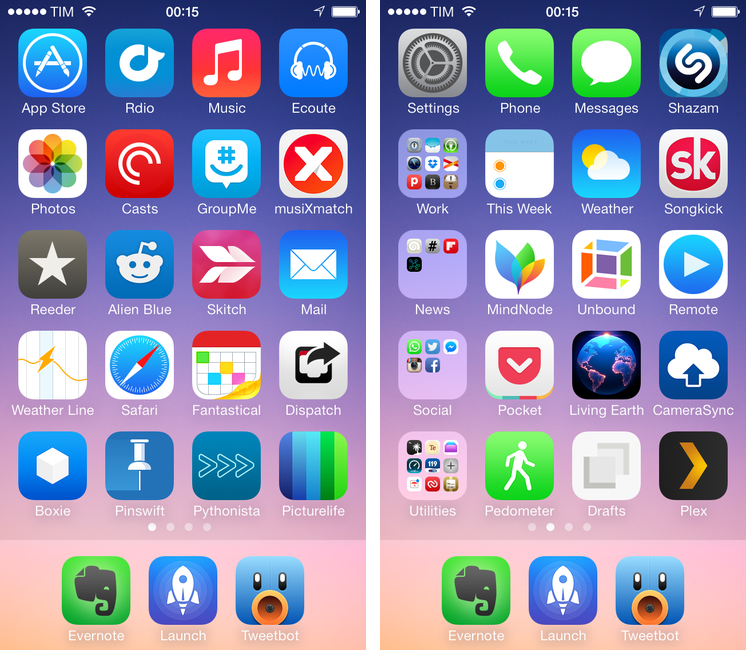
For the past three years, I’ve been running a series called “My Must-Have Mac Apps” that, once a year, would list the apps that I found indispensable on my Mac. This year, considering the changes that I went through from a workflow perspective, I thought it would be appropriate to start focusing on iOS as well. The first installment was about the iPad; then, I covered the Mac; today, I’m going to conclude this year’s series with the iPhone.
Like many others, I don’t use the “phone” part of the iPhone much. The iPhone is my portable computer. And I have lots of apps on it.
My workflow has changed a lot over the years. I used to have a MacBook Pro and I later got an iMac and replaced the MacBook Pro with a MacBook Air. I thought that I’d always need the Air but then I was forced to work from an iPad and I didn’t like it. As I kept trying, I ended up liking my iPad setup so much that I turned it into a tool more versatile than my Mac and wrote a book on it. But the way I use my iPhone has never changed: the iPhone is the computer that’s always with me. If anything, the software that runs on it has evolved through the years, with apps getting more powerful, inter-connected, and, in some cases, “desktop class”. And then, earlier this year, iOS 7 happened.
As expected, iOS 7 provided a fantastic opportunity for developers to reimagine and redesign their apps to take advantage of Apple’s new OS features and design language. Three months into iOS 7, I think that the developer response has been remarkable, but the results are very much still in flux. For the apps that I use on a daily basis, I’ve seen a few major relaunches of apps rebuilt from the ground-up for iOS 7, apps that still have to be optimized for it, and a lot of “compatibility redesigns” that brought lighter color schemes and translucencies without substantially altering the way an app works or is structured for iOS 7. As Apple itself is still trying to fully understand their own new design language, I think it’s fair to assume that third-party developers will need more time to really “get” iOS 7.
As I thought about the apps I wanted to include in this year’s last installment of the Must-Have Apps series, I realized that there was a good mixture of software that was built before and after iOS 7. As usual, my goal was to mention apps that I consider must-haves for my daily workflow, and for this reason you’ll find a mix of brand new iOS 7 apps, minor iOS 7 design updates, and a few pre-iOS 7 apps too. When it comes to having the best tool for the job, I value utility over fashion, and I cherish an old app if it still is the best for me.
The list below includes my 50 top picks and is organized in four sections: Main, for apps that I use several times every day; News, for discovering links and staying on top of RSS; Entertainment, for media consumption; and Utilities, for single-purpose apps that I use often but not heavily every day. Each app is listed with its App Store link and, at the end of the article, you’ll find my iPhone app of the year.
For the past three years, I’ve been running a series called “My Must-Have Mac Apps” that, once a year, would list the apps that I found indispensable on my Mac. This year, considering the changes that I went through from a workflow perspective, I thought it would be appropriate to start focusing on iOS as well. The first installment was about the iPad; today, I’m going to talk about the Mac.
As I wrote when Mavericks was released, I don’t need my Mac as much as I used to. I can do most of my work from iOS (particularly from my iPad mini), but that doesn’t mean that I don’t need a Mac for some tasks or that I’ve stopped using it altogether. I still have to use a few OS X-only apps and tools to get work done – stuff that wouldn’t be possible on an iPad, no matter how hard I try.
I may not be covering new Mac app releases on a weekly basis anymore, but, honestly, 2013 has been the year of iOS 7, with thousands of third-party developers shifting their focus to Apple’s mobile platform in order to update and redesign their apps in time for September. And the fact that Mavericks didn’t bring a radical new design or groundbreaking user features didn’t help either, as developers of Mac apps chose to release updates that focused on under-the-hood improvements and general optimizations.
And yet, in spite of a new design direction and several changes to built-in apps, iOS 7 still doesn’t come with valid alternatives to the stuff OS X is great at: a filesystem with easy management of files that can be opened by multiple apps, precision editing with a cursor, command line utilities, system-wide automation tools, and more. For as much as the iOS ecosystem is maturing and changing at an incredible pace, I haven’t stopped using my Mac and there are some things that can only be done on OS X. And therefore, like every year, I have put together a list of the apps that I consider my must-haves – apps that I install every time I set up my Mac and that I use regularly.
This year, I’ve simplified the list and gotten rid of extra layers for apps that I’m no longer using. You can compare the 2013 list to last year’s one and follow links from there to go back to previous years. You also won’t find last year’s section for price and Mac App Store stats at the bottom: developers often make price changes and release new versions of their apps outside the Mac App Store, so, ultimately, those stats couldn’t be properly contextualized over time.
The list below is organized in four sections: Main, for apps that I use several times every day; Writing, for tools that I employ to research and craft articles for MacStories; and Image & Video Editing, listing apps that allow me to put together screencasts, GIFs, and images for the site. Each app is listed with its App Store/website link and, at the end of the article, you’ll find my Mac app of the year.
Read more
Christmas is upon us once again! #MacStoriesDeals is the best place to find great deals for Mac and iOS apps and games, Apple hardware deals, and some great book and audio specials.
There are thousands of software and hardware deals online. We carefully pick the best ones and collect them in a single post with links to buy or share discounted products. You don’t need to be overwhelmed by App Store holiday deals because we take care of finding the best stuff for you.
Bookmark this post, and come back every day to find updated deals for each category. Updates will be listed as new entries at the top of each category.
You can find us as @MacStoriesDeals on Twitter.
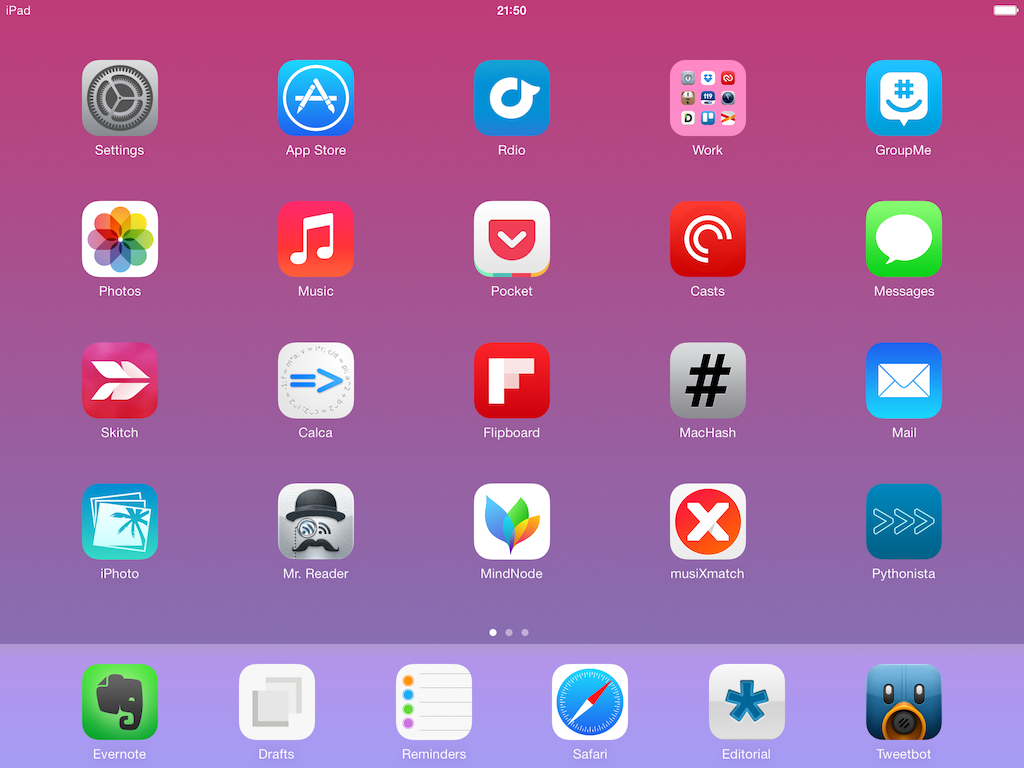
For the past three years, I’ve been running a series called “My Must-Have Mac Apps” that, once a year, would list the apps that I found indispensable on my Mac. This year, considering the changes that I went through from a workflow perspective, I thought it would be appropriate to start focusing on iOS as well. I’d like to start with the iPad.
I’ve been working primarily from my iPad for the past 15 months. For a variety of personal reasons that I’ve discussed before, I found myself unable to work from my Mac every day, so I decided to try and see whether the iPad and iOS could be viable OS X replacements – not just companions. I ended up enjoying the iPad as a work device and, eventually, as a primary device powered by terrific apps that allow me to be more efficient on iOS.
From a high-level, conceptual standpoint, this isn’t a new topic for MacStories readers or listeners of The Prompt. In the end, though, it all comes down to the apps – the software that I use on my iPad for work and play, for productivity and entertainment.
Hence, “My Must-Have iPad Apps”. I consider this the first installment, even though it technically isn’t: I published similar articles in 2010 and 2011, but I skipped 2012 – the year when I really got serious about working from the iPad. This year’s installment is a reboot of the iPad series, which I’m going to publish regularly from now on; if you want, you can check back on the old articles linked above to see if there are apps that I’ve been using for three years (spoiler: yes).
The list below is organized in four sections: Main, for apps that I use several times every day; News, for discovering links and staying on top of RSS; Entertainment, for media consumption; and Utilities, for single-purpose apps that I use often but not heavily every day. Each app is listed with its App Store link and, at the end of the article, you’ll find my iPad app of the year. Read more
Black Friday is upon us once again! #MacStoriesDeals is the best place to find great deals for Mac and iOS apps and games, Apple hardware deals, and some great book and audio specials.
There are thousands of software and hardware deals online. We carefully pick the best ones and collect them in a single post with links to buy or share discounted products. You don’t need to be overwhelmed by Black Friday deals because we take care of finding the best stuff for you.
Bookmark this post, and come back every day to find updated deals for each category. Updates will be listed as new entries at the top of each category.
You can find us as @MacStoriesDeals on Twitter.
Mavericks is the latest version of OS X that builds upon the foundation of Mountain Lion to offer new apps like Maps and iBooks, redesigned system apps, and new energy-saving technologies like App Nap and Safari Power Saver. For power users, Mavericks sports additions like improved multiple displays, Finder tabs, tags, and AppleScript Libraries.
At MacStories, we enjoy finding all the little tweaks and hidden features that come with a brand new OS X version each year. In this post, you’ll find over 70 tips, tricks, and details of OS X Mavericks that we’ve collected throughout the summer since the first beta release the new operating system.
Mavericks’ release was announced today at Apple’s media event in San Francisco, and it’s available for free on the Mac App Store. We will have more articles on Mavericks throughout the week in our Mavericks hub on MacStories.
In the meantime, you can enjoy our collection of tips and tricks to get the most out of Mavericks, and read my article on working with Mavericks.
Read more