Posts in reviews

Downtime Organizer Sofa Adds Apps, Audiobooks, Board Games, Deeplinking, Backups, and More Themes

Sofa is a terrific downtime organizer. Since its release, the app has seen frequent updates that have added features and refinements that make it an excellent one-stop destination for collecting media you want to enjoy later. We’ve covered the app before, so I won’t revisit its core functionality here, but if you’re new to the app, be sure to check out our previous reviews for more details.

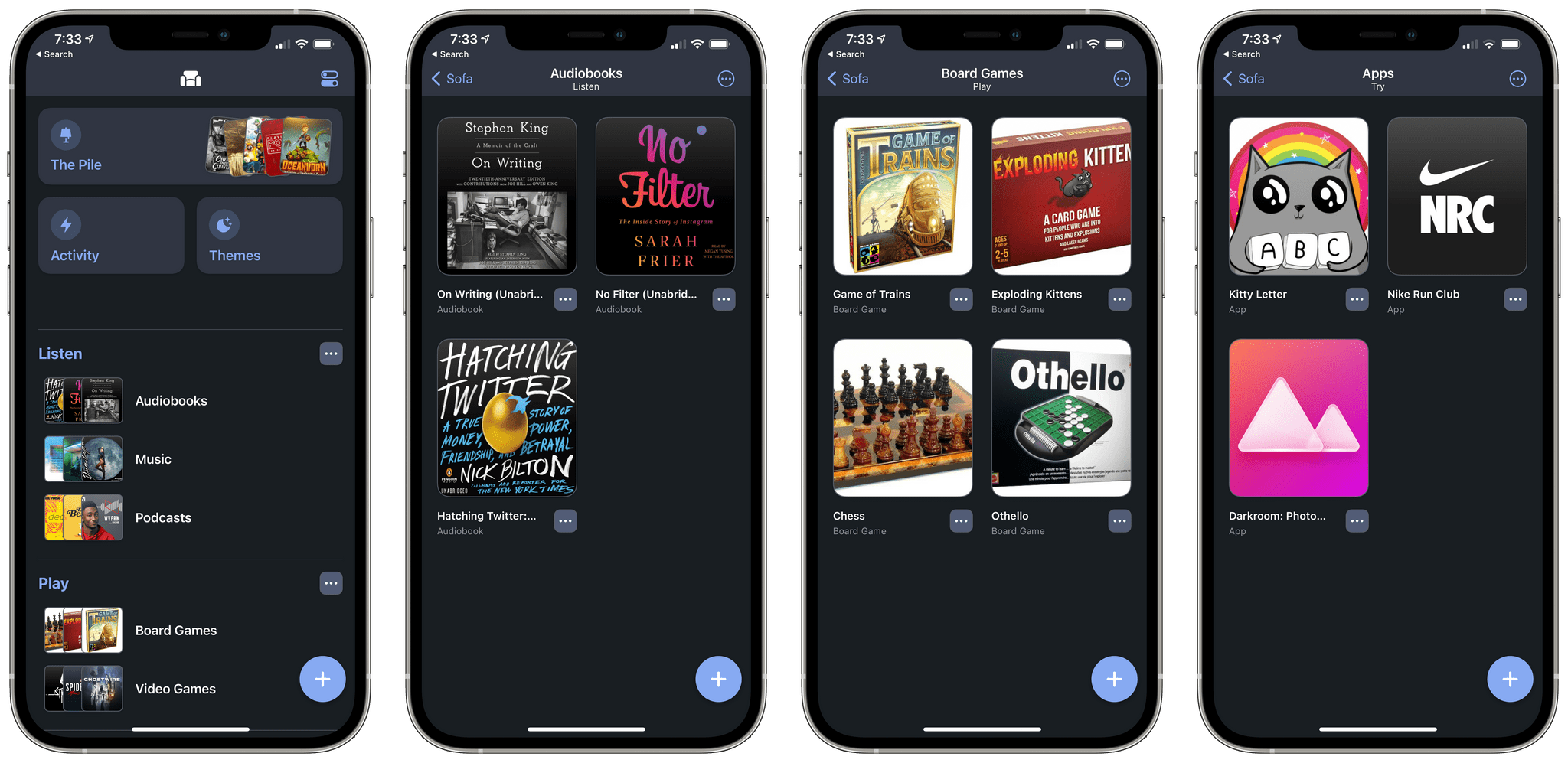
The headline feature of Sofa’s latest update is the addition of apps, audiobooks, and board games to the lineup of media it can track. I’m especially pleased to see that iPhone, iPad, and Mac apps have been added to Sofa. I’ve long considered trying new apps as a form of entertainment. Even poking around productivity apps that most people would consider ‘work’ apps is fun for many people.

The addition of apps is timely given the trend towards subscription-based apps with free trials. If an app catches your eye, but it’s got a relatively short free trial period, you can drop it into Sofa to try later when you can make the most of the trial. The addition of apps also provides a way to track games on Apple’s platforms that weren’t always available in Sofa’s videogame category. However, the change also means that you may have to search for an iOS game in a couple of different places at times.

Read more

Access Extra Content and Perks

Founded in 2015, Club MacStories has delivered exclusive content every week for nearly a decade.

What started with weekly and monthly email newsletters has blossomed into a family of memberships designed for every MacStories fan.

Learn more here and from our Club FAQs.

Club MacStories: Weekly and monthly newsletters via email and the web that are brimming with apps, tips, automation workflows, longform writing, early access to the MacStories Unwind podcast, periodic giveaways, and more;

Club MacStories+: Everything that Club MacStories offers, plus an active Discord community, advanced search and custom RSS features for exploring the Club’s entire back catalog, bonus columns, and dozens of app discounts;

Club Premier: All of the above and AppStories+, an extended version of our flagship podcast that’s delivered early, ad-free, and in high-bitrate audio.

Learn more here and from our Club FAQs.


First Impressions: Kensington’s StudioDock Aims to Turn Your iPad Pro into an Expandable Desktop Workstation

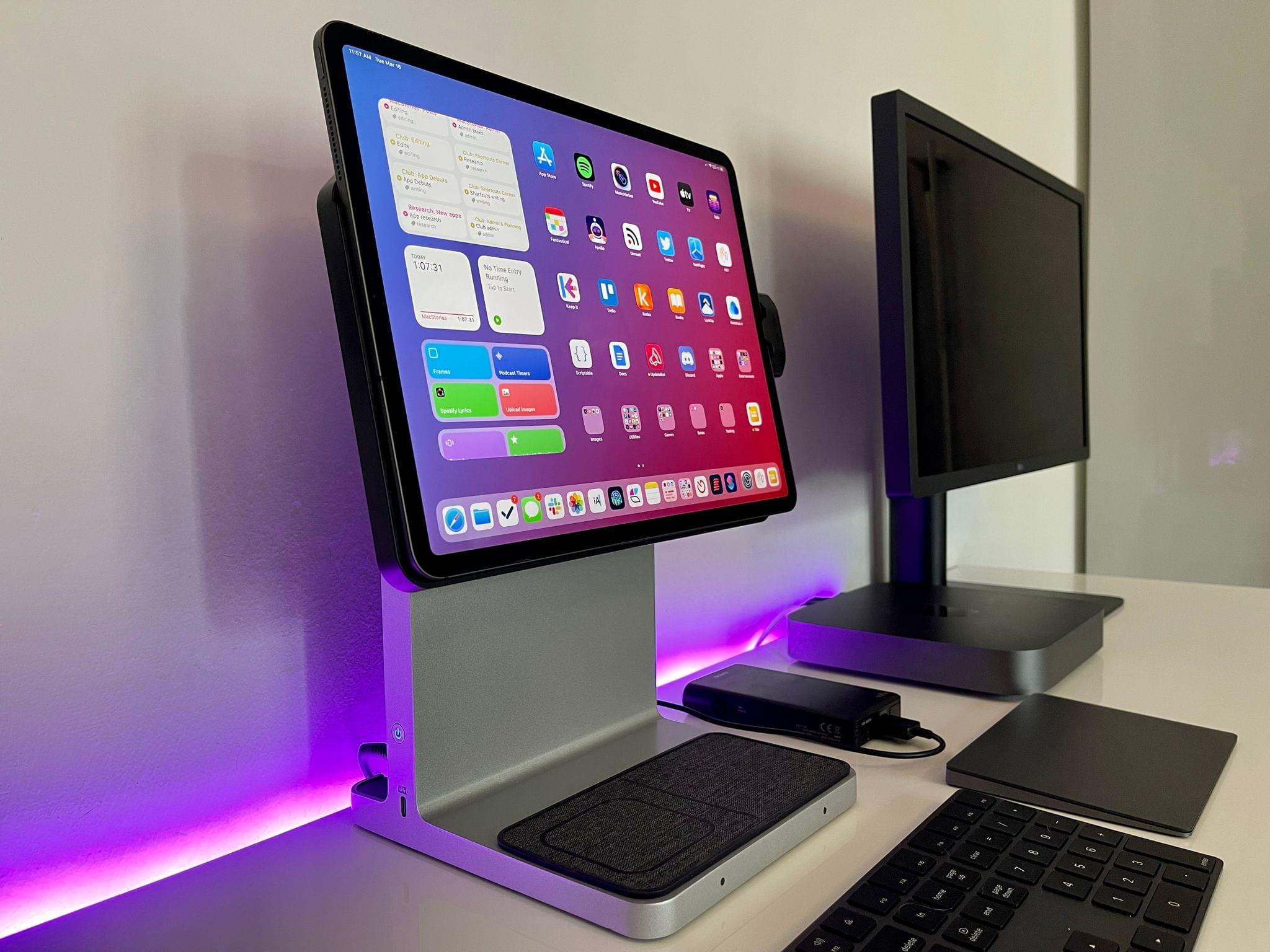
The Kensington StudioDock.

The Kensington StudioDock.

Nearly a year ago in the middle of the first wave of the COVID-19 pandemic here in Italy, I published an article that would turn out to feel obsolete in less than a month: in my Modular Computer story, I detailed my experiments with various accessories for the iPad Pro and how the device was capable of filling different roles in my computing life thanks to the Smart Keyboard Folio, an external 4K monitor, Apple’s Magic Trackpad, and a set of kickstands. About a month later, my laptop setup for the iPad Pro was upended by the arrival of Apple’s Magic Keyboard; as a result of the Magic Keyboard’s floating design and integrated keyboard/trackpad approach, I’ve preferred using my iPad Pro in laptop mode more often, even when I’m sitting at my desk.

A year later, Italy is going through the so-called “third-wave” of the pandemic (with a terribly mismanaged vaccine rollout and, for whatever reason, a different government) and I’ve spent the past 24 hours testing Kensington’s long-anticipated StudioDock, a $400 docking station1 that aims to turn the iPad Pro into a desktop workstation with support for display rotation, expansion via USB-C, USB-A, and SD card slots, and integrated Qi charging for iPhone and AirPods. And just like last year, I find myself torn between appreciating the potential of this product and concerned about its timing given rumors of an impending iPad Pro refresh just around the corner.

A day of usage2 isn’t enough time to evaluate this kind of product and its long-term impact on an iPad user’s daily workflow. I feel particularly uncomfortable giving MacStories readers any sort of buying advice here because of the price tag (again, $400 for the StudioDock version I tested) and the short amount of time I was able to spend with the accessory. For these reasons, I’ll try my best to focus on what the StudioDock is, what I like about it in the context of modularity and converting the iPad Pro into something it’s not (or, at least, something Apple probably didn’t anticipate), and a few features it’s missing.

Read more

Access Extra Content and Perks

Founded in 2015, Club MacStories has delivered exclusive content every week for nearly a decade.

What started with weekly and monthly email newsletters has blossomed into a family of memberships designed for every MacStories fan.

Learn more here and from our Club FAQs.

Club MacStories: Weekly and monthly newsletters via email and the web that are brimming with apps, tips, automation workflows, longform writing, early access to the MacStories Unwind podcast, periodic giveaways, and more;

Club MacStories+: Everything that Club MacStories offers, plus an active Discord community, advanced search and custom RSS features for exploring the Club’s entire back catalog, bonus columns, and dozens of app discounts;

Club Premier: All of the above and AppStories+, an extended version of our flagship podcast that’s delivered early, ad-free, and in high-bitrate audio.

Learn more here and from our Club FAQs.


Adobe Fresco: A Fun and Powerful iPad Drawing and Painting App For Pros and Novices

I’m not an artist by any stretch, so when I started poking around Adobe’s Fresco, the drawing and painting app for the iPad and iPhone, I approached the app with trepidation. I shouldn’t have.

Fresco is undeniably a ‘pro’ iPad app. The app has a deep set of sophisticated features and integrations with Adobe’s other Creative Cloud apps and services. However, the app is also designed to scale with its users, meeting them where they start and growing with them, whether they are absolute beginners or seasoned pros.

Adobe accomplishes this in a couple of ways. The first is with Fresco’s business model. I’m sure many people who see an app of Fresco’s caliber assume it must be part of an expensive subscription, but it’s not. The app is free, and although there are benefits that only come with a Creative Cloud subscription, their absence from the free version of the app doesn’t detract from its core experience. You can go a long way with the free version, which makes it excellent for beginners and a good way for Adobe to attract new users.

Free is powerful, but it only goes so far. The second reason Fresco works for a broad spectrum of users is the app’s design. From the spot in the app to which every user is taken when they open their first canvas to the many ways to learn and draw inspiration from experienced users, Fresco’s thoughtful design provides a focused approach to drawing and painting that works for users at all levels.

Ultimately, it’s Fresco’s design that convinced me that this was a review I should write. I’m as guilty as the next person of assuming apps like Fresco are only for pro users. I’ve been pleasantly surprised to find that that’s not true for Fresco. So let’s dive into what makes Fresco such a good place to start if you want to try drawing and painting with your iPad and iPhone.

Read more

Access Extra Content and Perks

Founded in 2015, Club MacStories has delivered exclusive content every week for nearly a decade.

What started with weekly and monthly email newsletters has blossomed into a family of memberships designed for every MacStories fan.

Learn more here and from our Club FAQs.

Club MacStories: Weekly and monthly newsletters via email and the web that are brimming with apps, tips, automation workflows, longform writing, early access to the MacStories Unwind podcast, periodic giveaways, and more;

Club MacStories+: Everything that Club MacStories offers, plus an active Discord community, advanced search and custom RSS features for exploring the Club’s entire back catalog, bonus columns, and dozens of app discounts;

Club Premier: All of the above and AppStories+, an extended version of our flagship podcast that’s delivered early, ad-free, and in high-bitrate audio.

Learn more here and from our Club FAQs.


Coppice: Visual Note-Taking and Research for the Mac

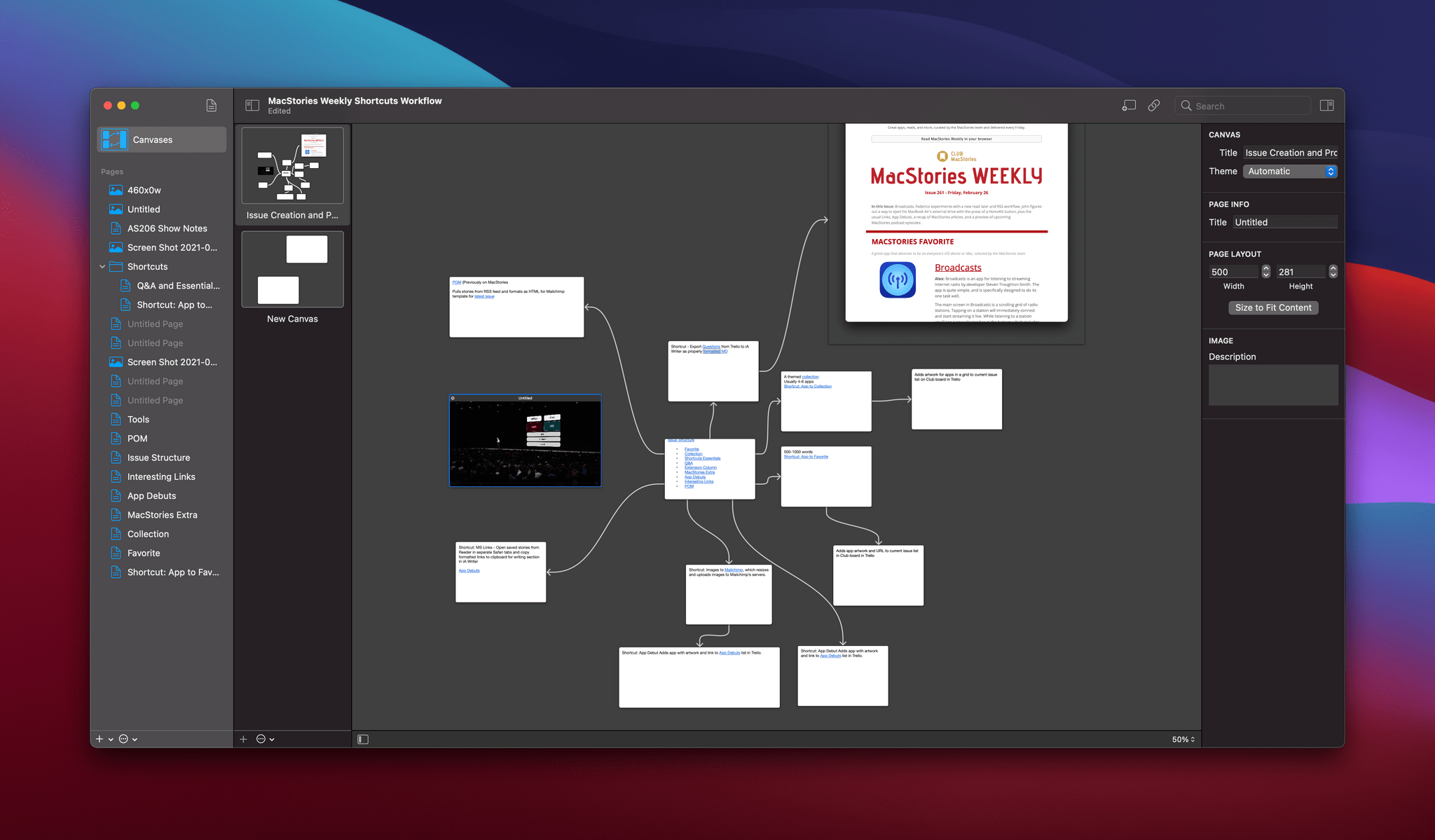
Apps that help you organize and connect ideas aren’t new, but it’s a hot category right now. There are note-taking apps, many of which offer wiki-style back-linking, outliners, diagramming apps, mind mapping apps, and more. The approaches vary as widely as the ways people process and organize their thoughts, which is what makes these apps so interesting. The category has become a playground of creativity, allowing developers to experiment with new ways to help users explore ideas free from the more constrained, structured environment of a text editor.

It’s into this app frontier that M Cubed Software launched Coppice, a Mac-only app that combines elements of mind mapping and note-taking to deliver a unique, note card-like experience. There are ways that I think Coppice could enhance its approach to extend the app’s power. However, despite some limitations, Coppice is an excellent addition to the genre that succeeds in offering a novel perspective on note-taking and research in a crowded field.

Read more

Access Extra Content and Perks

Founded in 2015, Club MacStories has delivered exclusive content every week for nearly a decade.

What started with weekly and monthly email newsletters has blossomed into a family of memberships designed for every MacStories fan.

Learn more here and from our Club FAQs.

Club MacStories: Weekly and monthly newsletters via email and the web that are brimming with apps, tips, automation workflows, longform writing, early access to the MacStories Unwind podcast, periodic giveaways, and more;

Club MacStories+: Everything that Club MacStories offers, plus an active Discord community, advanced search and custom RSS features for exploring the Club’s entire back catalog, bonus columns, and dozens of app discounts;

Club Premier: All of the above and AppStories+, an extended version of our flagship podcast that’s delivered early, ad-free, and in high-bitrate audio.

Learn more here and from our Club FAQs.


Overcast Revamps Apple Watch App and Shortcuts Actions

In the latest update to his popular podcast app, developer Marco Arment has shipped a completely overhauled version of Overcast for Apple Watch. The update not only resolves some longstanding issues with the old Watch client but also debuts playback speed controls, chapter skipping, and show notes for the first time on the Apple Watch.

When you first open the new Apple Watch app, Overcast will spend some time fully syncing with its iPhone counterpart. Once this initial sync completes, you’ll gain access to the new interface. Instead of the previous three-page, horizontal-scrolling layout, Overcast for Apple Watch now features a much simpler design. At the top, you’ll find large buttons to manually request a sync with your iPhone and to access the app’s settings.

Read more

Access Extra Content and Perks

Founded in 2015, Club MacStories has delivered exclusive content every week for nearly a decade.

What started with weekly and monthly email newsletters has blossomed into a family of memberships designed for every MacStories fan.

Learn more here and from our Club FAQs.

Club MacStories: Weekly and monthly newsletters via email and the web that are brimming with apps, tips, automation workflows, longform writing, early access to the MacStories Unwind podcast, periodic giveaways, and more;

Club MacStories+: Everything that Club MacStories offers, plus an active Discord community, advanced search and custom RSS features for exploring the Club’s entire back catalog, bonus columns, and dozens of app discounts;

Club Premier: All of the above and AppStories+, an extended version of our flagship podcast that’s delivered early, ad-free, and in high-bitrate audio.

Learn more here and from our Club FAQs.


DarkModeBuddy: Automatic Light and Dark Mode Switching Based on Ambient Light

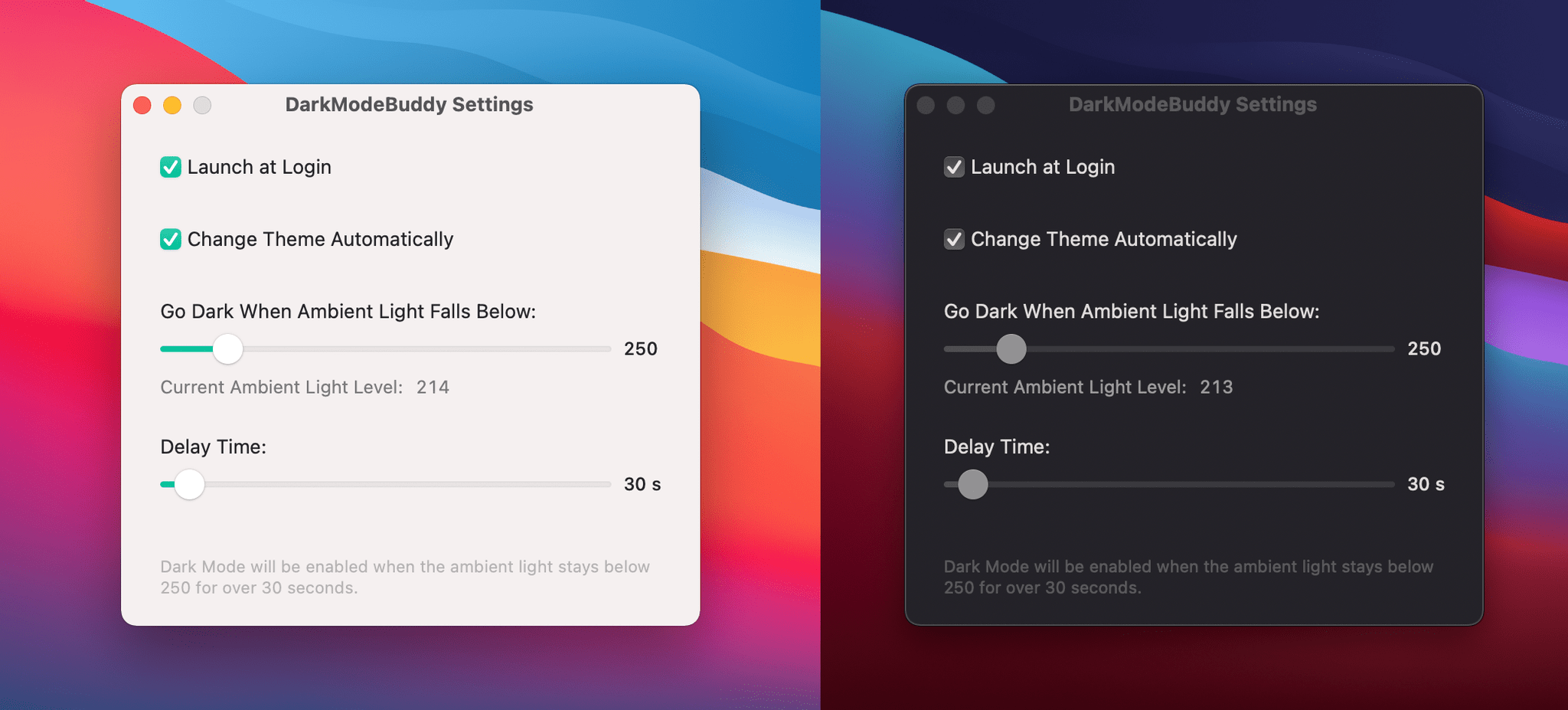
Gui Rambo, the maker or AirBuddy, the Bluetooth headphone and peripheral menu bar utility that I’ve covered before, has released a new app called DarkModeBuddy that can automatically switch between light and dark mode on Mac laptops based on ambient light levels. DarkModeBuddy runs in the background monitoring the ambient light readings from the same sensor that automatically adjusts your screen’s brightness. When the ambient light drops below a threshold you pick for an amount of time that you also choose, DarkModeBuddy automatically switches Big Sur from light to dark mode.

The app is a terrific example of the sort of single-purpose, useful utility available on the Mac. The app’s settings helpfully display the current light reading, which will assist you in deciding what light threshold to pick. The easiest way to dial in a comfortable setting is to choose something you think might work and then adjust it as you work in different lighting environments based on the readings reported by DarkModeBuddy.

If you watch the ambient light readings in DarkModeBuddy, you’ll see they jump around a bit as the lighting of your surroundings changes. That’s why the app has a Delay Time setting, which only switches between light and dark modes if the lighting conditions cross the threshold you set for a certain amount of time. The timer prevents flickering back and forth between light and dark modes based on small, temporary changes in lighting.

I generally run my Macs in dark mode full time, so I’m not planning to run DarkModeBuddy all the time. However, I like Gui’s approach to light and dark mode switching better than Apple’s. If I’m in a dark environment, light mode, especially with Big Sur’s emphasis on bright white UI elements, can feel like having someone point a spotlight at your face. You may find yourself in those conditions because it’s nighttime, but the time of day doesn’t account for when you’re working in a poorly lit room, which is where DarkModeBuddy really shines.1

DarkModeBuddy, which is an open-source project, is available with a ‘name your price’ model via Gumroad.


  1. Sorry (not sorry) for the bad pun. 

Access Extra Content and Perks

Founded in 2015, Club MacStories has delivered exclusive content every week for nearly a decade.

What started with weekly and monthly email newsletters has blossomed into a family of memberships designed for every MacStories fan.

Learn more here and from our Club FAQs.

Club MacStories: Weekly and monthly newsletters via email and the web that are brimming with apps, tips, automation workflows, longform writing, early access to the MacStories Unwind podcast, periodic giveaways, and more;

Club MacStories+: Everything that Club MacStories offers, plus an active Discord community, advanced search and custom RSS features for exploring the Club’s entire back catalog, bonus columns, and dozens of app discounts;

Club Premier: All of the above and AppStories+, an extended version of our flagship podcast that’s delivered early, ad-free, and in high-bitrate audio.

Learn more here and from our Club FAQs.


Nudget Review: Budgeting Made Simple

Nudget1 is a budgeting app designed to streamline the daily input of expenses. Developer Sawyer Blatz created a gorgeous and extremely efficient interface to make budgeting feel light and fun. With my beloved bank Simple closing this year, I’ve been looking for new solutions for keeping track of my finances. Over the last couple weeks I’ve worked with Nudget full-time, and the experience has been rewarding.

Getting Started

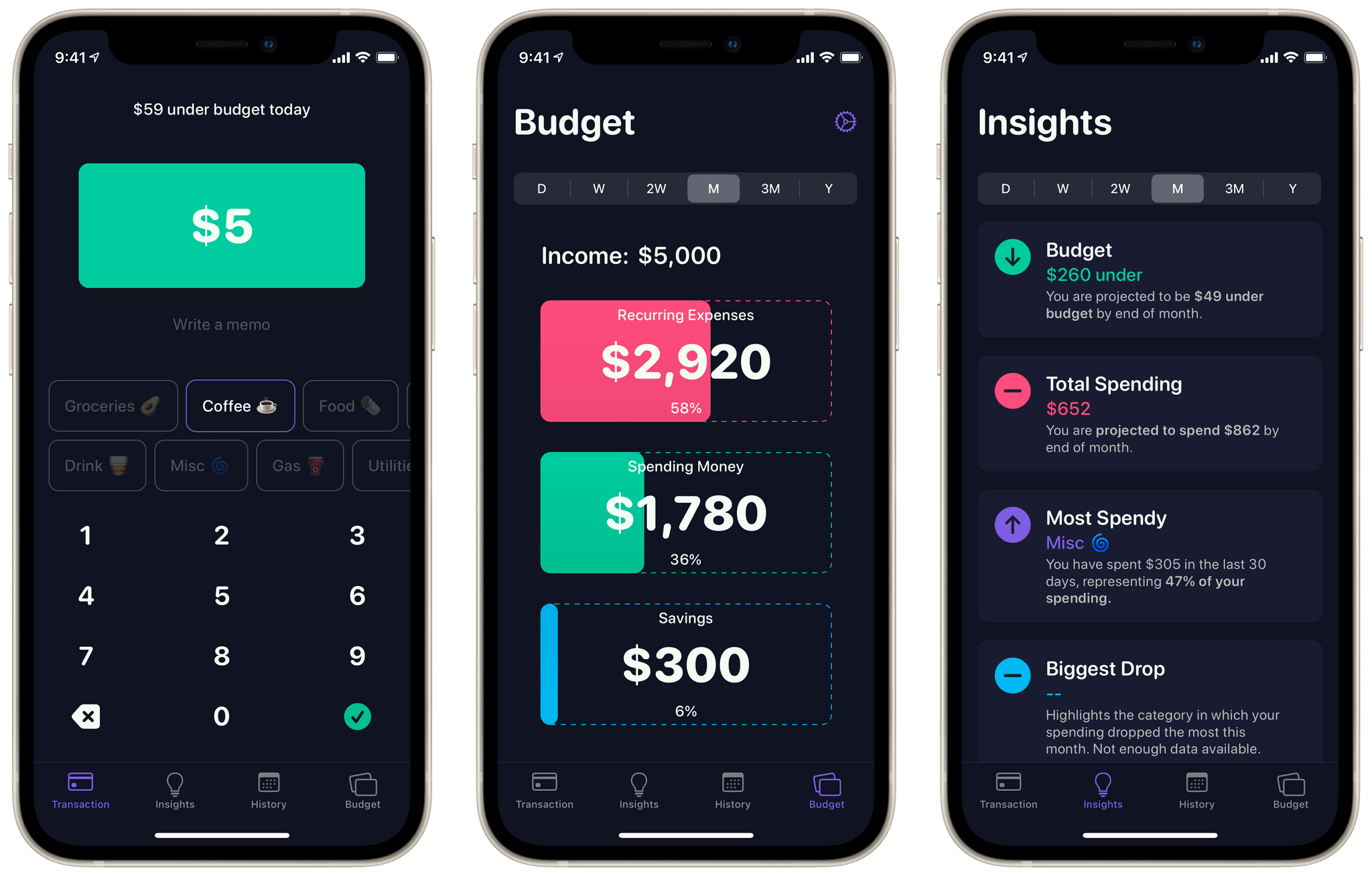
As is the case with any budgeting app, you’ll need to put in a bit of work up front to get started with Nudget. When you first open the app it will prompt you to input your after-tax income and recurring expenses. Nudget uses this data to craft a simplified budget for you. Budget-wise, the app isn’t doing anything too fancy. Each budget consists of three categories: recurring expenses, spending money, and savings. These categories are shown as large cards in Nudget’s ‘Budget’ tab, and you can tap each one to edit it.

Read more

Access Extra Content and Perks

Founded in 2015, Club MacStories has delivered exclusive content every week for nearly a decade.

What started with weekly and monthly email newsletters has blossomed into a family of memberships designed for every MacStories fan.

Learn more here and from our Club FAQs.

Club MacStories: Weekly and monthly newsletters via email and the web that are brimming with apps, tips, automation workflows, longform writing, early access to the MacStories Unwind podcast, periodic giveaways, and more;

Club MacStories+: Everything that Club MacStories offers, plus an active Discord community, advanced search and custom RSS features for exploring the Club’s entire back catalog, bonus columns, and dozens of app discounts;

Club Premier: All of the above and AppStories+, an extended version of our flagship podcast that’s delivered early, ad-free, and in high-bitrate audio.

Learn more here and from our Club FAQs.


Genius Scan 6.0: A Sophisticated iPhone and iPad Scanning App for All Kinds of Users

My scanning needs are modest. I occasionally need to scan a receipt or document for personal or work reasons, but the frequency with which I do that has steadily declined over the years. I have a Fujitsu ScanSnap scanner, which is excellent, but if it broke, I wouldn’t replace it. That’s because iPhone and iPad scanning apps have improved just as steadily as my scanning needs have declined.

These days, the ScanSnap sits in a drawer, demoted from taking up valuable desktop space that I need for the tools I use every day. I still set it up from time to time when I’m working at my desk, but more and more often, I’ve found it to be more trouble than it’s worth to set up.

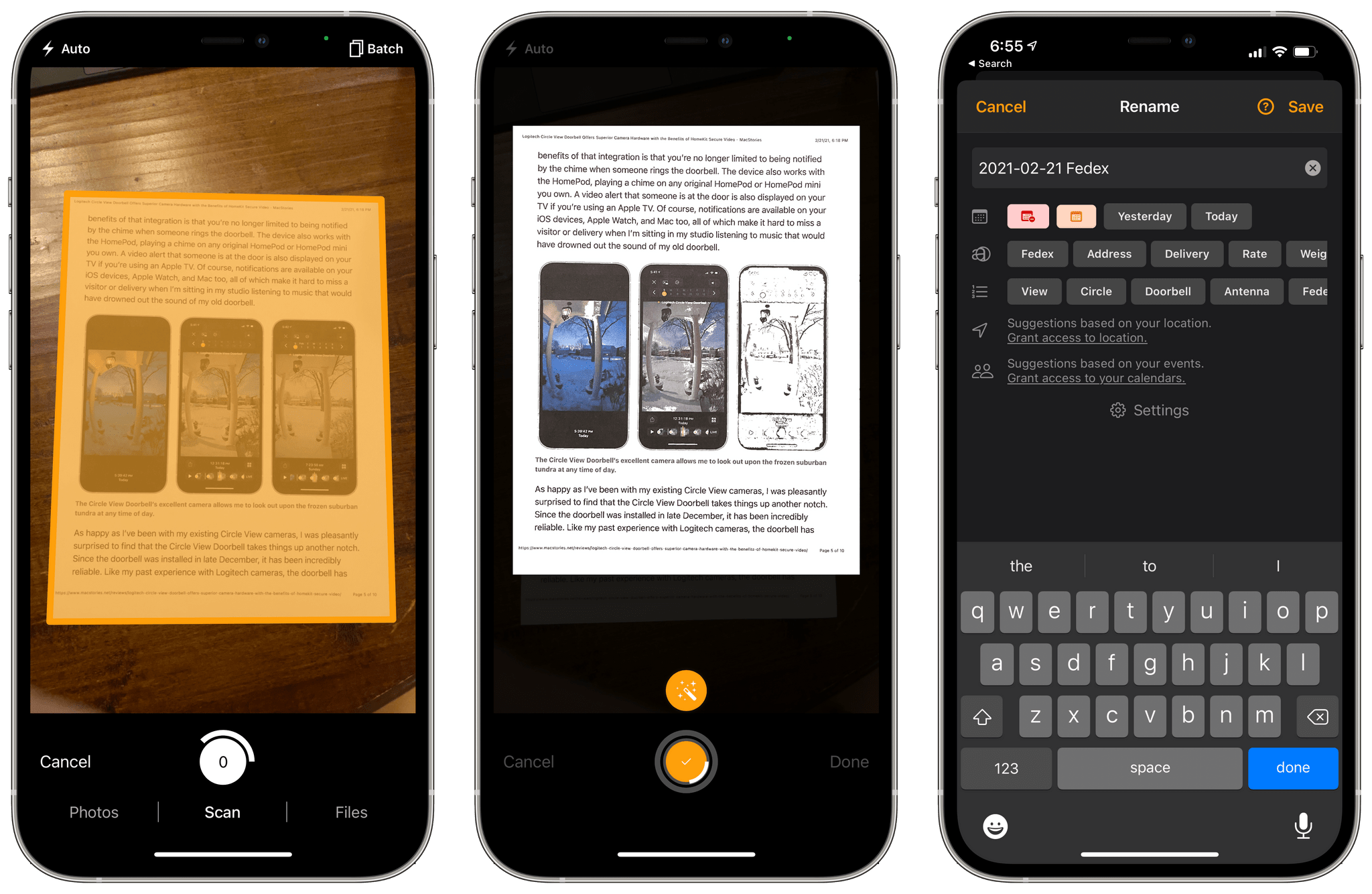
Instead, I’ve been experimenting with a variety of iPhone and iPad scanning apps, including Genius Scan 6, which was released today. The app has a long list of features, but at its core, what I like most about Genius Scan is its fast, flexible scanning workflow and business model that fits with a wide range of user needs from someone like me who doesn’t scan documents very often to people for whom scanning is essential to their daily tasks.

Read more

Access Extra Content and Perks

Founded in 2015, Club MacStories has delivered exclusive content every week for nearly a decade.

What started with weekly and monthly email newsletters has blossomed into a family of memberships designed for every MacStories fan.

Learn more here and from our Club FAQs.

Club MacStories: Weekly and monthly newsletters via email and the web that are brimming with apps, tips, automation workflows, longform writing, early access to the MacStories Unwind podcast, periodic giveaways, and more;

Club MacStories+: Everything that Club MacStories offers, plus an active Discord community, advanced search and custom RSS features for exploring the Club’s entire back catalog, bonus columns, and dozens of app discounts;

Club Premier: All of the above and AppStories+, an extended version of our flagship podcast that’s delivered early, ad-free, and in high-bitrate audio.

Learn more here and from our Club FAQs.


Logitech Circle View Doorbell Offers Superior Camera Hardware with the Benefits of HomeKit Secure Video

For nearly a year, I had a Logitech Circle View camera perched above the front door of my house, which allowed me to keep an eye out for visitors and deliveries. The wide-angle lens was able to capture my front stoop as well as my yard, providing an excellent perspective on what was happening outside.

That setup worked extremely well. In fact, my two Circle View cameras are so reliable that I had begun thinking about replacing a second outdoor camera from Canary that I was using in the back yard. That’s why when Logitech got in touch to see if I wanted to try its new Circle View Doorbell, I jumped at the chance. I figured that if it worked out, I could migrate the Circle View to the back yard. I was also intrigued by some unique features of Logitech’s doorbell and eager to see how well they worked in practice. I haven’t been disappointed.

Read more

Access Extra Content and Perks

Founded in 2015, Club MacStories has delivered exclusive content every week for nearly a decade.

What started with weekly and monthly email newsletters has blossomed into a family of memberships designed for every MacStories fan.

Learn more here and from our Club FAQs.

Club MacStories: Weekly and monthly newsletters via email and the web that are brimming with apps, tips, automation workflows, longform writing, early access to the MacStories Unwind podcast, periodic giveaways, and more;

Club MacStories+: Everything that Club MacStories offers, plus an active Discord community, advanced search and custom RSS features for exploring the Club’s entire back catalog, bonus columns, and dozens of app discounts;

Club Premier: All of the above and AppStories+, an extended version of our flagship podcast that’s delivered early, ad-free, and in high-bitrate audio.

Learn more here and from our Club FAQs.