Posts in news

Google Books for iOS Update: Landscape Reading, Faster

Released in December for iPhone and iPad users, the official Google Books app was very promising as it gave everyone access to Google’s 2 million book catalogue, with the possibility to download books locally and read them on-device. The app, however, sported some pretty bad UI inconsistencies and user experience issues, such as the impossibility to read in landscape mode on the iPad or several bugs that turned many users into frustrated readers that had to deal with an unstable and slow app.

Google wants to change this today with a major update to Google Books for iOS that introduces landscape reading on the iPad, a “find” feature that shows matches for a specific keyword as you scroll down the book and a useful “Get eBooks” button that will automatically sign you into the Google eBookstore with the same username you used to log into the app.  The app is now faster, bugs have been fixed and the iPad on iOS 4.3 also gets a nice 3D page curling effect. Google claims they have improved the book downloading experience, too, as well as the whole responsiveness of the app.

If you’re a Google Books user, you can find the app here. The update is propagating in the iTunes Store now.



iPad 2 Tops Consumer Reports Rankings In Spite of “Competitors”

In the past year, product review and rating magazine Consumer Reports had a troubled relationship with Apple products and its users: since the release of the iPhone 4 on AT&T in June 2010 and the whole “Antennagate” debacle that saw Apple issue a press conference to clarify that the issue was common to every smartphone and announce the free Bumper program, Consumer Reports couldn’t recommend the phone even when a) it was topping the publication’s rankings and b) Apple released the Verizon iPhone which, according to many, doesn’t come with any signal attenuation issues. They, however, recommended bumpers. It was pretty clear that Consumer Reports suddenly had a “thing” for not recommending Apple’s iPhones anymore, but we’re not here to speculate on the reasons or the testing methods they use.

The good news for Apple is, Consumer Reports today announced that the new iPad 2 tops the magazine’s tablet rankings, beating other devices in test labs. Competitors are approaching quickly, though, and Consumer Reports thinks that other tablets will soon give people more choice between different models:

So far, Apple is leading the tablet market in both quality and price, which is unusual for a company whose products are usually premium priced,” said Paul Reynolds, Electronics Editor at Consumer Reports. “However, it’s likely we’ll see more competitive pricing in tablets as other models begin to hit the market.

In their tests, the iPad 2 sported longer battery life than any other tablet: (from Archos, Dell, Motorola, Samsung, and ViewSonic)

The largest gap in performance among the 10 tested tablets was evident in Consumer Reports’ battery-life test, measured by playing the same video clip continually on each tablet and timing how long it played until the battery ran down. The top-scoring iPad 2 lasted 12.2 hours, but the lowest-rated tablet, the Archos 70 Internet Tablet, $270, lasted just 3.8 hours.

Tech specs, of course, aren’t everything when it comes to a personal device like a tablet, and Apple knows this very well. Still, if you’re really interested in Consumer Reports’ take on the whole subject, check out the full press release after the break. [via BGR]

Read more


Spotify iPhone App Updated With New Design

In spite of the issues with music labels the company is facing in the attempt to launch the service in the United States, Spotify is still committed to making great mobile apps to stream, organize and cache music for offline access while on the go. A major update to the iPhone client (not available in the US App Store) was released last night, and you can find it here for free.

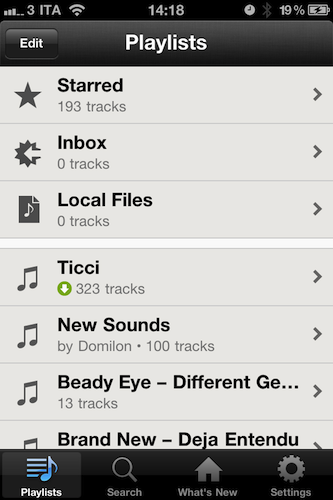
The Spotify iPhone app requires a Premium account: this subscription enables you to use the mobile apps for iOS, Android and other devices, removes ads and lets you stream songs at a higher bitrate. Premium also allows you to save music offline and access the service from another country (that’s what I do). The new iPhone app (version 0.4.11) is a rather big update as it brings a completely new (and elegant) UI design, much cleaner than before. With this new design style, I can’t wait to see what the iPad app will look like – Spotify hasn’t detailed plans for an iPad client but that’s most likely in the works and (finally) ready to ship. The new Spotify for iPhone has also been localized into French and Spanish, and marks the comeback of the Edit button to create and manage playlists, select them for offline usage and delete them. In the main screen, the “Local Files” tab indicates the music files wirelessly synced from Spotify on your computer. The (very unstable) iPod integration feature has been removed in this version.

Spotify for iPhone is available here. More screenshots below. Read more


EyeTV App Update Adds AirPlay Support

In its latest update, Elgato’s EyeTV, introduces support for AirPlay - something many users have been requesting be added.  You’ll be able to stream both live TV and recordings from either the iPhone or iPad version of the app straight to any TV connected with an Apple TV.

One might ask why you would bother streaming TV (particularly live TV) via a Mac to an iPhone to only send it back to a TV. But this can be handy if you have another TV, perhaps in a bedroom and don’t want the hassle of having to install another antenna or set top box which can also cost a lot more than just an Apple TV. That way you could just set up your Mac and EyeTV to record your favourite TV shows and stream it to that bedroom TV.

Don’t forget that there are a number of hacks/workarounds that allow you to stream (using AirPlay) from your iPhone or iPad to another iOS device using AirTuner or even to a Mac using Banana TV.

[Via TUAW]


Patent-Infringement Reversed: Apple Wins Court Battle For $625.5 Million

Penalized 208.5 million for three patent violations, Apple wasn’t going to give up a fight for a few of the most prominent features of today’s OS X: Spotlight, Time Machine, and Cover Flow. On October 1st, 2010, a jury initially awarded $625.5 million to Mirror Worlds LLC in the Texas Eastern District Court (a court which has been scrutinized for appealing to patent trolls). However, the verdict was postponed by U.S. District Judge Leonard Davis – additional post trial arguments were slated to last until November to the dispute.

Computerworld: Apple asked Davis to delay his final ruling on the verdict, claiming that the award amounted to “triple dipping” because the jury penalized Apple $208.5 million for each of the three patent violations.

The case dates back to 2008, as Yale University professor David Gelernter (the founder of Mirror Worlds Technologies) accused Apple of infringing on patents revolving around data manipulation. Specifically, the claims against Cover Flow involved how documents, pictures, and media were displayed on a computer via the Finder and iTunes (the patents also applied to the iPod, iPhone, and iPad). Today it was decided that the patents do not infringe on Mirror World’s technologies and that the damages were also too high.

Bloomberg: “Mirror Worlds may have painted an appealing picture for the jury, but it failed to lay a solid foundation sufficient to support important elements it was required to establish under the law,” U.S. District Judge Leonard Davis wrote.

Apple has also recently won an initial patent battle with cellphone giant Nokia, as the International Trade Commission ruled Apple did not infringe on a set of patents related to mobile phones, computer technologies, and portable music players.

[via Bloomberg]

Image via Engadget


Rumor of Sony Camera In iPhone 5 A Misunderstanding?

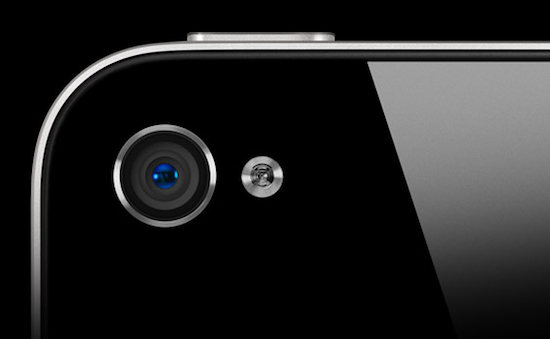
During the weekend, a rumor about Sony being selected by Apple as the only supplier for the image sensors in the next-generation iPhone quickly made the rounds of the Internet following some statements from Sony’s CEO Howard Stringer in an interview with Walt Mossberg at Carnegie Hall in New York City. The report came as a surprise to Apple fans and market watchers as the company has been using camera lenses provided by OmniVision in the iPhone 3GS (3.2 MP), iPhone 4 ( 5 MP), iPod touch 4th gen. and iPad 2 for the past few years.

The rumor suggested that, due to the earthquake and tsunami that damaged Sony’s Japanese facility in Sendai, shipments of image sensors to Apple would be delayed.

Stringer just said that their camera image sensor facility in Sendai was affected by the tsunami. Getting image sensors to Apple will be delayed.

The Wall Street Journal also published a blog post with a partial transcript of the interview:

Early on, he raised the irony of Sony supplying camera components for Apple devices. It “always puzzles me,” he said. “Why would I make Apple the best camera?”

It is unclear what devices he was talking about as Sony isn’t known to supply key camera components, known as image sensors, to Apple; A Sony spokeswoman declined to comment and an Apple spokesperson couldn’t be reached for comment.

Read more


Pogoplug iPhone App Updated With New UI and Faster Media Players

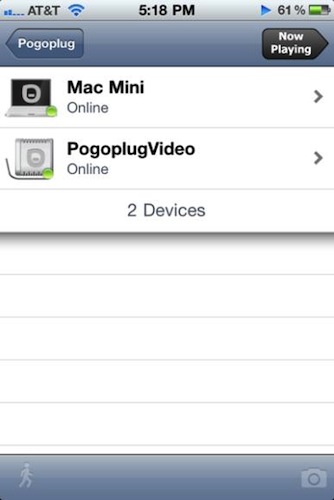
If your digital life is in the cloud as much as mine is, you’ve probably heard of the Pogoplug: in its Pro version, the $99 device can be configured on your local network to share content from attached external drives over the Internet. That means your music, movies and photos stored on regular USB drives can be easily accessed from anywhere thanks to the Pogoplug’s sharing capabilities; plus, the device also allows you to share files, “cloud print” and add unlimited storage as long as you keep attaching external drives to the Pogoplug. Basically, it’s a great way to put your media library in the cloud with minimal setup and, at the same time, get a bunch of additional features depending on the Pogoplug you choose. The great news is, Pogoplug is getting a lot better for iOS users thanks to the recent 4.0 update for the iPhone app.

Pogoplug 4.0 for iPhone adds a new dashboard design with slick icons that allow you to easily navigate between the various sections of the app; among these, a completely new music player that sports new indexing features which don’t force you anymore to manually load songs by letter from the library, but continually index the existing contents of your Pogoplug. The music player is faster, works in the background, and it’s got a new bottom toolbar to switch between songs, artists, albums and genres. The photo and video players have been updated in version 4.0, too, with a cleaner look and faster performances.

Last, the entire file browsing section of the iPhone app got a facelift and a huge speed boost to feel more stable and responsive. As reported by Peter Redmer at Pogoplugged, “navigating through your multiple Pogoplugs, attached drives, and desktops is now much easier and more streamlined”.

You can find the Pogoplug app for iPhone here. You can check out Pogoplug devices on the official website.


Official Facebook App Updated, Gets Map View and “Unfriend”

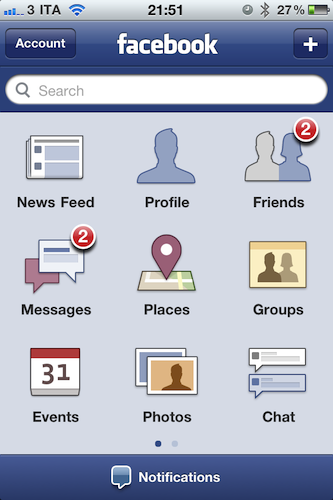
An update to the official Facebook app for iPhone was released in the App Store a few minutes ago, and it adds a number of new functionalities and design improvements. The app, which reaches version 3.4, introduces a new Map view for Facebook Places: friends that have checked in places nearby are now displayed through thumbnail previews on a Google Map; also, the app can now let you check in to Events you’re attending.

The app feels slightly faster and more responsive than before; the News Feed and Notifications UI have been improved (although I still haven’t noticed visible changes) and, overall, switching between sections from the main dashboard should be snappier now.

Perhaps more importantly, Facebook now lets you “unfriend” people directly from the iPhone. Tap on the Friends tab, select a person and hit “Unfriend” in the action button. Previously, this feature was only available on the desktop.

You can find Facebook for iPhone here. More screenshots below.

Update: MG Siegler at TechCrunch details how the new event check-ins work:

To be able to check-in to an event you have to (obviously) be invited and RSVP’d “yes” to attending. Your location also has to match the location of the listed event venue, and it has to be the correct time of the event. All of this will help with gaming.

Read more


Social and App Tabs to Play Big Role in Firefox 5

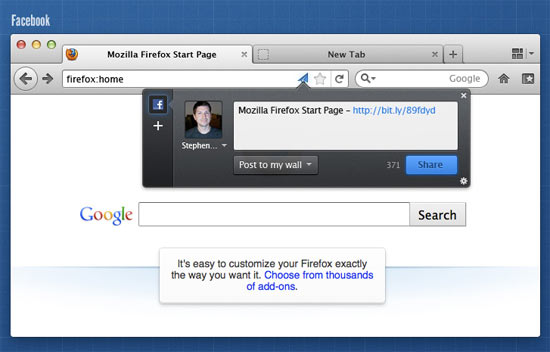
Mozilla has stepped up to the plate with their launch of Firefox 4, which has now garnered well over 59 million downloads as of its launch on March 22nd. With App Tabs, much improved performance, and some incredible features like Panorama baked right in, I’ve adopted Firefox 4 as my browser of choice for the time being over Chrome and Safari. While I leave my love of WebKit behind (perhaps only temporarily), ConceivablyTech dug into the Firefox UX planning pages to give us a glimpse of what’s next for Firefox 5.

Read more