This Week's Sponsor:

HomeSnap

A Private, Read-Only Window Into Your HomeKit Home


Posts in news

Authorized Biography of Steve Jobs Coming Early 2012

Publishing firm Simon & Schuster yesterday revealed that a biography of Steve Jobs is currently being written with an expected release date of early 2012, and unlike previous biographies of Steve Jobs this one has the blessing of Jobs himself. Being written by former Time executive Walter Isaacson and titled ‘iSteve: The Book of Jobs’, it will likely prove to be a fascinating and unprecedented look into the life and mind of Jobs.

Isaacson, who has also written biographies on Benjamin Franklin and Albert Einstein, has interviewed Jobs as well members of his family, co-workers and competitors for the book and was supposedly invited by Jobs for a tour of his childhood home. In a statement the publisher of Simon & Schuster, Jonathon Karp, said that “This is the perfect match of subject and author, and it is certain to be a landmark book about one of the world’s greatest innovators.”

A previously unwelcome biography, ‘iCon Steve Jobs: The Greatest Second Act in the History of Business’ led to Apple banning and removing all books by its publisher, John Wiley & Sons, from Apple’s retail stores.

[Via MacRumors, AppleInsider]


Adobe To Launch 3 New iPad Apps That Highlight Potential of Photoshop Touch SDK

Adobe today announced that it will release Creative Suite 5.5 (a “mid-cycle update”) on May 3 along with three new iPad apps that will complement the full-featured desktop version of Photoshop. The three apps are actually designed as a demo of how developers can take advantage of the new Photoshop Touch SDK (which was released today) and create their own apps that complement and add additional functionality to the desktop version of Photoshop but through an Android, BlackBerry or iOS app.

The three iPad apps; Adobe Color Lava, Adobe Eazel and Adobe Nav will all arrive on May 3rd on the same day as Creative Suite’s 5.5 update goes live.  Adobe Color Lava (priced at $2.99) is in simple terms a digital paint palette that will allow you to mix paints and generate a five-color palette that can be sent to the Photoshop color chip or swatch palette. Adobe Eazel ($4.99) is essentially a basic drawing program (similar to Brushes) that features a unique interface in which by placing 5 fingers on the screen a pop-up menu will appear above each finger, sliding up with the relevant finger will select that menu which will then let you to alter the relevant value (such as color or brush size) . Finally and perhaps most useful is Adobe Nav ($1.99), this app turns the iPad into a dedicated control that has the various tool palettes displayed, selecting a particular tool will select that tool on the desktop version of Photoshop, the app will also let you easily cycle between the various files you may have open in Photoshop.

UPDATE: Shawn Welch has already shown off his third party app that takes advantage of the new Photoshop Touch SDK. His app, Photoshop Remote, allows users to view a live preview thumbnail of any image that is open on a network connected Photoshop client and it can handle multiple clients at once. It even adds a dashboard that replicates a lot of the functionality of the Adobe Nav application including; “tool selection, color selection, filters, adjustment layers, and more.” Jump the break for his video demonstrating the app.

Also after the break is a video demonstrating Adobe Eazel and Adobe Nav apps and jump over to CNet where they wrote a short review of each of the 3 apps, also if you are a developer that is interested in implementing the Photoshop Touch SDK make sure to visit the Adobe Developer Center.

Read more


$200,000 Program Gets Kindergartens iPad 2s & Apps

In the past months, we’ve heard several stories about the iPad being deployed in education with pilot programs aimed at testing the device in educational contexts Apple perhaps didn’t think about in the first place as a possible main focus for the tablet. Many schools all over the world have shown interest in the iPad, mainly thanks to the large selection of software available that makes it easy for teachers to find exactly the apps they need, and for students to be engaged with a great digital experience. Singaporean schools added iPads to their teaching resources, and a $100,000 school program we mentioned last December got every 4th grader at two elementary schools in Hancock Count an iPad full of apps for reading books, doing math, and so forth. Overall, the biggest surprise wasn’t the iPad itself as a technological advancement: rather, it was about how student of every age interacted with it and was willing to learn more through software that impressed teachers, Apple, and bloggers.

Of course there’s more coming. The iPad 2 was released a few weeks ago, and those schools that didn’t have the chance to deploy it in their educational program last year now can have access to an overall better device, with a thinner and lighter design and better battery life. A new $200,000 program was approved in Auburn, Maine to give every kindergarten of the district access to this new teaching resource that is Apple’s iPad, complete with apps bought from the App Store and “insurance” (we assume it’s AppleCare). The district has bought 285 iPad 2s to use in the classroom; eventually, all elementary schools in Auburn will get an iPad as the program begins its rollout in May, and should be completed by the end of September. The 285 iPad 2s are only part of the initial rollout.

So why did the school board approve the program? Because teachers who owned an iPad saw an improvement in how kindergarten kids were learning the alphabet (always a difficult task) thanks to educational apps. So rather than buying new laptops (which are expensive), the district and the school board opted for iPads. Simple as that.

Maybe Apple didn’t expect this quick success in education, or maybe they saw this coming all along. I don’t know. What I do know, though, is that – once again – it’s not really about the specs, the RAM or the openness. These teachers could have asked for Xooms but they didn’t. It’s about the platform, the experience, the pleasure you get from using a device, the intersection of technology and liberal arts. There’s nothing more honest and genuine than a kid having real fun, and if educational software can do that whilst retaining its ultimate purpose of teaching stuff – then I think we have a winner here.

Check out the news video below. [via TUAW] Read more


Apple Looking Into Verizon iPad 2 3G Issues, Fix Likely Coming In Next iOS Update

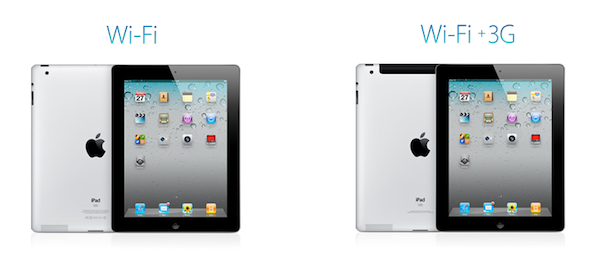
A thread on Apple Discussions detailing connectivity issues experienced by some users on the Verizon iPad 2 WiFi + 3G model caught the attention of the Internet today as more than 80 replies were posted on the original thread confirming that the issue occurred when turning on / off the 3G signal and trying to get it to work again. Other users reported tricks like temporarily activating Airplane mode on their iPad 2 to “kill” 3G and restart it didn’t work as a solution to re-enable connectivity on the device.

All Things Digital now reports an official statement from Apple, with the company confirming that they’re “investigating” the issues:

We are aware that a small number of iPad 2 customers have experienced connectivity issues with the Verizon 3G network and we are investigating it,” the company said in a statement to Mobilized. A Verizon representative did not immediately respond to a request for comment.

Apple has been rumored to be wrapping up the release of another iOS update, version 4.3.2, to make it available in the next two weeks. If Apple has confirmed their engineering team is looking into connectivity problems, there is the high chance these issues will be addressed in the aforementioned iOS update, which is going to be focused on bug fixes and performance enhancements for all iOS devices.


Cydia Tweak Activates Multitasking Gestures On iPhone

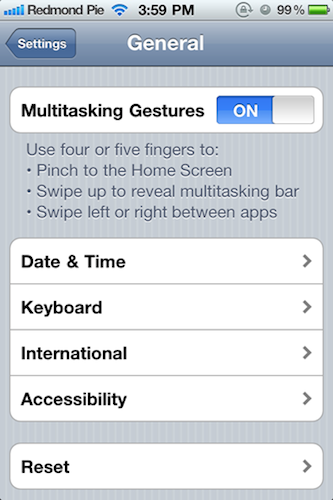
With iOS 4.3, Apple introduced the possibility for developers to activate “multitasking gestures”, a set of multitouch-based four and five-finger gestures that allow you to quickly switch between apps, go back to the homescreen, or invoke the multitasking tray. The gestures didn’t make it into the public version of iOS 4.3 (they were meant for dev test-only since the beginning), but they still can be enabled with a copy of Xcode, also sold in the Mac App Store at $4.99. Personally, I love multitasking gestures on my iPad and I use them all the time. Gestures are the future, and on the iPad they help me do things faster, in a much more intuitive process.

A new Cydia tweak called MT Gestures allows iPhone 4 and iPod touch 4g owners to turn on the multitasking gestures – with the same preference panel seen on the iPad. These settings have been there all the time, but they need to be manually enabled with an hack. This is exactly what MT Gestures does, for free. It’s available in ModMyi’s repository.

We don’t think, however, multitasking gestures are that great on the iPhone. If you want to be reminded why, check out the video below. [via Redmond Pie] Read more


What’s Going On With Apple and Best Buy?

An article published by CrunchGear last night suggested Apple “blacklisted” Best Buy over a misunderstanding between the company and the retailer which, allegedly, had been holding off on selling iPad 2 units they had in stock. Apple didn’t like the strategy, and stopped sending new iPad 2 shipments to Best Buy altogether. CrunchGear also reported it was unclear why Best Buy would keep iPads in stock without selling them (telling customers iPads weren’t available at all), with this information coming from “a reader who works at Best Buy.” The report also went on to claim that – according to the tipster – Tim Cook was involved in negotiations with Best Buy, and the situation was pretty bad for the American retailer.

As it usually happens with rumors involving Apple, the report got picked up by several blogs last night. But since CrunchGear posted the tip they received from a Best Buy employee, it all got more interesting. CrunchGear updated their original report with a purported email from Tim Cook sent to the tipster. Read more


Apple Design Award Winner Star Walk Brings Augmented Reality to iPad 2

We’re huge fans of Vito Technologies’ Star Walk products here at MacStories: winner of an Apple Design Award in June 2010 and released on the Mac under the “Solar Walk” brand a few months ago, Star Walk  is an incredible product that enables you to explore the universe (stars, constellations, planets, satellites) with swipes and taps thanks to iOS multitouch integration.

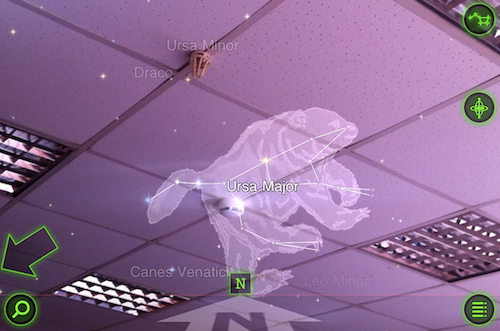
If you own a copy of Star Walk for the iPad and you recently bought an iPad 2, a brand new update is awaiting in the App Store. Released 2 days ago, Star Walk 5.2 (also available on the iPhone, the app is not universal) celebrates the 50th anniversary of the first human spaceflight (completed by Yuri Gagarin in his Vostok spacecraft on April 12, 1961) by adding several features like full Augmented Reality support. Similarly to how the SkyView app we reviewed in March allowed you to point your device to the sky and see the position of stars and constellations in real-time, Star Walk now lets you do the same and it works really well on the iPad 2. Among various bug fixes and enhancements to the control buttons, Star Walk 5.2 also includes a calendar of celestial events to plan your stargazing sessions within the app, and the possibility to search through all categories at once. We feel the Augmented Reality introduction is, however, the biggest and most important addition in this update, and you should consider giving a try to the app if you’ve heard of Star Walk in the past, and you just got an iPad 2. Exploring the universe is way more comfortable and elegant on the tablet’s large screen.

Star Walk for iPad is available at $4.99 in the App Store. The iPhone version is available at $0.99 here.


Apple Releases Boot Camp Update for MacBook Pro 2011 Owners

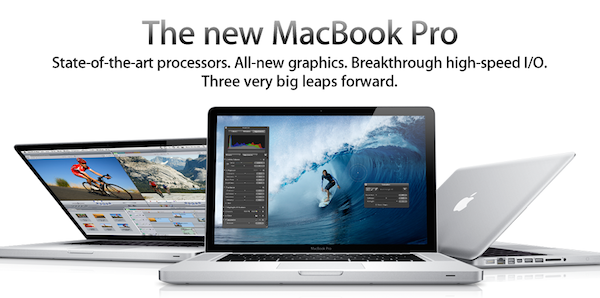
Boot Camp, the utility OS X users rely on to natively install Windows on their hard drives, was updated late last night to address several issues with the MacBook Pro 2011 models released in February. The update, available here, fixes some issues with unexpected shutdowns and Japanese / Korean keyboards, and it’s highly recommended for owners of the new MacBook Pros.

For more information about Boot Camp, visit Apple’s dedicated webpage.


PhotoSync 1.1 Lets You Upload to Dropbox, AirPlay Videos

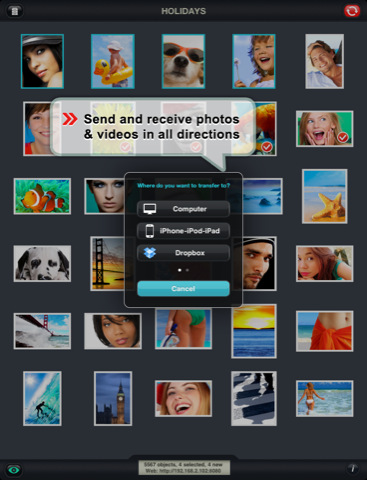
PhotoSync is a universal iOS application I reviewed a couple of months ago which allows you to share photos and videos shot on an iOS device in a completely new way: thanks to its powerful feature set, PhotoSync can send media from iOS to iOS, and from iOS to a Windows PC or Mac. Unlike several other iOS apps that usually launch a WebDAV server locally to share photos with a computer, or only enable you to send files over to another machine through a standalone utility running on the desktop, PhotoSync can do an actual iOS-to-iOS communication as well as standard desktop sharing. It requires a companion app if you want to send items to your computer, but configuration is painless if you just want to share photos and videos between iPhones and iPads using WiFi or Bluetooth.

The latest update to PhotoSync, released a few hours ago in the App Store, adds the possibility of uploading files to Dropbox or FTP servers directly from the app – a highly requested feature I’m sure will come in handy for those large photo collections that need to go into Dropbox. Uploads in original size (and even RAW) are also supported. Multiple files at once can now be uploaded from the app’s web interface, and videos can be streamed to an Apple TV thanks to AirPlay integration (iOS 4.3 is required).

PhotoSync 1.1 is available at $1.99 in the App Store. Full changelog below. Read more