This Week's Sponsor:

Halide

Unlock Your iPhone Camera


Posts in news

Switch Between iTunes Accounts From The Menubar

As usual after someone comes out with a hack that involves AppleScript and a bit of manual fiddling, a GUI version follows after a few weeks. Back in late April we covered an AppleScript created by a Reddit user that, once configured, allowed you to quickly switch between multiple iTunes accounts by simply invoking a shortcut or manually launching the script. Many of us have been there before: in order to enjoy music and apps from the iTunes Store internationally – sometimes avoiding restrictions and taking advantage of timezones – we have to set up different (possibly fake) international accounts. Whilst Apple doesn’t exactly accept this practice, it’s still possible as long as you don’t select a payment method in iTunes. Or maybe, some people simply prefer to create legit accounts and keep different purchases tied to each account. No matter the reason, however, switching between accounts in iTunes is a slow and annoying process: the app isn’t meant for multi-account usage, and every single time you’re forced to re-enter your account’s email and password.

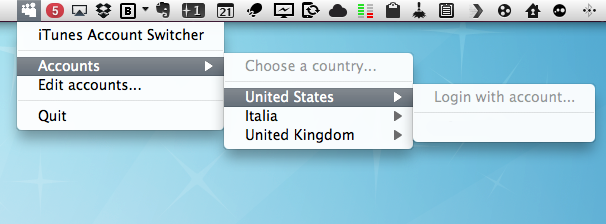
The AppleScript we covered provided a great way to switch accounts and have iTunes automatically fill in the required fields; today’s solution, brought to us by Nature’s Eye Studios, gives the same concept an interface with a lightweight app that lives in the menubar and lists all your iTunes accounts, properly organized by country. You can create as many accounts as you want from the settings, and the app will lets you switch between them by simply selecting one from the menubar’s dropdown menu.

I’ve found this app to be slightly more stable than the aforementioned AppleScript (which made my iTunes crash every once in a while) and, overall, more intuitive than launching a script created for each account I have. You can download iTunes Account Switcher here.



Apple Store iOS App Expected To Be Updated As Part Of Retail Revamp

Some more fragments of information have leaked out about what this weekends rumoured Apple Store 2.0 relaunch will bring. According to MacRumors, the iOS Apple Store app will be updated, bringing with it full support for building custom, built-to-order Macs.

It is suggested that the app update will bring all the features and purchasing options that the online Apple Store currently offers – meaning the ability to customize everything from the processor to memory and even pre-installed software. Add-ons, like printers and AppleCare, would also be options for customers to select when using the Apple Store app for ordering a new Mac. The Apple Store app was released just over a year ago but has always been somewhat limited, only offering customers the ability to order the base configurations of each Mac and with options for AppleCare or One to One.

With this update, it seems clear that Apple has opted to move the mobile ordering experience into an app rather than deploying it as a mobile-formatted website.

With this latest leak, it seems reasonable to expect a fairly large and broad revamp of the Apple Store experience, just days after its 10 year aniversary. From what has leaked and been rumoured, there is expected to be minor store makeovers, a revamp of the internal RetailMe service on iPad 2s, a new internal “Daily Download” application for store employees and now a new Apple Store app for iOS.

[Via MacRumors]


Apple Takes Down Order Status Page Ahead of May 22 Retail Meeting

As a latest piece to the retail meeting puzzle the tech press has been trying to put together in the past week, Apple has taken down the online status order webpage (where users can check on their Apple store orders, make changes, and track shipments) until Sunday, May 22. Other pages of store.apple.com seem to be up at the moment, as the order status page is the only one that reports systems are being upgraded.

Apple’s retail meetings on May 22 have been initially rumored to be focused on a product launch or 10th anniversary celebration of retail, though recent speculation indicated employees might be simply trained on new internal systems such as RetailMe installed on staff-only iPads, new Concierge and other overhauled internal services.

[Thanks, Jonathan]


Mozilla Releases Firefox 5.0 Beta

A few days later than originally expected, Mozilla updated the beta channel earlier today to include the first public beta of the next major version of Firefox, dubbed Firefox 5.0. Available for Mac, Windows and Linux PCs, the new Firefox comes with performance and stability enhancements, as well as support for new CSS animation standards. A detailed list of changes is provided in the Beta channel release notes:

  • Added support for CSS animations
  • Added support for switching Firefox development channels
  • The Do-Not-Track header preference has been moved to increase discoverability
  • Improved canvas, JavaScript, memory, and networking performance
  • Improved standards support for HTML5, XHR, MathML, SMIL, and canvas
  • Improved spell checking for some locales
  • Improved desktop environment integration for Linux users

More importantly, the new beta allows users to quickly switch between Aurora, Beta and Stable channels from the About menu of Firefox to “test features at various levels of development, quality and polish.” No visible interface changes made their way into the 5.0 beta, though from a first series of tests the speed and memory optimizations when dealing with dozens of open tabs seem remarkable. Aurora, the new release channel launched by Mozilla a few weeks ago, aims at following the path traced by Google Chrome with the Canary builds in offering users a way to get access to early builds a step above the so-called “nightly” builds. Today’s beta release marks the debut of Firefox 5. in the public beta channel.

Firefox 5.0 beta can be downloaded here. Read more


Apple Investigating Explosion at Foxconn iPad Factory

An explosion in a Foxconn facility in Chengdu, China, that killed 2 and injured at least 16 earlier today is currently under investigation from Apple and Foxconn, as well as local officials. The blast, reported by several news outlets this afternoon, took place in the factory where Foxconn makes iPads for Apple, the WSJ said. In Fried at All Things Digital posted an official statement from an Apple spokesperson:

We are deeply saddened by the tragedy at Foxconn’s plant in Chengdu, and our hearts go out to the victims and their families,” Apple said in a statement provided to All Things D. “We are working closely with Foxconn to understand what caused this terrible event.

Whilst speculation is running wild as to whether the damages to the facility will affect the iPad’s production chain, our thoughts and prayers go the victims of this terrible tragedy.


Intel Working On New ULV Sandy Bridge Processors Apple Could Use in MacBook Airs

CPU World reports (via MacRumors) that Intel is working on a series of new Core i5 and Core i7 ULV (ultra-low voltage) processors based on the Sandy Bridge architecture which, offering improved speed and graphics performances over the previous-gen Arrandale CPUs, might be a suitable choice for Apple in the next generation of MacBook Air models. The three new processors, Core i5-2557M, Core i7-2637M and Core i7-2677M, increase clock speed from 1.4 GHz and 1.6 GHz to 1.7 GHz and 1.8 GHz, with turbo boost frequencies set at 2.8 GHz and 2.9 GHz. With increased speeds, performances and the same 17 Watt thermal envelope, the new CPUs might as well end up being used by Apple in the MacBook Airs rumored to receive a Sandy Bridge and Thunderbolt update in June or July.

Two forthcoming Core i7 ULV dual-core processors, i7-2637M and i7-2677M, have 1.7 and 1.8 GHz base, and 2.8 GHz and 2.9 GHz Turbo Boost frequencies. This is 200 MHz higher than the frequencies of their predecessors, Core i7-2617M and i7-2657M. Default clock rate of the HD 3000 graphics on new chips stays the same, 350 MHz, although the maximum turbo frequency is increased to 1.2 GHz. The microprocessors boast 4 MB level 3 cache, and support HyperThreading and Vpro technologies. It is interesting to note that, despite of having lower processor number, the Intel i7-2637M SKU will be faster than the i7-2657M.

Low power consumption and speed are obviously factors Apple considers when selecting the processor to implement in thin and lightweight machines like the MacBook Airs. Whilst no release date has been announced by Intel yet, Apple usually gets components from Intel earlier than other companies, leading to speculation that the upcoming Air refresh may include the update Core i5 and Core i7 CPUs. Several reports in the past months indicated was working on a new version of the MBA line, last updated in October 2010, featuring Thunderbolt connectivity and faster processors following recent hardware changes to the MacBook Pros and iMacs.


Facebook for iPhone Creator Tries to Improve Scrolling in iOS Web Apps

Joe Hewitt, creator and former developer of the Facebook app for iPhone, announced earlier this month his intention to leave the company to focus on personal projects to build tools for designers, programmers, and writers. The first result of his renewed development efforts is Scrollability, ”a single script” that has no ”external dependencies” and it’s aimed at dramatically improving scrolling on mobile web applications. One of the biggest problems of web apps, in fact, when compared to native iOS applications, is that web apps usually suffer from bad scrolling performances and an overall feeling of “slowness” that most App Store apps don’t have because of the tools and frameworks they were written with.

On the official project’s page, Hewitt explains Scrollability works best on the iPhone 3GS, iPhone 4 and iPad. Once implemented on a webpage (by adding a few “CSS classes to scrollable elements”), the effects of Scrollability can be immediately noticed thanks to a general snappier and more responsive scrolling than regular iOS web apps. For now there’s only a Table View demo out, and you can try it by heading over this link with your iOS device.

Hewitt also details some of the changes that are being worked on:

Bugs Being Worked On

  • Increase momentum as you flick up or down several times
  • When releasing finger slowly, make sure scrolling is completely stopped
  • Lots of other hard to describe discrepancies with native scrolling…

Features Planned

  • Scroll to the top when status bar is tapped
  • Option to snap to page boundaries
  • Sticky table headers
  • Photo viewer with zooming

Scrollability is available on GitHub, and you can follow Hewitt’s Twitter account to stay updated with the latest changes and modifications to the script. With the improvements introduced in Mobile Safari after the iOS 4.3 software update, there’s a huge opportunity for web developers to write apps for iPhones and iPads that don’t require Apple’s approval; Joe Hewitt’s project may become obsolete as soon as next month when Apple previews iOS 5, but it’s still worth checking it out now and testing it on mobile web pages. [via ReadWriteWeb]


Weather HD for Mac Brings Beautiful Forecasts to the Desktop

Weather HD is a popular weather application for iPhone and iPad by development studio vimov which, unlike most weather tools that display current conditions and weekly forecasts through icons and data sets on screen, comes with a selection of beautifully animated videos that depict the weather conditions of your location. Weather HD animates a cloudy and dark sky when a thunderstorm is coming, and lets you view a green field with grass moving in front of you in case of a windy but sunny summer day. If you’ve tried the iPad app last year, you know what to expect – a very few numbers, lots of video and animations.

The Mac version of Weather HD, released today, takes where the iOS counterparts left off to offer even more videos, and bigger ones with new scenarios and conditions. The app is a 225 MB download for a reason: it’s full of video content that will be displayed on your Mac’s screen as soon as you enter your ZIP code or city name. In the Mac app, though, there’s more than the iPad version. You can set up notifications to be alerted when temperature drops below a certain amount of degrees, and quickly check out the hourly forecasts from an icon in the menubar. You can enter multiple locations, as well as choose to run the app in windowed or fullscreen mode. In the main screen, animated forecasts run on the right panel, and a series of tabs in the upper left hand corner get you access to a slew of other functionalities. You can check out severe conditions and moon phases in-app, or switch to the Map view and apply different layers on your location like clouds, temperature, humidity and wind. When you’re done, the additional panel slides back to reveal video forecasts in their full glory again.

Weather HD has never been an app for weather professionals and geeks, but the Mac app packs more features than its iOS siblings. Videos look good, and whether or not the whole concept can become annoying after a few days of usage it’s totally up to you. But at $3.99, I think vimov is off to another success in the App Store. Read more


Mac App Store Developer Reports 1 Million Downloads

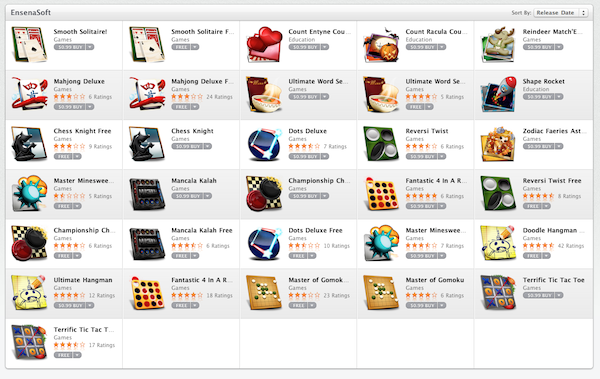
According to Industry Gamers, development studio EnsenaSoft has announced today they’re first developer to reach 1 million app downloads in the Mac App Store. Since arriving on the Mac App Store months ago, EnsenaSoft has released 31 educational and puzzle games / apps for the Mac, totaling 7,000 downloads on average each day.

We have incredible talent within our organization. The applications that they developed have become so popular, so quickly, with Mac consumers,” said Blanca Valencia, President of EnsenaSoft.  “The Mac App Store has allowed us to compete with much larger developers and reach out to a much broader audience than we could have ever imagined. Through the store, Mac users throughout the world can now learn from, and experience, our tremendous applications first hand.

EnsenaSoft has both free and paid apps in the Mac App Store, and the large selection of software surely helped the developers achieve the important milestone. It still surprising however, that the announcement of 1 million downloads is coming from a relatively unknown name like EnsenaSoft, rather than more popular devs like Rovio (developers of Angry Birds) or Pixelmator, a popular image editor for OS X that generated $1 million in revenue in the first 20 days of Mac App Store availability. EnsenaSoft’s success could be a sign detailing the nature of the Mac App Store, which with recent updates to the homepage from Apple has proved to be the perfect platformfor games and kids-oriented products.

Soon after the launch of the Mac App Store on January 6, other stories of success confirmed the theory that a unified app marketplace for the Mac was something users had been looking forward to. Digital organizer Evernote reported 40,000 new Mac users in the first days of 2011, and the developer of Compartments, another Mac app, said he went from 7 sales a day to 1,500. Apple itself announced 1 million app downloads during the first day of Mac App Store. [via Macgasm]