Posts in news

Help Fund A New Q&A Video Series With Startup and Solo iOS Developers

A few weeks ago Anthony Agius ran the ‘One More Thing’ conference in Melbourne, Australia. It was a conference in which a number of Australia’s top iOS developers came and gave speeches about their paths to App Store success to an audience of around 160 people. Some of the developers that appeared at the conference included Matt Comi of Big Bucket Software (The Incident, TV Forecast), Thomas Killen of Voxel Agents (Train Conductor), James Cuda of Savage Interactive (Procreate) and a number of others. Those speeches have now been posted online in full and for free, so if you’re a developer looking for inspiration or just interested be sure to check them out.

Agius hasn’t stopped there though, and has now decided to embark on a new project to make a 5-episode online TV series that features Q&A sessions with the speakers from the One More Thing conference. It is all inspired from a 60 minute Q&A session from the actual conference in which over 100 questions were submitted but time only allowed for 12 questions to be answered.

We want to develop an online TV show to support new startups and solo iOS developers. We will interview some amazing iOS developers about what it takes to do well in this industry, and some of the unexpected challenges that come up.

To make this a reality, Agius is appealing for donations to fund the project. To do it (as he says) to “the quality the community deserves” he is looking for $25,000 to cover all the costs from video editing, web design, motion graphics, flights, equipment hire and various other costs which he has roughly calculated. He is attempting to fund the project through ‘Pozible’, which if you are unfamiliar with is very similar to Kickstarter, and is offering various ‘rewards’ for funding the project which increase as the size of the donation increases - everything from a “twitter hug” to a name on the credits to a free Blu-Ray copy to adverts within the episodes.

So as you can see, it gets expensive to put on a high quality production! I don’t plan to make a profit off the show. Unless the project exceeds the funding target, I won’t make a cent. All raised funds will be put into the development of the show and promoting it. I just want to cover the costs to get it made, enjoy the experience, produce a show I can be proud of and create a valuable information source for those wanting to be indie iOS developers.

Below the break is a video of Agius explaining the project and you can read even more about the project on the Pozible project page, which is where you can also go to help contribute to the project. Video of the speeches from the ‘One More Thing’ conference can be found on Vimeo and you can follow Anthony Agius who co-founded MacTalk Australia on Twitter.
Read more


Turn A Magic Trackpad Into A Numpad With The Mobee Magic Numpad

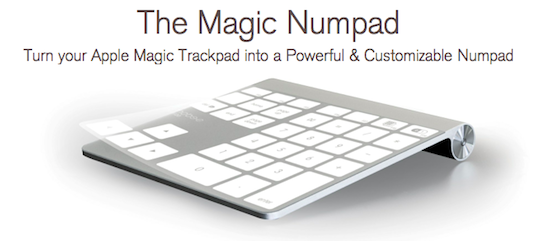
A new accessory from Mobee, which makes some inductive charging accessories for the Magic Mouse and Apple Keyboard, aims to use the Magic Trackpad as a Numpad replacement. The accessory is simply 3 plastic films that are applied onto a Magic Trackpad and a piece of software that translates a tap into a key command from a Numpad.

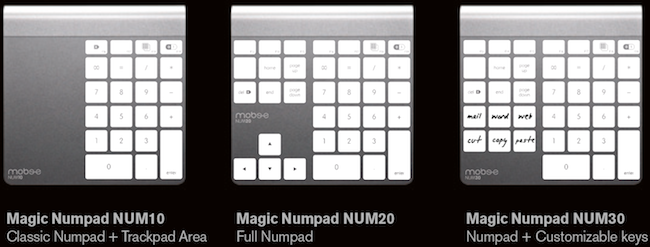
When purchasing the Mobee Magic Numpad you receive 3 different films to use on the Magic Trackpad, each of which have a different layout. You can see the three layouts below, the last of which includes six customizable keys. The films are claimed to be durable and re-usable in case you wish to change between layouts.

Mobee claims that with their product you will “instantaneously get both a Trackpad and a Numpad built into one single device” - although how exactly one switches between the Trackpad and Numpad ‘mode’ is not exactly explained. The Mobee Magic Numpad is available to order now for $29.90 but shipments won’t begin until October. So whilst this is certainly a niche product, it’s quite clever and fairly unobtrusive - although the real question would be how well it works and feels through some use.

[Via This is my next]


“Shrine of Apple” Wants To Photograph Every Apple Product Ever Made

Brought to my attention this morning by The Loop’s Jim Dalrymple, Shrine of Apple is a new website that launched last night with a very ambitious goal: to photograph every Apple product ever made. Not just the ones from 2007 up until today – all of them. From the About page:

Our mission is to showcase the entire spectrum of products that Apple have sold to the public since 1976 – every product Apple Inc has ever produced, in the highest quality and definition possible. Every desktop, every laptop, every notebook, monitor, iPod, iPad, iPhone, mouse, keyboard, modem, cable, port, adapter, docking station, memory expansion card….and that’s just their hardware. Operating systems, productivity suites and all the great software titles that Apple have published will make an appearance too!

The website launched with a relatively small collection of products, with many more queued up for the next weeks. Shrine of Apple’s database consists of detailed high-res photos of products complete with original packaging when available, manuals, and cables. The website’s categories include Desktops, Displays, iPads, iPhones, iPods, Laptops, Peripherals, PDAs, Servers and Software, with more to come. The current selection includes old gems like the Apple IIe Numeric Keypad, Lisa 7/7 Office software, and the Macintosh PowerBook 150.

With high-res photography, descriptions, related links and a true passion for Apple products, I wouldn’t be surprised to see Shrine of Apple becoming a de-facto standard for Apple fans looking up information on old computers and devices, provided by someone who really “knows” and cares about these products, not a faceless online database. Shrine of Apple is, in fact, the creation of Jonathan Zufi, “leading expert in the field of mobility and wireless devices by day – vivid Apple collector by night”.

Make sure to check out Shrine of Apple, and follow the website on Twitter for updates on new products and photos.


Apple Releases New iTunes Beta with iTunes Match

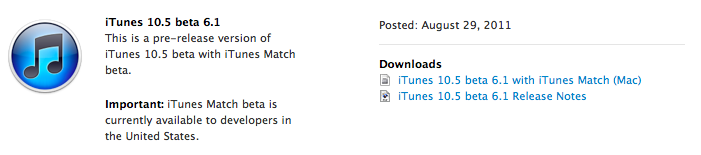
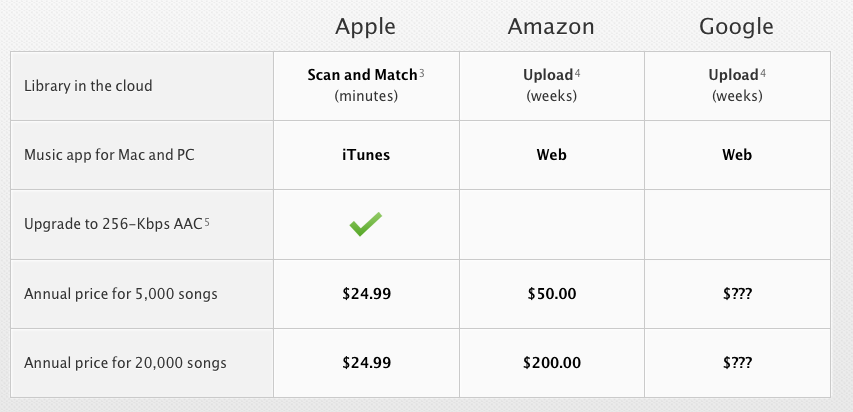
Apple just seeded a new version of iTunes 10.5 to developers, enabling the iTunes Match functionality that will allow users to upload songs to Apple’s iCloud directly from their iTunes libraries this Fall. Unlike other “cloud locker” services from Google and Amazon, Apple’s iTunes Match uses a “scan & match” technology that will try to match songs from a user’s library to the ones found on Apple’s iTunes Store servers, thus avoiding to upload a library in its entirety. The iTunes Match beta is currently available to developers in the United States, and as Apple explains in the release notes the music libraries added during this beta period may be subject to deletion, thus leading to additional re-scans and uploads.

As Apple also mentions in the release notes, iTunes Match beta subscribers “will receive the beta period and an additional 3 months of service with their 12 month subscription”, which as previously announced it’s set at $24.99 per year for 25,000 songs. iTunes LP and Extras are currently unsupported by Match, which is available as a subscription from iTunes’ new interface. From Apple’s official iTunes Match webpage:

Here’s how it works: iTunes determines which songs in your collection are available in the iTunes Store. Any music with a match is automatically added to your iCloud library for you to listen to anytime, on any device. Since there are more than 18 million songs in the iTunes Store, most of your music is probably already in iCloud. All you have to upload is what iTunes can’t match. Which is much faster than starting from scratch. And all the music iTunes matches plays back at 256-Kbps iTunes Plus quality — even if your original copy was of lower quality.

The first beta of iTunes Match comes with a few known issues such as impossibility to add music to iCloud from more than one computer at a time, or some playback issues on iOS. Apple is suggesting developers to backup their iTunes music libraries before installing and subscribing.

More information about iTunes Match is available on Apple’s website. Ars Technica also had a good write-up about this new service back in June.

Read more


Snow Leopard To Get Basic iCloud Compatibility with 10.6.9

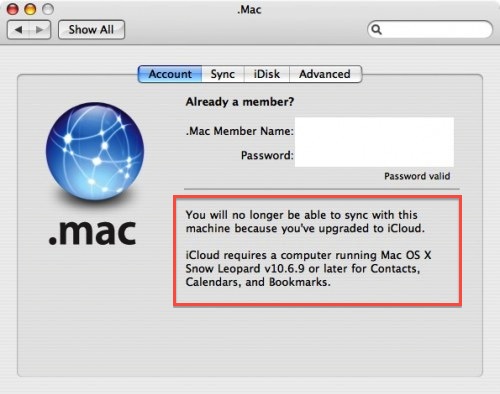
In a somewhat expected turn of events, a notice appeared on an old Mac running Tiger seems to confirm Apple will provide basic support for iCloud sync on Snow Leopard machines. As reported by MacRumors, a developer testing the MobileMe to iCloud transition with Tiger’s .Mac preference pane noticed a message about a 10.6.9 requirement for calendar, bookmark and contact sync.

You will no longer be able to sync with this machine because you’ve upgraded to iCloud.

iCloud requires a computer running Mac OS X Snow Leopard v10.6.9 or later for Contacts, Calendars, and Bookmarks.

Whilst Apple made no mention of Snow Leopard compatibility when detailing iCloud and the transition from MobileMe (actually indicating “some features of iCloud” will require iOS 5 and OS X Lion), it would certainly make sense to provide an additional 10.6 upgrade to ensure basic former MobileMe functionalities under the new iCloud brand. Apple has already started migrating MobileMe developer accounts to the new iCloud ecosystem, providing a desktop add-on for testing on the 10.7.2 developer seed. iCloud is expected to go public this Fall alongside the aforementioned 10.7.2 and iOS 5, whereas MobileMe will be officially discontinued on June 30, 2012.

Developer accounts that are being transitioned from MobileMe are automatically given free storage regardless of the previous subscription until next year, and considering Lion is still touted as an “upgrade to Snow Leopard” (which is required to purchase Lion from the Mac App Store) and that Snow Leopard is still available on Apple’s website, it would be an optimal solution to provide 10.6 users with one last software update to migrate from old MobileMe services to some new iCloud free offerings. There’s one caveat, however: assuming the MobileMe to iCloud transition goes as planned and Apple will really push 10.6.9 to enable iCloud sync, some old MobileMe features like syncing of Mac Dashboard widgets, keychains, Dock items, and System Preferences won’t be available on OS X anymore, as Apple explains here.


Saver For iPhone Giveaway: 10 Copies Of The Delightful Expense Tracker

After a big bug-squashing and feature-adding update last week to Saver, the developers have decided to run another giveaway of their excellent expense-tracking app. I reviewed Saver for iPhone about two months ago where I raved about its excellent and loving design which made the usually dull task of expense tracking a more exciting and vibrant experience. The genius of Saver though is that unlike many other apps on the market, its design keeps things simple whilst still being powerful enough for what most users will need out of an expense-tracker.

The developers are running their own giveaway of Saver where they are giving away 3 copies of the app everyday from today till next Monday, but MacStories readers have another chance to win the app because they have been kind enough to give us 10 copies to give away! Make sure to read our full review of Saver, but jump the break for all the details on how to enter our giveaway of 10 copies of Saver.

Read more


Adobe Releases CreatePDF for iOS

Earlier today Adobe added another application to its iOS portfolio with the release of CreatePDF for iOS, a $9.99 universal app aimed at letting users easily create PDFs on their iPhones or iPads. According to Adobe, “CreatePDF brings the same high-quality PDF creation as Adobe Acrobat” to iOS devices, with PDF documents that look “exactly” like the original files they were generated from; the app uses Adobe’s online services for performance and quality, creating PDFs that preserve quality and accessibility standards with the inclusion of links, images, footnotes, and more.

The app supports the following formats:

  • MS Word (docx, doc), Excel(xlsx, xls), PowerPoint (pptx, ppt)
  • Adobe Illustrator (ai), Photoshop (psd) and InDesign (indd)
  • Images – JPEG, BMP, PNG, GIF, TIFF
  • RTF, Text and WordPerfect
  • OpenOffice and StarOffice documents

CreatePDF works through iOS’s default “Open In…” menu, which allows third party apps to communicate with each other by sending documents to other applications that support specific file types, such as PDF, .doc, or plain text. For instance, the feature was recently introduced in the Omni Group’s OmniOutliner, letting the app export outlines as plain text or OPML to other iOS software installed on device. CreatePDF registers as an app capable of opening (and converting) the file types listed above, and in my first tests it’s proven to be a fast and reliable solution to convert plain text documents, images and PSDs to the PDF format. From any app that supports sending files, you can choose CreatePDF from the “Open In…” menu, and wait for the app to finish the conversion process to PDF. For reference, the app took a few minutes to convert a 12 MB PSD to PDF, with good results. Similarly, a .docx document forwarded to me via email and sent from the iPad’s Mail app to CreatePDF took less than 30 seconds to become a PDF.

CreatePDF looks like a solid solution to convert files to PDFs, although I wouldn’t mind having more sharing options inside the app itself. Currently, CreatePDF can only “open in” other apps, send via email, or print. It’d be nice to have, say, direct Dropbox integration or more online exporting options in the future. The $9.99 price tag might be a little steep for the average iOS users, but quality of converted documents looked superior to me than other apps I tried in the past, and support for Illustrator, Photoshop and InDesign documents is also very welcome.

You can get CreatePDF at $9.99 on the App Store. Read more


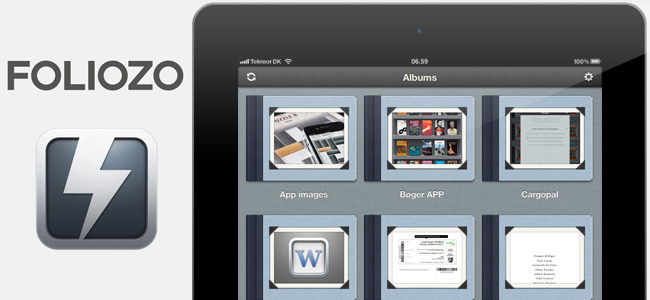
Use Your iPad As A Digital Portfolio With The Excellent Foliozo

One of the iPad’s biggest strengths is the ease to which you can show various pictures, videos or websites to the people around you - its sleek form factor and large display makes it feel much more natural and personal than a laptop or desktop would. It is that inherit trait of the iPad that Apple is taking further advantage of with iOS 5 and its Photo Stream feature that lets you take pictures with your friends and family at the beach on your iPhone and then show those pictures on your iPad after a family dinner because Photo Stream effortlessly syncs photos between the two devices. Our own Federico recently wrote about how it removed the effort of manually syncing photos after he used the feature extensively on a recent summer holiday.

So we know the iPad is great (and will get better with Photo Stream in iOS 5) for sharing pictures and videos with our families and friends, but surely this experience could also translate into the professional realm. The true fact is that it does, with many firms already using the iPad as a portfolio to show concepts, photos and designs to clients and there are already a number of apps in the App Store that make this process easier. Today, however, I’m reviewing Foliozo which is a new entrant to the ‘digital portfolio’ app market, and one I think that stands above the pack.

Jump the break for the full review, screenshots and their promo video.

Read more


Sparrow Developers Working on “Sparrow for iPhone”

As revealed by Dominique Leca to Business Insider, the company he co-founded is now working on an iPhone version of Sparrow, which is in the very early stages of development and simply known as “Sparrow for iPhone” at the moment. For those not familiar with the Mac app, Sparrow is an alternative email client for OS that started out as a mix between classic email and Tweetie-like UI to deliver a fresh Gmail experience on the desktop, and eventually evolved into a powerful solution to access Gmail (including features like shortcuts, stars, and labels) as well as classic IMAP. The app got more social and better integrated with Lion, adding full-screen mode and a completely redesigned sidebar for navigating through your inboxes. Some people say Sparrow’s success is due to the fact that the app does email, but it doesn’t feel like email; Sparrow is sold at $9.99 on the Mac App Store with a lite version available, and a licensed version also up on the devs’ website.

We previously reported on Sparrow adding Twitter’s Loren Brichter to the team of advisors, raising $250,000 in funding over the last months; according to Leca, Sparrow has made more than half a million dollars since the Mac App Store release, although they don’t like the fact that Apple’s store for OS X apps lists both indie software and applications from Apple such as Final Cut Pro X, iWork, or OS X Lion.

In the interview, Leca also reveals they’ve started working on an iPhone version of Sparrow, aimed at enhancing Apple’s Mail experience with a different and faster UI, attachments from the compose view, and lots more. If we had to speculate on Sparrow’s focus for iOS, we’d say porting the Gmail integration that has characterized the desktop app to iOS would be a good idea.

Still, the problem for Sparrow is that Apple has always been reluctant in accepting apps that “duplicate functionality”, such as email applications. That’s why Google hasn’t released an official Gmail app for iOS yet, whilst Android has one. Apple does, however, accept third-party browsers for iOS, albeit they’re based on the same engine of Safari – they can’t use their own interpreters. This is the reason behind the lack of a real Firefox version for the iPhone – the Firefox Home that Mozilla ships is actually based on WebKit, like any other alternative browser for iOS. They’re basically skins on top of Safari’s engine, with different functions and interfaces. Same applies to photo album management apps, which are simply connected to the Camera Roll (and Apple’s Photos app) through an API. An API or similar technique doesn’t exist for email messages, thus the lack of third-party email apps for iOS. Much has changed since 2008 (for instance, Apple now accepts web app wrappers such as MailWrangler), but native third-party email apps still haven’t made it to the App Store.

Leca seems somewhat confident in Apple’s intention to start opening up iOS soon to approve apps like Sparrow for iPhone, which in order to work would have to feature its own email assets in order to directly work with Gmail, out of Mail app, with a different UI and compose view. From the interview:

BI: So do you think they’ll approve it?

DL: I think they will. They’re accepting third party browsers, so why not mail? This would be really inconsistent. Opera has a browser out there, and I think Mozilla has one coming too.

BI: So you think it’s only a matter of time until Apple loosens the chains?

DL: Yeah, I guess so. In regards to apps that compete with their own apps, I think iOS is sufficiently settled and I think people have been evangelized enough now so Apple will feel more secure opening it up.

The current iPhone mail app is just about perfect, but we’re just making things faster in terms of UI, and we’re adding a lot of small details for power users, like attaching images straight from the compose window.

We’re looking forward to Sparrow’s upcoming features on the Mac and mobile version, although I’m personally not sure as to whether Apple could really decide to let others sell email apps or real browsers in the App Store. Sure, the platform is mature enough to let users easily differentiate between Apple’s default solutions and standalone apps, but that would mean giving up a bit of control on the ecosystem, something that Apple has carefully nurtured in the past three years. I believe Sparrow would also be a great addition to the iPad – which I use regularly to manage and respond to emails – but, again, I don’t know why and how could Apple free developers from the ties of Safari and Mail in the near future. [Business Insider via MacRumors]