Posts in news

Apple Releases iTunes 10.4.1 with Keyboard, Album Artwork Fixes

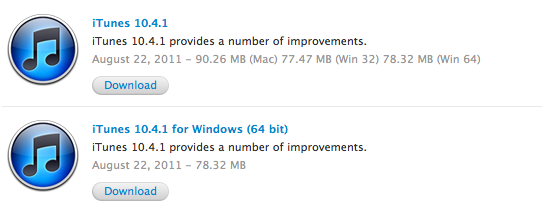
Apple released an update for iTunes a few minutes ago, bringing the app’s version number to 10.4.1 and including in a small delta update – available on Macs through the Software Update control panel – various fixes for the keyboard’s media keys, album artwork, and VoiceOver. From the changelog:

  • Fixes a problem where the media keys on some third-party keyboards work inconsistently with iTunes
  • Addresses issues with adding artwork to songs and videos
  • Resolves an issue which may cause iTunes to become unresponsive when purchasing an HD movie
  • Fixes a problem where iTunes may take longer than expected to open after waking your Mac from sleep
  • Addresses issues with VoiceOver support

iTunes 10.4.1 is available from Apple’s iTunes website and Downloads page, as well as Software Update. The update is available for Macs, Windows 32-bit and 64-bit machines. The app was recently updated to feature full Lion support and a completely rewritten Cocoa codebase, though a newer version of iTunes (10.5) has already been seeded to developers for iOS 5 testing.


Evernote Updates iOS App With New iPad UI, Rich Text, Shared Notebooks

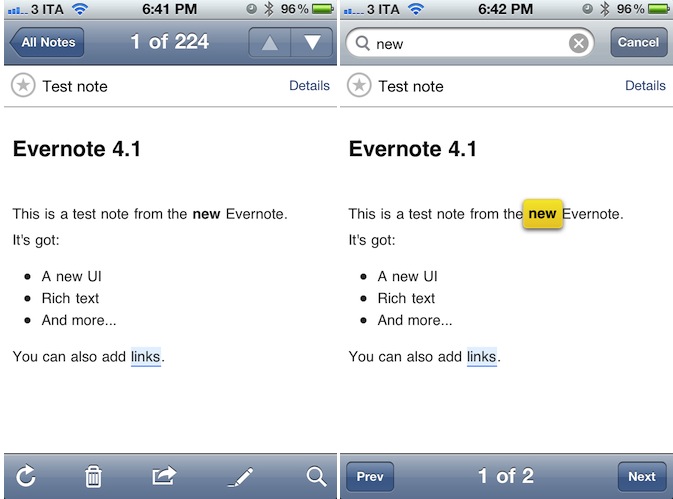
Teased at the first Evernote Trunk Conference last week, the long-awaited new version of Evernote for iPhone and iPad has been released today on the App Store, bringing much requested features to the iOS platform such as rich text styles, new iPad UI, support for shared notebooks and more. Evernote 4.1 for iOS is available for free here, whilst the Mac version’s publicly available beta still reports “beta 4” as the latest one.

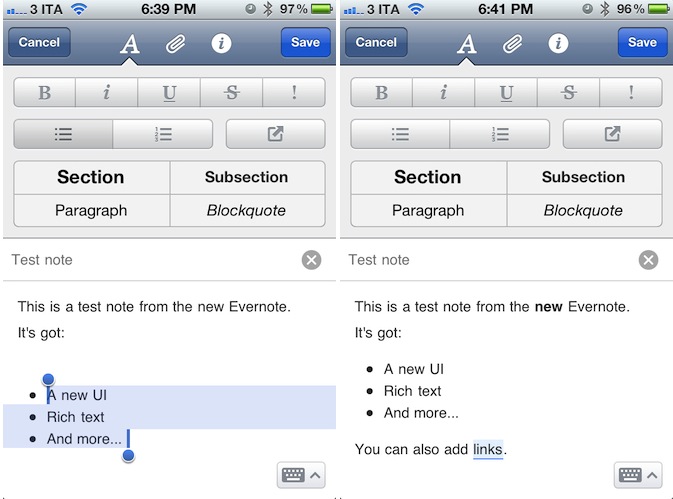
Evernote’s biggest change on iOS is the possibility of creating and editing notes with rich text styles. Whereas previous versions of the mobile app forced users to always edit notes in plain text – thus breaking styles coming from the desktop app – Evernote 4.1 allows basic creation of numbered and bulleted lists, as well as sections, paragraphs and blockquotes straight from an iPhone or iPad. Obviously, users can now also select text to make it bold, italic or underlined, with more options such as strikethrough and highlight available in a new formatting bar. To create or edit styles, Evernote uses a new tabbed toolbar on the iPhone that enables users to switch between styles (the uppercase A button),  attachments (images, audio notes, new photos), and note information such as notebook, tags, and location.

The Evernote team explains some of the limitations of rich text editing on iOS:

This update dramatically increases the creation and editing capabilities of Evernote for iOS. You will be able to edit any note that contains rich text that was created on the device. You will also be able to edit any note that contains styles available on iOS. There are some limitations to be aware of. You won’t be able to make direct changes to notes that contains more complex styles than what can be made in Evernote for iOS. These may include web clips, other typefaces or tables.

If you try to edit a complex note, you’ll be presented with new options: Append or Simplify. Append will add your additions to the end of the note. If you choose Simplify, Evernote will simplify the styles in the note to ones that are editable, which means that some complex styles may disappear. If you want to get back to the original, you can fish it out of the trash.

Evernote updated its iPhone app with a cleaner UI for note creation months ago, but admittedly this new version feels much nicer in comparison thanks to a clever usage of screen space, and elegant design. To edit a note and append rich text styles, users have to tap on the “edit” button when viewing a note, then manually select the text they wish to style – it works similarly to any desktop app in that you select text and then press a button to style it. Read more


Square Launches “Card Case” App for iPhone

Officially announced by Square in May, the company’s first Card Case app for iPhone is now available for free on the App Store, alongside an update to the official Square app that brings improved transaction speed, new tipping interface, and no signatures for transactions less than $25. Square, the mobile payment service that based its success on iOS apps and a mobile “card reader” that plugs directly into iOS devices’ headphone jack, detailed its plans to take over traditional wallets, credit cards and receipts with two new products, the aforementioned Card Case and Register for merchants.

Card Case is a digital wallet, a separate app available exclusively on the iPhone, that allows users to easily pay at their favorite local merchants with a few taps. By eliminating the need for cash, or real credit cards to carry around in a physical wallet, Card Case lives on the iPhone and collects different tabs associated to a user’s name and currently open at selected merchants. When it’s time to pay, instead of using cash or a credit card, merchants using Square can ask customers for their names, and have the Card Case app take care of the rest. Card Case lets you explore new and nearby places, keeps a list of recent transactions and paperless receipts which are automatically emailed after a transaction. Read more


iOS 5 Includes An Early Warning ‘Quake Alert’ Notification For Japanese Users

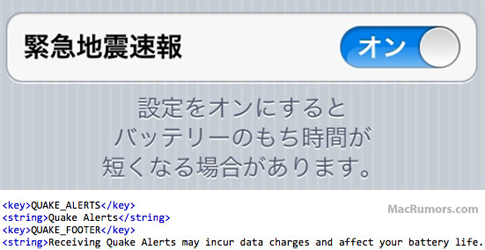
As discovered by a 9to5 Mac reader, iOS 5 contains a new ‘Quake Alert’ notification option to warn Japanese users of an expected earthquake. This new notification option simply hooks into the Japanese earthquake warning system and does a similar job to what some apps on the App Store already do, just on a simpler level that doesn’t require a third party app.

As this year’s devastating earthquake and ensuing tsunami in Japan tragically showed, such early warning systems are extremely important in getting just a little bit of time to prepare. Since the earthquake this year, Time has published an article that detailed the Japanese earthquake warning system:

Japan has the most advanced earthquake early-warning system in the world. A nationwide online system launched in 2007, it detects tremors, calculates an earthquake’s epicenter and sends out brief warnings from its 1,000-plus seismographs scattered throughout the country, one of the most earthquake-prone nations on the planet.

As MacRumors points out, this early warning system notification for the iPhone won’t be the first time the system has been integrated into a Japanese smartphone, with quite a number already featuring the system. Japanese users will be able to turn the ‘Quake Alert’ notification on and off from the Notification Center settings pane - although there is a warning that receiving quake alerts may impact on battery life (due to the connection to the early warning system.

[Via 9to5 Mac, MacRumors]


UDIDs To Become App-Specific After iOS 5

A subtle change noted by TechCrunch in the developer documentation for iOS 5 details how Apple, sometimes in the future and not necessarily starting with iOS 5.0, will start assigning unique device identifiers, or UDIDs, to apps rather than the device itself. TechCrunch reports that according to the documentation, “uniqueIdentifier” has been deprecated in iOS 5, suggesting developers to start using identifiers assigned to each app. For those not familiar with the concept of UDID, it is a alphanumeric string unique to each device (such as iPhone or iPad) that is widely used by advertisers to target ads at users without knowing personal information (just the UDID of a device, and some data associated with it), or by developers to test betas with a specific pool of users, making sure the beta doesn’t get installed on other devices (thus the UDID requirement).

In the past months, however, UDID usage has caused a number of privacy and security concerns because of certain advertisers and developers collecting more information associated to the UDID (such as email addresses or list of names) than they were allowed to, leading to a discussion as to whether UDIDs were really necessary. Basing on TechCrunch’s report, it’s unclear if Apple is going to remove UDIDs as we know them from the first version of iOS 5:

I guarantee Apple will not stop using UDID,” predicts one mobile industry CEO. If Apple does continue to use UDID for itself but denies it to developers that would be an “extremely lopsided change.” It would give Game Center and iAds yet one more advantage over competing third-party services.

Furthermore, when Apple announces that they’re “deprecating” a technology, it doesn’t mean it’s going away in a few weeks or months. Usually, a “deprecated” API or specific technology in, say, OS X is more of a warning to developers, a way to inform them that, going forward, there will be changes. This seems to be what Apple’s doing now with app-specific identifiers, with several iOS and Mac developers already wondering on Twitter how could Apple make the transition from device-based to app-specific UDIDs as seamless as possible for the developers themselves, and users.


Apple Releases iOS 5 Beta 6

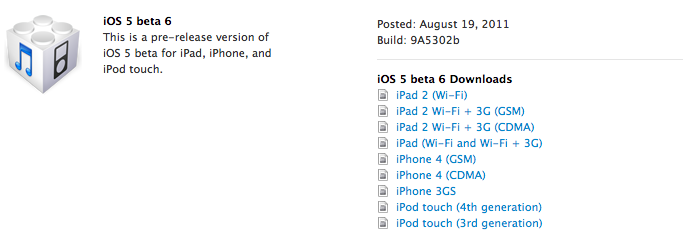
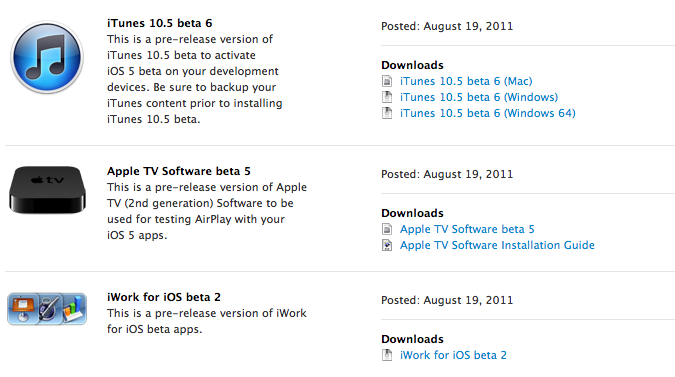
Apple has just released iOS 5 beta 6 in the Dev Center, with build number 9A5302b. Additionally, Apple has also released a new iTunes beta, Xcode 4.2 Developer Preview, Apple TV software and the second beta of iWork for iOS with iCloud functionalities. The release comes two weeks after iOS 5 beta 5, seeded to developers on a Saturday. iOS 5 is expected to be the operating system the next-generation iPhone will ship with out of the box, with recent rumors suggesting an early October release for the device.

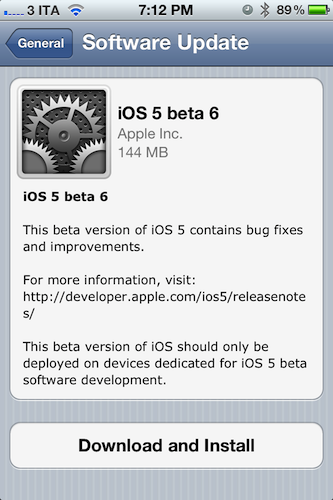
iOS 5 beta 6 can also be installed over-the-air on devices running iOS 5 beta 4 or later – beta 6 for the GSM iPhone 4 is a 144 MB download as pictured below. Apple recommends a backup either through iTunes or iCloud prior to installing iOS 5 beta 6.

iOS 5 is the next major release of Apple’s mobile operating system for iPhone, iPad, and iPod touch, bringing new features like direct Twitter integration, PC-Free setup, iCloud, and completely revamped notifications to iOS devices this Fall. We will update this post with more information on the latest beta as it becomes available.

Update: Apple also seeded a new beta of the iCloud desktop control panel for Lion, Safari 5.1.1 for developers, as well as a new version of OS X 10.7.2. OS X 10.7.1 was released earlier this week, and 10.7.2 is being provided to developers to test iCloud integration on the Mac.


WSJ: iPad 3 In Early 2012 with High Resolution Display

According to a new report by The Wall Street Journal, Apple will begin trial production of the next-generation iPad with key component suppliers in October, with the device set to debut in “early 2012” featuring a “high resolution display”. Whilst speculation in the past months had claimed Apple would release two iPads in 2011, with a possible “iPad 3” likely set for a Fall release alongside the iPhone 5, recent rumors have indicated Apple would either stick with its annual release cycle, or launch a minor refresh of the iPad 2 – dubbed iPad 2 HD – this year, focusing on improving screen resolution and processor speed.

The Wall Street Journal seems to believe the former theory, claiming that “[the] next generation iPad is expected to feature a high resolution display - 2048 by 1536 compared with 1024 by 768 in the iPad 2” with a launch in early 2012.

One component supplier to Apple said the company has already placed orders for parts for about 1.5 million iPad 3s in the fourth quarter.

“Suppliers will ramp up production and try to improve the yield rate for the new iPad in the fourth quarter before its official launch in early 2012,” said a person at the supplier.

Rumors surrounding a second iPad to be released in the fall started when both TechCrunch and Daring Fireball’s John Gruber hinted at an iPad 3 coming out this year for a “fall surprise”. Since then, speculation has been running wild as to whether Apple could really release the iPad 3 in 2011 whilst they were still struggling to meet demand for the iPad 2, which Apple COO Tim Cook later described as the “mother of all backlogs” due to a combination of high customer demand, and component shortages. However, at the Q3 earnings call in July Apple reported 9.25 million iPads sold in the quarter, mentioning that iPad 2 supply improved “dramatically” in the previous months.

Whereas several websites are still backing up the claims of a second iPad to be released in 2011, a report from Digitimes in June detailed how Apple had just began component certification for the iPad 3 set to come out next year. Technical details of the new device are unclear, although a number of reports in the past months – as well as graphical elements found in the iOS operating system – suggested Apple wants to build a “Retina Display” in the iPad 3 by doubling the existing resolution of the device, bringing it to 2048 x 1536 pixels up from 1024 x 768.


Evernote Acquires Skitch, Will Remain A Separate App

At the Evernote Trunk Conference that’s currently going on in San Francisco, Evernote CEO Phil Libin announced the company has acquired popular image sharing service Skitch. Skitch is a drawing tool for OS X that allows users to make quick edits and leave annotations on screenshots to share online with their friends and colleagues. The Mac app has got direct Twitter integration, it supports drag & drop and it can instantly send screenshots on to the web that anyone will be able to see with a browser. We had a review of Skitch for Mac last year, although the app has been improved a lot since then and given a new price point on the Mac App Store.

Following this acquisition, the price is the first thing that will change for Skitch. As part of Evernote, Skitch will be available for free on the Mac App Store, with no ads and no trials; existing Skitch users will be able to keep using the service with their accounts, though new users will get the possibility of signing up using their Evernote credentials. Evernote is promising “tighter integration between Evernote and Skitch” to “easily draw, ink, grab screenshots, annotate and share your favorite memories” – admittedly, as a long-time Evernote user, being able to edit and annotate images in a notebook has always been something I wished Evernote would do besides rich text editing and tagging. All Things Digital is also reporting an Android app will be launched soon, with Skitch for iOS and Windows to follow.

We were drawn to Skitch (har har) for one simple reason: we love and use their product with Evernote. For years, one of our most requested feature areas has been related to improved handling of images and annotation capabilities. Our users take and share millions of photos and screenshots already, but the experience isn’t as good as it could be. We debated about whether to add the improved functionality into Evernote or build a separate app to handle it. Finally, we decided to do both. Thanks to Skitch, we will.

According to Evernote, the engineers at the two companies will be working closely in the coming months to deeply integrate Skitch and Evernote with each other, as right now the only way to let the apps communicate on a Mac is by annotating an image in Skitch, and manually drag it into Evernote. It wouldn’t be a surprise if the app gained a feature to push annotations to Evernote’s cloud to avoid drag & drop – considering the app is coming to mobile devices, this has been certainly considered by the Evernote team. At the moment of writing this Skitch is still a paid app on the Mac App Store, so check back for changes soon to download it for free. We’re looking forward to whatever the Evernote team has in store for Skitch integration in their products – in the meantime, you can read the full announcement here.

Update: Skitch is now free on the Mac App Store.


Google’s Photovine App Now Open for All

Back in July we covered the release of Photovine for iPhone, an image sharing app developed by Google’s internal Slide team that, among other things, is also responsible for Disco, a group messaging app, and Pool Party. Powered by a slick design and attention to detail, the Photovine app that was released last month didn’t allow everyone to sign up and start sharing photos as the system was invite-only without an open sign-up. With an update pushed last night on the App Store, Photovine has revamped Facebook and Twitter integration from within the app and finally opened registrations without the need of a beta invite.

Unlike the popular photo sharing app and iPhone-based social network Instagram, Photovine doesn’t revolve around the simple concept of photos uploaded to a user stream and shared with followers. Rather, Photovine is based on “vines” – photos connected by a caption and contributed by you, your friends, and other people using Photovine. So, for example, say you’d like to share a photo about your newly acquired MacBook Air, you can start a vine called “My new MacBook” and your friends will be able to let the vine “grow” with new photos related to the caption, and the photo you originally posted. This is best explained by Photovine’s promo video, which we’ve embedded after the break.

Photos in a vine can obviously be liked and commented on, each user has its own dedicated page with a profile picture and followers/following/likes counts, and an Inbox tab in the bottom toolbar allows you to check on messages you’ve received from other users, or notifications such as new followers, comments, and likes. This is not too dissimilar from Instagram’s implementation of “activity”. Users can add new photos to an existing vine (or even “watch” a vine if they’re interested in it) or create a new one from scratch – Photovine comes with a beautiful custom camera interface that lets you snap your own photo, or pick one from the Camera roll. Indeed the whole app sports a gorgeous and clean design that makes it easy to jump through vines, user profiles, and comment on photos shared by others.

Photovine for iPhone is an interesting concept with a good-looking interface and additional social functionalities to forward photos to Twitter and Facebook, and find friends on those social networks as well. You can download Photovine for free on the App Store. Read more