Posts in news

Growl, Mountain Lion, And “Getting Sherlocked”

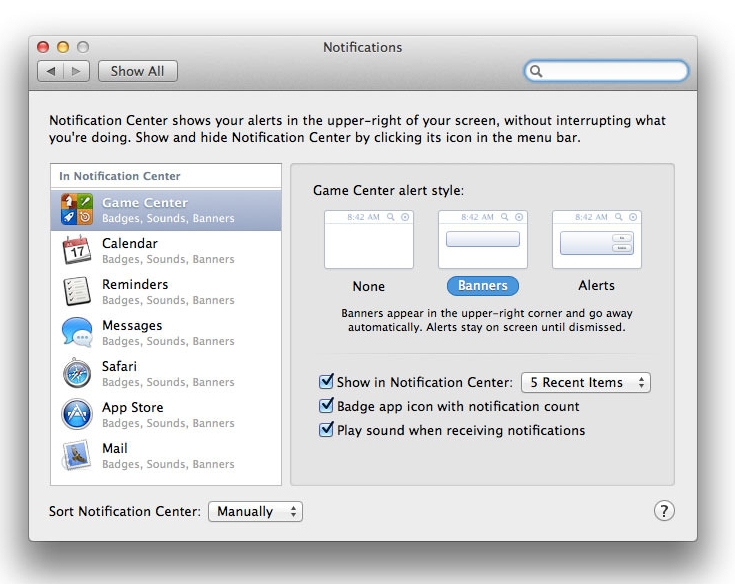
Last week Apple revealed its new Mac operating system, Mountain Lion, due out for this summer. While not a complete overhaul, 10.8 is a polished update that adds many similar functionalities from iOS 5. Among these changes, and one of the most important pieces, is Notification Center. As the name suggests, it is basically Notification Center ported from iOS, running at a system level on Mountain Lion. Besides having the same UI elements we see on our iPads and iPhones everyday, it also has a badge mode much like Growl, our favorite open source notification system for OS X. It’d be fair to say that almost every OS X die-hard uses Growl, as it’s very customizable with function and appearance. Last year, the Growl team overhauled the app and submitted it to the Mac App Store, where it quickly became one of the most popular utilities in the Top Paid charts.

Following Apple’s announcement, some people have said Notification Center will create a problem for Growl, as Apple’s own solution could hurt Growl by replacing its functionality on OS X. Now, as far as I know, Mountain Lion’s Notification Center will only work with Mac App Store apps, so Growl could still have a place for third-party apps that are installed outside of Apple’s storefront, as allowed by Gatekeeper.

Growl doesn’t seem to think Notification Center will immediately hinder installation or usage of their app, either. In a blog post from February 17th, the developers say Growl still has room in OS X to play with. They have listed some points as to how Growl will continue to go forward:

  • The developers are investigating options for integrating Growl with Notification Center.
  • Growl will work whether your application is from the App Store or not, as long as it supports Growl.
  • They’re still on schedule to release Growl 1.4 and 2.0.
  • Growl is great for customizable notifications.
  • Development of other applications will continue, such as HardwareGrowler, GrowlTunes,  and Capster as Mac App Store apps.

The Growl developers are optimistic even though they are going to have to compete with Apple. With Growl 1.4 already in beta testing (with many great improvements) and work on Growl 2.0 underway, I wouldn’t say Growl has been been “Sherlocked” by Apple’s announcement.

As a side note, developer Collect3 released Hiss today, a free app that sends all Growl notifications directly to Mountain Lion’s Notification Center. So, if you have an app that supports Growl, not Notification Center, you’re in luck. This could be the first step in both Growl and Mountain Lion’s Notification Center working together in some way (much like Notification Center hasn’t hurt the extensibility of Boxcar), albeit Connect3 was quoted on The Verge as saying that “(Hiss was) just a result of us being impatient to start seeing Notification Center become useful.”

[image via Macworld]


“Creating Flow with OmniFocus” Now Available as Audiobook

The aim of this text then is not just in using the productivity and task management program OmniFocus, but also in getting to the creative space wherever that may be found. The hope is in getting to those things you want to do and enjoy while maintaining the responsibilities that inevitably accrue in life. Be it in work, play, or with family, we are aiming for a relaxed depth of focus and flow.

Originally released in November 2010, Creating Flow with OmniFocus by Kourosh Dini is one of the best resources available to learn more about The OmniGroup’s fantastic GTD software. Specifically aimed at Mac users of OmniFocus, the 555 pages of Dini’s book will take you through the basic concepts of the application, such as Projects and Contexts, to more advanced techniques and workflows that may involve prioritization of your tasks, context management and, overall, finding the right “flow” for your tasks and Getting Things Done system. As a reader of Creating Flow with OmniFocus myself, I’ve always been impressed with the way the author made this book about balancing your own creativity with goals and projects you have to complete in real-life, rather than simply writing a “how to” guide for OmniFocus. Sure, the book has its tutorial-oriented sections with screenshots and tips, but I found the overall “focus” on creating flow and making the system work for you quite liberating.

Creating Flow has been substantially improved since its original release. Kourosh Dini worked hard to bring the book up to speed with the latest refinements introduced in OmniFocus for Mac (now at version 1.9), and today he released an audiobook version that is available on his website. I have been able to listen to a pre-release copy of the audiobook, and it’s a good alternative for those times when you don’t want to sit down with a full copy of the eBook in your Mac or iPad PDF reading app of choice (personally, I like PDF Expert), but still would like to catch up on some great OmniFocus suggestions and discussion. In fact, I would say that the biggest advantage of the audiobook is that, once synced to your iOS device, you’ll be able to quickly navigate between chapters and instantly get to your desired section with just one tap. You’ll lose images and the overall visual style of the eBook (albeit the .zip file comes with a reference of over 300 screenshots), but you’ll gain an improved navigation that makes it easy to skip sections you don’t want to listen to again if you’ve already read the book. In this regard, existing owners of Creating Flow should consider supporting Kourosh again and get the audiobook just to have a refresh on some parts of the original book without having to go through it again.

The audiobook has been narrated by professional voice actor, Bruce Edwards, encompassing nearly 10 hours of listening material. As I wrote in 2010, Creating Flow with OmniFocus is the book every OmniFocus user should read. Now you can listen to it as well with the audiobook available here.


VLC 2.0 Released: What’s New, And An Interview With VideoLAN Developers

Back in February 2010, I wrote a post for MacStories about Lunettes, a codename of a new interface for VideoLAN’s popular media player VLC. Back then, I used to spend a good portion of my days fiddling with media players and skins for VLC, which I used to access a well-organized media library on my MacBook Pro and various external hard drives. Lunettes was promising, and it proved that VLC could have an interface design more suitable for the needs of the Mac community. I didn’t know, however, that work on the next major version of VLC, VLC 2.0, had already begun in 2008 with the first concepts and technical drafts, with Lunettes being the complete rewrite of the application that stemmed  from that original vision that eventually led to VLC version 2.0, released today.

Available for Mac, Windows, and Linux machines, VLC 2.0 is a major update that brings several new optimizations on the technical side, new features, and a brand-new Mac interface that we’ve already covered here on MacStories. It can be downloaded for free from VideoLAN’s website.

Often regarded as “the media player that can open almost anything”, VLC has indeed become many’s de-facto choice over the years when it comes to dealing with a variety of video file formats, or audio files that other media players such as iTunes won’t open. If you weren’t aware of all its functionalities and secrets, you’d say VLC’s best feat is the fact that it can launch almost any kind of file you throw at it. From the strong foundation of VLC 1.x, VLC 2.0 introduces support for new formats – as well as enhancements and fixes for the currently supported ones – with better handling of H.264, MPEG-4/Xvid and WebM thanks to multi-threaded decoding, support for 10bits codes and WMV image, completely rewritten support for images, changes in RealVideo and Real Format integration, correct support for FLAC, RV and Hi10p in MKV, and a plethora of other minor adjustments and refinements that contribute to making VLC one of the most (if not the most) versatile and customizable media players around. For instance, professional users will find support for ProRes 422 and 4444, AVC/Intra, Jpeg-2000 and DNxHD/VC-3 in 10bits and a new, faster Dirac/VC-2 encoder, whilst anime fans will be pleased to know VLC 2.0 features a “vastly improved” MKV demuxer. If you simply care about formats and the stuff VLC can open or has been optimized for, this release shouldn’t disappoint you.

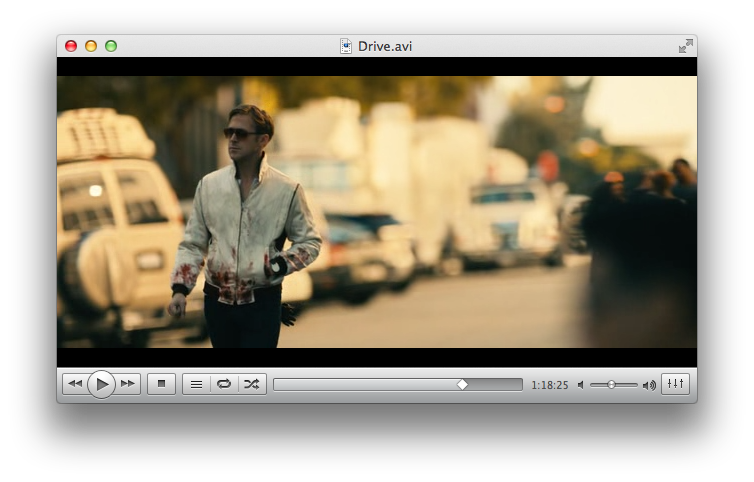
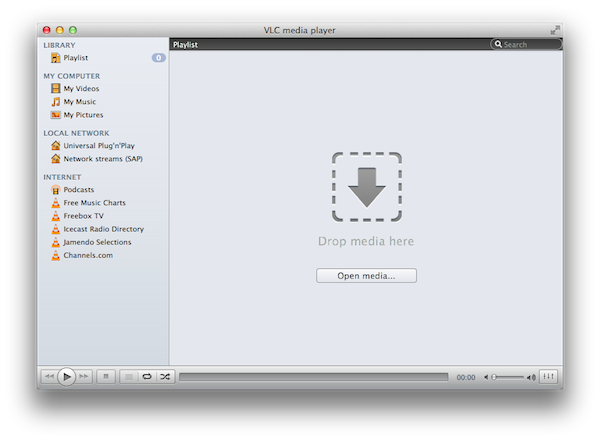
With over 7000 commits to the open source project and 160 contributing volunteers in the past couple of years, however, VLC 2.0 isn’t only focused on making its media player capabilities play nicer with audio and video formats. As we detailed in our previous coverage, one of VLC’s new visible changes is the application’s design on the Mac, a radical change aimed at unifying VLC’s file management and playback functionalities in a single window that, among other things, also happens to support Lion’s native full-screen mode. Available in two color schemes – Lion gray and QTX black – VLC’s new single window interface integrates playback and browsing in a way that, for example, allows you to start playing a movie, hit a button, and go back to the browsing UI with the movie still playing in the background. In my tests, transitioning from a movie (streamed off the MacBook Pro mentioned above, now used as a media server in my house as I upgraded to a MacBook Air) to VLC’s new Library was immediate, and the footprint on system memory minimal, or not visible at all. Because the new VLC for Mac integrates media, sources, and playback in the same window, you’ll be able to open a file, invoke the Playlist shortcut from the Window menu (CMD + Shift + P), look for another file (either manually or from the integrated search view), and adjust its position in the media queue right away.

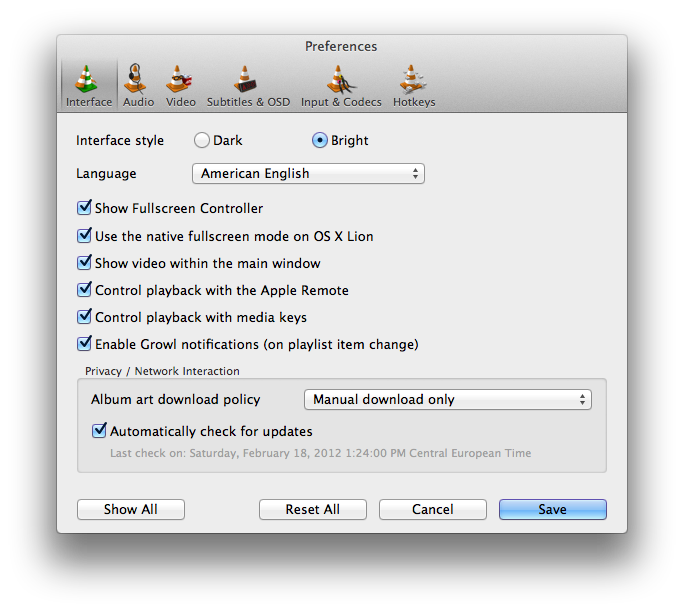
Thankfully, those who don’t like the change to a unified window will be able to revert back to VLC’s standard multi-window system with an option in the app’s Preferences. The Preferences menu has also been overhauled with a new design and more settings, including one to disable Apple’s full-screen mode for OS X Lion and enable Growl notifications on playlist item change. As usual, there’s a lot to explore within VLC’s settings if you really want to adjust the app to your tastes (and media configuration).

What I’ve always liked about VLC since I started using it in 2003 is that it can be extremely simple and accessible, or extremely complex and “advanced” thanks to the amount of options and settings it brings at your fingertips. If you really want to get geeky with video formats, inputs, codecs and streaming sessions, VLC 2.0 will most definitely have you covered with its variety of new features and tweaks to the underlying engine. If you, however, simply prefer a lightweight, elegant and powerful alternative to iTunes and QuickTime for browsing and playing your music and movies, VLC is an equally great alternative as it’s easy to use, fast, and stable. And whilst the new Mac interface will be heavily criticized (especially in its black version) by those that dislike change on principle, I think change is good, as it confirms that VideoLAN and its community strive for innovation in order to bring VLC to an even broader audience. The single window interface is useful, simple to understand, and helps you save time; performances in version 2.0 have been dramatically improved, and there’s lots more to come. Go download VLC 2.0 here.

For the release of the new VLC, I was able to chat with VideoLAN’s President Jean-Baptiste Kempf and lead Mac developer Felix Paul Kühne about the 2.0 milestone, the process that went into developing this new major release, and what’s in store for the future. Check out the interview, as well as a visualization of VLC’s development activity in 2011, after the break. Read more


Rovio Teases Angry Birds Space, Launching March 22

It may be on every platform under the sun and there may already be three versions of Angry Birds, but Rovio isn’t stopping any time soon with their Angry Birds franchise. In fact next month they will be launching the third game in the series: Angry Birds Space. Teaming up with NASA and the National Geographic, the new app will (naturally) feature some twists on the physics used in the game, including zero gravity and a new “lightspeed destruction” feature.

Angry Birds Space is a completely new game with innovative new gameplay, but with some of the familiar Angry Birds elements that fans already know and love – plus some surprises!

Rovio is planning on making it their biggest game launch since Angry Birds was first released and is targeting a launch on not only multiple platforms but also push the retail and publishing aspects of the game as well. Rovio will reveal more details about the game in early March, but until then you can visit the teaser site or view Angry Birds Teaser trailer below the break.

[Venture Beat via Eurogamer, Engadget]
Read more


Nightline Given Exclusive Access To Apple’s Foxconn Factories, Program To Air This Tuesday

The ABC’s Nightline program will air on Tuesday a report from Bill Weir that delves inside Apple’s Foxconn factories. ABC News announced the program on Twitter and PCWorld notes that Apple gave Weir “exclusive access” to tour the Foxconn factories, meet with workers as well as interview a “top executive”.

For years, Apple and Foxconn have been synonymous with monster profits and total secrecy so it was fascinating to wander the iPhone and iPod production lines, meet the people who build them and see how they live. Our cameras were rolling when thousands of hopeful applicants rushed the Foxconn gates and I spoke with dozens of line workers and a top executive about everything from hours and pay to the controversies over suicides at the plant and the infamous ‘jumper nets’ that line the factories in Shenzhen. After this trip, I’ll never see an Apple product the same way again.

It’s the latest move by Apple to try and quell the backlash from media and consumers over the treatment of workers at Apple’s suppliers — particularly at Foxconn. Earlier this year they released their 2012 Supplier Responsibility Report a few weeks earlier than previous years. Apple also revealed who their suppliers are and then joined the Fair Labor Association, who are currently conducting an investigation in regards to working conditions at Foxconn.


[PCWorld via TUAW]


Apple Counting Down to 25 Billion App Downloads

Thanks to over 315 million cumulative iOS devices sold and the breadth of applications available, Apple’s preparing to celebrate their 25 billionth download by awarding the lucky downloader a $10,000 App Store gift card. In only four months, iOS users will have downloaded an additional 7 billion apps from the App Store since last October where Apple reached 18 billion App Store downloads. (15 billion apps were downloaded as of last July). With over 550,000 apps available (175,000 iPad-specific apps) to download, there’s plenty of great applications to choose from that fill a variety of needs on user’s devices. The App Store’s great download spike can also be contributed to the number of iOS devices purchased in 2011 alone: 156 million iOS devices were sold last year compared to a total of 122 million Macs ever sold.

As of today, nearly 25 billion apps have been downloaded worldwide. Which is almost as amazing as the apps themselves. So we want to say thanks. Download the 25 billionth app, and you could win a US$10,000 App Store Gift Card.* Just visit the App Store and download your best app yet.

To participate in the competition, you simply have to purchase or download a free app from the App Store and be the lucky winner randomly chosen by Apple. You can also enter to win without purchasing anything from the App Store by simply visiting the contest page and filling out the linked contest form. One the 25th billion download has been reached, the contest ends! (Each applicable contestant is allowed only 25 entries.)

[via 9to5 Mac]

Edit (02/19/2012): Updated final paragraph to clarify contest rules.


Messages Will Be Available On Mountain Lion Only After Beta

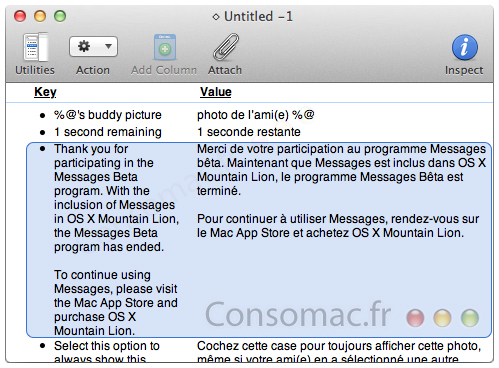
Apple may have released a public beta version of Messages for Lion yesterday, but from what Consomac has discovered, it may only be a temporary situation. Digging into the text strings inside the app’s resources found one particular string which said:

Thank you for participating in the Messages Beta program. With the inclusion of Messages in OS X Mountain Lion, the Messages Beta program has ended.

To continue using Messages, please visit the Mac App Store and purchase OS X Mountain Lion.

This suggests that once the Messages beta has concluded, the app will cease to work and users will have to purchase Mountain Lion to continue using the Messages app.

[Via MacRumors]


Mountain Lion’s Gatekeeper

Mountain Lion’s Gatekeeper

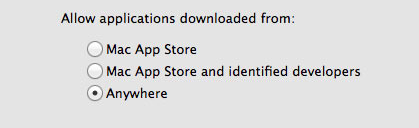
When the Mac App Store launched just over a year ago, many feared that it was the beginning of the end for running apps that weren’t approved by Apple on OS X. Jump forward a year and a bit and Apple has announced Mountain Lion, the next version of OS X that is set to launch this summer. One big feature of Mountain Lion is what Apple is calling Gatekeeper. It’s a new setting, aimed at both security and peace of mind. Essentially Gatekeeper will be giving users three options for controlling what apps run:

  • Only allow applications from the Mac App Store to run
  • Allow Mac App Store apps and those from identified developers
  • Allow any app to run

By default, the second option is chosen, allowing apps from the Mac App Store to run, as well as those from identified developers. What’s an identified developer? It’s someone that has registered as a developer with Apple and receives a personalised certificate. They can use that certificate to sign their apps, so that Gatekeeper will allow the app to run. It also means that if the app is found to be malicious, Apple can order Gatekeeper to remove that app from any Mountain Lion machine. Mac developers Panic have written a long blog post explaining the feature in great depth, explaining how it works, why it’s needed and why Apple chose to implement it in this way.

The simplest thing Apple could have done would have been to make the Mac App Store the sole source for Mac apps, in the same way the App Store is the sole source for iOS apps, shutting off every other app distribution venue in the process. While this would have immediately solved the problem, you would have seen developers’ heads bursting into flame and flying across the room in rage. Why?

Although security is a vital feature for Apple, developers, and users alike, being unable to run unsigned code cuts a lot of really great things off at the knees. You wouldn’t, for example, be able to just download and run an open source project unless it had been submitted to and reviewed by the App Store. Highly disruptive software (think Napster or BitTorrent) may have not been able to exist on the Mac platform since it would have been likely to run afoul of Apple’s App Store guidelines. Major vendors such as Adobe and Microsoft might have withdrawn their support for the platform, being unwilling to cede 30% of their revenue to App Store distribution.

It isn’t all good news though, Panic is concerned that Apple may be implementing an “artificial gulf” between App Store apps and non-App Store Apps by restricting some new features to only those distributed on the Mac App Store.

There remains one thing that is of concern to me. Despite these great strides forward, Apple is walking a dangerous line with regard to features that are only available to App Store distributed apps. The two most prominent examples are iCloud and Notification Center. Cabel asked Apple if, thanks to Gatekeeper and Developer ID, App Store-only features would be eventually be available to signed apps that were not distributed through the App Store. There was some shuffling of feet and a “we have nothing to announce at this time”. It didn’t sound particularly optimistic.

Gatekeeper will no doubt be a hot topic of discussion in the coming months and we’re likely to see all sides of the debate argue about what Gatekeeper represents. ZDNet, for example, has labelled the feature as a “tool that restricts what the user runs, rather than a security tool that sorts the wheat from the toxic chaff”. Macworld also has an in-depth hands on article with Gatekeeper that is well worth the informative read.

Permalink

Mountain Lion: Mac App Store-only, New Software Update System

Following the announcement of OS X Mountain Lion this morning, Pocket-lint has obtained more details regarding the distribution model for the new OS, and the way it will handle software updates in the future.

According to the website, OS X Mountain Lion will be available exclusively from the Mac App Store, breaking Apple’s usual tradition of making a physical copy of a new operating system available for purchase either online or through its retail stores. Mountain Lion won’t come on a dedicated USB Thumb Drive either, as Apple feels confident the experiment with Lion last year proved customers are ready for digital-only downloads and updates through the Mac App Store.

Including installs on new Apple Macs, Apple says that it has virtually shipped more than19 million copies of the current operating system, Lion, to date, with a 30 per cent uptake from Snow Leopard users, suggesting the digital download path has been a successful one.

Apple has confirmed to Pocket-lint though that its concerns weren’t justified with customers not remotely interested in the USB drive offering:

“It was an interesting test, but it turns out the App Store was just fine for getting the new OS.

In a similar fashion, Mountain Lion will adopt a new Mac App Store-based software update system that will get rid of the Mac’s standalone Software Update panel to unify new updates inside the Mac App Store to avoid user confusion and offer a single place to update both apps and the operating system.

Explaining to Pocket-lint in a behind-closed-doors briefing for the new developer preview of Mac OS X Mountain Lion, Apple has told us that the new method will offer updates to the OS and Apple applications in a similar way to how it does on iOS via the App Store, but in this case via the Mac App Store.

It also presumably means that all Apple users will be required to set up an Apple account to access software updates in the future, as well as to encourage users to keep the Mac App Store logo on their Dock to easily see when updates appear, although that has yet to be confirmed or set in stone - It is still early days for the developer preview.

When Apple released Lion last year, confusion indeed arose as to whether the company would release software updates through the dedicated desktop utility, or via the Mac App Store, which had been used to digitally distribute the OS. As it turned out for the best part of Lion’s history to date, Apple adopted a strange “Software Update first” model that saw new versions of Lion – such as 10.7.1 or 10.7.2 – released on Software Update and Apple’s website, then a few hours (or days) later via the Mac App Store. The Mac App Store updates, however, only allowed users to download the entire Lion installer, thus forcing those who simply wanted to update the OS, and not set up a fresh installation of OS X, to use Software Update or manually download a Combo updater from Apple’s servers.

While we’ll have to wait and see how Apple’s digital-only (for real this time) policy will play out for Mountain Lion upgraders, we think the Software Update overhaul is a welcome change. The previous system was confusing, inconsistent, and this new one is inspired by iOS’ simplicity and one-click access to ease the process of updating desktop software.

You can read more about Mountain Lion in our complete overview.