Posts in news

Second Apple Store in Rome To Open On April 21

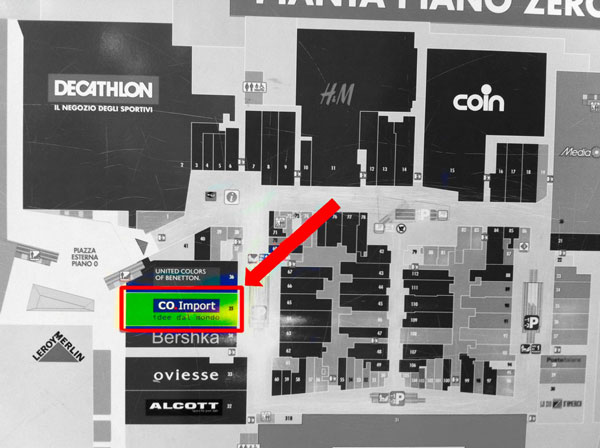
(The location of the Apple Store at Porta di Roma. Image via Macity)

According to iSpazio [Google Translation], Apple will open its second retail store in Rome, Italy, on Saturday, April 21. Currently, Apple only has one retail store in Rome. The new one, located at the Porta di Roma shopping mall, should open on the same day Rome celebrates its birthday, commemorating the city’s founding in 753 BC. iSpazio managed to take some exclusive shots of the progress being made with the store’s construction, supposedly showing the usual layout of retail stores located inside Italian malls. iSpazio says the opening date has been confirmed by an “inside source”.

Italian website Macity reported back in January that Apple had started working on the new store, sharing photos of the old Co.Import location under construction. Opening in between Benetton and Bershka retail stores (Benetton is an Italian fashion firm, Bershka is a retailer part of the Spanish Inditex group), the Apple Store will be located on the same floor of heavily trafficked H&M and Media World. The Porta di Roma shopping mall, easily reachable by bus or by car from the GRA, has long been rumored to be a favorite location for Apple to open a retail store, albeit speculation has also suggested the company would like to have a third retail store in downtown Rome.

Recently, Apple has also been rumored to be considering making its new retail store in Turin its “most important” Italian one. Apple was also on the verge of launching a new flagship store in Milan, but the company didn’t manage to get permissions from the city. Currently, Apple has 9 retail stores in Italy.


Apple Informs Australian WiFi + 4G iPad Owners Of Refund Offer, Tells Resellers To Update Marketing

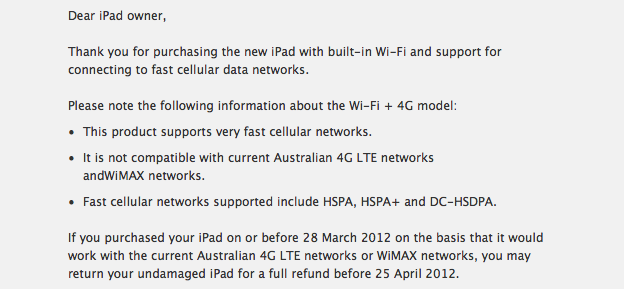
Apple today began emailing Australians who had purchased the new iPad WiFi + 4G model, informing them of their option to get a full refund if they had purchased it on the basis of thinking it would work with Australian 4G LTE or WiMAX networks. The offer is available to anyone who purchased the model before March 28th and they can return it for a full refund until the 25th of April.

It follows events from last week when the ACCC alleged Apple of misleading customers over the 4G capabilities of the new iPad and Apple responded by offering refunds and agreeing to clarify its marketing. Users who wish to obtain the refund must return the iPad and accessories to the original point of purchase and inform them that they had purchased the iPad on the “basis that it was compatible with current Australian 4G LTE networks or WiMAX networks”.

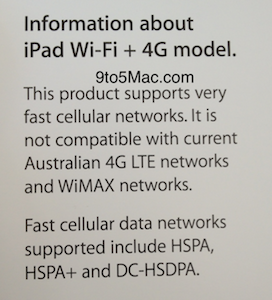
As noted by 9to5 Mac, Apple has also begun informing Australian iPad resellers to update their iPad signage to more accurately describe the iPad’s cellular capabilities in Australia. Notably the new signage includes the paragraph that Apple and the ACCC agreed on last week:

This product supports very fast cellular networks. It is not compatible with current Australian 4G LTE networks and WiMAX networks.

Jump the break to view the full email that Apple has sent to Australian consumers who purchased the “WiFi + 4G” model of the new iPad.

Thanks Stuart Hall, reseller information via 9to5 Mac.

Read more


Apple Releases iAd Producer 2.1

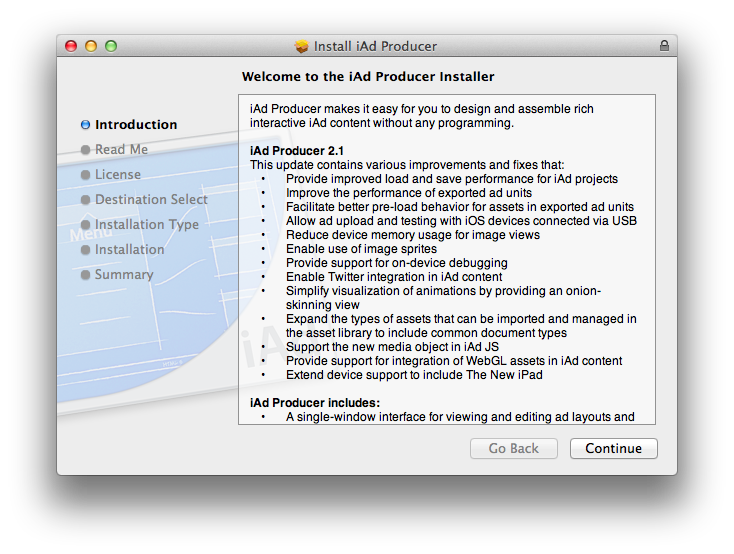
Apple today released an update to iAd Producer, its Mac application aimed at allowing designers and developers easily create and test rich advertising banners to feature on Apple’s iAd platform. The new version of the app, 2.1, provides support for WebGL assets in iAd content, brings support for the new iPad, and supports the new media object in iAd JS.

From the release notes:

  • Provides improved load and save performance for iAd projects.
  • Improves the performance of exported ad units.
  • Facilitates better pre-load behavior for assets in exported ad units.
  • Allows ad upload and testing with iOS devices connected via USB.
  • Reduces device memory usage for image views.
  • Enables use of image sprites.
  • Provides support for on-device debugging.
  • Enables Twitter integration in iAd content.
  • Simplifies visualization of animations by providing an onion-skinning view.
  • Expands the types of assets that can be imported and managed in the asset library to include common document types.
  • Supports the new media object in iAd JS.
  • Provides support for integration of WebGL assets in iAd content.
  • Extends device support to include iPad (3rd generation).

Version 2.0 of iAd Producer was released in November. iAd Producer is available for download here.


Sparrow 1.1 for iPhone Available, Push Coming “With or Without Apple”

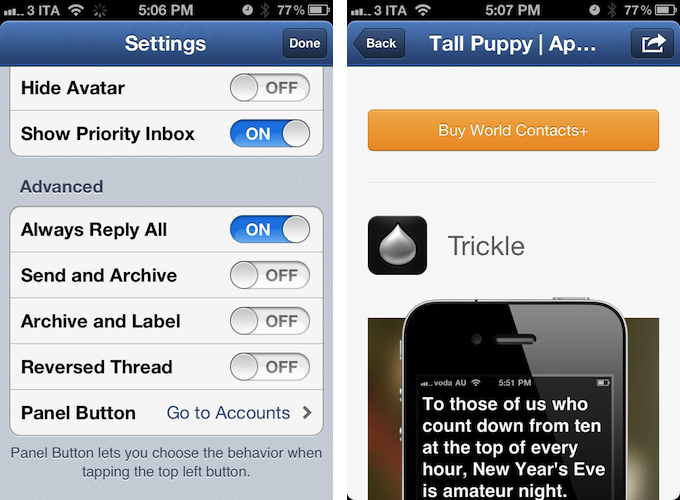
Sparrow for iPhone, the alternative email client for iPhone I reviewed three weeks ago, has an update on the App Store today, adding a number of functionalities that didn’t make it into version 1.0 of the software. Sparrow 1.1 allows you to show or hide the dock badge per account, open links through a built-in web browser (which includes options to open in Safari, and mail a link), and selectively choose which folders or labels to show in the app. There are new actions to empty trash or spam, and you can now activate a Send & Archive option in the Settings to instantly archive a message or conversation as you send a new email.

About push, which had to be removed from the final version of Sparrow 1.0 – the developers tested push notifications while the app was in beta, and they worked well, but Apple didn’t approve the implementation – the developers are confident Apple will revise its position. They will submit version 1.2 of the app soon, re-including support for push notifications. And if Apple won’t approve Sparrow with push for the second time, the developers say they are working out a solution to include push in other ways “with or without Apple”. It will be interesting to see whether Sparrow will consider adding push notifications through external services such as Boxcar, which recently raised new funding to build a push notification service for mobile developers. Update: the beta version of Sparrow I tested included push through a method that let the app run in the background leveraging the VoIP API. It’s not clear whether Apple will ever revise its position on letting a non-VoIP app use the VoIP API.

Thanks to your amazing support, we feel confident that Apple might revise its position on the Push API. We’ll submit a first version of Sparrow 1.2 including it. This might delay Sparrow 1.2 validation but we’re already working with some partners to include Push in future versions of Sparrow without needing Apple clearance.

Sparrow 1.2 for iPhone will also include landscape support, 9 more languages, and a gesture to swipe up or down between messages. The team is also working on Sparrow 1.6 for Mac, which will bring fixes and POP support.

Sparrow is a fantastic email client for iPhone, as I’ve already detailed in my review, and this 1.1 release adds some nice features that didn’t make the cut in the original 1.0. You can find Sparrow 1.1 on the App Store today.


Instagram’s Rise To 30 Million Users Visualized

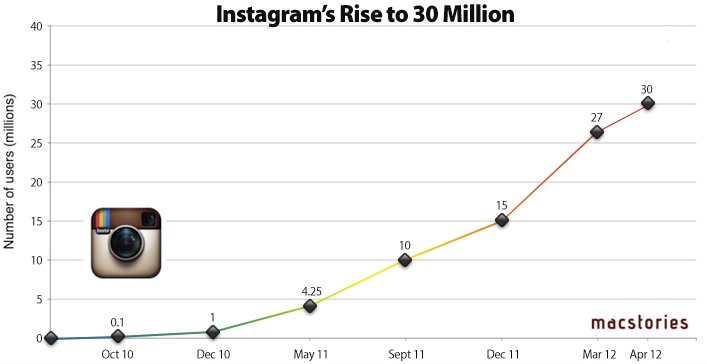
(Instagram’s growth. Click for full size.)

With the launch of the official Android app today, Instagram has released updated stats that show the stunning growth of the service over the past 18 months. It was only back in December 2011 that we reported 15 million users had signed up to Instagram; the growth rate of the service is accelerating, as the company announced 27 million users in mid-March, and 30 million users today. The Instagram Press Center reports additional numbers, including 1 billion photos uploaded so far, with 5 million photos each day and 575 likes per second on average.

In the past year, Instagram has added new designers to its relatively small team based in San Francisco, who helped revamping the iPhone app and worked on the launch of the Android client. More recently, Instagram started opening up its API to allow developers of other mobile applications to directly upload photos to Instagram – that was the case with Hipstamatic, and the company is keeping an eye on this API experiment to see if wider adoption among developers could lead to an even faster growth pace. The launch of Instagram for Android will surely help, as more than 430,000 users were already on the waiting list for the app.

Instagram Stats (April 2012)

  • 430K+ on Android Waiting List
  • 30 million+ Registered Users
  • 1 billion+ Photos Uploaded
  • 5 million+ Photos Per Day
  • 575 Likes Per Second
  • 81 Comments Per Second

Looking back at Instagram’s success over the past two years, it’s clear Instagram has become one of the fastest growing social networks that launched exclusively on iPhone. While many are wondering when the company will decide to monetize the service with advertising, more partnerships, or other plans, Instagram says they are actively considering more devices and platforms for the future.


App Updates: PDF Expert, OneEdit, ReaderX, Watchlater

A number of iOS applications have been updated following the release of the new iPad. While most of the software updates quickly approved by Apple have focused on Retina graphics, others that have come out in the past few days have brought new important functionalities as well.

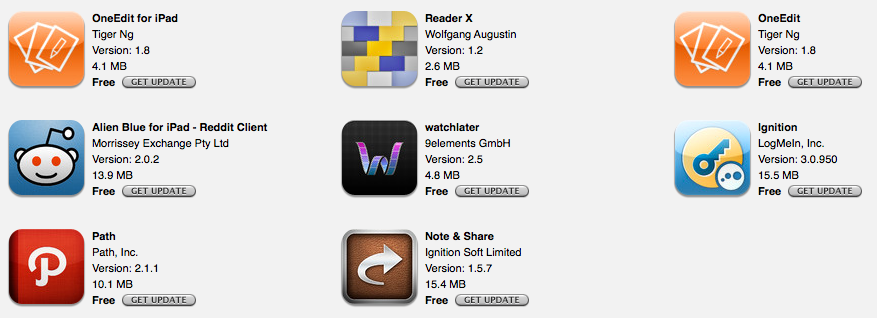
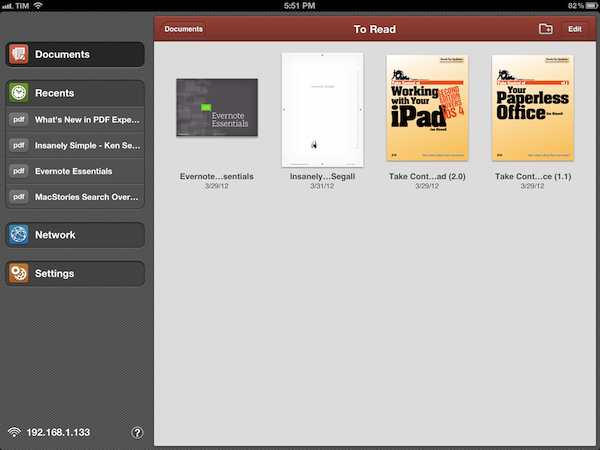
PDF Expert, our favorite app to read and manage PDFs on the iPad, adds Retina graphics and document thumbnails in its new 4.0 version. On the new iPad, graphics are shaper and more detailed, but more importantly text is crisper and more readable. The new thumbnail-based interface makes for a more visual presentation and intuitive file browsing, although support for drag & drop could be improved (I’d like to be able to create folders by dropping a file on top of another, like on the Home screen). PDF Expert 4.0 also supports PDF portfolios, attachments, and embedded media.

ReaderX has improved a lot since my original review. The app now comes with more fonts, more options, a revised preview popover, improved scrolling, and better sharing. The wallpaper concept makes a lot more sense on the iPad’s Retina display, as it makes it easy to set smaller fonts, while maintaining readability and detail. Give it a try again.

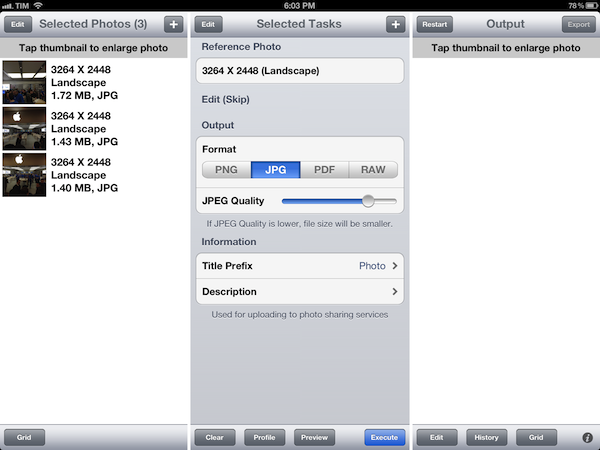
OneEdit is an app I use on my iPad to quickly resize multiple photos at once and save them back to the Camera Roll. The app doesn’t support Retina graphics yet on the new iPad, but the issue will likely go unnoticed (except for the icon) as the app uses a lot of native UI elements that Apple is already providing at Retina size. OneEdit 1.8 (the app is sold in separate versions for iPhone and iPad) enhances the batch-processing features of the app with support for individual photos from Dropbox, upload to WebDAV, and possibility to resize images based on scale. I particularly like OneEdit’s approach to image editing with separate sources/tasks/output processes that makes it easy and clear for me to select images, act on them, and save them somewhere else. OneEdit is also pretty powerful with tons of other options I don’t use, so make sure to check out the app’s full description on the App Store.

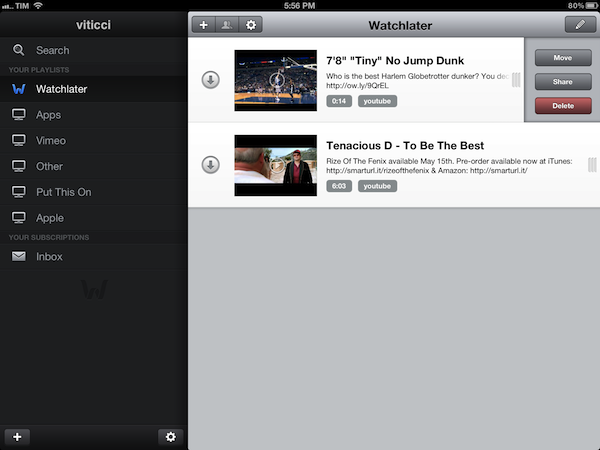
Watchlater keeps on being one of the best options to save videos from the web for later by adding a new design and more sharing options to version 2.5. Functionality-wise the app is mostly unchanged from my original review, but the UI is much better and collaborating with friends on playlists is a great idea.

Other minor updates have been released on the App Store as well: Note & Share added fixes and new iPad compatibility; LogMeIn Ignition added Retina graphics; Path started hashing user data with version 2.1.1; Alien Blue for iPad added a new gesture to load Reddit comments.

Make sure to check out the Great apps for the new iPad App Store section for a comprehensive list of software updates released in the past weeks.


Shazam 5.0 Brings Faster Tagging

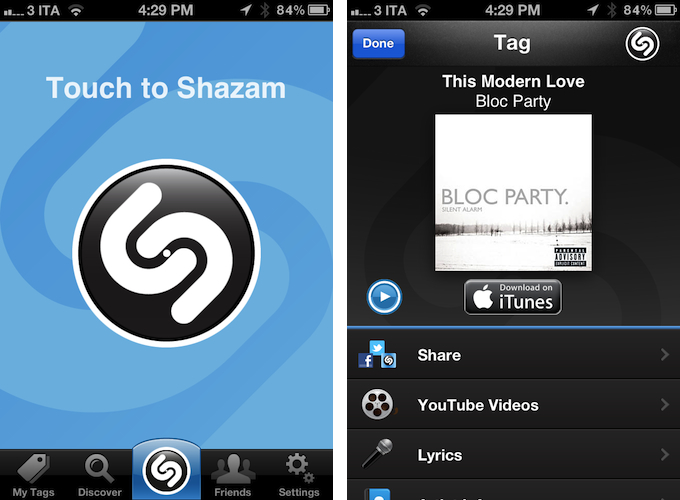
Music recognition service Shazam announced this morning a major update for its Shazam Free, Encore and RED apps, which reach version 5.0 and add a number of new functionalities and refined user interface design. Renowned for allowing users to tag songs and certain TV content in a few seconds by using the iPhone’s microphone and an Internet connection, Shazam has managed to improve on the already solid functionality of the app by cutting start-up times and reworking the way the app listens to music to tags songs.

Shazam’s startup is now over a second quicker, and the “Touch to Shazam” action has been moved to a new button in the app’s bottom toolbar. You may noticed this button will “pulse” every few seconds when the app is open – that is related to the new “instant listening” feature of the app, which contributes to making recognition and tagging super-fast. In my tests, I have noticed songs now take 4-5 seconds on average to be recognized (on WiFi) – a significant improvement from the previous 10-15 seconds it generally took me to tag songs.

Shazam 5.0 brings other improvements aside from better tagging. The Friends feed is faster, the UI more polished throughout the app; Twitter integration with iOS 5 is now properly supported, allowing users to edit their tweets; LyricPlay, a feature to associate lyrics with songs, has received improved sync and streaming.

Shazam 5.0 is available today on the App Store in three versions: Shazam, Shazam Encore, and (Shazam)RED.


Apple Announces Q2 2012 Conference Call For April 24

Last night, Apple updated its Investor Relations webpage to include a placeholder for the company’s next earnings call, scheduled for April 24. As usual with Apple’s conference calls, the event will be provided as an audio webcast for investors and listeners.

Apple plans to conduct a conference call to discuss financial results of its second fiscal quarter on Tuesday, April 24, 2012 at 2:00 p.m. PT.

Ended on March 31, Apple’s second quarter of the fiscal year typically brings in lower sales and volume for the company, although this year’s Q2 may signal a change in this tradition with AAPL soaring to new heights every week, and the new iPad selling very well in a larger number of countries than the iPad 2 last year. In fact, whilst Apple didn’t provide any official numbers for the iPad 2’s release last year, it is safe to assume this year’s debut of the new iPad saw larger sales thanks to a wider rollout on Day One (10 countries on March 16, as opposed to only 1 launch country for the iPad 2), rapid follow-up in more countries a week later (25 countries on March 23) and previously reported initial sales figures (3 million iPads were sold in 4 days, prior to the second worldwide March 23 rollout). Sales from the March 16 and March 23 iPad launches will be included in this year’s Q2 results.

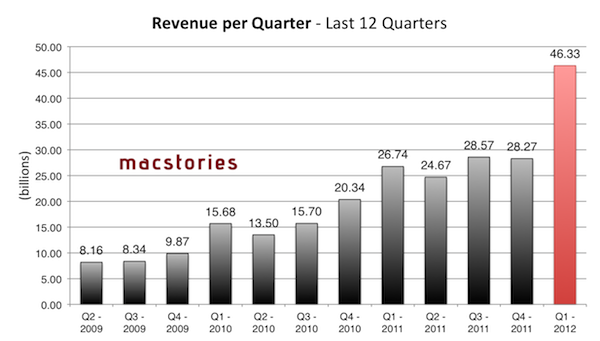
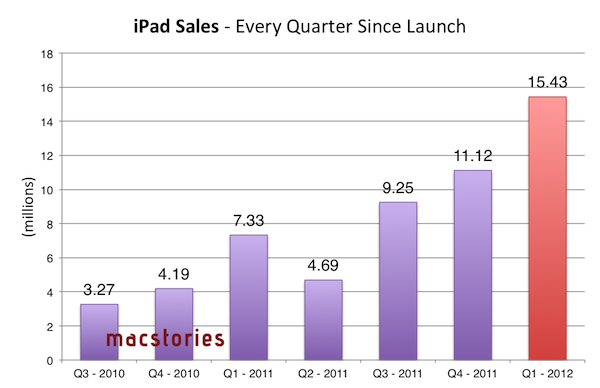
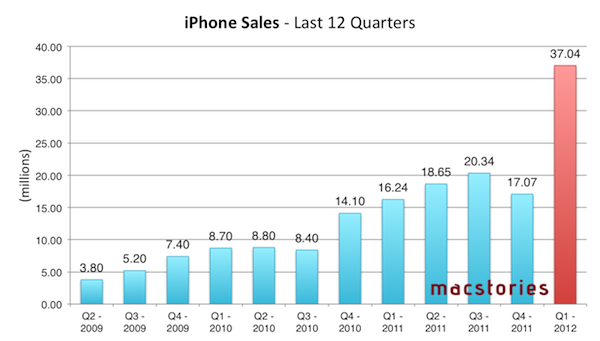
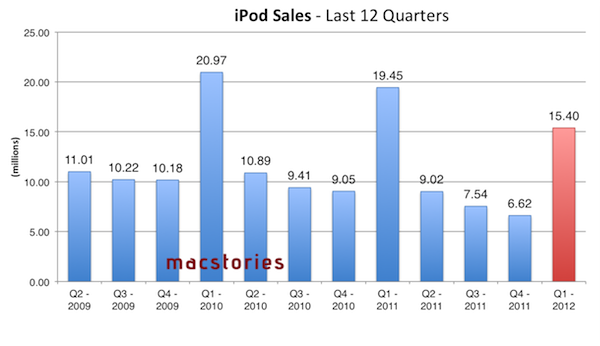
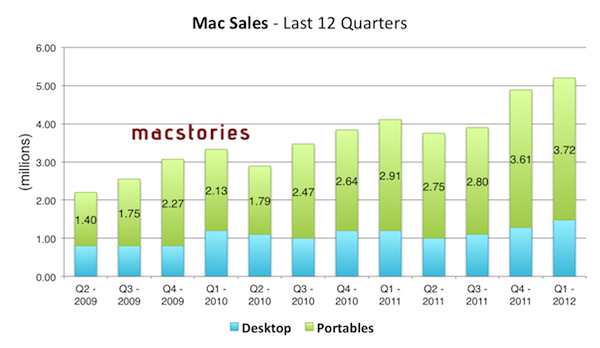
Apple’s previous quarter, Q1 2012, has been the company’s biggest to date. The company posted record-breaking revenue of $46.33 billion, with 15.43 million iPads, 37.04 million iPhones and 5.2 million Macs sold. Apple sold 15.4 million iPods, a 21 percent unit decline from the year-ago quarter. The company posted quarterly net profit of $13.06 billion, or $13.87 per diluted share. iPhone represented a 128 percent unit growth over the year-ago quarter, while iPad reported a 111 percent unit increase over the year-ago quarter. Until Q1 2012, Apple’s most profitable quarter had been Q3 2011 with $28.57 billion revenue.

In Q1 2012, Apple CEO Tim Cook remarked how the company was seeing China as “an extremely important market”, with “staggering demand” for iPhone. Cook also revealed that, in spite of the “bold bet” they took in terms of iPhone supply, Apple was short of iPhone supply throughout the quarter; the situation had improved by the time of the earnings call, but the company was still short in some areas. In the conference call, Cook also referred to iCloud as the company’s “big insight” for the next decade.

For Q2 2012, Apple set its guidance at $32.5 billion revenue and diluted earnings per share of about $8.50. As Apple’s own estimates are generally low, it is no surprise to see analysts projecting bigger sales and revenue, but as noted by Philip Elmer-DeWitt at Fortune, this quarter’s estimates show a great difference between estimates from the “pros” (Wall Street analysts) and the “indies”. With a $6.8 billion gap, Wall Street analysts expect the company to report $35.88 billion revenue, while the indies forecast revenue of $42.68 billion. While more bullish, estimates from the independent analysts tend to be more accurate, with only a few notable exceptions in the past (such as when they failed to predict customers were holding out for an iPhone upgrade in October).

In his own estimates for the upcoming Q2 results, Asymco’s Horace Dediu forecasted the following numbers:

  • iPhone units: 37.3 million (100%)
  • Macs: 4.7 million (25%)
  • iPads: 12.2 million (160%)
  • iPods: 7 million (-22%)
  • Music (incl. app) rev. growth: 40%
  • Peripherals rev. growth: 25%
  • Software rev. growth: 10%
  • Total revenues: $42.7 billion (growth: 73%)
  • GM: 44.7%
  • EPS: $12.0 (88%)

To put these possible numbers in context, here’s a graphical representation of how Apple performed in the past quarters.

Apple’s recently announced quarterly dividend won’t begin until the fourth fiscal quarter of 2012. We will provide live updates from the call on our site’s homepage on April 24 starting at 2 PM PT. For a recap of news and events that may have affected Apple’s results in the quarter, check out our January, February, and March In Review sections.


Air Display Gets HiDPI Mode Support on iPad Retina Display

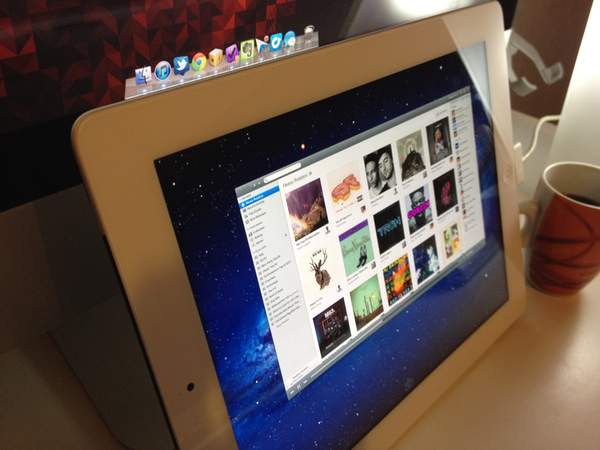
Announced last week, Avatron’s popular utility Air Display, a $9.99 app that can turn any iOS device into an external display for a Mac or PC, has been updated today to include support for two major new features and technical achievements: HiDPI mode and Retina graphics. Meant to be enjoyed on the new iPad’s Retina display, Air Display 1.6 requires the installation of a desktop application that will handle the wireless connection between Lion and the iOS app.

Once installed, Air Display Connect on the Mac will allow you to easily select the device you want to turn into an external monitor. For the new iPad’s display (and Retina iOS devices in general, but of course the app gives its best results on the iPad), Avatron has enabled support for high resolutions, although an option is present to render items at non-Retina resolutions as well. The Retina display’s tightly packed pixels have also allowed Avatron to use HiDPI mode – a hidden feature of Lion which draws element on screen at double the size – in a meaningful and gorgeous-looking way. Read more