Posts in news

Apple’s Java for OS X 2012-003 Update Removes Common Flashback Variants

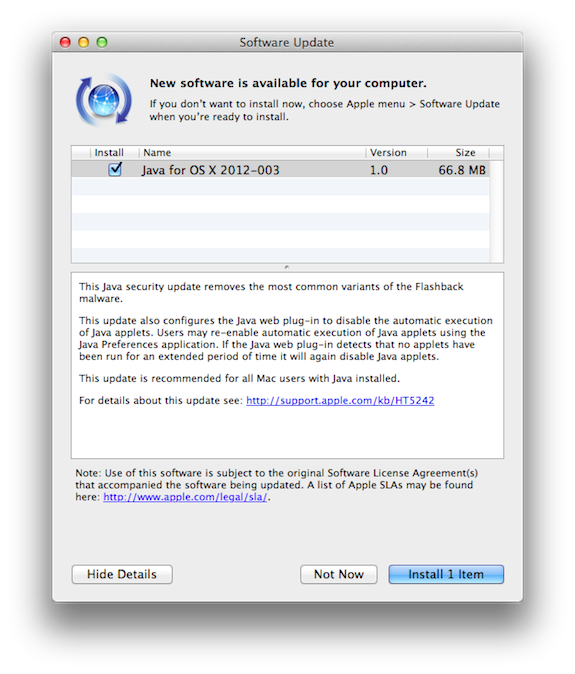
Two days after their initial announcement and on the heels of F-Secure’s removal tool, checking Software Update on your Mac should prompt you for Apple’s latest Java update for OS X. The 2012-003 update removes common variants of the Flashback trojan, as well as disabling automatic execution of Java applets. While you will be able to turn the ability to run Java applets back on through the Java Preferences app, it will automatically be disabled if you don’t consistently access or run applets after a period of time.

For more information, you can read the support article or the supplementary information provided through Software Update.

[Apple Support via The Loop]


Apple Increasing Security of Apple ID Accounts on iOS

Apple Increasing Security of Apple ID Accounts on iOS

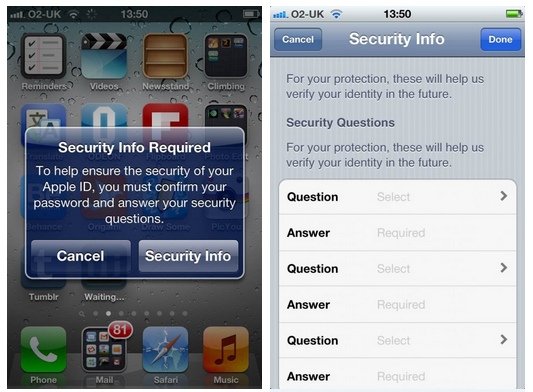
The Next Web reports Apple has begun enhancing the security of Apple ID accounts on iOS devices and iTunes by asking users to pick three security questions.

In the past 24 hours, Apple appears to have started prompting iOS devices owners and those with Apple IDs within iTunes to make their accounts more secure, requiring them to pick three security questions and enter their answers when they download a new app.

The company is also asking users to enter a backup email address, in order to better protect their device but also their account (which is tied to Apple’s Retail website and all of its media services).

Apple’s motivation to educate users on security by urging them to enable security questions is laudable, especially considering the many cases of phishing and hacked App Store accounts reported in the past years. However, it is worth noting how, on the other hand, several users have been asking Apple to be more flexible with entering an account’s password on the iOS App Store, letting users download free apps and updates without asking for a password after periods of inactivity.

Permalink

Adobe Updates Revel with Retina Support, Better Photo Management

Revel, Adobe’s cloud-based application for iOS and OS X to store photos online and have them synced across devices, was updated today to include several new features and Retina graphics for the new iPad. As I outlined in my original review of the app (when Revel was still called Carousel), Revel stands as a mix between Apple’s Photo Stream – a feature of iCloud that automatically transmits new photos taken on iOS devices to the cloud – and more traditional lightweight photo editors; with options to quickly crop and rotate photos, filters, and adjustments, Revel allows users to store, sync, and edit photos across devices by paying a monthly or yearly fee.

Revel, however, wasn’t perfect in its first version, and Adobe promised they would add more functionalities for better file management – admittedly limited and overly simplified in Revel 1.0 – to enhance the capabilities of the software. Revel, in fact, simply provided a stream of photos in chronological order, without enabling users to sort these photos in events, simply giving them an option to create and share “carousels”. Aside from supporting the Retina display, today’s major update to Revel brings several new options to organize, browse, and share photos imported from an iOS device’s photo library.

Revel 1.2 lets you organize photos in events. When photos are imported and organized by day, Revel displays an icon next to the date’s label to set an event name, or a different date and time. While in edit mode, this button allows you to quickly select or deselect photos from a specific day. Retaining the same horizontally-scrolling interface, Revel 1.2 also adds shortcuts to view the favorite items from a set, and browse a day in a more convenient grid mode that you can activate with a button, or by swiping to the right across a day’s photos. Photos can be assigned to an event, and photos from a different day – Revel is still largely based on a chronological visualization of your photo library – can be merged into an existing event. While updating the app with new events for my old photos, I noticed that, whilst graphics and images look better on the Retina display, photo thumbnails look slightly pixellated.

Viewing modes have been revamped as well. You can now view all photos, events by date or name, or photos that haven’t been uploaded yet. On the sharing’s side, you can now select multiple photos at once, and choose to share them, save them back to the Camera Roll, or delete them.

While still lacking several of the functionalities seen in desktop photo managers like iPhoto (you can’t sort people’s faces, view locations, and create albums), Revel offers a very intuitive and reliable sync mechanism that makes sure all your photos and changes are always kept in sync across devices, something even Apple’s own iPhoto doesn’t do yet. Revel 1.2 is a free download on the App Store, with monthly subscriptions starting at $5.99 through iTunes. Adobe Revel 1.2 has also been released for OS X, and it’s available on the Mac App Store.


Kickstarter: Pebble, an E-Paper Watch for the iPhone

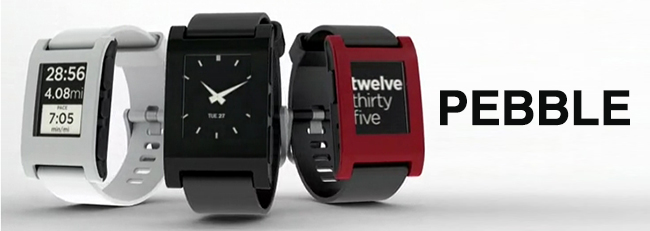
People love to fit their iPod nanos with a super sweet watch band. With its nice watch face and music on the fly, it’s a very attractive piece to add to your Apple nerdware. The Nano “iWatch” could be improved when it comes to its wrist functionality though. Pebble Technology from Palo Alto, California, is not only improving wrist technology but incorporating our smartphones with the Pebble watch, “it’s infinitely customizable, with beautiful downloadable watch faces and useful internet-connected apps.” Pebble connects to our iPhones via Bluetooth and sends information through silent vibrations for incoming calls, emails, messages, and more.

Pebble can easily be customized by adding apps (via the iPhone Pebble app) to be used for cyclists, runners, controlling music, a golf rangefinder and infinitely more apps via the SDK that they have also developed. The Pebble also has customizeable watch faces (much like the iPod nano) to fit each owner’s unique style. The watch will also come in 4 colors - arctic white, jet black, cherry red and one to be voted on my Kickstarter backers.

Video after the break. Read more


F-Secure’s Automated Flashback Removal Tool

F-Secure Flashback Removal Tool

F-Secure Flashback Removal Tool

Talking about Apple’s upcoming Flashback removal tool and F-Secure’s guide on how to check whether you’ve been infected, reader Phạm Duy Nguyên pointed us to a free tool F-Secure put out this morning that automatically checks for the infection, quarantines it if found, and lets you delete the malware from your system once it’s trapped in an archive on your desktop. The free removal tool takes the trouble or fear out of using the command line by providing a simple point-and-click utility. If you or friends and family are looking for easy solutions before Apple releases their removal tool, point them to F-Secure’s Flashback Removal Tool.

[F-Secure via @nguyenhimself]


Apple’s London Stores Prepare For Olympic Visitors And Journalists

Apple is beginning to  prepare its London retail stores for an onslaught of international visitors and journalists when the city hosts the 2012 Olympics in a few months time. TUAW learnt from a “high level Apple retail employee” in London that the stores will be stocking international replacement MacBook Pro, MacBook Air and MacBook keyboards. It’ll allow the retail stores to quickly repair any damaged laptops with the correct international keyboard, particularly for journalists from overseas, where time is of the essence. Traditionally such replacement keyboards for a non-UK MacBook would have to be ordered in.

As my source told me, “London is going to be overrun by an onslaught of journalists when the games begin. We want to be prepared should they need help with their equipment during the time they are here.”

As TUAW notes, the Olympics will bring in about 325,000 extra visitors to London during the event, as well as over 10,000 print journalists as well as photographers, TV and radio reporters. The source also noted that Apple may potentially also stock new MacBooks that feature American, Asian and other international keyboards - but this is apparently only under consideration at this point.

[via TUAW]


Apple to Provide Flashback Removal Tool

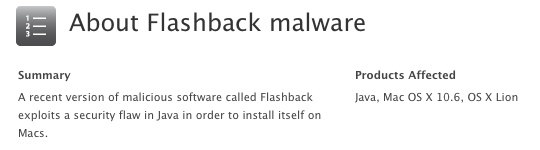
This evening, Apple has announced that they will be developing a tool to remove the Flashback trojan horse that has infected over half a million Macs. While Apple responded by releasing an updated version of Java on April 3rd (for both OS X 10.6 and 10.7), users who haven’t ran Software Update on their Macs are still susceptible to becoming infected if they visit a website with a malicious Java applet. According to Macworld, Flashback harvests usernames and passwords from web browsing activities.

In response to the widespread infection, Apple is working with ISPs to shut down the servers Flashback uses to communicate with its authors and perform its commands. In addition, Apple is developing and will be releasing a special removal tool focused on removing the Flashback trojan from infected systems. A release date is not known at this time, but in the meantime, you can follow this guide from F-Secure or use this handy tool to see whether you are infected. Instructions are given to remove the malicious program manually. Apple’s solution will likely be automatically included in a future Software Update that takes care of the infection for the user.

[Apple Support via The Loop | Flashback info via Macworld]


Tim Cook To Speak at D10 Conference

Apple CEO Tim Cook will be the opening night speaker at the D10 Conference, AllThingsD confirmed today. Taking place at the end of May (May 29-31) in Rancho Palos Verdes, California, the D10 conference, which celebrates its 10th anniversary this year, includes names like Zynga’s Marcus Pincus, Sean Parker, and New York mayor Michael Bloomberg among the list of confirmed speakers.

Walt Mossberg and I could not be more thrilled to announce that Tim Cook, CEO of Apple, will be the opening-night speaker at our 10th D: All Things Digital conference.

It will be Cook’s first appearance at D, as well as his first time being onstage at an event not run by Apple or for investors since he was named CEO last August.

AllThingsD’s “D” conferences saw a number of important speakers sharing their views on the world of technology on stage. As AllThingsD describes it, one of D’s greatest strengths is the focus on unscripted conversations:

D is different from other conferences: no canned speeches, no marketing pitches, and no bull. Instead, creators and executive producers Walt Mossberg and Kara Swisher put the industry’s top players to the test during unscripted conversations about the impact digital technology will have on our lives now and in the future. The results are unprecedented glimpses into the ideas and strategies of the industry’s most creative thinkers.

In Apple’s case, Steve Jobs made a series of appearances at D over the years, including one at D8 two years ago, where he famously discussed Apple’s stance on Flash, the lost iPhone 4 prototype, Apple’s internal culture, and more. The D10 conference will certainly be a good opportunity for Tim Cook to calmly and publicly go on the record about recent controversies and debates such as the one about China workers at Foxconn, the dividend, or more simply, the direction where Apple is heading.

In February, Tim Cook also spoke at the Goldman Sachs Technology Conference.


Tweetbot Gets iCloud Sync for Timelines, DMs, and Mute Filters

Two months ago, I took a look at the state of iCloud-enabled apps for Mac and iOS, sharing somewhat unsurprising results that showed few applications successfully were using iCloud sync across devices (not to mention platforms), and that developers were frustrated for the lack of extensive documentation by Apple. In these past 60 days, very little has changed on Apple’s side – if anything, we’ve only seen more third-party developers trying to figure out ways to properly use iCloud and make it work in their apps. Tapbots, makers of Tweetbot (our reviews for iPhone and iPad versions of the app), are releasing today an update to their Twitter client, which brings iCloud sync for various Twitter functionalities to the iPhone and iPad.

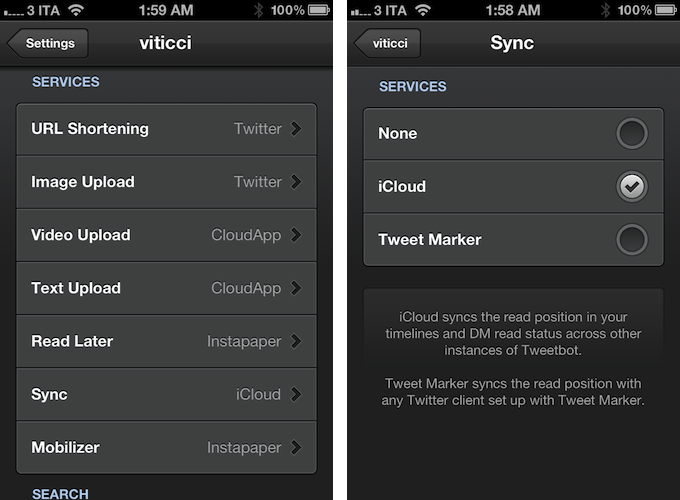
I have been able to test iCloud sync in Tweetbot for a few weeks now, and whilst I was initially skeptical about the service, I am pleased to report that Tapbots has come up with a solid, clever system that might just convince you switch from Tweet Marker – the only third-party solution to sync Twitter timelines that’s been widely adopted to date – if you’re planning to use Tweetbot as your main client.

iCloud sync, unlike Tweet Marker, works exclusively inside Tweetbot across its iPhone and iPad versions. You won’t be able to start iCloud sync on Tweetbot for iPhone and, say, find your timeline synced on Twitterrific. If you’re still looking for a real cross-platform syncing solution for Twitter, Tweet Marker remains your best option. If you, however, are you using the two Tweetbots as your default Twitter apps anyway and happen to be intrigued by iCloud sync, you might want to consider giving this new option in version 2.2 a try. Once enabled in the Sync settings, iCloud integration will sync mute filters, timeline positions, and DM read status across all instances of Tweetbot. This means that, if you’re using iCloud on your iOS devices running Tweetbot, the app will keep your position in the Twitter timeline synced similarly to how Tweet Marker works, only it will also sync your direct messages’ read status (if you read a DM on your iPhone, it will also be automatically marked as read on the iPad) and mute filters set in the app’s Preferences. In my tests, both Tweet Marker and iCloud have worked reliably when syncing timelines, but I switched to iCloud full-time for the added convenience of syncing DMs and filters across Tweetbot, and because of the lack of Tweet Marker-enabled apps (that I like) on my desktop. In fact, at least for the time being, I’m still using Twitter’s official client on my Mac. With iCloud sync, I can keep more data synced across Tweetbot for iPhone and Tweetbot for iPad, which I use on a daily basis. Please note that, while iCloud is supposed to be “invisible” to the user, working all the time in the background, there may be a short delay of 10-15 seconds when syncing the timeline position across clients, although I have noticed this sporadically. I suggest you use Tweetbot as you normally would, switching from one client to another when you really need to, avoiding keeping both apps open at the same time just to see if iCloud is working.

Version 2.2 of Tweetbot also brings other improvements and bug fixes throughout the app; most notably, images can now be closed with a pinch gesture on the iPad (similarly to how you can close images in Photos) and both iTunes and YouTube links have gained thumbnail previews in the timeline.

For the past months, I have been increasingly using my iPad as my primary computer, and thus Tweetbot has become the Twitter client I spend the most time using on my iOS devices. This newest update increases the overall stability and performances of the app, but more importantly it brings a native, consistent way to sync data across platforms that, at this point, can only get better in the future – and it’s already working admirably now.

You can get Tweetbot 2.2 on the App Store today.