Posts in news

Kindle 3.0 for iOS Released with New Library Design, Retina Text

Amazon’s official Kindle app for iOS reached version 3.0 today, adding a number of improvements for the new iPad, as well as a new design for the eBook library.

The new view of Kindle for iOS is organized in two separate Cloud and Device tabs. Cloud shows all items available in your online Kindle library; Device shows items that have already been downloaded locally. Items can be downloaded from the cloud with one tap, and they can be removed at any time. On the iPhone, users can choose to view their library in grid view, and a different view setting is also available on the iPad through a button in the bottom left corner of the app. Titles can be sorted by recent, title, or author.

Aside from these new options, the Kindle reading experience seems unchanged from the previous versions of the app; in the standard reading mode, there are still options to search, bookmark and go to the table of contents, sync with other Kindle devices, and change view choosing from three color schemes and six font sizes. On the new iPad, text is “optimized” for the Retina display, Amazon says. The Kindle app can obviously work in conjunction with the Cloud Reader web app Amazon launched last August, allowing users to read eBooks in the browser, while still syncing content and information across devices registered as Kindles.

Kindle 3.0 is available on the App Store. Check out more screenshots below. Read more


iPad Lines Around the World

As the new iPad begins its international rollout at 8 A.M. (local time) on Friday, March 16th, it’s no surprise Apple fans have started waiting in line at retail stores to get their hands on the device, which, this year, was also made available through online pre-orders.

On March 16th, the new iPad (our overview) goes on sale in 10 countries.

  • US
  • Canada
  • UK
  • France
  • Germany
  • Switzerland
  • Japan
  • Hong Kong
  • Singapore
  • Australia

In this post, we’ll collect photos and videos about the experience of our readers and other folks around the web while waiting in line for the new iPad. Come back later for updates and new images. Read more


MacUpdate Spring 2012 Bundle: 11 Mac Apps for $49.99

Today, there is a new MacUpdate Bundle that comes with a selection of top-notch Mac productivity apps, utilities, and games for just $49.99. The bundle includes some of MacStories’ favorite Mac apps including the excellent PDF Pen (by SmileOnMyMac) and the versatile utility Forklift. If you tried purchasing the included apps individually you’d be paying nearly $400, so if you’re looking to beef up your collection of Mac apps this is a terrific deal at just $49.99.

The MacUpdate Bundle includes:

  • VMware Fusion 4 - this is the easiest, fastest and most reliable way to run Windows applications and other operating systems on a Mac without rebooting.
  • Drive Genius 3 - the industry’s leading disk utility and the best way to optimize your drive’s performance.
  • PDFPen 5 - a PDF toolkit that lets you add text, images and signatures to PDFs – and much more.
  • ForkLift 2.5 - is arguably the most versatile utility ever made for the Mac. Originally conceived as a robust FTP client for file transfers, ForkLift has evolved to the point that it can be used as full-blown Finder replacement.
  • Typinator 5 - boosting your typing productivity by automatically inserting frequently used text, graphics, and more.
  • DesktopShelves - it will organize your chaotic Desktop in no time.
  • Snapheal - a new photo retouching tool that’s easy enough for beginners to use.
  • Boom - a convenient volume booster and system-wide equalizer that lets you boost the volume of your Mac and your music files.
  • Phone to Mac - transfers files from your iPhone, iPod or iPad to your Mac.
  • Star Wars: The Force Unleashed - inviting you back into the Star Wars universe for another high-energy, intergalactic adventure.
  • Worms Special Edition - a modern reprise of the classic comic strategy game.
  • If you help spread the word about this bundle, MacUpdate will give you a copy of Aurora, a $15 value, for free.

Disclaimer: For every bundle purchased through MacStories, we receive a small kickback. If you’re interested in the bundle and supporting the MacStories crew, please use the link here or any of the affiliate links above.


Firefox 11 Released, Features Add-On Sync, New Developer Tools

It’s been about a year since Mozilla shipped Firefox 4 and outlined its intentions to move toward faster and more frequent releases of Firefox. They’ve sure delivered upon that, yesterday releasing Firefox 11 with a handful of notable new features for both consumers and developers.

For users, the big new feature is add-on sync. It effectively allows users the option to keep their add-ons in sync across computers. This is an opt-in feature that is available in the Sync tab of the Preferences window. Meanwhile  developers can utilise a new ‘Page Inspector 3D View’ that literally turns a website into a 3D model that highlights how the particular webpage elements are constructed on top of each other.

While developer tools like “view source” have always been useful to learn about how to develop a page, the 3D View more clearly illustrates how the parts of a website are structured. After selecting “3D” View in Page Inspector, just hover your mouse over the elements to get more information about each piece you select.

Firefox 11 also features a ‘Style Editor’, allowing developers to edit CSS stylesheets and view their changes take effect instantly and live - all “entirely within the browser”. It’s sure to make it easy for developers to iterate quickly and efficiently. Once done developers can save the updated stylesheet to their computer.

Jump the break for a short video that demoes the new Page Inspector 3D view. You can download Firefox 11 here.

[via Firefox Blog]

Read more


Rdio Launches Complete Redesign

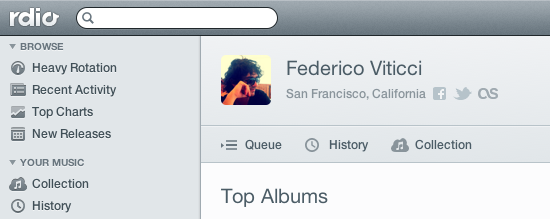
Rdio, a music streaming service that works on the web, Mac, and iOS, is holding a press event today to announce a major redesign that, however, is already available to subscribers in the web browser. Once enabled, “New Rdio”, as the company is calling the new experience, shows a complete rethink of the music browsing and listening workflow behind Rdio.com.

New Rdio is a visually beautiful and dynamic way to play Rdio’s massive catalogue of 15 million songs. New features include the oft requested drag and drop playlist creation, a more personalized Heavy Rotation, and private playlists.

From a first test, it appears the new user interface is heavily based on sidebars and panels to manage your music collection, playlists, queue, and network of friends or people you should follow. Playlists have been updated, and it’s now possible to create them and manage them through drag & drop, as well as make new “private playlists” that you can choose to share with just a few people. A new sidebar on the left organizes people and music influencers by “Your network” and “Who to follow”. The Network tab is similar to Facebook’s own ticker system, in that it shows people you’re currently friends with and the music they’re listening to. Click on an item, and a popover will open allowing you check out a song right away. The suggestions tab is equally interesting, presenting people that Rdio thinks you should invite or follow on the service. The aforementioned drag & drop system has also been enabled for sharing – you can now grab an item from the main panel, head over a friend’s avatar, and share it. Twitter, Facebook, and email sharing are supported.

Search seems a lot faster than before, presenting results for artists, songs, or albums in a few seconds. The overall design feels cleaner, less crowded, and easier to use. As the company stated at its press event “We basically took Rdio apart and put it back together”. The app is more social, puts music and people front and center, and, more importantly, keeps more items and sections within a single page thanks to popups, sidebars, and panels. Furthermore, the new design also allows you to click through items – for instance, an album – and navigate back while maintaining page position, without having to scroll again. What I think is interesting, and will likely take some time getting used to, is that while the Heavy Rotation for your account is harder to access and has been seemingly also incorporated with your network’s rotation, people that are listening to same music as you are now always shown in the UI, your collection included. Top Charts, Recent Activity, Queue, and New Releases keep more or less the same functionalities as before, only with a new design.

The new Rdio experience has also been brought to the official Mac app, which was updated earlier today to version 2.0 and is capable of automatically switching to the new UI once enabled in your account. The app is now smarter at recognizing when music is playing on another location (such as the browser), and offers you a way to quickly switch playback to the desktop.

We will update this story with more screenshots and details from Rdio as the company details the new features at its media event. For now, New Rdio is available only to Web and Unlimited subscribers, with everyone else gaining access sometime in the future. A promo video of the new Rdio is embedded after the break. Read more



Tweetbot Gets Streaming

Tweetbot, Tapbots’ excellent Twitter client for iOS that we recently reviewed for the launch of its long-awaited iPad version and 2.0 update on the iPhone, received today support for one of the most requested functionalities by its users: streaming.

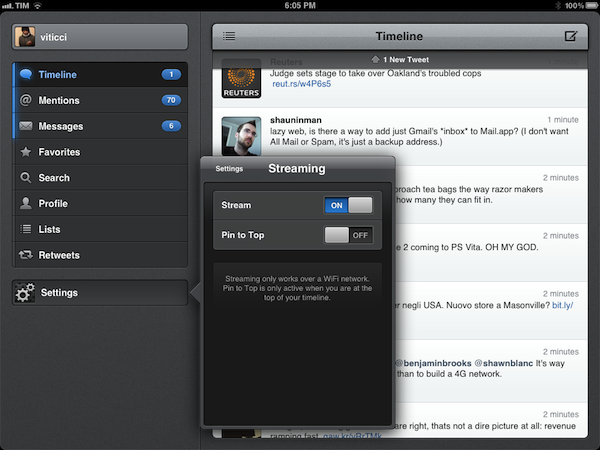
Available today in version 2.1 of the iPad app, live streaming allows users to stay on top of the latest tweets thanks to Twitter’s real-time push technology that can be seen in the new Tweetbot timeline, which, when on WiFi, will constantly check for new tweets and automatically load them above your timeline position. An option is available to disable streaming in the app’s Settings, as well as a switch to enable “Pin to Top”. In my tests, Tweetbot’s new streaming feature has been extremely reliable – that is, unless Twitter itself was experiencing issues – and has enabled me to forego completely the need of manually refreshing or waiting for Tweetbot to update my timeline every few minutes. Like on Twitter for Mac, I think streaming is an invaluable tool if you’re planning on getting the most out of Twitter’s real time nature, and Tweetbot’s implementation doesn’t disappoint.

With streaming come a few other changes to make the experience of fetching and syncing tweets more pleasant. The new tweets sound, for instance, is now limited to mentions, direct messages, and tweets fetched with pull-to-refresh. The Tweet Marker service, which allows you to keep your Tweetbots (and other supporting clients) in sync, has been vastly improved. Generally, this means the process of getting your latest-seen tweet and timeline position should sync faster to the cloud and back to the app – in testing the latest Tweetbot, I can confirm Tweet Marker sync seems a little faster and more “accurate” than before.

Tweetbot is my favorite Twitter client on any platform, and streaming makes it a lot better from a user experience standpoint. You can get iPad update from the App Store now (the app’s graphics are also ready for the new iPad coming out later this week); version 2.1 of the iPhone app, sporting the same new features and Camera+ 3.0 integration, is still waiting for approval in the App Store’s queue.


Apple Releases Safari 5.1.4

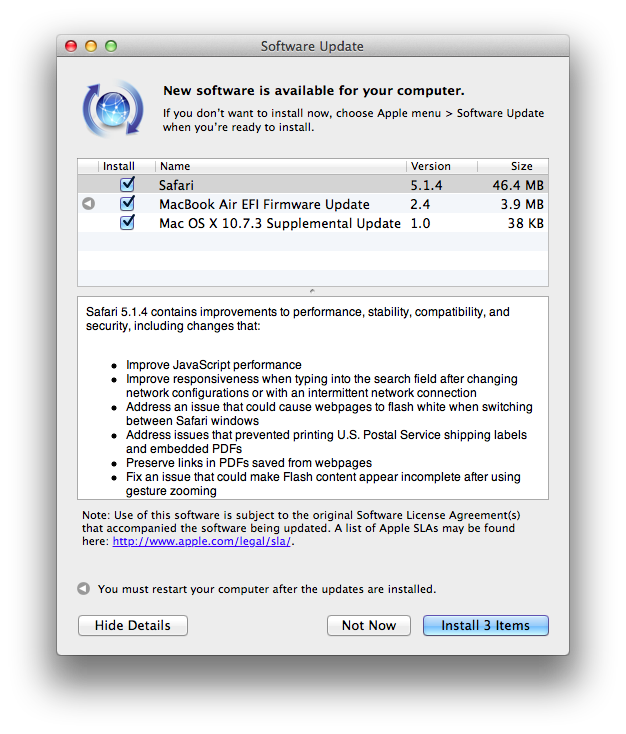
Apple just released an update to Safari on its Downloads website and Software Update, adding a number of improvements for stability, compatibility, and security.

  • Improve JavaScript performance
  • Improve responsiveness when typing into the search field after changing network configurations or with an intermittent network connection
  • Address an issue that could cause webpages to flash white when switching between Safari windows
  • Address issues that prevented printing U.S. Postal Service shipping labels and embedded PDFs
  • Preserve links in PDFs saved from webpages
  • Fix an issue that could make Flash content appear incomplete after using gesture zooming
  • Fix an issue that could cause the screen to dim while watching HTML5 video
  • Improve stability, compatibility and startup time when using extensions
  • Allow cookies set during regular browsing to be available after using Private Browsing
  • Fix an issue that could cause some data to be left behind after pressing the “Remove All Website Data” button

You can find Safari 5.1.4 here. The previous version of Safari, 5.1.3, was released alongside 10.7.3, adding, again, bug fixes and improvements.


New iPad Shipping Times Slip To 2-3 Weeks In Many Apple Online Stores [Update]

Update 3/10: Apple has confirmed in a statement to CNET that initial iPad units available for pre-order are sold out.

Customer response to the new iPad has been off the charts and the quantity available for pre-order has been purchased,” an Apple representative told CNET. “Customers can continue to order online and receive an estimated delivery date. Beginning Friday, March 16, the new iPad will be available for purchase at Apple’s retail stores and select Apple Authorized Resellers on a first come, first-served basis.

As noted by Matthew Panzarino at The Next Web, shipping times for the recently announced new iPad have slipped to 2-3 weeks in several online stores worldwide. The new device, announced at a media event on Wednesday, was made available through online pre-orders immediately after the event; in the hours following the refresh of the Apple online store with new products, the company had to face technical problems with the site not loading correctly due to heavy traffic. That hasn’t stopped customers, however, from sending their orders for the new iPad, whose initial shipments are now sold out in many international versions of the store – shipping times of 2-3 weeks are now reported in the UK, Germany, Japan, France, and Australia. Curiously enough, at the moment of writing this US shipping times had slipped to 2-3 weeks as well, only to go back to March 19 right before publishing.

Other stores of the initial launch countries are now reporting delays as well: in Canada, new iPad orders will be shipped on March 19, in Singapore and Australia on March 22.

On March 16th, the new iPad will go on sale in:

  • US
  • Canada
  • UK
  • France
  • Germany
  • Switzerland
  • Japan
  • Hong Kong
  • Singapore
  • Australia

25 more countries will follow one week later on March 23rd:

  • Austria
  • Belgium
  • Bulgaria
  • Czech Republic
  • Denmark
  • Finland
  • Greece
  • Hungary
  • Iceland
  • Italy
  • Liechtenstein
  • Luxembourg
  • Macau
  • Mexico
  • Netherlands
  • New Zealand
  • Norway
  • Poland
  • Portugal
  • Puerto Rico
  • Romania
  • Slovakia
  • Slovenia
  • Spain
  • Sweden

You can read more about the new iPad, which carries a Retina display, LTE, Bluetooth 4.0 and quad-core GPU, in our overview.


iWork.com Beta To Be Discontinued on July 31

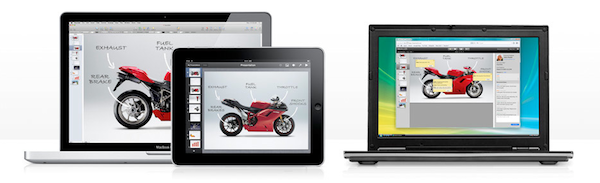
With a support document updated today, Apple has informed users of iWork.com that the public beta of the service will be discontinued on July 31:

After July 31, 2012, you can no longer publish new documents to iWork.com from any iWork application on your Mac or iOS device. Documents already shared on iWork.com will not be available to you or to those you shared documents with.

Moving forward, you can use iCloud to share documents between your computer and your iPhone, iPad, or iPod touch.

Giving instructions to save documents already published on iWork.com, Apple is advising customers to start using iCloud instead. Currently, iCloud offers a functionality to store iWork documents online, and access them from the native iWork apps for iOS. With Mountain Lion, Apple will offer a new iCloud save interface, although it’s not clear yet whether this will translate in a storage UI for iCloud.com as well, or an update to iWork for OS X. Currently, iCloud.com offers no sharing system for documents stored online, either.

Apple never showed too much interest in bringing new features to its iWork.com service, which has always been labelled as “beta” by the company. Some minor additions were brought to iWork.com last year, but the company never specifically mentioned major new functionalities would be introduced. Especially after the launch of iCloud, many had wondered if iWork.com was set to be discontinued, like other MobileMe services, and it now appears those doubts were legitimate, as the company is looking to move every document-related feature to iCloud. Right now, it’s not clear whether native apps will gain new options for publishing and sharing, or if Apple will keep building more powerful web apps for storing and sharing documents online.

Apple has already confirmed that MobileMe will be discontinued later this year, on June 30.