


As noted by 9to5mac, Apple today launched an updated version of its iCloud.com website to include new apps and tweaks to existing ones. Surfaced online earlier this year, the new iCloud.com – meant to be a web-based companion to native iCloud software on iOS and OS X – features the new Notes and Reminders apps introduced with Mountain Lion, and design and user experience changes to Mail and Find My iPhone. Read more
Posts in news
iCloud.com Gets New Apps: Our First Impressions
Twitter Archiving Tool Watermark Gets Dropbox Export Feature

Recently relaunched under a new name, Manton Reece’s Watermark is one of my favorite web services. Seamlessly integrated with Twitter, Watermark is an archiving tool that, through filters and custom collections, lets you archive and search your entire timeline. From our previous coverage:
Tweet Marker Plus was one of my favorite services to provide the kind of Twitter functionalities that Twitter the company always ignored: powerful search and filtering tools, collections, and additional browsing options. Like Cue, Tweet Marker Plus has proven to be a worthy addition to my workflow to retrieve tweets and leverage the information shared on the platform every day.
I use Watermark on a daily basis to retrieve tweets that have been shared in my timeline – status updates that would be hard to retrieve using Twitter’s web interface, let alone the official apps. Twitter never invested in powerful archiving and filtering tools, and Watermark provides a fantastic backup solution to know that, in the background and automatically, your timeline will be archived and made searchable for the future. This is important for online data preservation, a subject I’ve been exploring for the past year.
Today’s update to Watermark introduces yet another option to make sure your data will always be with you: automatic Dropbox export. Available in Watermark’s settings, once authorized with Dropbox the service will create archives of filters, collections, and your own tweets as .csv files. For your tweets, the 10,000 most recent ones will be saved, whereas filters and collections are limited to 1,000 for now. As Manton writes on his personal blog:
Dropbox sync fixes that. Watermark can now automatically copy tweets (and App.net posts) from your saved filters and custom collections to CSV files on Dropbox. For example, search Watermark for “iPhone 5”, click “Save as filter”, and the most recent 1000 tweets matching that query will appear in a file called “iPhone_5.csv” on Dropbox. It keeps running in the background, so the files are updated every hour as new tweets matching the search are downloaded by Watermark, even if you aren’t signed in.
Like I said, I use Watermark every day, and being a Dropbox fan as well, it’s great to see the two services coming together. I feel like Dropbox is becoming, for many, the de-facto “filesystem for the web”, and it only makes sense for a service like Watermark, which aims at freeing data from the pressure of Twitter, to gain an export option based on it. Right now, tweets are saved in .csv files with their ID, author’s username, date, service (Twitter or App.net), message, and original URL. In a future version, I hope Manton will consider some kind of plain text export option as well, though that might be tricky; right now, I’m comfortable with the structure of .csv archives.
Watermark is a service I highly recommend, and it’s only $5 per month.
Apple Details iOS 6 Feature Availability By Country

As noted by Horace Dediu, Apple has published an official list of iOS 6 feature availability on its website. While iOS 6 is officially coming out next week, on September 19th, not every feature will be available in every country.
The list focuses mainly on Siri, Maps, and Dictation. Availability of iTunes Store and App Store content is mentioned as well, but that’s not really new if you’ve been following the expansion of Apple’s digital storefronts in the past months. What’s interesting ahead of iOS 6’s launch is the list of features that, due to content limitations or the “beta” nature of Siri, won’t be available in some parts of the world.
For instance, Maps’ “standard” operation will be available from Afghanistan to Zimbabwe for a total of 181 supported countries. This should include the “standard” view of Maps – the new tiles that Apple is using after removing Google’s ones from iOS 6 entirely. Similarly, the Satellite view of Maps will be available in the same 181 countries worldwide. However, things start getting different with Maps’ Directions and and Turn-by-Turn navigation: the former will be available in 96 countries, the latter in 56. 3D buildings, another feature of Maps, will only be available in the United States at launch, whereas Traffic information will be available in 23 countries. Last, Maps Local Search will be available in 49 countries, and Business Reviews and Photos in 15.
Siri is even more limited. In spite of the voice assistant gaining support for more languages in iOS 6, several functionalities and integrations will be limited by the user’s location. So, for instance, while everyone will be able to set Siri to a supported language and issue commands, Sports data will be limited to 15 countries; Twitter and Facebook integration to 14; Local Search and Restaurant Information to 10, but Restaurant Reviews will only be available through Siri in 9 countries and Reservations in 3 (USA, Canada, Mexico). Another Siri integration, Movies, will be limited to 13 countries for Movie Information, 4 for Reviews, and only 3 for showtimes.
As Apple embraces more third-party services in its operating systems, it’s no surprise that some features will be restricted to only the countries where those services are fully operational. The same happened with the first version of Siri last year – some commands were only supported in the United States initially.
Check out the full list of iOS 6 feature availability here.
Apple Posts September 12 Keynote Video→
Apple Posts September 12 Keynote Video

Apple has posted a video for its September 12 Keynote that took place in San Francisco earlier today. The video can be streamed here, and a higher quality version should be made available in a few hours through iTunes. To avoid streaming errors, Safari is recommended for the best viewing experience.
- Streaming from Apple Events’ website
Update: The keynote video is now available for download as well through iTunes.
Also, here’s a recap of our ongoing coverage for today’s event:
Apple Announces New iTunes for OS X, iPod Touch 5th Generation, and a New iPod Nano
iPhone 5: Our Complete Overview
The Numbers and Facts From Apple’s September 12 Event
We will post additional news on the site’s homepage, or tweet as @MacStoriesNet throughout the day.
Apple To Developers: Submit Your iOS 6 Apps Today

Following the introduction of the new iPhone 5, new iPods and an upcoming new iTunes earlier today, Apple has now sent an official mail to its third-party developers. In it, Apple asks its developers to submit updates of their apps or completely new ones built with the newest iOS 6 SDK and APIs.
iOS 6 will soon be in the hands of hundreds of millions of customers. Take advantage of beautifully designed and smooth panning maps using the new vector based engine in MapKit. Provide tickets, loyalty cards, and other passes with Passbook. Integrate sharing capabilities for Facebook. Explore new camera APIs and new features for Reminders, In-App Purchase, and Game Center to create your best iOS apps yet.
To prepare your apps for submission, download the GM seeds for iOS 6 and Xcode 4.5 and test your existing apps for compatibility. Be sure to review the updated App Store Review Guidelines and the iOS 6 Readiness Checklist, and submit your apps today.
Developers can now head over to the Apple Developer website to download the new GM seeds for iOS 6 and Xcode 4.5.
iTunes 10.7 Now Available
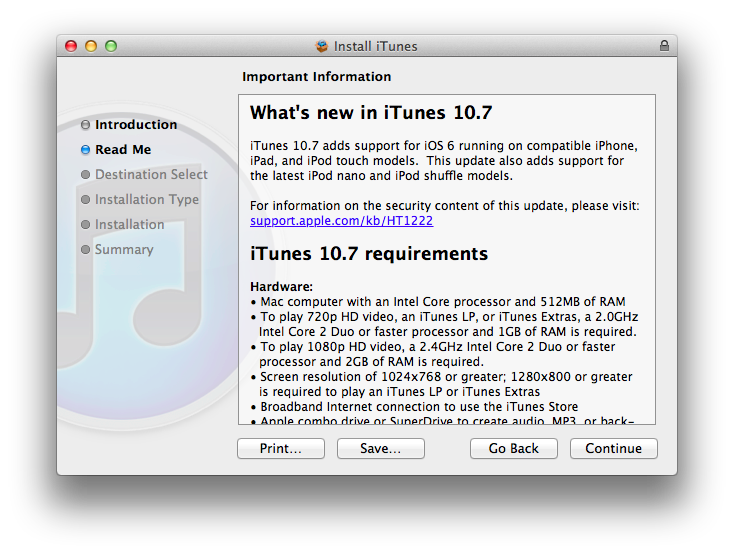
While a major new version of iTunes (coming in October) was announced at today’s media event in San Francisco, Apple has already released version 10.7 of the software. Labelled as “coming soon” on its website, iTunes 10.7 is actually available for download from the iTunes Download webpage.
iTunes 10.7 is a minor compatibility update for iOS 6 (which is coming next week) and the new iPods announced today.
iTunes 10.7 adds support for iOS 6 running on compatible iPhone, iPad, and iPod touch models. This update also adds support for the latest iPod nano and iPod shuffle models.
You can download iTunes 10.7 from Apple’s website.
Apple Announces New iTunes for OS X, iPod Touch 5th Generation, and a New iPod Nano

Apple hasn’t forgotten about the iPod or iTunes, announcing Wednesday a new iPod touch and a new iPod nano.
After the iPhone’s introduction, Tim Cook brought on Eddy Cue to talk about iTunes, introducing it as the #1 music store in the world, with over 200 million customers using iTunes, worldwide availability in 63 countries, and over 26 million songs available. “Two thirds of our downloads come from iOS,” Cue said on stage, while showing off brand new iTunes and App Store designs on the iPad, then on the iPhone 5. Launching September 19th, the visual refresh brings better performance when browsing through the store, and also includes the ability to preview music browsing and share store links with friends.
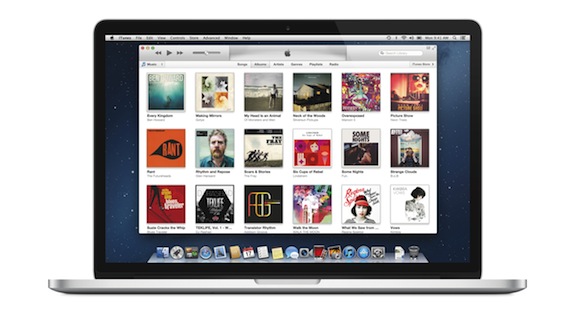
Apple also showcased an updated iTunes application for OS X, which features a new edge-to-edge design that looks similar to the iPad’s refreshed music app as of iOS 5. Album art flows across the display — clicking on an album expands album info as opening a folders does on iOS. iTunes also brings popovers that present a drop down of upcoming songs, and improved search results as you filter through music in your library. Cue also showed off a brand new mini-player design, which unlike previous designs, shows album artwork and gives the option to manage playlists and see upcoming songs as well.
More and updates past the break!
iPhone 5: Our Complete Overview

Apple’s Phil Schiller took the stage today at Apple’s media event in San Francisco to officially unveil the iPhone 5, Apple’s major upgrade iPhone family. As widely rumored, the iPhone 5 features a taller display to visualize more content, a thinner profile, and a new metal backplate. While similar in the overall aesthetic to the iPhone 4 and iPhone 4S, the changes made to the iPhone 5’s body construction, display, and glass design represent a major change from the industrial design first introduced in 2010. Read more
The Numbers and Facts From Apple’s September 12 Event
As usual with every Apple product announcement, keynotes start with “state of the business” introduction that, through various numbers and facts, reveals how the company is doing in several areas such as retail, the App Store, and hardware sales. At today’s media event in San Francisco, Apple CEO Tim Cook shared some interesting details on a variety of subjects.
- The new Apple retail store in Barcelona is made of limestone from a local quarry.
- Apple is opening a new retail store in the 13th country (Sweden) this Friday.
- There are 380 Apple retail stores worldwide.
- Customers’ response to Mountain Lion has been “fantastic”. Seven million copies have been downloaded to date.
- 17 million iPads have been sold in the last quarter (April-June).
- More iPads were sold than any other PC maker sold of their entire line-up.
- 84 million iPads have been sold to date.
- iPad’s share of the tablet market went up from 62% last year to 68% in spite of the competition.
- iPad accounts for 91% of web traffic from tablets.
- 94% of Fortune 500 are testing or deploying iPads.
- The App Store has now over 700,000 apps. 250,000 are made exclusively for the iPad.
- 90% of all apps are downloaded every month.
- More than 100 apps are downloaded per customer on average.
- 400 million iOS devices have been sold through June 2012.
For more coverage, check out our September 12 news hub and follow @macstoriesnet on Twitter.