This Week's Sponsor:

Winterfest 2025

The Winter Festival Of Artisanal Software


Posts in news

Sponsor: DraftCode

My thanks to Freeridecoding for sponsoring MacStories this week with DraftCode.

DraftCode is a new PHP development tool for iPad. With built-in offline PHP code execution (using standard PHP 5.4.10), DraftCode lets you build and run PHP projects right on your iPad. In addition to offline PHP execution, DraftCode also includes CGI handling and fully supports working with POST and GET forms, includes, and linking to other PHP files in your workspace. Via its built-in webkit based preview, DraftCode lets you work on javascript/AJAX, HTML and CSS in conjunction with PHP, making it a full featured workspace to develop your PHP website.

Other features of DraftCode include the possibility of sending files to other iPad apps, an extended keyboard, and an easy to use workspace for all your files.

DraftCode is available on the App Store for $8.99, and you can find more information here.


AppShopper Is Back On The App Store

Speaking of App Store discovery services, AppShopper is back on the App Store today (after last year’s removal) with a brand new iPhone app called AppShopper Social:

Our original AppShopper app was removed from the App Store due to a conflict with a new set of App Store rules introduced last year. Since that time we’ve been hard at work creating a new app to continue to provide useful functionality to our users and also remain in compliance with Apple’s rules. Today, we’re happy to announce that we’ve released AppShopper Social. The new version of the app still contains the core Wish List functionality that we’ve always had, but also introduces a social discovery portion to the app.

AppShopper is, by far, my favorite service when it comes to finding new apps and receiving notifications for updates and price changes. I have been beta testing AppShopper Social for the past months, and I think the new version makes a lot of sense: rather than offering a better interface for the App Store charts, the main area is now a Stream of app recommendations from people you follow. You can follow websites like AppShopper and TouchArcade, or log in with your Twitter account and find friends who are using AppShopper. When I say that App Store discovery needs more human curation, this is exactly what I mean (in addition to the work Apple itself is doing with sections and collections).

The new app resembles the old version of AppShopper, if only with a fresh coat of paint. In the Stream, you can view All/iPhone/iPad/Universal apps, filter by category, type of app, and paid/free/both. Tapping on an app in the list opens the usual single app page with “I want it/I own it” buttons (the Wish List is still there), screenshots, description, changelog & app activity, and ratings by websites with a link to their reviews. Presenting App Store ratings mixed in with reviews from writers who do this professionally is a very welcome addition in my opinion.

There are some things in the new AppShopper that could be improved: the process of adding friends from Twitter could be further developed with a screen showing how many Twitter friends are also using the app, and, currently, it’s not possible to view a user’s complete profile to show all the apps he/she is recommending to others. I like the refreshed design of the app pages, but I’d like to see a list of friends who have recommended the app in there as well. And, of course, the app isn’t Universal yet and essential features like What’s New haven’t still been enabled as the AppShopper team is figuring out how to get them past Apple’s review process. Fortunately, the team also says they’re working hard on improving the app, and I’m looking forward to the next updates.

The App Store doesn’t come with any social features (besides sharing) or connections to reviews from trusted sources, and I believe AppShopper Social fills an important gap in terms of app discovery and recommendations.


Skitch 2.5 Adds PDF Annotations

Skitch

Skitch

Skitch, the image annotation and sharing tool that Evernote acquired in the summer of 2011, has today been updated on iOS to include support for PDF annotations. I have been testing the new feature for the past few months, and, while not as full-featured as a dedicated PDF annotation app, I believe it is a solid addition to Skitch. Read more


Pocket Introduces “Send to Friend” on First Year Anniversary

Pocket, Share to Friend

Pocket, Share to Friend

One year ago today, Read It Later was reborn as Pocket, transforming into a service that emphasized saving anything, not just articles, for later. For the past year, Pocket has rapidly iterated while landing on numerous devices between Android and iOS, even arriving on Apple’s desktops and laptops with a native Mac app. Recently, Pocket made it even easier to save stuff for later thanks to Feedly, WordPress, and HootSuite integration. With more than 8.5 million users who’ve saved more than 300 million articles in the past year, Pocket has also launched Pocket for Publishers, giving creators on the web an easy way to gain insights on the lifespan of their content.

Share to Friend Inbox

Share to Friend Inbox

To celebrate their one year anniversary, Pocket is launching Send to Friend, a brand new feature that goes beyond sharing to Facebook, Tumblr, and Twitter. Send to Friend improves upon email sharing, which Pocket found people used more than twice as often as sharing to social networks. Send to Friend allows for better interpersonal sharing between friends and family. Content can be shared with a comment and a highlighted quote, and if the person receiving the shared link also uses Pocket, they’ll receive a Push Notification and the content in their inbox. Anyone who receives a link can save it to their list of stuff to view later, or simply ignore it.

Share Menu

Share Menu

Lastly, Pocket improves upon their Share Menu by automatically bubbling up icons and making more convenient shortcuts to often used services and friends that you share to. If you find yourself sharing to Twitter and to a couple of particular friends more often, the Share Menu will place shortcuts to them first. Of course, you can always get to seldom used services at any time.

Pocket with Send to Friend is available as a free download in the App Store.


Rdio Brings New Sharing Interface To iOS App

Rdio Share

Rdio Share

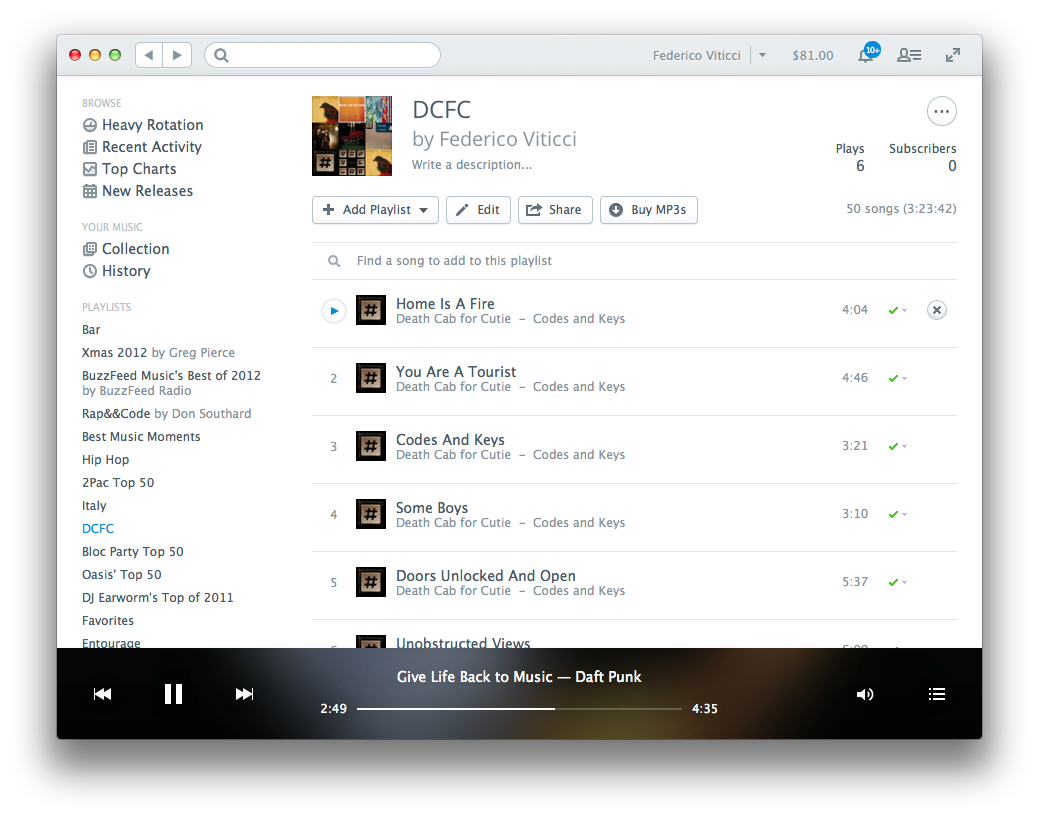
Earlier today, music streaming service Rdio updated its iOS app with a new sharing interface. Alongside the existing Facebook and Twitter options, the new sharing UI includes an updated menu to send a song or album directly to a Rdio user that you’re following: from the Share view (which was introduced two months ago), you can now tap on profile pictures of your friends, or you can use the old Twitter and Facebook sharing features, which have also been given a fresh coat of paint in this new release.

Interestingly enough, while previous design changes were made exclusively on the iPhone, this time Rdio for iPad has received the new Sharing interface in the form of a modal window (but it still lacks the full-screen album art view of the iPhone app). Items shared by your friends will appear in the notifications area on the Rdio website and desktop app, and you’ll also receive an email notification (if you have allowed the service to notify you via email); the iOS apps can share items, but they still can’t access notifications from other users.

I previously took a look at Rdio’s major 2.0 release and 2.1 update. Version 2.1.7 is out now on the App Store.

Update: this new version also restores visibility of the iOS status bar. Personally, this is a very welcome change.


MacHeist nanoBundle 3: 8 Top Mac Apps for $9.99

Bundle deals come and go, but MacHeist has always killed it when it comes to selling and promoting their own bundles. Today, MacHeist has resurrected the nanoBundle which they haven’t offered in 3 years. The MacHeist nanoBundle 3 is a set of excellent applications worth $250 that can be purchased for $9.99, with 10% of the proceeds going towards a reputable charity of your choice. So is it worth your hard earned cash? I’d instantly tell you yes - Fantastical is one of the best Mac apps to own and if you still haven’t purchased it, now is the time. Also, if you do ANY designing and/or developing, xScope (MSRP $30) is a great app to have in your arsenal of weapons.

Read more


Sponsor: PDFpenPro 6

Our thanks to Smile for sponsoring MacStories this week with PDFpenPro 6.

PDFpenPro is the advanced version of PDFpen. PDFpenPro does everything that PDFpen does, such as add signatures, edit text and images, perform OCR on scanned documents and export Microsoft Word documents. It also has the ability to create a PDF form, build a table of contents, and convert HTML files to PDF.

The new PDFpenPro 6 adds document permission settings. When you share a PDF, you can restrict printing, copying, and editing of your PDFs. You can also use the new automatic form field creation tool to convert a non-interactive form into an interactive PDF form with text fields and checkboxes automatically added. PDFpenPro 6 is optimized for the Retina Display and now takes advantage of Versions and Auto Save available in Lion and Mountain Lion, which better saves your edits from accidental loss.

PDFpenPro 6 is available on the Smile Store and the Mac App Store for $100. A free demo can be downloaded on the Smile site. Find out why Macworld calls PDFpenPro “the crème de la crème of PDF editing and annotating applications.”


Introducing Better Linked Posts

You may have noticed that I haven’t written much lately. In mid-March, I decided I needed to take some time off the site to rest and focus on some ideas and changes for MacStories that I’ve been thinking about for quite a while. I came to the conclusion that I need to be able to share more links to interesting news, apps, and articles here on MacStories. I want MacStories to be the place where readers can find our own articles as well as cool stuff produced by others. Read more


Sponsor: MacPaw

Our thanks to MacPaw for sponsoring MacStories this week with CleanMyMac 2.

CleanMyMac 2 is the successor to MacPaw’s award winning system utility, rebuilt and redesigned from the ground up to make it easier than ever to remove the cruft that’s taking up unnecessary storage space on your Mac. CleanMyMac 2 scans your hard drive, looking for unneeded temporary files, unused caches, forgotten files, and even cleans up application-specific trash in applications like iPhoto. It can also optimize your iPhoto library, removing original versions of images that you’ve since modified while editing. CleanMyMac 2 even helps you take care of plug-ins and widgets, while ensuring applications are completely uninstalled.

CleanMyMac 2 is free to try, and a single license is available for only $39.95. A license for up to five Macs is only $89.95.

For families with PCs in addition to Macs there’s also CleanMyPC, which brings the same easy-to-use interface to the Windows desktop.