This Week's Sponsor:

Dropzone 5

Improve your Drag-and-Drop Workflow


Posts in news

Spotify Launches New ‘Spotify Mixes’ with Personalized Playlists Based on Artists, Genres, and Decades

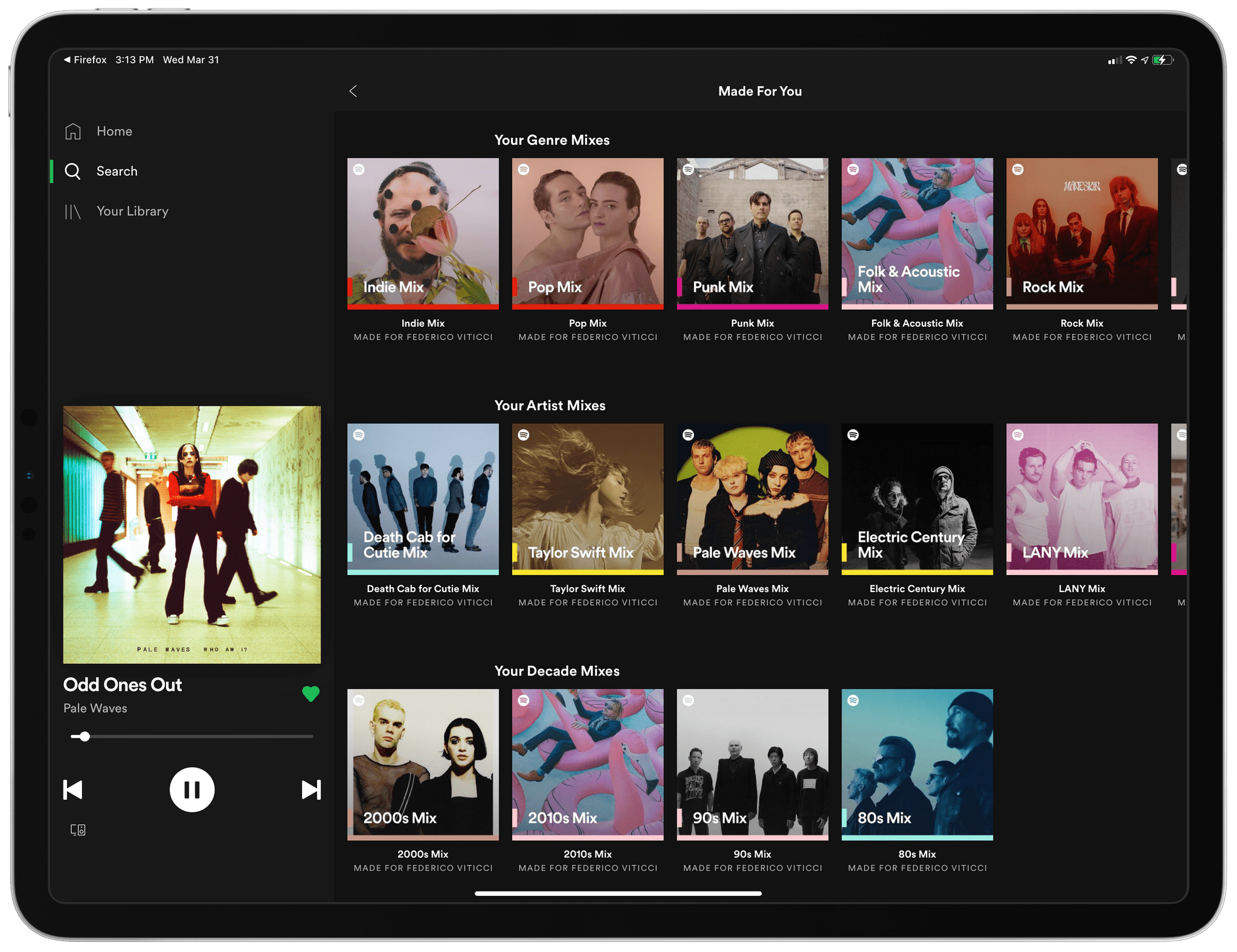
Spotify Mixes in the Made for You hub.

Spotify Mixes in the Made for You hub.

Earlier today, Spotify announced their latest feature rollout for both free and premium users: Spotify Mixes. Inspired by the Daily Mix, which the company introduced in 2016, Spotify Mixes are a collection of personalized playlists tailored specifically to each user and available in three main “flavors”: in the updated Made for You hub (which you can find in the Search page), you’ll find Artist Mixes, Genre Mixes, and Decade Mixes.

Here’s how Spotify says these new playlists will work:

Each mix is created with you at the core, based on your listening habits and the artists, genres, and decades you listen to most. They’re rooted in familiarity, meaning that you won’t just hear your favorite artists, but your favorite songs from those artists.

Then, we supplement by adding in songs we think you’ll love, meaning they’ll be filled with the music you have on repeat alongside some fresh picks. So whether you want to jam out to a specific artist or hear more music from another decade, there’s a mix just for you.

According to Spotify, these new mixes will update over time to reflect your listening habits and will present a dynamic collection of playlists from different artists, genres, and decades, including both songs you already know and new ones the service thinks you might like.

I received the new Spotify Mixes this morning and, as you can see in the image above, they provide an eerily accurate representation of my diverse music preferences – from late 90s Placebo and mid 2000s emo punk to modern artists such as Pale Waves and Taylor Swift.

As I’m writing almost on a weekly basis now, I’m impressed with Spotify’s ongoing streak of product launches and understanding of what their users seek in the service. With genre filters, the ability to shuffle liked songs based on mood, and now mixes for decades and artists, Spotify helps me enjoy and rediscover music in any moment of the day; so far, I’m glad I decided to switch from Apple Music for a year.
Google Announces New Maps Features, Including Indoor Live View, Weather and Air Pollution Layers, and Eco-Friendly Driving Directions

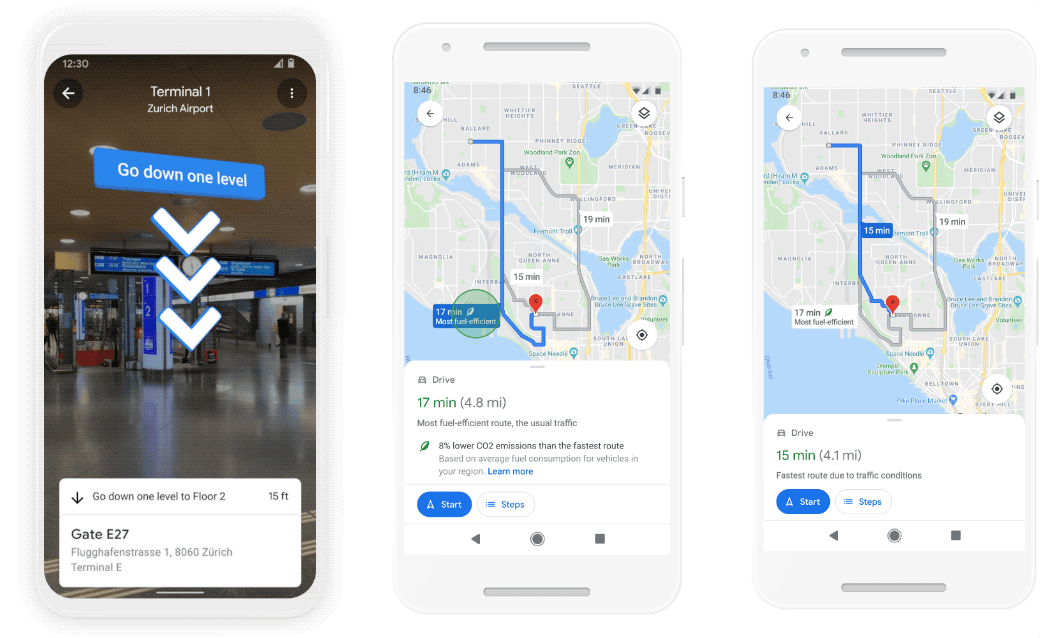
Source: Google.

Source: Google.

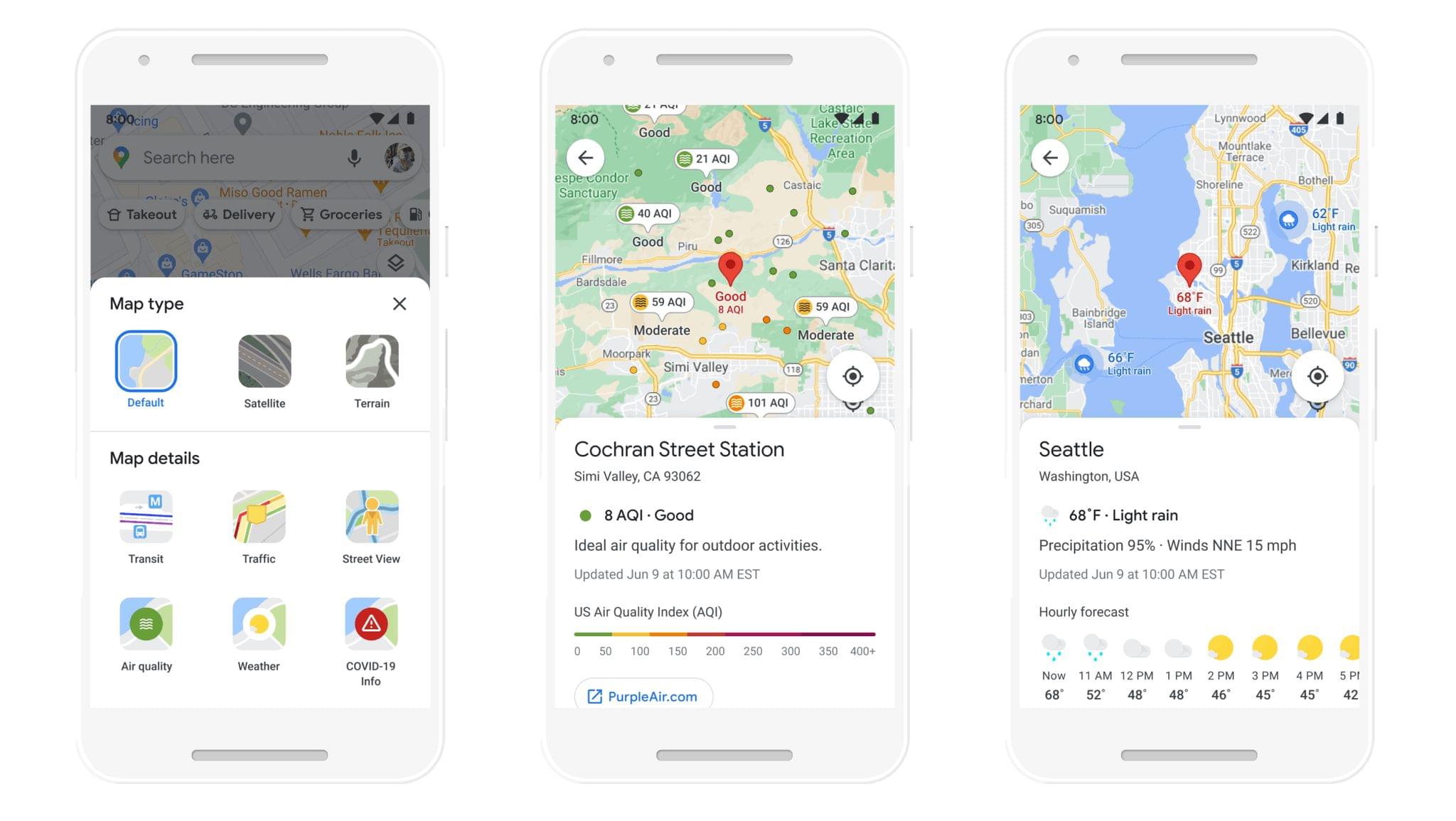
In more mapping news, Google announced several new features that are available in its Maps app now or are coming later this year, including improvements indoor navigation, weather and air pollution data, eco-friendly driving directions, and delivery and pickup information.

Google is expanding its Live View feature to indoor locations, providing AR overlays in Maps to help you find locations inside airports, shopping malls, and transit stations. The feature is already available on Android and iOS for shopping malls in Chicago, Long Island, Los Angeles, Newark, San Francisco, San Jose, and Seattle in the US. Airports and transit stations in Tokyo and Zurich will be the first to get the feature, with other cities being added later.

Weather and air pollution layers. Source: Google.

Weather and air pollution layers. Source: Google.

New weather and air quality layers are being added to Google Maps in the coming months too. The rollout will begin in Australia, India, and the US, with other countries to follow.

Using data from the U.S. Department of Energy’s National Renewable Energy Lab, Google says Maps will soon offer eco-friendly driving and transit directions, and that the reduced carbon option will be the default when the ETAs of two routes are roughly the same. Google is also adding emission zone data to Maps later this year, which is a feature that Apple’s Maps app added with iOS 14 and a comprehensive listing of all transit methods available for any directions you request.

Finally, search on mobile is adding delivery and pickup details to business profiles in the app, including delivery options, fees, order minimums, and other information. The feature will start with Albertsons grocery stores in the US, with other businesses to follow. This summer, Google is also teaming up with Kroger and Meyers stores for a pilot program in Portland that will integrate Maps notifications and routing information with those companies’ apps when you place a grocery order.

Although most of the features Google announced for Maps are coming later in the year or are limited to selected geographies, it’s good to see the app being pushed forward. The frequency of new features in Apple and Google’s mapping apps goes to show the kind of progress that competition can produce.


COVID-19 Travel Guidance for Airports Begins Appearing in Apple Maps

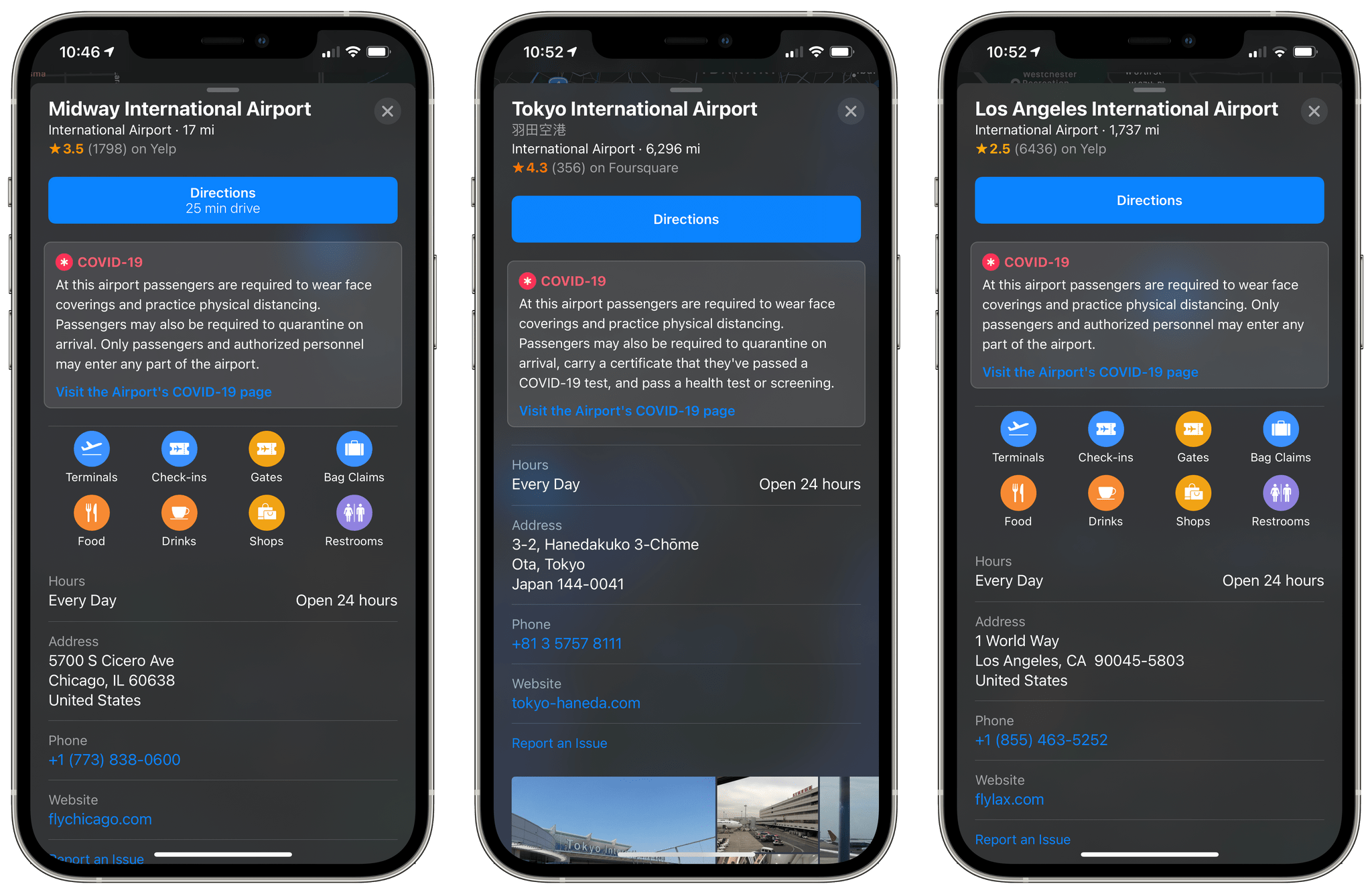
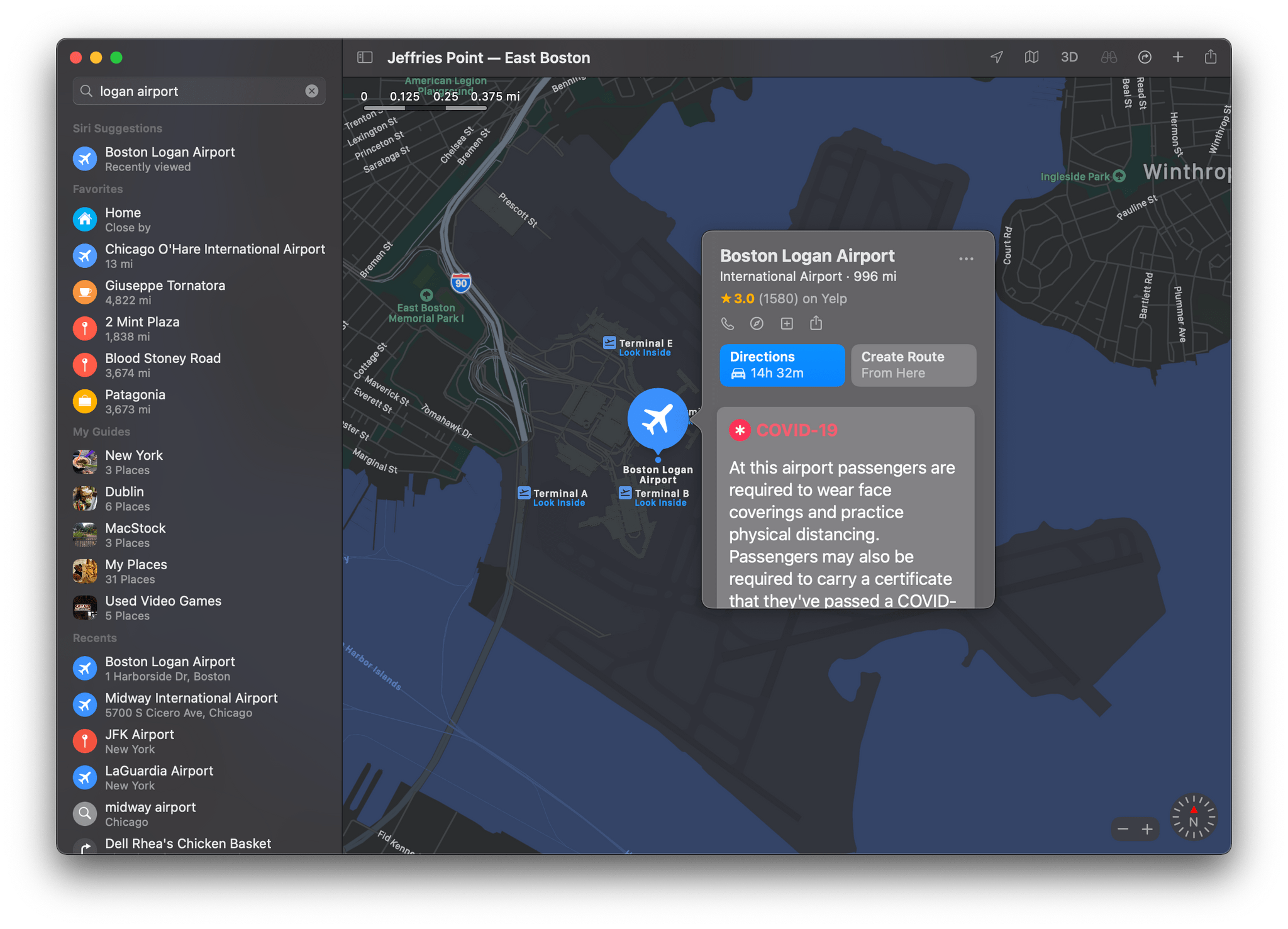
With more people being vaccinated all the time, air travel has picked up too. To help iPhone, iPad, and Mac users understand each airport’s health requirements, Apple has begun adding COVID-19 travel guidance to airport place cards in Maps.

The data includes information like requirements for face coverings, health tests or screenings, and quarantine guidelines, along with links to each airport’s travel guidance webpage. The data is sourced from the Airports Council International, which announced the partnership on its website today. Commenting on the feature, Airports Council International’s World Director General Luis Felipe de Oliveira said:

Having this information displayed in Apple Maps will help to make this crucial data much more broadly accessible to passengers. This will help passengers to plan their journeys and be reassured that their health and safety remains a priority for the industry as we all work towards a sustained return to operations and global connectivity. Collaboration remains key to a globally coordinated recovery and we are grateful to our members for the partnership we have forged to deliver this important tool that will contribute to the rebuilding of passenger confidence in air travel.

The new Maps feature is currently rolling out to more than 300 airports worldwide, so if you don’t see it for your local airport yet, check back later.

Maps' new airport travel guidelines are rolling out internationally.

Maps’ new airport travel guidelines are rolling out internationally.

The new travel guidance adds to Maps’ growing database of COVID-related information available to users, such as the recent addition of COVID vaccination sites in the US and details on testing sites. Travel requirements during the pandemic vary from airport-to-airport, so it’s nice to see Apple is giving its users a convenient place to go to understand the guidelines before leaving home.


A First Look at the Apple Developer App’s New Design and Search Functionality

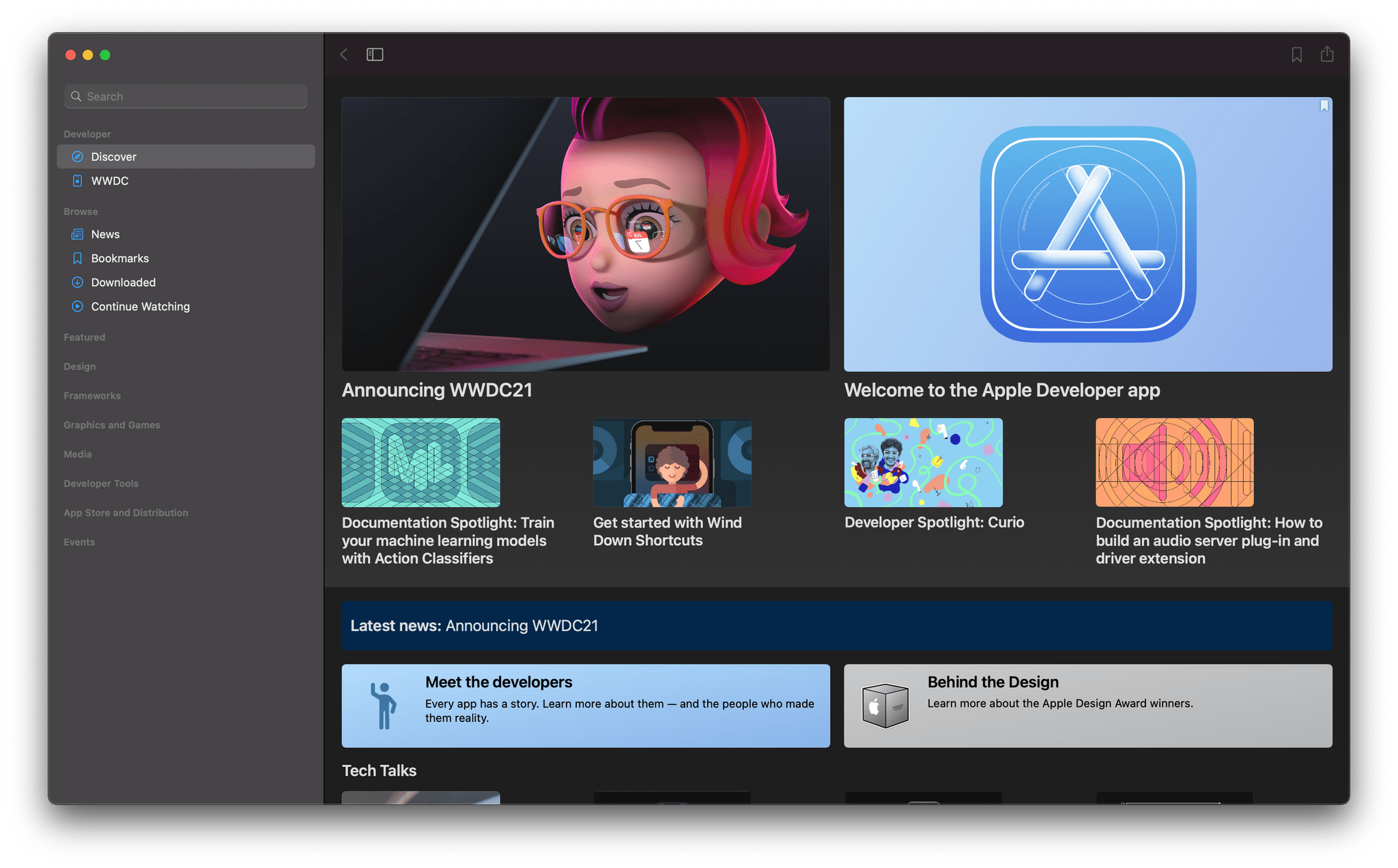
Shortly after announcing WWDC will be held online again this year from June 7 - 11, Apple released a significant update to its Developer app, which serves as a hub for news and watching WWDC sessions.

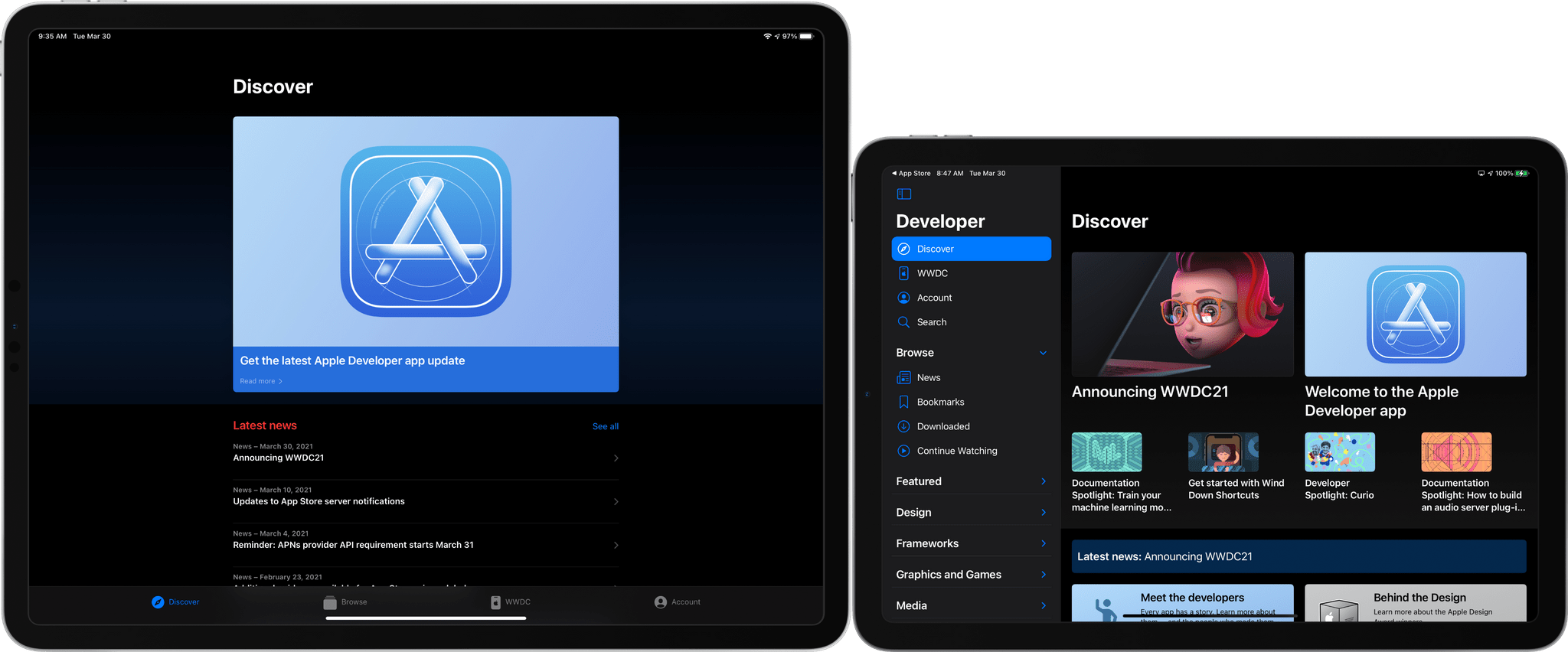
The sidebar of Developer is now easier to navigate. On the iPhone and iPad, content categories, such as Design, Frameworks, and Graphics and Games, can now be collapsed, greatly reducing the amount of vertical scrolling when browsing news and sessions. The iPhone and iPad versions of the app use a more compact, tile-based layout for the Discover tab, which allows for more items to be featured too. The design works well on the smaller screen of the iPhone, but where it really shines is on the iPad and Mac’s larger screens.

The old Discover tab (left) and the updated version (right).

The old Discover tab (left) and the updated version (right).

The iPad app’s tab bar has also been eliminated, moving what was previously there into the sidebar. Combined with the collapsible sidebar sections, the app is both easier to navigate and has more room for content on the iPad than ever before.

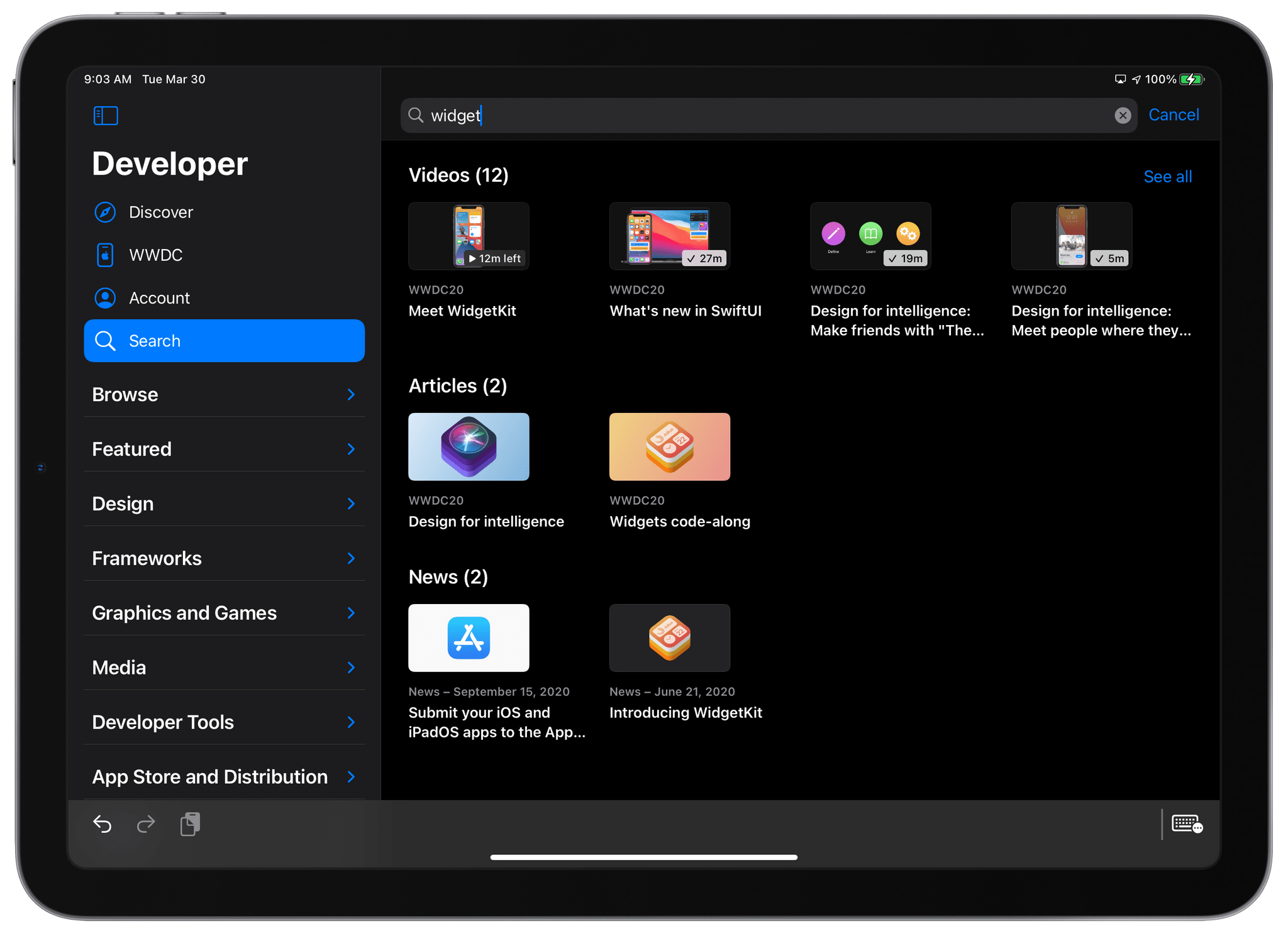
Search results are better organized than before.

Search results are better organized than before.

The update also includes a dedicated Search tab. Instead of a vertical list of results in the sidebar, the results are displayed in the app’s main view organized by videos, articles, and news, showing top results with the ability to ‘See all’ if more results than can fit onscreen are available. I used Developer’s search functionality a lot last year and looking at the results pulled from last year’s WWDC, I can already tell it will be easier to find the videos I want. Also, ‘Favorites’ have been replaced by ‘Bookmarks,’ although the functionality of the two appears to be the same in my limited testing.

The Developer app has always been a useful companion app for WWDC, but with the event being remote last year and again this year, it has taken on greater importance as one of the primary ways developers access sessions and news about Apple’s frameworks. Although I haven’t spent a lot of time with the app yet, it’s clear that a lot of thought went into adapting it to fit in with Apple’s modern iPad and Mac design vision and providing a better experience when sifting through the deep catalog of videos and other content that is available to developers.


Apple Announces That WWDC 2021 Will Be Online-Only Again from June 7 - 11

Apple has decided to make WWDC an online-only event again for 2021, which is no surprise given the on-going global pandemic. Before going online-only last year, WWDC was held at the San Jose McEnery Convention Center in San Jose, California, from 2017 - 2019. The event has been scheduled for June 7-11, 2021. Submissions for the Swift Student Challenge are open now through April 18th.

In a press release issued by the company today, Susan Prescott, Apple’s Vice President of Worldwide Developer Relations and Enterprise and Education Marketing said:

We love bringing our developers together each year at WWDC to learn about our latest technologies and to connect them with Apple engineers. We are working to make WWDC21 our biggest and best yet, and are excited to offer Apple developers new tools to support them as they create apps that change the way we live, work, and play.

Although there are benefits to an in-person event that cannot be replicated online, last year’s WWDC was widely considered to be a success. Apple released dozens of excellent videos about its latest APIs and conducted online lab sessions for developers that received high marks from participants. Although Apple hasn’t released details about this year’s format yet, it’s a safe bet that it will be similar to 2020.

I miss in-person WWDC a lot. Last year’s online version was excellent, but it’s impossible to replace the chance to get together with friends who I often only see at WWDC and meet with the developers whose apps we write about all year long. I expect there’s a chance that even after the pandemic recedes, WWDC will remain online-only, but I sure hope not.

Of course, MacStories readers can expect the same kind of comprehensive WWDC coverage we do every year. In 2020, we tried a few new things that worked well, and we’ll continue to experiment again this year, so stay tuned.


MacStories Unwind: Mac OS X Turns 20, Shortcuts Links Temporarily Break, and a Big Reflector Update

AppStories+ Deeper into the world of apps
0:00
27:02

AppStories+ Deeper into the world of apps


Sponsored by: Ulysses – The Ultimate Writing App for Mac, iPad and iPhone

This week on MacStories Unwind:

MacStories

Club MacStories

  • MacStories Weekly
    • Federico experiments with Firefox on iOS
    • John builds PDF-based read later workflow with three-shortcuts
    • MacStories Recommends: Calendar 366 

AppStories

Unwind


Recently-Created Shortcuts Links Are Currently Broken

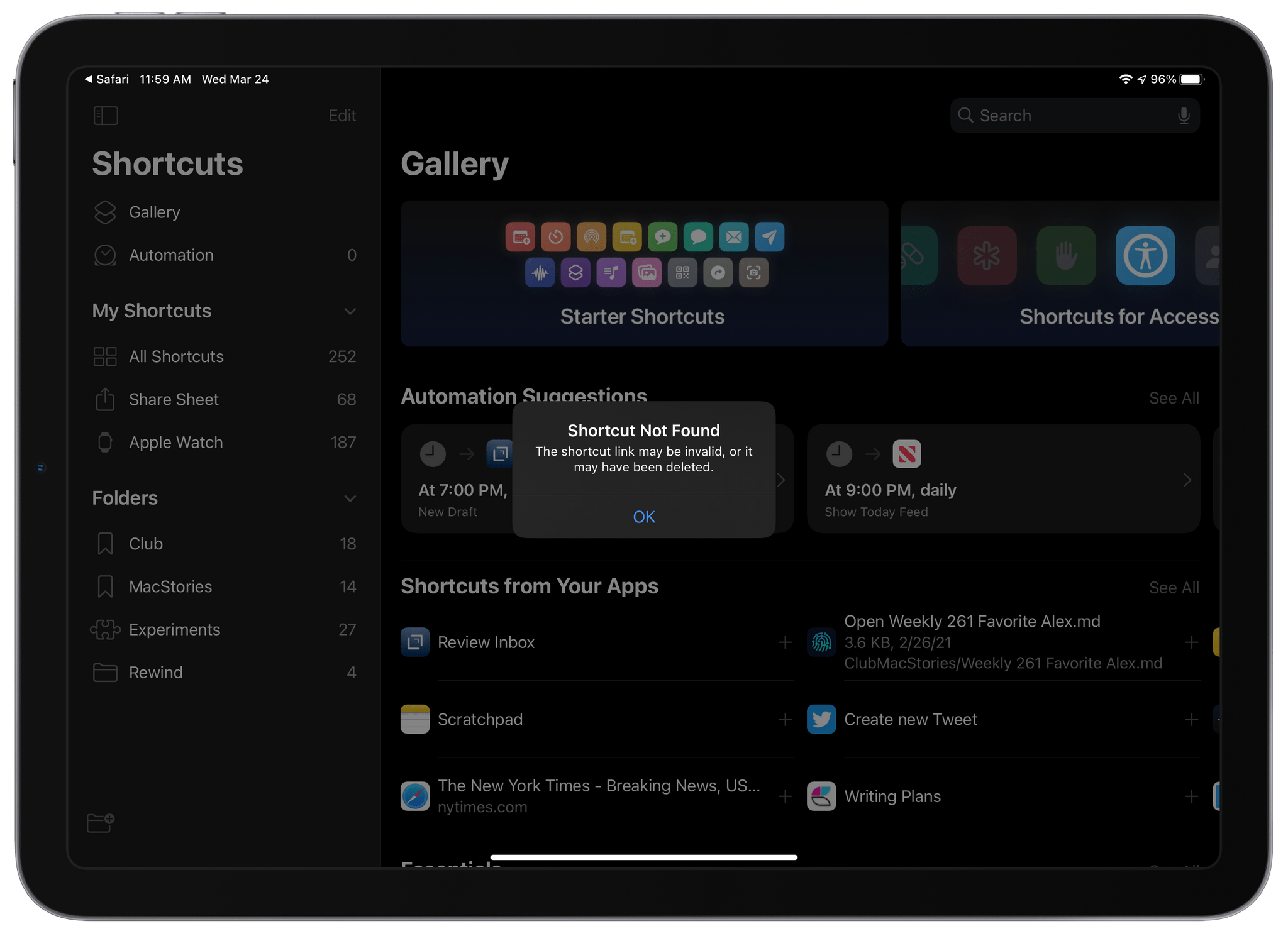
iCloud links to shortcuts broke sometime in the past 24 hours. Instead of opening the Shortcuts app and allowing users to install a shared shortcut, tapping a shortcut link displays an alert with the message ‘Shortcut Not Found,’ explaining that the link may be invalid or the shortcut may have been deleted. Based on our internal testing, the issue appears to affect all shortcut links created before yesterday.

The problem with shortcut links first surfaced in the Shortcuts subreddit late yesterday and early today on Twitter. Yesterday also saw the release of OS betas by Apple, but there is currently no evidence that the two events are linked. It’s also unknown whether the change was intentional or not. However, given that URLs can still be created and shared for new shortcuts, it seems more likely that the issue is related to a bug. We have contacted Apple seeking clarification about the situation but haven’t received a statement from the company.

The issue affects everyone who has shared shortcuts, from individual users to publications like MacStories that have shared shortcuts online. As a result, none of the shortcuts shared in the MacStories Shortcuts Archive currently work. That’s also true for other sites like RoutineHub and the shortcuts subreddit and writers and YouTubers like Chris Lawley and Matthew Cassinelli who have shared many of their own shortcuts.

Unfortunately, as this story is published, we don’t yet know if or when shortcuts links will begin working again. We will update this post as new information surfaces.

Update: Late yesterday, we received the following statement from Apple about the problem with previously-shared shortcuts links:

We are aware of an issue where previously shared shortcuts are currently unavailable. Newly shared shortcuts are available, and we are working to restore previously shared shortcuts as quickly as possible.

This is great news for shortcuts users. We don’t know yet when previously-shared shortcuts will be available, but we’ll let you know as soon as they are, so keep an eye on MacStories for further updates.


MacStories Unwind: Federico Test Drives a High-End iPad Dock, We Recap Reviews of Panic’s Nova and Sofa, and the Sad, Perplexing HomePod News

AppStories+ Deeper into the world of apps
0:00
32:37

AppStories+ Deeper into the world of apps


Sponsored by: Raycast – Goodbye Spotlight, Hello Raycast

This week on MacStories Unwind:

MacStories

Club MacStories

  • MacStories Weekly
    * Federico shares three more Taio automations
    * John on CleanShot X
    * An Interview with Sawyer Blatz, developer of Nudget

AppStories

Unwind


Apple Maps Adds COVID-19 Vaccination Sites in the US

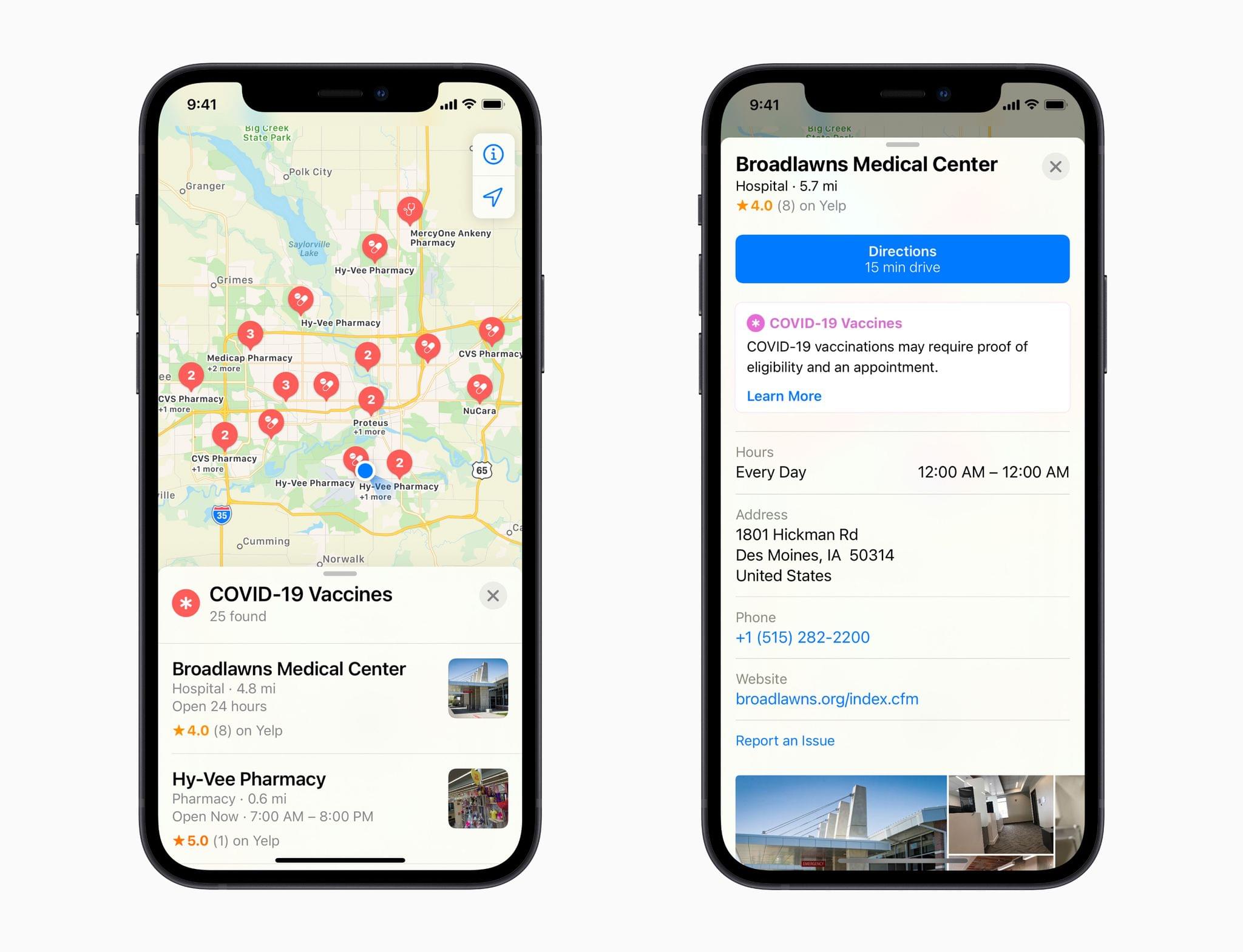
In a press release today, Apple announced that its Maps app has been updated to include the COVID-19 vaccination locations. According to the company:

Apple today updated Apple Maps with COVID-19 vaccination locations from VaccineFinder, a free, online service developed by Boston Children’s Hospital that provides the latest vaccine availability for those eligible at providers and pharmacies throughout the US. Users can find nearby COVID-19 vaccination locations from the Search bar in Apple Maps by selecting COVID-19 Vaccines in the Find Nearby menu or by asking Siri, “Where can I get a COVID vaccination?”

Apple says that the feature currently includes over 20,000 locations and lists operating hours, address information, telephone numbers, and links to vaccine providers’ websites. The company will continue to update the list as new locations become available. Apple has also opened up a registry process for businesses that provide COVID-19 testing and vaccinations to submit their information, which will be added to Maps after it is validated.

With vaccinations being offered at a wide variety of locations run by a combination of governmental entities and private companies, this is a terrific resource that I know I’ll be using when I’m eligible to be vaccinated.