Posts in mac

Apple Finally Has A Better Short URL for Ping: iTun.es

Tonight I went out to show some friends of mine Infinity Blade for the iPhone (they all loved the graphics, by the way) and when I came back home 10 minutes ago I decided I would take 10 minutes to check out The Smith’s albums that were released in the iTunes Store earlier today.

I had configured my Ping account to share items on Twitter, so I clicked the “Post” button and noticed something interesting: Apple has finally deployed a new short URL for Ping tweets, itun.es. The itun.es domain was purchased by Apple years ago, and since Apple announced the Ping - Twitter integration in November many thought itun.es would be a great option for those tweeted items. The itun.es links are now ready to go and they show up in the iTunes Store when sharing a song / album on Twitter. Read more



Cydia Is Coming To The Mac

Well, well. Look what we have here. We’ve been hearing rumors all week about the Mac App Store launching soon, we found out that the upcoming store won’t allow Mac developers to generate promo codes and won’t feature in-app purchases and Game Center integration, Apple clarified its position on demos and trials.

Now Jay Freeman, a.k.a. Saurik, creator of popular alternative store Cydia for jailbroken devices, told the attendees of 360|MacDev that Cydia is coming to the Mac. Read more


No In-App Purchases and Game Center In The Mac App Store

Looks like the Mac App Store is going to be quite different from the iOS model we’ve gotten used to in these past two years. Yesterday we broke the news that developers won’t be able to generate promo codes for Mac apps sold though the new Store (even if they’ve gone international for all users), today 9to5mac reports that in-app purchases and Game Center won’t find their way to Jobs’ latest reinvention of the Mac software environment, either.

Mark Gurman notes:

Apple has informed App Store developers that two major iOS app store features will not make their way ‘back to the mac.’

Note: In app purchases are not available for Mac OS X apps.

Note: Game Center is not available for Mac OS X apps.

As we wrote yesterday, Apple is clearly aiming at a simple purchase experience similar to the iOS App Store, but with less features than the mobile counterpart. Perhaps they don’t want Mac users to feel overwhelmed with new functionalities such as in-app purchases? Maybe they didn’t have time to implement them by the 2011 opening?

Still, we think Game Center on the desktop would be great. And terrible for our productivity.


Apple Releases Aperture 3.1.1 With Bug Fixes, Performance Improvements

Today Apple released a minor update to Aperture 3, which reaches version 3.1.1 and adds a number of fixes and overall performance improvements.

This update fixes an issue with iMovie ‘11 becoming unresponsive while scanning Aperture’s library for videos, incompatibilities with the media browser, issues with cameras causing the app to quit unexpectedly.

Aperture 3.1.1 also contains fixes for web publishing, slideshows and upgrades. More information about the update can be found here. Check out the full changelog below.

[Thanks, Bea!] Read more


Apple Releases QuickTime 7.6.9

A few minutes ago Apple pushed an update to QuickTime, which reaches version 7.6.9 and includes various security fixes for vulnerabilities found in previous iterations.

QuickTime 7.6.9 is propagating now in Software Update, or you can download it from Apple’s website. More information about the update are available here.


Is This The Finder You Want in OS X Lion?

With the Mac App Store reportedly around the corner and OS X Lion set to ship sometimes next summer, we are going to see hundreds of new apps coming to the Mac in the next months. Thanks to a unified purchase system modeled after the insanely successful iOS App Store and all the excitement around a major new version of OS X, developers are jumping to the Mac once again. The interesting apps released in these past weeks confirm that the Mac is far from “dead”.

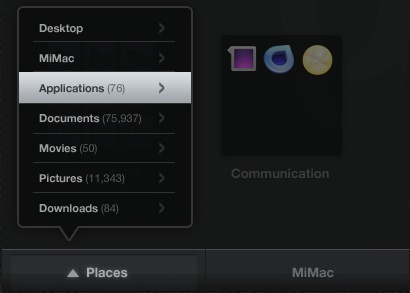
Still, there’s one application users would like Apple to slightly tweak and / or completely change: the Finder. Some would be fine with a tweaked version inspired by TotalFinder, some claim Apple is going after a Finder-less model just like on iOS. And while we don’t think Apple is going to kill the Finder just yet, we’re definitely playing around with the idea of a massive update to OS X default file manager come Lion next year. Read more


Pure Reader: Amazing Google Reader Mod

A lot of people started using RSS once again when Reeder for Mac (public beta) came out last week. It is a beautiful app that brings the power of Google Reader to the desktop with a lot of additional functionalities such as support for sharing on multiple social networks and background loading of webpages. But many users are still tied to Google Reader in the browser, that pinned tab that they just can’t close.

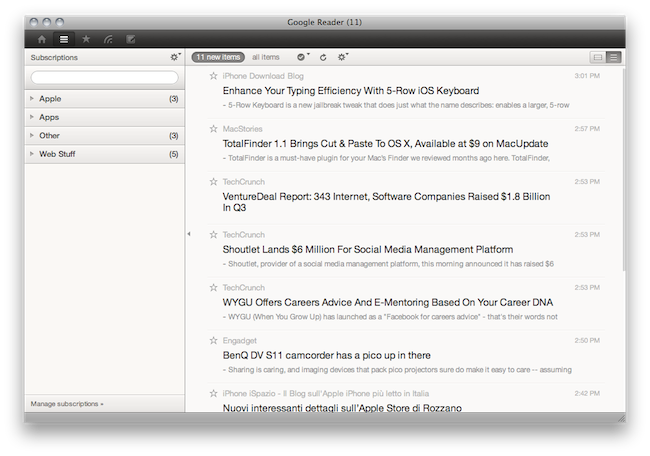
If so, take a look at Pure Reader, a browser extension by designer Na Wong. Read more


TotalFinder 1.1 Brings Cut & Paste To OS X, Available at $9 on MacUpdate

TotalFinder is a must-have plugin for your Mac’s Finder we reviewed months ago here. TotalFinder, developed by Binary Age, brings a lot of additional functionalities to Apple’s default file manager, including the possibility to open multiple tabs, a “visor” feature to open the Terminal as a transparent layer on top of any window, folders on top, dual mode and many other tweaks.

It’s a massive extension to the original Finder which I’ve been using for months now, and haven’t really looked back. It doesn’t get in the way like many other alternative file managers do, as it perfectly blends with the Finder itself.

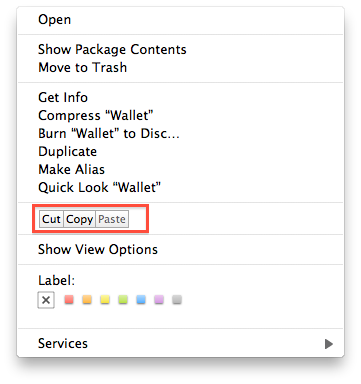
Today Binary Age released a major update to TotalFinder, introducing a variety of bug fixes and improvements but, most of all, a new icon and proper cut & paste support. To activate cut & paste for files in the Finder (which doesn’t ship by default with OS X machines) you just have to open the preferences and check an option. Once activated, you’ll find a cut & paste menu in the Finder’s default contextual menu. The 1.1 update also brings much smoother tabs animations, sidebar tweaks in dual mode, fast toolbar hiding.

TotalFinder was a must-have on its version 1.0, and it still is now that the first major update is out. Actually, I can’t recommend this more now that cut & paste is a go and lots of bugs have been squashed. Plus, the app is available today at $9 on MacUpdate Promo – you can’t miss it.