Posts in iPad

Photoshop For iPad To Be Updated With Support For Layers

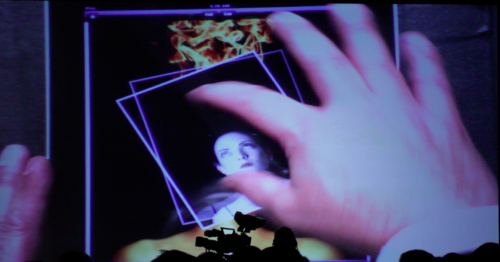
Photography Bay got to go hands on with an updated Photoshop app for the iPad, which will bring support for layers and new features to compared original and edited photos. Recently, the Photoshop app was updated to its second version which included multitasking support and an update to utilize the Retina Display on the iPhone. Back in November, Adobe’s John Nack offered some insight as to what features would arrive in future app updates after a brief survey. Electronista notes that an updated Photoshop would, “help address the lack of content creation, one of the most commonly cited flaws of the platform.” Maybe the author hasn’t been paying attention, but while Adobe is updating Photoshop, many other photo editors such as Photogene, Masque, and PhotoForge have existed for a while. An update to Photoshop is still, however, a welcome addition to the iPad. While the Photography bay was able to snap some blurry demo photos and video, the video hasn’t been published online and has been noted to be published later tonight.

[Photography Bay via Electronista]

Access Extra Content and Perks

Founded in 2015, Club MacStories has delivered exclusive content every week for nearly a decade.

What started with weekly and monthly email newsletters has blossomed into a family of memberships designed for every MacStories fan.

Learn more here and from our Club FAQs.

Club MacStories: Weekly and monthly newsletters via email and the web that are brimming with apps, tips, automation workflows, longform writing, early access to the MacStories Unwind podcast, periodic giveaways, and more;

Club MacStories+: Everything that Club MacStories offers, plus an active Discord community, advanced search and custom RSS features for exploring the Club’s entire back catalog, bonus columns, and dozens of app discounts;

Club Premier: All of the above and AppStories+, an extended version of our flagship podcast that’s delivered early, ad-free, and in high-bitrate audio.

Learn more here and from our Club FAQs.


#MacStoriesDeals - Exclusive Wednesday

If you didn’t already know, we’ve set up a new twitter account for Deals, it’s @MacStoriesDeals. We’ll tweet the daily deals there as well as exclusive weekend deals too. Help spread the word! Here are today’s deals on iOS, Mac, and Mac App Store apps that are on sale for a limited time, so get ‘em while they’re hot!

Read more

Access Extra Content and Perks

Founded in 2015, Club MacStories has delivered exclusive content every week for nearly a decade.

What started with weekly and monthly email newsletters has blossomed into a family of memberships designed for every MacStories fan.

Learn more here and from our Club FAQs.

Club MacStories: Weekly and monthly newsletters via email and the web that are brimming with apps, tips, automation workflows, longform writing, early access to the MacStories Unwind podcast, periodic giveaways, and more;

Club MacStories+: Everything that Club MacStories offers, plus an active Discord community, advanced search and custom RSS features for exploring the Club’s entire back catalog, bonus columns, and dozens of app discounts;

Club Premier: All of the above and AppStories+, an extended version of our flagship podcast that’s delivered early, ad-free, and in high-bitrate audio.

Learn more here and from our Club FAQs.


iFixit Tears Down, Compares WiFi, GSM And CDMA iPad 2s

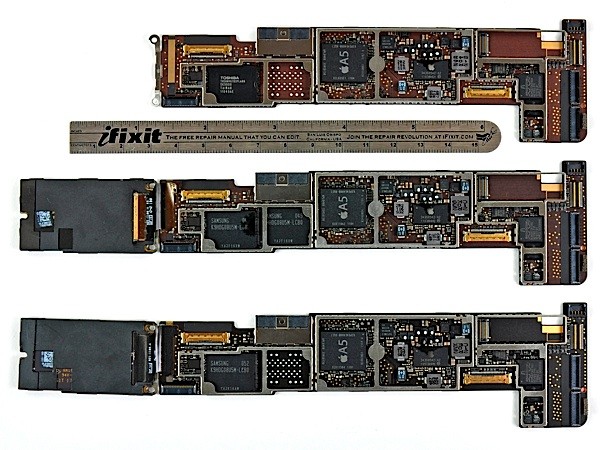
If you’ve been intrigued by what exactly is different between the WiFi, GSM (AT&T) and CDMA (Verizon) versions of the iPad 2, well iFixit has you covered yet again with some very nice comparisons of the internals of those three base models. The above photo shows you the logic board of the three (WiFi up top and 3G below the ruler) but iFixit also documents the other key vitals of the iPad 2 on their site from the various antennas, 3G chips and the headphone jack.

The key differences to note are that the CDMA model has an additional antenna compared to the GSM variety and it also uses a Qualcomm Gobi dual-mode radio with integrated GPS that actually supports both CDMA and GSM, but the GSM compatibility is unused by the iPad. As for the GSM models, they use an Infineon GSM chip and a Broadcom GPS chip. Interestingly the hardware for both the CDMA and GSM iPad 2 follows the iPhone 4, in which the GSM versions used that Infineon and Broadcom chips whilst the Verizon CDMA version used the single Qualcomm one.

Want to see more? Jump through to the iFixit site and don’t forget to have a look at the full iPad 2 teardown and Smart Cover teardown that they also did earlier this month.

[Via Engadget]


Access Extra Content and Perks

Founded in 2015, Club MacStories has delivered exclusive content every week for nearly a decade.

What started with weekly and monthly email newsletters has blossomed into a family of memberships designed for every MacStories fan.

Learn more here and from our Club FAQs.

Club MacStories: Weekly and monthly newsletters via email and the web that are brimming with apps, tips, automation workflows, longform writing, early access to the MacStories Unwind podcast, periodic giveaways, and more;

Club MacStories+: Everything that Club MacStories offers, plus an active Discord community, advanced search and custom RSS features for exploring the Club’s entire back catalog, bonus columns, and dozens of app discounts;

Club Premier: All of the above and AppStories+, an extended version of our flagship podcast that’s delivered early, ad-free, and in high-bitrate audio.

Learn more here and from our Club FAQs.


Gamer Develops Homebrew iControl App For A-10 Flight Simulator

In succession of the wireless hack we found this morning, this afternoon brings us another case of the iPad being modified for new and awesome things. Flight simulator DCS A-10C is virtual combat simulator for the A-10C Warthog, giving wannabe pilots the opportunity to take to the air in the one world’s most advanced (and vicious looking) combat fighters. Use of Multi Function Control Displays (MFCDs) in the game (those fancy on-screen controls in the cockpit) would traditionally take the eyes of the pilot off of their environment in-game, but an iPad mod utilizing the game’s API brings the MFCDs to the iPad’s display, giving the pilot an additional monitor to work with alongside the joystick and throttle. The iPad provides a way to tap into different displays and control sets in the cockpit, all the while the gamer can continue to control the plane and move the pilot to check the wings and and surrounding environment. It’s incredibly impressive, and Electronista notes that a final version of the controls may make its way to the App Store so everyone can have access to the digital overlay. You can check out video of the DCS iControl in use after the break.

[Shacknews via Electronista]

Read more

Access Extra Content and Perks

Founded in 2015, Club MacStories has delivered exclusive content every week for nearly a decade.

What started with weekly and monthly email newsletters has blossomed into a family of memberships designed for every MacStories fan.

Learn more here and from our Club FAQs.

Club MacStories: Weekly and monthly newsletters via email and the web that are brimming with apps, tips, automation workflows, longform writing, early access to the MacStories Unwind podcast, periodic giveaways, and more;

Club MacStories+: Everything that Club MacStories offers, plus an active Discord community, advanced search and custom RSS features for exploring the Club’s entire back catalog, bonus columns, and dozens of app discounts;

Club Premier: All of the above and AppStories+, an extended version of our flagship podcast that’s delivered early, ad-free, and in high-bitrate audio.

Learn more here and from our Club FAQs.


#MacStoriesDeals - Tuesday

If you didn’t already know, we’ve set up a new twitter account for Deals, it’s @MacStoriesDeals. We’ll tweet the daily deals there as well as exclusive weekend deals too. Help spread the word! Here are today’s deals on iOS, Mac, and Mac App Store apps that are on sale for a limited time, so get ‘em while they’re hot! Read more

Access Extra Content and Perks

Founded in 2015, Club MacStories has delivered exclusive content every week for nearly a decade.

What started with weekly and monthly email newsletters has blossomed into a family of memberships designed for every MacStories fan.

Learn more here and from our Club FAQs.

Club MacStories: Weekly and monthly newsletters via email and the web that are brimming with apps, tips, automation workflows, longform writing, early access to the MacStories Unwind podcast, periodic giveaways, and more;

Club MacStories+: Everything that Club MacStories offers, plus an active Discord community, advanced search and custom RSS features for exploring the Club’s entire back catalog, bonus columns, and dozens of app discounts;

Club Premier: All of the above and AppStories+, an extended version of our flagship podcast that’s delivered early, ad-free, and in high-bitrate audio.

Learn more here and from our Club FAQs.


Impressive Hack Wirelessly Mirrors iPad 2 To Display

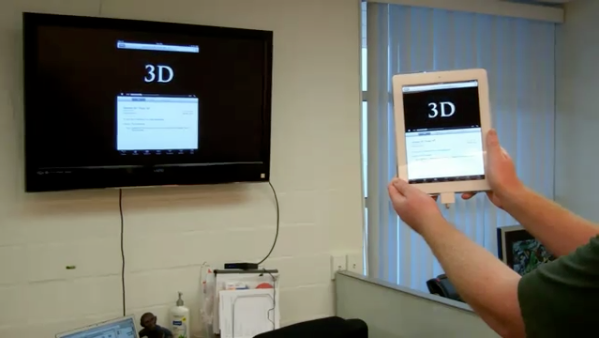
Cables suck, and if you want to kill a presentation you need to be untethered from that fifteen foot long VGA cable tethered to that overhead projector. When a client wanted to cut the cord, some ingenuity resulted in shell housing a minimum of two components and a simple usb cable. The idea revolves around the HP Wireless TV Connect and a Cooler Master Choiix Power Fort battery pack to power the transmitter used for the iPad, connected by a simple USB cable. The HP Wireless TV Connect consists of a transmitter and a receiver: the receiver is connected to the display, while the transmitter is fed power (up to two hours) using the battery. Using a wooden block for a mold, a shell was created to house the components and sit the iPad 2 on top, with enough space to connect the cord from the dock connector to the components inside. How does it work? Asides from the bulk and the two pounds added, the wireless iPad works just as you’d expect it to. We have a video after the break if you’re curious to see how it all goes down, and if you have the time and money you too could roll your own for around $275 according to the mastermind behind it all.

[Youtube (eg0voruhk) via Reddit, MacRumors Forums]

Read more

Access Extra Content and Perks

Founded in 2015, Club MacStories has delivered exclusive content every week for nearly a decade.

What started with weekly and monthly email newsletters has blossomed into a family of memberships designed for every MacStories fan.

Learn more here and from our Club FAQs.

Club MacStories: Weekly and monthly newsletters via email and the web that are brimming with apps, tips, automation workflows, longform writing, early access to the MacStories Unwind podcast, periodic giveaways, and more;

Club MacStories+: Everything that Club MacStories offers, plus an active Discord community, advanced search and custom RSS features for exploring the Club’s entire back catalog, bonus columns, and dozens of app discounts;

Club Premier: All of the above and AppStories+, an extended version of our flagship podcast that’s delivered early, ad-free, and in high-bitrate audio.

Learn more here and from our Club FAQs.


#MacStoriesDeals - Monday

If you didn’t already know, we’ve set up a new twitter account for Deals, it’s @MacStoriesDeals. We’ll tweet the daily deals there as well as exclusive weekend deals too. Help spread the word! Here are today’s deals on iOS, Mac, and Mac App Store apps that are on sale for a limited time, so get ‘em while they’re hot!

Read more

Access Extra Content and Perks

Founded in 2015, Club MacStories has delivered exclusive content every week for nearly a decade.

What started with weekly and monthly email newsletters has blossomed into a family of memberships designed for every MacStories fan.

Learn more here and from our Club FAQs.

Club MacStories: Weekly and monthly newsletters via email and the web that are brimming with apps, tips, automation workflows, longform writing, early access to the MacStories Unwind podcast, periodic giveaways, and more;

Club MacStories+: Everything that Club MacStories offers, plus an active Discord community, advanced search and custom RSS features for exploring the Club’s entire back catalog, bonus columns, and dozens of app discounts;

Club Premier: All of the above and AppStories+, an extended version of our flagship podcast that’s delivered early, ad-free, and in high-bitrate audio.

Learn more here and from our Club FAQs.


Meet The Plasticine iPad

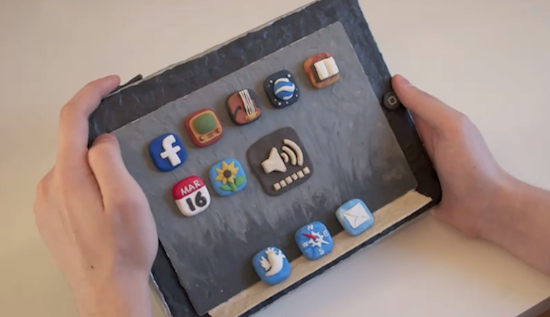
iOS devices are beautiful examples of industrial design and we know they can also resist the most terrible accidents thanks to their great build quality, but none of them is as cute as the plasticine iPad 2 we found on Youtube. Perfectly “compatible” with multitouch and coming with a handful of third-party apps installed, this alleged prototype from Cupertino (not really, but we like the idea) does 3D projections without glasses as well, with real-time manipulation. Of course it also does games, maps, Twitter and web browsing.

Seriously though, the work that went into this stop-animation video must have been huge, and you should check it out below.
Read more

Access Extra Content and Perks

Founded in 2015, Club MacStories has delivered exclusive content every week for nearly a decade.

What started with weekly and monthly email newsletters has blossomed into a family of memberships designed for every MacStories fan.

Learn more here and from our Club FAQs.

Club MacStories: Weekly and monthly newsletters via email and the web that are brimming with apps, tips, automation workflows, longform writing, early access to the MacStories Unwind podcast, periodic giveaways, and more;

Club MacStories+: Everything that Club MacStories offers, plus an active Discord community, advanced search and custom RSS features for exploring the Club’s entire back catalog, bonus columns, and dozens of app discounts;

Club Premier: All of the above and AppStories+, an extended version of our flagship podcast that’s delivered early, ad-free, and in high-bitrate audio.

Learn more here and from our Club FAQs.


Apple Australia Lets You Reserve An iPad 2 For Pickup

If you’re on the hunt for an iPad 2 and live in Australia you might just have a good chance of snapping one up from an Apple Store by reserving one online. That’s right, Apple Australia is letting customers reserve iPad 2’s for pick-up at an Apple Store and the next day no less!

There is however a (large) caveat in that you can only reserve an iPad 2 if that particular store has them in stock – and after going live only 3 hours ago I’ve looked through most of the Australian Apple Stores and none have stock of any of the 12 models.  Apple Stores do however receive stock fairly frequently, at least a few times a week so keep checking if you’ve missed out in this first batch of reservable iPad 2’s.

If you live close enough to an Australian Apple retail store and want to reserve an iPad 2 for pickup, jump over to the Apple retail site. At this stage it seems that Apple isn’t offering to do reserve iPad 2’s in any other country but one would suspect they may transition this system internationally and hopefully soon as it sure beats going to an Apple store everyday to ask if they have the model you want in stock.

[Via MacTalk]


Access Extra Content and Perks

Founded in 2015, Club MacStories has delivered exclusive content every week for nearly a decade.

What started with weekly and monthly email newsletters has blossomed into a family of memberships designed for every MacStories fan.

Learn more here and from our Club FAQs.

Club MacStories: Weekly and monthly newsletters via email and the web that are brimming with apps, tips, automation workflows, longform writing, early access to the MacStories Unwind podcast, periodic giveaways, and more;

Club MacStories+: Everything that Club MacStories offers, plus an active Discord community, advanced search and custom RSS features for exploring the Club’s entire back catalog, bonus columns, and dozens of app discounts;

Club Premier: All of the above and AppStories+, an extended version of our flagship podcast that’s delivered early, ad-free, and in high-bitrate audio.

Learn more here and from our Club FAQs.