Posts in giveaway

The MacStories Productivity Giveaway

The great thing about working at MacStories is we get exposed to a ton of brilliant applications that solidify our workflows and give us different perspectives on how to get things done. All of us have various tools that work for us, and just as we like to share our findings we occasionally tussle over our tools of choice. Any of us could get by with just the basics, but the Mac is made so much better when you come to appreciate and enjoy all the great software that’s available to us. The four of us working at MacStories put our heads together and picked out five of our favorite applications to share with you guys in hopes of loading up your summer Macs with a great selection of productive software. As you can see in the banner, we have a great lineup we’d love to share with you.

Reeder for the Mac (Up to 5 winners): Certainly we have the occasional NNW vs. Reeder clash behind the scenes, but all of us agree that Reeder is something really special for the Mac. It takes your RSS feeds and puts them in a beautiful interface that can be as minimal or expanded as you need it to be, and it works fluidly with gestures on newer Macs. My favorite feature: Readability works extremely well with linked posts, formatting the original article for Reeder without distracting web nonsense. If you love it for the iPad and iPhone, Reeder for Mac is a must have.

Notefile for iOS (Up to 3 winners): When it comes down to it, we just want an easy way to sync notes, reminders, and to-do lists between our Macs and iOS devices. Dropbox is nice, but it’s not as automatic as Junecloud’s Notefile. You’d think it already had iCloud support, pulling down your most recent notes from the Dashboard widget or onto your iPhone. We think this is a great replacement for Apple’s Notes, and we absolutely love how simple Notefile is in its entirety.

Alfred Powerpack for Mac (Up to 3 winners): Alfred is really fantastic for Mac users who want to take it to the next level. If you’re looking for an edge in productivity, Alfred is a swiss-army knife that’ll launch documents, recall snippets from the clipboard, and call on apps with a few simple keystrokes. Search Amazon, Google, Wikipedia, and the IMDb right from your desktop. Alfred is free to download, but the Powerpack adds file system navigation, clipboard history, terminal control, an iTunes remote, and email integration to the already powerful launcher.

Fantastical for Mac (Up to 5 winners): Fantastical is the iCal companion that makes it easy to manage your schedule of meetings, client reviews, and other events through plain english. If you wanted to meet me at Brian’s Bar and Grill at four o’clock on Saturday, you could totally just type that in… and it’d just work. Fantastical is amazing.

Courier for Mac (Up to 5 winners): Productivity doesn’t always have to extend into the workplace. We’re always looking for better ways to get files online, and Courier for the Mac allows us to do just that. Simply drag and drop pictures and movies to upload them to your personal accounts such as Facebook and Flickr — web interfaces are a thing of the past.

We’re giving out a total of twenty one apps to twenty one lucky winners, and we want to thank all of the developers for hooking us up and helping us give you guys some great software. For your chance to win one of these great apps, you’ll need to check out the giveaway rules past the break!

Read more

Access Extra Content and Perks

Founded in 2015, Club MacStories has delivered exclusive content every week for nearly a decade.

What started with weekly and monthly email newsletters has blossomed into a family of memberships designed for every MacStories fan.

Learn more here and from our Club FAQs.

Club MacStories: Weekly and monthly newsletters via email and the web that are brimming with apps, tips, automation workflows, longform writing, early access to the MacStories Unwind podcast, periodic giveaways, and more;

Club MacStories+: Everything that Club MacStories offers, plus an active Discord community, advanced search and custom RSS features for exploring the Club’s entire back catalog, bonus columns, and dozens of app discounts;

Club Premier: All of the above and AppStories+, an extended version of our flagship podcast that’s delivered early, ad-free, and in high-bitrate audio.

Learn more here and from our Club FAQs.


The Freelance Mac App Bundle Giveaway

Mac owning freelance web developers might be able to push pixels in Photoshop and write code in BBEdit, but just how are you going about your invoices, backup, and how do you even begin to collect all the little bits of inspiration you find around the web? Clients need secure passwords to protect their websites, and responding to gobs of email can keep you from being focused on what really matters. Entertainment and keeping your daily routine in check are just as important. Freelancers also need to be on top of their game, and thus, we have the Freelance Mac App Bundle which packages $300 worth of goodies together for only $49.

Billings ($39.99)
TextExpander ($34.95)
WriteRoom ($24.99)
Radium ($9.99)
Arq ($29)
LittleSnapper ($29)
1Password ($39.99)
Alarms ($16.80)

Envato is also throwing in a wordpress theme, client manager, a professional business card, and an eBook from RockablePress to round out the bundle.

Freelancers looking for a bargain on really great apps can grab their copy today. Being a MacStories reader, however, also gives you a chance to win one of two bundles which you’ll find past the break. Read more

Access Extra Content and Perks

Founded in 2015, Club MacStories has delivered exclusive content every week for nearly a decade.

What started with weekly and monthly email newsletters has blossomed into a family of memberships designed for every MacStories fan.

Learn more here and from our Club FAQs.

Club MacStories: Weekly and monthly newsletters via email and the web that are brimming with apps, tips, automation workflows, longform writing, early access to the MacStories Unwind podcast, periodic giveaways, and more;

Club MacStories+: Everything that Club MacStories offers, plus an active Discord community, advanced search and custom RSS features for exploring the Club’s entire back catalog, bonus columns, and dozens of app discounts;

Club Premier: All of the above and AppStories+, an extended version of our flagship podcast that’s delivered early, ad-free, and in high-bitrate audio.

Learn more here and from our Club FAQs.


Link Your Computer And iOS Device With myPhoneDesktop: Double Pass Giveaway!

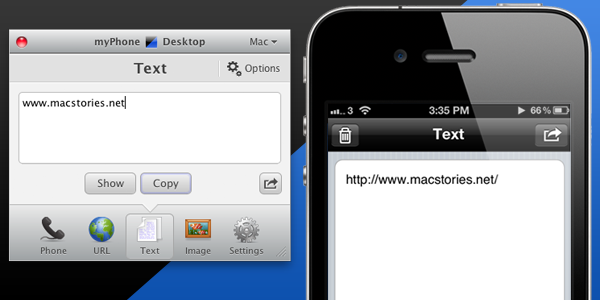
We’ve talked about myPhoneDesktop before on MacStories but we thought it deserved a short ‘re-review’ to accompany today’s giveaway. Keeping it simple, the premise of myPhoneDesktop is that it provides a portal through which you can easily transfer data and information from your desktop computer to your iPhone or iPad.

Broadly speaking the app transfers four types of data including phone data (both numbers and text messages), website URLs, text and images. When you send any of that data from your computer, and there is both a desktop and web client, it will be pushed straight to your device with a notification.

But where I think the app becomes most powerful is when you have the data on your iPhone or iPad. In the corner of the app it has the “Open in” icon where it literally has a wealth of options for your data. There is everything from the obligatory search with Google, to send by email, add to contact, send SMS or launching another app with that data. Importantly, the developers aren’t resting on their laurels, since we last talked about myPhoneDesktop there have been a few updates that continue to add more app integrations including Navigon and InstaTodo.

In reality I have only just scraped the surface of what this app can do, for example it also integrates with Google Voice and Skype, so make sure to check out the myPhoneDesktop website to learn more and get your own copy. Today we’re giving away 5 ‘double passes’ of myPhone desktop – in other words the five winners will receive two promo codes, perfect to give one copy to a iPhone-toting friend or family member, or (god forbid) use it as a belated Father’s Day gift. Details of the give away are past the break.

Read more

Access Extra Content and Perks

Founded in 2015, Club MacStories has delivered exclusive content every week for nearly a decade.

What started with weekly and monthly email newsletters has blossomed into a family of memberships designed for every MacStories fan.

Learn more here and from our Club FAQs.

Club MacStories: Weekly and monthly newsletters via email and the web that are brimming with apps, tips, automation workflows, longform writing, early access to the MacStories Unwind podcast, periodic giveaways, and more;

Club MacStories+: Everything that Club MacStories offers, plus an active Discord community, advanced search and custom RSS features for exploring the Club’s entire back catalog, bonus columns, and dozens of app discounts;

Club Premier: All of the above and AppStories+, an extended version of our flagship podcast that’s delivered early, ad-free, and in high-bitrate audio.

Learn more here and from our Club FAQs.


Apple Design Award Winner djay Goes on Sale, Gives Us Three Copies To Celebrate

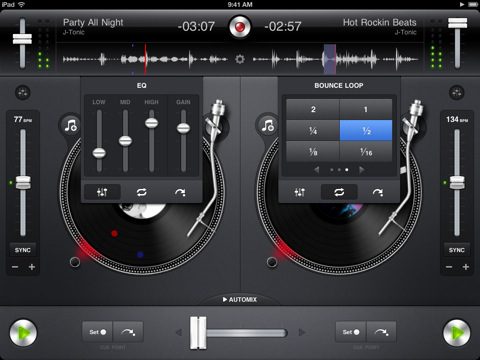
There’s no way we could deny the opportunity to give away a few copies of djay having gotten up close and personal with all those sexy pixels, which were recognized by the top dogs at Apple before they handed out the all-to-well-known Apple Design Award to Algoriddim. It doesn’t surprise us that such talent didn’t go unrewarded: turntables come alive with artist artwork, finger friendly equalizers can be easily adjusted, and let’s not forget the terrific automix mode for the amateur DJs in the house. Apple chose djay for its utilization of Core Audio, which helps the app pump out pristine sound at “ultra-low latencies”, and if cables aren’t your thing then AirPlay can get you set up with your preferred AV receiver. Taking advantage of the iPad 2’s A5 processor, djay for the iPad hums along as you scratch tracks, record your own sessions, and pull DRM free songs from your library with just a flick of the finger. To celebrate on their achievement, djay is on sale for $9.99 (normally $19.99) in the App Store for a limited time, so get it while it’s hot!

We’re also giving away three copies of this Apple approved app past the break - we wouldn’t want you to miss out on one of the biggest apps of this year.

Read more

Access Extra Content and Perks

Founded in 2015, Club MacStories has delivered exclusive content every week for nearly a decade.

What started with weekly and monthly email newsletters has blossomed into a family of memberships designed for every MacStories fan.

Learn more here and from our Club FAQs.

Club MacStories: Weekly and monthly newsletters via email and the web that are brimming with apps, tips, automation workflows, longform writing, early access to the MacStories Unwind podcast, periodic giveaways, and more;

Club MacStories+: Everything that Club MacStories offers, plus an active Discord community, advanced search and custom RSS features for exploring the Club’s entire back catalog, bonus columns, and dozens of app discounts;

Club Premier: All of the above and AppStories+, an extended version of our flagship podcast that’s delivered early, ad-free, and in high-bitrate audio.

Learn more here and from our Club FAQs.


Stay on Top of Retweets, Faves, and Follows from your Menubar with Bird Bell: Review and Giveaway!

If you’ve wanted to stay on top of your Twitter status in real time, many Twitter clients won’t show you whether that last tweet caused a few unfollows or if it was fave’d by a few of your fans. For those obsessed with getting realtime feedback, Bird Bell is an excellent companion app to any Twitter client you have on the Mac, integrating with Growl and displaying real time feedback on retweets, follows, unfollows, favorites, and lists you’re added to. Bird Bell integrates with both Twitter and Favstar, and can be customized to a wide extent in revealing growl or menubar notifications per account. With the official Twitter app for the Mac (which offers live streaming), Bird Bell can give you a bird’s eye view on just how responsive your audience is to what you’ve tweeted as soon as you’ve hit the return key. Bird Bell works in the background, and only notifies you based on your interests: I personally don’t care about follows and unfollows, and choose to see favorites and retweets instead.

Twitter junkies who want to revel in their tweets can purchase Bird Bell on the Mac App Store for $1.99 — it’s a great utility that works alongside your favorite Twitter clients. We’re also giving away five copies of Bird Bell, and you can click past the break for your chance to win.

Read more

Access Extra Content and Perks

Founded in 2015, Club MacStories has delivered exclusive content every week for nearly a decade.

What started with weekly and monthly email newsletters has blossomed into a family of memberships designed for every MacStories fan.

Learn more here and from our Club FAQs.

Club MacStories: Weekly and monthly newsletters via email and the web that are brimming with apps, tips, automation workflows, longform writing, early access to the MacStories Unwind podcast, periodic giveaways, and more;

Club MacStories+: Everything that Club MacStories offers, plus an active Discord community, advanced search and custom RSS features for exploring the Club’s entire back catalog, bonus columns, and dozens of app discounts;

Club Premier: All of the above and AppStories+, an extended version of our flagship podcast that’s delivered early, ad-free, and in high-bitrate audio.

Learn more here and from our Club FAQs.


Get Social with the Sparrow 1.2 Giveaway!

Sparrow is the email client for the rest of us who want nothing more than an elegant app that requires no setup, looks good, and works seamlessly with Gmail out of the box. There is no concept of mapping folders to your Inbox or setting up an archive heap: Sparrow simply works with your IMAP or POP3 accounts with little needed configuration. As you may have previously read, Sparrow recently updated to include a universal inbox so you can see all of your activity in one place, and Facebook fans will be happy with the additional ability to add people as Facebook friends and pull down profile pics. Toss in Gravatar and Address Book support, and Sparrow aims to keep you connected its venture towards social integration. A lite version of Sparrow is free in the App Store, and the full version can be found for $9.99. Today, AppSumo is offering a 40% discount off Sparrow so you can pick it up for just $6, and we’re teaming up with the sales gurus to make the deal even sweeter. We’re giving away ten copies to our email churning MacStorians, and you can find all of the necessary rules past the break.

Read more

Access Extra Content and Perks

Founded in 2015, Club MacStories has delivered exclusive content every week for nearly a decade.

What started with weekly and monthly email newsletters has blossomed into a family of memberships designed for every MacStories fan.

Learn more here and from our Club FAQs.

Club MacStories: Weekly and monthly newsletters via email and the web that are brimming with apps, tips, automation workflows, longform writing, early access to the MacStories Unwind podcast, periodic giveaways, and more;

Club MacStories+: Everything that Club MacStories offers, plus an active Discord community, advanced search and custom RSS features for exploring the Club’s entire back catalog, bonus columns, and dozens of app discounts;

Club Premier: All of the above and AppStories+, an extended version of our flagship podcast that’s delivered early, ad-free, and in high-bitrate audio.

Learn more here and from our Club FAQs.


ForeverSave 2 Giveaway

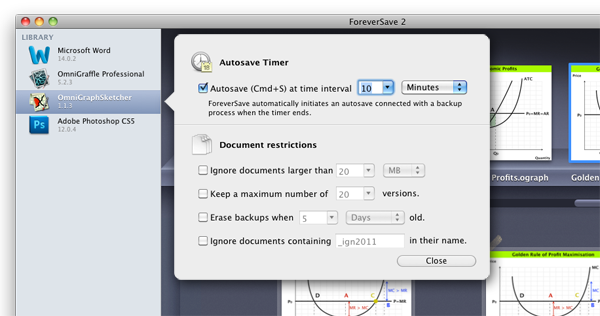
There’s nothing worse than working on an important document only to have the power cut, and it can be heartbreaking if your most recent changes haven’t been saved before beforehand. Dropbox is an excellent tool for making sure files are backed up, but what if you imbued Snow Leopard with a powerful library capable of browsing file history (outside of Time Machine of course), storing those multiple iterations in Dropbox, and automatically invoking that command-S keystroke at timed or inactive intervals so you’ll always have the most recent version of the file on hand? ForeverSave 2 is my Textmate, OmniOutliner, Pages, and otherwise all-around document companion for constantly saving multiple versions of my documents in preparation for the worst-case scenario. ForeverSave 2 is a convenient menubar utility with a simple activation and reminder scheme for initial setup (just check out our review), and it’s currently available for $19.99 in the Mac App Store. We want you to remain vigilant with your backup regimen, which is why we’re prescribing ten copies to ail those versioning blues. Rules after the break.
Read more

Access Extra Content and Perks

Founded in 2015, Club MacStories has delivered exclusive content every week for nearly a decade.

What started with weekly and monthly email newsletters has blossomed into a family of memberships designed for every MacStories fan.

Learn more here and from our Club FAQs.

Club MacStories: Weekly and monthly newsletters via email and the web that are brimming with apps, tips, automation workflows, longform writing, early access to the MacStories Unwind podcast, periodic giveaways, and more;

Club MacStories+: Everything that Club MacStories offers, plus an active Discord community, advanced search and custom RSS features for exploring the Club’s entire back catalog, bonus columns, and dozens of app discounts;

Club Premier: All of the above and AppStories+, an extended version of our flagship podcast that’s delivered early, ad-free, and in high-bitrate audio.

Learn more here and from our Club FAQs.


A Fantastical Giveaway

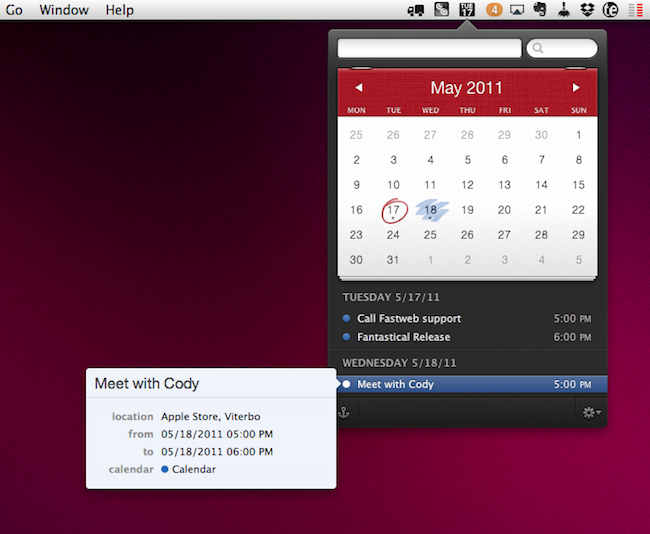
Your calendar application might be great at mitigating and managing various calendars, but entering new dates and creating events at a moment’s notice should be practical and easy. Digitally, it’s often difficult to remove the abstraction of pull down menus, date pickers, alarms, and event notes when you simply want to note a few meetings and your kid’s soccer game. I don’t like to fidget with my calendar software, and I don’t need it open all day. Fantastical does a couple of great things, such as allowing me to remove iCal from my Object Dock so I can quickly glance at the date, and it makes entering events painless since input is derived from plain English. Just tell Fantastical that you’ll be attending a two hour meeting at four o’clock on Sunday, and without any menu-selecting Fantastical will schedule that all important briefing. The interface is terrific, sporting an iOS-like popover with a fine attention to showing you matters most without cluttering your desktop. Fantastical is always ready when I need it to be, and I don’t need to open some gargantuan calendar app just to enter a few events. Between this and the recent OmniFocus update (a quick plug since these two apps work excellently in conjunction), you’ve got yourself a slick app handcrafted to help you schedule and manage your various activities. Fantastical is currently $14.99 on the Mac App Store, but we’re going to be giving away two copies to a couple of lucky calendar-needy MacStorians past the break.

Read more

Access Extra Content and Perks

Founded in 2015, Club MacStories has delivered exclusive content every week for nearly a decade.

What started with weekly and monthly email newsletters has blossomed into a family of memberships designed for every MacStories fan.

Learn more here and from our Club FAQs.

Club MacStories: Weekly and monthly newsletters via email and the web that are brimming with apps, tips, automation workflows, longform writing, early access to the MacStories Unwind podcast, periodic giveaways, and more;

Club MacStories+: Everything that Club MacStories offers, plus an active Discord community, advanced search and custom RSS features for exploring the Club’s entire back catalog, bonus columns, and dozens of app discounts;

Club Premier: All of the above and AppStories+, an extended version of our flagship podcast that’s delivered early, ad-free, and in high-bitrate audio.

Learn more here and from our Club FAQs.


Foodish: Delightfully Mindful of What You’re Eating. Review & Giveaway!

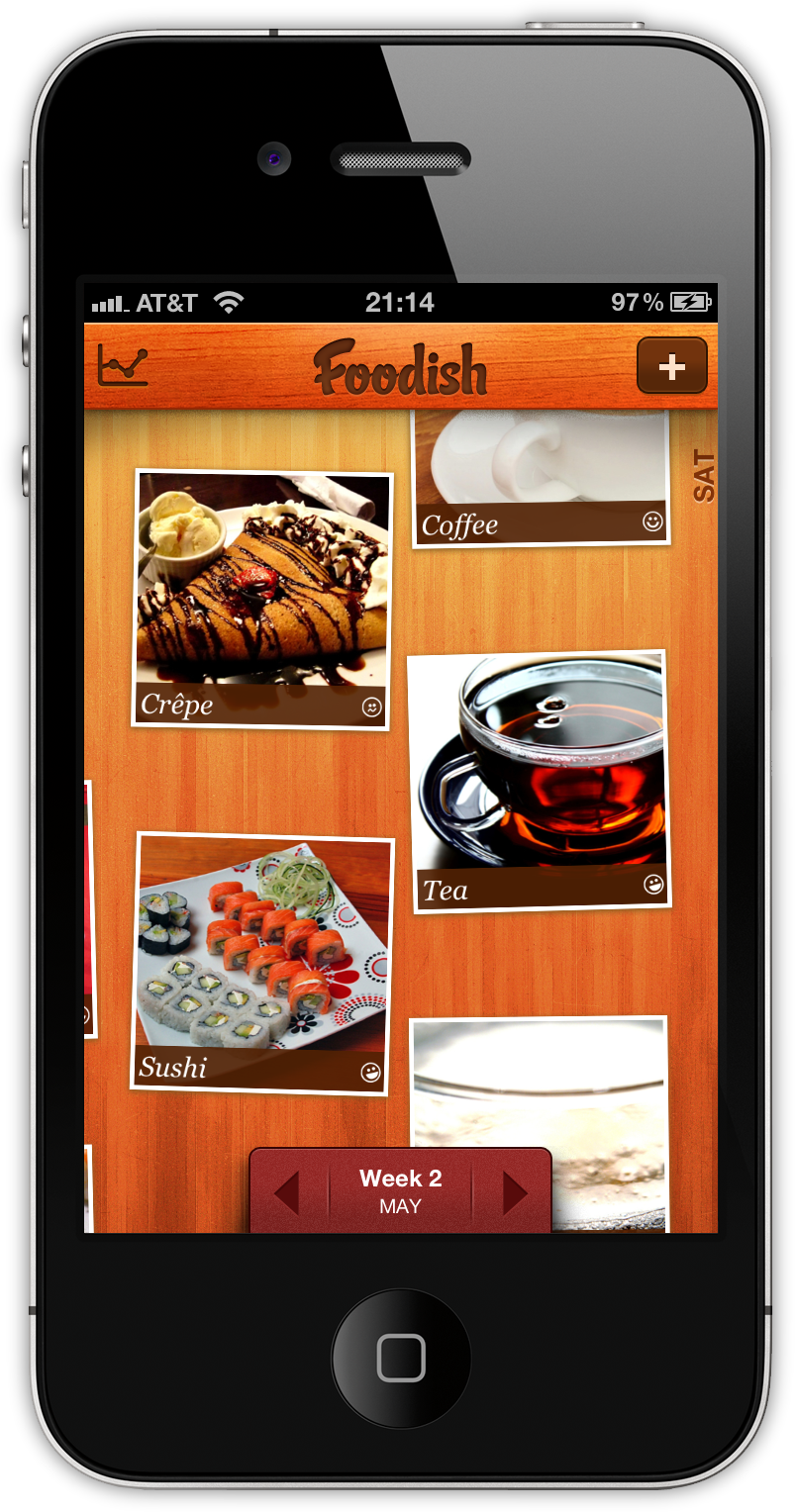
Calories aren’t fun. No matter what kind of appreciation you have for food, watching what you eat while being a food-a-holic can be difficult when everyone else focuses on just the numbers. Eating should be about discovery. It should enjoyable, shared, and fun without making everything else out to be a dangerous game of cat and calories. In my opinion, it’s much better to be mindful of what you’re eating, and Foodish is exactly the kind of app that fulfills this desire very well.

Not only is Foodish wrapped in a beautiful user interface, it’s fun and simple to use. Based on good conscience alone, you simply snap a picture of your meals and rate them on a general “bad to good” scale that tracks your overall eating habits over time. The concept is great: not only can the foodie in you keep a record of all those great meals and memories, but it also keeps you aware of just what exactly you’re shoving into that pie hole. Plus, you get to totally brag about the incredible meal you’re having at that five start restaurant from within the app. It’s a win-win!

Read more

Access Extra Content and Perks

Founded in 2015, Club MacStories has delivered exclusive content every week for nearly a decade.

What started with weekly and monthly email newsletters has blossomed into a family of memberships designed for every MacStories fan.

Learn more here and from our Club FAQs.

Club MacStories: Weekly and monthly newsletters via email and the web that are brimming with apps, tips, automation workflows, longform writing, early access to the MacStories Unwind podcast, periodic giveaways, and more;

Club MacStories+: Everything that Club MacStories offers, plus an active Discord community, advanced search and custom RSS features for exploring the Club’s entire back catalog, bonus columns, and dozens of app discounts;

Club Premier: All of the above and AppStories+, an extended version of our flagship podcast that’s delivered early, ad-free, and in high-bitrate audio.

Learn more here and from our Club FAQs.